St. Patrick’s Day Giveaway Ideas: How to Run One on Your WordPress Site
 Stacey Corrin
Stacey Corrin
Stacey Corrin
 John Turner
John Turner
John Turner
TL;DR Running a St. Patrick’s Day giveaway is one of the fastest ways to grow your email list or social following before March 17. Here’s how to do it right:
- Set a specific goal: Email subscribers, social follows, or brand awareness. Pick one before you start.
- Pick a relevant prize: It doesn’t need to be Irish. It needs to be something your audience actually wants.
- Choose a contest format: Photo contests and scavenger hunts get the most entries of the 7 formats below.
- Set it up on WordPress: RafflePress handles the whole giveaway from your WP Admin in under an hour.
- Announce the winner publicly: Post it on social and email them directly. This closes the loop and builds trust for your next giveaway.
March 17 is two weeks away and you’re still figuring out what to do for your promotion. Your competitors are running the same green-discount deal they run every year, and you want to do something that actually brings in new leads.
A themed giveaway or contest is one of the easiest ways to stand out. I’ve run seasonal giveaways on my own site using RafflePress and the setup takes less time than it looks like it will.
In this guide, I’ll walk you through 7 St. Patrick’s Day giveaway ideas you can adapt for your brand, plus a step-by-step RafflePress tutorial to get it live.
- Why Run a St. Patrick's Day Giveaway?
- Set Your Giveaway Campaign Goals
- Brainstorm St. Patrick's Day Giveaway Ideas
- Choose a Prize for Your St. Patrick's Day Giveaway
- Set Up Your St. Patrick's Day Giveaway in WordPress
- Promote Your St. Patrick's Day Giveaway
- Announce Your Giveaway Winner
- Frequently Asked Questions
Note: in this article I use “giveaway,” “contest,” and “sweepstakes” interchangeably — the FAQ section at the bottom explains the technical differences if you need them.
Why Run a St. Patrick’s Day Giveaway?
A St. Patrick’s Day giveaway gives you a concrete reason to reach out to your audience at a time when most brands are competing on generic holiday discounts. It can grow your email list, boost social following, and generate buzz, without a sale.
Set Your Giveaway Campaign Goals
First, you’ll need to define your objectives. In other words, write down what you want your giveaway to achieve.
For example, you may want to:
- Increase brand awareness
- Generate a buzz
- Boost sales
- Grow your social media pages
- Collect user-generated content (UGC)
Next, you’ll need to decide who you want to reach with your marketing strategy. Will you target existing customers, or are you most interested in attracting new leads and customers?
If you need help defining your ideal audience, you can check out this guide on creating a buyer persona.
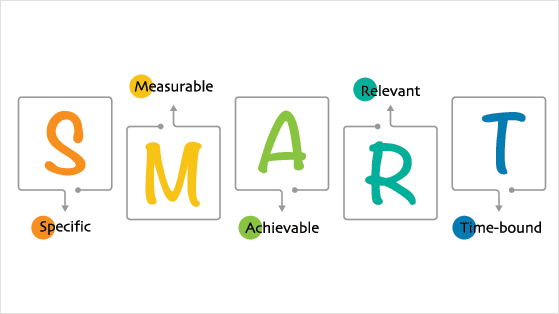
After defining your audience, set specific and measurable goals for your st patrick’s day giveaway. This helps you track progress and gives you benchmarks when the giveaway ends.
Here are some examples of clear and specific giveaway goals:
- Increase website traffic by 20%
- Gain 100 new social media followers
- Grow your email list by 50 subscribers
- Get 150 shares on Twitter
Keep your goals relevant to your brand and measurable so you can track your progress.
Free: Download Our Giveaway Playbook
Templates, prize ideas, and promotion strategies in one guide.
Brainstorm St. Patrick’s Day Giveaway Ideas
Here are some St. Patrick’s Day giveaway ideas and st patrick’s day contest formats you can adapt for March 17th:
- Pot of gold hunt: Hide a “pot of gold” somewhere in-store or in the community and give clues on your social media to help customers find it.
- Online scavenger hunt: Create an online scavenger hunt where participants must find specific items or information related to St. Patrick’s Day to win a prize.
Wendy’s ran a version of this in May 2020: they hid gift card codes across Twitter, Spotify, and their own website and gave out daily clues. You don’t need Wendy’s scale to use this mechanic. Hiding a discount code in a specific blog post or Instagram Story works the same way.
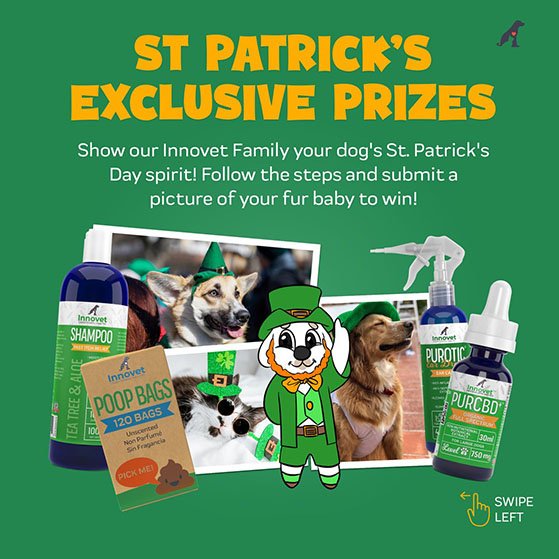
- St. Patrick’s Day-themed photo contest: Encourage customers to share photos of themselves celebrating at a St. Patrick’s Day parade or gathering on social media for a chance to win a prize.
Starbucks ran a version of this for the holidays. They asked customers to post a photo of their red cup on Instagram with a campaign hashtag. Over 24,000 people entered in five days. A photo contest around a St. Patrick’s Day moment (a parade, a themed outfit, a green-themed meal) follows the same logic.
- Irish whiskey tasting: Host a whiskey-tasting event and give away a bottle of Irish whiskey or green beer as a prize.
- St. Patrick’s Day-themed cook-off: Host a virtual cook-off where participants must make a dish using traditional Irish ingredients and give a prize to the winner.
- Storytelling or trivia contest: Ask social media followers to submit their St. Patrick’s Day myths and legends. For instance, why do Leprechauns wear green, or how did the first shamrock or four-leafed clover come to be?
Ikon Pass tied their trivia contest to a specific athlete. Only participants who scored above a threshold qualified for the prize draw. That filter mechanic keeps casual browsers out and makes the prize feel earned by your most engaged audience.
- Irish dance challenge: Celebrate Ireland’s traditional dance with an Irish dance-off on TikTok and reward the best entries with a free dance class.
Getting more entries comes down to entry design, not just the prize. Ask an open question that starts a conversation (“What’s your lucky charm this St. Patrick’s Day?”), use a guessing game (count the shamrocks), or require a tag-a-friend step to extend reach. The mechanic matters as much as the idea itself.
Choose a Prize for Your St. Patrick’s Day Giveaway
Once you know the type of giveaway you’ll run, it’s time to think of an exciting prize. You’ll need a prize to encourage your audience to participate while keeping it relevant to your brand.
The prize doesn’t need to be expensive, but it should reflect your niche and be something your audience desires. For most small businesses, a $25-50 gift card or a product bundle in that range is enough. Relevance to your audience drives entries far more than price.
For example, you could offer green t-shirt merch or a Guinness mug if you’re a dropshipping business. Or, if you sell homeware, you could offer a green-themed gift basket filled with candles, home decor, a lucky charm four-leaf clover, and more good luck goodies.
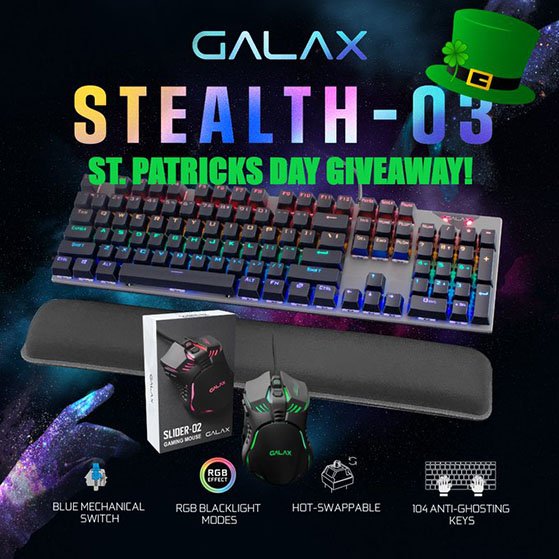
Alternatively, you could offer a gift card to a local Irish pub or restaurant for a St. Patrick’s Day party. You can also check out these giveaway prize ideas for more inspiration.
Once you have your goals, promo ideas, and prize in place, you’re ready to start setting up your giveaway in WordPress.
Set Up Your St. Patrick’s Day Giveaway in WordPress
RafflePress is a WordPress giveaway plugin used by over 200,000 sites to grow email lists and social following through viral contests. It runs entirely inside WP Admin, with no embed code, no separate dashboard.
RafflePress lets you run any st patrick’s day giveaway on your WordPress website. It includes 30+ entry actions and integrations for all popular social media platforms, including Facebook, Twitter, Instagram, TikTok, and YouTube.
It also includes 1-click fraud protection and verified giveaway entries, so you can be confident all entries are genuine.
Let’s start setting up your St. Patrick’s Day giveaway with RafflePress. Follow the instructions below and you’ll be up and running in no time.
First, log into your RafflePress account, download the plugin ZIP file, and install it via Plugins » Add New » Upload Plugin in your WordPress admin. You can follow this guide on installing RafflePress if you need help.
You can use the free version of RafflePress to run basic giveaway campaigns. However, we’ll use the premium version because it has more entry actions and integrations.
After activating the plugin, navigate to RafflePress » Settings from your WordPress admin, and paste your license key.
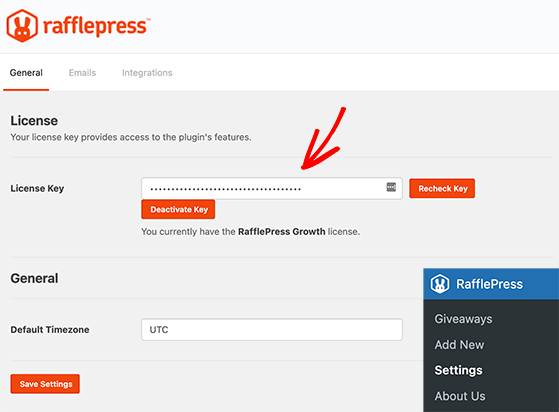
You can find that information in your RafflePress account under the Downloads heading. Once you’ve done that, click the Verify Key button.
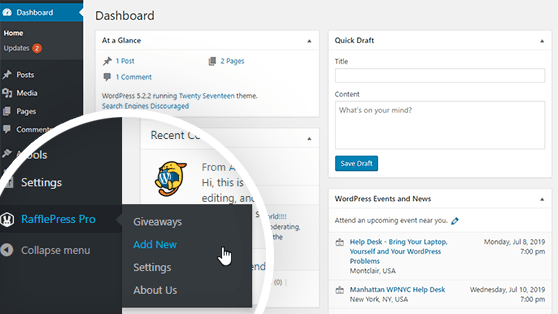
Now you’re ready to create your first giveaway, so head to RafflePress » Add New, which will launch the giveaway builder.
On the next screen, you’ll first need to give your giveaway a name. Then you can choose from several pre-made giveaway templates.
RafflePress offers templates for different giveaway goals, such as growing your Instagram followers and getting more email subscribers. Choose any template that matches your goal.
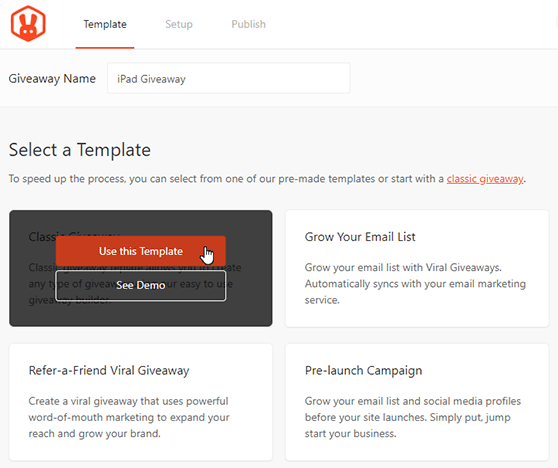
We’ll use the blank template for this guide to create a giveaway from scratch. To do that, hover your mouse over the template and click the Use This Template button.
You’ll now see the RafflePress builder, where you can start entering your giveaway details.
Enter Your Giveaway Prize Details
First, you’ll want to let contestants know what they could win, so click on the “My Awesome Prize” headline and replace it with your St Patrick’s Day giveaway prize.
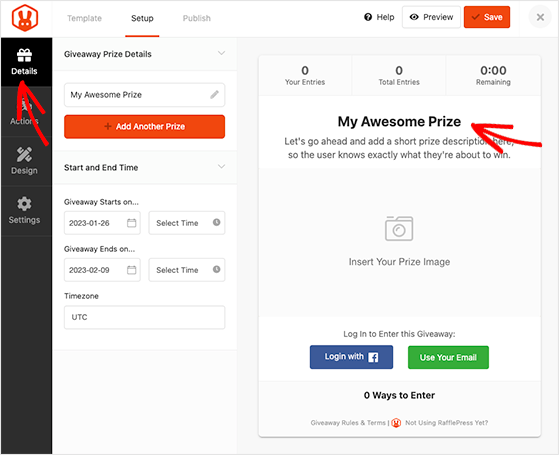
From there, enter more information about the giveaway to encourage users to enter. You can add a more detailed description and upload a custom Prize Image so users can see what’s up for grabs.
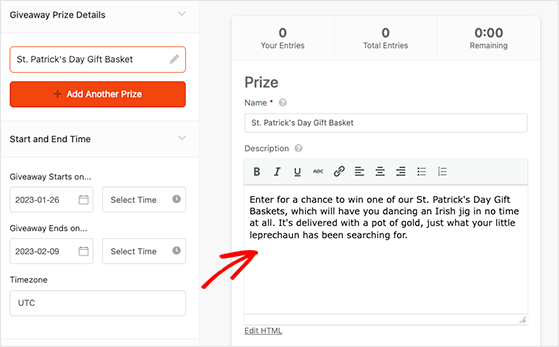
To add a prize image, click the Select Image button and choose an image from your WordPress media library or computer.
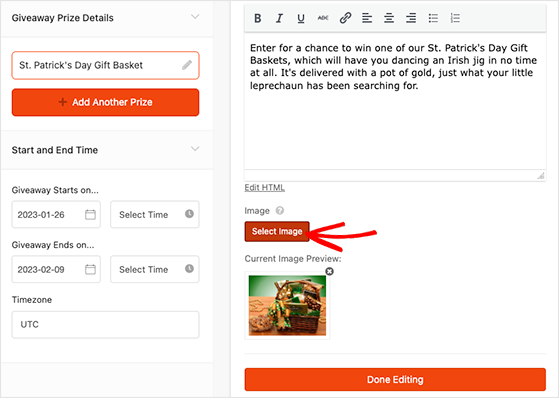
When you’re happy with your prize details, click Done Editing.
You can also enter the giveaway duration on the same screen, including the start and end date, times, and timezone.
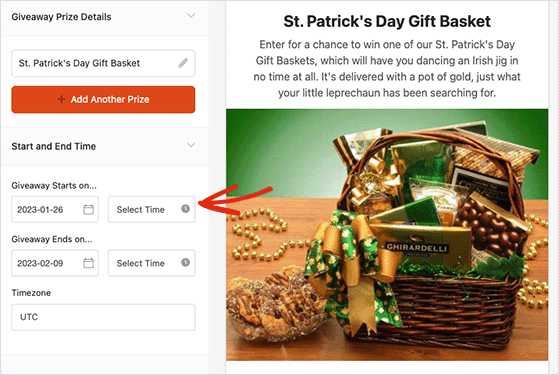
Now, let’s move on to adding ways for your audience to enter your giveaway.
Add Your Giveaway Entry Actions
Giveaway actions are how your visitors can participate in the giveaway. For instance, they can subscribe to your podcast or share a post on social media.
RafflePress has countless actions you can add to your campaign. Only choose the ones that will help you meet your giveaway goals.
For example, if you want to grow your email list, you might use the “Join an Email Newsletter” action. Or, to get more blog engagement, you can use the “Leave a Blog Comment” action.
To see all RafflePress’s actions, click the Actions tab in the left-hand panel.
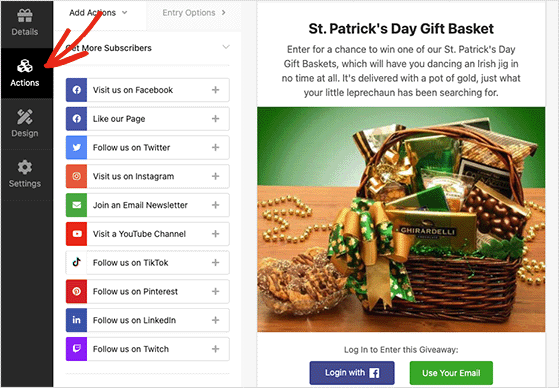
You can add an action by clicking it, and it will appear automatically in the giveaway widget below your prize details.
From there, you can configure the action settings in the left-hand panel.
You can customize some basic settings for each action. This includes adding a title visible to participants and making the action mandatory.
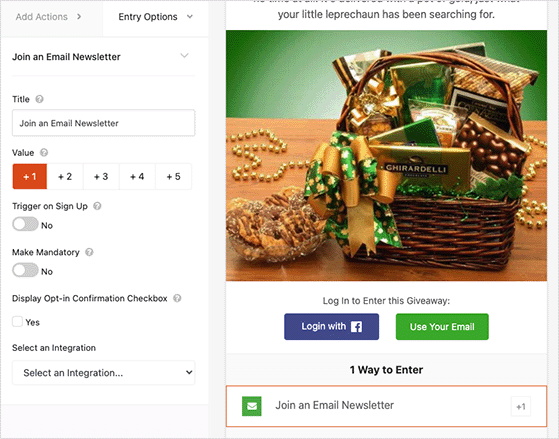
Mandatory actions are helpful if you plan to offer multiple entry methods but want to ensure users complete a specific task.
By default, each action is worth 1 entry, but you can adjust the value to make specific actions more valuable. Doing so encourages users to prioritize actions, even if they can choose from multiple entry methods.
Besides these basic settings, there may also be some action-specific settings. For example, in the Visit a Facebook Page action, you’ll need to enter the page’s URL.
You can add as many actions as you like. It’s a good idea to prioritize actions based on your goals. If your primary goal is to grow your email list, put that action at the top of your list.
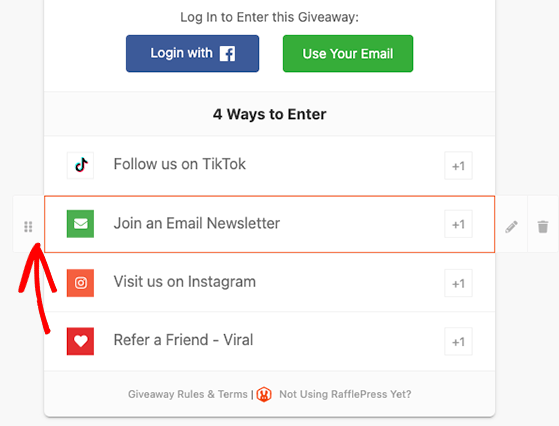
To do that, hover over an action, click the dotted button and drag the action to its new position. Now go ahead and click the Save button to store your changes.
Customize Your Giveaway Appearance
With your giveaway set up, you can start customizing its appearance by clicking the Design tab.
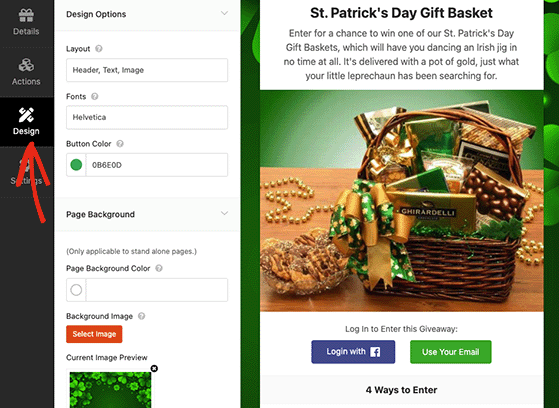
In RafflePress, you can customize the design of your St Patrick’s Day giveaway by changing the fonts, button color, background color, and more. You can also use custom CSS to personalize the giveaway template further.
You’ll see a live preview of the changes and once you’re happy with the design, remember to click Save.
Configure Your Giveaway Settings
RafflePress offers various settings to configure your giveaway, including displaying and hiding elements, tracking entries, and more. To see them click the Settings tab.
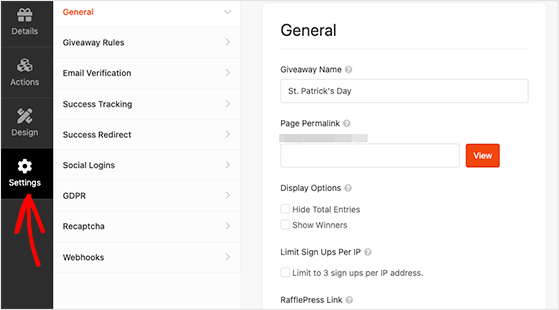
In the General section, you can set basic settings for your giveaway, like showing the contest winners on the widget, hiding or showing the total entries, and limiting sign-ups by IP address.
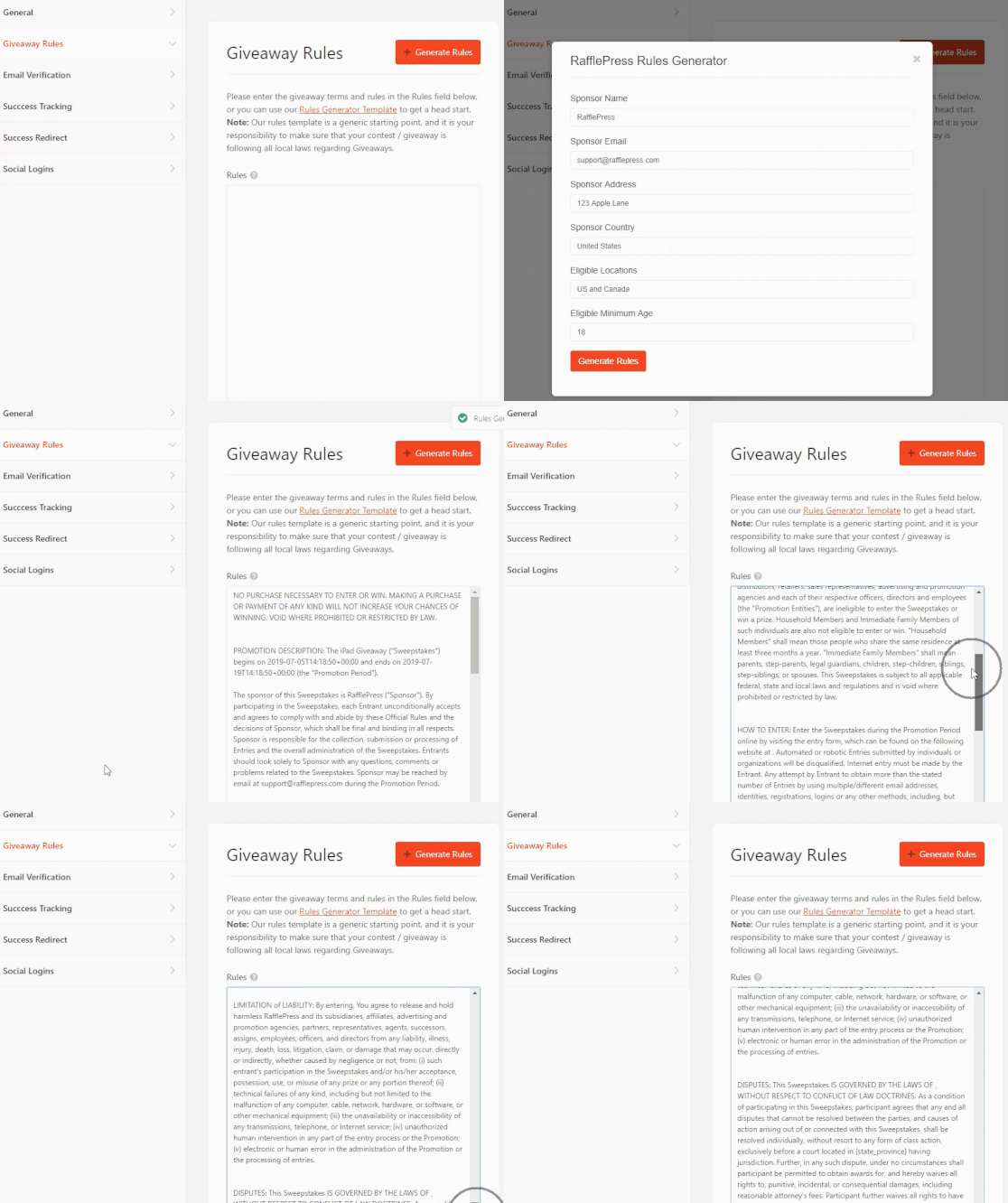
Next, switch to the Giveaway Rules tab, where you can use the Rules Generator to create giveaway rules for your promotion quickly.
Now click the Email Verification tab. On this screen, you can require users to verify their email address, which is a good idea if you’re running a giveaway to get more subscribers.
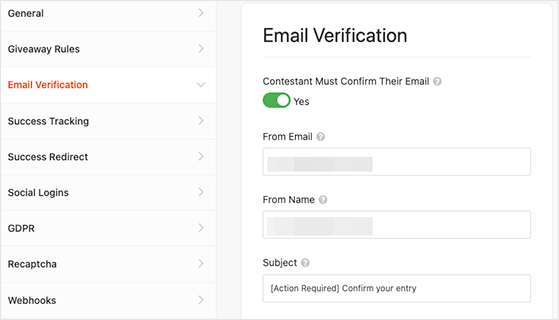
You can do that by clicking the ‘Contestant Must Confirm Their Email’ toggle until it turns green.
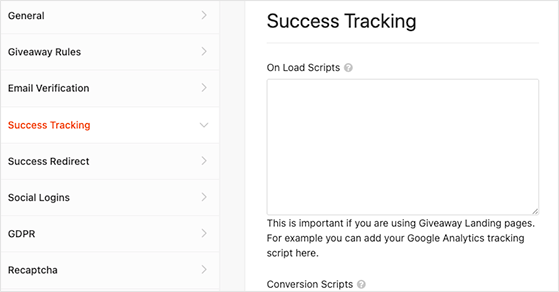
If you want to know how people engage with your giveaway, you can use Google Analytics tracking. Click the Success Tracking heading and add your Google analytics code.
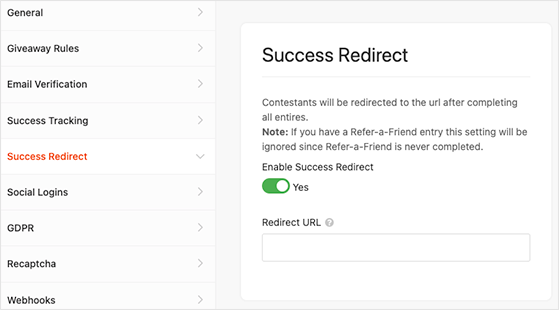
Additionally, you can set up a redirect for your giveaway. This means you can send people who enter your giveaway to a different page on your website, like a thank you page or a popular blog post.
To do that, select the Success Redirect tab and click the ‘Enable Success Redirect’ toggle. Now add your chosen page to the ‘Redirect URL’ field.
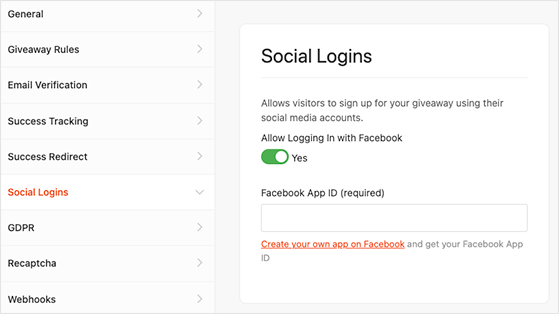
You can also make it easy for people to enter your giveaway by allowing them to sign in using their Facebook account. This can help you get more entries.
To allow logging in with Facebook, click the Social Logins tab and activate the ‘Allow logging in with Facebook’ toggle.
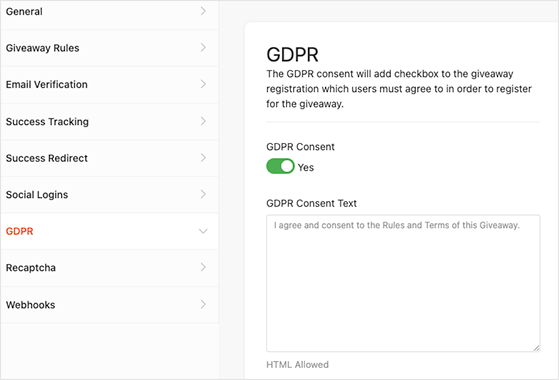
It’s also essential to follow GDPR. This law ensures people have control over their personal information. RafflePress can help you follow this law by asking for permission before people enter your giveaway.
Click the GDPR tab and activate the ‘GDPR Consent’ toggle.
To prevent spam and fake entries, you can use Invisible Recaptcha, which you can find in the Recaptcha tab.
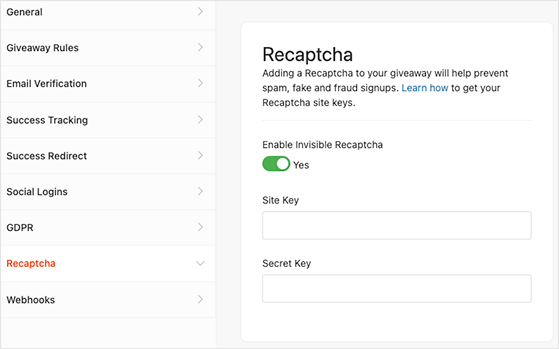
This setting helps block spam without hurting the visitor’s experience.
When you’re done setting up your contest, remember to click the Save button.
Publish Your Giveaway on Your Website
Now that your giveaway is set up, you’re ready to publish it on your website. With RafflePress, you have 3 ways to do this:
- The RafflePress block lets you add your giveaway to a WordPress post or page.
- You can add the contest to any post, page, or widget area with the shortcode.
- You can publish your giveaway on a standalone giveaway landing page.
You can see our documentation on publishing a giveaway for each method. However, the easiest and most effective way to publish your St. Patrick’s Day giveaway is on a landing page.
Landing pages are ideal for sharing across multiple platforms. You can tweet your giveaway page link and use popular hashtags to boost its reach. They’re also free from distractions, making users more likely to enter.
To set up a giveaway landing page, click the Publish tab from the giveaway editor, and select the Giveaway Landing Page option.
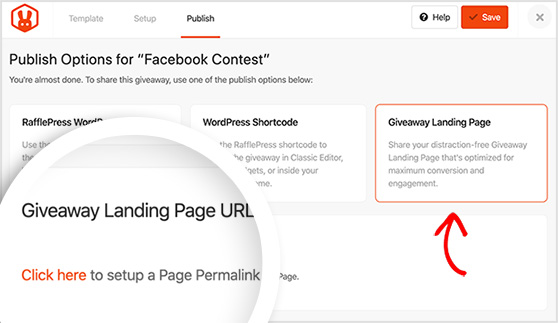
Now select the “Click here” link, which will take you to the General Settings page.
Next to the Page Permalink heading, enter a URL for your giveaway page, and click the View button.
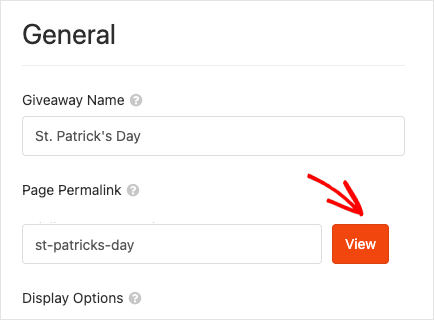
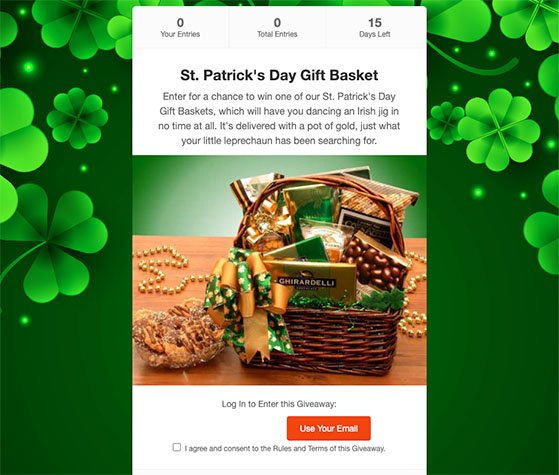
RafflePress will publish your giveaway on a landing page, and if you visit the URL, you’ll see it live on your website.
Promote Your St. Patrick’s Day Giveaway
Start promoting 1-2 weeks before March 17 — not the day you publish. Running the contest for 5-7 days tends to build the best momentum before entries taper off. Ending on or before March 17 keeps the holiday relevance intact.
After publishing your St Patrick’s Day giveaway, let people know about it so they can enter. Tell your email subscribers and post about the giveaway on your social media accounts. You can also promote it on websites or forums relevant to your giveaway.
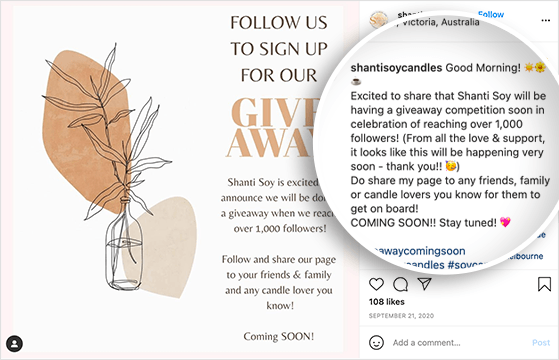
Check out this in-depth guide for even more contest promotion ideas.
Announce Your Giveaway Winner
Once your giveaway is over and you’re ready to pick a winner, you can use RafflePress to select the winner randomly.
First, go to the RafflePress page in your WordPress dashboard. If you didn’t set an end date for the giveaway, you need to end it manually.
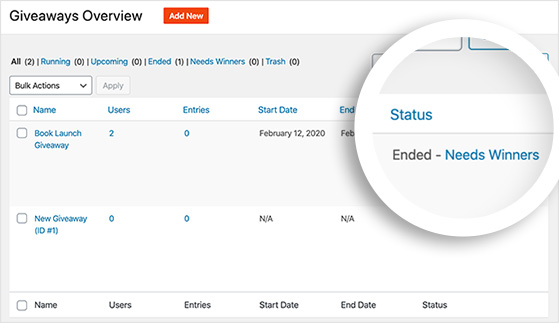
Next, click on the “Needs Winners” link. You’ll see a list of all the people who entered the giveaway and how many entries they have.
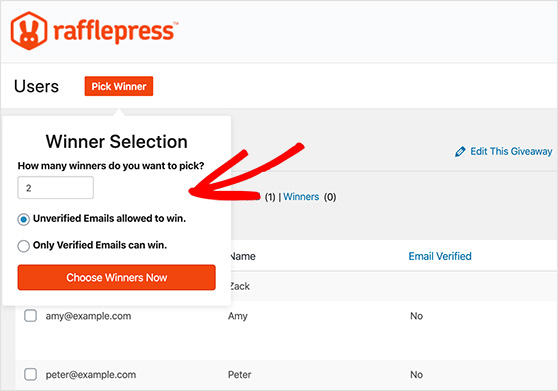
In the “Winner Selection” panel, type the number of winners you want to pick. When ready, click on the “Choose Winners Now” button.
RafflePress will pick a winner and show you their name at the top of the list.
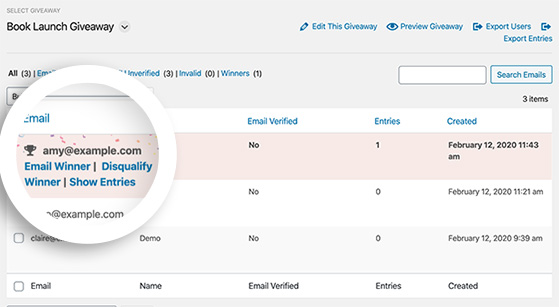
Finally, email the winner to let them know they won your St. Patrick’s Day giveaway. For tips on what to write, see this guide on how to announce a giveaway winner.
Frequently Asked Questions
What’s the difference between a St. Patrick’s Day giveaway, contest, and sweepstakes?
A giveaway and sweepstakes are the same thing: a prize is awarded by random draw, no purchase necessary. A contest requires skill or merit to win, such as a photo contest or trivia quiz, for example. In everyday use, “giveaway” and “contest” are often used interchangeably, but if you’re writing official rules, the legal distinction matters. A sweepstakes must be free to enter; a contest can award the best entry rather than a random one.
How long should a St. Patrick’s Day giveaway run?
5-7 days is the sweet spot. Shorter than that and you don’t give people enough time to find and share the giveaway. Longer than two weeks and momentum drops because people assume they have plenty of time. For a St. Patrick’s Day giveaway specifically, start around March 10-12 and end on or before March 17 to maintain the holiday connection.
Do I need to sell Irish products to run a St. Patrick’s Day giveaway?
No. The holiday is a hook, not a product requirement. Any business can run a St. Patrick’s Day giveaway. The theme comes from the timing and the visual identity (green branding, lucky messaging), not from what you sell. A software company, a bakery, or an online course creator can all run a themed st patrick’s day contest by dressing up a relevant prize with seasonal framing.
What are the legal requirements for running an online giveaway?
In the US, your giveaway rules must include a NO PURCHASE NECESSARY statement. You must also specify age and geographic eligibility. If you’re running the giveaway on Facebook or Instagram, you’re required to include a disclaimer that the giveaway is not officially endorsed by or affiliated with Meta. For skill-based contests, the judging criteria must be stated clearly. RafflePress’s giveaway rules generator covers the core requirements automatically.
Can I run a St. Patrick’s Day giveaway for free?
Yes, with limits. The free RafflePress Lite plugin lets you run a basic giveaway widget on your site. Most entry actions and integrations (email list growth, social follows, referral entries) require the paid plan. If your goal is simple brand awareness, the free version may be enough. If you want the giveaway to grow your email list or social following, the paid plan is the practical choice.
Start Your St. Patrick’s Day Giveaway Today
You came in looking for a way to stand out from the standard green discount. A well-run giveaway does that — it gives people a reason to share your brand before March 17 arrives.
Over 200,000 WordPress sites run their giveaways with RafflePress. Get started with RafflePress and your first St. Patrick’s Day giveaway can be live before March 17.
You might also find these helpful: St. Patrick’s Day marketing ideas, how to run an online contest, and contest prize ideas.
If you liked this article, please subscribe to our YouTube Channel for RafflePress video tutorials. You can also find us on Twitter and Facebook.


