How to Run a Blog Giveaway (and Which Mistakes to Avoid)
 Stacey Corrin
Stacey Corrin
Stacey Corrin
 John Turner
John Turner
John Turner
TL;DR: How to Run a Blog Giveaway
Running a blog giveaway can grow your email list, boost traffic, and expand your social reach. But only if you avoid the mistakes that leave bloggers with a bunch of freebie hunters and nothing to show for it.
Here’s what this guide covers:
- Choose your tool – RafflePress is the only WordPress giveaway plugin with a built-in viral refer-a-friend mechanic.
- Define your prize – Make it relevant to your audience; a sponsor can cover the cost entirely.
- Set up entry actions – Use the refer-a-friend action to multiply reach without extra spend.
- Write your rules – Include FTC disclosure requirements to stay legally compliant.
- Promote and wrap up – Run for 1-4 weeks, announce the winner publicly, then measure your results.
You’ve heard that giveaways grow your audience. But you’ve also seen bloggers run them and get nothing but freebie hunters who disappear the next day.
The difference between a blog giveaway that builds real momentum and one that wastes your time usually comes down to a few specific decisions: your prize, your entry setup, and your promotion strategy.
A well-run blog giveaway can add hundreds of email subscribers in a single week, drive referral traffic from entrants sharing your contest, and expand your social reach. All from your own website where you control the rules.
This guide walks you through every step, including the mistakes that trip up most bloggers.
How to Run a Giveaway on Your Blog
Your blog is actually the best platform for running a giveaway. You own the audience, you control the rules, and you’re generating more organic traffic there than from any social media profile.
Here’s how to set it up right.
- Step 1. Which Giveaway Tool Should You Use?
- Step 2. How Do You Choose the Right Prize?
- Step 3. How Do You Make It Easy to Enter?
- Step 4. How Do You Write an Engaging Blog Post?
- Step 5. What Rules Does a Blog Giveaway Need?
- Step 6. How Do You Embed and Publish Your Giveaway?
- Step 7. How Do You Promote Your Blog Giveaway?
- Step 8. How Do You Choose a Giveaway Winner?
Step 1. Which Giveaway Tool Should You Use?
The first step is to pick a blog giveaway tool. There’s a wide range of contest tools available, and if you’d like an overview, check out our comparison of Rafflecopter vs. Gleam vs. RafflePress here.
For this tutorial, we’ll use RafflePress, the only WordPress giveaway plugin with a viral refer-a-friend mechanic built in.
RafflePress is a WordPress giveaway plugin that turns every entrant into a promoter. Its refer-a-friend mechanic lets contestants earn bonus entries by sharing your giveaway, which multiplies your reach without any extra ad spend.
If you’re comparing options, RafflePress differs from Rafflecopter and Gleam on three key factors: it’s a one-time payment rather than a monthly subscription, your data stays in your own WordPress database rather than a third-party platform, and it offers more entry action types than either alternative.
For bloggers, that means an easy way to build and host your giveaway with built-in social sharing features to grow your blog and attract more website traffic.
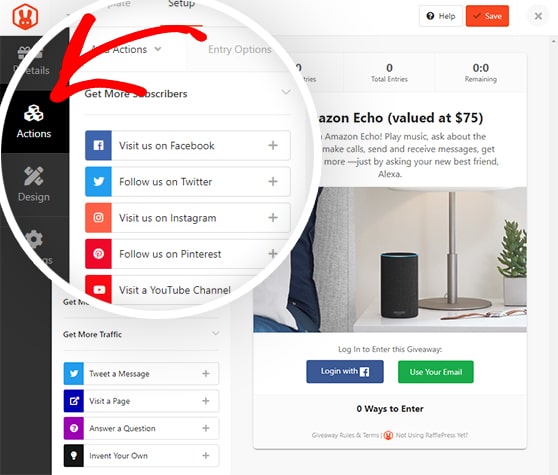
The ready-made contest templates help you get up and running with just a few clicks. To help you get started, here’s everything you need to know to create an online contest with RafflePress.
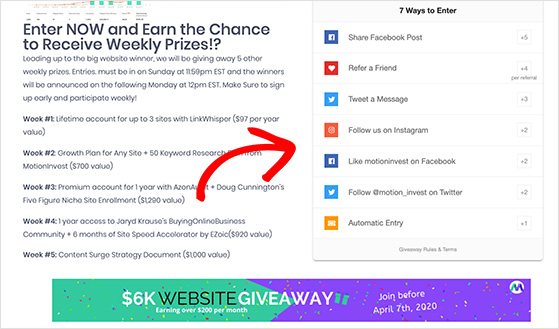
Next, it’s time to decide what prize you’ll offer your readers.
Step 2. How Do You Choose the Right Prize?
Your prize needs to do two things: excite people enough to enter, and attract the kind of readers who’ll stick around after the contest ends. It must be relevant to your audience and desirable enough to spur them into action.
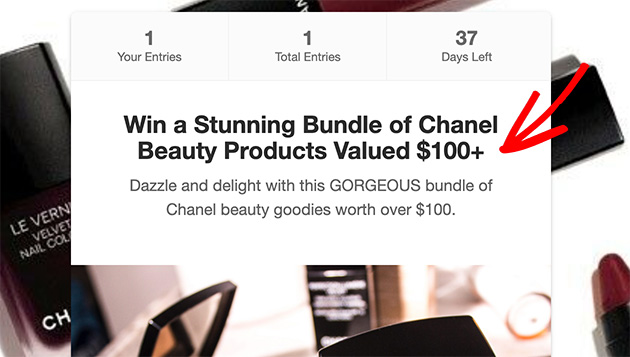
For example, blogs based on book reviews can consider running a book giveaway with an Amazon gift card. If you’re a beauty blogger, a bundle of big-ticket beauty products is a better prize.
Keep in mind that gift card giveaways are quick and easy to run, but higher-value items like a prize pack typically pull more entries.
Related: What Happened to Amazon Giveaways? (+ How to Still Run Them)
Make it crystal clear what winners will receive. That means having the prize written in the contest title, headings, descriptions, and any Linky lists. Include how many winners you’ll choose, the number of prizes on offer, and the total prize value.
On budget: Running a blog giveaway doesn’t have to cost much. A digital product or free service tier costs nothing to give away, while a physical prize adds shipping on top of product cost. RafflePress is a one-time purchase, compared to Gleam and Rafflecopter’s ongoing monthly fees, so the tool itself saves money over time.
Another path is to approach a brand sponsor to supply the prize. Pitch it as a brand exposure opportunity: their product gets seen by your audience, they get an inbound link, and your prize cost drops to zero. A short email explaining your blog’s niche, audience size, and the giveaway format is usually enough to start a conversation.
Step 3. How Do You Make It Easy to Enter?
After choosing a prize, make it easy for blog visitors to enter for the chance to win. When using RafflePress to create a competition on your blog, you can ask people to complete many actions to earn entries.
The best giveaway entry actions for your blog are:
- Leave a Comment: Ask visitors to leave a comment on your blog post to enter.
- Subscribe to RSS Feed: Encourage people to follow your blog’s RSS Feed for bonus giveaway entries.
- Join an Email Newsletter: Ask users to subscribe to your blog’s email list for more entries.
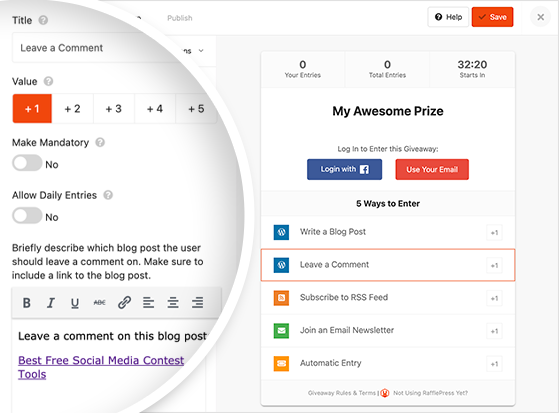
You can also use RafflePress’s giveaway actions to promote your blog on social media. Users can earn bonus entries by:
- Liking your Facebook page.
- Sharing your giveaway on Facebook.
- Posting on X (formerly Twitter).
- Following you on LinkedIn.
- Sharing your giveaway on LinkedIn.
- Following you on Pinterest.
- Referring friends (viral refer-a-friend giveaway action)
You can even ask other bloggers to write a blog post to enter your giveaway.
The Refer-a-Friend Entry Action
The refer-a-friend action is the strongest growth mechanic in RafflePress. When someone enters your giveaway, they get a unique share link. Every time a new person enters through that link, the original entrant earns bonus entries.
That incentive keeps your giveaway spreading without any extra budget on your part. I’ve seen this mechanic drive the bulk of entries on well-run contests, often outperforming all other entry actions combined.
This is RafflePress’s biggest competitive advantage over Gleam and Rafflecopter. Both offer sharing actions, but the refer-a-friend mechanic ties bonus entries directly to successful referrals. That means entrants are motivated to share with people who’ll actually enter, not just anyone.
To set it up, go to your giveaway’s entry actions panel and select Refer a Friend from the action list. Set the number of bonus entries per successful referral, then save. RafflePress handles the tracking automatically.
Step 4. How Do You Write an Engaging Blog Post?
Your blog post encourages readers to engage and enter when running a blog competition. If your content isn’t interesting enough, they’ll click away from your post and move on to the next blog.
Write to your audience’s core desire.
A beauty blogger’s readers want to look and feel better, so frame the prize around that outcome. A detailed review, unboxing video, or personal story about the product all work well.
Pick the format that fits how you already publish and how your audience likes to consume content.
When you’ve created your blog post, move on to putting together the rules for your blog giveaway.
Step 5. What Rules Does a Blog Giveaway Need?
Every successful contest has a clear set of rules to keep your prize draw legal and fair to all entrants. They also help filter out people looking for a quick win with no real interest in your blog.
Here’s a list of things to include in your rules disclaimer:
- Contest start and end date, so users know how long your giveaway will last
- Is your giveaway open to international entrants or certain countries?
- The minimum age people need to be to enter
- What will the winner receive?
- Can users exchange the prize for a cash alternative?
- Do entrants need to purchase to enter? Or is no purchase necessary?
- How will you draw the winners?
Also, make it clear if your contest is sponsored or affiliated with a business or brand to maintain transparency.
FTC disclosure requirement: If your giveaway is sponsored or you receive any compensation in connection with it, the FTC requires you to disclose that relationship clearly.
This applies to bloggers running contests with brand-supplied prizes. Failing to disclose can result in FTC enforcement action. See the FTC Endorsement Guides for full guidance on what’s required.
Next, you need to add your rules to your giveaway. RafflePress makes this easy with the Giveaway Rules Generator, and it’s an excellent place to start if you’re unsure what to include.
The Rules Generator asks you several questions about your contest, then instantly turns them into a complete set of contest rules you can display in the RafflePress widget.
Here’s how to access the generator in RafflePress and add them to your giveaway.
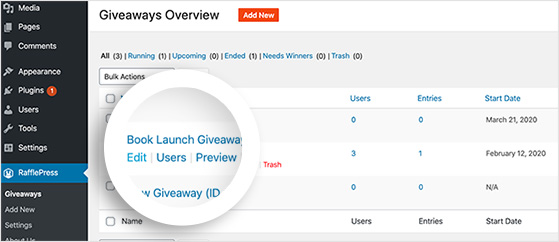
First, go to your RafflePress giveaway and click Edit.
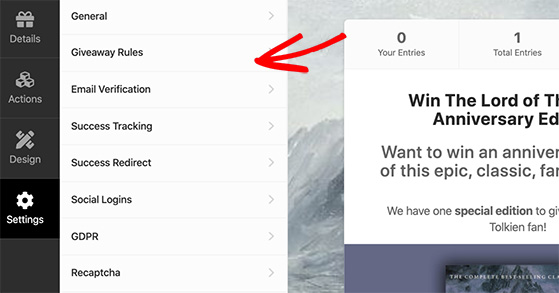
Then click Settings » Giveaway Rules.
When you click the Generate Rules button, you’ll see the questionnaire mentioned above, where you can add your contest details.
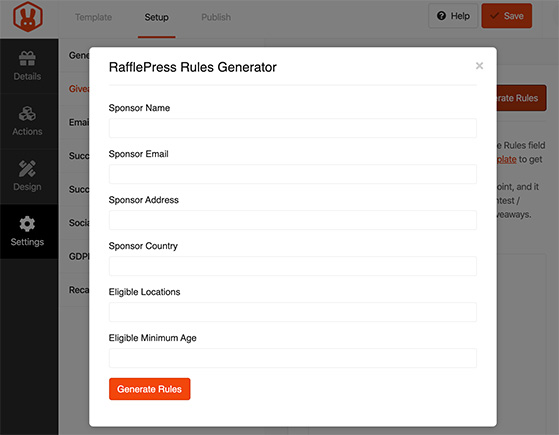
Afterward, click the Generate Rules button for RafflePress to generate a set of rules automatically.
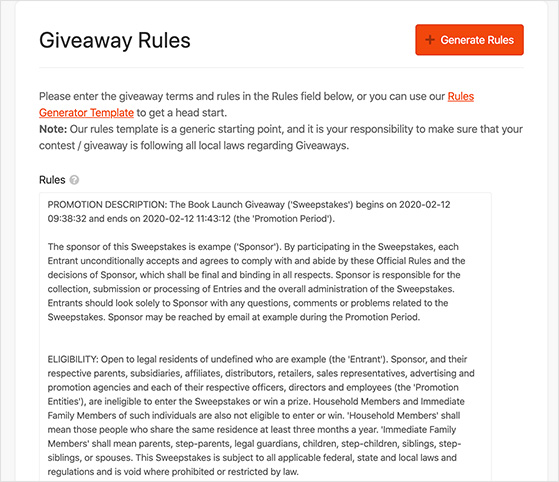
Click Save, and RafflePress will add them to your contest.
You can also copy and paste those rules into the body of your blog post to make them clearer to participants.
You can add your contest to your blog now that you’ve created a clear set of instructions and rules.
Step 6. How Do You Embed and Publish Your Giveaway?
Adding your giveaway to your WordPress blog is straightforward. You can embed your RafflePress giveaway directly into any blog post. Readers enter without leaving your site, which keeps entry rates higher than redirect-based tools.
To add your contest to a WordPress post, head to the post you prepared earlier and click Edit.
Then click the plus icon in the WordPress editor to add a new content block and search for RafflePress.
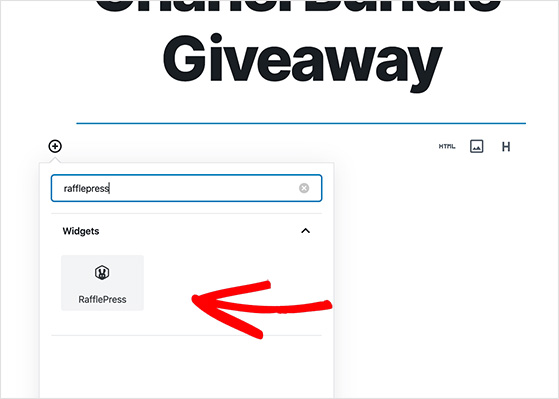
This will reveal the RafflePress block. Go ahead and click it to add it to your blog post.
Then choose your blog giveaway from the drop-down list to embed your contest.
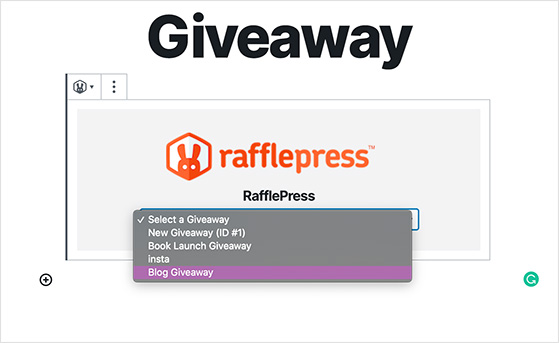
Now it’s all ready to publish!
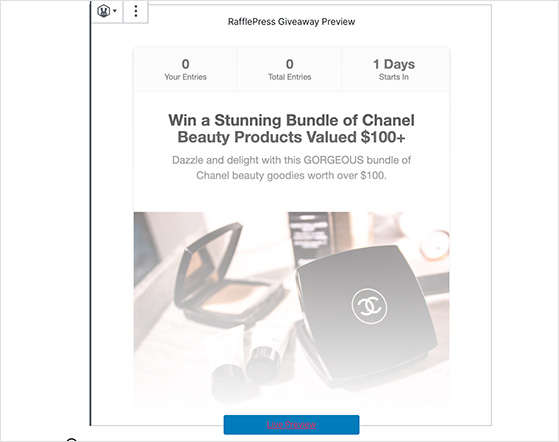
Alternatively, you can publish your contest on a giveaway landing page to reduce distractions and focus people on entering.
You can do this by heading to your giveaway in RafflePress and clicking Edit. Then head to Settings » General.
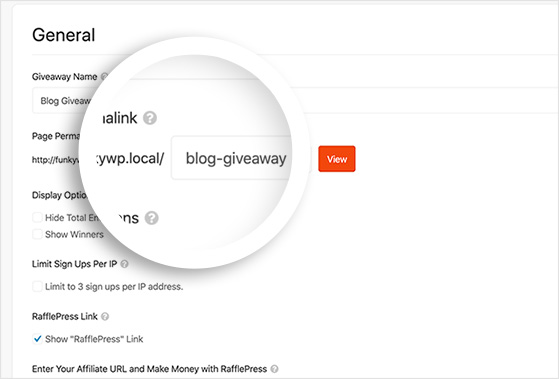
Add URL parameters for your contest in the Page Permalink box. Then click Save.
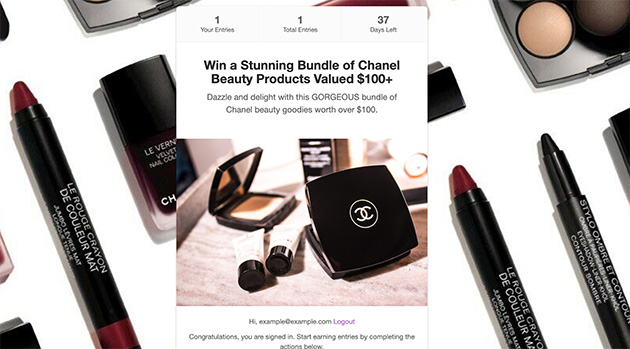
You can send visitors to that URL to enter when your giveaway starts. This is a great way to share your contest on other platforms besides WordPress, as all you need is the landing page link.
Step 7. How Do You Promote Your Blog Giveaway?
Once you’ve launched your blog giveaway, it’s time to promote it. Promoting your contest exposes it to a broader audience, boosting its reach and attracting more participants.
For a full system covering every channel, including social media, email, your website, and partner outreach, see our guide on how to promote your contest on multiple platforms.
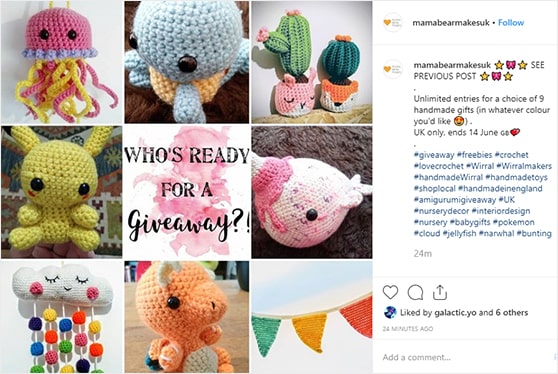
Here are a few ideas you can use to promote your giveaway:
- Share your giveaway blog post on social media with your followers to encourage them to enter.
- Send an update to your email list with a link to your giveaway post asking them to join in.
- Submit your article to contest directories built to promote giveaways.
Set a schedule to post on social media regularly over the time it’s running, not just once at launch. Consistent posts keep your contest visible in feeds and remind people to enter before it closes.
Check out this guide for even more contest promotion ideas.
Now that you know how to promote your contest, let’s learn how to pick a winner.
Step 8. How Do You Choose a Giveaway Winner?
There are several ways to draw a winner for your giveaway. It largely depends on the type of contest you’re running.
Most competitions draw winners randomly, whereas the number of votes determines voting contest winners. Competitions with a panel of judges will need to be decided by the panel.
For this tutorial, let’s focus on drawing a winner randomly, which you can quickly achieve with RafflePress.
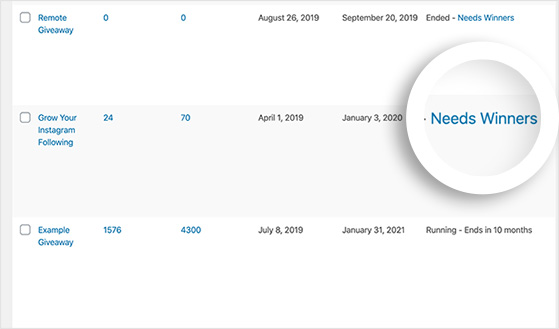
When your contest has ended, head to the RafflePress dashboard and navigate to the contest that needs a winner. Then click Needs Winners.
Then you’ll see a page asking you to choose from the following options:
- Winners – How many winners you’d like to pick.
- Unverified Emails – If you’d like to include unverified entrants in the pool of potential winners
- Verified Emails – Choose winners based on if they’ve verified their email address
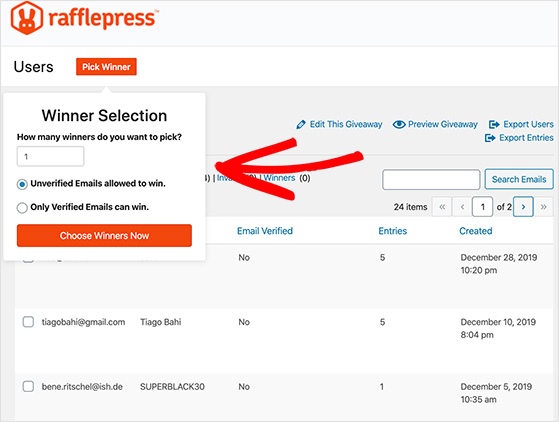
Then go ahead and click the Choose Winners Now button.
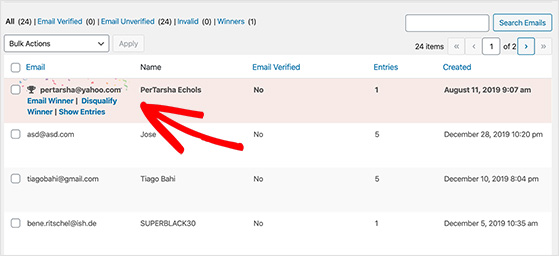
RafflePress highlights the winner in your entrant list, as shown below. Then you can click to email the lucky winner with the good news.
If you’re not using RafflePress, you can also use Random.org as an alternative winner selector. Paste your entrant list, run the randomizer, and you have your winner.
Congratulations, you’ve now successfully run a blog giveaway and picked the winner!
What to Do After Your Blog Giveaway Ends
Most giveaway guides stop at winner selection which is a mistake. What you do in the 48 hours after your contest closes has a real impact on whether you see the results you were aiming for.
I’ve run enough contests to know that this wrap-up stage is where bloggers either lock in their gains or let them slip.
Confirm Winner Eligibility
Before you contact anyone, verify that the selected winner meets your contest rules. Check that they completed the required entry actions, meet any age or location requirements, and have a verified email address. RafflePress lets you filter entries by verified status to make this faster.
Fulfill the Prize
Contact the winner privately within 24-48 hours of the contest closing. Confirm their shipping details or delivery method, and set a clear timeline for when they’ll receive the prize. If a sponsor is fulfilling the prize, loop them in at this stage.
Announce the Winner Publicly
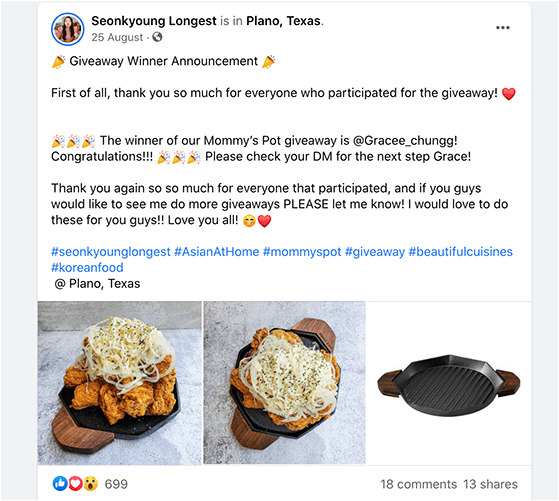
Post a winner announcement on your blog and share it on the same social channels you used to promote the giveaway. This closes the loop for everyone who entered, builds trust for future giveaways, and gives you one more piece of shareable content from the campaign.
Measure Your Results
Compare your key metrics before and after the giveaway, including email list size, website traffic, social follower counts. This tells you which entry actions drove the most growth and whether the prize was compelling enough to hit your goals.
RafflePress shows you total entries and entry action breakdowns in the giveaway dashboard.
Plan Your Next Giveaway
The best time to plan your next blog giveaway is right after you’ve measured the results of the last one. You know what prize worked, which entry actions got the most traction, and how long was optimal. Use that data to set a realistic timeline rather than starting from scratch.
Free: Download Our Giveaway Playbook
Templates, prize ideas, and promotion strategies in one guide.
Blog Giveaway Mistakes to Avoid
You know how to run a blog giveaway. But plenty of bloggers make mistakes that are easy to avoid. Here are the most common ones.
1. Not Understanding Your Goals

The biggest mistake most bloggers make is not understanding the goal of their giveaway. Your giveaway’s goal determines the results you’ll get, so if you pick a goal that doesn’t align with what you want to achieve, the results will be poor.
Each type of contest generates a different result. Subscriber contests are for growing your email list, and social sharing contests increase your blog traffic. Without a clear goal, choosing a contest type that works is nearly impossible.
2. Failing to Remind Your Email Subscribers

Another common mistake is not letting your email list know that you have a contest running. Most bloggers are growing their lists to drive traffic to their blogs, so failing to tell them is a missed opportunity.
Your subscribers took action to sign up for your list, which means they’re more likely to click through and enter. As soon as your contest is live, send an email broadcast to get your readers clicking.
3. Not Promoting Your Giveaway on Contest Directories

Many bloggers skip submitting their giveaways to contest directories and sweepstakes websites. These sites are built for listing and promoting competitions, and thousands of active entrants visit them specifically to find contests.
Check out this list of the best sweepstakes and contest directories to find the right ones for your niche.
4. Missing Out on Social Media Promotion
Besides promoting your giveaway on social media once, set a schedule to post regularly over the time it’s running. Consistent posts keep your contest visible in feeds and remind people to enter if they haven’t already done so.
Most social networks have insights and analytics to track engagement with your content, so you can measure the ongoing success of your promotions. Effective promotion on Instagram can help your contest go viral. Learn all about how to go viral on Instagram here.
5. Offering an Irrelevant Prize

A prize that doesn’t fit your niche doesn’t excite your readers enough to enter. Worse, the wrong prize attracts an audience that disappears after the contest ends and never reads another post.
6. Running Your Giveaway for the Wrong Length of Time

Aim for 1-4 weeks: long enough to spread the word, short enough to maintain urgency. Shorter than a week and you don’t have time to build momentum. Longer than a month and people forget they entered.
The sweet spot for most blog giveaways is two weeks. It gives you enough time for two or three promotional pushes without the urgency fading.
For more inspiration, browse our complete list of giveaway ideas.
Frequently Asked Questions
How long should a blog giveaway run?
Run your blog giveaway for 1-4 weeks. Shorter than a week doesn’t give you enough time to build entries and spread the word. Longer than four weeks and urgency fades, so people stop entering because there’s no pressure to act now.
Two weeks is the sweet spot for most blog giveaways. It gives you time for multiple promotional pushes while keeping momentum high through to the end.
Do I need legal disclaimers or rules for a blog giveaway?
Yes. Every blog giveaway needs a clear set of rules covering eligibility, entry methods, prize details, how winners are selected, and when the contest ends. Rules keep your giveaway legally compliant and fair to all entrants.
If your giveaway is sponsored or you receive any compensation, the FTC requires you to disclose that relationship clearly. See the FTC Endorsement Guides for what’s required. RafflePress includes a built-in Rules Generator that creates a compliant rules set based on your contest details.
How do I pick a winner for my blog giveaway?
For most blog giveaways, a random draw is the fairest method. RafflePress has a built-in winner selector that lets you filter by verified email addresses and choose how many winners to pick. It handles the randomization for you.
If you’re not using RafflePress, Random.org is a free alternative. Paste your entrant list and run the randomizer. Whatever method you use, document it in your giveaway rules beforehand so entrants know the process is fair.
What’s the best prize for a blog giveaway?
The best prize is one that your specific audience wants, not just something expensive. A high-value prize that’s irrelevant to your niche will attract entrants who disappear after the contest ends and never read another post.
Match the prize to what your readers already care about. A beauty blogger’s audience wants beauty products. A book blogger’s audience wants books or gift cards. The more specific the prize is to your niche, the better the quality of entrants you’ll attract.
How do I promote my blog giveaway after I publish it?
Start with your existing audience: email your list the day the giveaway goes live and share it across all your social channels. Then expand: submit it to sweepstakes directories, reach out to other bloggers in your niche, and schedule regular social posts throughout the contest rather than posting once at launch.
RafflePress’s refer-a-friend entry action is your best organic promotion tool. Every entrant who shares your giveaway link earns bonus entries for successful referrals, which means your audience does a significant portion of the promotion for you. See our full guide on how to promote your contest on multiple platforms for a complete system.
Running a blog giveaway the right way takes more than just picking a prize and hitting publish. Set a clear goal, use the refer-a-friend mechanic to multiply your reach, and measure your results so each contest builds on the last.
Get RafflePress and start your first giveaway today.
If you liked this article, take a look at our guide on driving traffic to your website here along with:
If you liked this article, please subscribe to our YouTube Channel for RafflePress video tutorials. You can also find us on Twitter and Facebook.


