How a Giveaway Grew Our Email List by 6,507 Subscribers
 Stacey Corrin
Stacey Corrin
Stacey Corrin
 John Turner
John Turner
John Turner
TL;DR: How to Do a Giveaway to Grow Your Email List
We added 6,507 subscribers to our email list in 25 days with one giveaway, for under $1 each. Here’s the exact process you can copy:
- Pick a targeted prize: Choose something your ideal subscriber genuinely wants, not a generic gift card.
- Set up RafflePress: Start from the “Grow Your Email List” template so email entry is built in.
- Connect your email service: Link your email marketing tool so every entry joins your list automatically.
- Generate your rules: Use the built-in rules generator to create compliant terms in a click.
- Promote everywhere: Email your list, post on social, and add a site-wide banner.
- Build the follow-up: Welcome new subscribers, offer non-winners a consolation deal, then keep sending.
Growing an email list is slow. You publish, you share, and the list still creeps up by a handful of names a week.
A giveaway is the one tactic I have watched break that pattern again and again. We ran one on SeedProd and added 6,507 subscribers in 25 days, for less than a dollar each.
In this guide, I’ll walk you through the exact process we used. Then I’ll show you how to turn it into a system that keeps growing your list long after the prize is gone.
- Why Giveaways Grow Your Email List
- What Makes an Email List Giveaway Work?
- Email List Giveaway vs. Social Media Giveaway
- How to Run a Giveaway to Grow Your Email List
- Real Results: 6,507 New Subscribers in 25 Days
- Turn Your Giveaway Into a Lead-Generation Funnel
- More Lead-Generation Ideas to Pair With Your Giveaway
- Which Email Tools to Connect Your Giveaway To
- Use a Giveaway to Get More Survey Responses
- Keep Subscribers Engaged With an Email Newsletter
- Why Run Your Giveaway With RafflePress
- Frequently Asked Questions
Why Giveaways Grow Your Email List
A giveaway trades something people want for something you want: their email address. That’s a fair swap, and it works because the incentive is immediate and concrete.
Most list-building tactics ask for patience. A lead magnet works slowly, and a content upgrade helps only at the margins.
A giveaway compresses months of that trickle into a few weeks, because entering takes seconds and the payoff feels immediate.
What really holds it up is the referral loop. When each entrant earns extra chances for sharing, your existing audience starts recruiting new subscribers on your behalf.
One entry becomes five, and your reach stretches well past the people you started with.
What Makes an Email List Giveaway Work?
The prize decides everything. Pick the wrong one and you fill your list with freebie hunters who unsubscribe the day the winner is announced.
A giveaway works for list growth when three things line up:
- The prize attracts your buyer, not everyone: A prize your ideal customer wants filters out the bargain hunters before they ever enter.
- Entry is effortless: One required action (join the list), with optional bonus actions for extra entries.
- Sharing earns more entries: The refer-a-friend mechanic is what turns a modest giveaway into a viral one.
Get those right and the people who join actually want to hear from you. That’s what turns a bigger list into a better one.
Free: Download Our Giveaway Playbook
Templates, prize ideas, and promotion strategies in one guide.
Email List Giveaway vs. Social Media Giveaway
A social media contest can get you followers fast. But followers aren’t subscribers.
Social followers live on a platform you don’t control. Your reach to them depends on an algorithm that can change overnight.
An email list is yours to keep. You can reach every person on it directly.
| Email List Giveaway | Social Media Giveaway | |
|---|---|---|
| Who owns the audience | You own the list | The platform owns the relationship |
| How you reach them | Direct email, every time | Algorithm-limited reach |
| Long-term value | High, a channel you control | Lower, subject to algorithm shifts |
| What you collect | Email address and signup source | Platform-dependent profile data |
| Cost per lead | Under $1 per subscriber (our result) | Varies by platform and ad spend |
With RafflePress, the WordPress plugin we use to run our giveaways, entrants join your email list directly as part of entering. You capture email addresses you own, instead of follows that live on someone else’s platform.
How to Run a Giveaway to Grow Your Email List
Here’s the full process, start to finish. It’s the same one we used for the 6,507-subscriber campaign, broken into seven steps you can follow today.
Step 1: Pick a Prize That Attracts the Right People
Your prize is your targeting. Choose something only your ideal subscriber would want, and you pre-qualify every entrant before they join.
For our giveaway, the prize was a MacBook Air. It appealed directly to the tech-minded professionals we wanted on our list, which is why most of them stayed subscribed after it ended.
Skip the generic cash or a general gift card. If you are stuck, these contest prize ideas can help you match the prize to the audience you want.
Step 2: Set Up Your Giveaway With RafflePress
RafflePress is a WordPress giveaway plugin that lets you build a giveaway with drag-and-drop, no code required. It’s the tool we used, and it’s built specifically for growing email lists and followers.
To install it, log into your RafflePress account, download the plugin ZIP, then go to Plugins » Add New » Upload Plugin in your WordPress dashboard and enter your license key.
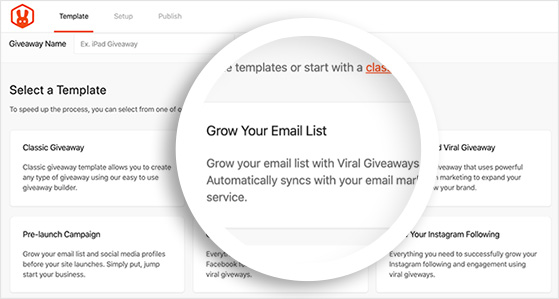
Once it’s active, start a new giveaway and pick the “Grow Your Email List” template. It comes pre-configured with an email entry action, so the core of your giveaway is set before you change a thing.
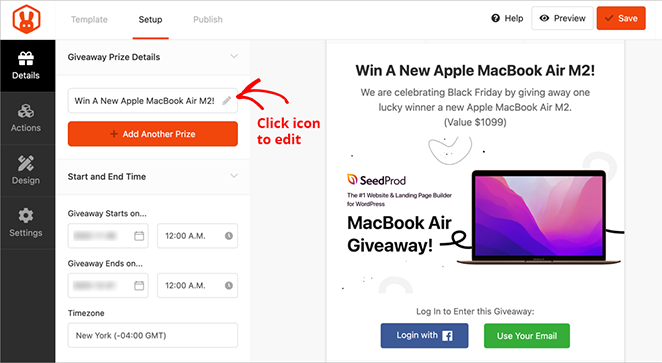
You’ll add your prize name, description, image, and start and end dates in the same setup panel. That’s your campaign framed in a couple of minutes.
Step 3: Connect Your Email Marketing Service
This is the step that makes the whole thing automatic. Connect your email marketing tool to RafflePress, and every person who enters joins your list without any manual work.
RafflePress connects natively to over 15 email services, including Constant Contact, Mailchimp, MailerLite, Drip, ConvertKit, and AWeber. Add the “Join Newsletter” entry action, connect your account, and pick the list you want new entrants added to.
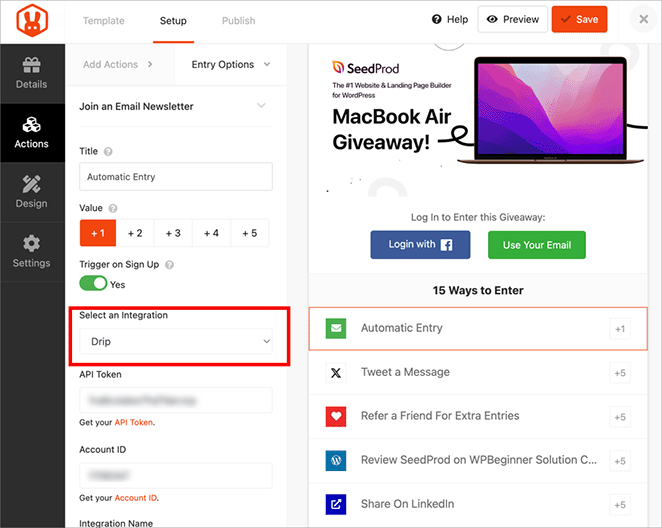
If you’re not sure which email tool fits, I compare the main options below, so you can match the tool to the list you’re trying to build.
Step 4: Set Up Your Giveaway Rules
Every giveaway needs official rules, and skipping them is how people land in legal trouble. You won’t have to write them yourself.
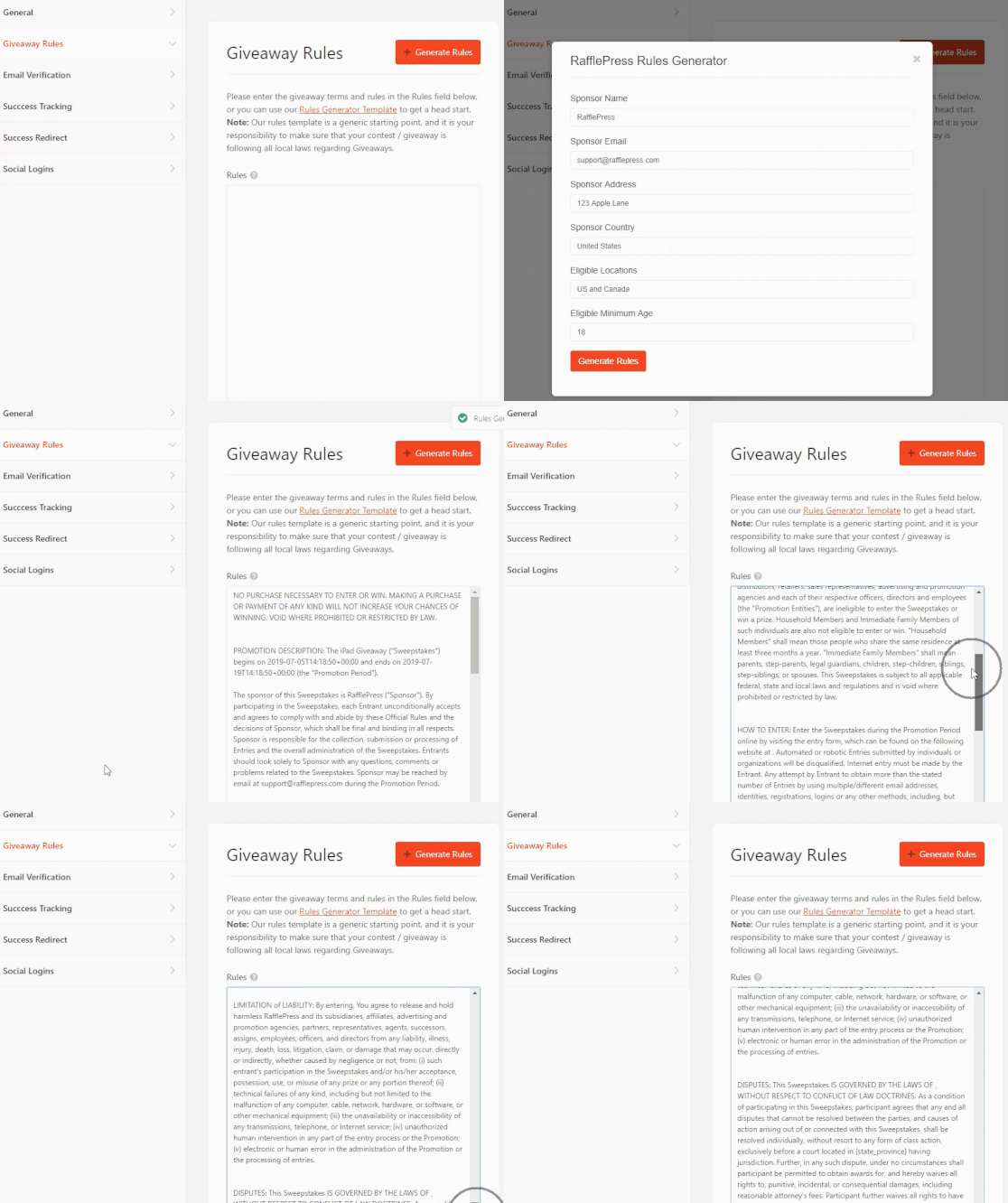
RafflePress has a built-in rules generator. Answer a few questions about your prize and eligibility, and it produces compliant terms you can attach to your giveaway in a click.
Step 5: Promote Your Giveaway Everywhere
A giveaway only grows your list if people see it. Promotion is where most campaigns quietly underperform, so treat this as a real step, not an afterthought.
Put it everywhere your audience already is:
- Email your existing list and ask them to enter and share.
- Post across your social channels, more than once, over the run of the giveaway.
- Add a site-wide banner or popup so every visitor sees it.
- Turn on refer-a-friend so entrants earn bonus entries for bringing people in.
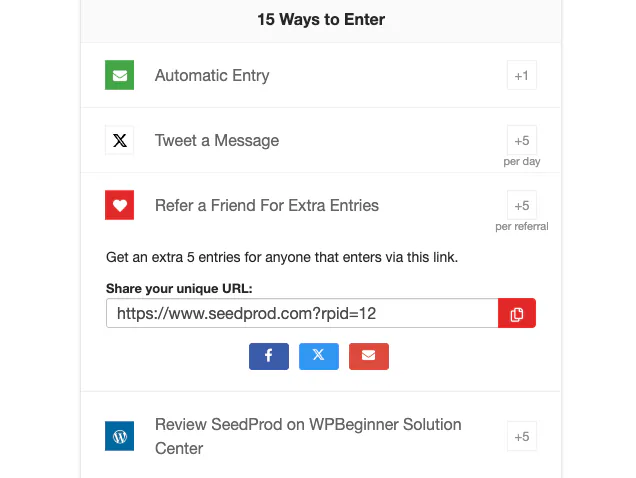
That last one did the heavy lifting for us. Our giveaway generated more than 22,000 referrals, which is how 6,507 subscribers came from a single prize.
Step 6: Choose and Announce the Winner
When the giveaway ends, you can use RafflePress to pick a winner at random from verified entries with one click. You can exclude anyone who didn’t complete a required action and redraw if a winner doesn’t respond.
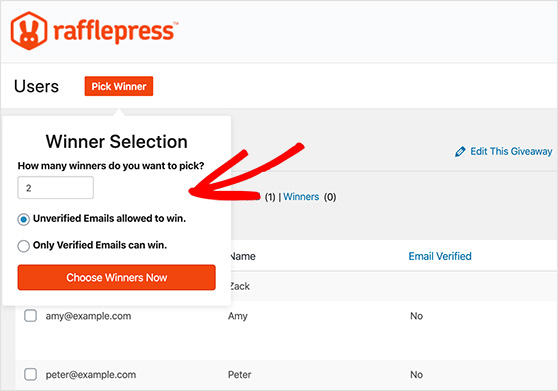
Announce the winner publicly and email your whole list to tell them. A win announcement keeps the people who didn’t win engaged, and it sets up your next email.
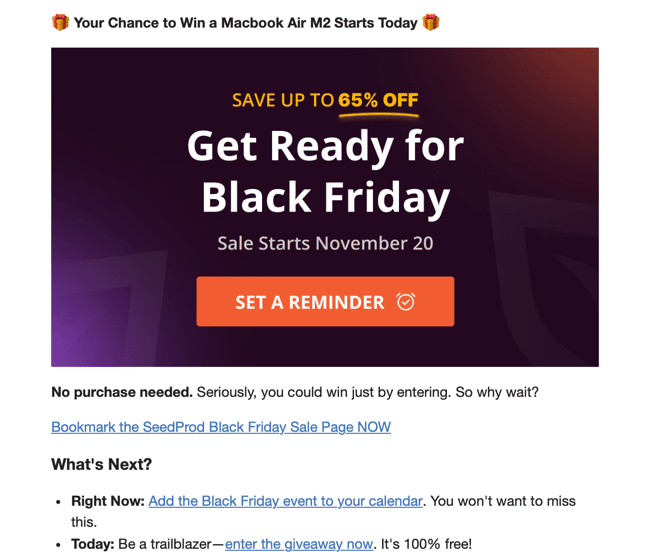
Step 7: Follow Up With Your New Subscribers
The follow-up is where a giveaway pays off. A list you never email is a list that forgets you signed them up.
Send non-winners a small consolation offer, a discount or a free resource, so entering still felt worth it. Then move everyone into a welcome sequence that introduces who you are and what they can expect.
Get the follow-up right and a one-time spike turns into a channel you keep. Get it wrong and you paid for names that unsubscribe within a week.
Real Results: 6,507 New Subscribers in 25 Days
Here’s what the campaign actually produced. These are our numbers, from the giveaway we ran on SeedProd.
| Metric | Result |
|---|---|
| New email subscribers | 6,507 |
| Days run | 25 |
| Cost per subscriber | Under $1 |
| Referrals generated | 22,000+ |
| LinkedIn shares | 11,000+ |
| YouTube channel visits | 3,000+ |
| Facebook likes | 2,000+ |
| New Twitter followers | 2,000+ |
The result came down to the right prize, an entry that took seconds, and promotion across every channel we had. Because the MacBook appealed directly to our audience, most subscribers stayed active after it ended.
Turn Your Giveaway Into a Lead-Generation Funnel
A giveaway that ends when the prize is claimed leaves most of its value on the table. Those subscribers are the start of a funnel you can keep selling to.
Think of it as a path every entrant walks. They enter, they confirm, they get welcomed, and a short sequence turns a new name into a customer.
RafflePress and your email tool automate the whole path, so it runs without you.
Here’s the sequence I would set up behind any list-growth giveaway:
- Entry: The “Join Newsletter” action adds them to your list the moment they enter.
- Confirmation: A double opt-in email confirms the address and keeps your list clean.
- Welcome: One email that says who you are and what they signed up for, sent immediately.
- Nurture: Two or three emails over the giveaway that share useful content, not a pitch.
- The offer: After the winner is announced, a consolation deal for everyone who didn’t win.
That consolation email is the one people skip, and it’s often the one that sells the most. Someone entered to win your product, then found out they didn’t.
A small discount right at that moment of disappointment turns a lot of non-winners into first-time customers.
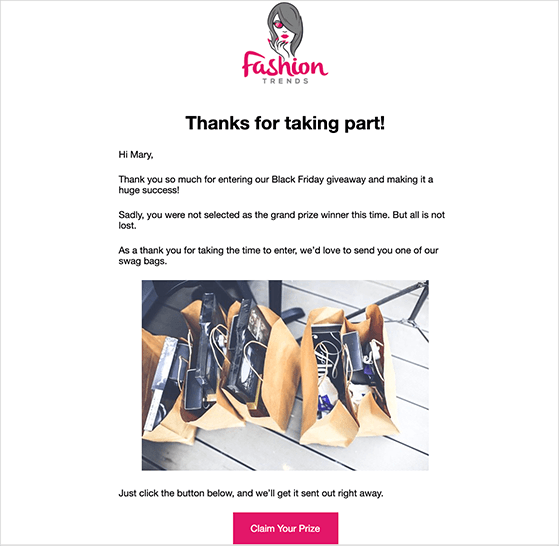
Map the sequence once inside your email tool and it fires automatically for every entrant, whether you get 50 or 5,000.
More Lead-Generation Ideas to Pair With Your Giveaway
A giveaway is one of the strongest lead-generation tactics you have, but it works even better next to a few others. The goal is to catch people who aren’t ready to enter and give them another way in.
These are the lead-generation ideas I would pair with a giveaway, all built around the same list you’re growing:
- Gate a genuinely useful resource: Offer a checklist, template, or mini-guide in exchange for an email. It captures the researcher who isn’t in the mood to enter a contest.
- Add a content upgrade to your best posts: A downloadable version of an article that already ranks quietly pulls in leads every day.
- Run a quiz or poll: People answer questions they would never fill a form for, and you collect an email at the end.
- Use an exit popup: Catch visitors who are about to leave with your giveaway or a lead magnet before they go.
- Partner with a complementary brand: Co-host a referral-driven giveaway with someone who shares your audience but isn’t a competitor, and split the new subscribers.
You don’t need all of these. Pick the one or two that fit how people already find you, and let the giveaway be the spike that the rest of your funnel catches.
Which Email Tools to Connect Your Giveaway To
Your giveaway is only as good as the list it feeds, and that means the email tool you connect it to matters. The right one depends on what you plan to do with your subscribers once they join.
RafflePress connects natively to over 15 email services, so you aren’t locked into one. Here are the ones I would look at first, and who each suits.
Constant Contact is the easiest starting point for a small business or a first-timer. The setup is friendly, the templates are ready to go, and it handles the basics of welcoming new subscribers without a learning curve.
MailerLite is where I would send anyone watching their budget. It has a genuinely useful free plan, clean automation, and enough room to grow into paid features when your list does.
Drip is built for selling. If you run a store and want to tie giveaway subscribers to purchase behavior and product recommendations, its ecommerce automations are the reason to choose it.
ConvertKit and AWeber both suit creators and bloggers who live off their newsletter. Tagging, simple sequences, and reliable delivery are the strengths here.
Here’s how they compare at a glance, after you have a sense of which one fits.
| Tool | Best for | Free plan | Strength |
|---|---|---|---|
| Constant Contact | Small business beginners | No, free trial only | Easiest setup and templates |
| MailerLite | Budget-conscious growth | Yes | Free plan and clean automation |
| Drip | Ecommerce stores | No | Purchase-based automation |
| ConvertKit | Creators and bloggers | Yes | Tagging and newsletter sequences |
| AWeber | Reliable all-rounder | Yes | Delivery and ease of use |
Whichever you pick, connect it before your giveaway goes live. A giveaway that collects emails with nowhere to send them is a missed opportunity you can’t get back.
Use a Giveaway to Get More Survey Responses
A giveaway isn’t just for growing a list. It’s one of the best ways to get people to answer a survey, because it fixes the reason most surveys fail: nobody has a reason to bother.
Attach entries to survey answers and response rates climb. People who would ignore a plain feedback request will happily answer a few questions for a shot at a prize they want.
RafflePress has a poll-and-survey entry action built for this. Add it to your giveaway, and entrants earn extra entries by answering your questions, so you collect audience research and email addresses in the same step.
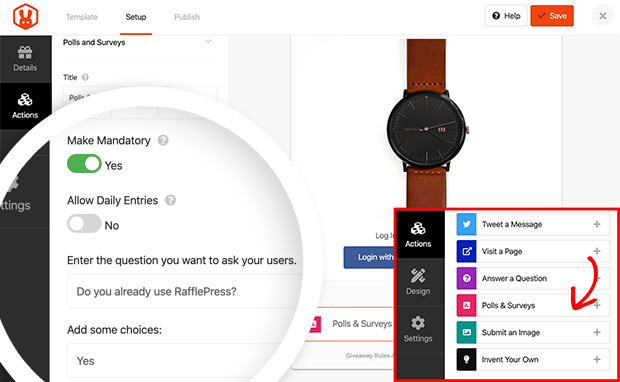
Keep the survey short and the questions specific. Ask what a food blog’s readers struggle with most, or which product a store’s customers wish existed.
You come away with a bigger list and a clear read on what to sell them next.
Keep Subscribers Engaged With an Email Newsletter
A giveaway fills your list, but a newsletter is what keeps those subscribers from forgetting they joined. Skip it and the 6,000 names you worked for go cold within a month.
Over years of writing and editing email content, the lists that stay valuable are the ones that show up consistently with something worth opening. A newsletter is how you do that.
You don’t need anything elaborate to start. A good email newsletter comes down to a few decisions you make once:
- Pick a rhythm you can keep: Weekly or every two weeks beats daily bursts you abandon.
- Give before you ask: Lead with something useful, a tip, a short guide, a genuine recommendation. Sell in one email out of every few, not every send.
- Write one clear subject line: It’s the only part most people see. Say what is inside plainly instead of trying to be clever.
- Send from a real person: A name in the “from” field opens more than a faceless brand.
Set up the first welcome email as an automation so it goes out the moment someone enters your giveaway. Then treat the ongoing newsletter as the relationship the giveaway started.
Why Run Your Giveaway With RafflePress
RafflePress is the WordPress giveaway plugin we built for exactly this: growing an email list and social following without paying for ads. It runs inside your WordPress dashboard, so your data stays on your site instead of a platform you rent.
I use it because the pieces that make a giveaway work are already there. You get the “Grow Your Email List” template, the refer-a-friend mechanic that drove our 22,000 referrals, over 15 email integrations, and fraud protection that keeps fake entries out of your winner draw.
It’s also a one-time payment, not a monthly subscription. You pay once and own it, which matters when a competitor like Gleam charges every month and hosts your data on its servers.
Over 200,000 WordPress sites run their giveaways with RafflePress, and real businesses use it to grow their lists. You can get started with RafflePress and have your first list-growth giveaway live today.
Frequently Asked Questions
How long should I run an email list giveaway?
Two to four weeks is the sweet spot. Shorter than that and your promotion never builds momentum. Longer and urgency fades, because entrants assume they have plenty of time and put it off. Our 6,507-subscriber giveaway ran for 25 days.
Do giveaways attract low-quality subscribers who just unsubscribe?
Only if the prize is generic. A targeted prize your ideal customer actually wants filters out freebie hunters before they enter. Give away something tied to your niche, not cash or a general gift card, and most subscribers stay after the giveaway ends.
How many email subscribers can I realistically get from one giveaway?
It depends on your prize, your promotion, and whether refer-a-friend is turned on. Small giveaways commonly add a few hundred subscribers. With a strong prize and heavy sharing, thousands is realistic, which is how ours reached 6,507.
Is a giveaway better than paid ads for list growth?
For most small sites, yes. A giveaway cost us under $1 per subscriber and kept growing through referrals, while ad costs rise the more you spend. A giveaway also gives you subscribers who arrived through people they trust, not an interruption.
Ready to Grow Your Email List?
Growing a list a few names at a time is slow. A single giveaway can add more subscribers in a month than a year of waiting for them to trickle in.
You have the exact process we used to add 6,507. Pick a prize your audience actually wants, and you can have your giveaway live before the end of the day.
If you liked this article, please subscribe to our YouTube Channel for RafflePress video tutorials. You can also find us on Twitter and Facebook.


