How to Run a Social Media Contest to Boost Your Following and Email List
 Stacey Corrin
Stacey Corrin
Stacey Corrin
 John Turner
John Turner
John Turner
TL;DR: How to Run a Social Media Contest A well-run social media contest can grow your following, build your email list, and generate real leads in a matter of days. Here’s how it works:
- Define your goal: Know whether you’re growing followers, building an email list, or driving traffic before you set up a single entry method.
- Choose your contest type: Photo contests, hashtag contests, sweepstakes, and referral contests each serve different goals.
- Set your budget and prize: Pick a prize your audience actually wants, and decide how much to spend on promotion vs. the prize itself.
- Pick the right platform: Go where your audience already spends time: Instagram, Facebook, TikTok, or across all of them with RafflePress.
- Follow platform rules: Each network has specific contest guidelines. Breaking them can get your account suspended.
- Publish and promote: Launch your contest and drive entries through email, social sharing, and referral mechanics.
When I wanted to grow a client’s social media following and email list fast, contests were the #1 tactic that made an instant difference. I’ve used them to drive thousands of new leads in just a few days without spending big on ads.
If you’re looking to get more followers, grow your list, and boost conversions, a social media contest is one of the simplest ways to do it.
In this guide, I’ll walk you through how to plan, launch, and promote a giveaway that actually delivers results.
- What Is a Social Media Contest?
- Why Run a Social Media Contest?
- How to Run a Social Media Contest
- Step 1: What Goals Should Your Social Media Contest Achieve?
- Step 2: What Types of Social Media Contests Can You Run?
- Step 3: Set Your Budget and Prizes
- Step 4: How Do You Pick the Right Platform?
- Step 5: What Rules Apply to Social Media Contests?
- Are Social Media Contests Legal?
- Step 6: Publish and Promote Your Social Media Contest
- Step 7: How Do You Measure Contest Results?
- FAQs About Social Media Contests
What Is a Social Media Contest?
A social media contest is a promotional campaign where a brand invites its audience to complete a specific action in exchange for a chance to win a prize. That action might be following an account, submitting a photo, or sharing a post.
It’s worth knowing the difference between a contest and a giveaway, because people use the terms interchangeably but they’re not the same thing.
In a contest, winners are judged on the quality of their submission, like best photo, best caption, or best answer. In a giveaway (also called a sweepstake), the winner is chosen at random from all eligible entries.
Both formats work well for growing an audience. Which one you choose depends on your goal, your audience’s willingness to participate, and how much effort you want to require from entrants.
Why Run a Social Media Contest?
According to a Tailwind study of over 60,000 Instagram posts, accounts that run contests grow their followers about 70% faster than those that don’t. And about 34% of new customers are acquired through contests, as seen in Outgrow’s giveaway research.
Those are metrics that translate directly into list growth and revenue.
Here’s what a well-run social media contest can do for your brand:
- Grow your social media following: When entering requires following your account, follower counts climb fast, and the algorithm rewards that surge in activity.
- Expand your email list: Requiring an email signup as an entry method is one of the highest-converting list-building tactics I’ve used with clients.
- Increase brand awareness: The activity spike from a giveaway gets recognized by platform algorithms, so your content reaches far more people than your normal posts.
- Drive engagement: Contests generate buzz, pull people into your profile, and give your audience a reason to interact with your content.
Real-World Examples That Worked
Nissan Australia ran a TikTok contest called #improvisewithJUKE, inviting users to submit creative videos. The campaign generated 34,000 video submissions, 140.6 million views, and a 92% brand awareness lift. (Source: Emplifi)
Kimpton Hotels ran a pet photo contest on social media, asking guests to share photos of their pets during their stay. The prize was a free hotel stay, which was hyper-relevant to the audience, and the entry mechanic (sharing a pet photo) was genuinely fun.
It drove a flood of user-generated content and kept the campaign self-funding through word-of-mouth sharing.
Free: Download Our Giveaway Playbook
Templates, prize ideas, and promotion strategies in one guide.
How to Run a Social Media Contest
When setting up your contest, there are several things you need to get right to make it a success. Here’s each step in order.
Step 1: What Goals Should Your Social Media Contest Achieve?
One of the first steps when hosting a social media contest is to set your goals. Figure out the purpose of your giveaway and what you want the outcome to be.
Your goal determines your entry methods. If you want to use a giveaway to grow your email list, your entry method needs to require signing up to your list.
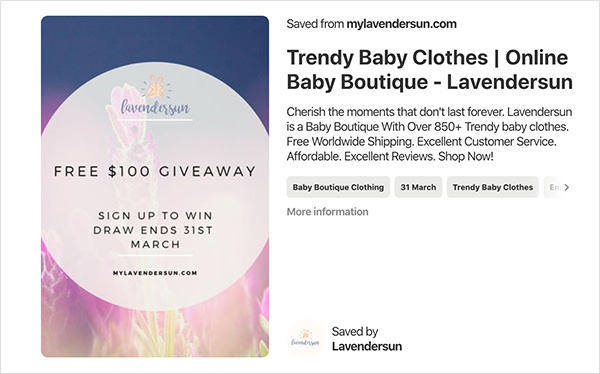
If you want to increase follower count, you’ll ask people to follow your social media profiles to enter.
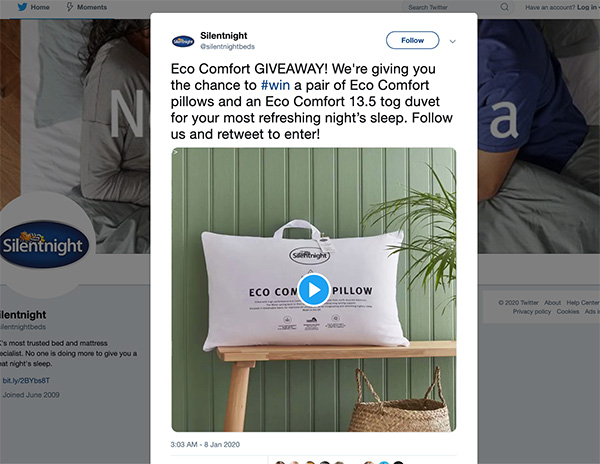
These giveaways would look completely different because the end goals achieve different outcomes. Spend some time defining your goals before moving on.
If you’re a small business or solo creator working without a big ad budget, don’t let that hold you back. The viral mechanic works at any scale.
You can use AI to help plan and set up your giveaway, and RafflePress has a free tier for testing the format before committing to a paid plan.
Step 2: What Types of Social Media Contests Can You Run?
The type of contest you run is determined by your end goal. Here are the main contest types, each with a distinct use case:
- Photo/UGC contest: Entrants submit photos or videos for judging or voting. Best for building brand content and engagement. Works well on Instagram and TikTok. See how to run an Instagram photo contest.
- Caption contest: You post an image, entrants submit the best caption. Easy to run, generates high comment volume, great for brand awareness.
- Hashtag contest: Entrants post using your branded hashtag to enter. Ideal for reach and discoverability. Learn how to run a hashtag contest step by step.
- Trivia/quiz contest: Entrants answer a question correctly to be entered into a draw. Great for driving website traffic when the answer requires visiting your site.
- Sweepstakes (random draw): Entrants complete an action (follow, subscribe, share) and a winner is chosen randomly. Lowest barrier to entry, highest volume of participants.
- Referral contest: Entrants earn extra entries by referring friends. Generates viral growth because every participant becomes a promoter.
For even more inspiration, this list of 100 proven contest prize ideas covers almost every scenario.
Step 3: Set Your Budget and Prizes
If you have a marketing team, talk with them about budget before you start. Split it between your contest promotion and the prize itself.
A good prize aligns with your brand’s goals and values and is something your audience actually wants. If it doesn’t resonate, entrants won’t convert into paying customers, which defeats the point.
What Are Good Giveaway Prizes?
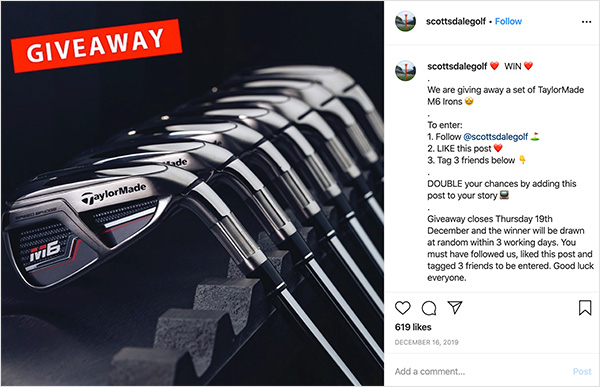
- Trending products: If there’s a product people are desperate to get hold of right now, tap into that demand. It drives a heap of entries.
- Cash: Cash prizes get loads of people interested, but the amount matters. Smaller amounts don’t have the same pull.
- Gift cards: Gift cards work in both small and large amounts. You can offer a card for your own store or a Visa card people can use anywhere.
- Free trips: Everyone loves a free vacation. Pick a destination your audience would actually want to visit.
- Event tickets: Free tickets to movies, live music, or theatre are popular because they offer something experiential rather than just a product.
Step 4: How Do You Pick the Right Platform?
Your next task is to figure out where your audience spends time on social media so you can tailor your giveaway to reach the right people on the right platforms.
Different people use different networks, and the type of content they engage with varies significantly by platform. Once you know where your audience is, focus there.
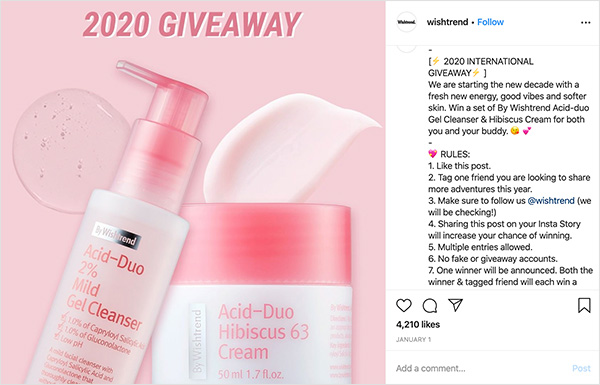
- Instagram: Strong for visual-heavy giveaways. Particularly effective with younger audiences interested in fashion, beauty, food, and lifestyle. Run a giveaway for Instagram using photo entry methods.
- TikTok: Now rivals Instagram for younger audiences and outperforms it for raw reach through the For You Page. Ideal for video-based contests and hashtag challenges. TikTok’s algorithm can surface your contest to people who don’t follow you yet.
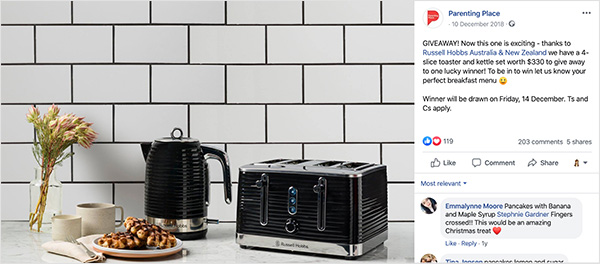
- Facebook: Best for a more mature, family-oriented audience. A contest that runs on Facebook works well for community-building and email list growth.
- X (formerly Twitter): Good for fast-moving engagement and retweet-to-enter mechanics. Works best for audiences already engaged with your brand.
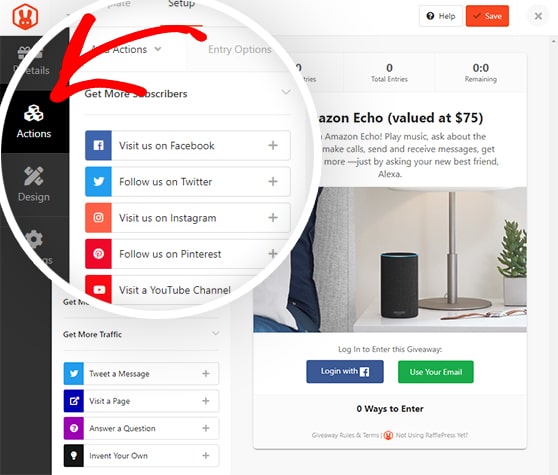
If your audience spans multiple platforms, RafflePress is a WordPress giveaway plugin that runs entirely inside your WP Admin (no embed codes or separate dashboards needed) and includes 30+ entry actions for growing your email list, social following, and traffic.
It lets you add entry options for Facebook, Instagram, TikTok, and more in a few clicks. See this guide to creating an online contest with RafflePress.
Step 5: What Rules Apply to Social Media Contests?
With your audience defined, focus on clarifying the rules for your competition. Each social network has its own contest guidelines, and ignoring them can get your account suspended.
Here are the current rules for the main platforms:
- Facebook: You must state what the contest is and confirm that Facebook does not sponsor or endorse the giveaway. You can’t require people to share the post or tag friends as an entry method.
- Instagram: Owned by Meta, so the rules are similar to Facebook’s. You must confirm Instagram isn’t affiliated with or sponsoring your contest. Don’t ask people to tag others in photos unless those people actually appear in the image.
- TikTok: TikTok’s guidelines require you to clearly disclose that the promotion is run by you as a third party, not by TikTok. Include a disclaimer that TikTok does not sponsor, endorse, or administer your promotion. Review TikTok’s full branded content policy before launching.
- X (formerly Twitter): X discourages multiple accounts and tweeting the same content repeatedly. Each account should only enter once, and entries should be unique.
- Pinterest: You can’t require people to save a specific image, shouldn’t allow more than one entry per person, and can’t suggest Pinterest sponsors the giveaway. Entrants should use “contest” or “sweepstakes” in their descriptions.
You should also publish your own brand’s rules alongside the giveaway. RafflePress includes a terms and conditions section within the contest widget, plus a built-in rules generator. Enter your details and it creates a standard set of rules for your competition.
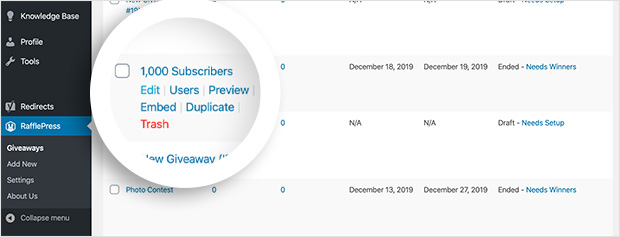
After setting up your RafflePress giveaway using the guide we linked above, click Edit on your giveaway.
Then go to Settings » Giveaway Rules. Paste any rules you’ve already written.
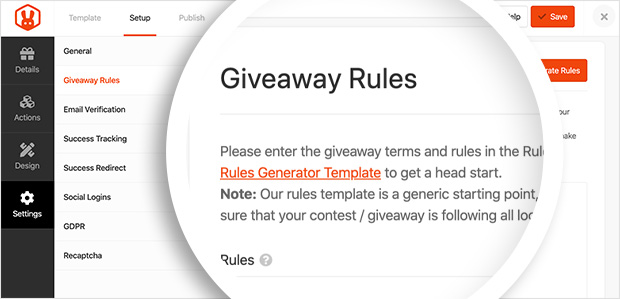
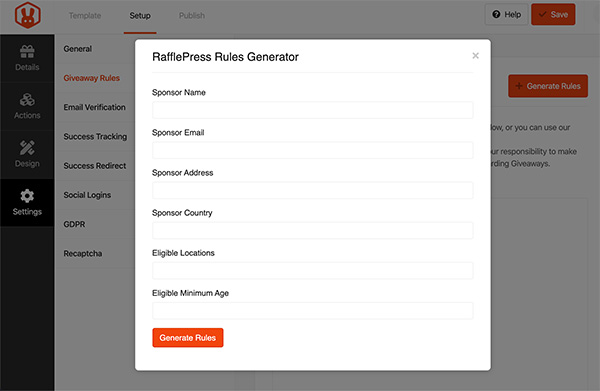
Or click the orange Generate Rules button to use the generator. Enter your sponsor name, email, address, country, eligible locations, and minimum age, then click Generate Rules. A standard set of rules will populate. Click Save when done.
Are Social Media Contests Legal?
Yes, social media contests are legal, but there are rules you need to follow, and they vary by country and state.
- US lottery law: In the United States, a giveaway becomes an illegal lottery if it requires a purchase to enter. Your contest must always have a free alternative method of entry (AMOE). Including “no purchase necessary” language in your rules is standard practice and protects you legally.
- FTC disclosure requirements: The FTC requires that any material connection between you and participants be clearly disclosed. If you’re working with influencers to promote your contest, they must disclose the partnership. See the FTC’s endorsement guidelines for specifics.
- State-level variations: Some US states have stricter rules. Adding “void where prohibited” to your rules covers most state-level variations. New York and Florida have specific filing requirements for sweepstakes with large prize values, so check the rules if your prize is significant.
- Data privacy: If you’re collecting email addresses or personal data through your entry form, comply with GDPR (for EU participants) and CCPA (for California participants). Include a clear statement about how you’ll use entrants’ data and give them a way to opt out of marketing after the contest ends.
This isn’t legal advice. Consult a lawyer for high-stakes campaigns. But following these basics keeps the vast majority of contests fully compliant.
Step 6: Publish and Promote Your Social Media Contest
With your goals, rules, and prize sorted, it’s time to publish and promote your contest.
RafflePress gives you two ways to publish your giveaway:
- The RafflePress content block: Add your contest to any existing post or page using the WordPress block editor. The widget includes everything in one place: heading, description, image, entry methods, and rules.
- The RafflePress landing page: Publish your contest on a dedicated, distraction-free landing page with its own URL. This is the easiest format to share in social posts.
Publish With the RafflePress Content Block
Create a new post or page, then click the plus icon to add a new content block.
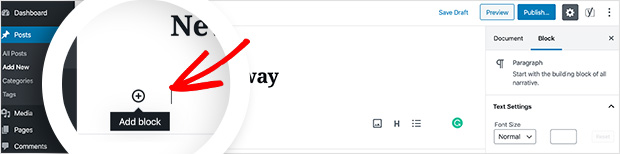
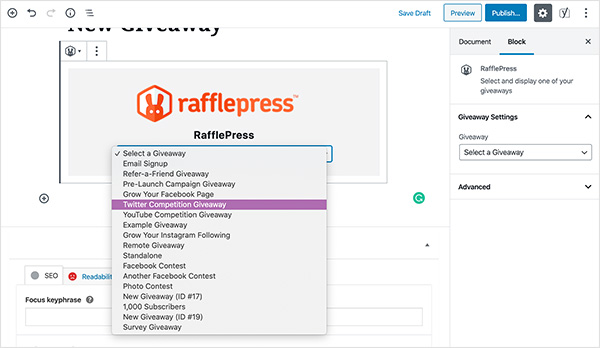
Type RafflePress into the search box and click the block to insert it.
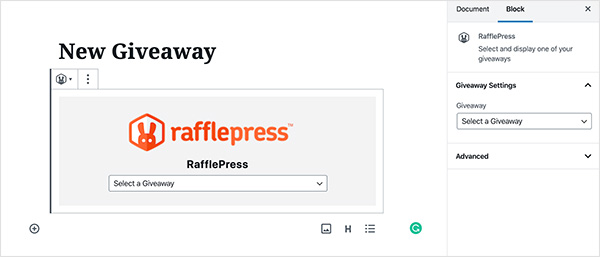
Select your giveaway from the dropdown box, then click Publish.
Publish Your Contest on a Landing Page
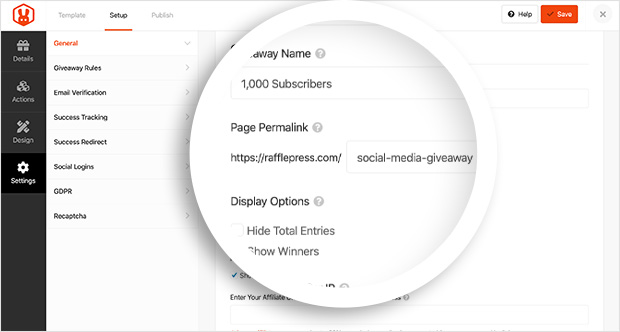
Find your giveaway in the RafflePress dashboard and click Edit. Go to Settings » General and find the Page Permalink field. Enter your preferred URL and click Save.
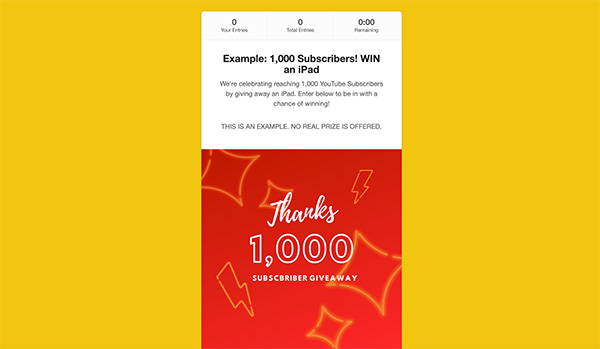
Visit that URL and you’ll see your giveaway in a clean, distraction-free environment. Include this URL in all your social posts when promoting the contest.
How to Promote Your Contest
Once it’s live, here’s how to drive entries:
- Require a share or referral entry: This is the single most effective way to go viral. Every person who enters also shares your contest with their own network, exposing you to new potential entrants with zero extra spend.
- Email your list: Send your contest to your existing subscribers. They’re already warm leads and are highly likely to enter and share. Most email marketing providers have built-in templates that make this quick.
- TikTok and Instagram Stories: Short-form video content and Stories drive strong click-through to contest pages. Post daily Stories updates during your contest window to maintain momentum.
- Cross-promote with partners: Partner with complementary brands to promote each other’s contests to your respective audiences. This doubles your reach without any ad spend.
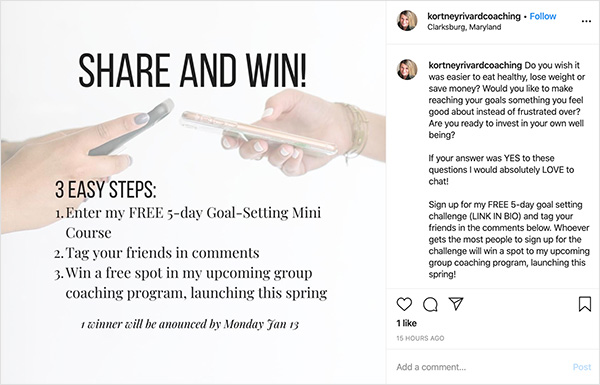
For a deeper breakdown, see this guide to promoting your Instagram giveaway and this list of effective contest promotion ideas.
Step 7: How Do You Measure Contest Results?
When the contest ends and you’ve picked a contest winner, take stock and look at your contest metrics to see how everything performed against the goal you set in Step 1.
The simplest way to track results is with the MonsterInsights Google Analytics plugin for WordPress. It records visits to your contest landing page, referral traffic sources, and conversion behavior, all inside your WordPress dashboard.

With real-time stats, you can monitor and adjust while your contest is still running.
What to Do After the Contest Ends
What happens after the contest closes matters as much as the contest itself. Here’s what to do:
- Announce the winner publicly: Post the announcement on the same channels where you promoted the contest. This builds trust and confirms the giveaway was legitimate.
- Follow up with non-winners: Send an email to everyone who entered but didn’t win. A consolation offer (a discount code, a free resource, or a heads-up about your next contest) converts a surprising number of these contacts into customers.
- Retarget contest visitors: Anyone who visited your giveaway page is a warm lead. Set up a retargeting campaign targeting that audience with a related offer while they still remember your brand.
FAQs About Social Media Contests
Are online contests legal?
Yes, social media contests are legal in most countries, including the United States, as long as you follow a few key rules. In the US, you must allow free entry (no purchase required), include clear rules, and disclose that the platform doesn’t sponsor the contest.
FTC guidelines require disclosure of any material relationships with promoters. For large prize values, some US states have additional filing requirements. Adding “void where prohibited” to your rules covers most state-level variations. If you’re collecting email addresses, comply with GDPR and CCPA requirements for data use disclosure.
How long should a social media giveaway run?
Most of the time, 7 to 14 days is the sweet spot. It’s long enough to build momentum, but short enough to keep people interested and motivated to enter before it closes.
If you’re promoting to a new audience, run it a little longer. If you’re running a flash giveaway to your existing list, a shorter window of 3 to 5 days creates urgency. Longer than two weeks and momentum usually drops, because people assume they have plenty of time and end up not entering.
How do I pick a winner fairly?
The easiest way is to use a random winner tool. RafflePress includes one that automatically filters out fake or duplicate entries before selecting a winner, so every legitimate entrant gets a fair shot.
For judged contests (like photo or caption contests), set your judging criteria upfront and share them publicly so participants know what they’re being evaluated on. Document your selection process so you can answer questions if anyone asks.
What’s the best platform for a social media contest?
It depends on who you’re trying to reach. Instagram works well for visual giveaways with younger audiences. TikTok is excellent for video-based contests and reaching new people through the For You Page algorithm. Facebook works best for broader, family-oriented audiences.
If you’re not sure, use RafflePress to run the same contest across multiple platforms at once. You can include entry actions for Instagram, TikTok, Facebook, and X in a single giveaway widget, with no separate setups needed.
How do I know if my contest worked?
Go back to the goal you set in Step 1. If your goal was follower growth, check your follower count before and after. If it was email list growth, count new subscribers acquired during the contest window.
Use MonsterInsights to track landing page visits, referral traffic sources, and conversion rates. RafflePress also shows you entry counts and which entry actions performed best, so you can run a better contest next time.
When I ran that first contest for my client, we gained more followers in one week than we had in the previous three months. The difference was simply having a clear goal, a prize worth entering for, and a platform that made the mechanics easy to set up.
Over 200,000 WordPress sites run their giveaways with RafflePress, and it holds a 5-star rating on WordPress.org. Get RafflePress now and you can have your first contest live today.
If you want to go deeper, take a look at how to grow your engagement on Twitter. And if you’d like to run a social media photo contest specifically, this tutorial walks through the full process.
If you liked this article, please subscribe to our YouTube Channel for RafflePress video tutorials. You can also find us on Twitter and Facebook.


