How to Do a Review Giveaway in WordPress
 Stacey Corrin
Stacey Corrin
Stacey Corrin
 John Turner
John Turner
John Turner

TL;DR: How to Do a Review Giveaway in WordPress A review giveaway lets you collect genuine customer feedback by offering a chance to win a prize. Here are the key steps:
- Define your goals – Decide whether you want more reviews, traffic, or email signups, and set a specific target.
- Choose a prize – Pick something your audience values, such as a gift card or one of your own products.
- Set your rules – Cover eligibility, duration, FTC disclosure, and which review platforms you will use.
- Set up RafflePress – Install the plugin, choose a giveaway template, and add your prize details.
- Add entry actions – Use the Trustpilot, G2, or Capterra review actions (never Google, Amazon, or Yelp).
- Promote and pick a winner – Share across email and social media, then use RafflePress to randomly select a winner when the giveaway ends.
Want to get more customer reviews without breaking the rules? A review giveaway is one of the fastest ways to boost trust, credibility, and sales for your business.
By offering a chance to win a prize, you can encourage genuine reviews, build powerful social proof, and attract new customers while staying compliant with Google, Amazon, and FTC guidelines.
In this guide, I’ll show you exactly how to run a review giveaway in WordPress step-by-step, so you can grow your reputation and brand authority the right way.
Quick steps to set up a review giveaway in WordPress:
- Step 1. Install and Activate RafflePress
- Step 2. Choose a Giveaway Template
- Step 3. Add Your Giveaway Prize Details
- Step 4. Choose the Giveaway Entry Actions
- Step 5. Design Your Giveaway Widget
- Step 6. Configure Your Giveaway Settings
- Step 7. Publish Your Review Giveaway
- Step 8. Promote Your Review Giveaway
- Step 9. Choose the Review Giveaway Winner
- Step 10. Track and Analyze the Results
What Is a Review Giveaway?
A review giveaway is a type of contest where customers are encouraged to share their honest feedback about your product or service in exchange for a chance to win a prize. Instead of paying directly for reviews, which most platforms prohibit, participants enter by leaving a review and are then included in a random prize drawing.
This approach makes it easier to collect genuine customer testimonials, build social proof, and improve your online reputation. Since reviews are one of the biggest trust signals for new buyers, running a review giveaway can directly increase conversions and sales.
Can You Really Do a Giveaway for Reviews?
Yes, you can run a review giveaway as long as you follow the right rules. When done correctly, a giveaway helps you collect honest feedback, build social proof, and grow customer trust without violating platform or FTC guidelines.
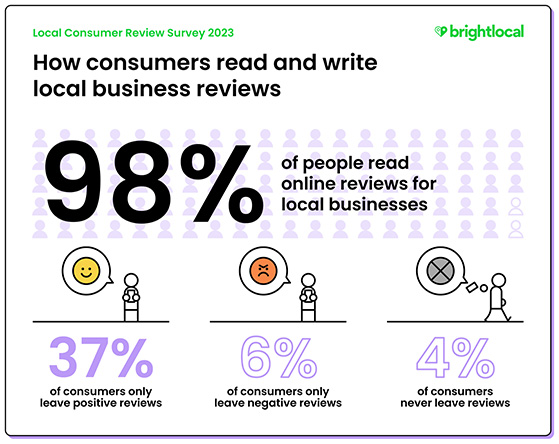
Research shows that 98% of consumers read online reviews before buying, and most people read around 10 reviews before trusting a business. That means every new review you collect can directly impact sales and credibility.
Unlike paying for reviews, which Google, Amazon, and other platforms strictly prohibit, a giveaway offers a chance to win a prize, not a guaranteed reward. This keeps the process fair and compliant while still motivating participation.
To stay safe, always be transparent with your audience, disclose that reviews may be used for marketing, and follow the rules of each review platform. When handled properly, a review giveaway is both ethical and highly effective for building your reputation.
Free: Download Our Giveaway Playbook
Templates, prize ideas, and promotion strategies in one guide.
Can You Use a Giveaway to Get Google Reviews?
No. Google’s review policy explicitly prohibits any form of incentive for Google reviews, including raffle entries, gift cards, discounts, or anything of value tied to leaving a review. Violations can result in reviews being removed or your account being penalized.
The same applies to Amazon and Yelp. All three platforms treat incentivized reviews as a policy violation, regardless of how the incentive is structured.
Here’s what these platforms prohibit:
- Raffle or contest entries in exchange for leaving a review
- Gift cards, discounts, or coupons tied to writing a review
- Any payment or reward for review content, positive or negative
What you can do on any platform is ask customers directly to share their honest experience. A follow-up email after a purchase encouraging a review is fine, as long as no reward is attached.
For compliant review giveaways, use platforms that permit incentivized reviews with proper disclosure. The FTC also requires you to disclose that reviewers entered a contest in all related promotional content.
| Platform | Allows Review Giveaways? | Notes |
|---|---|---|
| Trustpilot | Yes | Requires disclosure that reviewer entered a contest |
| G2 | Yes | Allows with transparency and FTC-compliant disclosure |
| Capterra | Yes | Permits with proper disclosure |
| No | Prohibits any form of incentivized reviews | |
| Amazon | No | Strictly prohibits review incentives |
| Yelp | No | Not permitted under community guidelines |
Why Choose RafflePress for Your Review Giveaway?
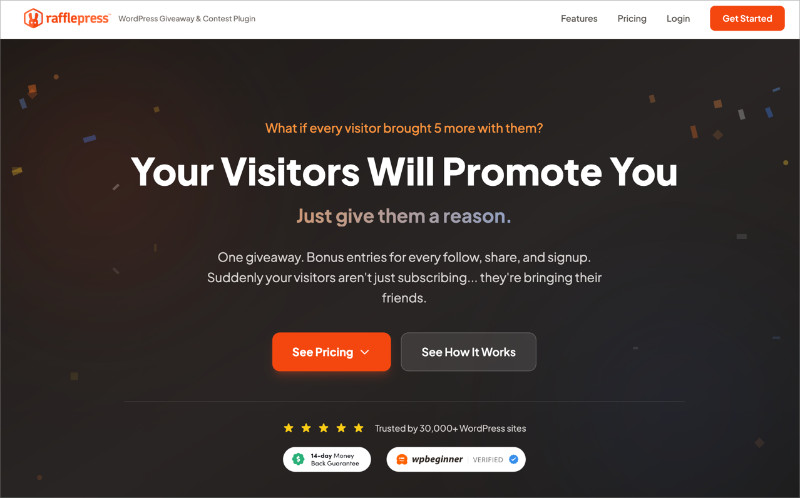
RafflePress is a WordPress giveaway plugin with dedicated entry actions for Trustpilot, G2, and Capterra. That means you can send participants directly to your listing on whichever review platform matters most for your business, with a built-in way to verify entries.
The built-in giveaway landing page gives your review campaign a dedicated URL you can share anywhere. When the giveaway ends, RafflePress picks a winner at random inside your WordPress dashboard, with no spreadsheets or third-party tools needed.
I use RafflePress on the campaigns I run, and the feature I find most useful is the “Invent Your Own” action. If your review platform isn’t on the built-in list, you write custom instructions and participants confirm their submission manually, which gives you a compliant path for almost any platform.
Preparing for Your Review Giveaway
Before you jump into setting up your giveaway, some groundwork is essential. Proper preparation ensures your campaign aligns with your business objectives and runs smoothly.
Define Your Goals

The first step in any successful review giveaway is defining what you hope to achieve. Setting specific goals upfront gives you benchmarks to measure success when the campaign ends.
Some common goals to consider:
- More reviews: How many new reviews are you aiming for, and on which platform?
- Increased traffic: Are you looking to drive more visitors to your website or a specific landing page?
- Brand awareness: Do you want to reach a new audience or demographic?
- Customer engagement: Are you aiming to increase interactions on your social media platforms?
- Email list growth: Do you want to grow your email subscriber list alongside collecting reviews?
Set SMART goals (specific, measurable, achievable, relevant, and time-bound) so you have clear benchmarks against which to measure the success of your review giveaway.
Choose the Prize
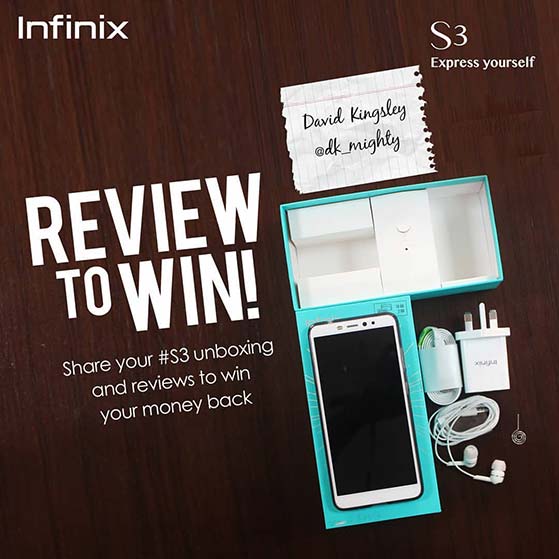
Selecting the right giveaway prize is crucial for participation. Choose something your audience genuinely values without overextending your budget.
Gift cards, exclusive discounts, or a popular product from your line are often good choices. Consider offering more than one prize to improve the odds and keep more people engaged.
You can also consider non-material prizes. Experiences, special recognition, or exclusive content can work well as incentives for the right audience.
Set the Rules and Guidelines
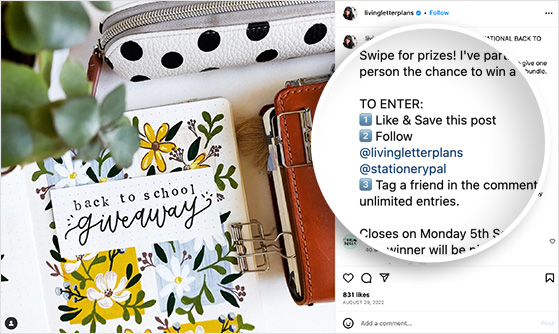
Transparency is key to any successful review giveaway. Clearly outlining the rules ensures entrants know what to expect and keeps your campaign compliant.
Your rules should cover:
- Eligibility: Who can participate? Are there age or location restrictions?
- Duration: Specify the start and end dates. The giveaway duration should be long enough to gather entries but not so long that people lose interest.
- Entry methods: Detail exactly how participants can enter, including which review platform to use.
- Winner selection: Explain how the winner will be chosen. Random drawing is the most compliant and transparent approach.
- Prize distribution: Outline how and when the prize will be delivered.
- Legal compliance: Include FTC disclosure language and a disclaimer that the giveaway is not sponsored by any social media platform you use to promote it.
For more information, see our guide on how to write giveaway rules.
Guide to Setting Up a Review Giveaway in WordPress
Now that you’re well-prepared, it’s time to set up your review giveaway. With RafflePress, this process is straightforward and walks you through each step inside your WordPress dashboard.
Step 1. Install and Activate RafflePress
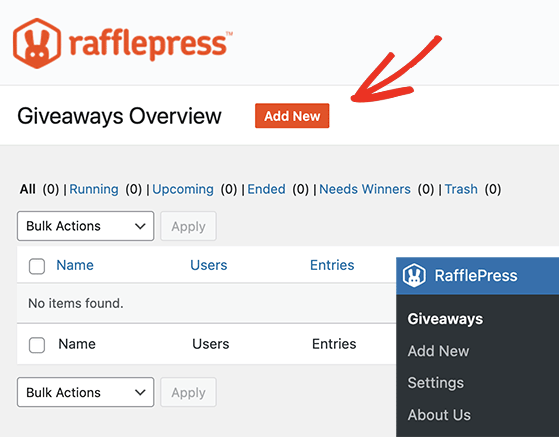
Before anything else, you’ll need to install and activate the RafflePress plugin on your WordPress site. For step-by-step instructions, see this guide on how to install the RafflePress plugin.
Note: RafflePress has a free version that lets you run simple sweepstakes and giveaways. For this guide, we’re using RafflePress Pro for its advanced giveaway features.
Step 2. Choose a Giveaway Template
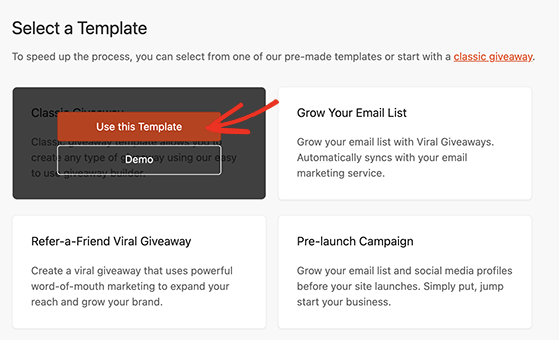
After activating the plugin and entering your license details, navigate to RafflePress » Giveaways from your WordPress dashboard and click the Add New button. You’ll see several pre-designed giveaway templates optimized to meet different campaign goals.
Choose a template that aligns with your objectives by hovering over it and clicking the Use This Template button. This template will serve as the foundation for your giveaway widget.
Step 3. Add Your Giveaway Prize Details
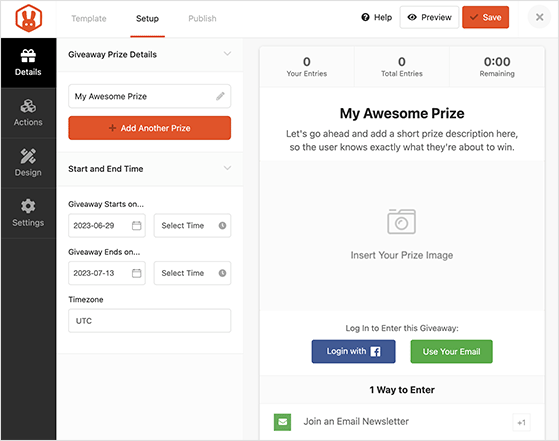
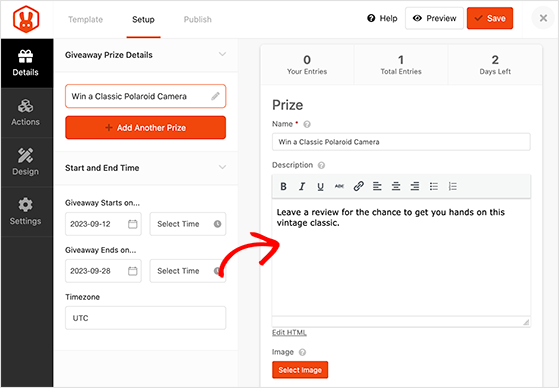
Your chosen template will open in RafflePress’s drag-and-drop giveaway builder, with customization options on the left and a live preview on the right. Simply point and click to add your prize name, description, and photo.
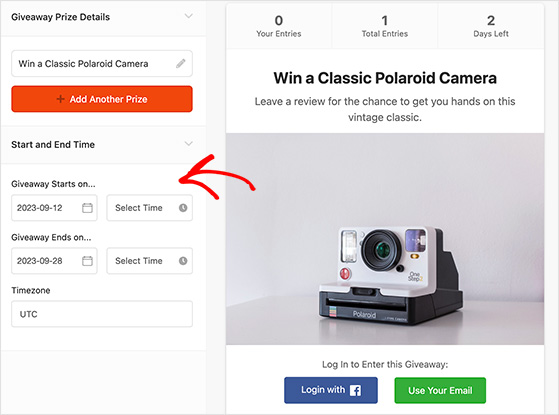
You can also set your giveaway duration on the same page, including start time, end date, and time zone. Don’t forget to click Save before moving on.
Step 4. Choose the Giveaway Entry Actions
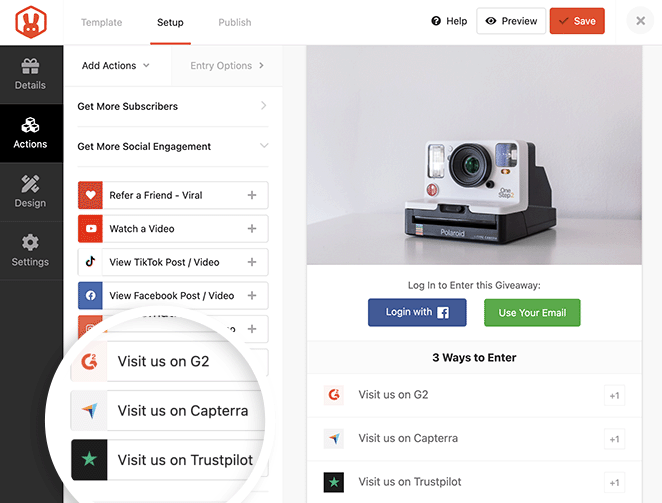
Entry actions are the tasks users complete to qualify for the giveaway and earn bonus entries. Click the Actions tab in the left-hand sidebar to see RafflePress’s full list.
For a review giveaway, RafflePress includes three dedicated review entry actions:
- Get G2 reviews with the Visit us on G2 action
- Incentivize reviews on Capterra with the Visit us on Capterra action
- Get Trustpilot reviews with the Visit us on Trustpilot action
Click any of these actions to add them to your widget. From there, you can add a direct link to your product page on that review site, make the action mandatory, and set how many entries it’s worth.
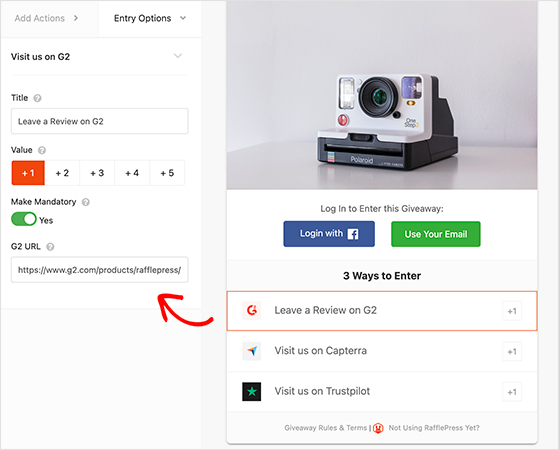
When users complete these actions, they’ll see a button to visit your product page on the review platform and a text field to paste the URL to their review.
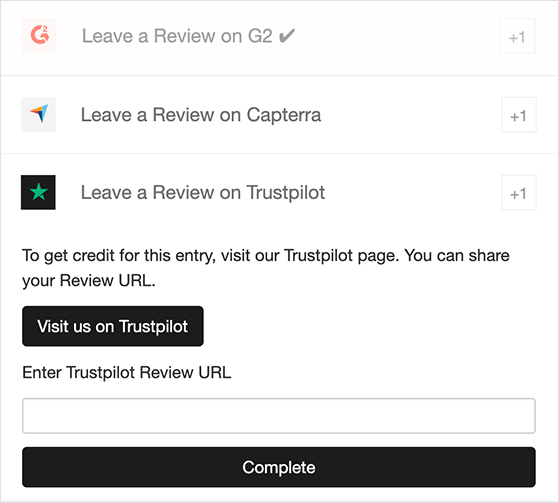
If your review site isn’t in the built-in actions list, such as for your own website, use the “Invent Your Own” action. Simply rename the action, include instructions for participants, and add a way to confirm the entry.
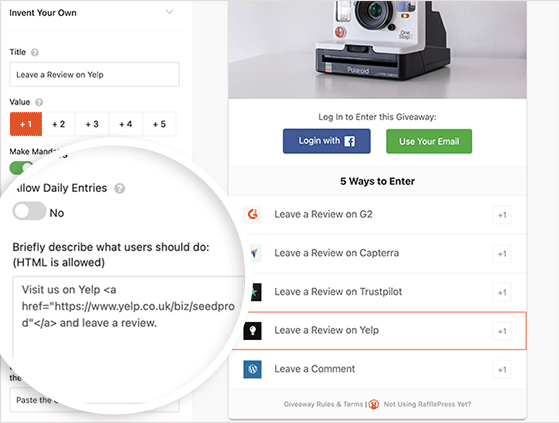
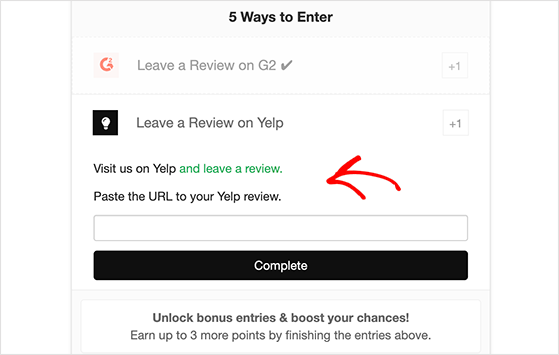
Here’s how this would look on the front end for someone entering the giveaway:
Want to go further? Consider adding bonus actions to increase participants’ chances of winning, such as tweeting a message, leaving a comment, or sharing the giveaway with friends.
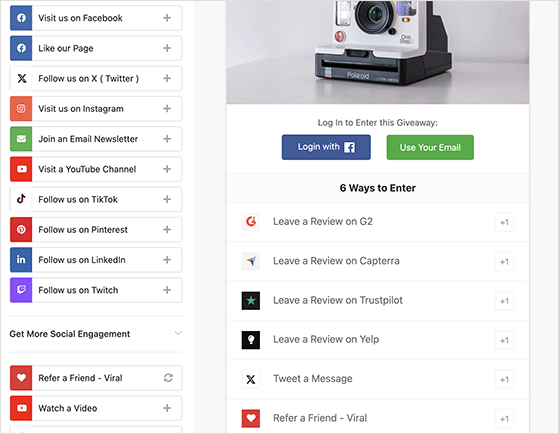
Look back at the goals you set earlier and include actions that will help you meet them. For example, if you also want to get more blog comments, add that as a bonus action.
Step 5. Design Your Giveaway Widget
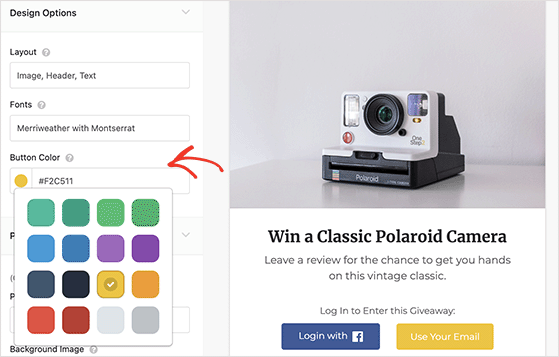
Once your actions are in place, click the Design tab to customize the look of your giveaway. RafflePress includes layout presets, custom font options, and brand color controls.
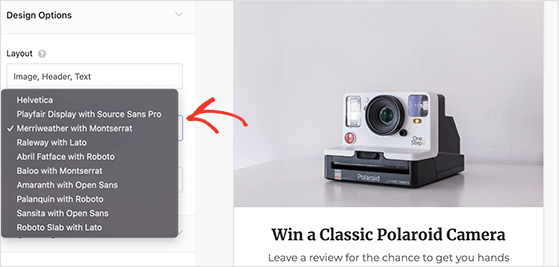
You can arrange the widget with the image first or the title first, and choose from several font options to match your brand. RafflePress also lets you customize the main call-to-action button color.
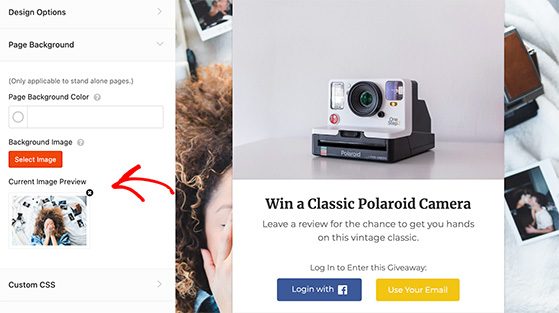
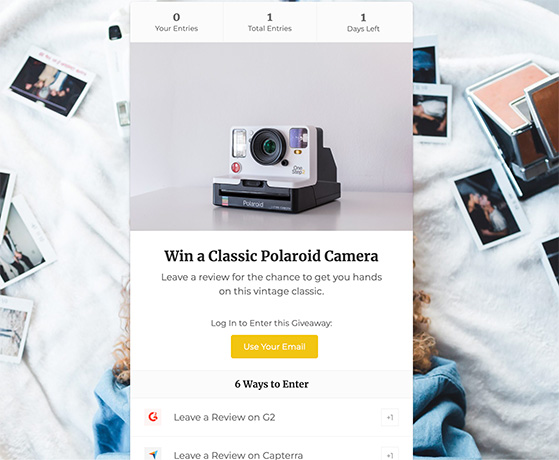
If you plan on using the built-in giveaway landing page (covered in Step 7), you can also upload a custom background image here.
Step 6. Configure Your Giveaway Settings
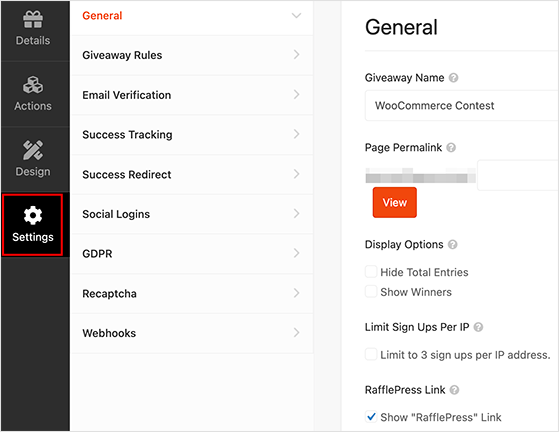
Click the Settings tab to configure how your campaign runs. The General settings let you set your giveaway page permalink, hide total entries, show winners, and limit signups per IP address.
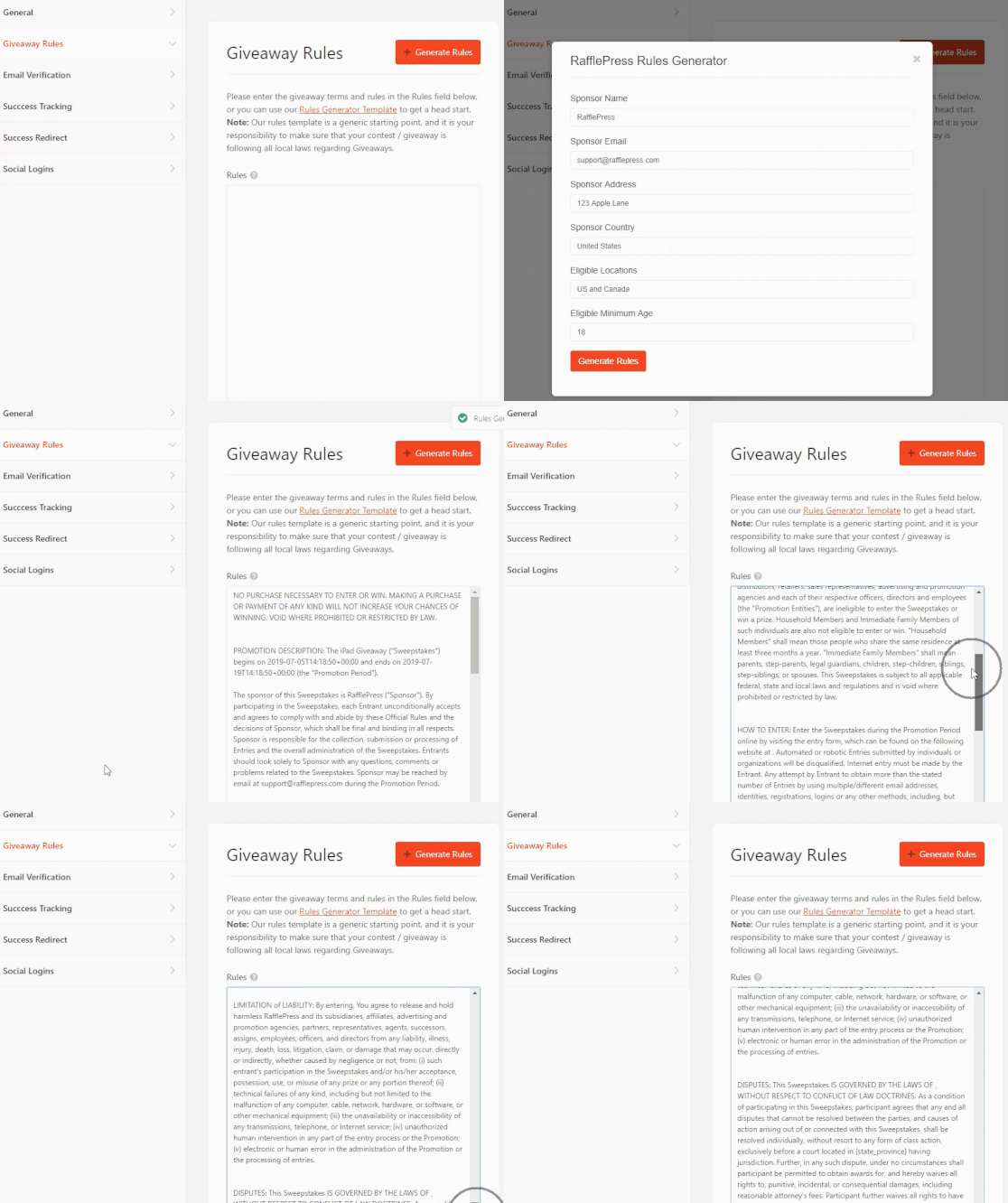
Next, move to Giveaway Rules, where you can answer a few questions to automatically generate the official rules for your giveaway.
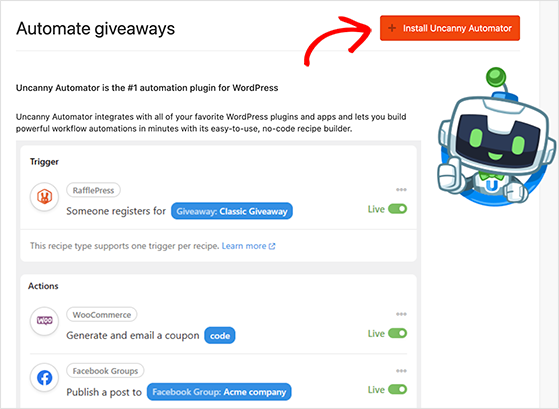
In the Automation section, you can integrate your giveaway with Uncanny Automator to automate various tasks. For example, you could deliver a coupon code after users enter or schedule a follow-up in your CRM.
The Email Verification setting lets you require users to confirm their email address, which adds an extra layer of verification and ensures you’re gathering valid contacts.
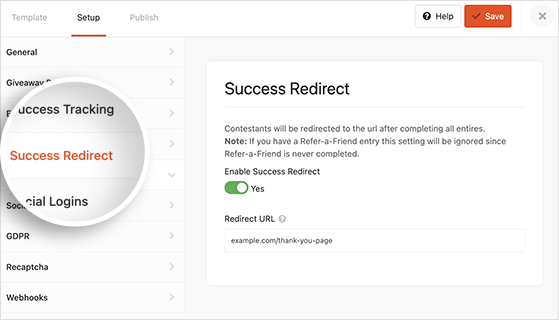
Use the Success Redirect option to send users to a specific URL after entering, such as a thank-you page or another promotional offer.
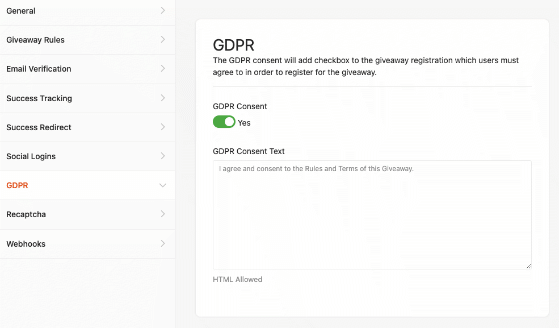
Don’t forget the GDPR section. Enable the consent box and customize the text to ensure you comply with privacy regulations before going live.
Step 7. Publish Your Review Giveaway
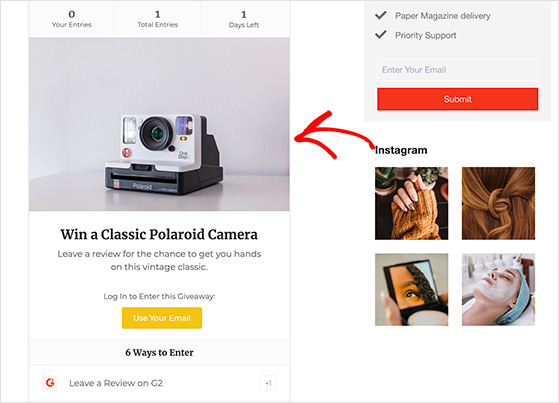
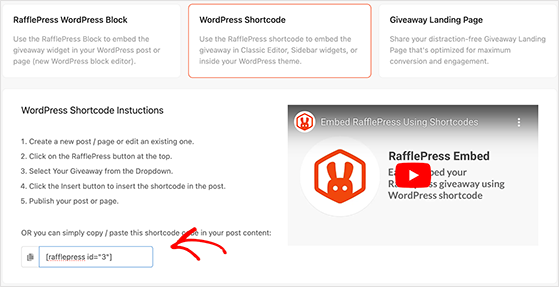
Once you’ve configured all the settings, it’s time to publish your giveaway. RafflePress offers three ways to publish:
- RafflePress WordPress Block: Search for the RafflePress block in the block editor and select your giveaway from the dropdown list.
- Shortcode: Use the provided shortcode to insert the giveaway into any post, page, or widget area that supports shortcodes.
- Giveaway Landing Page: Assign a permalink in the General settings to give your review campaign its own dedicated page, which minimizes distractions and keeps visitors focused on entering.
Step 8. Promote Your Review Giveaway
Now that your review giveaway is live, the next step is promotion. A well-promoted giveaway can dramatically increase participation and help you hit your campaign goals faster.
Here are some strategies to effectively promote your review giveaway:
- Social media: Announce the giveaway with eye-catching graphics and relevant hashtags. Consider running paid ads for even greater reach.
- Email marketing: Send an announcement to your email list, then follow up with reminders as the end date approaches.
- Collaborations: Partner with influencers or complementary brands to co-promote the giveaway and reach new audiences.
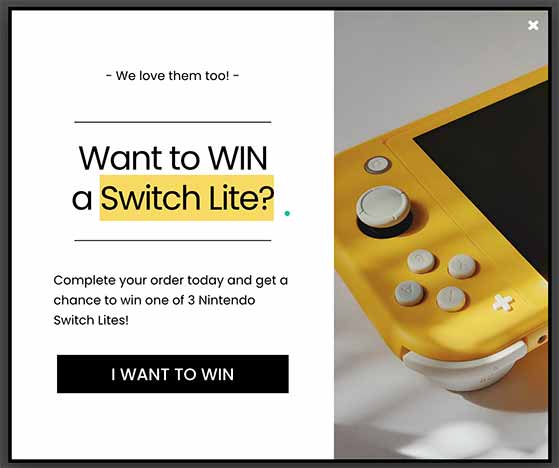
- Website and blog: Feature the giveaway as a banner, a popup, or a dedicated blog post that explains how to enter.
- Press releases: Send a press release to relevant media outlets if your giveaway is newsworthy for your industry.
- Community and forums: Share in relevant online communities, following each platform’s rules on promotional posts.
For more ideas, check out our giveaway promotion tips.
Step 9. Choose the Review Giveaway Winner
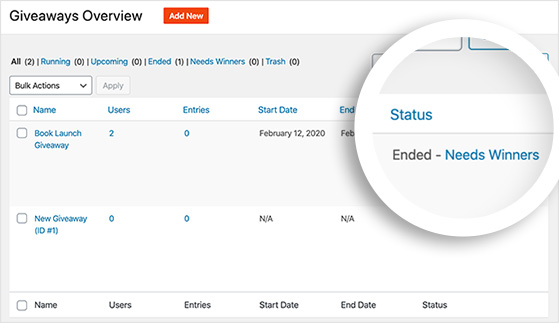
Once your giveaway ends and the entry period closes, navigate to your WordPress dashboard and open the giveaway. You’ll find a “Needs Winners” link that reveals all participants who entered.
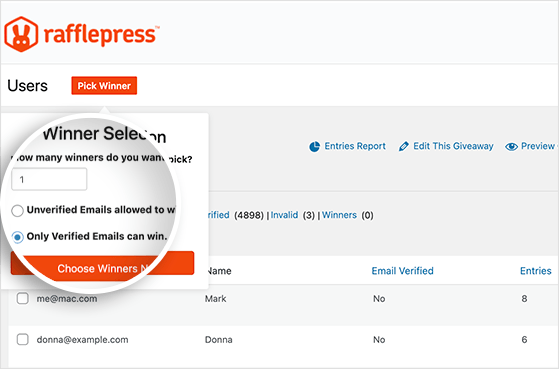
Click the Choose Winners Now button and the system will randomly select a winner from all entries, ensuring every participant had an equal chance of winning.
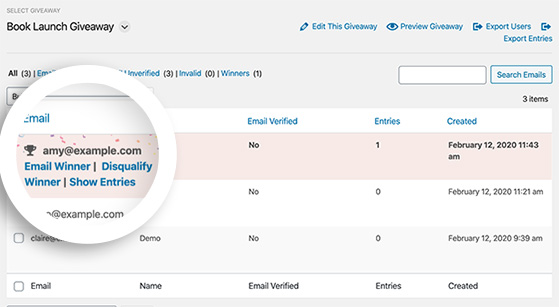
After selecting the winner, you can email them directly from the RafflePress dashboard with details on how to claim their prize. It’s also a good idea to announce the winner on your social media channels and via email to all participants, thanking them for entering and letting them know about future giveaways.
Step 10. Track and Analyze the Results
The end of your review giveaway is an opportunity to gather insights for future campaigns. Tracking results helps you understand what worked and set more accurate goals next time.
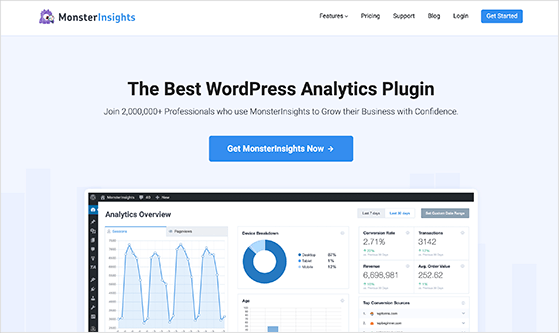
With tools like MonsterInsights, a powerful Google Analytics plugin for WordPress, you can track page views and user interactions with your giveaway widget directly from your dashboard.
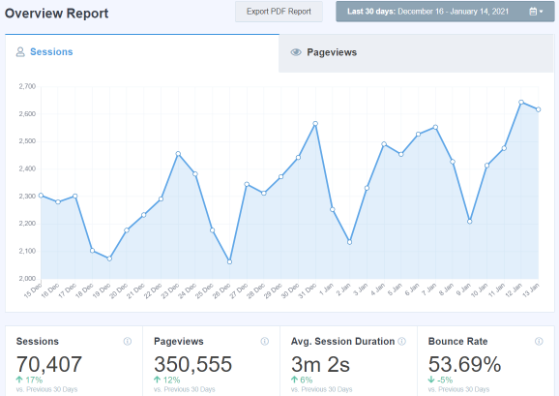
Don’t forget to review the performance of your promotional efforts. Check analytics on your social media posts, email campaigns, and other channels to understand which methods were most effective in driving participation.
Finally, compare the results to the goals you set at the beginning of your campaign. Understanding whether you hit your targets will help you run even more effective review giveaways in the future.
FAQs About Review Giveaways
How do you run a Google review giveaway without violating Google’s rules?
You can’t use a giveaway to collect Google reviews. Google’s policy prohibits any incentive for reviews, including raffle entries. To run a compliant review giveaway, use third-party platforms like Trustpilot, G2, or Capterra, or collect reviews directly on your own website. Never tie a giveaway entry to leaving a Google, Amazon, or Yelp review.
Are review giveaways legal?
Yes, review giveaways are legal when you follow FTC guidelines and the rules of each platform. Legality depends on where reviews are collected: Google and Amazon prohibit incentivized reviews entirely, while Trustpilot, G2, and Capterra permit them with disclosure. The FTC requires you to disclose that the reviewer entered a contest anywhere that review or testimonial appears.
What platforms allow review giveaways?
Trustpilot, G2, and Capterra allow review giveaways with proper disclosure. Google, Amazon, and Yelp do not permit any form of incentivized reviews, including raffle entry. Always check each platform’s current review guidelines before launching your campaign, as policies can change.
Do review giveaways actually work?
Yes, when targeted at your actual customers. A well-timed giveaway with a relevant prize can significantly increase review volume on platforms like Trustpilot or G2. The key is using a prize your audience genuinely wants and keeping the entry process simple, so the barrier to participate stays low.
More Ways to Grow Your Brand with Giveaways
You’ve done it! You now have everything you need to run a review giveaway in WordPress and make it a success.
If you have other marketing goals, check out these other WordPress giveaway tutorials:
- How to Run an Influencer Giveaway in WordPress
- How to Run a Free NFT Giveaway on WordPress Start to Finish
- How to Do a Giveaway on Instagram to Gain Followers
- How to Do a Giveaway on Etsy: a Guide for Small Businesses
- How to Make a WooCommerce Contest for More Customers
- How to Do a TikTok Giveaway Contest in WordPress
- How to Do Giveaways on Twitch Step-by-Step
- How to Run a Competition on LinkedIn to Grow Your Brand
If you liked this article, please subscribe to our YouTube Channel for RafflePress video tutorials. You can also find us on Twitter and Facebook.

