How to Get Trustpilot Reviews Fast (Without Fake Ones)
 Stacey Corrin
Stacey Corrin
Stacey Corrin
 John Turner
John Turner
John Turner

TL;DR: How to Get Trustpilot Reviews Fast (Without Fake Ones)
The fastest way to get Trustpilot reviews is to automate your review request emails using Trustpilot’s free Automatic Feedback Service (AFS), a process that takes about 10 minutes to set up.
- Set up AFS – BCC your unique Trustpilot address on order confirmation emails to trigger automatic review invites.
- Ask customers directly – A personalized follow-up email one day after purchase can significantly boost reviews with no ad spend.
- Run a review giveaway – Use RafflePress to incentivize honest reviews ethically, without violating Trustpilot’s rules.
- Embed reviews on your site – Displaying Trustpilot reviews on your website creates a feedback loop that encourages more reviews.
- Add a TrustBox to your email signature – Every email you send becomes a passive invite to your Trustpilot profile.
Everyone wants Trustpilot reviews fast. But in my experience, trying to take shortcuts usually ends with a banned account or a ruined reputation.
I’ve seen businesses buy reviews to get a quick boost, only to have Trustpilot’s fraud detection wipe them out a week later. The only safe way to get reviews quickly is not by cheating, but by automating your “ask” at the perfect moment.
When you automate the process, you turn every sale into a potential 5-star rating without lifting a finger. In this guide, I’ll show you the exact strategies I use to get more Trustpilot reviews quickly, ethically, and effectively.
What Are Trustpilot Reviews?
Trustpilot reviews are customer ratings on a five-star scale published on one of the most trusted consumer review platforms online. With over 190 million reviews hosted on the platform, it is one of the primary signals for consumer trust online today.

In Trustpilot, customer ratings are on a five-star scale, categorized as Organic (left unprompted by the business), Invited (requested by the business), or Verified (linked to a confirmed transaction).
- Organic Reviews (Natural): Customers write these on their own. It shows they care enough to share their thoughts without you asking.
- Invited Reviews (Requested): These happen because you sent an email or request. Trustpilot lets you send these easily through their dashboard.
- Verified Reviews (Proven): These are linked to a real purchase. Because they are verified by the system, search engines like Google often trust them more.
Should You Buy Trustpilot Reviews?
Buying Trustpilot reviews might seem like a quick fix, but it’s a risky move. Many business owners search for “How do you choose your best site to buy Trustpilot reviews?” or ask “Is it possible to buy Trustpilot reviews/comments?”
Technically, yes, you can find sites that sell them. However, there is no “best” way to buy positive Trustpilot reviews because the risk is too high.
Trustpilot has advanced fraud detection systems that can easily spot fake patterns. If you’re caught, you face penalties and account suspension.
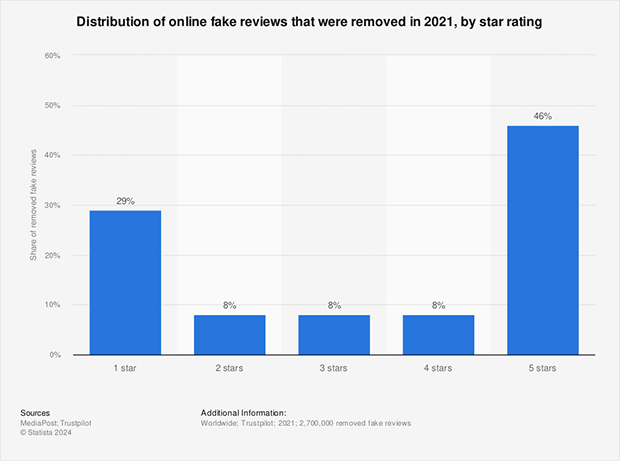
Fake reviews also fail to help your business. A 2021 report from Statista found that 46% of the 2.7 million fake reviews detected were five-star ratings, which shows how misleading they are.
Instead of buying reviews, build a genuine reputation through organic and invited reviews. It might take more time and effort, but it’s the only way to earn your customers’ trust and create a sustainable online presence.
To get started, make sure you claim your free Trustpilot Business profile. This will give you access to the tools needed to start inviting customers and managing your online reputation.
Is Trustpilot Worth It for Small Businesses?
For most small businesses, yes. Trustpilot’s free plan covers the core use case: collecting reviews and sending up to 50 invitations per month.
That limit is enough for most local service businesses, freelancers, and small ecommerce stores to build a credible review presence. If you’re a plumber, a personal trainer, or running a small online store, 50 invites per month is more than most businesses use consistently.
The calculus shifts for product businesses competing on Google Shopping. There, Google’s own star ratings appear more prominently in product listings, so Google Reviews often takes priority. In that case, I’d focus on Google Reviews first and add Trustpilot as a secondary layer once you have a system running.
For service businesses, consultants, or any business where consumer trust is the deciding factor before purchase, a solid Trustpilot profile carries real weight. It can close deals that Google Reviews alone won’t.
Free: Download Our Giveaway Playbook
Templates, prize ideas, and promotion strategies in one guide.
How to Get Trustpilot Reviews
Ready to start collecting reviews the right way? Here are 9 proven strategies that are ethical and effective in encouraging genuine customer feedback.
- 1. How Do You Ask Customers for Trustpilot Reviews?
- 2. How Do You Automate Trustpilot Review Requests?
- 3. Can You Incentivize Customers to Leave Trustpilot Reviews?
- 4. Integrate Trustpilot With Your Platforms
- 5. Ask Creatively for Trustpilot Reviews
- 6. Embed Trustpilot Reviews on Your Website
- 7. Add a Review Link to Email Signatures
- 8. Promote Reviews With Ads
- 9. Use Review Generation Tools
- Best Practices for Trustpilot Reviews
- Why Do Trustpilot Reviews Get Removed?
- Frequently Asked Questions About Trustpilot Reviews
1. How Do You Ask Customers for Trustpilot Reviews?
Asking customers directly for a review is often the simplest and most effective approach.
A personal touch can go a long way, whether in person after purchase, through a follow-up email, or even a friendly SMS message.
Here are some tips for asking for reviews:
- Timing is key: Reach out when the experience is fresh. If you sell physical products, wait until the item has actually arrived. Asking before delivery is a common mistake that leads to bad ratings.
- Keep it brief: Thank them for buying. Say that you value their opinion.
- Make it easy: Give them a direct link. Don’t make them hunt for your profile.
- Personalize it: Use their name. Mention what they bought so they know it’s not spam.
When I tested this strategy with a client in the wellness space, we added a simple “How did we do?” email one day after purchase. Within 2 weeks, their Trustpilot reviews jumped by 38%, with no additional ad spend.
You may be surprised at how many customers are willing to share their positive experiences on Trustpilot when you ask.
How to Get Trustpilot Reviews as a New Business
Starting with zero reviews is the hardest part. Your TrustScore won’t mean much until you have at least 10 recent reviews, so the early goal is to reach that baseline quickly.
Front-load your ask with your first 10 customers. Send a personal email, not a template, and explain that you’re building your Trustpilot presence. People respond to that kind of honesty more than a generic automated message.
If you’re on Trustpilot’s free plan, you have 50 invitation credits per month. Use them strategically and prioritize customers who have already expressed satisfaction, whether in person, by email, or in a support conversation.
Don’t spread invitations evenly over 30 days. Trustpilot’s algorithm weights recency and velocity, so sending 10 invitations in the first week looks healthier than trickling one per day.
2. How Do You Automate Trustpilot Review Requests?
Trustpilot offers a suite of free tools to help you collect reviews. One of the most powerful is their Automatic Feedback Service (AFS).
Here’s how it works:
- Get your unique email address: In your Trustpilot Business account, look for the Get Reviews or Integrations tab. Navigate to Automatic Feedback Service (AFS) to find your address.
- Add the email as a BCC: Copy that address. Add it as a BCC recipient on your transactional emails (like order confirmations).
- Trustpilot sends the invite: The system detects the email and schedules a review invitation to go out automatically after a set time (usually 7 days).
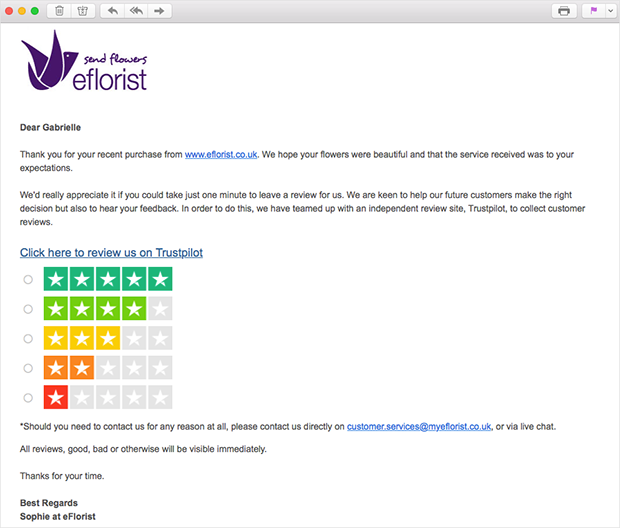
Here’s an example of an effective review invitation email:
Subject: How did we do?
Hi [Customer Name],
Thank you for choosing [Your Business Name]! We hope you’re enjoying your recent purchase.
We’d love to hear about your experience. Would you mind taking a few minutes to leave us a review on Trustpilot? Your feedback helps us improve and lets others know what to expect.
[Link to Trustpilot Review Page]
Thanks again for your business!
Sincerely,
[Your Name]
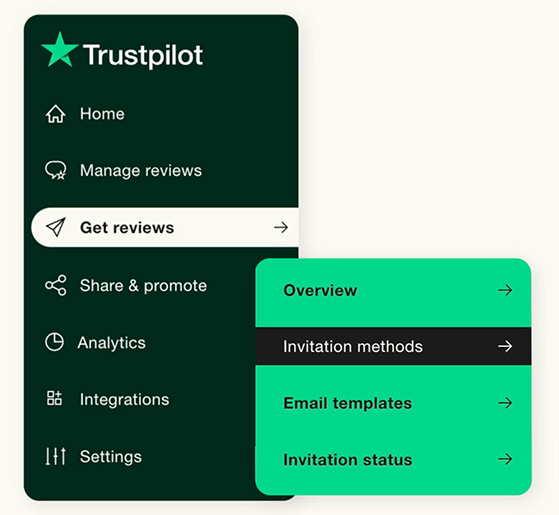
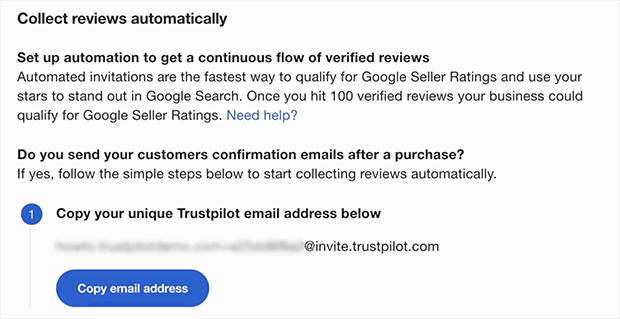
Trustpilot’s free tools handle the invitation scheduling automatically, making it easier for customers to share their feedback. If you need help, there are instructions in the Trustpilot help center.
3. Can You Incentivize Customers to Leave Trustpilot Reviews?
While you can’t directly offer rewards for positive reviews (that’s against Trustpilot’s rules), you can create incentives that encourage customers to leave reviews in general.
Here are a few ideas:
- Discounts or coupons: Offer a small discount on their next purchase as a thank-you for their feedback.
- Contests or giveaways: Enter reviewers into a giveaway for a chance to win a prize or gift card.
- Early access or exclusive perks: Give reviewers early access to new products, exclusive discounts, or loyalty program benefits.
Important: You must be transparent about any incentives you offer. The reward must be for leaving an authentic review, regardless of its star rating or content. Offering rewards specifically for positive reviews is against Trustpilot’s rules and can get your account penalized.
Using RafflePress to Incentivize Reviews on Trustpilot
If you have a WordPress website, you can use RafflePress’s Trustpilot Review action to easily create giveaway campaigns that incentivize customers to leave reviews.
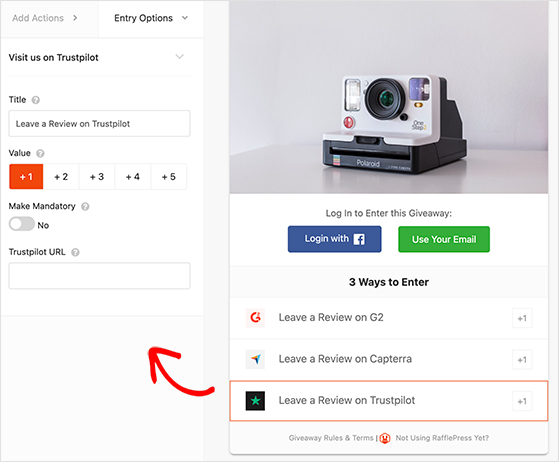
This WordPress giveaway plugin lets you set up giveaways that require participants to leave a Trustpilot review as an entry requirement.
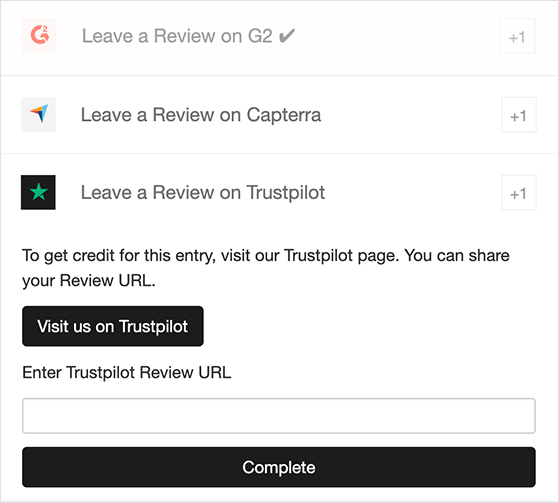
RafflePress also automatically tracks and verifies these reviews, ensuring fairness and preventing fraudulent entries. You can customize your giveaway to your heart’s content, choosing from various prize options and entry methods to create an engaging customer experience.
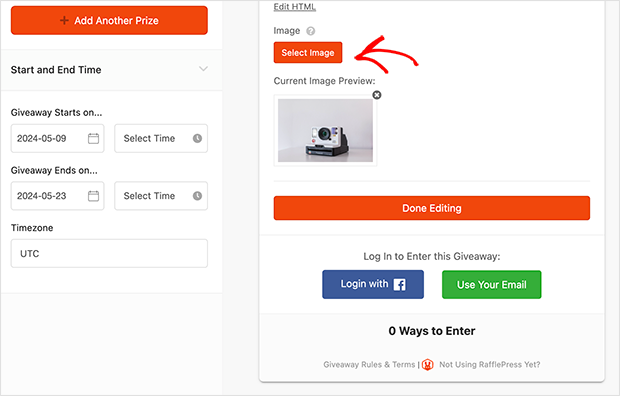
For example, you could run a monthly giveaway where customers who leave a review are entered to win a gift card to your store. This encourages reviews and builds customer loyalty and engagement.
Please refer to our guide on how to do a review giveaway, which includes all the steps.
4. Integrate Trustpilot With Your Platforms
Connecting Trustpilot with your Customer Relationship Management (CRM) or ecommerce platform allows you to automate review invitations, sync customer data, and track the impact of reviews on your sales.
Here’s why you should consider it:
- Automation: Set up automatic review invitations to be sent after a purchase or service interaction, saving you time and effort.
- Data syncing: Keep your customer data up-to-date across both platforms, ensuring accurate and personalized communication.
- Review analytics: Track the impact of reviews on your sales and customer satisfaction.
For example, to integrate Trustpilot with WooCommerce, install and activate the Trustpilot Reviews plugin, then follow the prompts to connect your Trustpilot Business account.
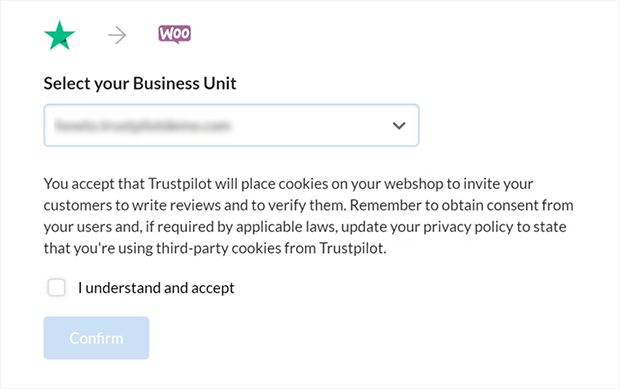
You can then customize your settings to choose when and how review invitations are sent.
Trustpilot also offers integrations with other popular platforms like:
- Shopify: Collect reviews and display them directly on your product pages.
- Magento: Automate review invitations and manage customer feedback within your Magento dashboard.
- Salesforce: Connect Trustpilot with your Salesforce CRM to see all of your customer feedback and sales data in one place.
5. Ask Creatively for Trustpilot Reviews
Not every review request has to come through email. You can catch customers at other moments when their experience is fresh and positive.
Use Popups After Purchase
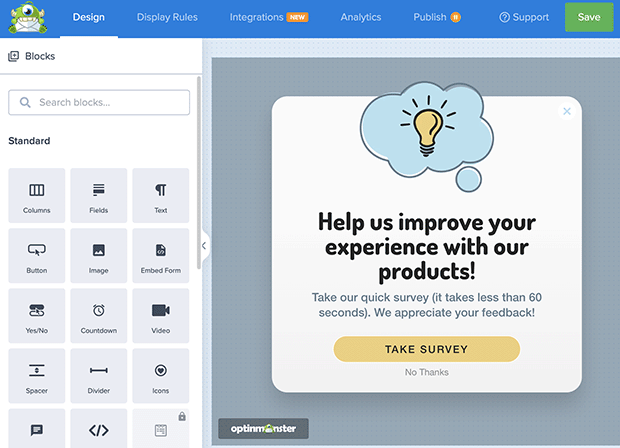
A simple popup right after checkout or a support interaction can be an effective nudge. Tools like OptinMonster let you design review popups that appear only after key actions, making the request relevant and timely.
Include Review Requests in Product Packaging
Product inserts or postcards in your packaging are a low-cost way to encourage reviews. Add a short thank-you note and a QR code linking to your Trustpilot profile. Customers can scan and leave feedback in seconds.

Add In-Store Signs and QR Codes
If you run a physical store, small signs at checkout or product displays can work wonders. Add a line like “Love your purchase? Review us on Trustpilot!” with a QR code. This captures reviews when customers are happiest, right after buying.

6. Embed Trustpilot Reviews on Your Website
Displaying Trustpilot reviews directly on your website builds credibility. You can use Trustpilot’s own widgets (TrustBoxes), but they often have limited designs.
If you try to style them yourself, you might run into a “CSS error” that messes up your page layout. This is frustrating for non-coders.
For a better solution, I recommend Smash Balloon’s Reviews Feed plugin. It offers clever ways to display Trustpilot reviews without breaking any rules or writing code.
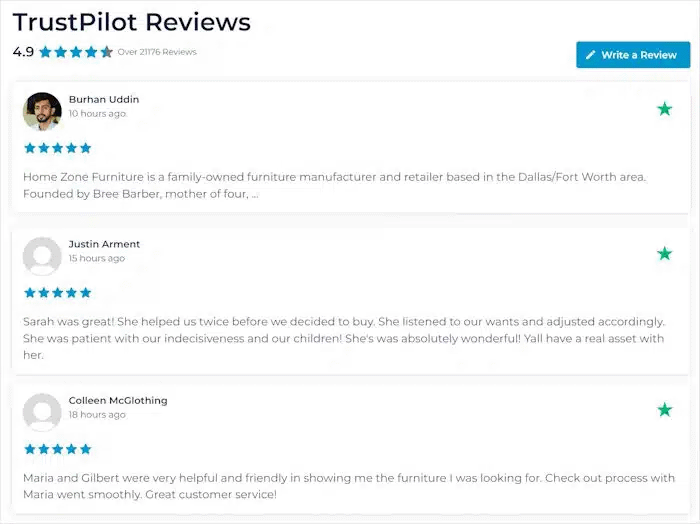
This plugin lets you:
- Create custom feeds: Filter which reviews you want to show.
- Use better layouts: Show reviews in a carousel, grid, or list.
- Match your brand: Customize colors and fonts easily.
By placing Trustpilot widgets and review feeds on your website, you can make social proof a core part of your marketing strategy. This helps convert visitors into customers and encourages more customers to leave reviews, creating a positive feedback loop.
7. Add a Review Link to Email Signatures
Your email signature is prime real estate for promoting your Trustpilot profile. Every email you send is an opportunity to invite customers to share their feedback.
You can do this using Trustpilot’s email widgets.
Go to your Trustpilot Business account and navigate to Share & promote » Email widgets » TrustBox Signature. Then, configure the widget’s appearance to your liking.
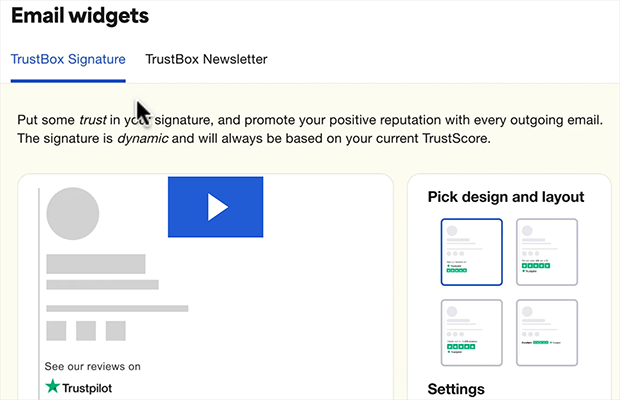
Once finalized, click “Get code” under the preview to copy the HTML code for the widget.
Now, you’ll need to access your email client’s signature settings. The specific steps may vary slightly depending on your email provider, but the general idea is the same.
Here are the steps for setting it up in Gmail:
- Go to Settings » See all settings » General.
- Scroll down to the “Signature” section and click Create new.
- Name your signature and paste the copied Trustpilot widget code into the editing area.
- Configure your default settings to use this signature and click Save Changes.
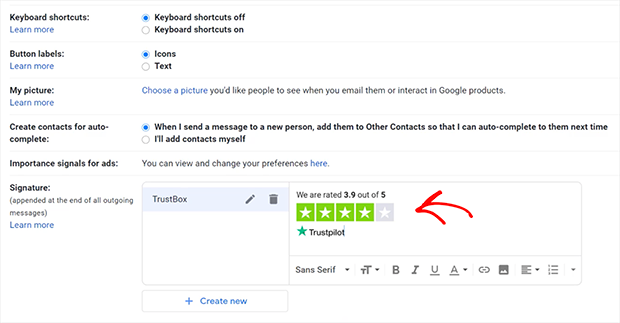
That’s it! Now, every email you send will display your TrustBox signature, encouraging recipients to visit your Trustpilot profile and share their feedback.
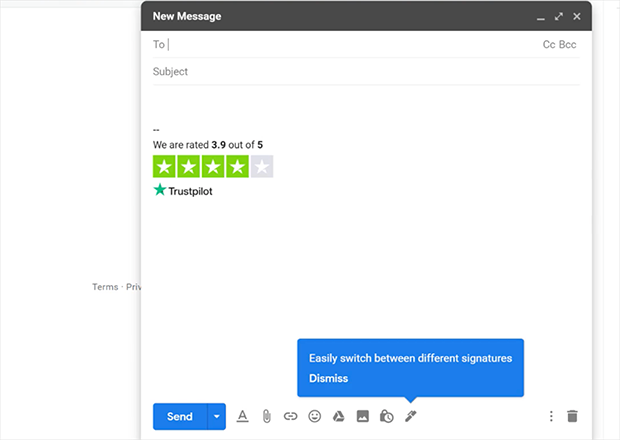
Alternatively, you can add a line like “Share your experience on Trustpilot” or “See what our customers are saying on Trustpilot” with a link to your profile. This subtle reminder can make a big difference in generating organic reviews.
8. Promote Reviews With Ads
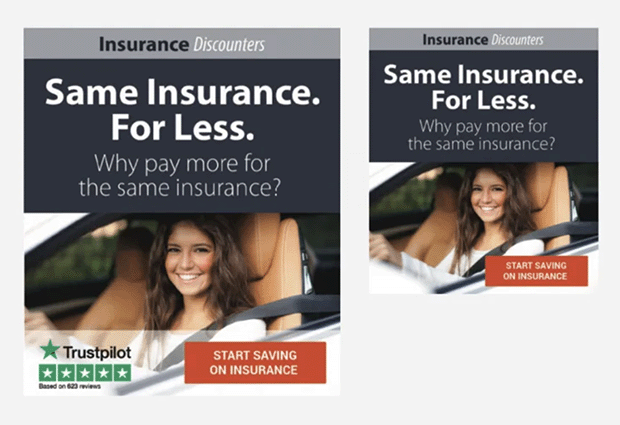
Paid advertising can be a powerful way to get your Trustpilot profile in front of a wider audience. Studies show that including the Trustpilot trust mark in your ads can significantly boost their effectiveness.
According to a survey, 91% of consumers chose the ad with the Trustpilot logo in this example:
If you use paid ads, here are some tips for creating effective review-focused ads:
- Highlight your star rating: Showcase your Trustpilot star rating in your ad copy and visuals.
- Use strong calls to action: Encourage viewers to “Read our reviews” or “Share your experience on Trustpilot.”
- Offer an incentive (optional): If you’re running an incentive program, mention it in your ad to attract more reviewers.
- Test different ad formats: Experiment with different ad formats and targeting options to find what works best for your business.
9. Use Review Generation Tools
If you’re looking for a more hands-off approach to collecting Trustpilot reviews, review generation platforms can help. These platforms automate sending personalized review invitations to your customers after purchases or service interactions.
Some popular review-generation platforms include:
| Platform | Description |
|---|---|
| Trustpilot’s Paid Plans | Offers advanced features beyond their free tools, such as customizable invitation templates and enhanced analytics. |
| Feefo | Offers various review collection tools and integrations. |
| Reviews.io | Specializes in collecting and managing customer reviews. |
These platforms can save you time and effort but usually charge a monthly or annual fee. You may also have less control over the review collection process than if you managed it yourself.
Best Practices for Trustpilot Reviews
To maintain the authenticity and value of your Trustpilot profile, actively manage customer feedback. Here are the key practices for keeping your reviews authentic and helpful:
Respond to Every Review
Replying shows you care and builds credibility. According to a 2021 study, nearly 1 in 5 consumers (17.56%) change their opinion of a business based on its responses.
- Positive reviews: Thank them and invite them back. Example: “Thanks so much, [Name]! We’re thrilled you had a great experience.”
- Negative reviews: Acknowledge, apologize, and offer to fix it. Example: “We’re sorry to hear this, [Name]. Please contact us so we can make it right.”
- Neutral reviews: Highlight the good and note their suggestions. Example: “Thanks for your feedback, [Name]. We’ll use your comments to improve.”
How to Handle Fake or Suspicious Trustpilot Reviews
Keep an eye on your profile and flag anything that looks fake or misleading. Trustpilot will review reported violations and remove reviews that break their policies.
Here’s what to do when you spot a problem:
- Flag the review: Use Trustpilot’s “Report” button on any review you believe is fake or abusive.
- Report repeat offenders: If the same user leaves multiple suspicious reviews, report the account directly.
- Know the rules: Review Trustpilot’s business guidelines so you understand what qualifies for removal and stay compliant.
Why Do Trustpilot Reviews Get Removed?
Trustpilot uses automated fraud detection to flag reviews that look suspicious. This affects new businesses most, because a sudden spike of five-star reviews from new accounts looks like a pattern, even when those reviews are genuine.
Here are the most common reasons reviews disappear:
- Fraud detection flags: Reviews from new accounts, accounts with no prior history, or reviews posted in a short window after your invitation can be flagged automatically.
- Policy violations: Reviews mentioning competitors, containing personal information, or written by someone with a conflict of interest can be removed.
- Business-reported fraud: If you report a review, Trustpilot investigates and removes it if it violates their guidelines.
If a legitimate review disappears, you can appeal through Trustpilot’s business support. Submit evidence of the transaction, such as an order confirmation or customer email, and the moderation team will review it.
The best defense is a steady, consistent invitation cadence. Slow and steady review growth looks authentic. A sudden burst, even from real customers, can trigger the fraud filter.
Frequently Asked Questions About Trustpilot Reviews
How can I get Trustpilot reviews quickly?
The fastest ethical method is to set up Trustpilot’s Automatic Feedback Service (AFS). BCC your unique Trustpilot address on order confirmation emails, and Trustpilot automatically sends a review invitation after 7 days. Pair this with a direct personal email to your best customers in the first week and you’ll see results without any ad spend.
Why do Trustpilot reviews sometimes get removed?
Trustpilot’s fraud detection removes reviews that look suspicious: sudden spikes from new accounts, reviews from people with no transaction history, or content that violates their guidelines. If a legitimate review disappears, you can appeal by submitting transaction evidence through Trustpilot’s business support portal.
Is it legal to incentivize Trustpilot reviews?
It’s legal as long as you follow Trustpilot’s rules. You can offer incentives, such as a discount or giveaway entry, for leaving an honest review. Offering rewards specifically for positive reviews is not allowed. The incentive must apply regardless of star rating, and you must disclose it to customers.
How many reviews do I need to improve my Trustpilot TrustScore?
Your TrustScore becomes meaningful once you have at least 10 recent reviews. Below that, even one negative review can drag your score down significantly. Trustpilot also weights recent reviews more heavily, so maintaining a steady flow of invitations matters as much as your total count.
What is the difference between organic and invited Trustpilot reviews?
Organic reviews are left by customers on their own, without any prompt from your business. Invited reviews are ones you requested, typically through AFS or a direct email. Both count toward your TrustScore. Invited reviews also receive a “Verified” label when linked to a confirmed transaction, which can increase reader trust.
Get Reviews on Trustpilot Today
Trustpilot reviews are a powerful tool for any business. By focusing on genuine customer feedback and using the strategies I’ve covered, you can build trust, boost your reputation, and attract new customers.
Ready to grow your Trustpilot presence? If you’re a WordPress user, try RafflePress’s Trustpilot Review action to incentivize genuine reviews with exciting giveaways.
If you liked this article, please subscribe to our YouTube Channel for RafflePress video tutorials. You can also find us on Twitter and Facebook.


