How to Embed a Giveaway in a Blog Post (Step by Step)
 Stacey Corrin
Stacey Corrin
Stacey Corrin
 John Turner
John Turner
John Turner
TL;DR: How to Embed a Giveaway in a Blog Post
Turn a post that already ranks into a lead capture tool by adding a RafflePress giveaway widget directly inside it. No code required.
- Install RafflePress – Free from WordPress.org, or upload the premium zip from your account at rafflepress.com.
- Create your giveaway – Enter a name, choose a template, then add prize details and dates.
- Add entry actions – Connect your email provider via the ‘Select an Integration’ dropdown inside the email subscribe action.
- Configure settings – Set contest rules and success redirect in the ‘Settings’ tab.
- Embed in your post – Add the RafflePress block in the block editor, position it, and update the post.
You’ve got a blog post ranking on Google and pulling in steady traffic every week. But when you check your email list growth, those visitors aren’t converting.
They read the post, maybe click around, and leave without signing up for anything.
The post is already doing the hard SEO work. What it needs is a reason for readers to stick around and hand over their email address before they go.
Embedding a giveaway directly in that post is one of the fastest ways to fix this. With RafflePress, a WordPress giveaway plugin, you can add a giveaway widget to any existing post in a few minutes, no code required.
This guide walks you through the exact steps.
Why Add a Giveaway to an Existing Blog Post?
Most giveaway guides tell you to create a dedicated landing page for your contest. That works, but it requires starting from scratch and sending people to a new URL.
Adding a giveaway to a post that already has traffic means you’re capturing people who are already interested in your topic. They found your content through search, so they’re pre-qualified for whatever you’re giving away.
You also pick up social follows, YouTube subscribers, or any other action you configure. Email list growth and social growth can both happen from a single embed.
There are several tools that can run giveaways on a blog. Gleam and SweepWidget are the most common.
Each works by giving you an embed code to paste into your post’s editor. That adds a technical step, your giveaway data lives on their servers, and most charge a monthly subscription fee.
RafflePress on the other hand, is a WordPress plugin, not a hosted platform. It adds a native WordPress block, so embedding a giveaway in a post is the same as adding any other block.
Your data stays on your own site and there’s no monthly fee. It also includes a refer-a-friend entry action: every entrant gets a unique share link, and friends who enter through it earn the original entrant bonus entries.
That one mechanic can turn a post with moderate traffic into something that spreads well beyond your existing audience. If you want to build a full campaign around it, this guide to running a referral contest covers the mechanics in depth.
| RafflePress | Gleam | SweepWidget | |
|---|---|---|---|
| WordPress block (no HTML paste) | Yes | No | No |
| Pricing model | One-time payment | Monthly subscription | Monthly subscription |
| Giveaway data location | Your WordPress site | Gleam’s servers | SweepWidget’s servers |
| Refer-a-friend mechanic | Yes | Yes | Yes |
| Entry actions | 30+ | Multiple | Multiple |
How to Embed a RafflePress Giveaway in a Blog Post
The setup takes about five minutes. Make sure you have these in place before you start the steps below.
- A WordPress site with at least one published blog post
- RafflePress installed and activated (free version available at WordPress.org, premium at rafflepress.com)
- A prize that’s relevant to the blog post’s topic
- An email marketing account to collect subscribers automatically (optional but recommended)
One note on the prize: relevance matters more than value. A $500 Amazon gift card will attract entrants from every corner of the internet.
A free ebook about meal planning will attract people who actually care about meal planning. The second giveaway builds a better list.
For more ideas on what to give away, this list of contest prize ideas covers options across different niches and budgets.
Step 1: Install and Activate RafflePress
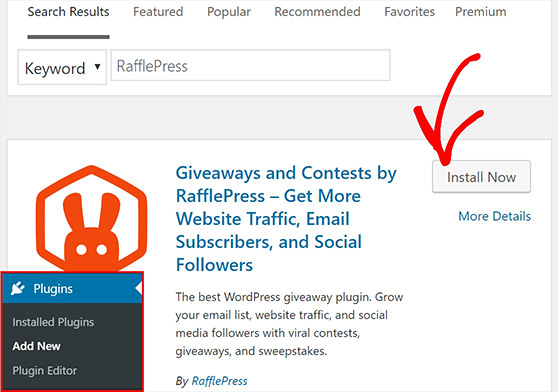
For the free version, go to Plugins » Add New in your WordPress dashboard, search for “RafflePress,” then click ‘Install Now’ and ‘Activate.’
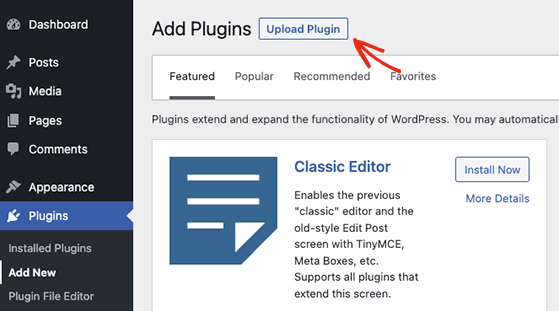
For the premium version, download the zip file from your account at rafflepress.com. Then go to Plugins » Add New » Upload Plugin, upload the zip, and click ‘Activate Plugin.’
After activation, you’ll see a RafflePress menu item in your left sidebar. Click it to open the RafflePress dashboard.
Step 2: Create a New Giveaway
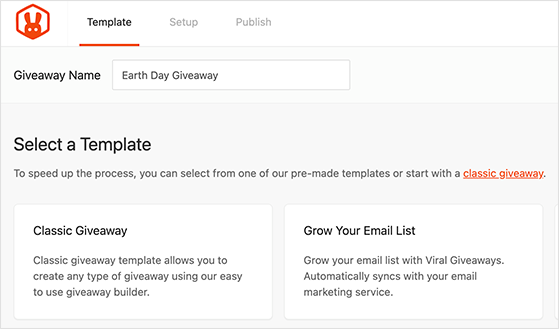
Go to RafflePress » Add New. Enter a name for your giveaway, then choose a template by hovering over it and clicking ‘Use This Template.’
Templates include Grow Your Email List, Refer-a-Friend, Pre-launch Campaign, Grow Your Facebook Page, and Classic Giveaway. Choose the one that matches your main goal.
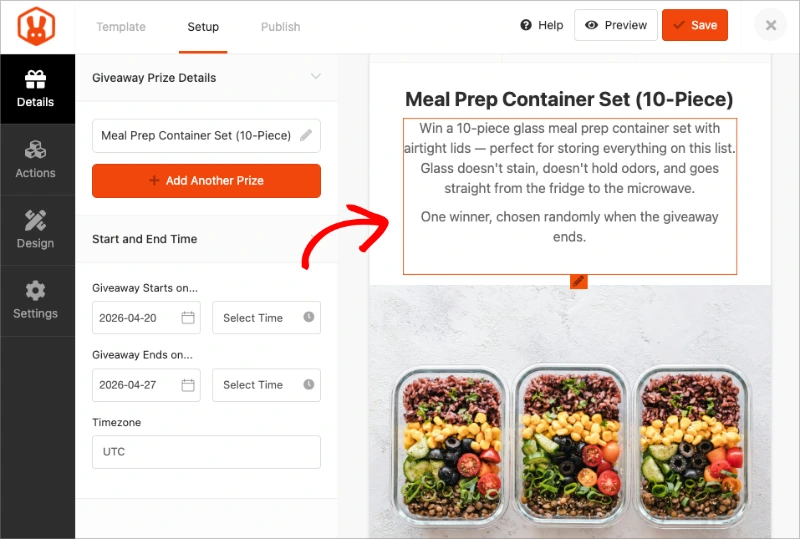
Inside the builder, find the ‘Giveaway Prize Details’ section and click the pencil icon. Enter your prize name, description, and upload an image. Set your start and end dates under ‘Start and End Time’ in the same section.
Step 3: Add Your Entry Actions
Click the ‘Actions’ tab in the builder. This is where you choose what participants need to do to earn entries: subscribe to your email list, follow you on Instagram, share the giveaway, watch a YouTube video, and more.
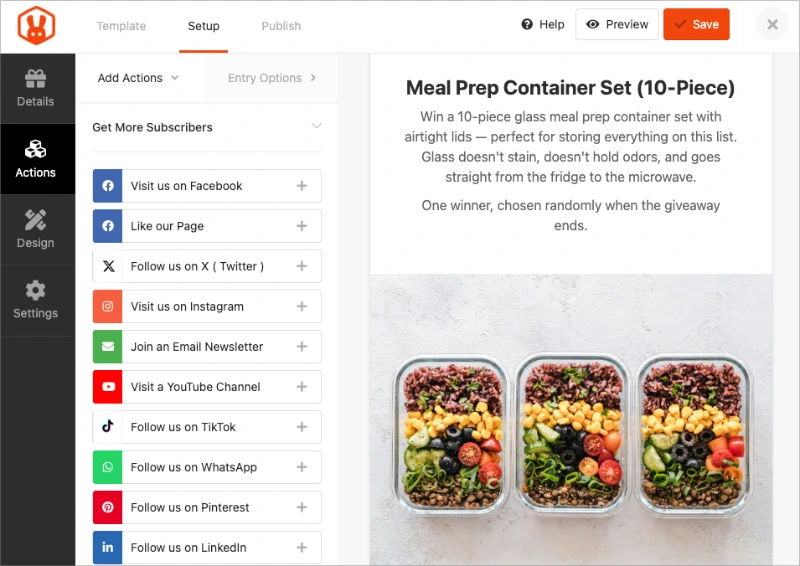
RafflePress includes 30+ entry actions. For a blog post embed, I’d recommend starting with three:
- Email newsletter subscribe
- Refer a friend
- One social follow relevant to your audience
For the email subscribe action, click to expand it and use the ‘Select an Integration’ dropdown to connect your provider. Enter your API key and select the list you want entrants added to. RafflePress connects with 15+ platforms including Mailchimp, ConvertKit, AWeber, and ActiveCampaign.
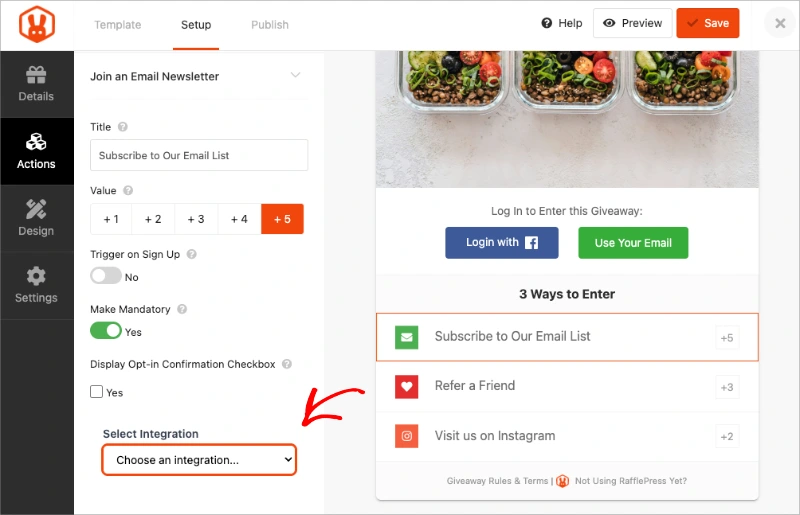
Once set up, anyone who completes the subscribe action gets added to your list automatically. For ideas on following up after the giveaway ends, email marketing for contests is worth reading before you launch.
The refer-a-friend action is the one that makes giveaways grow beyond your existing audience. Without it, you’re limited to people who already found your post.
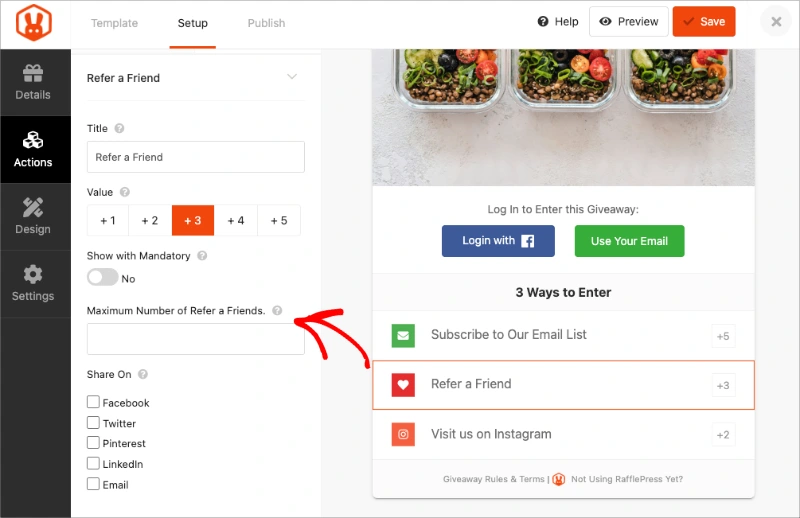
With it, every entrant becomes a potential recruiter. Refer-a-friend promotion ideas can help you think through how to frame this action to get more participation.
Step 4: Configure Your Settings
Click the ‘Settings’ tab to configure rules, email verification, and what happens after someone enters. Use the ‘Rules Generator Template’ to auto-populate your contest rules by entering your sponsor details and eligibility requirements.
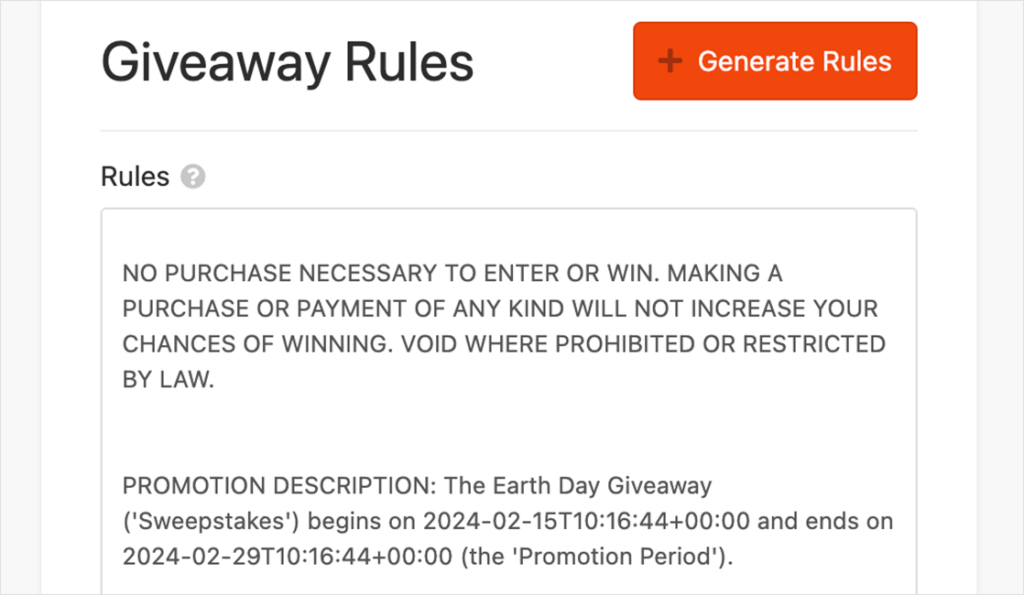
A run time of 7 to 14 days gives people enough time to enter and share without losing momentum. When the contest ends, you can use the random winner selection tool built into RafflePress to pick a winner fairly.
Step 5: Embed the Giveaway in Your Blog Post
This is the step that takes a few seconds with RafflePress, versus requiring a trip into HTML view with every other tool.
Open the WordPress post you want to update. In the block editor, click the ‘+’ button to add a new block.
Search for “RafflePress” and select the RafflePress block from the results. A dropdown will appear listing all your saved giveaways.
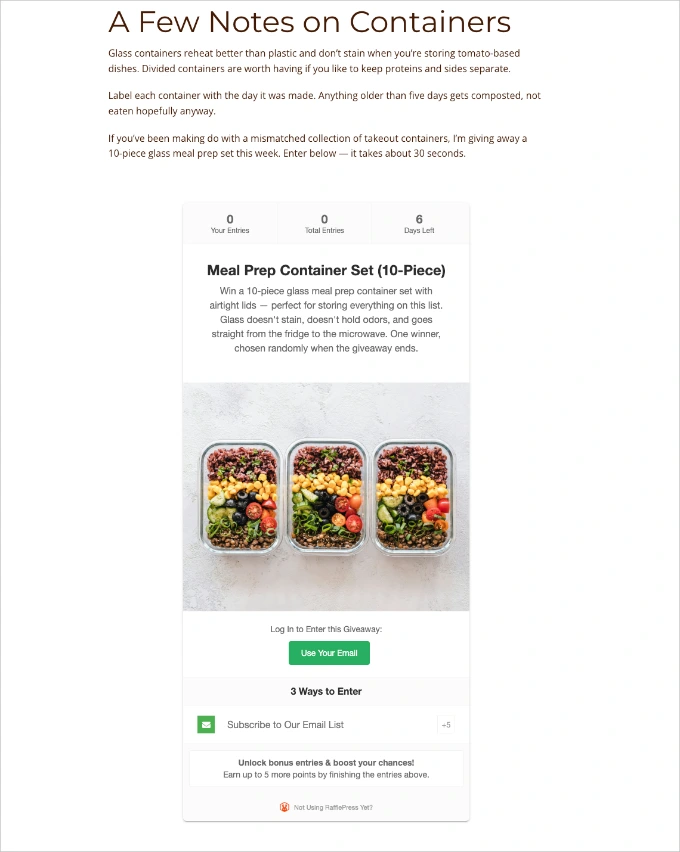
Select the one you just created. The giveaway widget loads inline in the post editor, and you can position it anywhere in the post.
I usually place it somewhere in the middle of longer posts so readers encounter it after they’re already engaged with the content.
If you’re using the Classic Editor or prefer shortcodes, RafflePress provides a shortcode for every giveaway. Go to RafflePress » All Giveaways, hover over the giveaway name, and copy the shortcode.
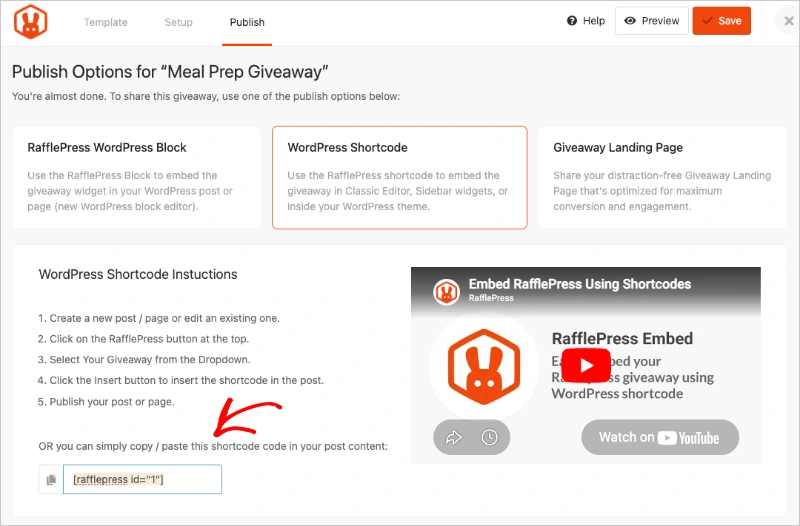
Paste it anywhere in your post using a Shortcode block or directly in the Classic Editor. Click ‘Update’ to save the post.
Your giveaway is now live inside the existing content. The post captures leads on autopilot while it continues to rank.
Free: Download Our Giveaway Playbook
Templates, prize ideas, and promotion strategies in one guide.
How to Choose Which Blog Post to Add a Giveaway To
You can embed a giveaway in any post, but some posts will convert much better than others. The best candidates share a few things in common:
- Steady organic traffic. Open Google Search Console and look for posts that consistently pull impressions and clicks. MonsterInsights shows the same data inside your WordPress dashboard.
- A prize that matches the topic. A WordPress security post warrants a plugin license. A recipe roundup warrants a kitchen gadget. The closer the prize is to what the reader came to learn, the more likely they are to stay subscribed after the giveaway ends.
- Seasonal timing. Gift guides, back-to-school content, and holiday posts spike at predictable times. Add a giveaway a week before that spike and you’re ready to capture leads at peak traffic.
Avoid posts that answer a one-time question. Those visitors got what they needed and have no reason to subscribe. Posts that solve recurring problems or speak to an ongoing interest work better.
Frequently Asked Questions
Can I embed a giveaway in an existing WordPress blog post?
Yes. RafflePress provides a dedicated Gutenberg block that you can add to any published post in the block editor.
Select the block, choose your giveaway from the dropdown, and update the post. The giveaway appears inline in the existing content without requiring you to rebuild the post or switch to HTML view.
Do I need to know HTML to embed a giveaway in WordPress?
No. With RafflePress, the Gutenberg block handles the embed without any code. If you’re using the Classic Editor, you can paste the RafflePress shortcode instead.
Other tools like SweepWidget and Gleam require you to switch to a code or HTML view and paste a script tag manually. RafflePress doesn’t.
How do I add a RafflePress giveaway to a page using a shortcode?
Go to RafflePress » All Giveaways, hover over the giveaway you want to embed, and copy the shortcode that appears. It looks like .
Add a Shortcode block to any post or page in the block editor, paste the shortcode in, and update the content. The giveaway will display wherever you placed the block.
Will adding a giveaway to an old post affect its SEO ranking?
Adding interactive content to a post generally doesn’t hurt rankings. If anything, a giveaway can improve engagement signals like time on page and reduce bounce rate, which may support rankings over time.
The main thing to avoid is embedding content that slows page load significantly. RafflePress loads the widget asynchronously, so it shouldn’t affect page speed in a meaningful way.
How long should a blog post giveaway run?
Seven to fourteen days is a reasonable window for most blog giveaways. A week is long enough for the refer-a-friend mechanic to spread the giveaway through participants’ networks, but short enough that there’s urgency to enter.
Giveaways that run longer than two weeks often lose momentum because people assume they have plenty of time. For a deeper look at the tradeoffs, this guide on how long a giveaway should last breaks down the factors involved.
What’s the best prize for a blog giveaway?
The best prize is something your ideal reader would specifically want, not something everyone would want. A relevant digital product, a tool you use in your workflow, or a resource pack related to the post’s topic all work well.
Generic prizes like gift cards attract the broadest possible crowd, which dilutes the quality of your subscriber list.
Can I embed the same giveaway on multiple blog posts?
Yes. The RafflePress shortcode or block uses the giveaway’s ID, and you can place the same giveaway on as many posts or pages as you want.
All entries from every embed go into the same giveaway pool. This is useful if you have several posts on the same topic and want to run one contest across all of them at once.
Start Growing Your Email List with Your Next Giveaway
Adding a giveaway to a post that already ranks is one of the faster ways to turn passive traffic into email subscribers. The refer-a-friend mechanic means each entrant can bring in more without any extra work from you.
RafflePress makes the embed take about thirty seconds. Find the post, add the block, and you’re done. If you don’t have it yet, you can get started with RafflePress here.
If you want to go deeper, growing your email list with a giveaway covers the full strategy from prize selection to post-giveaway follow-up.
Embedding is one step of the bigger picture. Our complete guide on how to run a blog giveaway walks through choosing a prize, writing the rules, and promoting your contest from start to finish.
If you liked this article, please subscribe to our YouTube Channel for RafflePress video tutorials. You can also find us on Twitter and Facebook.


