How to Do a Twitter Giveaway to Maximize Engagement
 Stacey Corrin
Stacey Corrin
Stacey Corrin
 John Turner
John Turner
John Turner

TL;DR: How to Do a Twitter Giveaway
Follow these steps to run a Twitter giveaway that drives real engagement and grows your audience.
- Set a goal — Decide if you want more followers, email subscribers, or website traffic.
- Choose a relevant prize — Pick something your target audience actually wants, not just a generic freebie.
- Write your rules — Cover entry requirements, eligibility, and no-purchase-necessary language.
- Build your giveaway widget — Use RafflePress to set up Twitter-specific entry actions in minutes.
- Promote before and during — Start promoting before launch to build anticipation and lock in early entries.
- Pick a winner randomly — Use RafflePress to select and notify the winner fairly.
- Track your results — Use MonsterInsights to measure traffic, entries, and what worked best.
Want to learn how to do a Twitter (X) giveaway that actually gets results?
I’ve run dozens of Twitter contests over the years, for product launches, email list growth, and just for fun. Each time, I’ve seen the same thing: when your giveaway is clear, easy to enter, and has the right prize, it can explode your engagement almost overnight.
In this guide, I’ll walk you through how to host a giveaway on Twitter using RafflePress, step by step. Whether your goal is more followers or a bigger email list, the steps below cover everything.
- How to Do a Twitter (X) Giveaway in WordPress
- 1. Set Your Twitter Giveaway Goals
- 2. Choose Your Twitter Contest Prize
- 3. Create Rules for Your Twitter Giveaway
- 4. Pick Your Giveaway Entry Requirements
- 5. Create Your Twitter Giveaway
- 6. Promote Your Twitter Contest
- 7. Pick a Giveaway Winner
- 8. Follow Up with Non-Winners
- 9. Track Your Twitter Giveaway Performance
Why Run a Twitter (X) Contest for Your Business?
Running a Twitter (X) contest is one of the easiest and quickest ways to boost your Twitter followers. It’s also a great way to increase brand awareness and improve your engagement rates on the platform, including Twitter likes and followers.
What’s more, you can use Twitter contests to improve other areas of your marketing strategy, such as:
- Growing your email list
- Promoting new products and services
- Cross-promoting other social media channels
- Driving traffic to your website
- Collecting user-generated content (UGC)
Most of all, Twitter giveaways are a fun way to show your online audience that you value their loyalty.
What Makes a Successful Twitter Giveaway?
The difference between a Twitter giveaway that generates real results and one that fizzles usually comes down to four factors. Get them right and participation takes care of itself.
Your prize has to appeal specifically to your audience, not just anyone scrolling past. A niche prize converts entries into real leads. A broadly appealing one mostly attracts people who want free stuff and won’t stick around after the contest.
Entry requirements need to be simple. If people have to complete too many steps just to enter, most will quit before finishing. OptinMonster added over 3,500 new users from a single giveaway by keeping entry straightforward with focused actions.
Timing affects how much momentum your giveaway builds. A 3-7 day run creates urgency without letting steam run out. Start promoting before the launch date to build anticipation and lock in entries on day one.
Legal compliance is the piece most brands skip, and it’s the one that can get your account flagged. Your giveaway needs to clearly state that no purchase is necessary, include a link to your official rules, and follow X’s promotion guidelines.
Free: Download Our Giveaway Playbook
Templates, prize ideas, and promotion strategies in one guide.
Types of Twitter Giveaways
Before diving into the steps, it helps to choose the right format for your goals. Each type of Twitter giveaway works differently depending on what you’re trying to achieve.
Here are the five most common formats:
- Retweet to win — Participants retweet your post for a chance to win. Great for maximum reach.
- Follow + retweet — Participants follow your account and retweet to enter. The go-to format for growing your follower count.
- Reply to win — Participants reply to your post to enter. Good for boosting engagement and surface-level brand conversations.
- Hashtag challenge — Participants post with a branded hashtag to enter. Best for generating user-created content and brand visibility.
- Tag a friend — Participants tag a friend in the comments. Strong for referral growth and reaching new audiences.
Use this table to match your format to your goal:
| Format | Best For |
|---|---|
| Retweet to win | Maximum reach and impressions |
| Follow + retweet | Growing your follower count |
| Reply to win | Boosting engagement and comment count |
| Hashtag challenge | User-generated content and brand awareness |
| Tag a friend | Referral growth and new audience reach |
How to Do a Twitter (X) Giveaway in WordPress
If you’re not sure how to run a contest on Twitter, don’t worry, this guide will walk you through it step-by-step.
Follow the steps below to plan and create a successful Twitter giveaway.
1. Set Your Twitter Giveaway Goals
Before you create your giveaway contest, you need to decide what you want to achieve. Setting clear goals will help you build your giveaway and make it easier to see if it was a success.
Some goals you can meet with a Twitter giveaway include:
- Raising product or brand awareness
- Sending targeted traffic to your website
- Building your Twitter following
- Increasing your Twitter engagement
- Generating business leads
If your goals seem a little too vague, you can make them more detailed by using the SMART goals method.
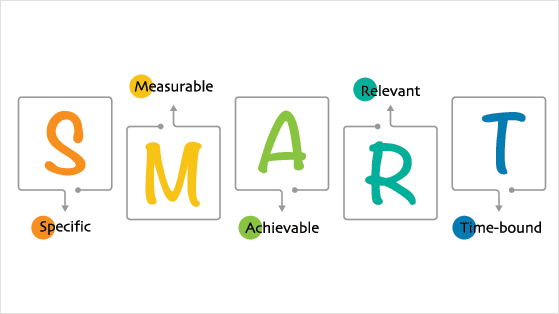
This will make your goals:
- Specific – Who do you want to reach, why do you want to reach them, and what do you want to achieve?
- Measurable – What metrics will you use to decide your contest is a success?
- Achievable – Are your goals realistic and easy to achieve?
- Relevant – Do your giveaway goals align with your business goals?
- Timely – Have you set a realistic deadline for your giveaway duration?
It’s much easier to stay on track with your goals in place and turn your Twitter giveaway into a raging success.
2. Choose Your Twitter Contest Prize
The next step is to choose a prize for your Twitter giveaway. Many brands make the mistake of going overboard with the prize or not offering something valuable enough.
For instance, if you offer a top-of-the-range Apple product, people will materialize out of thin air to enter. That can lead to many unqualified leads, which means a ton of people who are not interested in your brand. They just want that sweet freebie.
Alternatively, if you offer a prize that’s of low value, like a $5 Amazon gift card, it won’t be worth peoples’ effort to enter. It won’t generate enough excitement and interest for you to meet your SMART goals.

When selecting a prize for your Twitter contest, think about your audience’s desires and interests. Select a prize that’s specific and relevant to your audience.
Do you run a hair salon? Why not offer a complete cut, color, and style revamp at your salon as the prize? You could give away a cut and finish, or a hair treatment as second and third prizes.
Maybe your audience targets entrepreneurs. In that case, some noise-canceling headphones or a lightweight, portable laptop would suit those customers.
See this guide for even more contest prize ideas.
3. Create Rules for Your Twitter Giveaway
After choosing an excellent giveaway prize, you need to think about the rules. Clear Twitter contest rules make it easier for people to enter and help protect your account from spam or confusion.
When writing your rules, you should cover the following information:
- The minimum age of users eligible to participate
- If your giveaway is limited to a particular country or location
- What the giveaway prize is
- How people can enter your giveaway (more on that shortly)
- The duration of your contest, including start and end times
- How you’ll pick a winner
- Disclosure of any sponsors
It’s also worth noting that there is “no purchase necessary” for entering your Twitter contest. If you require users to purchase to enter your giveaway, you run the risk of setting up an illegal lottery.
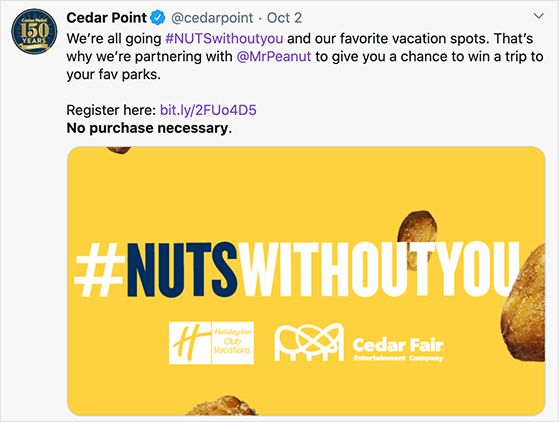
When it comes to X’s rules and guidelines for promotions, you’ll find they’re relatively straightforward. Your rules should state that you’ll disqualify people using multiple accounts to enter and that multiple entries on a single day will not be eligible.
Those rules are to ensure X’s search quality. When you encourage people to share or retweet a message multiple times, X might automatically filter them out of the search results.
You’ll also need to address a few compliance requirements before you launch:
- FTC disclosure — Any entry tweet or repost should include #giveaway or #contest so followers know it’s a promotion. This is an FTC requirement for sponsored content and contests.
- No-purchase-necessary language — Under US sweepstakes law, you must clearly state that no purchase is necessary to enter and that a purchase does not improve your odds of winning.
- High-value prize registration — Some US states require sponsors to register giveaways with prizes over $5,000. If your prize value is high, check your state’s requirements before launching.
For more information, see our guide on how to write giveaway rules like a pro.
4. Pick Your Giveaway Entry Requirements
As mentioned above, you should include easy ways for people to enter your Twitter giveaway for a chance to win. RafflePress, the best WordPress giveaway plugin, makes this super-easy no matter what type of Twitter contest you run.
With RafflePress, people can enter your giveaway by completing the following actions:
- Following you on Twitter
- Tweeting a message
- Referring a friend
- Joining your email newsletter
- Visiting a specific webpage
- Submitting an image
- Answering a question or poll
- Watching a video
- Following you on Pinterest
- Visiting your Facebook, Instagram, or YouTube profiles
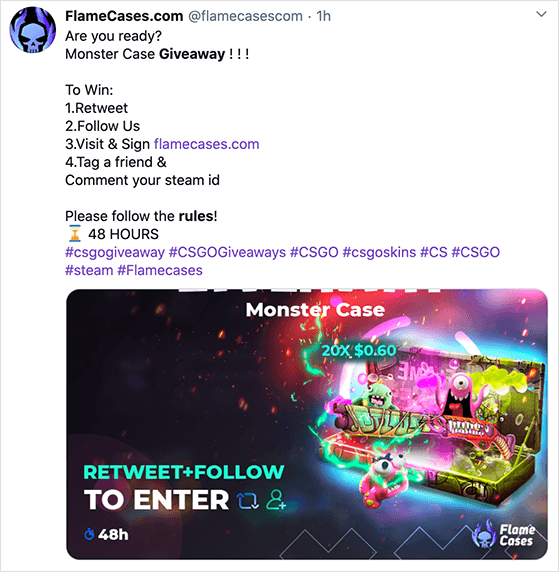
You can also grant users automatic entry into your contest after logging in. Plus, you can use the Invent Your Own action to create an entry method specific to your business, such as entering the URL to a comment left on your blog giveaway post or social media post.
5. Create Your Twitter Giveaway
Creating your Twitter giveaway is just as easy as the previous step. RafflePress is the best Twitter (X) giveaway tool I’ve used because it makes everything, from building the contest to picking a winner, simple and fast.
It comes with a ready-made Twitter template designed to grow your Twitter following. After choosing the template, it automatically populates your contest widget with Twitter-specific entry methods.
If you’re not convinced, here’s how OptinMonster generated 3,500+ new users from one giveaway.
Don’t worry if you’re not sure where to start. We’ll explain each step in the process.
First, click here to get started with RafflePress and download the plugin to your computer. Then follow these instructions to install a WordPress plugin.
Step 1: Create a New Twitter Giveaway
After installing and activating the RafflePress WordPress plugin, click the RafflePress icon in your WordPress admin area and click Add New.
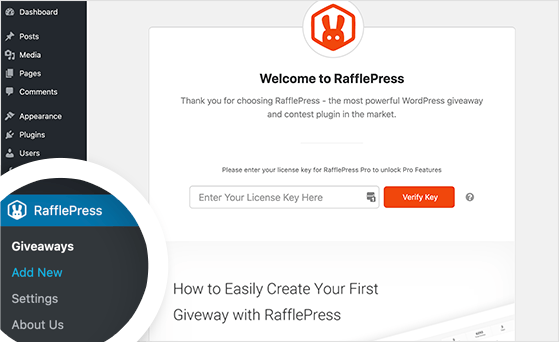
This opens the RafflePress giveaway builder, where you can give your contest a name and select a giveaway template based on the type of giveaway you wish to run.
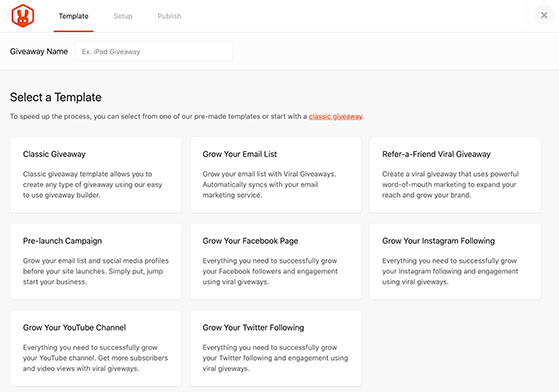
As mentioned earlier, the easiest way to create a Twitter giveaway is to select the Grow Your Twitter Following template.
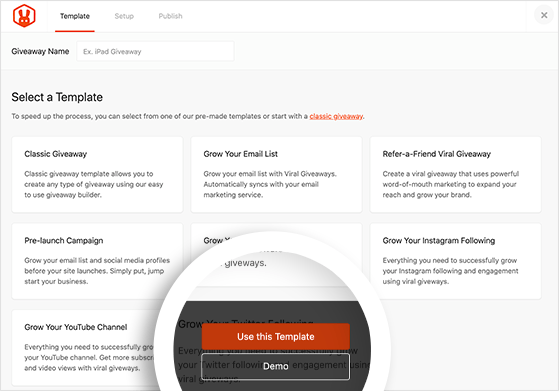
So, go ahead and hover your mouse over the Twitter giveaway template and click the Use This Template button.
RafflePress then opens the template in the drag-and-drop giveaway builder, complete with 2 ways to enter your contest:
- Follow us on Twitter
- Tweet a Message
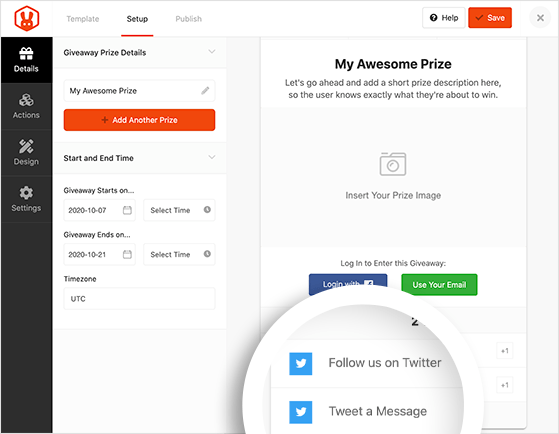
Step 2: Enter Your Prize Details
On this screen, you can enter the details for your giveaway prize. To do that, click the pencil icon under the Giveaway Prize Details heading.
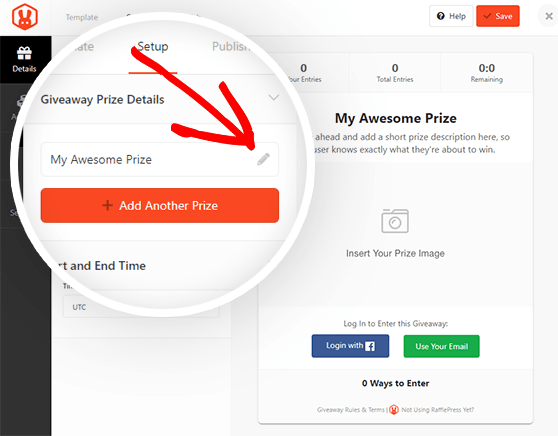
On the right-hand side, you can enter the title and description of your prize. You can also upload a prize image from your computer or WordPress media library by clicking the Select Image button.
When you’re happy with your prize details, click Done Editing.
On the left-hand side, you can set the duration of your giveaway under the Start and End Time heading.
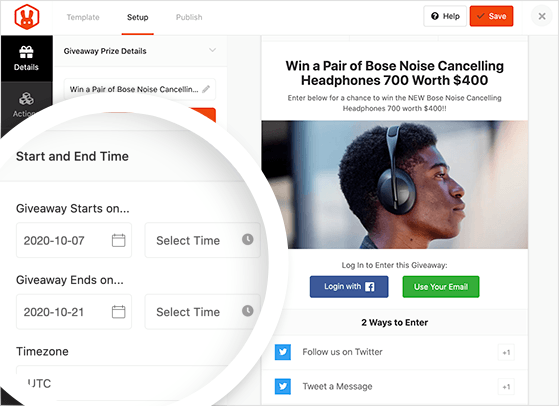
Remember to click the Save button in the top-right corner periodically to preserve your settings.
Step 3: Add Bonus Contest Entry Methods
After adding your prize details, it’s time to select some bonus entry methods for your Twitter giveaway. You can do that by clicking the Actions tab on the left and choosing the plus (+) icon next to any action in the list provided.
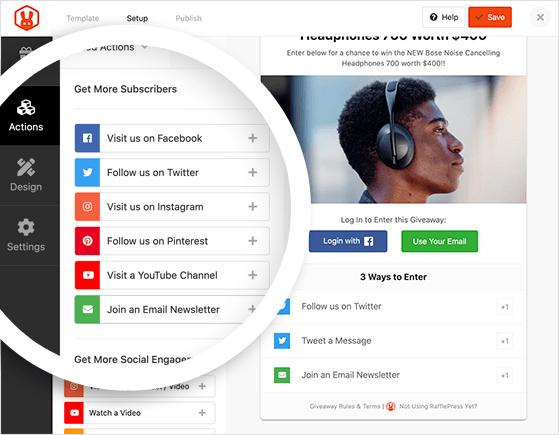
For example, one of your giveaway goals could be to grow your email list and your Twitter followers. In this case, you can click the Join an Email Newsletter action to add it to your giveaway widget.
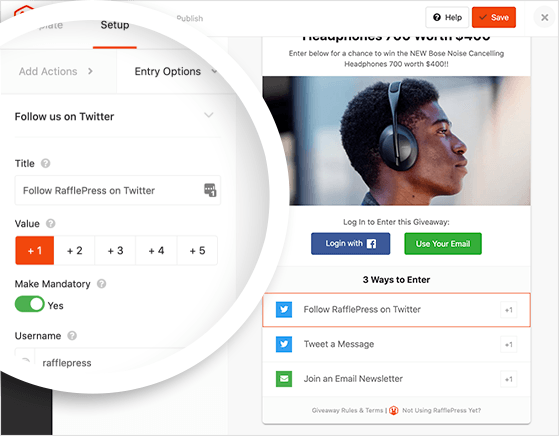
It’s also possible to edit each entry action by clicking it in the giveaway widget on the right. Doing so reveals various options you can change for each action.
For example, clicking the Follow us on Twitter action gives you the ability to:
- Change the action title
- Assign a value (how many entries that action is worth)
- Make the action mandatory
- Enter your Twitter username
Upon clicking the Join an Email Newsletter action, you can edit the following settings:
- Action title
- Value
- Trigger on signup (Automatically add a user to your list when they sign up for the giveaway)
- Make mandatory
- Display a double opt-in confirmation
- Select an integration (connect to popular email marketing services)
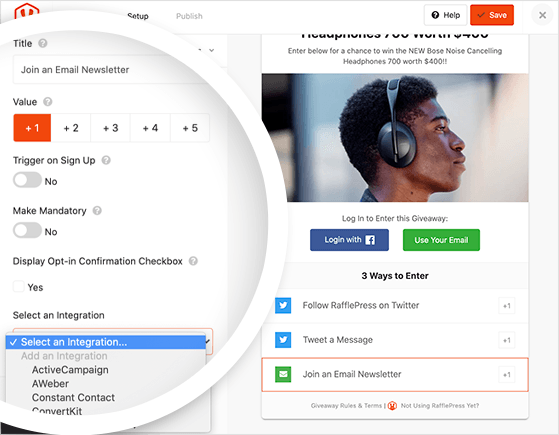
Repeat the process above for every bonus action you wish to add to your Twitter giveaway and remember to click Save.
Step 4: Design Your Giveaway Widget
The next step is to customize your giveaway widget to suit your brand by clicking the Design tab.
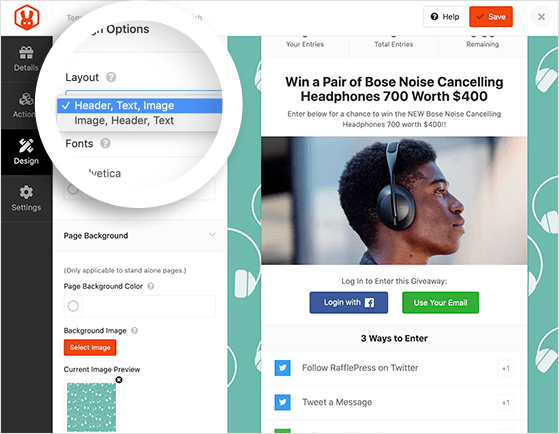
You can choose from 2 different giveaway layouts on this page, select a different font combination, and choose a primary button color.
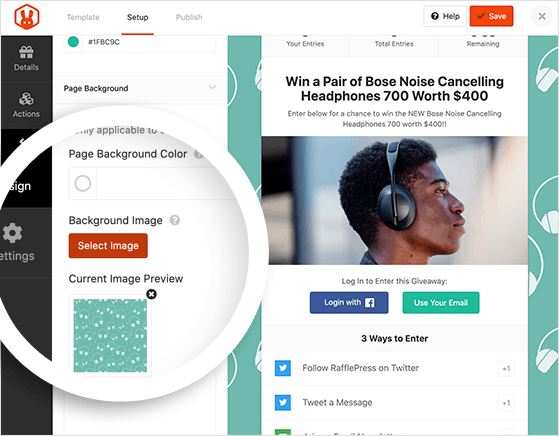
If you plan to publish your Twitter contest on a standalone landing page, you can also choose a background color for your page or upload a custom background image.
Click the Save button when you’ve finished designing your giveaway widget.
Step 5: Configure Your Twitter Giveaway Settings
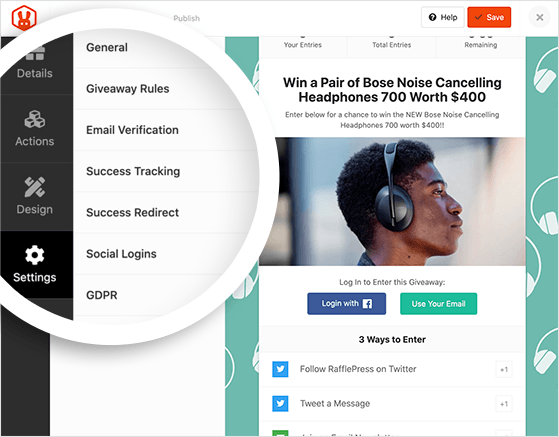
Next, click the Settings tab on the left-hand side of your screen. You can set up your contest’s general settings, email verification, success tracking, social media logins, and more on this page.
The most important setting is the Giveaway Rules. RafflePress makes creating and displaying your contest rules easy with the rules generator template.
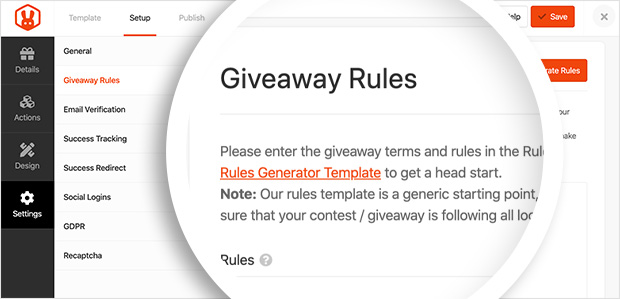
Just click the +Generate Rules button, and a lightbox window appears where you can enter information such as:
- Your sponsor name
- Sponsor email
- Address
- Country
- Eligible locations
- Minimum age
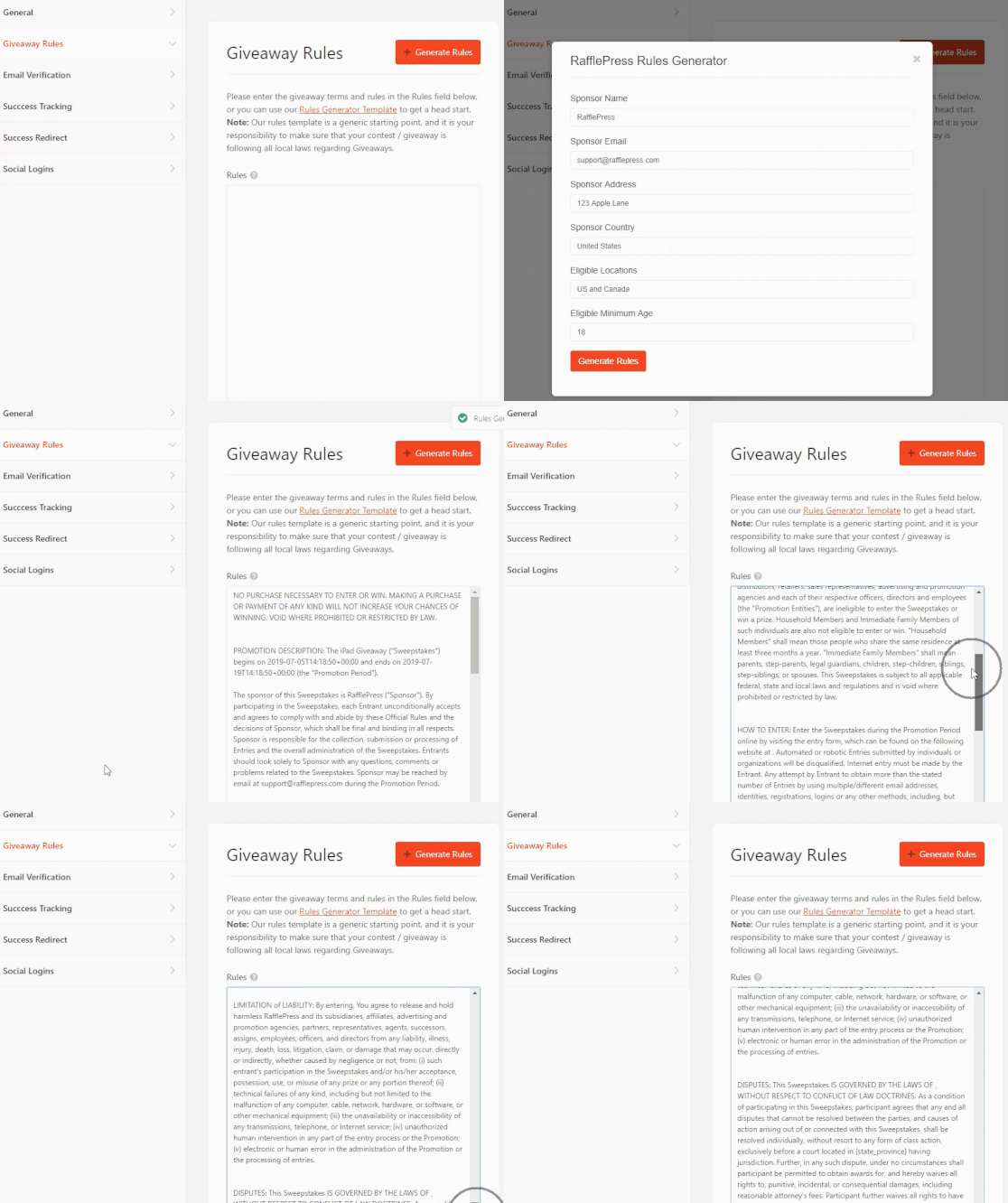
Then go ahead and click the Generate Rules button to automatically create a set of standard rules and guidelines and add them to your contest widget.
Step 6: Publish Your Twitter Giveaway in WordPress
Now you’ve created your Twitter giveaway, it’s time to publish it in WordPress. Click the Publish button at the top of your screen to see the different publishing options available.
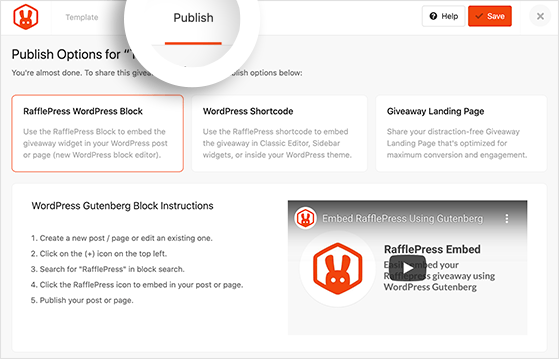
RafflePress offers 3 easy ways to publish your Twitter giveaway in WordPress, including:
- RafflePress WordPress Block: Embed the giveaway widget in a WordPress post or page using the WordPress block editor.
- WordPress Shortcode: Embed the giveaway in the classic editor, sidebar widgets, or inside your WordPress theme.
- Giveaway Landing Page: Publish your giveaway on a distraction-free landing page optimized for maximum conversions and engagement.
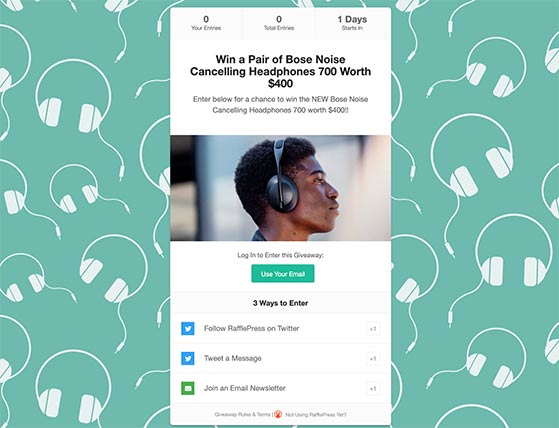
The easiest option is to publish your Twitter contest on a standalone Giveaway Landing Page. That way, there won’t be anything to distract users from taking action and entering.
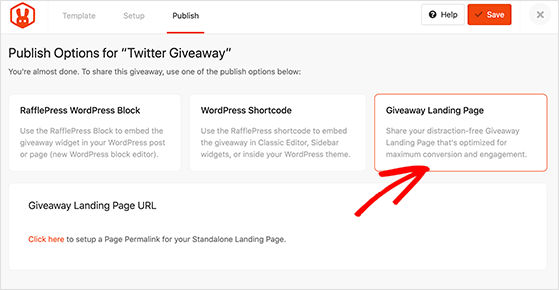
So, go ahead and click the Giveaway Landing Page option. A message will appear below, asking you to “Click here” to set a permalink for your giveaway page. Clicking the link takes you to the General Settings page.
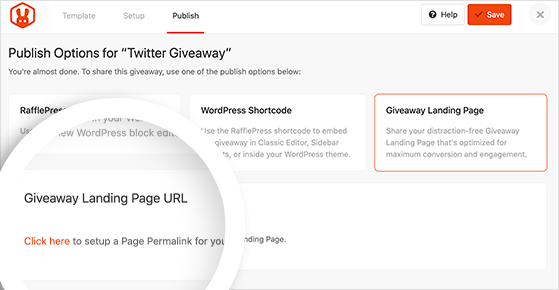
Under the Page Permalink heading, enter a short phrase separated by dashes, such as twitter-giveaway, then click the Save button.
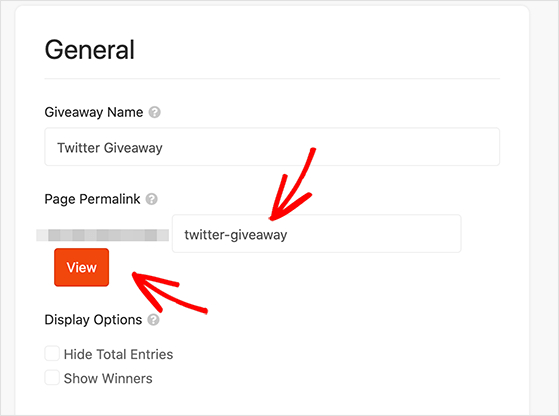
Now you can click the View button to see what your Twitter giveaway landing page looks like to participants.
6. Promote Your Twitter Contest
When your Twitter giveaway goes live, you’ll need to promote it to ensure as many people enter as possible. The easiest way to promote your giveaway is to write a viral Tweet to excite your Twitter (X) audience.
You can also promote your contest by:
- Sharing your giveaway page on your other social media platforms
- Submitting your contest to giveaway and sweepstake directory sites
- Emailing your newsletter subscribers
- Adding a lightbox popup to your website
- Using giveaway-specific hashtags in your promotional tweets
Check out these contest promotion ideas for more inspiration.
Start promoting your giveaway weeks before it starts to generate the most anticipation and secure entries on day 1.
How to Write Your Giveaway Announcement Tweet
The announcement tweet is the most important promotional asset you’ll create. It needs to communicate the prize, entry steps, and deadline in a single glance.
A strong announcement tweet follows this structure: lead with the prize, then the entry instructions, then the deadline and rules link. Keep the entry steps to two actions maximum so the tweet stays easy to read.
Here’s a simple template you can adapt:
🎁 GIVEAWAY: Win [prize name]

To enter:
✔ Follow @YourHandle
✔ Retweet this post
✔ Reply with #YourHashtag

Winner picked [date]. No purchase necessary. Full rules: [link] #giveaway
Pin the announcement tweet to your profile so new visitors see it immediately. Re-promote it midway through the contest to capture anyone who missed the launch.
7. Pick a Giveaway Winner
When your Twitter giveaway is over, you’ll need to choose and notify the winner. RafflePress makes picking a giveaway winner easy.
Just navigate to RafflePress » Giveaways when the contest is over, and click the Needs Winners link on the right-hand side of your screen.
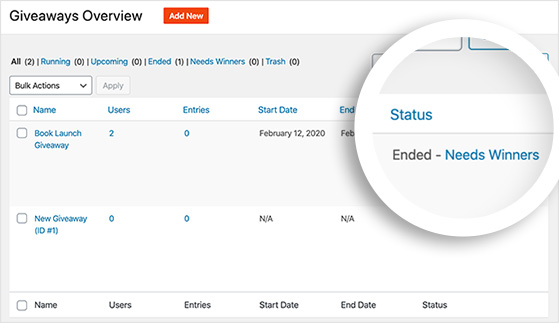
That takes you to a list of everyone that entered your contest, their contact details, and how many entries they each have.
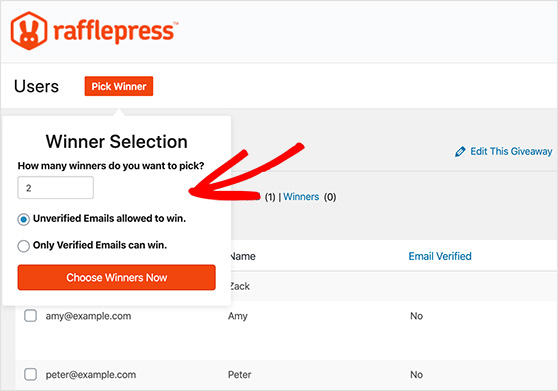
Next, click the Pick Winners button at the top of your screen, enter your options, and click Choose Winners Now. RafflePress will pick a winner randomly and highlight them at the top of your list of entrants.
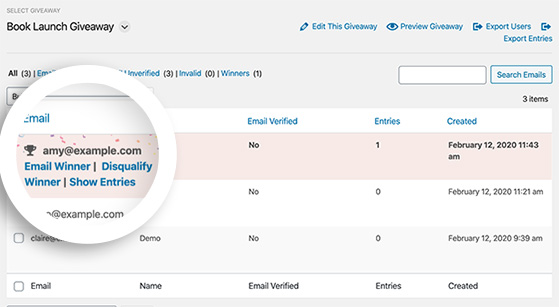
After you’ve selected a winner, all you need to do is click to email the winner with the good news.
8. Follow Up with Non-Winners
Now that you’ve chosen a winner and arranged for them to claim their prize, you should think about the participants that didn’t win.
How can you engage with your new audience and ensure they stick around even though the contest is over?
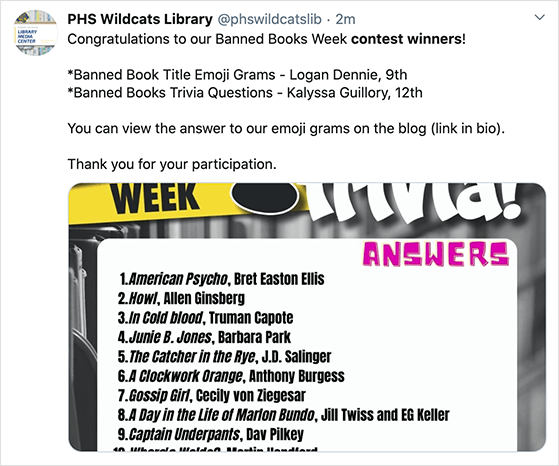
One way is to write a Tweet announcing the contest winner, tag them in your message, and (if you have one) share a photo of them with their prize. Announcing the winner and following up demonstrates that you care enough about your audience to follow up even though the giveaway has ended.
You can also send an email to everyone who took part, thanking them for participating and inviting them to join your next contest. If you’re still working on growing your email list, this follow-up message is a great way to keep new subscribers engaged.
If you’re feeling especially giving, you can offer a discount on their next purchase. Not only will you have a happy giveaway winner, but you’ll also have a whole new engaged and interested Twitter audience.
9. Track Your Twitter Giveaway Performance
Your last task in learning how to do a Twitter giveaway is to analyze your performance. By looking at your contest statistics, you’ll get an idea of how well you did and what you can do to improve your next giveaway.
The easiest way to track the performance of your Twitter giveaway is with MonsterInsights, the best analytics plugin for WordPress.

MonsterInsights makes it easy to add Google Analytics to your WordPress website so you can collect the data you need about your contest activity, such as:
- Traffic to your giveaway landing page
- General website traffic
- Link clicks
- Referral traffic
- Traffic from social media
- eCommerce traffic
Then you can view powerful reports inside your WordPress dashboard and gain actionable insights on what did and didn’t work for your contest. You can use that data to put steps in place to create a much more successful giveaway in the future.
Common Mistakes to Avoid When Running a Twitter Giveaway
Even well-intentioned giveaways fail when a few basic things go wrong. Here are the mistakes I see most often and how to avoid them.
- Choosing an irrelevant prize — A prize that appeals to everyone attracts the wrong crowd. Your prize should match your niche so you attract people who actually want what you sell.
- Overcomplicating the entry requirements — Too many required actions kills participation. Stick to one or two required steps and offer extras as optional bonus entries.
- Skipping official rules — Running a giveaway without formal rules puts your account at risk. At minimum, you need eligibility, entry method, duration, and winner selection details in writing.
- No post-contest follow-up plan — Most brands announce the winner and go quiet. A simple follow-up email to all participants keeps the new audience engaged and primes them for your next campaign.
- Not tracking results — If you don’t measure traffic, entries, and follower growth during the contest, you can’t improve the next one. Set up tracking before you launch.
FAQs About Running a Twitter Giveaway
What makes a successful Twitter giveaway?
A successful Twitter giveaway comes down to four things: a prize that appeals to your specific audience, simple entry requirements (one or two actions), a 3-7 day run length to create urgency, and clear rules that follow X’s promotion guidelines. Giveaways that convert best have a niche prize and keep entry straightforward. The more focused the prize and entry process, the better quality participants you attract.
Can I require a follow and retweet for a Twitter giveaway?
Yes, you can ask participants to follow your account and retweet a post to enter your Twitter giveaway. Just make sure your contest rules follow X’s promotion guidelines to avoid disqualification or reduced reach. Your rules should also state that multiple entries and duplicate accounts will be disqualified.
How long should a Twitter giveaway last?
Most Twitter giveaways run for 3 to 7 days. This gives your audience enough time to see and enter the contest while creating urgency to act quickly. Longer than two weeks and momentum usually drops, because people assume they have plenty of time and never get around to entering. Shorter than 3 days and you may miss people who don’t check Twitter every day.
What are Twitter’s rules for running a giveaway?
X (formerly Twitter) requires that your contest discourages the use of multiple accounts, avoids spammy behavior, and clearly states how winners are chosen. You should also include a note that “no purchase is necessary” and link to the full contest rules. Entry tweets should use #giveaway or #contest to comply with FTC disclosure requirements. See X’s official promotion guidelines for the full list of requirements.
Is a Twitter picker free to use?
Some basic Twitter picker tools are free, but they typically only support simple retweet or reply-based entries. If you’re running a giveaway with multiple entry actions, email list integration, or fraud prevention, you’ll need a more capable tool. RafflePress has a free plan that lets you create and manage a Twitter giveaway with random winner selection at no cost. Paid plans add email integrations, analytics, and advanced entry options.
There you have it!
I hope this article helped you learn how to do a Twitter giveaway to maximize your business engagement. With RafflePress’s ready-made Twitter giveaway templates, actionable entry methods, and easy drag-and-drop giveaway builder, running a Twitter contest is easier than ever.
Get started with RafflePress today!
If you liked this article, please subscribe to our YouTube Channel for RafflePress video tutorials. You can also find us on Twitter and Facebook.


