How to Do a Giveaway on Instagram to Gain Followers
 Stacey Corrin
Stacey Corrin
Stacey Corrin
 John Turner
John Turner
John Turner
TL;DR: How to Do a Giveaway on Instagram to Gain Followers
Running an Instagram giveaway is one of the fastest ways to grow your following without buying followers or using bots. Here’s the process at a glance.
- Choose a prize – Pick something relevant to your brand that your audience will genuinely want to win.
- Set the rules – Decide on entry requirements, eligibility, start and end dates, and how you’ll pick a winner.
- Pick a giveaway tool – RafflePress lets you run the giveaway from your website with multiple entry options.
- Build and publish – Set up your giveaway widget, add Instagram entry actions, and publish as a landing page.
- Promote it – Share across your channels and use Stories and Reels to reach new audiences every day of the giveaway.
- Pick a winner and retain followers – Announce the winner publicly, then follow up with new followers to keep them engaged.
You’re posting consistently, but your Instagram follower count is barely moving. Whether you run a boutique, a food blog, or a local service business, that plateau is frustrating when you’re already putting in real effort.
One of the fastest ways to break through it is with an Instagram giveaway.
In this guide, I’ll show you how to do a giveaway on Instagram to gain followers, step by step, using a method that brings in real people who are actually interested in your brand.
- Do Giveaways Increase Followers?
- Types of Instagram Giveaways
- How to Do a Giveaway on Instagram to Gain Followers
- Step 1. Choose an Exciting Giveaway Prize
- Step 2. Set the Rules for Your Giveaway
- Step 3. Choose the Best Instagram Giveaway Tool
- Step 4. Set Up an Instagram Giveaway to Boost Followers
- Step 5. Promote Your Giveaway on Instagram to Gain Followers
- Step 6. Choose and Announce the Giveaway Winner
- Step 7. Engage New Followers to Retain Them
- Step 8. Analyze Your Giveaway Results
- Frequently Asked Questions
- RafflePress and Your Small Business
Let’s get started!
Do Giveaways Increase Followers?
Yes. Accounts that run follower giveaways grow about 70% faster than those that don’t, according to data from Tailwind.
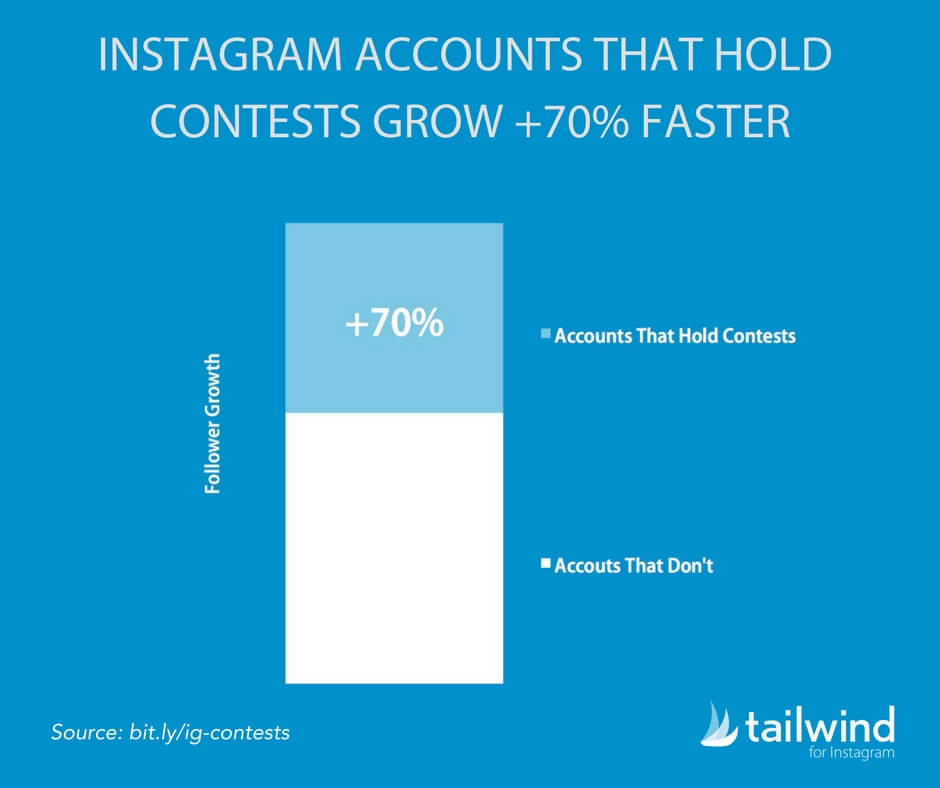
The reason it works comes down to the entry structure. When following your account is a requirement, every participant becomes a direct new follower. When they tag friends or share your post, those friends see your giveaway too.
You won’t need to buy followers or rely on bots. These are real people who are already interested in what you’re offering.
Types of Instagram Giveaways
Before you build your giveaway, it helps to know which type fits your goal. The format shapes your entry requirements, your audience’s effort level, and the kind of growth you get. See our full guide to types of contests and giveaways for more detail on each.
- Like, follow, and share: The simplest format. Participants like your post, follow your account, and share to their feed to enter. Best for quick follower boosts when you want low friction and a wide reach.
- Tag a friend: Ask entrants to tag one or more friends in the comments. Each tag introduces your account to a new person who wasn’t following you before. Great for amplifying reach without a paid promotion budget.
- Comment to enter: Ask a question related to your brand or prize and have users answer in the comments. Drives engagement and gives you useful audience insights. Works well when you want to build a sense of community.
- Caption contest: Post a photo and ask followers to write the best caption to win. Generates creative engagement and gives you content to repurpose. Best for brands with a strong visual identity.
- UGC (photo or video): Ask participants to submit photos or videos featuring your product or brand theme. You collect real customer content and build social proof at the same time. Best suited to product-based businesses with an active, creative audience.
- Share to Stories: Require entrants to share your giveaway post to their Stories for an entry. This puts your giveaway in front of their entire follower list, often reaching people who’d never discover you through the feed algorithm.
How to Do a Giveaway on Instagram to Gain Followers
Before creating your giveaway, you need to determine the prize you’ll offer, your giveaway rules, and which giveaway tools you’ll use. This will help you plan your giveaway and build it quickly and efficiently.
So, how do you do a giveaway on Instagram to gain followers? Let’s find out.
Step 1. Choose an Exciting Giveaway Prize
Your Instagram giveaway’s goal is to get more social media followers, so choosing a grand prize that generates excitement makes sense.
Choose a prize you know your audience will love and ensure it’s relevant to your brand. In my experience, if the prize has nothing to do with your business, it’ll be harder to turn participants into potential customers. Instead, they’ll be in it for the freebie and probably won’t engage with your company after.
Here are some Instagram giveaway prize ideas to get you started:
- Offer a free product or service from your business
- Create a giveaway bundle of products related to your brand
- Team up with similar non-competitors to offer a high-quality prize or gift card
- Give away limited edition or custom products unavailable elsewhere
I love this example from MOB Kitchen. They teamed up with food influencers to offer users the chance to win a bundle of kitchen-related goodies.
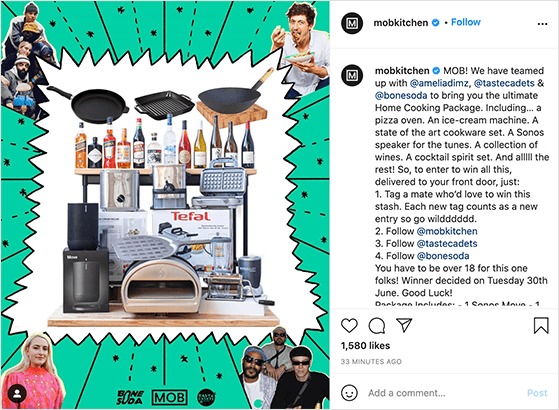
This Instagram post helped them spread the cost of the prize and tap into the audiences of their partners.
Step 2. Set the Rules for Your Giveaway
The next step is to define the rules of your giveaway. Doing so will keep your giveaway fair and avoid potential confusion.
You can run several types of giveaways on Instagram with varying entry requirements, so keep that in mind when drafting your rules.
For example, classic giveaways simply ask users to enter for the chance to win. Other giveaway ideas might require users to submit a photo (for photo contests), video, or other media.
When setting one up, I always recommend that your giveaway rules include the following details:
- The minimum age to enter your contest
- If there are any location limits
- The start and end dates and times
- How people can enter your giveaway (e.g., tag a friend in the comments)
- The way you’ll draw a winner
- If your giveaway is sponsored or affiliated with a third party
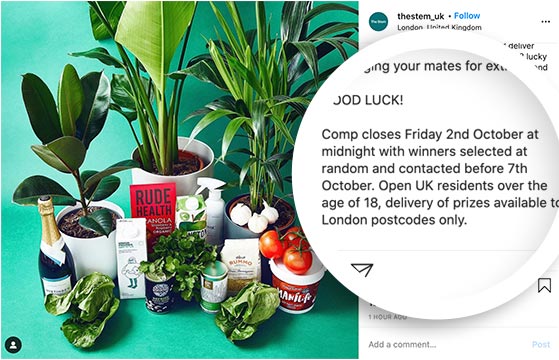
Make sure your entry methods directly align with the specific outcomes you want to achieve. For example:
- To gain followers: Make following your Instagram profile a requirement to enter.
- To boost engagement (likes): Ask participants to like the giveaway post.
- To increase reach and visibility (shares): Require entrants to share the giveaway post on their story for a bonus entry.
- To encourage interaction (comments): Ask a question in your giveaway post and have users comment with their answers to enter.
By carefully tailoring your entry requirements, you can effectively use your giveaway to target particular growth areas.
Remember: the giveaway rules for each social media platform may differ. For example, Instagram’s rules may be different from Twitter’s. You can check out Facebook and Instagram promotion guidelines on their website.
For help with this step, see our complete guide on writing giveaway rules.
One more thing to decide at this stage: how long to run it. For simple like/follow/share entries, 3 to 5 days is usually enough to build momentum.
If you’re offering a larger prize or asking for UGC, 1 to 2 weeks gives people more time to participate. I’d avoid running longer than 2 weeks, as engagement typically drops once the initial excitement fades.
After choosing a prize and defining your rules, you can start looking for the best giveaway tool to make running your giveaway easier.
Step 3. Choose the Best Instagram Giveaway Tool
While many brands run Instagram giveaways directly on the platform by asking fans to like, follow, and share, this method has limitations. Instagram doesn’t allow in-post URLs, making it challenging to drive traffic to other platforms or your website.
Giveaway tools offer a solution by allowing you to run contests from your website and include bonus entry options like joining your email list or following you on other social media platforms. These tools typically feature a dedicated builder that displays your giveaway details in an easy-to-use widget.
Popular giveaway tools include:
- RafflePress: My recommended tool for its user-friendly interface and versatile features.
- Gleam: Flexible with a wide range of actions, suitable for businesses of all sizes.
- Woobox: Great for running giveaways across multiple social platforms simultaneously.
- ShortStack: Offers advanced features, suitable for larger businesses.
When choosing a tool, consider your goals, budget, and technical requirements. I recommend exploring each option’s features and pricing to find the best fit for your needs.
Step 4. Set Up an Instagram Giveaway to Boost Followers
Now it’s time to create your Instagram giveaway. I use RafflePress to walk you through the process.
RafflePress is the best WordPress giveaway plugin on the market. It’s a powerful giveaway builder for WordPress website owners. You can get started with a premade giveaway template and customize it easily with the drag-and-drop builder.
RafflePress offers a comprehensive library of giveaway actions, allowing you to gain social media followers, grow your email list, and drive targeted traffic to your website.
Follow the steps below to create your Instagram giveaway with RafflePress.
Install and Activate RafflePress Giveaway Plugin
First, click here to get started with RafflePress and download the plugin to your computer. You’ll then need to install and activate the plugin on your WordPress website.
Here’s a step-by-step guide on installing WordPress plugins if you need help.
Note: There is a free version of RafflePress available, but we’ll use RafflePress Pro for the advanced features.
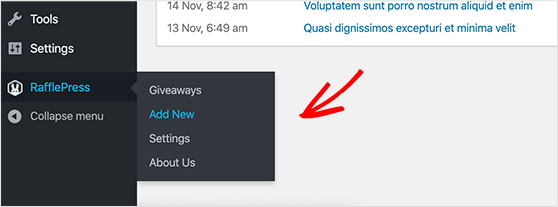
After installing the plugin, hover your mouse over the RafflePress icon and click Add New to create a new giveaway.
Choose the Instagram Giveaway Template
You can enter your giveaway name on the following screen and choose a giveaway template.
RafflePress has several pre-made templates designed to meet specific marketing goals like, Grow Your Email List, Refer-a-Friend, etc.
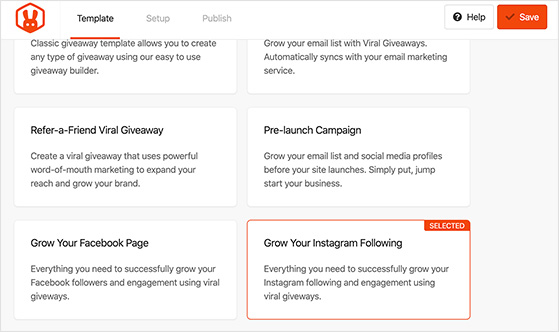
To do a giveaway on Instagram to gain followers, choose the Grow Your Instagram Following template by hovering your mouse over it and clicking Use This Template.
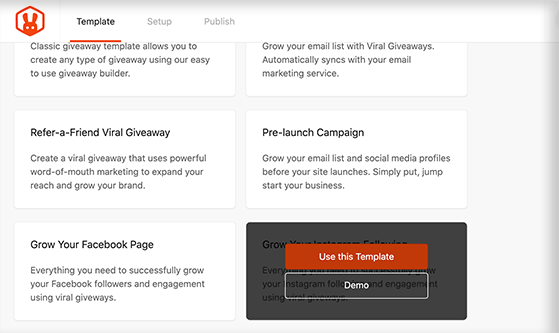
This template will populate your widget with giveaway actions to boost interactions and engagement on Instagram.
Add Your Giveaway Prize Details
On the next screen, you’ll see RafflePress’s giveaway builder. Here, you can enter your prize details, entry methods, and other details for users to see in an interactive giveaway widget.
Click the pencil icon under the Giveaway Prize Details heading to give your giveaway a title and description.
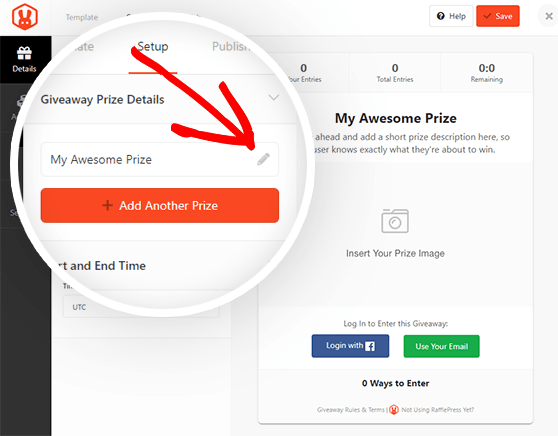
You can also upload a prize image from your media library or computer by clicking the Select Image button on the right-hand side of the screen.
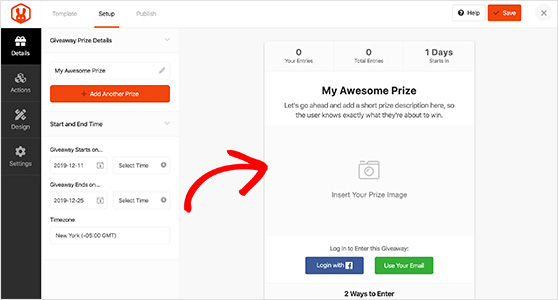
When you’re happy with your prize details, click the Done Editing button.
You can add extra prize details by clicking the +Add Another Prize button if you’re offering many prizes. Below that, you can also enter the giveaway start and end times.
Remember to click the Save button periodically to save your changes.
Add Actions to Grow Your Social Media Followers
Because we’re using the Grow Your Instagram Following template, your giveaway widget will already have 2 giveaway actions:
- Visit us on Instagram – Users can visit your profile and decide for themselves to follow you for entry into your giveaway.
- View Instagram Post / Video – You can ask users to view an Instagram post inside the giveaway widget to enter.
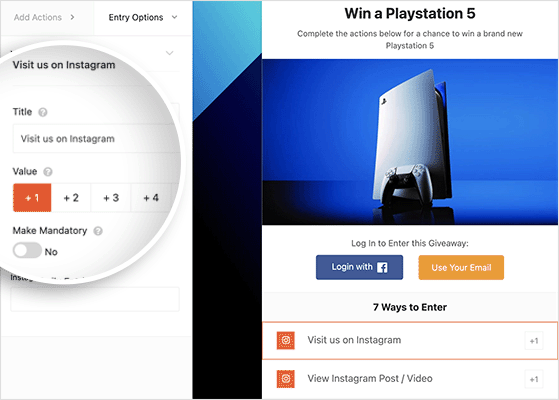
These actions are an excellent way to boost your Instagram followers. Still, if you want more social media followers on Twitter, Pinterest, LinkedIn, and Facebook, you’ll need to add actions to follow you there.
For example, you can use the Follow us on Pinterest action to get more Pinterest followers. Clicking the action inside the widget reveals more customization options, including:
- Change the action label
- Choose a value (how many entries that action is worth)
- Make the action mandatory
- Enter your Pinterest profile URL
In RafflePress, you can also set up bonus entries to drive people to follow your social channels.
Let’s look at a few examples:
- If you want more Facebook followers, you can add bonus entries for people to visit you on Facebook
- To get more Twitter followers, you can offer another bonus entry to follow you on Twitter
- For extra LinkedIn contacts, you can use the Follow us on LinkedIn action
- For more YouTube subscribers, add a 4th bonus entry to visit your channel
- To get more TikTok Followers, include another bonus entry to follow you on TikTok
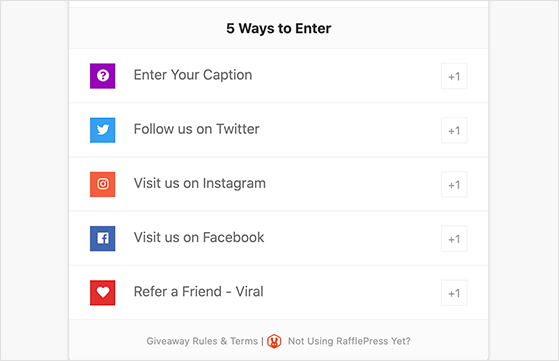
Using bonus entries will attract engaged followers because it gives users more chances to win and take action on the platforms you want.
You could even ask users to submit a photo or selfie to collect user-generated content (UGC) or leave a comment in your comments section.
In addition to follow-based entries, you can encourage different engagement types:
- Comment-to-Enter: Ask a question related to your brand or the giveaway prize and require users to comment with their answer for an entry.
- Tag-a-Friend: Prompt participants to tag one or more friends in the comments for additional entries. This expands your giveaway’s reach significantly.
- Visit a Page: Drive traffic to a specific page on your website by requiring users to visit that page for an entry.
Customize Your Giveaway Widget
Now that you’ve added entry methods, let’s finish designing your contest. To do that, click the Design tab, where you can choose from 2 giveaway layouts, change the widget font, and choose a button color.
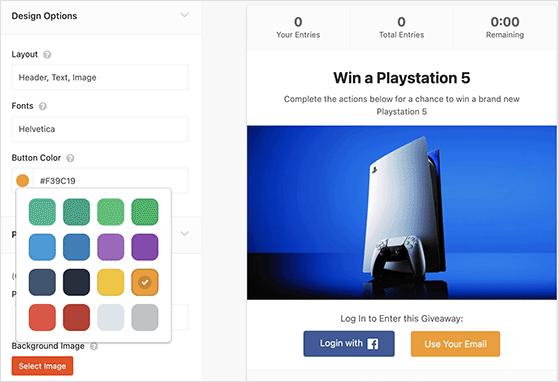
Under the Page Background heading, you can upload a background image for your giveaway’s landing page by clicking the Select Image button.
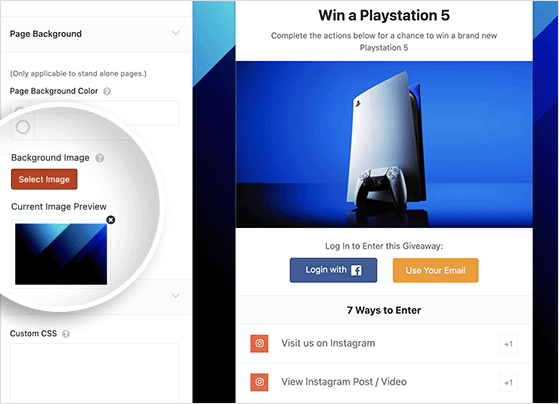
Remember to click Save to save the changes.
Display Your Giveaway Rules
Remember the rules you defined earlier? With RafflePress, you can display those rules right inside your giveaway widget.
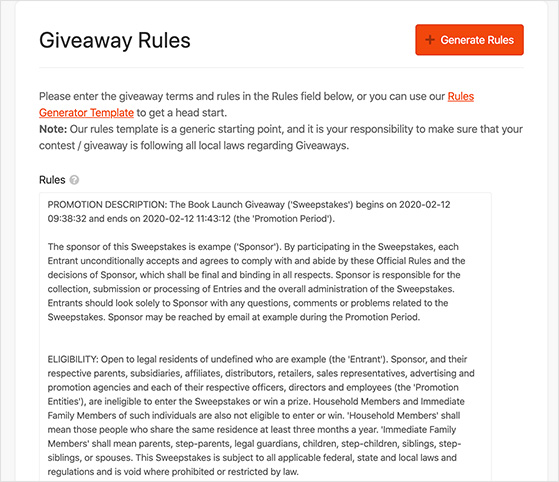
Click the Settings tab and select Giveaway Rules, where you can paste your rules directly into the widget. Alternatively, you can use the built-in Rules Generator to create a simple set of rules.
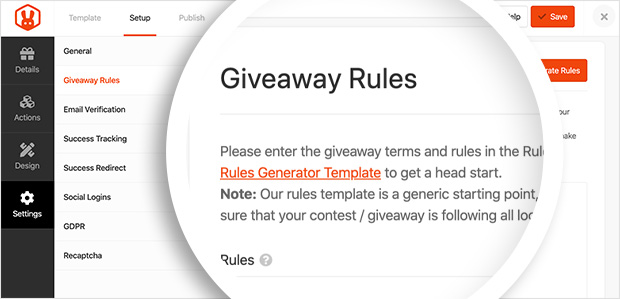
Click the + Generate Rules button, then answer questions about your sponsor, contact details, age, and location eligibility information.
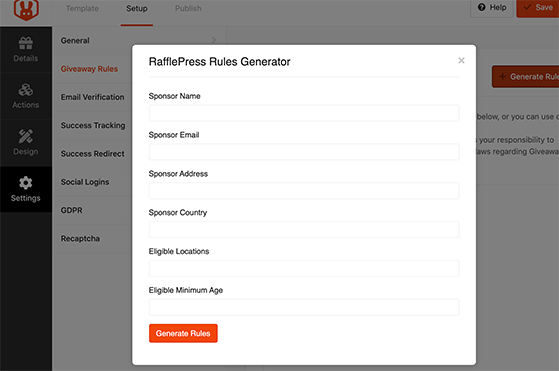
Next, click the Generate Rules button to add a complete set of rules to the content area. You can also edit and add to the content to suit your business requirements.
Publish Your Instagram Giveaway
RafflePress offers 3 different ways to publish your giveaway in WordPress, including:
- RafflePress WordPress Block: Use the WordPress block editor to embed your giveaway widget in a new post or page.
- WordPress Shortcode: Embed your giveaway in the classic WordPress editor, sidebar widgets, or inside your WordPress theme.
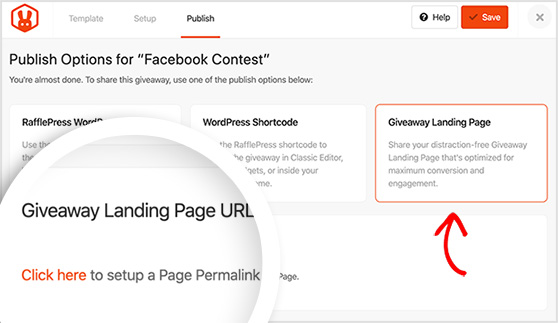
- Giveaway Landing Page: Create a clean, distraction-free landing page for your giveaway.
The best option for securing the most entries is to use the Giveaway Landing Page option. Because there’s nothing else on the page to distract people, they’re more likely to enter and boost your followers quickly.
Click the Giveaway Landing Page option, then click the “Click Here” link to add the URL for your page.
After, you can click the View button to see how your giveaway landing page looks.
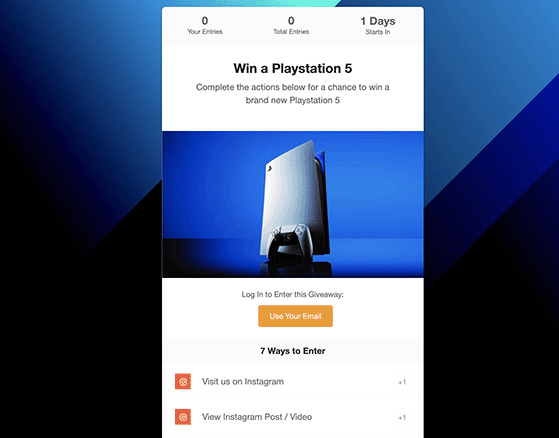
Awesome! You have a fantastic-looking landing page for your Instagram giveaway.
The work doesn’t stop once you publish your giveaway. You need to promote it with a social media giveaway post to maximize entries. You’ll also need to track your giveaway performance so you can make improvements.
We’ll look at this in more detail below.
Step 5. Promote Your Giveaway on Instagram to Gain Followers
You can’t simply wait for people to discover your giveaway. If no one knows about it, you won’t get any entries, and more importantly, you won’t get the social media followers you need to reach your business goals.
Instead, you should start promoting your giveaway right away to get the message out and spread the word. There are several proven contest promotion methods available. The easiest way is to share your giveaway post on your social media channels and ask people to tag a friend in the comments.
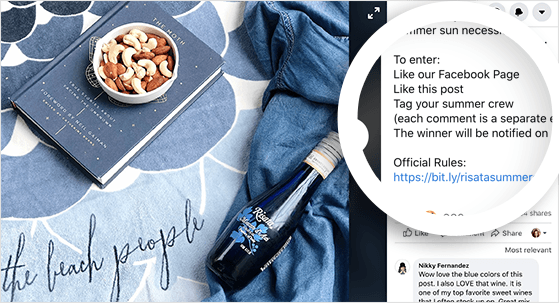
For example, in this Facebook giveaway, Risata Wines asked their fans to tag their summer crew. This helped spread awareness about the contest, gaining over 3k comments, 130+ shares, and 900+ reactions.
You can also use the following Instagram giveaway promotion methods:
- Send an email newsletter announcing your giveaway to existing subscribers
- Add an exit popup linking to your giveaway that triggers when users are about to leave your site
- Add a link to your giveaway landing page on your homepage
- Enter your giveaway into some of these contests and sweepstake directories
- Make your giveaway easier to find by using popular Instagram hashtags
- Run Facebook ads and ads on other social media platforms
- Announce your giveaway in your Instagram stories
Instagram Stories are one of the most effective ways to remind people your giveaway is live. You can post multiple Story reminders per day without cluttering your feed, and add a link sticker pointing directly to your giveaway landing page.
Reels can extend your reach well beyond your existing followers. A short clip showing the prize, who it’s for, and how to enter takes under a minute to create and can pull in entries from people who’ve never seen your account before. Reels is now the primary organic discovery tool on Instagram, so leaving it out means leaving real growth on the table.
Start promoting your giveaway from the moment it goes live to get tons of entries from the very first day.
Step 6. Choose and Announce the Giveaway Winner
Picking an Instagram giveaway winner is easy in RafflePress. Head to RafflePress » Giveaways and click the Needs Winners link on the right.
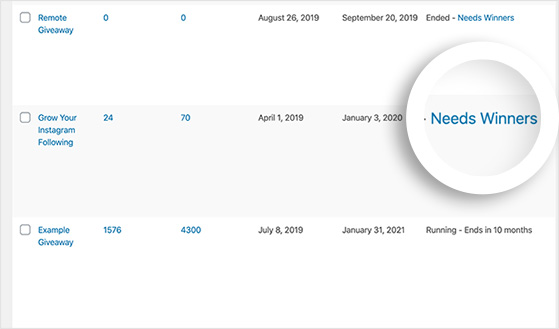
On the following page, you can see who entered your giveaway, how they entered, and their contact details.
To choose a winner randomly, click the Pick Winner button, select your options, and click Choose Winners Now.
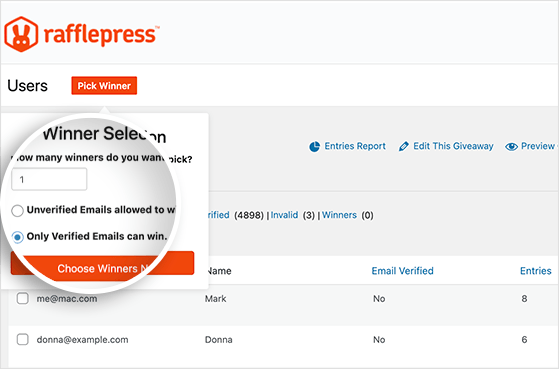
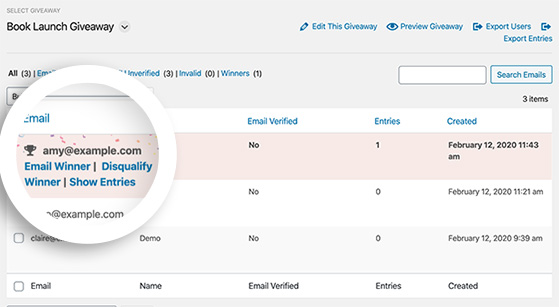
RafflePress will highlight the winner instantly. You can easily click to email them and tell them the good news!
Don’t forget to announce the winner on social media and on your Instagram feed to let your new audience know and generate some last-minute engagement and follows.
Step 7. Engage New Followers to Retain Them
Running a successful giveaway is just the first step. The real challenge lies in retaining them and turning them into engaged members of your community.
Here are some tips to keep your new Instagram followers interested:
- Welcome new followers: Create a story or post welcoming new followers and thanking them for participating in your giveaway.
- Provide value immediately: Share your best content in the days following the giveaway to show new followers why they should stick around.
- Engage consistently: Respond to comments, like posts where you’re tagged, and actively engage with your followers’ content.
- Run a follow-up campaign: Create content that references your giveaway and encourages continued engagement.
- Offer exclusive content: Provide special offers or behind-the-scenes content to make followers feel like part of an exclusive community.
- Plan your content calendar: Ensure you have a steady stream of interesting and relevant content planned to keep new followers engaged.
- Ask for feedback: Create polls or question stickers in your Stories to get input from your new followers about what content they’d like to see.
One step many brands skip: capture entrant emails before the giveaway closes, then follow up with a consolation offer for those who didn’t win. A small discount or freebie via email turns a one-time participant into a warm lead. See our guide to email marketing for contests for how to set this up with RafflePress.
Remember, the goal is to turn these new followers from contest participants into loyal, long-term members of your Instagram community. Consistent, valuable engagement is key to achieving this.
Step 8. Analyze Your Giveaway Results
When your giveaway is over, take the time to analyze your results. This will help you create a better giveaway next time with more effective Instagram giveaway growth.
The easiest way to collect actionable data about your contest is with MonsterInsights, the best Google Analytics plugin for WordPress.
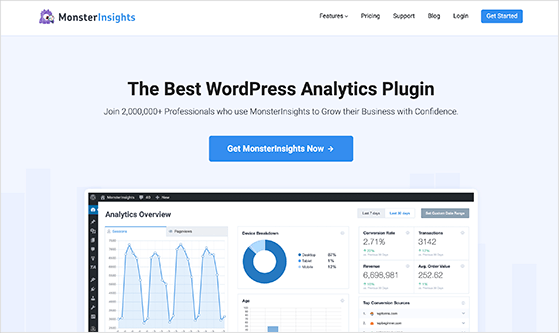
MonsterInsights makes it easy to track visits to your contest landing page, website traffic, referral traffic, etc. You can see all your data right within your WordPress dashboard.
By looking at your data with MonsterInsights, you can see which promotion methods drove the most entries to your contest. Then, you can use that information to improve your marketing strategy for future giveaways.
For a complete breakdown of what to measure, see our guide to contest metrics.
Frequently Asked Questions
How do you get more followers on Instagram with a giveaway?
Make following your account a mandatory entry requirement so every participant becomes a new follower. Pair that with a tag-a-friend action to amplify reach. Your RafflePress giveaway can handle both entry requirements automatically, and promoting the giveaway via Stories and Reels will push it in front of people who don’t follow you yet.
How long should an Instagram giveaway run?
For simple like/follow/share entries, 3 to 5 days is the sweet spot. If you’re offering a larger prize or asking for user-generated content, 1 to 2 weeks gives people enough time to participate. Avoid running longer than 2 weeks as engagement typically drops once the initial excitement fades and people assume they have plenty of time.
Do Instagram giveaways really work for gaining followers?
Yes. Accounts that run follower giveaways grow about 70% faster than those that don’t, according to Tailwind data. The growth is real because entry requires following your account. Just make sure your prize is relevant to your brand so the followers you gain are actually interested in what you offer.
How do you pick a winner for an Instagram giveaway?
RafflePress has a built-in winner picker that randomly selects a verified entrant from your giveaway dashboard. Go to RafflePress » Giveaways, click Needs Winners, then click Pick Winner and Choose Winners Now. RafflePress will highlight the winner instantly and let you email them directly from the dashboard.
What are Instagram’s rules for running a giveaway?
Instagram requires that you include a disclaimer stating the promotion is not sponsored, endorsed, or administered by Instagram. You must also offer a free method of entry since requiring a purchase is not allowed. Your giveaway rules should clearly state eligibility requirements, entry methods, the prize, and how the winner will be selected.
RafflePress and Your Small Business
We hope this article helped you learn how to do a giveaway on Instagram to gain followers. RafflePress makes growing your social media followers from your business website easy.
Ready to create your next Instagram giveaway?
Get started with RafflePress today.
RafflePress is here to help you grow your business in all ways. For more Instagram giveaway tips, check out our blog. Here are a few of our favorite relevant posts:
- Instagram Giveaway Examples to Skyrocket Your Followers
- 11 Top Instagram Marketing Tools for More Likes & Followers
- 16 Instagram Story Giveaway Ideas (and how to Create One)
- 25 Winning Contest Ideas for Customers (Quick and Easy!)
- How to Run an Earth Day Giveaway in WordPress
If you liked this article, please subscribe to our YouTube Channel for RafflePress video tutorials. You can also find us on Twitter and Facebook.

