How to Run a Social Media Contest to Boost Conversions
 Stacey Corrin
Stacey Corrin
Stacey Corrin
 John Turner
John Turner
John Turner
When I wanted to grow a client’s social media following and email list fast, contests were the #1 tactic that made an instant difference. I’ve used them to drive thousands of new leads in just a few days—without spending big on ads.
If you’re looking to get more followers, grow your list, and boost conversions, a social media contest is one of the simplest ways to do it. In this guide, I’ll show you how to plan, launch, and promote a giveaway that actually delivers results.
Quick Summary: To run a high-converting social media contest, you need to:
- Define your contest goals and ideal outcome
- Choose a prize your audience wants
- Pick a platform where your audience hangs out
- Set up the giveaway using a tool like RafflePress
- Follow platform rules and write clear entry instructions
- Promote the contest across email, social, and partners
- Track the results and follow up with entrants
Click here to skip to the step-by-step guide.
You’ll learn how to run a giveaway campaign that brings in real leads—without needing expensive tools or a huge audience.
Why Run a Social Media Contest?
Social media contests offer brands many benefits and can result in the following outcomes:
- A larger social media following – asking your audience to like and follow your profile as a way of entering your contest can result in a huge boost in follower numbers.
- Greater brand awareness – the increase in activity that comes with a social media giveaway is recognized by the platforms’ algorithms which can help your posts appear to many more people.
- Email list growth – asking people to sign up for your email list is another popular way of entering contests. This results in an explosion in list growth.
- Engagement with your brand – giveaways on social media are a great way to generate a buzz around your brand and encourages people to interact with your profiles and content.
With the benefits of launching a contest in mind, let’s find out how to run your own social media giveaway.
How to Run a Social Media Contest
When setting up your contest, there are always several things you should consider to make it a success.
We’ll cover each of these below, so you know exactly how to get started.
1. Set Your Contest Goals
One of the first steps when hosting a social media contest is to set your goals. The best way to do this is to figure out the purpose of your giveaway and what you want the outcome to be.
This is because, depending on your goal, the entry methods of your giveaway might need to be different to achieve your desired outcome.
For example, if your brand’s goal is to use a giveaway to grow your email list, you’ll need to include a method of entry that requires signing up to your list to achieve it.
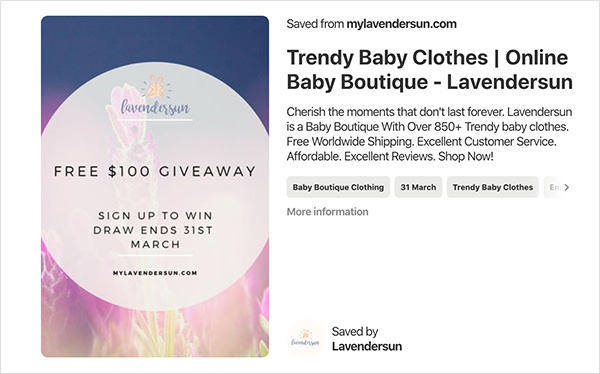
On the other hand, if you simply want to increase your follower count, you’ll focus on asking people to follow your social media profiles to enter your contest.
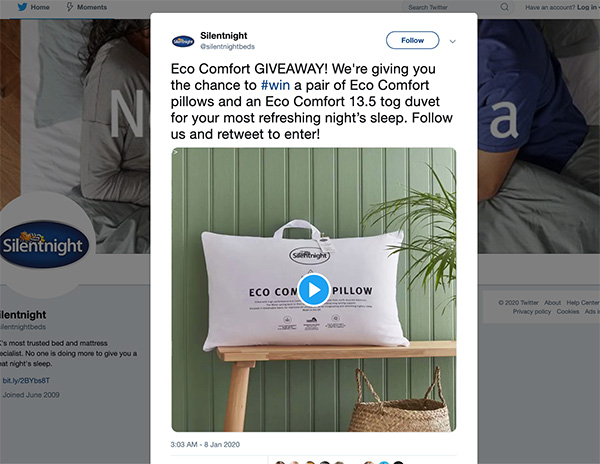
These giveaways would look totally different because the end goals achieve different outcomes. So spend some time defining your goals before moving on.
2. Determine the Type of Contest
As we just mentioned, the type of contest you run is largely determined by the end goal, and there are plenty of contest types to choose from, which can be pretty confusing.
What are good contest ideas?
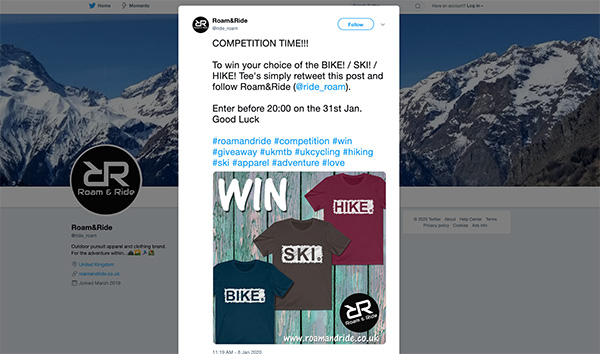
Some of the best contest ideas for Facebook, Instagram, and Twitter include giveaways that encourage likes, shares, or user-generated content.
To make things a little easier for you, here are some good contest ideas that work well with specific goals in mind:
- Free products – giving away a product is a great way to promote your product and brand because people will naturally want to know more about what they could win.
- Seasonal – contests with a seasonal theme can help build hype and engagement around your brand at different times of the year, especially around holiday times.
- Promotions and discounts – offering money off coupons and discounts are effective if you want people to join an email list or newsletter because you can have them sign up to your list as a requirement for entering.
- User-generated content – asking people to send photos for people to vote on is a fun way to encourage sharing and grow your followers because most social platforms require you to be following a brand to send a message.
- Answer a question – a giveaway that asks people to answer a question in return for a prize is ideal for getting more website traffic because you can have people search your site to find the correct answer.
As you can see, there are plenty of ideas out there for figuring out the type of giveaway you’ll run. Just be sure to make it fit with your goals.
3. Set Your Budget and Prizes
No social media contest is complete without a great prize, and a smart social media marketing strategy should always have a budget in mind.
If you have one, make sure you communicate with your marketing team about your company’s budget and what they can spare for this giveaway. Then you can split it up between paying for your contest promotion and your giveaway prize.
What are good giveaway prizes?

Again, a good giveaway prize will align with your brand’s goals and values. But you also need to ensure it’s a prize your audience will find interesting. If it’s not, they probably won’t convert into paying customers, defeating your contest’s purpose.
Some popular giveaway prize ideas include:
- Trending products – if there’s a product on the market that’s super popular right now, people are likely desperate to get hold of it. This is an excellent way for you to tap into current trends and get a heap of entries.
- Cash – cash prizes are another way to get loads of people interested in your giveaway but be sure to make it a large amount. Smaller amounts don’t have the same wow factor.
- Gift cards – gift cards, on the other hand, are fantastic to give away in both smaller and larger amounts. You could offer gift cards to your store or provide a Visa gift card people can use anywhere they like.
- Free trips – everyone loves a free vacation, so having a free trip as your prize will generate huge interest among your audience. Try to pick a location your entrants desire to maximize the results.
- Tickets to shows – who doesn’t want a night out now and then? Free tickets can offer a much-needed break to many people and prove super popular. You can offer free tickets to the movies, to see live music and even tickets to the theatre.
For even more ideas, take a look at this list of over 100 proven contest prize ideas for viral giveaways.
4. Locate Your Audience
Your next task is to figure out where your audience hangs out on social media so you can better tailor your giveaway to reach the right people on the right platforms.
If you look at these social media marketing statistics, you’ll see that different people use different social media networks. What’s more, the type of content they consume on each network can differ significantly.
Once you know where your audience spends most of their time, you can target those specific platforms.
For example, if your audience is primarily made up of younger females interested in fashion and beauty, you’ll want to tailor your giveaway for Instagram users.
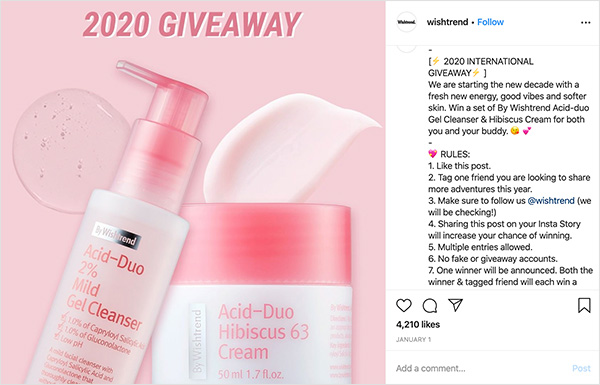
On the other hand, a more mature and family-oriented audience would likely favor a contest that runs on Facebook.
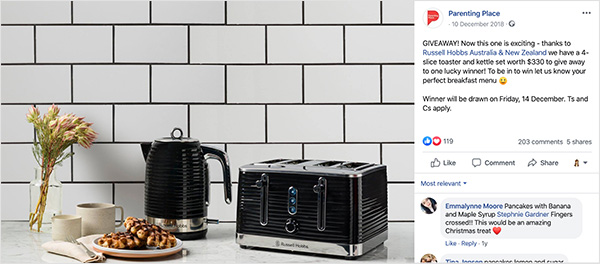
If your audience is spread out over multiple social networks, make sure you have a range of entry methods for each platform.
An excellent way to achieve this is to use RafflePress, the best WordPress giveaway plugin, to build your contest.
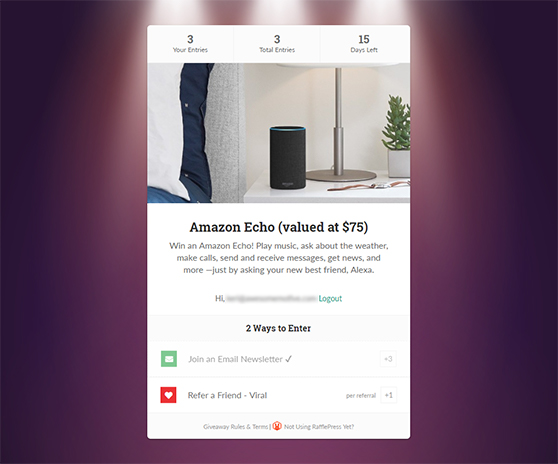
Using a social media contest platform like RafflePress lets you add entry options for Facebook, Instagram, and more in just a few clicks.
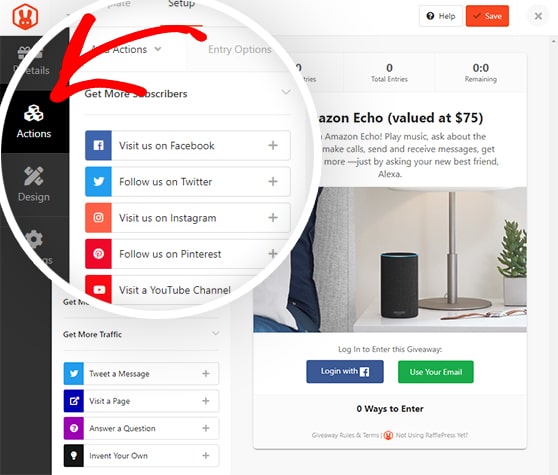
See this step-by-step guide to learn about creating an online contest with RafflePress.
5. Clarify Your Contest Rules
With your audience defined, you should next focus on clarifying the rules for your competition.
Each social network has its own set of rules for contests and promotions, so you must comply with them to avoid having your account suspended.
Here are the rules for running contests on the main social platforms:
- Facebook – Facebook requires you to state what your contest is and that you let people know they don’t sponsor your giveaway. You also can’t have people share the post or tag friends to enter.
- Instagram – Facebook owns Instagram, so the rules are pretty similar. You must let your audience know Instagram isn’t affiliated with and doesn’t sponsor your contest. People shouldn’t be tagged in a photo if they aren’t in it.
- Twitter – Twitter’s rules focus on ensuring you discourage people from making multiple accounts and tweeting the same content repeatedly.
- Pinterest – Pinterest’s guidelines make it clear you can’t require people to save a specific image, shouldn’t have more than 1 entry per person, and can’t suggest Pinterest sponsors the giveaway. You should also ensure entrants use “contest” or “sweepstakes” in their descriptions.
You should also make your own brand’s rules clear to your audience. Publish them alongside your contest when you post it.
RafflePress makes it easy to do this by including a terms and conditions section within the contest widget. There’s also a handy generator where you can create a set of basic terms based on the information you enter.
Let’s look at how you do this.
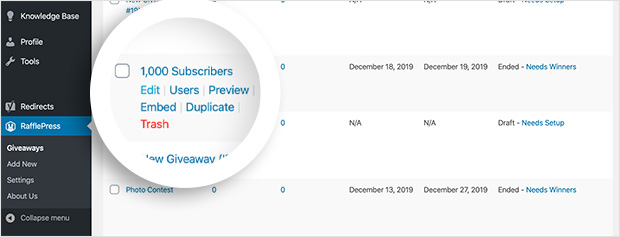
After setting up your RafflePress giveaway using the guide we linked above, click Edit on your giveaway.
Then click Settings » Giveaway Rules. Here you can paste any rules and terms you’ve already written for your sweepstakes.
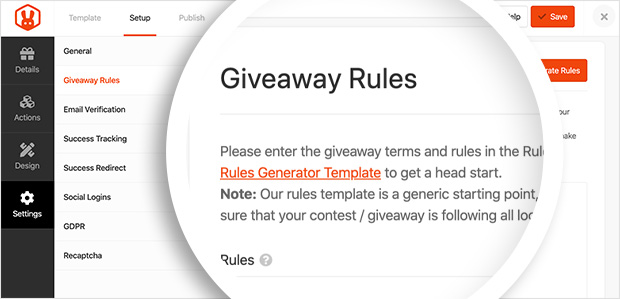
However, click the orange Generate Rules button if you’d like to use RafflePress’s rule generator.
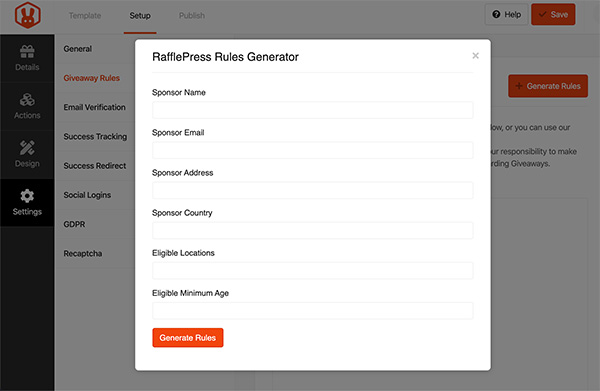
Here you can enter the following details regarding your contest:
- Sponsor Name – the name of the person, company, or brand sponsoring the giveaway.
- Email – their contact email address.
- Address – the physical address if they have one.
- Country – the sponsor’s registered country.
- Eligible Locations – which countries and locations the giveaway is open to.
- Eligible Minimum Age – the minimum age people should be to enter.
After you’ve entered that information, click Generate Rules. A standard set of rules and guidelines will populate the message area using your provided details.
After this, click Save to save the changes.
6. Publish and Promote the Contest
With all of your details, goals, and rules gathered, it’s time to publish your social media contest and promote it like crazy.
RafflePress offers 2 ways for you to publish your giveaway:
- The RafflePress post or page widget. The RafflePress widget has all the information about your contest in one place. It includes a heading, description, image, entry methods, rules, etc. This widget can be added to your posts and pages using a content block or embed code.
- The RafflePress landing page. RafflePress lets you publish your giveaway on a landing page, making it easy for you to share in your social media posts.
Publish With the RafflePress Content Block
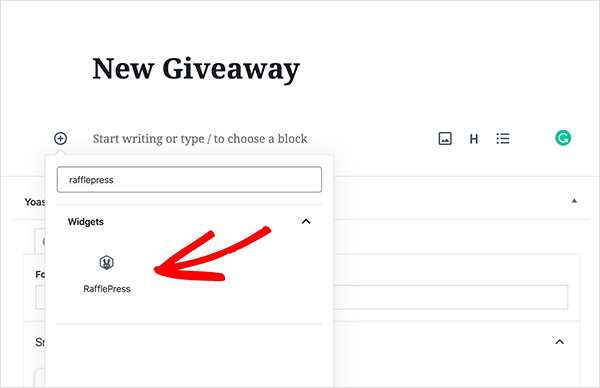
To publish your competition on your website, create a new post or page. Then click the plus icon within your post or page editor to add a new content block.
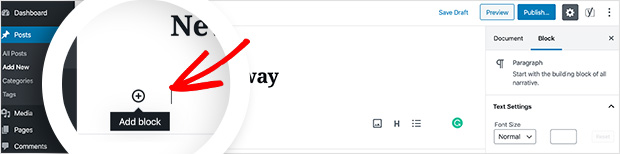
Type RafflePress into the search box to bring up the RafflePress content block.
Clicking it will insert the block into your post.
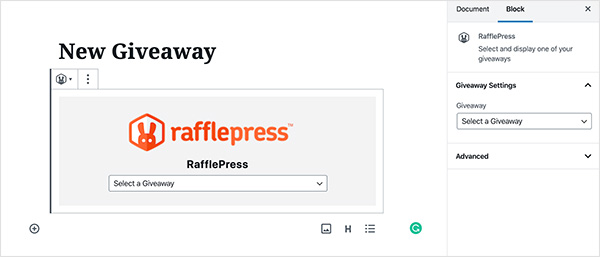
Now select your giveaway from the dropdown box for it to show up in your post.
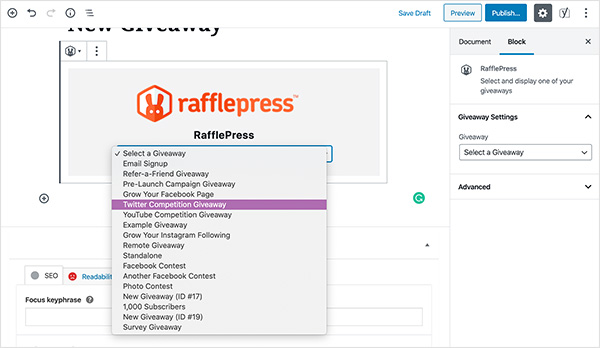
Click Publish to finish the setup.
Publish Your Contest on a Landing Page
To publish your competition using the landing page method, find your giveaway in the RafflePress dashboard and click Edit.
Then head to Settings » General and find the Page Permalink heading.
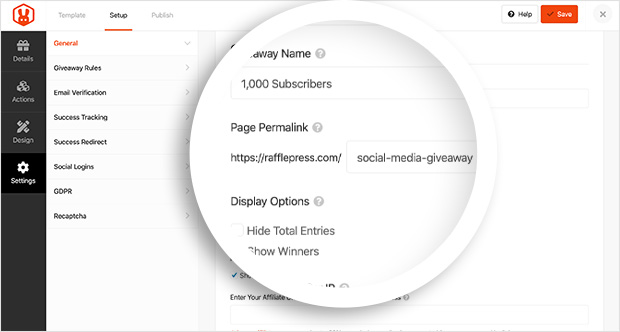
Enter the parameters for your landing page URL here and click save.
When you visit that URL, you’ll see your giveaway displayed in a beautiful distraction-free environment.
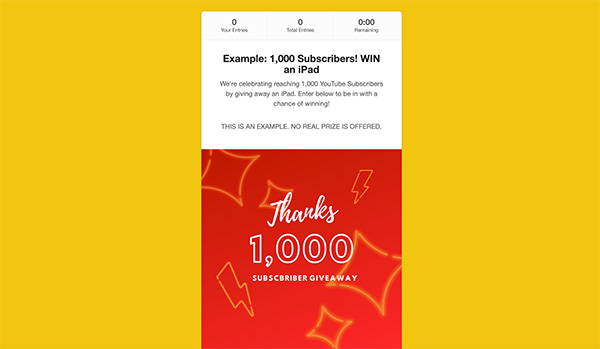
You can then include this URL in all of your social media posts when promoting your contest for people to enter.
7. Promote your contest on social media
To get more entries on your giveaway, try requiring a share or referral action. This encourages viral participation.
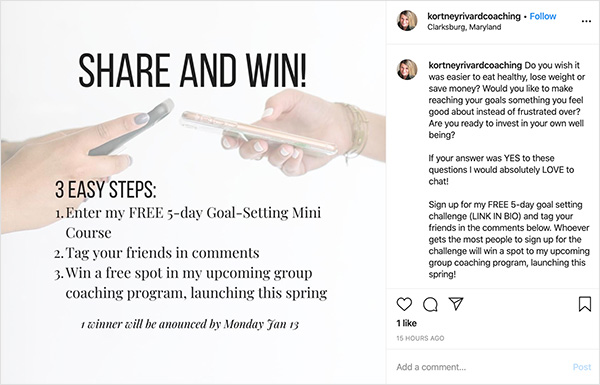
This is the easiest way to go viral because every person who enters also shares your competition with their network of friends. This exposes you to more people and increases the potential for more leads.
You can also share your contest in your email newsletter, which will likely reach a different audience than your social network. But it’s still an audience that is highly likely to click your competition link and enter.
Most email marketing service providers these days have easy ways to help you design an eye-catching email, so make use of these tools. Remember to include a strong call to action to encourage people to enter.
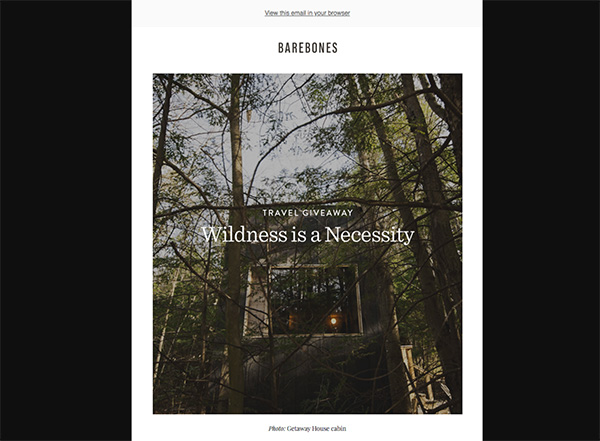
For even more effective contest promotion ideas, see this guide.
8. Gather Your Results
When everything is over and you’ve picked a contest winner, it’s time to take stock and gather your results to see if you’ve come close to the goal you set in the beginning.
Looking at your contest metrics in detail lets you know how everything went and helps you run an even better giveaway in the future.
The simplest and easiest way to track and analyze your results is with the MonsterInsights Google Analytics plugin for WordPress.

With MonsterInsights, you can record visits to your contest’s landing page, your website, referral traffic, and much more.
You can then see all this data in dashboard reports right within your WordPress admin area.
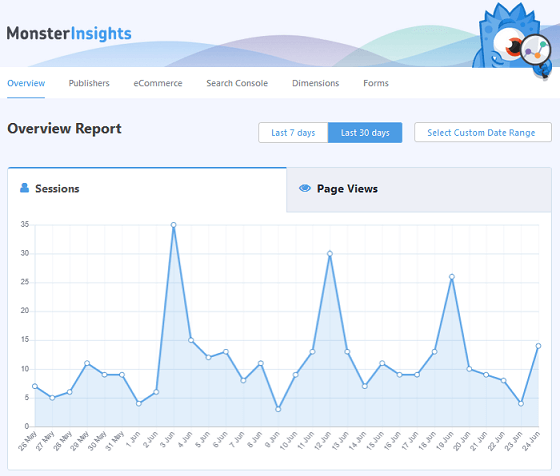
With this information gathered, you can see which of your strategies worked to increase traffic to your giveaway page. With real-time stats from MonsterInsights, you can monitor and adjust your competition while it’s still running.
FAQs About Social Media Contests
It depends on who you’re trying to reach. Instagram is great for visual giveaways, Facebook works well for broader audiences, and Twitter is best for fast engagement and retweets. If you’re not sure, you can use RafflePress to run the same contest across multiple platforms at once.
Most of the time, 7–14 days is the sweet spot. It’s long enough to build momentum, but short enough to keep people interested. If you’re promoting to a new audience, you might want to run it a little longer.
The easiest way is to use a random winner tool. RafflePress includes one that automatically filters out fake or duplicate entries. That way, everyone gets a fair shot, and you save time manually checking results.
There you have it!
You now know how to run a social media contest that boosts conversions. Now all you need to do is put this information into practice to convert your audience into paying customers.
Why not take a look at how to grow your engagement on Twitter at the same time. And if you want to use a contest or sweepstakes to explode your list growth, this collection of genuine ways to grow your email list is well worth a read.
And if you’d like to run a social media photo contest, this tutorial will help.
Don’t forget, if you liked this post, check out our YouTube channel. You can also find us on Facebook and Twitter for even more great giveaway ideas.

