How to Promote TikTok Videos for Free (Step-by-Step)
 Stacey Corrin
Stacey Corrin
Stacey Corrin
 John Turner
John Turner
John Turner
TL;DR: How to Promote TikTok Videos for Free (Step-by-Step)
TikTok has a built-in Promote tool for paid boosts, but free strategies drive more consistent long-term growth. Here’s what actually moves the needle:
- Run a giveaway – Use RafflePress to reward entries for watching, following, or sharing your TikTok.
- Create quality content – Hook viewers in 3 seconds, deliver a payoff, and prompt a CTA to trigger the algorithm.
- Use targeted hashtags – Mix 1-2 trending tags with 2-3 niche-specific tags per post.
- Post at peak times – Check your Analytics Followers Activity tab for your audience’s active hours.
- Cross-promote on other platforms – Repurpose TikToks as Instagram Reels, YouTube Shorts, and X posts.
- Review analytics weekly – Track what’s working and double down on your top-performing content formats.
You’ve posted a great TikTok video and watched it sit at 47 views for three days. No shares, new followers, nothing. If that sounds familiar, the problem usually isn’t your content.
In this guide, I’ll show you exactly how to promote TikTok videos step by step. You’ll see how to set up TikTok Promote campaigns, plus free methods like running giveaways, embedding videos on your site, and cross-posting to other platforms.
What Is the TikTok Promote Tool?
TikTok Promote is the app’s built-in ads feature that boosts your videos to more viewers. You can set a goal like getting more video views, website clicks, profile visits, new followers, or even direct messages.
Promote campaigns are only available for public videos, and you’ll need to use original audio or tracks from TikTok’s Commercial Music Library. If your post promotes your own business, switch on the “Content disclosure” option in settings to stay compliant.
Where to find it:
- Creator Tools: Go to Profile » menu (3 lines) » Creator Tools » Promote.
- From a video: Open your TikTok post » tap the 3 dots » choose Promote.
- Business Suite / TikTok Studio: From your profile menu, tap Business Suite (or Studio) » Promote.
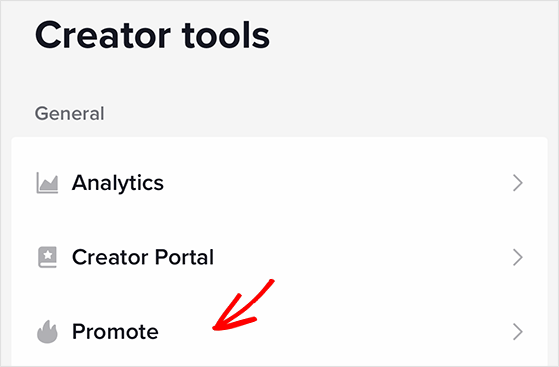
How it works: After selecting a goal, you can target a custom audience or let TikTok decide, set your daily budget (minimum $3/day), and choose how long the campaign runs. Depending on your device, you’ll pay in local currency or with TikTok Coins.
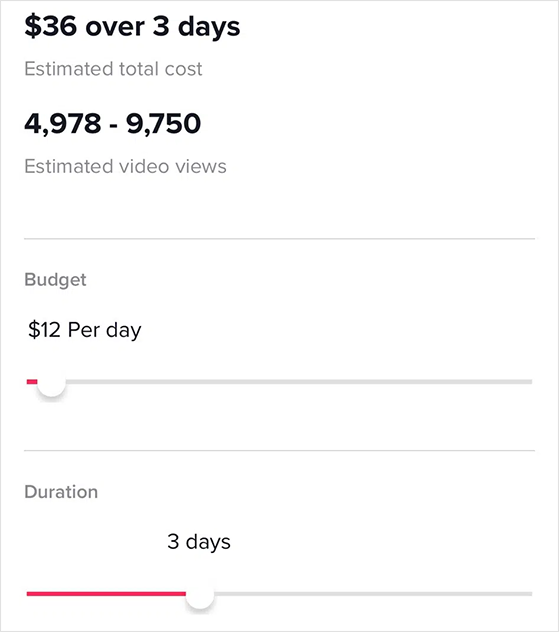
When the promotion ends, you can track results like views, likes, comments, shares, website clicks, and audience demographics directly inside the app.
How to Set Up a TikTok Promote Campaign (Step by Step)
Setting up a Promote campaign takes about five minutes. Here’s exactly what to do:
- Choose your video: Open the TikTok post you want to boost, tap the 3-dot menu, and select Promote. Only public videos with eligible audio qualify.
- Set your goal: Pick from more video views, more website visits, more followers, or more messages.
- Define your audience: Choose “Automatic” to let TikTok target based on your content, or set a custom audience by age, gender, interest, and location.
- Set your budget: The minimum is $3/day. For testing, I’d recommend starting at $5-10/day for 3-5 days before committing to a longer run.
- Choose your duration: Pick how many days you want the campaign to run. Your total spend displays before you confirm.
- Add payment and submit: Pay with local currency or TikTok Coins. Once submitted, TikTok reviews and activates the campaign, usually within a few hours.
Track results inside the Promote dashboard. Watch video views, follower growth, and website clicks together before deciding to scale up.
TikTok Promote Eligibility Requirements
Not every video qualifies for Promote. Before you try to boost a post, check that it meets all of these:
- Public video: Private or friends-only posts cannot be promoted.
- Original or commercial audio: Videos using sounds not cleared for commercial use will be rejected.
- Age 18+: Your account must meet TikTok’s minimum age requirement for ads.
- Account in good standing: Accounts with recent policy violations may be blocked from Promote.
- Content disclosure for branded content: If the video promotes a product or brand, the “Branded content” toggle must be switched on before boosting.
If Promote is greyed out or throws an error, check each of these first. The audio restriction is the most common reason a video gets blocked.
Is Paying for TikTok Promotion Worth It?
Paying for TikTok Promote can quickly boost your reach, but it’s not always the most cost-effective way to grow long term. Results depend on your budget, goals, and how strong your content already is.
When a video struggles to hit the For You Page, a small Promote campaign can put it in front of more people and generate extra likes, comments, and followers. This can be useful for testing content or driving short-term traffic to your website.
However, costs add up quickly. If your target audience doesn’t match the viewers TikTok sends your way, you might pay for traffic that never converts. That’s why it’s best to treat Promote as a supplement, not your main strategy.
One concern I see come up constantly is does using Promote suppress your organic reach?
TikTok officially states it does not throttle non-promoted videos. From what I’ve seen, the bigger risk is training yourself to rely on paid boosts instead of fixing what’s actually weak about the content. Test one video at a time so you can separate the Promote effect from organic performance.
In the long run, TikTok rewards videos that perform well organically. Focusing on high-quality content, posting at the right times, and using free strategies like running a giveaway will usually bring more consistent results than paid boosts alone.
Free: Download Our Giveaway Playbook
Templates, prize ideas, and promotion strategies in one guide.
TikTok Promote vs. Spark Ads: Which Should You Use?
TikTok offers two ways to pay for promotion, and they work very differently.
Promote is the simple in-app boost. Spark Ads is TikTok’s full advertising platform, built for businesses running managed campaigns.
| TikTok Promote | Spark Ads | |
|---|---|---|
| Best for | Quickly boosting an existing video | Running structured ad campaigns with targeting control |
| Where you manage it | Directly inside the TikTok app | TikTok Ads Manager (desktop) |
| Budget | $3/day minimum | $50/day minimum (campaign level) |
| Targeting | Basic: age, gender, interest, location | Advanced: lookalike audiences, retargeting, custom audiences |
| Creative | Boosts the video exactly as posted | Can boost organic posts or run separate ad creatives |
| Complexity | Low, no ad account needed | High, requires TikTok Ads Manager setup |
For most, Promote is the practical starting point. Spark Ads makes sense once you’re seeing consistent organic traction and want to scale what’s already working with serious budget behind it.
For zero-budget promotion, every tactic below is completely free.
How to Promote TikTok Videos for Free
Whether you’re a seasoned TikTok user or just starting your content strategy, the tips below will show you how to promote TikTok videos for free. That way, you’ll have more of your budget to spend on other digital marketing strategies for your business.
- 1. Run a TikTok Giveaway or Contest
- 2. Excite Viewers with High-Quality Content
- 3. Amplify Your Video Reach With Popular Hashtags
- 4. Post on TikTok at the Right Time
- 5. Embed TikToks on Your Website
- 6. Cross-Promote TikTok Videos on Other Social Networks
- 7. Collaborate With Creators and Join Communities
- 8. Use TikTok Analytics to Improve
1. Run a TikTok Giveaway or Contest
Giveaways are one of the fastest ways to promote TikTok videos for free. A prize motivates viewers to watch, share, and follow, spreading your content beyond your current audience.
To run a simple TikTok giveaway:
- Pick a prize: Choose something that fits your niche so you attract the right followers.
- Set clear rules: For example, “Watch this TikTok, follow my account, and tag a friend in the comments.”
- Promote it: Post about the giveaway on TikTok and share it on your other platforms.
- Stay transparent: Tell people exactly how and when you’ll pick the winner.
If you run a WordPress site, you can make this easier with RafflePress. It has ready-made giveaway templates and built-in TikTok actions, so you can grow your email list while you grow your TikTok following at the same time.
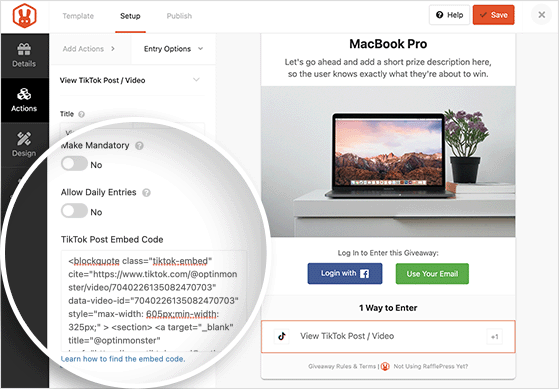
For example, you can reward entries for watching a TikTok, following your account, or referring a friend, all from one contest widget.
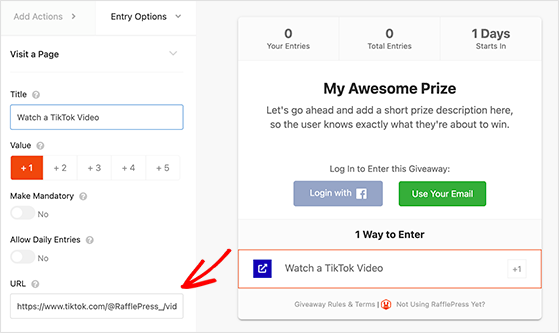
This way, you grow your TikTok presence while collecting leads and driving traffic to your website at the same time.
2. Excite Viewers with High-Quality Content
The easiest way to promote TikTok videos for free is to make content people want to finish and share. TikTok’s algorithm pushes videos that hold attention and spark interaction.
Focus on three parts of every video:
- Hook (first 3 seconds): Use captions, bold visuals, or a direct question to stop the scroll.
- Payoff: Deliver a tip, punchline, or story that rewards viewers for staying.
- CTA: Add text or audio prompts like “follow for part 2” or “drop your answer in the comments.”
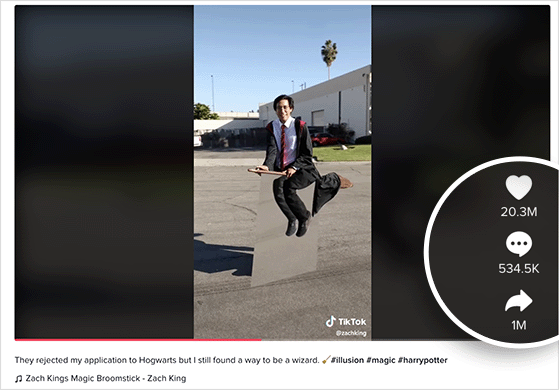
When people watch to the end, rewatch, or share your video, TikTok reads those signals as quality. That increases your chances of landing on the For You Page and reaching new viewers organically.
3. Amplify Your Video Reach With Popular Hashtags
Hashtags make your TikTok videos discoverable. The right mix helps you appear in searches and trend feeds without spending money.
Use these quick rules when adding hashtags:
- Be specific: Use hashtags tied to your niche (#fitnessforbeginners) instead of broad tags (#workout).
- Mix sizes: Add 1-2 trending tags, 2-3 niche tags, and your branded tag if you have one.
- Check your analytics: See which hashtags have driven views before and reuse your top performers.
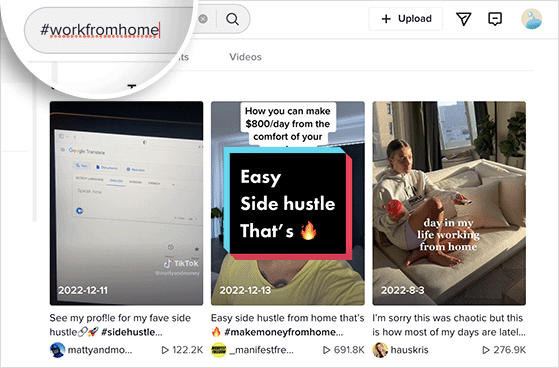
Relevant hashtags improve reach and attract viewers already interested in your topic, making them more likely to follow, comment, and share. For a wider strategy, pairing hashtags with a social media contest can multiply your reach fast.
4. Post on TikTok at the Right Time
Posting when your audience is most active gives your videos an instant engagement boost, which helps them reach the For You Page.
To find your best posting times:
- Check Analytics » Followers Activity: Look for the hours and days your followers are online most often.
- Test dayparts: Try posting in common high-traffic windows like late afternoons (3-6 p.m.) and evenings (7-10 p.m.), then compare results.
- Match time zones: If you target global viewers, schedule content to align with their peak hours, not just yours.
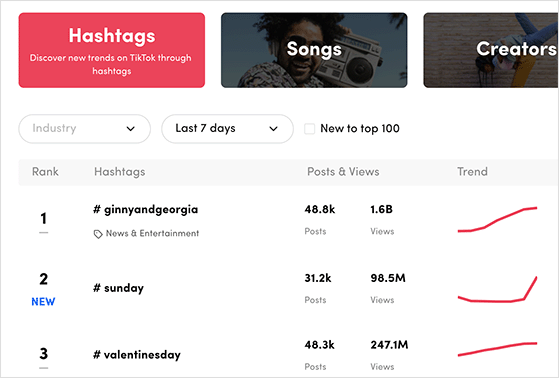
Track performance over a few weeks. Once you know your personal “hot spots,” stick to them for a higher chance of consistent reach.
5. Embed TikToks on Your Website
Adding TikTok videos to your website keeps visitors engaged and sends new traffic back to your TikTok account, all without extra cost.
You have two easy options:
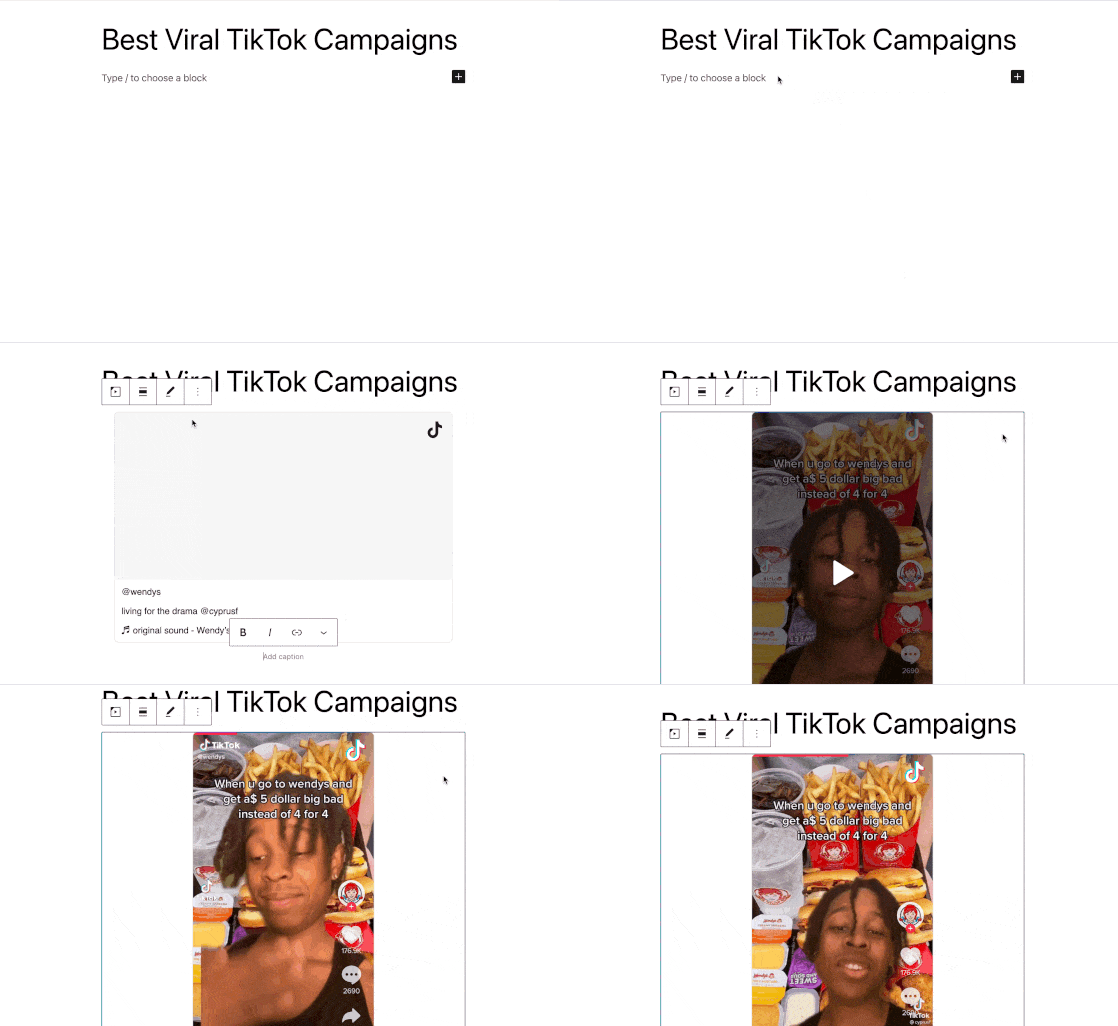
- Inside blog posts or pages: Copy your TikTok video URL and paste it into the WordPress editor. It auto-embeds the video so visitors can watch it without leaving your site.
- In your sidebar or footer: Add a TikTok embed block or widget to show off your latest or best videos across your whole site.
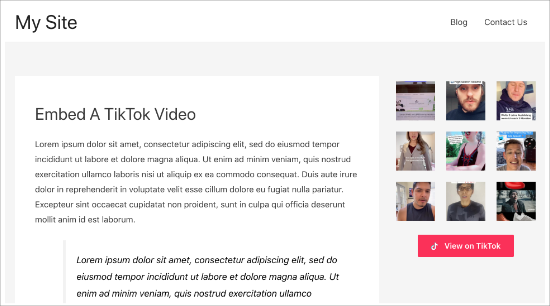
By placing TikToks in high-visibility spots, you extend their life beyond the app and encourage blog readers to follow you on TikTok too.
6. Cross-Promote TikTok Videos on Other Social Networks
Sharing your TikToks on other platforms introduces them to new audiences and gives each video a second life.
Here are smart ways to repurpose your TikTok content:
- Instagram Reels & Stories: Upload directly for more reach on Meta’s platforms. You can also run an Instagram giveaway to boost visibility on both channels at once.
- YouTube Shorts: Perfect for quick tutorials, tips, or entertainment clips.
- Facebook Stories or posts: Engage older demographics who may not use TikTok.
- X (formerly Twitter): Share short clips or link to your TikTok to reach followers who prefer the platform.
- Pinterest Idea Pins: Share evergreen or visual content to drive long-term discovery.
- Email newsletters: Embed or link to your top TikTok each week to warm up subscribers.

Cross-promotion multiplies your exposure. Many users follow brands on multiple platforms, so one video can build traction across your entire online presence.
7. Collaborate With Creators and Join Communities
Partnering with other TikTokers exposes your videos to their followers and builds credibility in your niche. I’ve seen this approach work especially well for small accounts, because a single collaboration with the right creator can double your follower count overnight.
Easy ways to collaborate include:
- Duets & Stitches: Add your own spin to another creator’s video so both audiences see it.
- Challenges: Team up with peers to launch or join trending challenges.
- Mini-series: Plan a series of themed videos with a partner and alternate posting.
- Content swaps: Share each other’s TikToks to build mutual visibility.

Outside TikTok, you can also share helpful TikToks in online forums like Reddit.
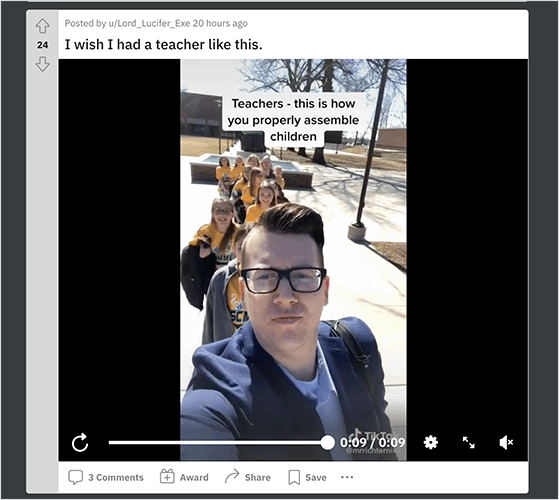
Just make sure your post adds value to the discussion and follows each community’s rules. That way you earn engagement instead of being flagged as spam.
8. Use TikTok Analytics to Improve
TikTok’s free analytics show you exactly what’s working so you can double down on the right content and posting times. From what I’ve seen, most creators skip this step entirely, which is why they keep posting without improving.
Key reports to check each week:
- Video performance: Views, likes, comments, shares, and average watch time.
- Audience insights: Age, gender, top locations, and when your followers are most active.
- Traffic sources: See if people find you from the For You Page, profile, search, or hashtags.
- Hashtag performance: Spot which tags drive the most engagement and reuse the winners.
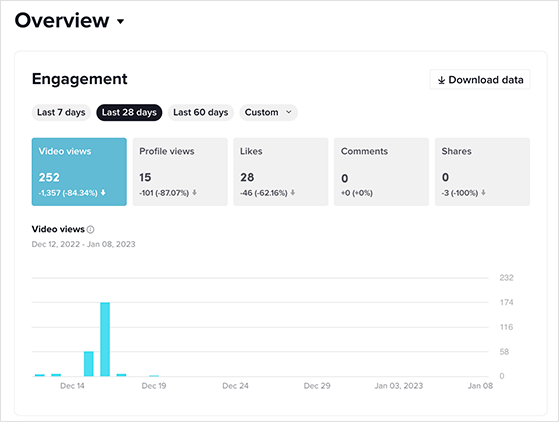
Use these insights to refine your posting schedule, hashtags, and content style. A simple routine, review analytics once a week and adjust, can steadily grow your reach without spending a cent.
FAQs About Promoting TikTok Videos
How do I make TikTok promote my videos?
TikTok promotes your videos organically when they generate strong early engagement, including watch time, replays, likes, comments, and shares. To trigger the algorithm, focus on a strong 3-second hook, deliver a clear payoff, and add a CTA that prompts interaction.
For paid promotion, open the TikTok app, go to your video, tap the 3-dot menu, and select Promote. You’ll set a goal, audience, daily budget (minimum $3/day), and campaign duration.
How much does TikTok Promote cost?
TikTok Promote has a minimum budget of $3 per day. For testing, starting at $5-10/day for 3-5 days is a reasonable approach before committing to a longer campaign.
You pay in local currency or TikTok Coins depending on your device and region. The total spend is shown clearly before you submit the campaign.
Does TikTok Promote suppress organic reach?
TikTok officially states that using Promote does not suppress the organic reach of other videos on your account. Your non-promoted posts continue to be distributed based on their own performance signals.
That said, it’s worth testing Promote on one video at a time and comparing your organic metrics before and after. That way you can see the actual effect rather than relying on assumptions.
How do I cancel a TikTok Promote campaign?
To cancel an active Promote campaign, open the TikTok app and go to your profile. Tap the 3-line menu, select Creator Tools, then Promote, and find the active promotion.
Tap the campaign and look for the option to end or stop the promotion. TikTok does not provide refunds for budget already spent, but any unused daily budget from the current day forward should not be charged after cancellation.
What is the difference between TikTok Promote and Spark Ads?
TikTok Promote is a simple in-app boost with a $3/day minimum and basic targeting. It’s designed for creators who want to quickly increase views, followers, or website clicks without managing a full ad account.
Spark Ads is TikTok’s full advertising platform, managed through TikTok Ads Manager on desktop. It supports advanced targeting like lookalike audiences and retargeting, has a $50/day campaign minimum, and is built for businesses running structured paid campaigns at scale.
Can I run a TikTok giveaway for free?
Yes. You can host a giveaway directly on TikTok by asking users to follow, watch, or comment to enter. If you use WordPress, the free version of RafflePress lets you set up a giveaway widget and link TikTok actions for extra exposure.
Final Thoughts
You don’t need a big budget to grow on TikTok. The accounts that see consistent growth combine quality content with the right timing, smart hashtag use, and community building, and they check their analytics to know what’s actually working.
If you want to accelerate your results, launching a TikTok giveaway with RafflePress is one of the fastest ways to turn viewers into followers, leads, and customers, all from your WordPress site.
I hope you found this guide helpful. Before you leave, you may also like this tutorial on How to Use Contest Marketing to Grow Your Business.
If you liked this article, please subscribe to our YouTube Channel for RafflePress video tutorials. You can also find us on Twitter and Facebook.


