10 YouTube Giveaway Ideas I’d Steal for My Next Contest
 Stacey Corrin
Stacey Corrin
Stacey Corrin
 John Turner
John Turner
John Turner
TL;DR
The best YouTube giveaway ideas all pull viewers off the platform and onto a page you control. Here are the strongest types I’d rebuild as a WordPress giveaway, plus the one rule you can’t break.
- Comment contest: ask viewers to leave a comment to enter, the lowest-friction action on YouTube.
- Milestone celebration: tie the giveaway to a subscriber or anniversary milestone to give it a reason to exist.
- Multi-action sweepstakes: combine a watch, a visit, and a referral into one landing page so each entry does more.
- Trivia or secret-code: hide a code in the video so only people who watch to the end can enter.
- Refer-a-friend: reward entrants for sharing the giveaway, which turns one entry into several.
- The one rule that matters: you can’t require viewers to subscribe to enter, per YouTube’s contest policies.
Looking for YouTube giveaway ideas that won’t get your channel flagged or leave you sorting through fake entries by hand?
YouTube giveaways are one of the fastest ways to grow your channel, but standing out is hard and YouTube’s rules make some popular tactics off-limits. So I rounded up real public examples and worked out how I’d rebuild each one as a WordPress giveaway I could manage.
Jump to my favorite YouTube giveaway ideas:
- 1. New Year YouTube Giveaway Example
- 2. Product Roundup and Giveaway
- 3. Birthday YouTube Giveaway Example
- 4. Product Unboxing Giveaway
- 5. 100k Subscribers Daily YouTube Giveaway
- 6. Monthly YouTube Giveaway Example
- 7. Q & A YouTube Giveaway Example
- 8. Gift Guide and Giveaway
- 9. Video Tutorial and Giveaway
- 10. Video Challenge YouTube Giveaway Example
Why Should You Run a YouTube Giveaway?
A giveaway gives viewers a reason to act now instead of scrolling past. The most obvious payoff is boosting your subscriber base, since viewers tend to flock to a channel that’s offering something for free.
That said, YouTube giveaways have several other benefits:
- Increasing engagement: Social media contests tend to get high engagement, which helps you build relationships with your audience and increase your YouTube likes.
- Driving website traffic: Hosting your YouTube giveaway on WordPress is a great way to drive targeted traffic to your business website.
- Growing your email list: By asking participants to subscribe to your newsletter to enter, you can grow your list and reach people outside of YouTube.
- Cross promoting other channels: A successful giveaway can boost your followers on your other social platforms too.
- Collecting user-generated content: You can use your giveaway to collect content from users that you can reuse to promote your brand.
So how do you actually run one? Here’s the process I follow.
How Do I Run a YouTube Giveaway?
Before you film anything, it helps to have a simple process. Here’s the framework I use to plan a YouTube giveaway from start to finish:
- Set a goal: decide whether you want more subscribers, email signups, traffic, or social follows. The goal shapes every other choice.
- Pick an idea: match the giveaway type to your goal and your channel, using the ideas further down this page as a starting point.
- Set your entry actions: choose what people do to enter, such as watching a video, visiting your channel, or referring a friend.
- Check YouTube’s rules: confirm your entry actions are allowed before you publish, since requiring a subscription isn’t.
- Pick and announce a winner: draw a winner fairly and tell your audience publicly so the result feels legitimate.
The most popular way is to film a contest video and ask people to enter in the comments or a form. Yet that’s a lot of work with mixed results, and confirming who qualified is hard, which leaves you open to spam and fraud.
Steps 3 to 5 are where most of that work lives, and they’re far easier to handle on a page you control. That’s why I’d create the giveaway on your WordPress website with a giveaway tool like RafflePress.
RafflePress is the best WordPress giveaway plugin. It’s a drag-and-drop tool that helps you grow your email list, website traffic, and social followers with viral giveaways and contests, all from inside WordPress.
It comes with pre-built giveaway templates that include the actions needed for a successful contest.
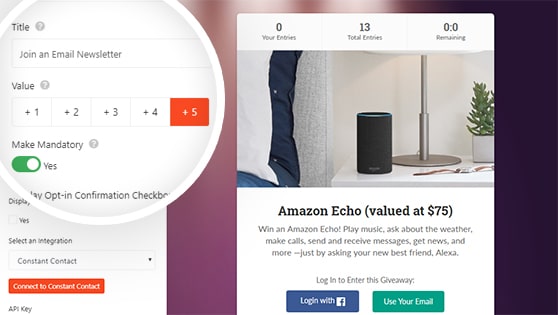
The Grow Your YouTube Channel template has actions to watch a video and visit your YouTube channel built right into the widget. From there, you can add more actions with the drag-and-drop builder, no coding required, such as:
- Referrals with the refer-a-friend action
- Social shares on popular networks with room to add hashtags
- New subscribers with the join an email newsletter action
- YouTube comments with the invent your own action
- New product promotion with the visit a page action
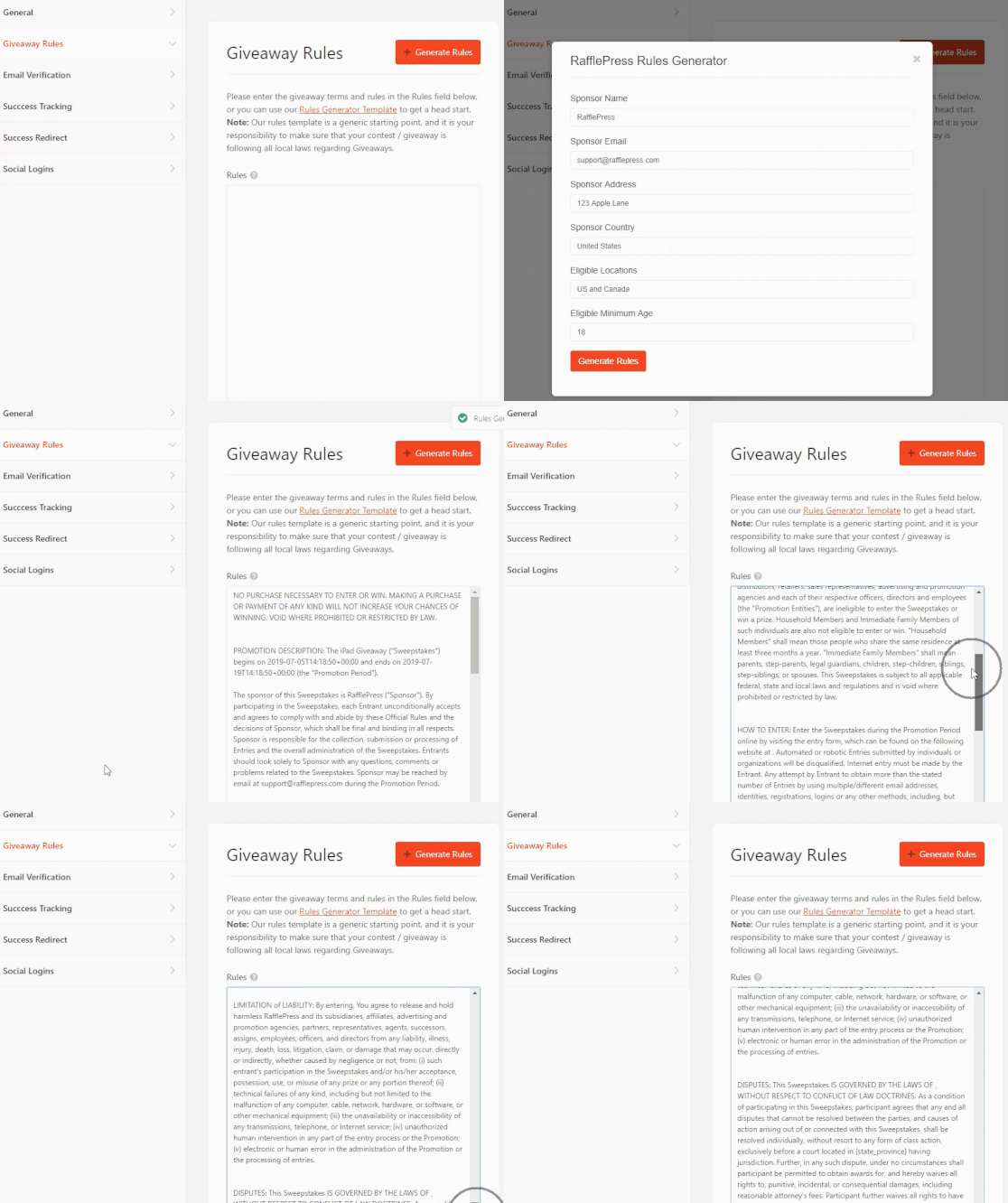
Alongside this is RafflePress’s giveaway rules generator. Instead of writing your official rules by hand, you answer a few questions and it generates your terms of service.
Once generated, you can edit them and add a disclaimer to release YouTube from any liability related to your contest.
Managing the contest is straightforward too. The user management dashboard shows who’s entering, the actions they took, how many entries they earned, and their contact details.
And when it’s time to draw a winner, you do it with the built-in random winner picker.
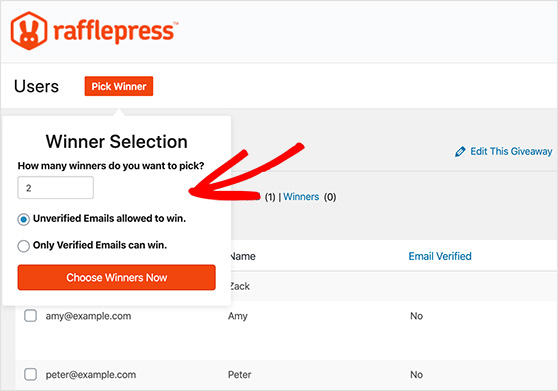
RafflePress integrates directly with popular email marketing services and includes controls to set your giveaway start and end date. For complete instructions, check out this step-by-step guide on how to do a giveaway on YouTube.
What Are YouTube’s Giveaway Rules?
YouTube lets you run contests, but it sets clear conditions you have to meet. Get these wrong and your giveaway can be removed, or your channel flagged for fake engagement.
- It must be free to enter: you can’t require a purchase to take part.
- You can’t require a subscription: asking viewers to subscribe as a condition of entry breaks YouTube’s contest policies. You can invite them to visit your channel as a bonus action instead.
- You must disclose that YouTube isn’t a sponsor: your rules need to make clear YouTube has no involvement and release it from liability.
- You need a privacy policy: if you collect any personal data to run the contest, your rules must explain how you’ll use it.
I lean on RafflePress’s rules generator here because it covers the YouTube disclaimer and privacy language without me having to draft it from scratch.
Free: Download Our Giveaway Playbook
Templates, prize ideas, and promotion strategies in one guide.
10 Winning YouTube Giveaway Ideas
Now that you know the benefits and the rules, here are 10 real giveaway ideas you can borrow. Use the table to jump to the one that fits your channel, then read on for how I’d rebuild each as a WordPress giveaway.
| Giveaway idea | Best for |
|---|---|
| New Year multi-platform giveaway | Channels active on several social networks |
| Product roundup and giveaway | Review and niche product channels |
| Birthday or anniversary giveaway | Established brands marking a milestone |
| Product unboxing giveaway | Cross-promoting a second platform like Instagram |
| Subscriber milestone giveaway | Channels hitting a big subscriber number |
| Monthly recurring giveaway | Building steady, repeat engagement |
| Q&A secret-code giveaway | Getting viewers to watch to the end |
| Gift guide giveaway | Creators with brand partnerships |
| Video tutorial giveaway | How-to and educational channels |
| Video challenge giveaway | High-energy collaboration content |
1. New Year YouTube Giveaway Example
My first example is from Tidal Gardens, which started the year with a bang. Instead of a single giveaway, they ran multiple contests across several social media platforms at once, including YouTube, Facebook, and Instagram.
In the video description, viewers can click through to the official rules and how to enter.
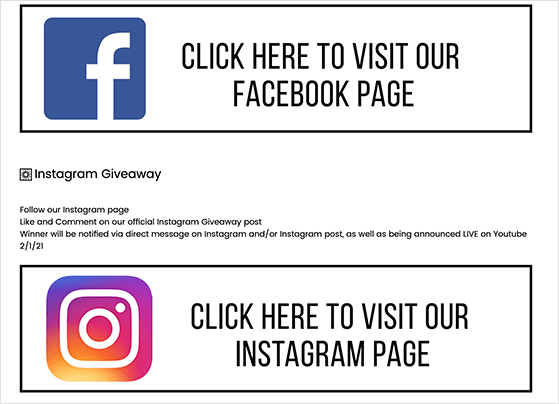
Running on so many channels is great for brand awareness, but entries scattered across different places get confusing fast.
To rebuild this, I’d consolidate it into a single giveaway landing page with one entry action per platform. Take a look below to see what I mean.
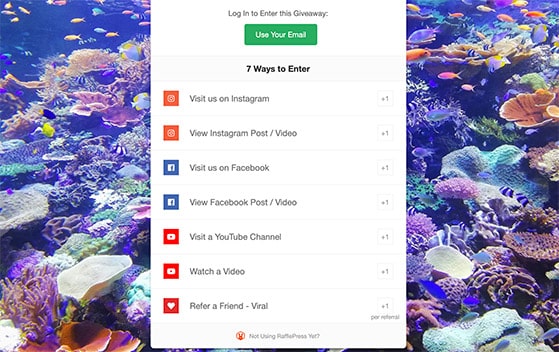
With every social action in one place, it’s easier for people to enter and easier for the brand to manage and draw a winner.
2. Product Roundup and Giveaway
The next YouTube giveaway idea comes from Joshua Bardwell, a first-person view drone hobbyist. His video rounds up some of the latest products in his niche, and at the end he gives one of them away.
The giveaway rules in the description are a great model for handling your terms and conditions on YouTube. Every detail is clear and leaves no room for confusion.
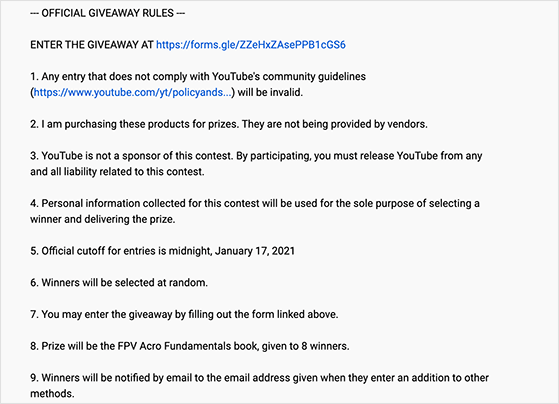
To enter, viewers fill in a Google form with their email and answer a few questions, though the questions aren’t required.
To rebuild this, I’d host the giveaway on my own site and use the Automatic entry method, so anyone who registers gets an entry. Then I’d add optional bonus entries like visiting the YouTube channel, watching a video, or referring the contest to a friend to boost visibility.
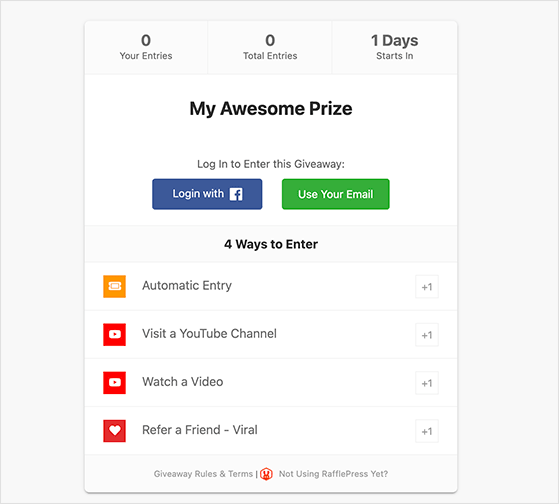
Since entrants aren’t required to follow the YouTube channel, it stays within YouTube’s giveaway rules.
3. Birthday YouTube Giveaway Example
In this example, WPBeginner created a giveaway to celebrate an anniversary. The video covered some of the site’s recent articles and told viewers what they could win by entering.
WPBeginner then hosted the giveaway directly on their website using RafflePress.
The entry actions they used included:
- Joining WPBeginner’s Facebook Group
- Visiting their YouTube channel
- Visiting their Instagram profile
- Following WPBeginner on Twitter
- Following them on Pinterest
- Visiting their Facebook page
- Referring a friend
- And more
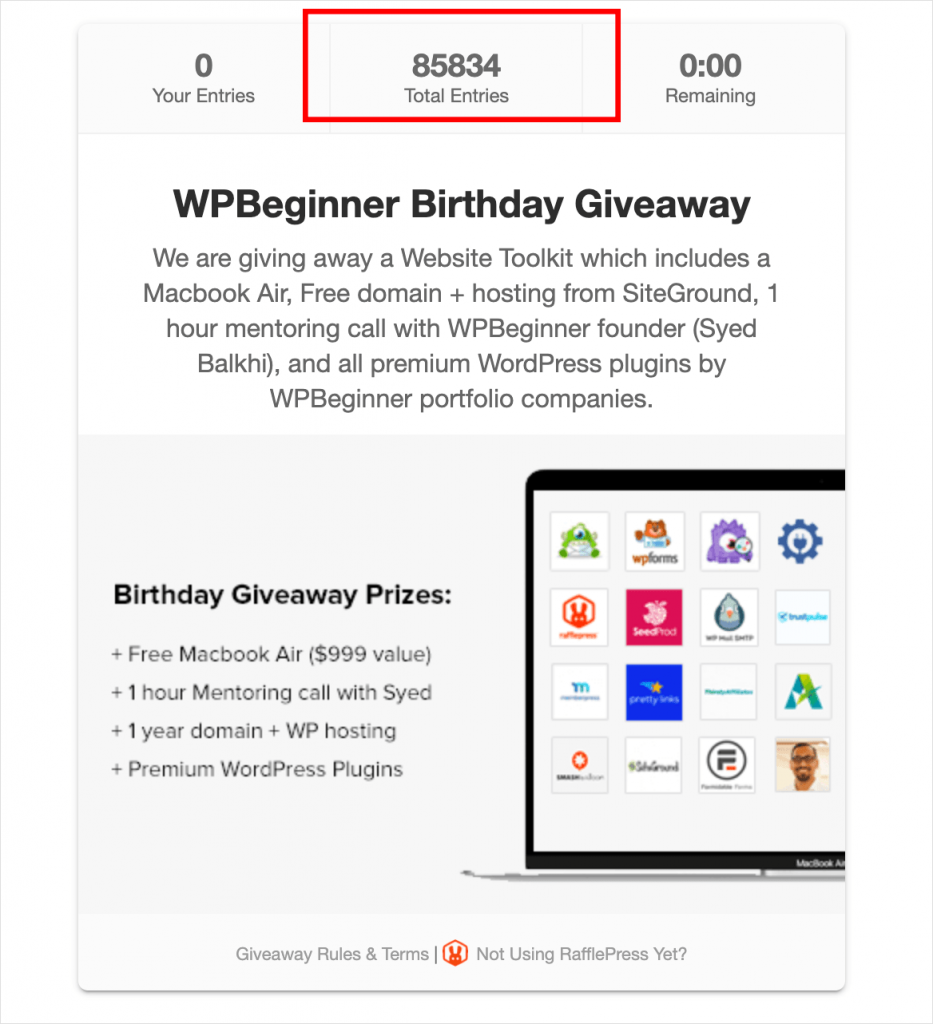
The giveaway generated over 85,000+ entries and a lot of growth for WPBeginner’s social channels. I’m familiar with WPBeginner from the WordPress ecosystem, and a milestone is exactly the kind of reason that gives a giveaway its hook.
4. Product Unboxing Giveaway
It might seem counterintuitive, but using YouTube to grow an Instagram following works well. That’s what Supercar Blondie did in this unboxing giveaway, using Instagram as a contest promotion strategy.
The video is a phone unboxing, with the devices available to win as part of the giveaway. To enter, viewers had to follow a link to an Instagram post, follow the profile, and tag three friends in the comments.
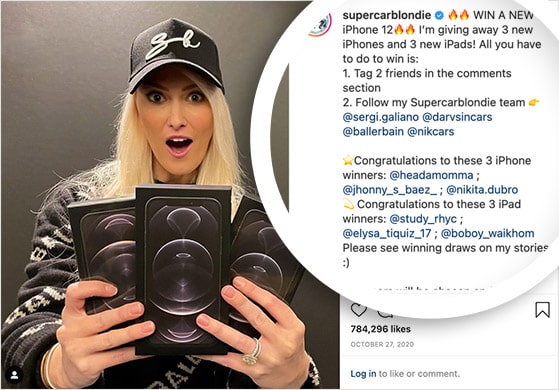
It’s an effective way to grow both the channel and the Instagram profile, but it’s a lot of steps for entrants to follow.
To rebuild this, I’d create a giveaway landing page with RafflePress and add actions to visit both YouTube and Instagram. You could also add actions to share the giveaway with friends.
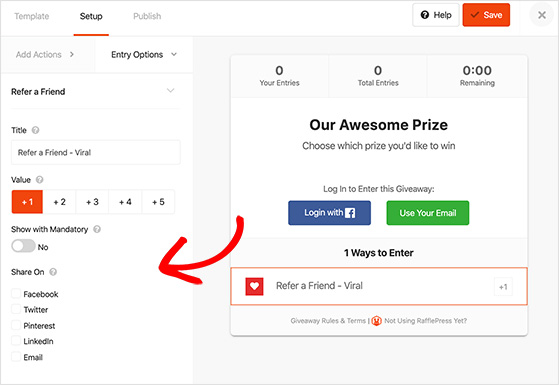
The result is the same, it just takes fewer steps and is much easier to manage. Check out this post for more winning contest ideas you can try.
5. 100k Subscribers Daily YouTube Giveaway
A giveaway is a great way to celebrate your fans and subscribers. In this example, Just One More Watch took its 100k subscribers milestone to a new level.
Instead of one giveaway, he ran one per day for 10 days to give away 10 watches. To enter, viewers had to:
- Subscribe
- Like the video
- Visit a URL
- Leave a comment with a new watch idea
YouTube’s giveaway rules have tightened over the years to stop channel owners from manipulating metrics, so I’d replicate this with RafflePress on your website instead.
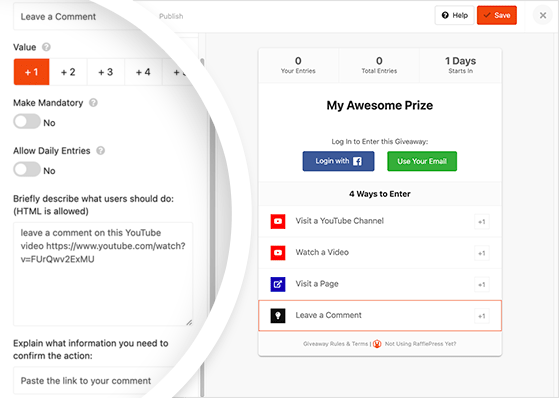
Rather than requiring a subscription, you’d ask people to visit your channel. Then you can invite them to watch your video, visit a link, and leave a comment as bonus entries.
You might also like these business giveaway ideas to grow your brand.
6. Monthly YouTube Giveaway Example
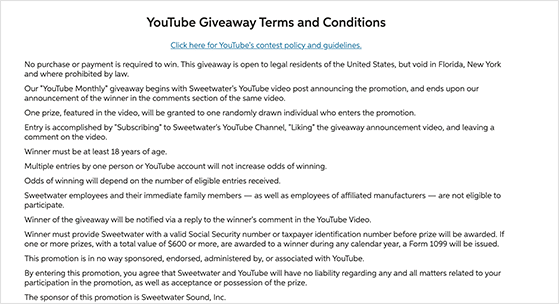
A regular giveaway keeps excitement building for your channel month after month. That’s what Sweetwater did in this contest.
For the chance to win free audio gear, viewers had to:
- Subscribe to the YouTube channel
- Like the YouTube video
- Comment on the video
What stands out to me here is the link to the official contest rules. It keeps the contest in line with YouTube’s rules and gives entrants the details they need.
Since Sweetwater already has a website, I’d host the giveaway on their site with RafflePress. That way they can use the built-in rules generator to show their guidelines inside the giveaway widget.
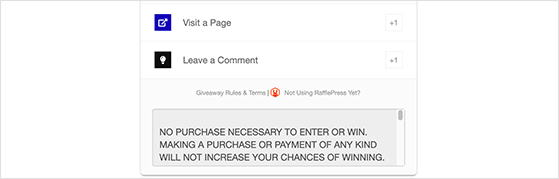
This means entrants don’t have to leave the page to read the rules.
7. Q & A YouTube Giveaway Example
Here’s something a little different. To celebrate 10 years on YouTube, Veritasium made a video answering popular questions from fans.
Throughout the video, letters appeared in the top-right corner of the screen. Viewers combined the letters into a password and submitted it through a form to enter.
It’s a clever way to make sure people watch to the end. The downside is that forms can be cumbersome and hard to manage.
To rebuild this, I’d host the giveaway on my website with RafflePress. Then I’d ask people to watch the video and answer a question using the password as the answer.
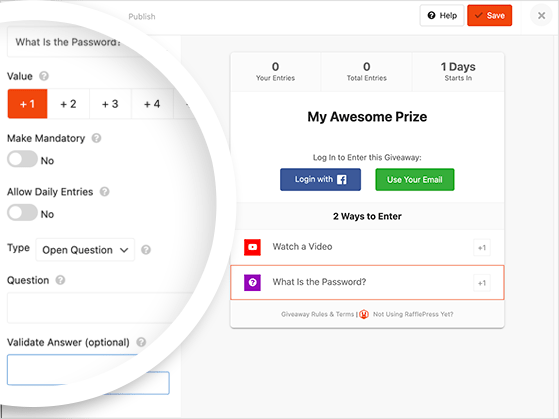
You can even set the correct answer in the action settings so only the right entries count.
8. Gift Guide and Giveaway
This YouTube giveaway idea is one almost anyone can run. Brands and creators with partnerships can build a gift guide featuring several products as giveaway prizes.
Look at this example from Lisa Eldridge, where entrants could win one of more than 40 products. To enter, all they had to do was leave a comment on YouTube.
To rebuild this, I’d ask people to watch the video and answer a question about their favorite product from the guide. That keeps the low-friction comment feel while giving you verified entries you can actually filter and draw from inside RafflePress.
9. Video Tutorial and Giveaway
This idea is like the gift guide above, but with a useful twist. Mel Thompson created a tutorial on how to use a makeup palette, with the chance for viewers to win one of their own.
A tutorial offers more value than a roundup because it teaches viewers something new. Add a comment-to-enter action and more people stick around to the end.
To rebuild this, I’d use a RafflePress watch-a-video action so entries are tied to the tutorial itself. Then I’d add a question about a tutorial step as a bonus entry, which rewards the viewers who actually watched.
10. Video Challenge YouTube Giveaway Example
My final YouTube giveaway idea is this challenge from ZHC in collaboration with CoolKicks LA.
The video follows Zach into several shoe stores, where he customizes shoes before giving them away to shoppers. He finishes with a call to action to win shoes and store credit, with entries tied to following both accounts on Instagram, YouTube, and Twitter.
To rebuild this for a collaboration, I’d build one shared RafflePress landing page with visit-channel actions for both partners. A single page means both brands grow from the same entries, and neither has to chase comments across two channels to find a winner.
What Makes a Winning Giveaway Comment?
A winning giveaway comment is specific, on-topic, and follows the prompt you set. A reply that answers your actual question stands out far more than a generic “pick me.”
When you ask for a comment, give people something concrete to say, like their favorite product or what they’d do with the prize. The more specific the prompt, the easier the entries are to judge.
To judge fairly, set your criteria before the giveaway opens and apply them the same way to everyone. The cleanest approach I’ve found is to collect comments as a verified entry action, then draw at random from the entries that met your prompt.
What Prizes Work Best for a YouTube Giveaway?
The best prizes appeal directly to the audience you want to keep. A prize someone outside your niche would want attracts entrants who unsubscribe the moment the giveaway ends.
Your own product is often the strongest option because it filters for people who actually want what you make. When I run giveaways with RafflePress, the prizes that hold an audience are the ones tied to the niche.
Niche items work for the same reason. Pick something your viewers would genuinely use, and skip generic cash, which draws prize hunters more than fans.
How Do I Announce the Winner?
Announce your winner publicly so the result feels legitimate. A live reveal or a follow-up video builds trust and shows the giveaway was real, which matters for the next one you run.
I use the RafflePress random winner picker to draw the winner, then share the result with my audience. For the full process, see this guide on how to announce a giveaway winner.
FAQs About YouTube Giveaways
How do you pick a winner for a giveaway on YouTube?
Pick a winner with a random draw so the result is fair and defensible. If you run the giveaway on your website, the RafflePress random winner picker draws from verified entries in one click.
Picking from YouTube comments by hand works for small contests, but it’s slow and harder to prove fair. For full steps, see how to pick a winner of a giveaway.
What is the best comment to win a giveaway on YouTube?
The best comment answers the prompt the creator set, clearly and specifically. If they ask for your favorite product, name it and say why rather than just writing “pick me.”
Most giveaways draw winners at random, so a strong comment won’t change your odds. It does help when the creator is judging entries on quality.
How do YouTube giveaways work?
A creator offers a prize, sets entry actions like leaving a comment or visiting a channel, then draws a winner once the giveaway ends. The actions have to be free and can’t require a subscription.
Many creators run the giveaway on their own website with a tool like RafflePress, which verifies entries and draws the winner automatically.
Can I require users to subscribe to my channel to enter?
No. YouTube’s contest policies don’t allow you to make a subscription a requirement to enter.
You can ask viewers to visit your channel as a bonus action instead, using a tool like RafflePress.
I hope these YouTube giveaway ideas give you what you need to start running one for your business. You might also want to know why your giveaway needs to be no purchase necessary.
If you found this article helpful, be sure to join us on YouTube, Twitter, and Facebook for more giveaway guides and tutorials.


