How to Get More Subscribers on YouTube (15 Proven Strategies)
 Stacey Corrin
Stacey Corrin
Stacey Corrin
 John Turner
John Turner
John Turner
TL;DR: How to Get More Subscribers on YouTube
Getting real YouTube subscribers takes consistent effort across setup, content, and community. Here are the 15 strategies this guide covers:
- Run a YouTube giveaway – use RafflePress to make subscribing a contest entry requirement.
- Brand your channel – set a recognizable icon, channel art, and clear value prop.
- Make a channel trailer – short, auto-plays for new visitors, hooks them fast.
- Design clickable thumbnails – 1280x720px, bold title, clear visual.
- Write keyword-optimized descriptions – lead with the most important info.
- Add a subscribe watermark – shows on every video automatically.
- Optimize for watch time and consistency – longer content plus a regular schedule.
- Add a subscribe CTA at the end – tell viewers exactly what to do next.
- Embed your YouTube feed on your site – turn site visitors into subscribers.
- Post YouTube Shorts – 70B daily views, algorithm favors smaller channels.
- Reply to comments – builds community and brings viewers back.
- Create playlists – increases session time, which boosts algorithm recommendations.
- Partner with other creators – reach audiences already primed to subscribe.
- Share videos across social media – bring your existing audience to YouTube.
- Use YouTube Analytics – find your best-converting videos and make more of them.
When I started my first YouTube channel, getting that subscriber count to move felt impossible.
If you’ve been wondering how to get subscribers on YouTube without spending money or using sketchy tactics, I’ve got you covered.
In this post, I’ll share 15 proven strategies I’ve used (and seen work) to grow real, engaged subscribers, even on brand-new channels. And yes, giveaways are part of it.
Quick Summary: 15 Ways to Get More YouTube Subscribers:
- Can You Buy YouTube Subscribers?
- How to Get Subscribers on YouTube
- 1. Run a YouTube Giveaway to Get Subscribers
- 2. Brand Your Channel for a Strong First Impression
- 3. Make a Channel Trailer That Hooks New Viewers
- 4. Design Thumbnails That Get More Clicks
- 5. Write Descriptions That Boost Views and Subs
- 6. Add a Subscribe Watermark to Every Video
- 7. Optimize for Watch Time and Consistency
- 8. Add a Clear Subscribe CTA at the End
- 9. Showcase Your YouTube Feed on Your Site
- 10. Use YouTube Shorts to Get Discovered
- 11. Create Playlists to Keep Viewers Watching
- 12. Partner With Creators to Grow Your Audience
- 13. Reply to Comments to Build Community
- 14. Share Your Videos Across Social Media
- 15. Use YouTube Analytics to Double Down on What Works
- Frequently Asked Questions
Can You Buy YouTube Subscribers?
A popular way to get more people on your follower list is to buy YouTube subscribers. You might think this is the best hack to reach that all-important 1,000 subscriber goal so you can get paid. But the truth is, it can do more harm in the long term.
I strongly suggest you DO NOT buy YouTube subscribers for the following reasons:
- Paid-for subscribers are often just bots.
- Bot subscribers don’t engage with your videos.
- You risk alienating your actual audience, who likely values authenticity and transparency.
- YouTube could ban you for going against their Fake Engagement Policy.
- Brands are looking for genuine engagement and will avoid you like the plague.
More importantly, it’s not worth the time, effort, and potential fallout to go down that route. Instead, build a free and authentic YouTube following with these 15 proven strategies.
How to Get Subscribers on YouTube
Looking for more legitimate ways to grow your YouTube subscribers? Follow the tips below to learn how.
1. Run a YouTube Giveaway to Get Subscribers
Giveaways are one of the fastest ways to grow your subscriber count — especially when you make subscribing part of how people enter.
People love giveaways because not only do they get the chance to win a great prize they get to engage with channel owners too. Giveaways are also an excellent way to celebrate milestones on your channel, like reaching your first 1,000 subs.
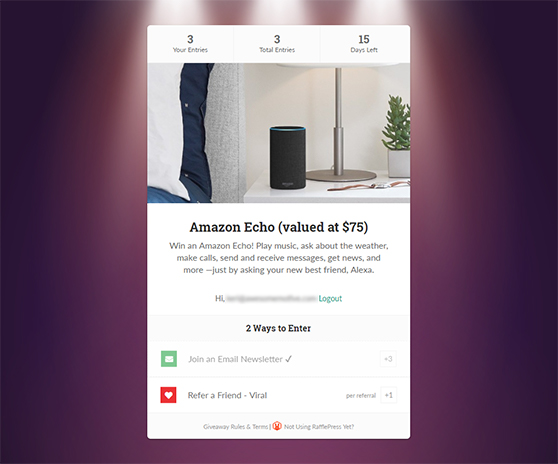
You can quickly run a giveaway on YouTube using RafflePress, the best WordPress giveaway, and contest plugin, while cross-promoting the giveaway on your blog. Let’s take a look at how to get one up and running.
First, grab yourself a copy of RafflePress. Then download and install the WordPress plugin on your website. If you need help, check out this guide for installing WordPress plugins here.
With RafflePress installed, hover over the RafflePress icon and click Add New to bring up the pre-built giveaway templates.
Now give your contest a name. You’ll want to select the Grow Your YouTube Channel template, then click Use This Template to set it up.
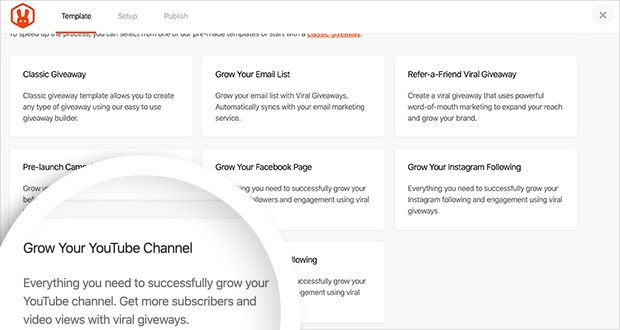
The next screen you’ll see will look similar to the one below.
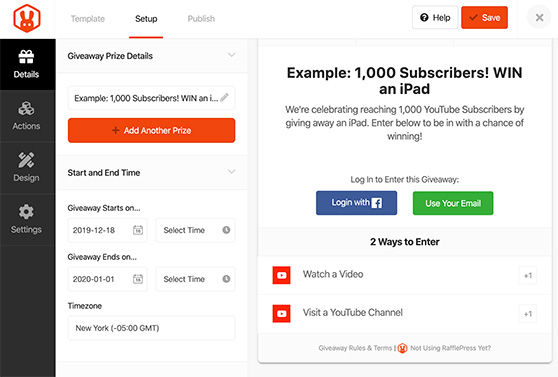
For the pre-built YouTube template, RafflePress automatically adds actions users can take to enter your giveaway on YouTube. By default, the 2 actions are:
- Watch a Video
- Visit a YouTube Channel
You can make either of these actions mandatory by toggling the Make Mandatory option and allowing people to enter daily.
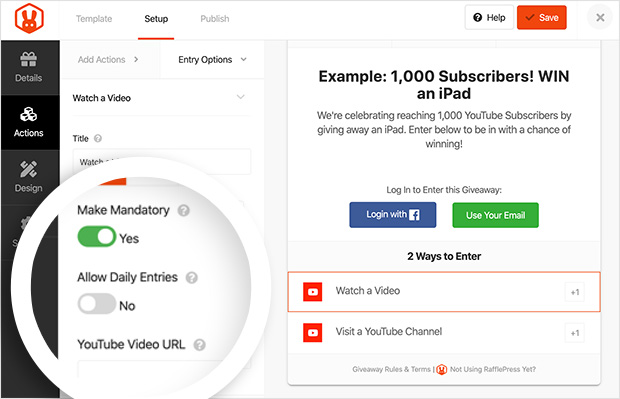
But these are just the default actions for this particular giveaway template. RafflePress has many other ways you can let people enter your giveaway. Further actions include:
- Following or visiting other social profiles.
- Joining an email newsletter.
- Automatically entering.
- Visiting a URL.
- Referring a friend.
- Completing a survey or poll.
- Answering a question.
- Submitting an Image.
- Posting a Tweet.
- Watching videos on Facebook or Instagram.
You can even invent an entry action of your own if you’re feeling creative.
But since we’re focused on getting more YouTube subscribers, let’s stick with the default YouTube giveaway template actions.
The next step is to add the URL of the video you want people to watch into your action settings.
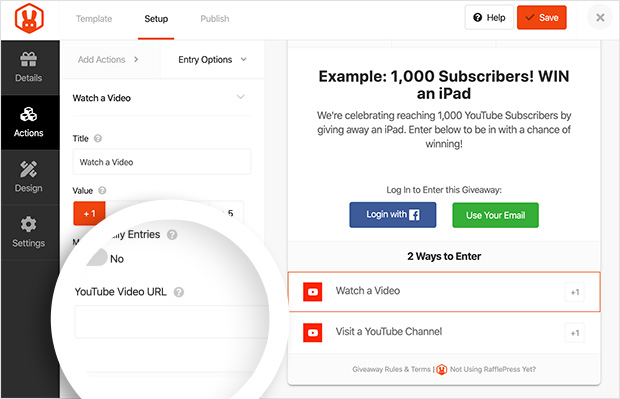
For the Visit a YouTube Channel action, use your subscription confirmation URL instead of your standard channel URL. This is the one change that makes the giveaway actually convert entrants into subscribers.
To build your confirmation URL, go to your channel homepage and add ?sub_confirmation=1 to the end of the URL.
RafflePress’s YouTube Channel URL looks like this:
https://www.youtube.com/channel/UCPtN7xV_892Pa6AcoOYzbAg
After adding the extra details, it will look like this:
https://www.youtube.com/channel/UCPtN7xV_892Pa6AcoOYzbAg?sub_confirmation=1
When someone visits this second URL, they’ll see the following confirmation box:
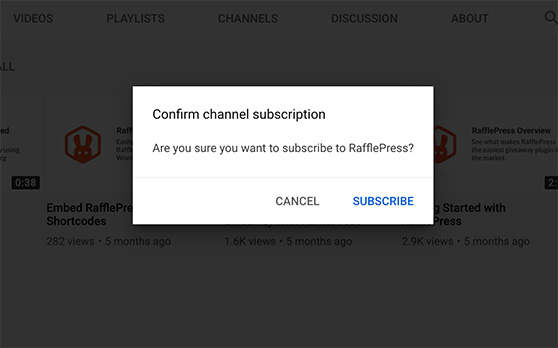
This bypasses the extra step people need to take to click the subscribe button. Instead, they just need to confirm they’d like to subscribe.
With this done, go ahead and finish the setup. This guide has everything you need to know about setting up a giveaway with RafflePress, so you’ll be up and running in no time at all.
2. Brand Your Channel for a Strong First Impression
A consistent brand makes your channel easier to recognize and helps viewers decide if your content is worth subscribing to.
A well-branded channel provides visitors with helpful information and helps you become easy to recognize across the web. Plus, unbranded channels look dull and won’t inspire anyone to subscribe.
The 2 most important branding aspects are your channel art and channel icon.
- The channel icon should ideally be 800 x 800 pixels in size.
- The channel art size should be 2560 x 1440 pixels.
Both should clearly define your brand so visitors know exactly what they’re looking at and what to expect from you.
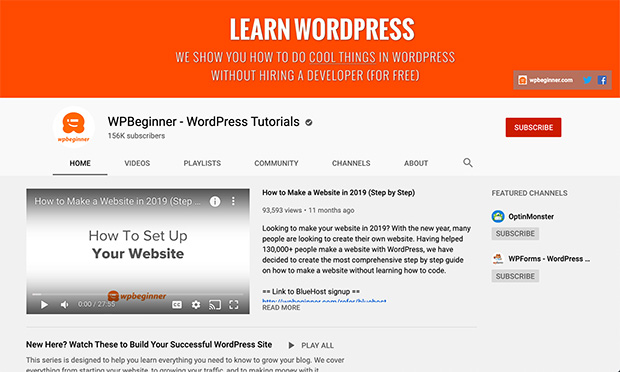
WPBeginner does a great job of branding its YouTube Channel. They use the WPBeginner mascot and logo in their icon and have channel art that clearly states what you can learn by watching their videos.
3. Make a Channel Trailer That Hooks New Viewers
Something else to add to your branding checklist is to create a trailer for your channel. Your trailer is the first impression for new visitors, so use it to tell people what your channel’s about and why they should subscribe.
You can feature your trailer in the YouTube welcome module, which sticks to the top of your channel and offers a great video marketing opportunity for you to hook viewers.
Videos in this space play automatically, so when people land on your page, your trailer auto-plays, explaining who you are and what you offer.
This trailer from the Slow Mo Guys has everything! It’s fun, engaging, and explains what viewers will get from watching their videos. Doesn’t that make you want to subscribe?
4. Design Thumbnails That Get More Clicks
Another quick YouTube hack to inspire people to subscribe is to make your video thumbnails more clickable.
Video thumbnails are the first thing a viewer sees when discovering your video. A standard thumbnail isn’t going to tell them much about what they’re about to watch.
Thumbnails act like billboards for your videos, and a great one can boost clicks, watch time, and subscriber growth.
The ideal dimension of your YouTube video thumbnail should be 1280 x 720 pixels. The absolute minimum width is 640 pixels.
Good thumbnails also have a clear title and screenshots of the video content.
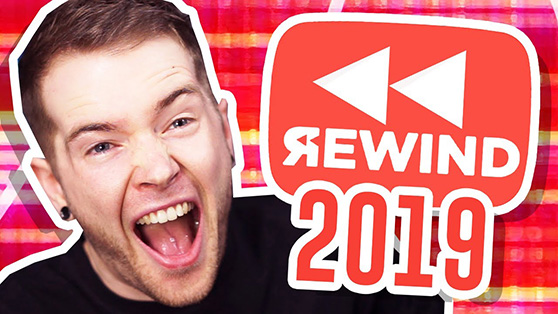
This video thumbnail from a popular gaming YouTuber is eye-catching and shows what people can expect when they click on his video.
5. Write Descriptions That Boost Views and Subs
Next up is an important hack that can improve the discoverability of your videos and an uptick in subscribers. And that is optimizing your video descriptions for search.
When people browse YouTube, they often use it like a search engine, typing keywords into the search box to find what they’re looking for.
So, escriptions that include the right keywords and calls to action help your videos get found — and your subscriber count grow.
Start by researching target keywords for your video. An easy way to do this is to look at similar videos in a YouTube search and note down the suggestions as shown below.
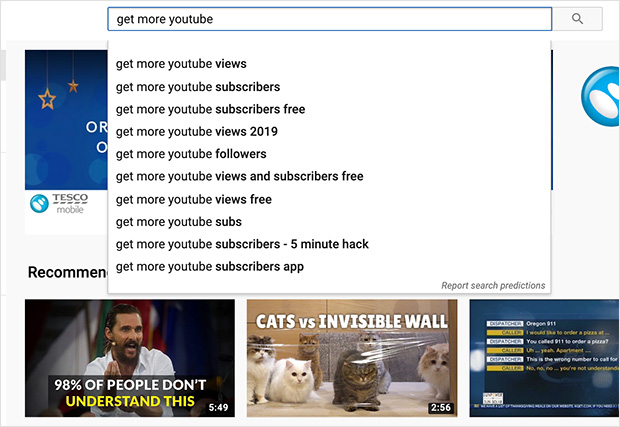
Alternatively, you can use a keyword research tool to better define your keywords and learn more about search volumes.
Next, you’ll want to rename your video file to include your target keyword. Make sure you add it naturally to your video title too.
Now we’ll look at your video description. At this point, it’s worth noting that while Google gives you a 1,000-character limit for video descriptions, they’ll only display the first 2-3 lines to viewers. After that, people will need to click the show more link to continue reading.
That’s why it’s good practice to put your most important information, including keywords and calls to action, at the front of your video description. After all, people came to watch your video, not to read an essay.
6. Add a Subscribe Watermark to Every Video
Adding a watermark to your videos gives viewers a consistent subscribe button they can click without leaving the video.
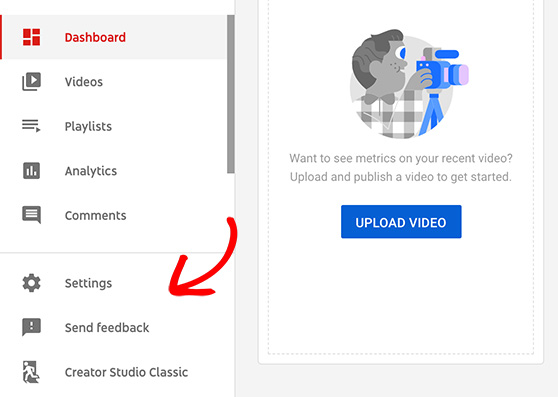
To set your channel watermark, head to your channel’s YouTube studio dashboard and click Settings.
Then click the Channel option and the Branding tab.
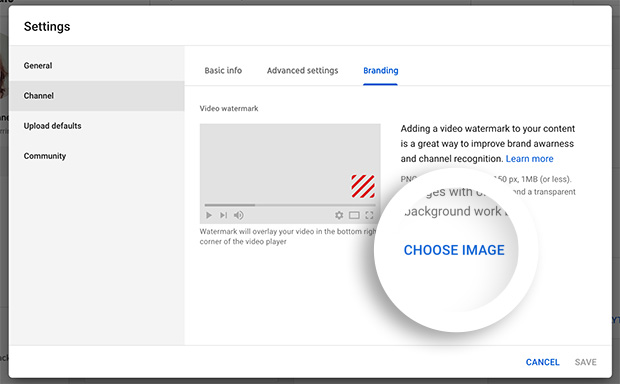
Click Choose Image to find your logo on your computer. Then decide when you’d like your watermark to display in the video.
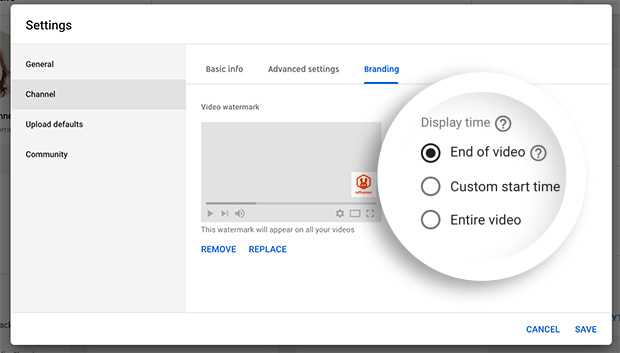
Click Save, and you’re done. Now when your videos play, your watermark will show up when you set it to. And when people click your watermark, they can choose to subscribe.
7. Optimize for Watch Time and Consistency
Longer videos often perform better in search because they give you more time to connect with viewers before asking them to subscribe.
That said, don’t pad a 5-minute video into a 60-minute one just for the sake of length. If viewers bail early, watch time drops and the algorithm works against you.
Consistency matters just as much as length. Uploading at least once a week gives people a reason to subscribe and come back.
If once a week isn’t realistic, every two weeks works too. What matters most is consistency. People subscribe when they know you’ll keep showing up.
8. Add a Clear Subscribe CTA at the End
Don’t assume people will subscribe on their own. Tell them exactly what to do next, and give them a reason to do it.
In your case, you want them to click the subscribe button, so why not encourage them to do that right before they leave?
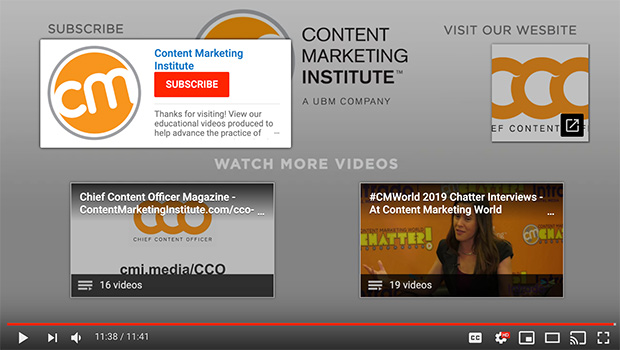
The Content Marketing Institute does a great job of encouraging people to subscribe at the end of their videos. When you hover over the Subscribe heading, an overlay appears with their direct subscribe link.
9. Showcase Your YouTube Feed on Your Site
If you run a blog or website, embedding your latest videos can turn casual site visitors into YouTube subscribers.
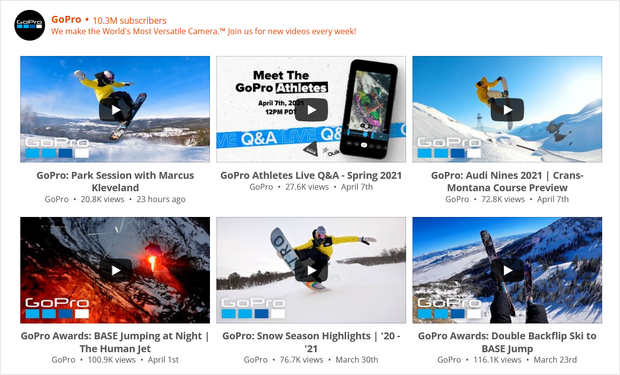
You can embed a YouTube feed anywhere on your WordPress site using Smash Balloon. Check out this tutorial to learn how to add a YouTube feed in WordPress.
10. Use YouTube Shorts to Get Discovered
YouTube Shorts gets about 70 billion daily views, and the algorithm surfaces Shorts from smaller channels more aggressively than long-form content. If you haven’t tried Shorts yet, this is the fastest way to reach new audiences in 2026.
The best way to use Shorts for subscriber growth is to treat them as previews of your long-form videos. End each Short with a CTA pointing to the full video and add a subscribe prompt in the final few seconds.
Viewers who discover you through a Short often visit your channel before subscribing, so your channel branding and trailer (strategies 2 and 3) do real work here. A well-set-up channel page converts Short viewers into subscribers much faster than a bare one.
11. Create Playlists to Keep Viewers Watching
Playlists keep viewers watching your content in sequence, which increases session watch time. YouTube’s algorithm rewards higher session time with more recommendations, which means more people discovering your channel.
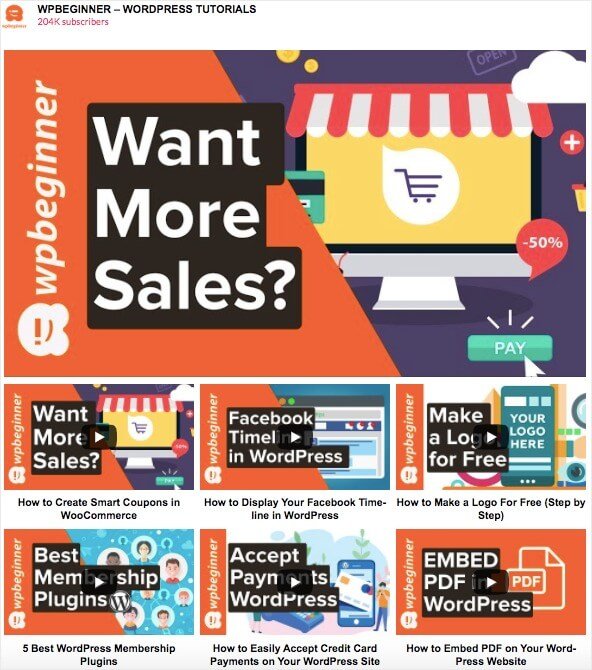
Create a playlist for your most subscribe-worthy videos and link to it from your channel description and video end screens. When someone watches two or three of your videos back-to-back, they’re far more likely to subscribe than someone who watched just one.
12. Partner With Creators to Grow Your Audience
Partnering with other creators helps you reach new audiences and gain subscribers who already love similar content.
Working with others, especially if their account is already established, can be a great way to promote your channel. Doing so exposes you to a whole new audience of people who might not know you exist. And so, as your visibility increases, your subscribers will too.
13. Reply to Comments to Build Community
When you reply to comments, you build community and viewers are more likely to subscribe to creators who engage back.
Think of it this way, would you care about a channel that ignored your comments? Probably not!
We’re human and love feeling like we have something to offer. And a quick response to what we have to say goes a long way to turning us into loyal fans.
And since it’s not something YouTubers do all that often, replying to comments will help you stand out more as a genuine content creator netting you more subscribers.
14. Share Your Videos Across Social Media
Many other social media platforms work seamlessly with video content. On Facebook, for example, videos are more popular than any other content.
Share your videos on platforms like Instagram, TikTok, and Facebook to bring your existing audience over to YouTube. If you’re running a giveaway, promoting it across multiple platforms can amplify your subscriber growth even faster.
You can also cross-promote your channel on streaming services like Twitch.
Remember to add a link back to the original video in the captions.
15. Use YouTube Analytics to Double Down on What Works
Most creators focus on getting more views. The ones who grow fastest figure out which videos actually convert viewers into subscribers, then make more of them.
In YouTube Studio, go to Analytics, then Content, and sort by Subscribers Gained. The videos at the top are your subscriber magnets. Look at what they have in common: topic, format, length, and thumbnail style. Use that as your content template going forward.
I’d also check the Audience tab to see when your subscribers are most active. Uploading when your audience is already on YouTube gives every new video a better shot at reaching people who are likely to subscribe.
Frequently Asked Questions
How do I get my first 1,000 YouTube subscribers?
The fastest legitimate approach is to combine a giveaway with consistent content. Running a YouTube giveaway with RafflePress, where subscribing is a requirement to enter, can push you toward 1,000 fast. Pair that with at least one new video per week and a fully branded channel page, and the algorithm starts surfacing your content to new viewers.
Do YouTube Shorts help you get more subscribers?
Yes, and they’re especially useful for newer channels. YouTube Shorts gets about 70 billion daily views, and the algorithm favors smaller channels in Shorts discovery. The key is using Shorts as a preview of your long-form content. End each Short with a CTA pointing to your full video so curious viewers follow you to your channel and subscribe.
What’s the best entry action to use in a YouTube giveaway?
Use the “Visit a YouTube Channel” entry action in RafflePress, but paste your subscription confirmation URL instead of your standard channel URL. Adding ?sub_confirmation=1 to the end of your channel URL takes entrants directly to the subscribe confirmation screen, which means you get real subscribers instead of just channel visits.
How can I tell which videos are getting me the most subscribers?
In YouTube Studio, go to Analytics, then Content, and sort by Subscribers Gained. This shows you which videos are actually converting viewers into subscribers, not just which ones get the most views. The patterns you find, like topic, format, length, and thumbnail style, are your blueprint for future content.
Does replying to comments really help you get more subscribers?
It does, more than most creators expect. When you reply to comments, YouTube’s notification system brings that viewer back to your channel, and returning visitors are far more likely to subscribe than first-time ones. Using YouTube’s Heart feature on comments also triggers notifications, which can drive even more return visits.
If you want a fast path to your first 1,000 subscribers, running a giveaway with RafflePress is one of the best places to start. You get real, engaged subscribers, not bots, and the setup takes less than 30 minutes.
From there, use these strategies alongside your regular uploads. Want to keep growing? Check out these tips on how to get more likes on YouTube too.
Don’t forget to subscribe to our YouTube Channel (see what we did there?). You can also find us on Facebook and Twitter for more helpful guides and tutorials.


