6 Best TikTok WordPress Plugins for 2026 Compared
 Stacey Corrin
Stacey Corrin
Stacey Corrin
 John Turner
John Turner
John Turner


Your TikTok bio link goes to your WordPress homepage, and you’re watching people bounce. The homepage wasn’t built for someone who just tapped a link in a 30-second video.
Getting TikTok traffic to convert on your WordPress site means picking the right plugin for your goal. These 6 best TikTok plugins for WordPress each target a different use case, so you can find the one that fits without trying all of them.
| Plugin | Pricing | Free Plan | Best For | Rating |
|---|---|---|---|---|
| RafflePress | Free / From $299 one-time | Yes | TikTok giveaways and follower growth | A+ |
| SeedProd | Free / From $39.50/yr | Yes | TikTok landing pages and link-in-bio | A |
| Smash Balloon TikTok Feeds | Free / From $49/yr | Yes | Customizable TikTok video feeds | A |
| TikTok for Business | Free | Yes | Official TikTok pixel and ad tracking | B |
| MonsterInsights | From $99.50/yr | No | Tracking TikTok referral traffic | A |
| Floating TikTok Button | Free | Yes | Adding a TikTok follow button to every page | B |
How I Chose the Best TikTok Plugins for WordPress
I focused on what each plugin specifically does for TikTok, not general social media tools with TikTok support listed as a footnote. Here’s what I evaluated:
- Genuine TikTok functionality. Does the plugin solve a real TikTok problem you can’t handle without it?
- Beginner-friendly setup. I looked for plugins a WordPress user can configure in under 30 minutes without touching code.
- Active development. I checked update history and support responsiveness for each plugin.
- Honest free version. I noted exactly what the free version lets you do, so you know before you install.
Six plugins, six distinct use cases. No overlap.
- 1.RafflePress: Best for TikTok Giveaways and Growing Followers
- 2. SeedProd: Best for TikTok Landing Pages and Link-in-Bio
- 3.Smash Balloon TikTok Feeds: Best for a Polished, Customizable TikTok Feed
- 4. TikTok for Business: Best for Official TikTok Ad Tracking
- 5. MonsterInsights: Best for Tracking TikTok Traffic in WordPress
- 6.Floating TikTok Button: Best for Getting More TikTok Followers from Your Site
1. RafflePress: Best for TikTok Giveaways and Growing Followers

| Feature | Details |
|---|---|
| Pricing | Free / From $299 one-time |
| Free Plan | Yes (unlimited free trial) |
| Standout Features | • Dedicated TikTok follow and watch video entry actions • Drag-and-drop giveaway builder • Pre-built giveaway templates • Random winner picker |
| Rating | A+ |
| Best For | Growing TikTok followers through contests and giveaways |
RafflePress is a WordPress giveaway plugin that lets you run viral contests and grow your social media following directly from your site. It’s the top pick on this list because it has dedicated TikTok entry actions that no other giveaway plugin includes out of the box.
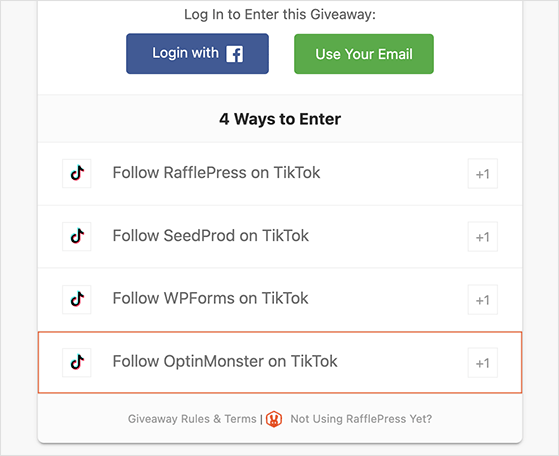
I use RafflePress on my own sites, so I know the setup well. The TikTok entry actions take about a minute to configure: paste in your TikTok username or video URL, and contestants earn entries by following your TikTok account or watching a specific video.
The drag-and-drop builder starts from a pre-built giveaway template. A complete contest with TikTok follow and email sign-up actions takes under 20 minutes to set up from scratch.
| Pros | Cons |
|---|---|
| Dedicated TikTok follow and watch video entry actions | Giveaway-specific; doesn’t embed feeds or track ad pixels |
| No-code drag-and-drop setup | TikTok actions require a premium plan |
| Unlimited free trial before paying | |
| Integrates with major email marketing services |
RafflePress is the right pick if your goal is growing your TikTok following through a contest or driving views on a specific video. If you need to embed a feed or track ad conversions, one of the other plugins below fits that job better.
2. SeedProd: Best for TikTok Landing Pages and Link-in-Bio

| Feature | Details |
|---|---|
| Pricing | Free version available / From $39.50/yr premium |
| Free Plan | Yes |
| Standout Features | • 180+ landing page templates • Link-in-bio page support • Drag-and-drop page builder • Live mobile preview |
| Rating | A |
| Best For | TikTok landing pages and link-in-bio pages |
SeedProd is a drag-and-drop WordPress website and page builder. Its TikTok use case is specific: building a dedicated landing page for your TikTok bio link, or creating pages for TikTok ad campaigns.
I built a TikTok link-in-bio page in SeedProd to see how well it handles that use case. Starting from a pre-built template, I had a working page with links, a follow button, and a brief intro in about 15 minutes. The live mobile preview matched what it looked like on my phone.
SeedProd isn’t a TikTok-specific tool. It’s a page builder that solves a real TikTok problem: the generic homepage bio link that wasn’t designed for someone who just watched a 30-second video.
| Pros | Cons |
|---|---|
| Built for landing pages and link-in-bio, no code needed | Not a dedicated TikTok plugin |
| Free version available for basic pages | Full theme builder requires a premium plan |
| Live mobile preview included | Doesn’t embed feeds or track TikTok ad conversions |
| Works with major email marketing services |
SeedProd is the right choice if you want to send TikTok traffic to a purpose-built landing page or link-in-bio. It’s not useful for feed embedding or conversion tracking.
3. Smash Balloon TikTok Feeds: Best for a Polished, Customizable TikTok Feed

| Feature | Details |
|---|---|
| Pricing | Free / From $49/yr premium |
| Free Plan | Yes (basic grid feed, lightbox player, username feed) |
| Standout Features | • Drag-and-drop feed customizer • Grid, carousel, and masonry layouts • Popup lightbox video player • 6+ pre-built feed templates |
| Rating | A |
| Best For | Displaying TikTok videos with full design control |
Smash Balloon TikTok Feeds is a dedicated feed plugin with 60,000+ active installs. It’s built by the same team behind the popular Instagram and Facebook feed plugins, so if you’ve used any Smash Balloon plugin before, the setup process will feel familiar.
I’ve used Smash Balloon’s other feed plugins on multiple sites, and the TikTok version follows the same pattern: connect your account, pick a template, and customize via the drag-and-drop editor. The free version covers a basic grid feed with a popup lightbox player, which is enough for most use cases. Carousel and masonry layouts, hashtag filtering, and multi-account feeds are pro-only.
The standout difference from a simpler feed plugin is the visual customizer. You can adjust spacing, colors, card borders, and font sizes without touching CSS, and preview every change live before publishing.
| Pros | Cons |
|---|---|
| 60,000+ active installs, actively maintained | Carousel and masonry layouts require a paid plan |
| Solid free tier: grid feed, lightbox, username feed | Hashtag filtering and multi-account feeds are pro-only |
| Drag-and-drop visual customizer with live preview | |
| 6+ pre-built templates speed up setup |
Smash Balloon is the strongest feed option on this list for anyone who wants design control beyond a basic grid. The free version is genuinely useful, and the premium upgrade is worth it if you need multiple accounts or advanced layouts.
4. TikTok for Business: Best for Official TikTok Ad Tracking

| Feature | Details |
|---|---|
| Pricing | Free |
| Free Plan | Yes (fully free) |
| Standout Features | • Official TikTok pixel and Events API • One-click pixel setup (no code) • Lead generation ad support • Server and browser-side connection • WooCommerce catalog sync (via extension) |
| Rating | B |
| Best For | Installing the official TikTok pixel without editing code |
TikTok for Business is TikTok’s own official WordPress plugin. It installs the TikTok pixel and Events API directly from your WordPress dashboard: no theme file edits, no pasting code into headers. With 200,000+ active installs, it’s the most widely used TikTok pixel solution for WordPress.
The setup flow connects your TikTok Ads Manager account, deploys the pixel automatically, and enables event tracking for standard actions like page views, form submissions, and purchases. For WooCommerce stores, the companion TikTok for WooCommerce extension adds product catalog sync and shopping ad creation.
One thing worth knowing: the plugin’s WordPress.org rating is 1.8 out of 5, with many complaints about account connectivity and setup errors. The functionality works when it connects. If you hit issues, check the support threads before assuming the plugin is broken.
| Pros | Cons |
|---|---|
| Official TikTok plugin — free with no paid tier | 1.8/5 stars; connectivity issues are common complaints |
| 200,000+ active installs, regularly updated | Only useful if you run TikTok ads |
| One-click pixel and Events API setup | WooCommerce catalog sync requires a separate extension |
| Lead generation ad support built in |
TikTok for Business is the right starting point if you run TikTok ads and want the official pixel at no cost. Just go in knowing the setup can be fiddly. The support forum has solutions for most connection errors.
5. MonsterInsights: Best for Tracking TikTok Traffic in WordPress

| Feature | Details |
|---|---|
| Pricing | From $99.50/yr |
| Free Plan | No |
| Standout Features | • Social referral traffic reports inside WordPress • Real-time traffic view • WooCommerce analytics • Form conversion tracking |
| Rating | A |
| Best For | Tracking TikTok referral traffic without leaving WordPress |
MonsterInsights is a Google Analytics plugin for WordPress with over 3 million active users. It’s not a TikTok plugin in the traditional sense, but it fills a gap the others don’t: showing you how much traffic TikTok actually sends to your site and whether those visitors convert.
The use case I went deepest on was social referral tracking. TikTok shows up under “Social” in Google Analytics, but isolating it from other channels takes several clicks in the GA4 interface. MonsterInsights surfaces that data directly inside your WordPress dashboard in a cleaner, faster format.
If you’re spending time on TikTok content and want to know whether it’s driving real website traffic, this closes the analytics gap the other plugins leave open.
| Pros | Cons |
|---|---|
| Shows TikTok referral data directly inside WordPress | No free version |
| Trusted by 3+ million users, actively maintained | Not a dedicated TikTok integration |
| Covers WooCommerce analytics in the same dashboard | Higher price point at $99.50/yr to start |
MonsterInsights is the right pick if you want to see whether TikTok is driving real traffic to your WordPress site. Without it, you’d have to dig through Google Analytics manually every time you want to check.
6. Floating TikTok Button: Best for Getting More TikTok Followers from Your Site

| Feature | Details |
|---|---|
| Pricing | Free |
| Free Plan | Yes (fully free) |
| Standout Features | • Floating TikTok follow button on every page • TikCode (QR code) display option • Position, animation, and style controls • Desktop and mobile visibility toggle |
| Rating | B |
| Best For | Adding a persistent TikTok follow prompt to every page |
Floating TikTok Button adds a persistent floating button to your WordPress site that links directly to your TikTok profile. It’s the simplest tool on this list: one job, zero cost, no account connection required. Just enter your TikTok username and it works.
The plugin also supports TikCode, TikTok’s QR code format, which lets visitors scan directly to your profile from their phone camera. You can set the button to appear on desktop only, mobile only, or both, and choose the position on screen.
One honest note: the plugin has around 100 active installs, which is low compared to the others on this list. It’s a newer plugin with limited public track record. It works as described and was last updated in January 2026, but factor that install count into your decision.
| Pros | Cons |
|---|---|
| Completely free, no paid tier | Only ~100 active installs; limited track record |
| No TikTok account connection needed | Single-purpose: follow button only |
| TikCode (QR code) support included | No analytics or click tracking |
| Desktop/mobile visibility controls |
If you want a follow button on every page without any setup complexity, this is your option. The low install count is worth knowing, but the plugin is functional and free.
Frequently Asked Questions
What is the best TikTok plugin for WordPress?
The best TikTok plugin for WordPress depends on your goal. Use RafflePress to grow your TikTok following through a giveaway. Use SeedProd to create a TikTok landing page or link-in-bio. Use Smash Balloon TikTok Feeds to embed your TikTok videos on your site. Use TikTok for Business if you run TikTok ads and need the official pixel. Use MonsterInsights to see how much traffic TikTok sends to your site. Use Floating TikTok Button to add a follow prompt to every page for free.
How do I embed a TikTok feed on my WordPress site?
Install Smash Balloon TikTok Feeds from the WordPress plugin directory. After activating it, the setup wizard walks you through connecting your TikTok account and choosing a feed template. Use the drag-and-drop customizer to style the feed, then embed it with a shortcode or Gutenberg block. The free version covers a basic grid feed by username. Carousel, masonry, and hashtag feeds require the premium version.
Can I run a TikTok giveaway from my WordPress site?
Yes. RafflePress lets you run TikTok giveaways directly from your WordPress site. It includes dedicated TikTok entry actions that let contestants earn entries by following your account or watching a specific TikTok video. RafflePress has an unlimited free trial so you can test it before purchasing a paid plan.
How do I add a TikTok link-in-bio page to WordPress?
SeedProd is the easiest way to create a TikTok link-in-bio page on WordPress. Start from a pre-made landing page template and use the drag-and-drop builder to add your links, a TikTok follow button, and any other content TikTok visitors should see. A basic link-in-bio page takes about 15 minutes to set up. SeedProd has a free version for simple pages.
Is there a free TikTok plugin for WordPress?
Yes. Smash Balloon TikTok Feeds is free for basic username-based grid feeds. TikTok for Business is completely free with no paid tier. SeedProd has a free version for basic landing pages. RafflePress offers an unlimited free trial. Floating TikTok Button is also fully free. In each case, advanced features like hashtag feeds, the full page builder, or TikTok giveaway entry actions require a paid plan.
Free: Download Our Giveaway Playbook
Templates, prize ideas, and promotion strategies in one guide.
Which TikTok Plugin Is Right for You?
The right TikTok WordPress plugin depends on what you’re trying to accomplish.
- Use RafflePress to grow your following through a contest.
- Use SeedProd if your bio link needs a proper landing page.
- Use Smash Balloon to embed your TikTok videos on your site.
- Use TikTok for Business if you run ads and need the official pixel.
- Use Floating TikTok Button if you just want a follow prompt on every page for free.
Start with the one that matches your most pressing need. You can always add the others as your TikTok presence grows.
For more on TikTok and WordPress, see how to run a TikTok giveaway and how to market your business on TikTok. You might also like these top social media plugins for WordPress.
If you liked this article, please subscribe to our YouTube Channel for RafflePress video tutorials. You can also find us on Twitter and Facebook.

