How to Run a Facebook Flash Giveaway
 Stacey Corrin
Stacey Corrin
Stacey Corrin
 John Turner
John Turner
John Turner
TL;DR: How to Run a Facebook Flash Giveaway
A Facebook flash giveaway is a short contest (24-72 hours) that drives fast engagement and follower growth. Here’s how to run one step by step:
- Set your goals: Know what you want from the contest before you build it — followers, engagement, or email subscribers.
- Choose a relevant prize: Pick something your audience actually wants, tied to your brand.
- Write your rules: Set the duration, entry method, and eligibility requirements up front.
- Build it in RafflePress: Use a template, add entry methods, and publish to a dedicated landing page.
- Promote with urgency: Post the moment it goes live, then send reminder updates throughout the window.
- Maximize your reach: Use Reels, Groups, and early-sharer bonuses to extend organic reach.
- Pick and verify a winner: Use RafflePress to select randomly, then confirm the winner completed all entry actions.
- Follow up and measure: Announce the winner, send a thank-you to non-winners, and track your KPIs.
Tracking giveaway entries by hand on Facebook is a nightmare. You end up scrolling through hundreds of comments, copying names into a spreadsheet, then hoping your random.org pick didn’t enter twice under different accounts.
A flash giveaway solves the fast-engagement problem, but only if you set it up right. With RafflePress, you can manage every entry, pick a verifiable winner, and do it all from your WordPress dashboard.
This guide walks you through the exact process, from setting your goals to reviewing your results after it ends.
- 1. Determine Your Flash Giveaway Goals
- 2. Choose a Facebook Flash Giveaway Prize
- 3. Set Out Your Giveaway Rules
- 4. Create Your Facebook Flash Giveaway in WordPress
- 5. Promote Your Flash Giveaway
- How to Maximize Your Flash Giveaway Reach on Facebook
- 6. Choose a Flash Giveaway Winner
- 7. Follow Up After the Giveaway
- 8. Review Your Flash Giveaway Results
What Is a Flash Giveaway on Facebook?
A Facebook flash giveaway is a short giveaway many businesses and bloggers hold on their Facebook pages. A flash giveaway is often used to get more Facebook page engagement, increase your page likes, and drive brand awareness.
That’s because as more people interact with your giveaway post, with new comments, likes, and reactions, the Facebook algorithm will show the Facebook giveaway to more and more people who it thinks will find it interesting. As a result, you get more eyes on your content, leading to a page bustling with activity.
For smart business owners, more people seeing and clicking on your content can result in more leads and potential customers.
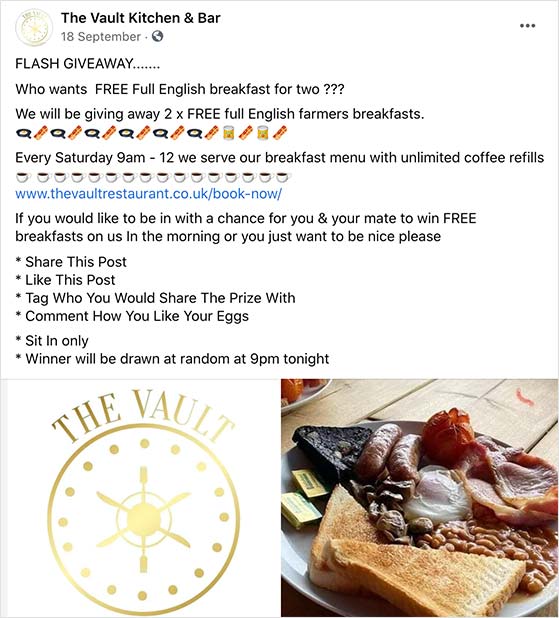
How to Run a Facebook Flash Giveaway: Step-by-Step
Despite its name, you can’t just rush into building a Facebook flash giveaway or sweepstakes. Even the shortest giveaways need planning to ensure you get the results you want for your business.
But don’t worry. Follow the steps below to run a flash giveaway your Facebook fans will love.
1. Determine Your Flash Giveaway Goals
The first step in creating any contest is to plan out your goals. Your goals are what you want to get out of running a giveaway.
So ask yourself, “what do I want to achieve for my page?”.
For a flash giveaway specifically, the most effective goals are ones that benefit from urgency. You might want to run one to:
- Boost your Facebook page followers
- Get a fast spike in post engagement
- Tell your fans about a new product or service
- Get more email newsletter subscribers
With a flash giveaway, you have 24-72 hours and no time to course-correct mid-contest. Clear goals matter more here than with longer campaigns — they keep every decision on track from the prize choice to the entry method.
Setting goals will help you ensure your giveaway stays on track as you follow the steps to create it. Then, when it’s over, you can link up those goals with your results to see if your efforts were successful.
With your goals in place, you can move on to choosing a prize for your flash giveaway.
2. Choose a Facebook Flash Giveaway Prize
When picking a prize for your flash giveaway, it’s essential that you choose one that excites your fans. If, for instance, your prize is low value, they won’t make an effort to enter.
Your prize must be relevant to your brand and audience for flash giveaways and valuable enough to incite action. You want users to see your post in the news feed and get so excited that they enter immediately.
Some popular contest prize ideas include:
- Money
- Amazon gift cards
- Free product bundles
- Free service subscriptions
An excellent prize example is this Father’s Day cooking bundle from Food in a Minute. Since the prize is relevant to their audience and brand, it’s the ideal combination for generating tons of entries.

The above example generated over 899 comments, 50 shares, and 796 reactions on Facebook alone. Why don’t you create something similar for Mother’s Day or Christmas?
After picking the grand prize for your Facebook flash giveaway, you can move on to writing your rules.
3. Set Out Your Giveaway Rules
Your next step is to define the rules and logistics for your giveaway. Doing so will make it easier for people to enter and ensure you have a good benchmark for qualifying entries.
Since flash giveaways are short by nature, the most important rule you’ll need to decide is how long the contest will run.
The duration of a flash giveaway is usually around 24 hours, yet some brands extend them to last up to 3 days. Any longer than that, and you’re no longer running a “flash” giveaway.
Remember: flash giveaways on Facebook should be short enough to inspire people to enter for fear of missing out (FOMO). But they shouldn’t be so long that you give users too much time to consider joining.
Next, you should consider how users will enter the contest. While it’s tempting to ask people to do something to show they really want to win, like submitting a photo, you don’t want to make it too hard to enter. Otherwise, people won’t make an effort.
Instead, you could ask people to leave a comment to enter, or even better, grant users automatic entry where all they need is to register for a chance to win.
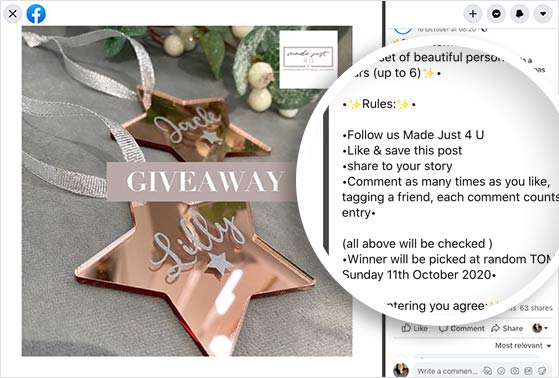
Other details you’ll need to include in your flash giveaway rules and disclaimer are:
- The minimum age for entering
- If the contest is limited to a certain location
- The start and end dates and times
- How you’ll draw a winner
Also include a statement that your promotion is not sponsored by or affiliated with Facebook, as required under Facebook’s promotion guidelines. Linking to your full rules from your RafflePress landing page makes this easy to do.
Including extra entry methods that align with your giveaway goals is also an excellent idea.
For example, if the primary way to enter your flash giveaway is an automatic entry for registering, you can include bonus entries for visiting your Facebook page and referring friends. We’ll go into entry methods in a little more detail later.
With your Facebook contest rules in place, you can start creating your Facebook flash giveaway.
4. Create Your Facebook Flash Giveaway in WordPress
Many small businesses and bloggers choose to run flash giveaways directly on their Facebook pages. And while it’s certainly possible to manage your contest manually like this, it poses a few problems.
First, keeping tabs on all the comments and likes you receive as entries is pretty hard. Second, choosing a random winner from users who have liked or commented on a Facebook post is just as tricky.
To solve that problem, we created RafflePress, a WordPress giveaway plugin that lets you run viral contests to grow your email list, social following, and traffic.
The RafflePress giveaway app makes it easy to create any type of online contest, including Facebook flash giveaways, right from your WordPress website. It provides everything you need to achieve your giveaway goals, whether growing your Facebook page, email list, or getting more website traffic.
You can manage all your giveaway entries in a single place inside your WordPress dashboard. When it’s time to pick a random winner, you can use the built-in random winner generator to choose from all the qualifying entries.
Unlike other tools, RafflePress offers entry options for many different purposes, including getting more TikTok followers, growing your Youtube channel, boosting podcast subscribers, and more.
If you’re not convinced, here’s how OptinMonster generated 3,500+ new users from one giveaway.
Step 1: Create a New Giveaway
To begin, click here to get started with RafflePress and download the RafflePress WordPress plugin. If you need help with this, here’s a step-by-step guide on installing WordPress plugins.
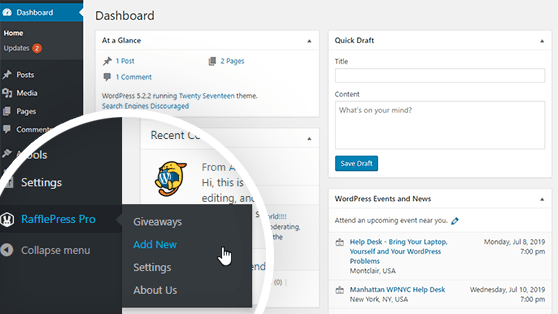
Once you’ve installed and activated the RafflePress plugin, navigate to your WordPress dashboard. Then hover your mouse over the RafflePress icon and click Add New to create a giveaway.
Step 2: Choose a Giveaway Template
After clicking to create a new contest, you’ll head to a screen where you can give your giveaway a name and choose a pre-made template.
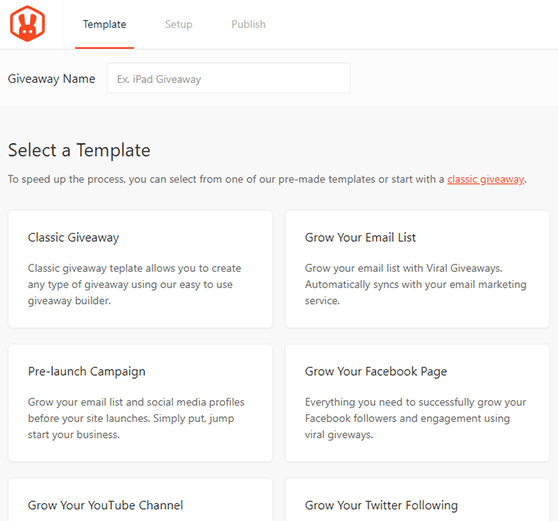
RafflePress comes with various pre-made giveaway templates designed to reach specific goals such as Grow Your Email List, Refer-a-Friend, Pre-launch Campaign, and more.
For this tutorial, we’ll choose the Grow Your Facebook Page template. This template comes with everything you need to run a successful Facebook flash contest, including contest entry methods, to visit your Facebook page and view a post/video on Facebook.
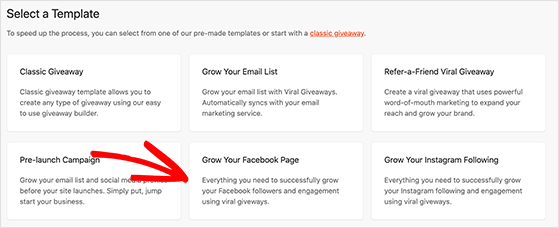
Choose the Facebook giveaway template by hovering your mouse over it and clicking Use This Template.
Step 3: Add Your Flash Giveaway Prize Details
After choosing a template, you’ll head to the RafflePress giveaway builder. Here you can add your giveaway prize details to your contest widget.
First, click the pencil icon under the Giveaway Prize Details section.
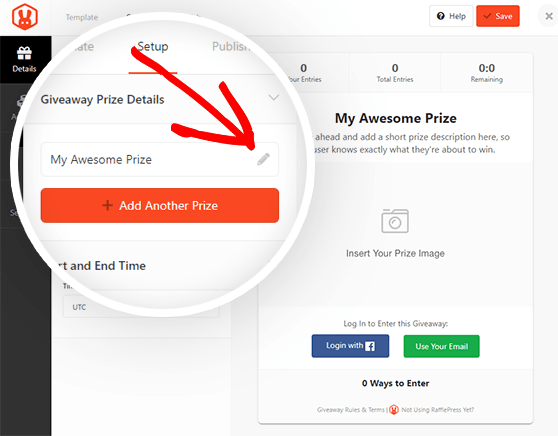
In this area, you can choose the name of your prize and write a short description of the prize and what people should do to enter.
It’s also possible to upload a prize image by clicking the Select Image button below the description box. You can upload a photo from your computer or choose an existing image from your WordPress media library.
When you’re happy with your prize details, click the Done Editing button.
On the left-hand side of the giveaway builder, you can set your giveaway duration and timezone under the Start and End Time section.
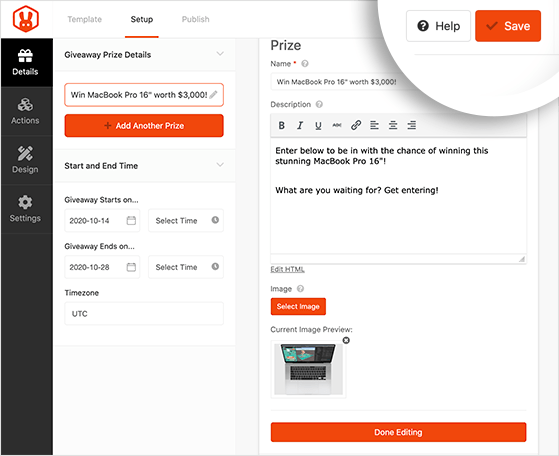
After, click the Save button to store your changes. You should do this periodically to save your work throughout the giveaway building process.
Step 4: Choose Your Flash Giveaway Entry Methods
RafflePress gives users multiple ways to enter your flash contest, which will help you reach the goals you set out at the beginning.
For instance, you can allow users to receive 1 contest entry for registering, a 2nd contest entry for visiting your Facebook Page, a 3rd entry for viewing a Facebook post, and so on.
Most people will take as many actions as possible because they’ll get more chances to win.
Click the Actions tab to select how users can get entries for your flash giveaway. The giveaway entry methods are grouped by goal, such as:
- Get More Subscribers
- Get More Social Engagement
- Get More Traffic
Click any action to add it to your giveaway widget.
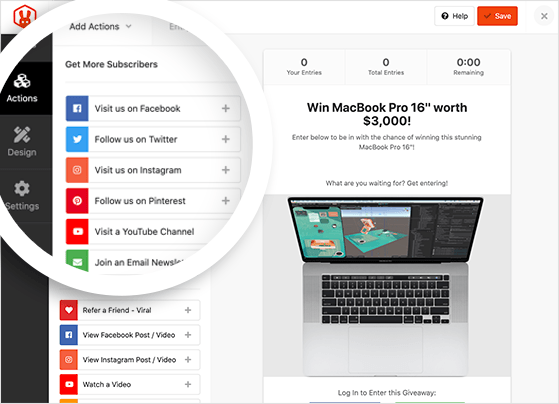
You can then customize the entry options by clicking the action in your widget, which reveals a panel on the left-hand side of your screen.
The settings you’ll see include the action title, value (how many entries the action is worth) if the action is mandatory, and fields for your social media profiles or post URL (this changes depending on which action you choose).
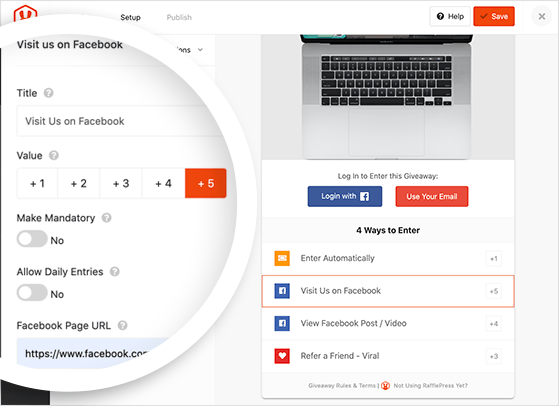
For flash giveaways, I recommend adding the refer-a-friend entry action. It turns every entrant into a promoter, which is especially useful when you only have 24 hours to spread the word.
Don’t forget to click the Save button to preserve your changes.
Repeat the same process for every entry method you want to add to your contest; you can add as many as you like and rearrange them by dragging them to a different place on the widget.
Step 5: Design Your Facebook Flash Giveaway
The next step is to click the Design tab to customize the look of your giveaway. On this page, it’s possible to choose from 2 different layouts (display image, then header, or header, then image) and several fonts and button colors.
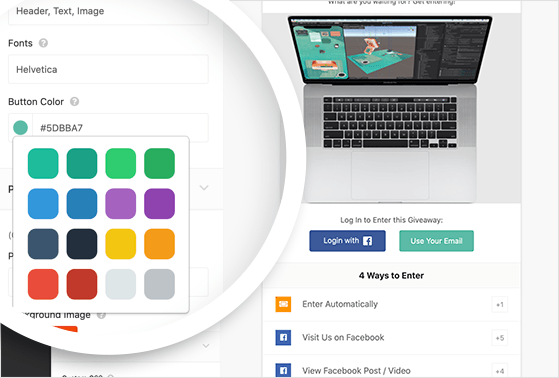
If you’re creating a giveaway landing page for your flash contest, you can also pick a page background color or upload a background image.
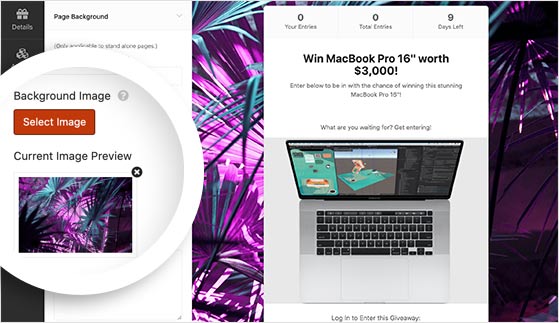
Once your contest looks the way you want, click the Save button.
Step 6: Configure Your Giveaway Settings
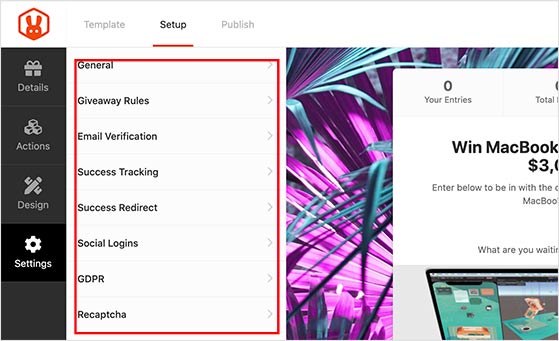
There are several different sections in the Settings tab, including:
- General
- Giveaway Rules
- Email Verification
- Success Tracking
- Success Redirect
- Social Logins
- GDPR
- Recaptcha
Of all these, the most important setting is the giveaway rules, as this will explain what is and isn’t allowed when entering your Facebook flash giveaway.
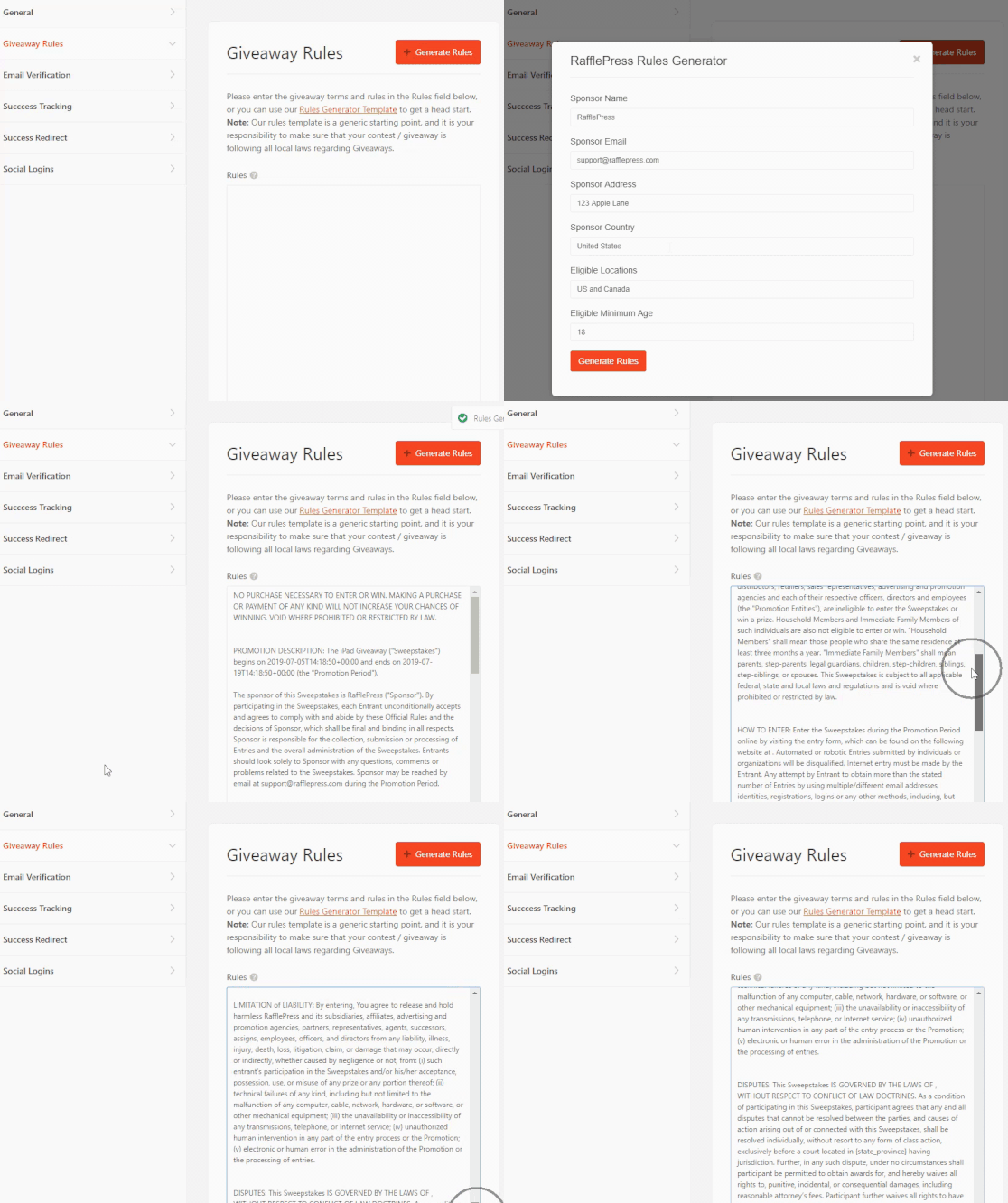
RafflePress makes it easy to add your contest rules with the Rules Generator Template.
Clicking the +Generate Rules button launches a window where you can enter the sponsor name, email, address, eligible locations, the minimum age to enter, and more.
Then, click Generate Rules to add your terms and conditions to the RafflePress widget.
Once you’re finished with your settings, click Save.
Step 7: Publish Your Facebook Flash Giveaway
Now that you know how to run a Facebook flash giveaway, it’s time to make it live!
RafflePress makes it easy to launch your giveaway. All you need to do is click on the Publish tab at the top of the screen.
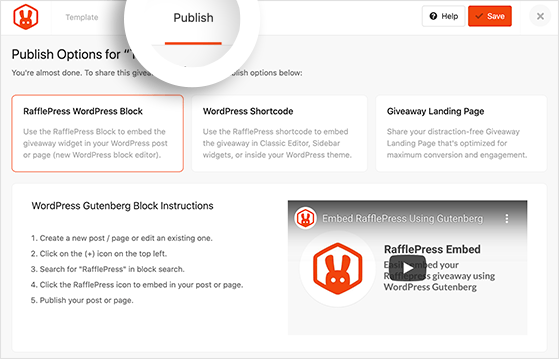
There are 3 giveaway publishing options available:
- RafflePress WordPress Block — Embed the giveaway widget in your WordPress post or page (new WordPress block editor).
- WordPress Shortcode — Embed the giveaway in the classic WordPress editor, sidebar widgets, or inside your WordPress theme.
- Giveaway Landing Page — Create a distraction-free landing page on your website for your giveaway.
The easiest option is to create a dedicated landing page for your flash giveaway.
Because there isn’t anything else on the page to distract people, it’s more likely they’ll sign up to enter. Moreover, you can link to your flash giveaway landing page from your initial Facebook post to collect entries.
So, go ahead and choose the giveaway landing page option.
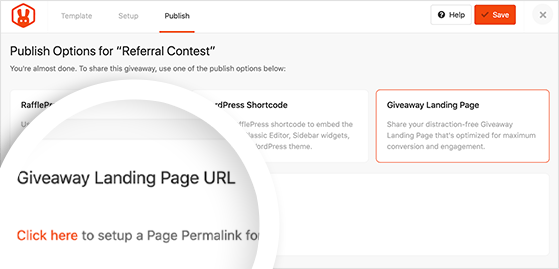
If you haven’t already created one, you’ll see a link asking you to “click here” to set up your page permalink.
The permalink is like the address of your landing page added to the end of your main website URL. The settings are under the Page Permalink heading in the General settings tab.
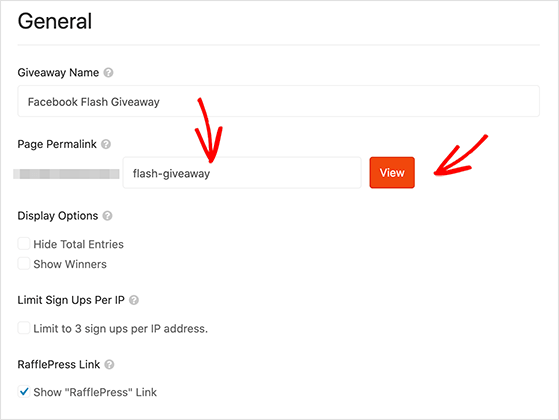
For instance, if you choose a permalink of “flash-giveaway,” the address for that page would look like this:
https://example.com/flash-giveawayAfter entering your giveaway page permalink, click the View button to see how the page looks.
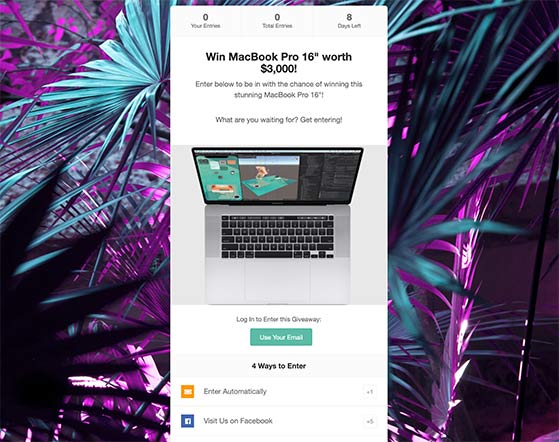
Congratulations! You’ve just created a Facebook flash giveaway using RafflePress!
5. Promote Your Flash Giveaway
Even though your flash giveaway is only running for a short time, you’ll still need to promote it to spread the word and ensure as many people enter as possible.
The most important promotion move with a flash giveaway is timing: publish your Facebook post the moment the giveaway goes live, not before. Then follow up with 2-3 reminder posts throughout the contest window. A message like “Only 6 hours left to enter!” creates the urgency that makes flash giveaways work.
You can also promote your Facebook flash giveaway by:
- Sharing updates on your other social media channels
- Sending a newsletter to your email subscribers
- Asking people to tag friends in the comments of your post
- Tagging your giveaway sponsors to help spread the word
- Using giveaway hashtags when cross-promoting on Instagram and Twitter
You can check out this article for even more contest promotion ideas.
Grow Your Flash Giveaway Reach on Facebook
Publishing your giveaway post is just the start. The Facebook algorithm rewards early engagement, so your launch window is your highest-leverage moment.
- Post timing. Launch when your audience is most active. Check your Facebook Page Insights to find your peak engagement window and schedule your launch post for that exact time.
- Reels announcement. Record a 30-second Reel announcing the giveaway with a clear CTA overlay (“Link in comments to enter”). Reels get higher organic reach than standard feed posts, so this can reach people who don’t already follow your page.
- Facebook Groups. If you’re active in relevant niche groups, share the giveaway there. Group posts typically get more organic reach than Page posts, and the audience is already warm to your topic.
- Early-sharer bonus entries. Add a “share this giveaway” entry action in RafflePress with bonus entry points. Every person who shares turns into a micro-promoter, which compounds your reach especially fast in a 24-hour window.
I’ve seen flash giveaways with a refer-a-friend bonus consistently outperform those without one on total entry count. The multiplier effect hits hardest when the window is short and entries feel urgent.
6. Choose a Flash Giveaway Winner
When your giveaway has ended, it’s time to choose a winner. Since you probably didn’t ask users to submit their own content, you won’t need to judge their entries based on creativity or merit. So the best way to choose a winner, in this case, is to pick one randomly.
RafflePress makes it easy to pick a random winner. When your flash giveaway ends, head to RafflePress » Giveaways from your WordPress dashboard and click the Needs Winners link on the right-hand side.
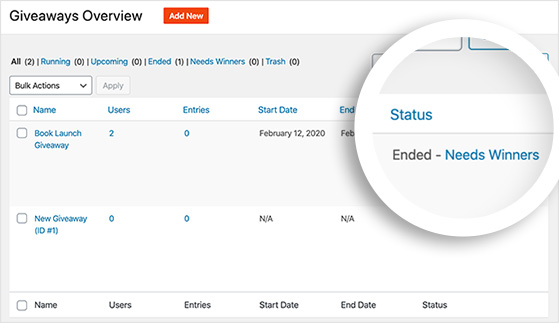
After that, you’ll see a list of everyone who entered and how many entries each person has. To choose a winner randomly, click the Pick Winner button, select your options, and click the Choose Winners Now button.
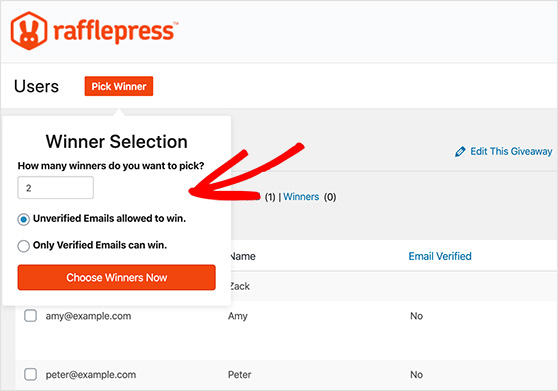
You’ll see the winner highlighted instantly at the top of the list. Then you can click to email them and tell them that they won!
Before announcing publicly, take a moment to verify the winner completed all mandatory entry actions. RafflePress tracks this for you in the entry list — if the winning entry is missing a required action, select the next eligible winner instead. This prevents disputes and keeps the contest fair.
7. Follow Up After the Giveaway
Now that you’ve picked a winner for your flash giveaway, it’s important you announce it to your community and everyone who entered but didn’t win. This will help you form better relationships with your newfound Facebook audience and offer you the chance to mention your giveaway once more.
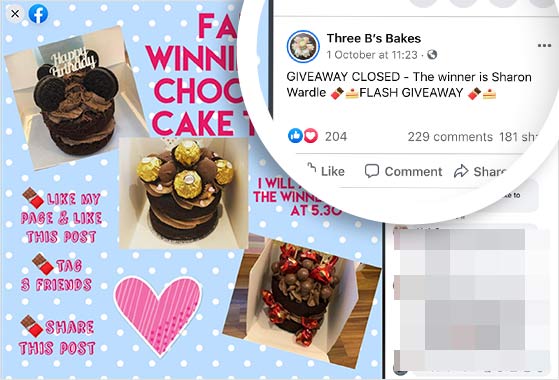
The easiest way to follow up and announce the winner of your flash giveaway is to create a new post on Facebook. You can tag the winner in the announcement post, and if you have one, you can include a picture of the winner with their prize.
Another way to follow up with entrants is to send an email newsletter announcement. Make sure you thank everyone for taking part. You can also invite them to keep an eye out for your next contest so they can enter when it goes live.
Offering a coupon is an excellent way to simultaneously thank participants and boost sales. If your budget allows, a small consolation prize, like a discount code or free download, for all non-winners is a great way to turn entrants into customers.
Related: How to Email Non-Winning Giveaway Contestants (5 Tips)
At the end of this process, you’ll have many happy fans eager to hear more from your business.
8. Review Your Flash Giveaway Results
With your flash giveaway over, how do you learn if it was a success? The key is knowing which numbers actually tell you something about flash giveaway performance, not just general website traffic.
There are three metrics worth tracking after every flash giveaway:
- Referral traffic spike: How much traffic did your giveaway landing page get during the 24-72 hour window? Compare it to your baseline to see the lift.
- Page followers gained: Check your Facebook Page Insights before and after the contest. Net new followers are the clearest measure of audience growth.
- Email subscribers added: If you included an email entry action, how many new addresses did you collect? This is often the highest-value metric for long-term business growth.
Google Analytics is a great way to track referral traffic, but it’s often far too complicated for beginners to understand. Instead, you can use MonsterInsights, the best Google Analytics plugin for WordPress.
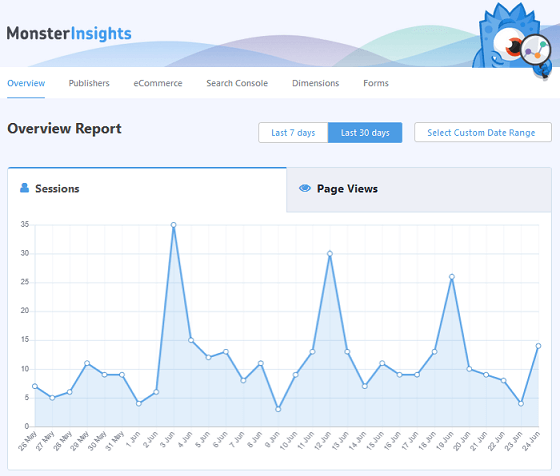
MonsterInsights makes it easy to track visits to your flash giveaway landing page, general website traffic, and referral traffic from Facebook and other social media networks. It takes all that data and displays it in easy-to-understand reports right inside your WordPress dashboard.
You can then use that information to learn what did and didn’t go well with your contest and plan improvements for the next one.
FAQs About Facebook Flash Giveaways
How long should a Facebook flash giveaway last?
Most Facebook flash giveaways run for 24 hours, though some brands extend to 72 hours. The key is keeping it short enough to create genuine urgency. Anything longer than 3 days loses the “flash” effect and starts to feel like a standard giveaway. I’d recommend 24 hours as the default, especially for your first flash contest.
How do Facebook giveaways usually work?
A Facebook giveaway typically asks followers to complete an action — like a comment, page follow, or share — to enter. The host announces a winner after the contest closes, usually by tagging them in a post or sending a direct message.
Using a tool like RafflePress lets you manage entries on a dedicated landing page instead of tracking comments manually, which makes the whole process significantly easier and more verifiable.
What makes a flash giveaway different from a regular giveaway?
The main difference is the timeframe. A flash giveaway runs for 24-72 hours, while a standard giveaway can run for weeks. The short window creates FOMO that drives faster, higher-volume entry. It also means the promotion strategy is different — you need to post immediately at launch and send reminders throughout the day, rather than spreading promotion over several weeks.
Can I run a flash giveaway without a tool like RafflePress?
You can, but it’s a lot of manual work. Running a giveaway directly on Facebook means tracking entries by scrolling through comments, picking a winner by hand, and verifying they met your entry rules with no automated help.
For a short flash giveaway where entries can come in fast, that process breaks down quickly. RafflePress handles entry tracking, random winner selection, and entry verification automatically, which is why I’d recommend using it from the start.
That’s it!
Run your first Facebook flash giveaway with RafflePress and you’ll have entries coming in within hours — without manually tracking a single comment.
Get started with RafflePress today.
If you liked this article, please subscribe to our YouTube Channel for RafflePress video tutorials. You can also find us on Twitter and Facebook.

