How to Create an Online Contest in WordPress (Step by Step)
 Stacey Corrin
Stacey Corrin
Stacey Corrin
 John Turner
John Turner
John Turner
TL;DR: How to Create an Online Contest
Running a contest is one of the fastest ways to grow your email list and reach new followers. Here’s the short version:
- Choose your contest type – sweepstakes, photo contest, UGC, voting, or skill-based, depending on your goal.
- Set your goal and pick a prize – tie the prize to a specific outcome and make sure your audience actually wants it.
- Write clear rules – cover eligibility, entry methods, and how you’ll pick the winner.
- Build it with RafflePress – set up your contest in WordPress in under 30 minutes, no coding needed.
- Promote where your audience is – email, social media, and your website all working together.
- Follow up with all entrants – announce the winner and email everyone else to turn participants into long-term subscribers.
This guide walks you through every step, from choosing the right contest type to following up with entrants.
- What Is an Online Contest or Giveaway?
- Types of Online Contests: Which One Fits Your Goal
- How Do You Create an Online Contest in WordPress?
- Step 1: Plan Your Budget and Timeline
- Step 2: Set a Goal That Drives Results
- Step 3: Pick a Prize People Actually Want
- Step 4: Write Rules That Avoid Legal Trouble
- Step 5: Build It Fast with a WordPress Plugin
- Step 6: Promote It Where Your Audience Hangs Out
- Step 7: Announce Your Winner to Boost Credibility
- Step 8: Track What Worked (and What Didn’t)
What Is an Online Contest or Giveaway?
An online contest or giveaway is a powerful way to grow your business on the internet. You offer a prize in exchange for users taking part, like joining an email list.
While often used interchangeably, there is a key difference between the two. A contest usually requires skill or effort, like submitting a photo or writing an essay.
A giveaway (or sweepstakes) relies entirely on luck. Winners are picked randomly from a pool of entries, making it easier for people to join.
Types of Online Contests: Which One Fits Your Goal
Not all online contests work the same way, and choosing the right format makes a real difference in what you get out of it.
| Contest Type | How It Works | Best For |
|---|---|---|
| Sweepstakes | Random draw from all valid entries | Email list growth, high participation |
| Photo or Video Contest | Entrants submit visual content; a judge picks the winner | User-generated content, visual brands |
| UGC Contest | Entrants create content featuring your product | Social proof, brand awareness |
| Voting Contest | Community votes on submitted entries | Engagement, community building |
| Skill-Based (Essay) | Written submissions judged on quality | High-intent leads, smaller niche audiences |
Sweepstakes are the most common choice for small businesses because they’re easy to enter and pull in the most participants. If you want online contest ideas that generate content or build community, a photo contest or UGC contest is worth the extra setup time.
Free: Download Our Giveaway Playbook
Templates, prize ideas, and promotion strategies in one guide.
How Do You Create an Online Contest in WordPress?
Creating an online contest in WordPress is a simple process:
| Step | What you’ll do in WordPress |
|---|---|
| 1 | Plan your goal |
| 2 | Install the RafflePress plugin |
| 3 | Set your prize |
| 4 | Choose entry actions |
| 5 | Design the contest widget |
| 6 | Publish it on your site |
| 7 | Promote it so people enter |
Follow the steps below to launch your contest fast.
Step 1: Plan Your Budget and Timeline
Before you dive into goals and prizes, it’s smart to quickly outline your budget and timeline. A clear plan here ensures your contest is both affordable and effective, preventing unexpected costs and keeping your audience engaged.
Your contest budget doesn’t need to be complicated, but you should account for these key costs:
- The Prize: The total value of what you’re giving away.
- Advertising: Any budget for paid ads on social media or search engines.
- Contest Tool: The cost of the plugin you’ll use, like RafflePress.
Choosing the right duration is crucial. A contest that’s too long can lose momentum, while one that’s too short might not get enough entries. Here’s a simple rule of thumb:
- For simple giveaways (like, share, or subscribe): 1–2 weeks is perfect. This creates urgency and encourages immediate action.
- For skill-based contests (photo or video submissions): Allow 3–4 weeks. This gives participants enough time to create and submit quality entries.
Step 2: Set a Goal That Drives Results
Before launching your giveaway, take a moment to set clear goals. A well-defined goal will guide your entire strategy and help you measure success. Make sure your goals align with your overall business and marketing plans.
Most businesses aim for these common giveaway goals:
- Bring more visitors to their website
- Create excitement around their brand
- Grow their email subscriber list
- Build stronger customer relationships
- Boost their product sales
- Get more social media engagement
- Collect customer photos and videos
- Learn which products customers love most
For example, if your primary goal is to ‘Get more social media engagement,’ you’ll want to choose entry actions in your giveaway tool like ‘Visit our Facebook Page’ or ‘Follow us on Twitter’ and give them a higher point value to encourage users to complete them.
Having a clear goal helps you design your giveaway the right way and choose the best methods to promote it. It also makes it easier to track your results and see if your giveaway was successful.
If you’re not sure what type of giveaway to run, here are 25 winning giveaway ideas to help you decide.
Step 3: Pick a Prize People Actually Want
People love getting free stuff, but they won’t try to enter your giveaway if the prize isn’t good. If you want a viral giveaway, choose a high-quality grand prize that will attract many people.
Some of the most popular giveaway prize ideas include:
- Money
- Gift cards or gift certificates
- Free products/services
Studies show that contests offering gift cards or cash receive significantly higher engagement than branded merchandise. Pick something that motivates them to act.
Here’s a list of exciting giveaway prize ideas to help you decide.
You’ll want to ensure that your contest prize is relevant to your target audience and your brand. For instance, Supreme House Fitness offered a fitness package to the lucky winners of their social giveaway.

Choosing a prize that you know your target audience would love will help you attract more contest entries from your ideal customers.
Step 4: Write Rules That Avoid Legal Trouble
Every successful giveaway needs clear, simple rules. Your rules protect both you and your participants while keeping things fair for everyone.
It’s also good to know that the legal rules for a skill-based contest can be more complex than for a random giveaway. Since this guide focuses on giveaways, the process is much more straightforward!
Here’s what your giveaway rules should cover:
- Prize details and how they’ll be delivered
- Who can enter (age limits, location restrictions)
- How to enter (entry methods and requirements)
- Contest dates (start and end times)
- How winners will be chosen and notified
- Entry limits (one per person, daily entries, etc.)
Always reference local regulations, such as FTC guidelines in the US or GDPR in Europe, to ensure full compliance. This builds trust and keeps your business safe.
It’s also important to check the promotion guidelines for any social media platforms where you’ll be sharing your contest. Sites like Facebook and Instagram have their own specific rules for running giveaways.
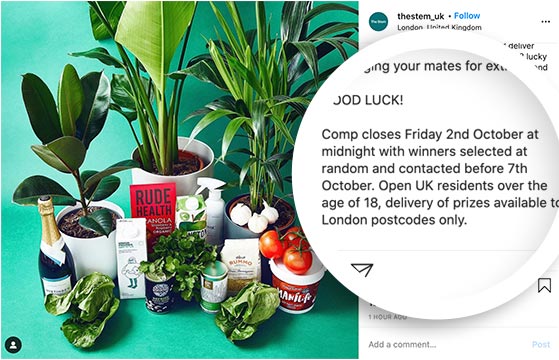
Make your rules easy to find and understand. For example, The Stem UK clearly states in their contest post when their giveaway ends, how they’ll pick and contact winners, and who can join.
Want to save time? Most contest tools like RafflePress include a rules template you can customize for your needs.
Want help with the legal side? Use this guide to write giveaway rules like a pro.
Step 5: Build It Fast with a WordPress Plugin
You have a few options for running an online contest: social media platforms, third-party contest tools, or a WordPress plugin hosted on your own site.
Social media platforms limit what you can customize. Third-party tools often add their own branding and hold your participant data.
A WordPress plugin keeps your data inside your own site from day one.
I use RafflePress for this. It’s a WordPress contest plugin that lets you build a giveaway landing page, set entry actions, and connect your email list, all without touching code.
Here’s how to set it up.
Create a New Contest
First, you’ll need to download the RafflePress plugin. Here’s a step-by-step guide on installing WordPress plugins if you need help.
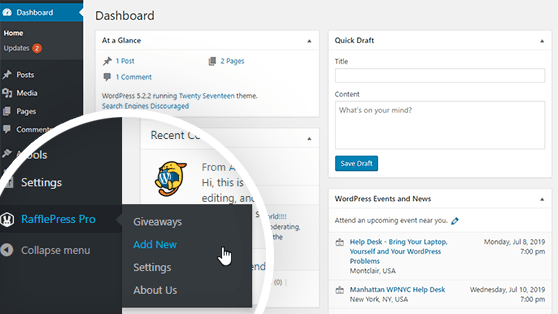
After installing and activating the plugin, hover over the RafflePress icon and click Add New to create a contest.
Name Your Giveaway and Choose a Template
Once you click Add New, the plugin will take you to a new screen where you’ll name your giveaway and choose a contest entry form template.
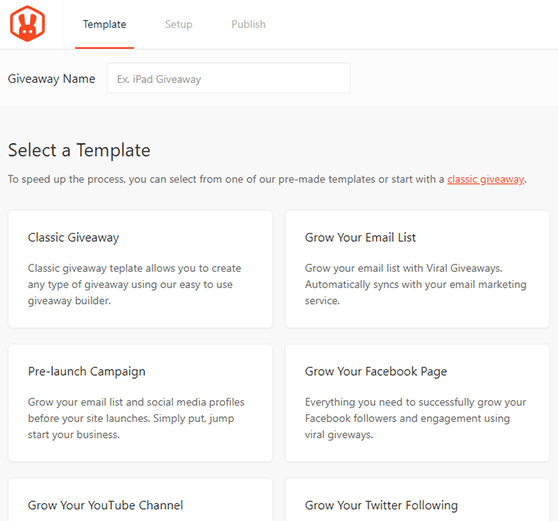
First, type in a name for your giveaway in the text field at the top of the screen. Choose any name for your giveaway. For instance, if your contest prize is an iPad, you can name your giveaway “iPad Giveaway.”
Next, choose your giveaway template. RafflePress offers several pre-made contest entry form templates designed to reach particular giveaway goals, such as:
- Grow Your Email List
- Refer-a-Friend
- Pre-launch Campaign
- Grow Your Facebook Page and more.
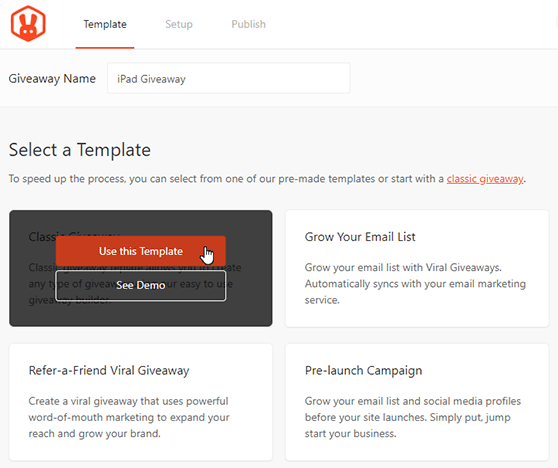
For this tutorial, we’ll choose the Classic contest entry form template. This template allows you to create any type of giveaway contest using the easy RafflePress builder.
Choose the Classic Giveaway template by hovering over it and clicking Use This Template.
Set the Giveaway Prize Details
After selecting the Classic Giveaway template, you’ll be taken to the RafflePress giveaway builder. The first step to building your online giveaway is to set the giveaway prize details.
First, click on the pencil icon under the Giveaway Prize Details section.
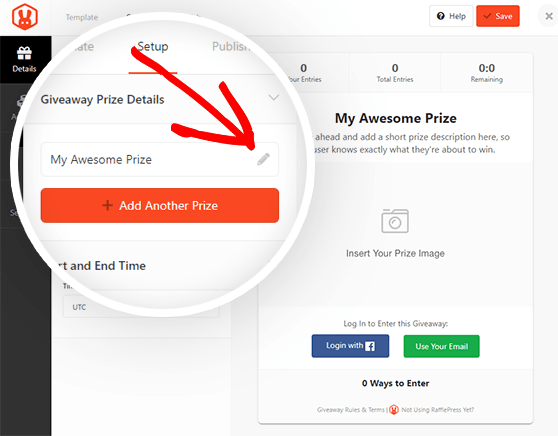
Here, you can choose the name of your prize, for example, “iPad Giveaway,” and write a brief description of the prize.
You can also upload an image of your prize by clicking the Select Image button below the description box. You can then choose an image from your media library or upload an image from your computer.
When you’re happy with your prize name, description, and image, click on the Done Editing button.
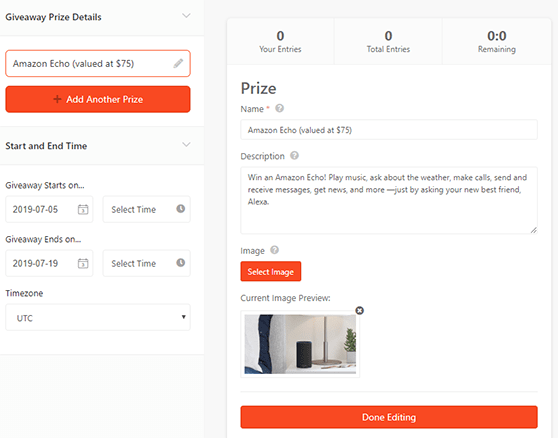
You can click the + Add Another Prize button if you have multiple prizes to add more to your contest form.
You can also set the date and the time your giveaway will start and end and choose your timezone underneath the Start and End Time section.
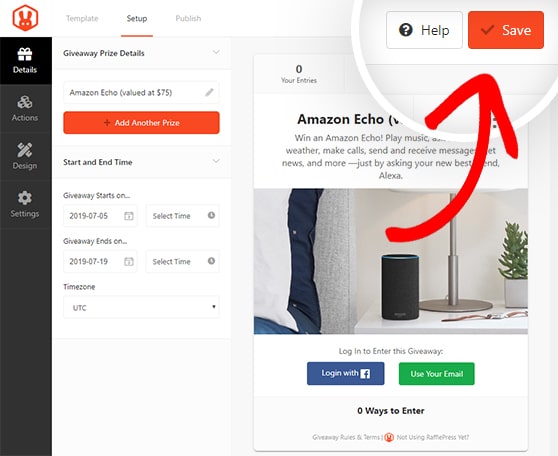
Click the Save button to save the changes. Remember to save your work periodically throughout the process of building your contest.
Choose Your Raffle Entry Methods
Entry actions are how participants earn chances to win. You can add as many as you want, and most entrants will complete all of them to improve their odds.
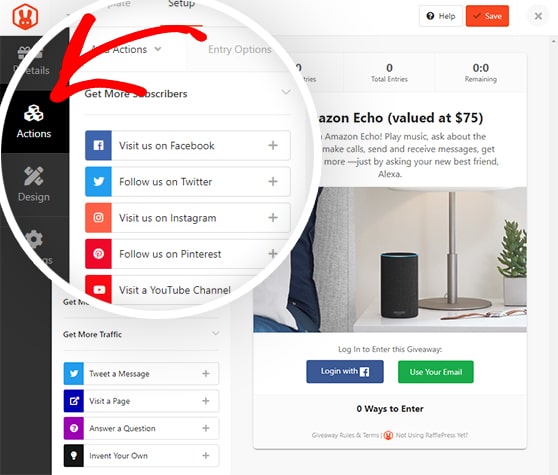
Click the Actions tab to see the full list. Actions are grouped by goal: growing your email list, increasing social engagement, or driving traffic to your site. Click any action to add it to your contest.
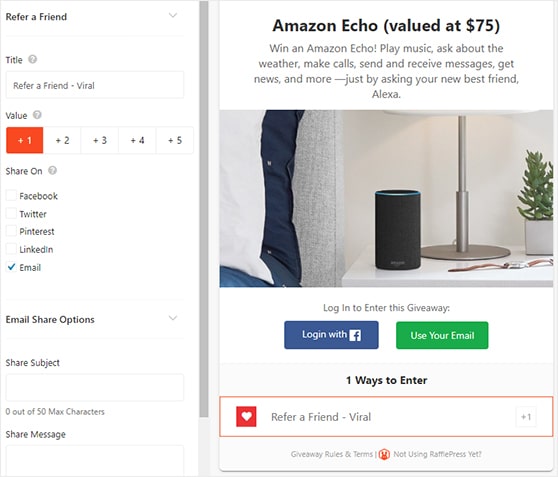
Once you’ve chosen an action, you can set the entry options. These settings include:
- The title
- Value (how many entries the action will be worth)
- If the action is mandatory
- A field to add your URL
If you add many entry methods, ensure that the most important actions are worth more entries.
Click the Save button to save your changes.
Repeat the process for any other actions you want to add to your contest; you can add as many as you want.
For instance, you can also add a Join an Email Newsletter action to boost subscribers, including an opt-in confirmation checkbox and integration with your email marketing service.
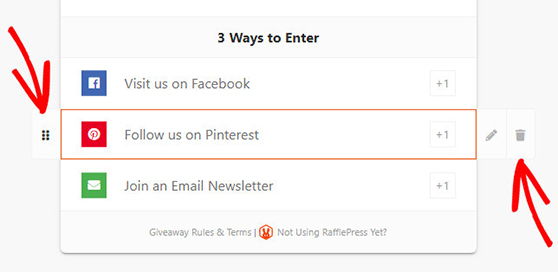
You can easily rearrange actions for your contest by dragging and dropping on the left side or delete actions by clicking the trash can icon on the right side.
Design Your Online Giveaway Contest
Next, you can customize the look of your online giveaway in the Design tab. You can choose from 2 different layouts (display image, then header, or header, then image) and several fonts and button colors.
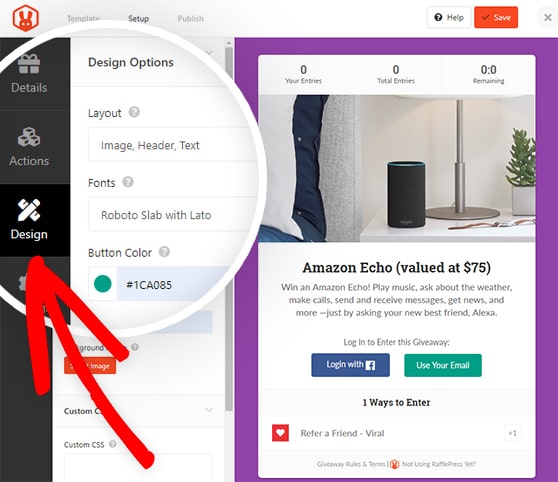
If you’re creating a stand-alone page for your contest, you can also choose the page color background and a background image.
Hit the Save button once your contest looks precisely the way you want.
Configure Your Contest Settings
The Settings tab has six sections:
- General
- Giveaway Rules
- Email Verification
- Success Tracking
- Success Redirect
- Social Logins
One of the most important settings you’ll need to configure is the giveaway rules.
RafflePress makes it easy to get started. You can use the Rules Generator Template to quickly get a head start on creating your contest rules.
Clicking this button will allow you to type in the sponsor name, email, address, eligible locations, the minimum age to enter, and more.
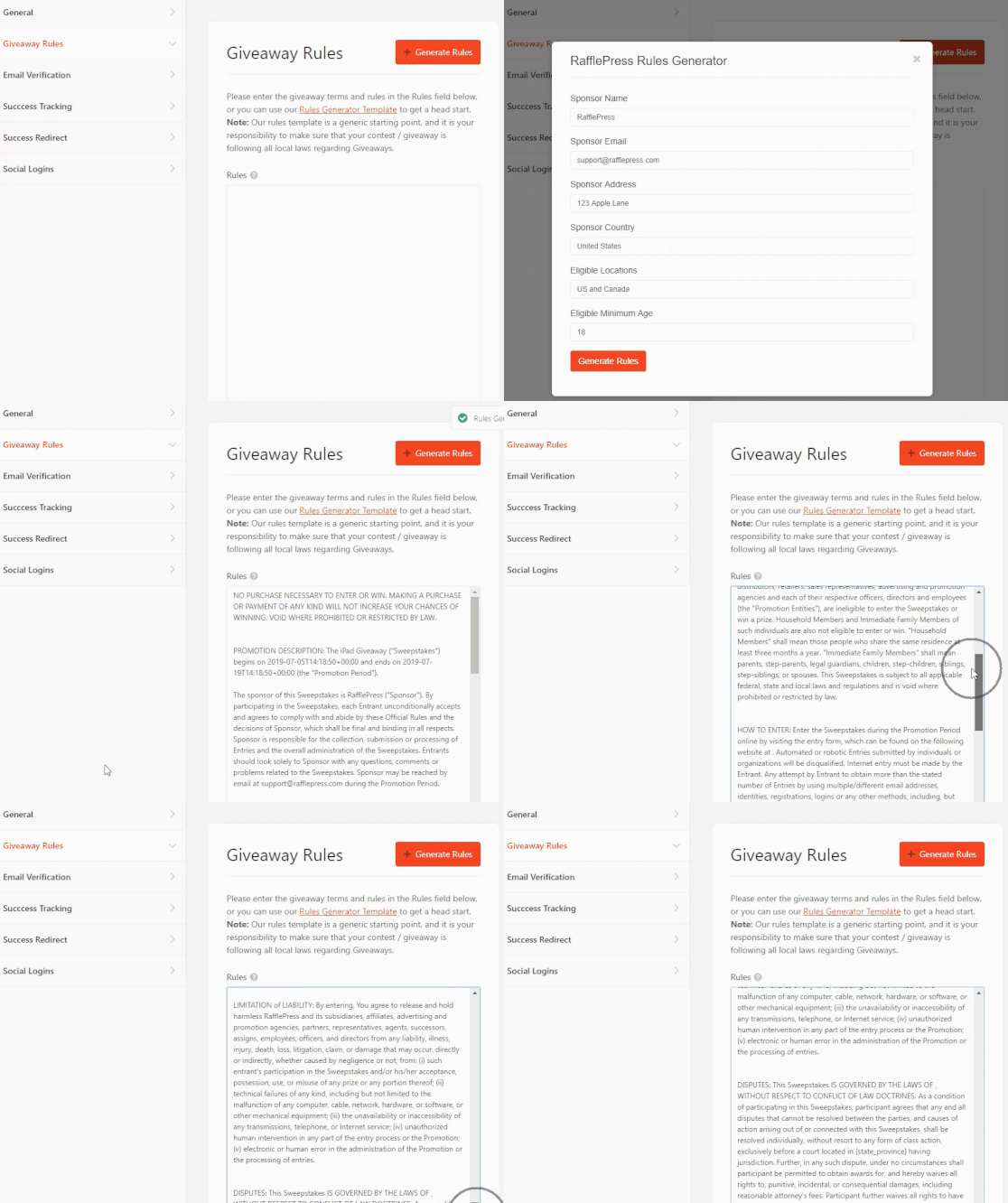
You can check out our documentation for details on all the RafflePress settings.
After configuring your settings, click Save.
Publish Your Online Contest
Now you know how to run a giveaway, it’s time to make your contest live! RafflePress makes launching a giveaway easy. Just click on the Publish tab at the top of the screen.
You have 3 publishing options for your contest:
- RafflePress WordPress Block – Embed the giveaway widget in your WordPress post or page (new WordPress block editor).
- WordPress Shortcode – Embed the giveaway in the classic WordPress editor, sidebar widgets, or inside your WordPress theme.
- Giveaway Landing Page – Create a distraction-free landing page on your website for your giveaway.
A dedicated landing page for your contest is an excellent option for getting more contest entries. Since there’s nothing else on the page to distract users, they’ll be more likely to sign up for your contest.
So, let’s choose the giveaway landing page option.
Click the View Page button to see your contest landing page.
Here is an example of a giveaway landing page we created on our test website:
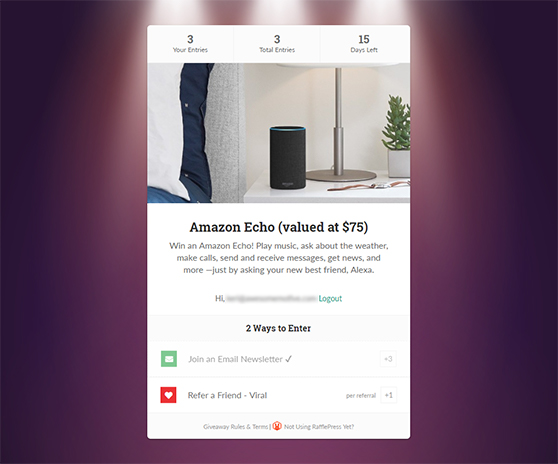
Voila! You now have a fantastic landing page for your giveaway.
Step 6: Promote It Where Your Audience Hangs Out
Once your contest is live, share it on the social platforms you’re most active on. Include a clear image of the prize and a direct link to your entry page.
To get more reach without paying for ads, add a Refer-a-Friend entry action in RafflePress. It gives participants an extra entry for every person they bring in, which means your contest spreads through their networks automatically.
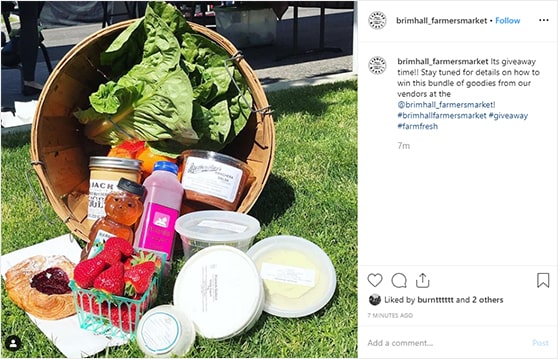
For instance, see this Instagram giveaway post from Brimhall Farmers Market’s Instagram Account. Their Instagram post includes a photo of the grand prize to let users know what they can win and #giveaway to widen their reach on social networks and Instagram feeds.
You can also promote your contest in these ways:
| Promotion Method | Best Used For |
|---|---|
| Paid Advertising | Targeted Reach |
| Email Marketing | Existing Audience |
| Social Media Sharing | Viral Growth |
| Influencer Partnerships | Brand Awareness |
Start promoting your contest weeks before it goes live to get tons of traffic and entries on day 1.
Need help getting the word out? Check out these contest promotion ideas that really work.
Step 7: Announce Your Winner to Boost Credibility
When your contest ends, it’s time to pick a winner and share the results. With RafflePress, you can randomly select winners with just a few clicks.
Just head to RafflePress » Giveaways, click Needs Winners, and hit Pick Winner. You can email the winner directly from your dashboard.
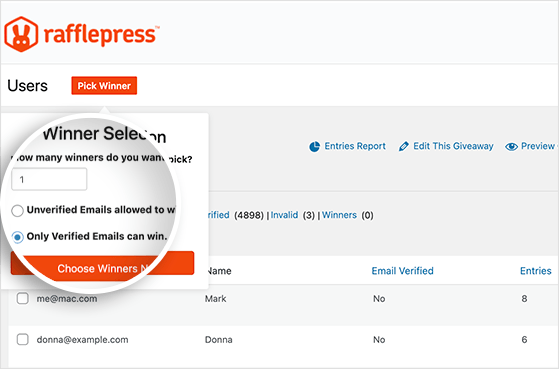
Once chosen, announce your winner on your website, email, and social media. This gives your contest a strong finish and keeps everyone feeling good about participating.
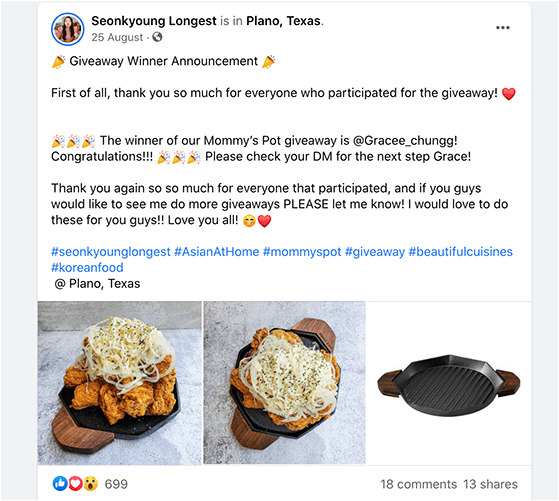
Tip: Offer a discount code to non-winners to turn entries into future customers.
Email All Entrants After Your Contest
Most businesses stop at announcing the winner. That’s a missed opportunity.
Every person who entered is already interested in what you offer. Send a follow-up email within 24-48 hours of the contest ending. Thank them for participating, announce the winner, and include a consolation offer for everyone who didn’t win.
A discount code, a free resource, or early access to your next contest all work well here. Entrants who took action once are more likely to take action again. That’s how a single contest becomes a long-term list-building system.
Step 8: Track What Worked (and What Didn’t)
Once your giveaway ends, take a few minutes to see how it performed. RafflePress includes built-in reports that show you which entry methods worked best.
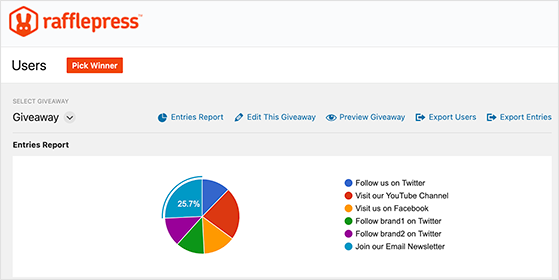
If you’re using MonsterInsights, you can also track pageviews, traffic sources, and conversions right from your WordPress dashboard. This helps you see where your traffic came from and what actions users took.
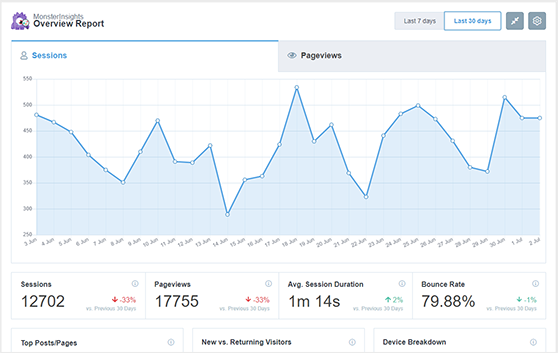
You can track traffic and conversions with Google Analytics and even send entrants to a custom thank you page after they enter.
Use these insights from your giveaway metrics to improve your next contest. For example, if Instagram entries performed better than Facebook, focus your next promotion there.
FAQs on How to Run an Online Contest
If you’re confused about the terminology, you can learn the difference between sweepstakes vs contest vs lottery here.
Start Your WordPress Contest Today
Now that you know how to do a giveaway, get out there and start your contest marketing. Creating an online giveaway will bring your target audience joy, and your company will see benefits such as more traffic, increased brand awareness, and lots of engagement.
You might also find these social media contest guides helpful:
- How to do a giveaway on Facebook
- How to run a Pinterest contest
- How to run a social media photo contest
- How to do a YouTube video contest
- How to run an Instagram contest
- How to run a Facebook flash giveaway
- How to promote your contest on multiple platforms
If you liked this article, please subscribe to our YouTube Channel for RafflePress video tutorials. You can also find us on Twitter and Facebook.

