How to Run a Successful Pinterest Contest in 2026
 Stacey Corrin
Stacey Corrin
Stacey Corrin
 John Turner
John Turner
John Turner
TL;DR: How to Run a Pinterest Contest Running a Pinterest contest is one of the fastest ways to grow your following, collect leads, and drive traffic from a platform that still gets overlooked. Here’s how the process works:
- Review the rules: Pinterest’s community guidelines set strict limits on what you can and can’t ask entrants to do.
- Pick your contest type: Pin to Win, Board Contest, UGC, Comment, or In-App. Each serves a different goal.
- Choose a relevant prize: The prize should appeal to your exact audience, not just anyone.
- Set your rules: Cover eligibility, dates, how entries work, and how you’ll notify the winner.
- Build and publish: Use RafflePress to create an in-app contest with multiple entry actions and a dedicated landing page.
- Promote and analyze: Pin your contest, email your list, cross-promote on other platforms, then review your data to improve the next one.
You’ve got a Pinterest presence, but your follower count barely moves and you’re not sure what it would actually take to change that. A contest feels like the right answer, but every guide you find either glosses over the rules or skips straight to a tool without explaining why you’d pick one format over another.
I’ve run contests across every major social platform, and Pinterest rewards a different approach than Instagram or Facebook. In this guide, I’ll walk you through how to run a Pinterest contest step by step, from picking the right format to analyzing your results.
What Are the Benefits of Running a Pinterest Contest?
Pinterest gets overlooked in favor of bigger platforms, but for the right brand it punches well above its weight. If your audience is into fashion, home design, food, or anything visually driven, Pinterest’s user base lines up with your buyers in ways that Instagram and Facebook often don’t.
Here are a few concrete reasons to run a Pinterest contest:
- Mostly female audience: About 70% of Pinterest users are female, according to Sprout Social. If you’re trying to reach a primarily female audience, Pinterest gives you a more concentrated pool than most other platforms.
- Highly active users: Pinterest’s user base actively curates and shares ideas across recipes, crafts, design projects, and DIYs. That kind of engaged behavior makes it more likely that contest participants will actually interact with your content rather than scroll past it.
- Increase brand awareness: Pinterest is an aspirational platform, and brands use it to provide inspiration that attracts a following over time. A well-run contest spreads your branded content to a broader audience through repins and shared boards.
- Collect user-generated content (UGC): Ask your audience to submit their own Pins or Boards as part of a contest, and you gather loads of UGC while simultaneously driving engagement. That content can fuel future campaigns well after the contest ends.
Now that you know what a Pinterest contest can do for your business, let’s put one together.
How to Create a Pinterest Contest
Creating a Pinterest contest is more manageable than it looks. Follow these steps and you’ll have yours live before the end of the week.
- Step 1: Learn the Pinterest Contest Rules
- Step 2: Choose the Right Type of Pinterest Contest
- Step 3: Pick a Relevant Contest Prize
- Step 4: Determine Your Pinterest Contest Rules
- Step 5: Build Your Pinterest Contest
- Step 6: Configure Your Contest Settings
- Step 7: Publish Your Pinterest Contest
- Step 8: Promote Your Pinterest Contest
- Step 9: Choose and Announce the Contest Winner
- Step 10: Analyze Your Results
Free: Download Our Giveaway Playbook
Templates, prize ideas, and promotion strategies in one guide.
Step 1: Learn the Pinterest Contest Rules
Before you build anything, read Pinterest’s rules. Running a contest that violates their guidelines can get your account flagged or restricted, which would undo all the work you’re about to put in.
You can read their full community guidelines for running a contest here, but here’s what matters most:
- You must not allow more than 1 entry per person.
- You can’t require users to pin a specific image. Give them the option of choosing their own pin from a selection based on their preferences.
- Don’t post your contest on a board that has nothing to do with it.
- Keep your behavior non-spammy. Don’t repeatedly repost the same content or ask users to do so.
- You must not claim that Pinterest endorses or sponsors your contest or promotion.
With these Pinterest contest rules understood, let’s choose the type of contest you’ll run.
Step 2: Choose the Right Type of Pinterest Contest
There are two broad approaches to Pinterest contests: frictionless (entry happens directly on Pinterest) and in-app (entry happens on your website).
Frictionless formats like Pin to Win and Board contests are easy to enter but don’t let you collect email addresses or offer multiple entry actions. In-app contests require users to leave Pinterest briefly, but you get email collection, multiple entry options, and full control over your data.
The best format depends on your goal. If brand awareness and repins are the priority, a frictionless format works well. If you want leads, an in-app contest gives you more to work with.
Once you know what you’re trying to achieve, pick the type that fits.
Here’s an overview of each:
Pin to Win
Pin to Win contests ask participants to choose one or multiple images from a collection you provide and repin them for a chance to win. It’s a direct way to get your content spreading through participants’ own followers.
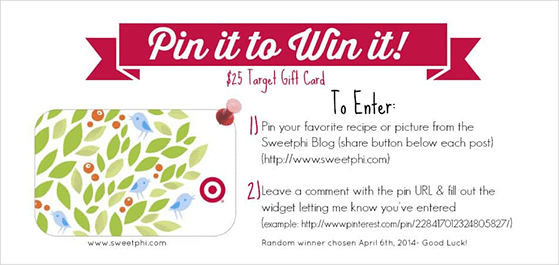
To stay within Pinterest’s guidelines, offer a variety of image options so users can choose based on their own preferences. Create a dedicated Pinterest board of images that entrants can select from.
Real example: Whole Foods Market has run seasonal “pin your recipe” and “pin to win” Pinterest contests promoting their products. You can browse their active boards at pinterest.com/wholefoods or check their main website for current promotions.
Create a Pinterest Board Contest
This type of contest asks users to create a Pinterest board filled with images on a specific theme. Good practice is to ask participants to pin a couple of your own images and fill the rest of the board with pins from elsewhere.
Board contests are excellent for building stronger relationships with your audience. They also drive word-of-mouth referrals as participants share their boards with their own followers.
User-Generated Content Contest
UGC Pinterest contests ask users to pin images following specific guidelines with a giveaway hashtag. This is a great way to showcase how your customers use your products.
Home design brands can ask participants to share photos of how they’ve used your products in their own homes. Fashion brands can collect images of users wearing their latest clothing line. To increase submissions, collect photos from multiple platforms rather than relying only on Pinterest.
Real example: GoPro Awards is an ongoing UGC program that asks users to submit footage shot on GoPro cameras for cash prizes and featured placement, a strong model for any product-based UGC campaign.
Feedback and Comment Contest
Feedback and comment contests are the simplest format. All users need to do is leave a comment on your pin for a chance to win.
You can use this type of contest to gather valuable feedback: which products are most popular, which products users would like to see next, or tips for using your products. The tradeoff is that you won’t collect email addresses or get the benefit of multiple entry actions.
In-App Contests
You can also run contests on your website to drive Pinterest engagement and activity by using a contest app.
Running an in-app contest does require users to leave Pinterest and complete a set of actions, but that small amount of friction comes with real advantages: you provide multiple ways for users to engage with your brand, you collect email addresses, and you own all your entry data.
- Sending people to your contest is as simple as pinning an image with a link to your contest. This drives traffic back to your website, which creates more chances for users to engage with your business.
- With your contest based on your website, you can attract entrants from sources beyond Pinterest. This is an excellent way to grow your Pinterest following while building your overall audience.
- With multiple entry options, you can collect email addresses to grow your list and generate qualified leads for your business.
With your contest type chosen, you’re ready to pick a prize.
Step 3: Pick a Relevant Contest Prize
Your prize is what stops someone mid-scroll and makes them decide to enter. It needs to be relevant and desirable for your specific audience, not just something with broad appeal.
A generic prize like a gift card attracts a lot of entrants who have no interest in your brand, which makes your list harder to convert after the contest ends.
Some of the most effective contest prizes are:
- Your own products or services
- High-value cash prizes
- Gift vouchers for stores your audience already loves
- Trips and experiences tied to your niche
For more help choosing a prize, see our guide on proven contest prize ideas.
Step 4: Determine Your Pinterest Contest Rules
With your prize chosen, you need a set of rules for your contest. Rules protect both you and your entrants: they set clear expectations, prevent disputes when the contest closes, and keep things fair for everyone who participates.
Your Pinterest contest rules should cover:
Who can enter:
- Age requirements for entering
- Geographic restrictions (if your contest is limited to specific countries or regions)
How it works:
- Start and end dates and times
- How people can enter your contest
- What the prize is
- How you’ll draw and notify the winner
- If anyone sponsors your contest
- Your contact details so users can ask questions
For a full walkthrough, see our guide on how to write giveaway rules like a pro.
Step 5: Build Your Pinterest Contest
With your rules in place, you’re ready to build your contest. For this guide, we’ll use RafflePress to create an in-app contest you can embed on your website.
RafflePress is a WordPress giveaway plugin that lets you run viral contests to grow your email list, social following, and website traffic without any code required.
The visual drag-and-drop giveaway builder lets you create your contest in minutes. With powerful entry actions, you can drive tons of entries to your contest by using word-of-mouth marketing tactics. Follow the steps below.
Note: You’ll need a self-hosted WordPress website to use RafflePress.
Step 1: Create a New Giveaway
Click here to get started with RafflePress and download the plugin to your computer. If you need help, here’s a step-by-step guide to installing RafflePress.
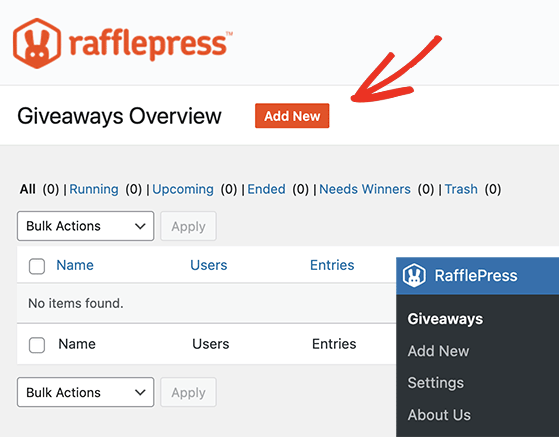
Once you’ve installed the RafflePress plugin from your WordPress dashboard, hover over the RafflePress icon and click Add New to create a new contest.
Step 2: Choose a Giveaway Template
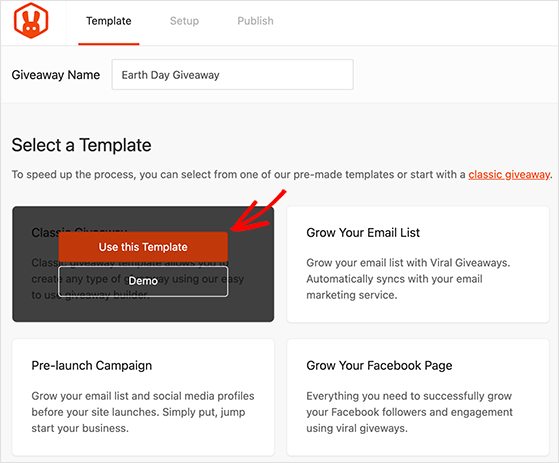
After clicking Add New, you’ll see a screen where you can give your giveaway a name and choose a template. RafflePress offers several giveaway templates designed to meet specific business goals: Grow Your Email List, Grow Your Instagram Following, and others.
For this guide, choose the Classic Giveaway template. Hover your mouse over it and click Use This Template.
Step 3: Enter Your Prize Details
Once you’ve picked your template, you’ll see the giveaway builder screen. Click the pencil icon beneath the Giveaway Prize Details section to enter your contest prize details.
Give your contest a name and write a description of your prize. You can also add a prize image by clicking the orange Select Image button. When you’re happy with all your prize details, click Done Editing.
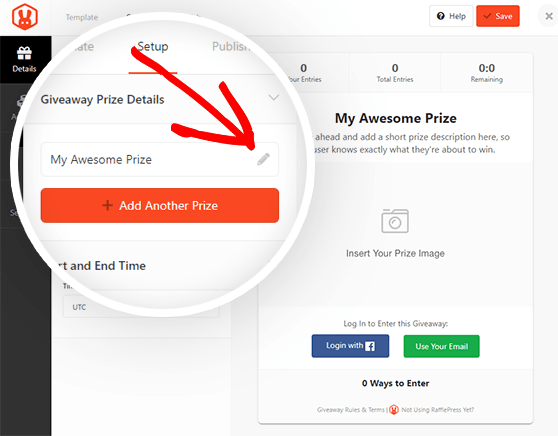
If you have more than one prize, click the +Add Another Prize button to include more. Choose the date and time your contest starts and ends in the Start and End Time area, then click Save.
Step 4: Choose Your Pinterest Contest Entry Methods
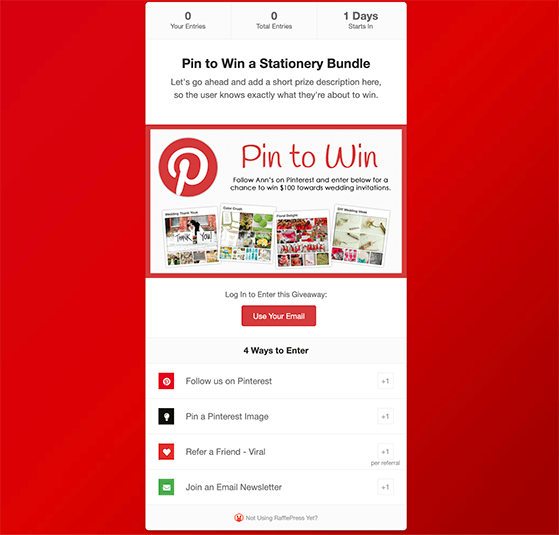
RafflePress is an excellent way to run a Pinterest contest because it offers multiple ways to enter beyond just visiting your Pinterest page. For example, you can offer 1 entry for following you on Pinterest, 2 entries for visiting a Pinterest board, and a bonus entry for joining your email newsletter.
Click on the Actions tab to choose your entry methods. All actions are grouped by goal: more subscribers, more engagement, more traffic. Click any action to add it to your giveaway widget.
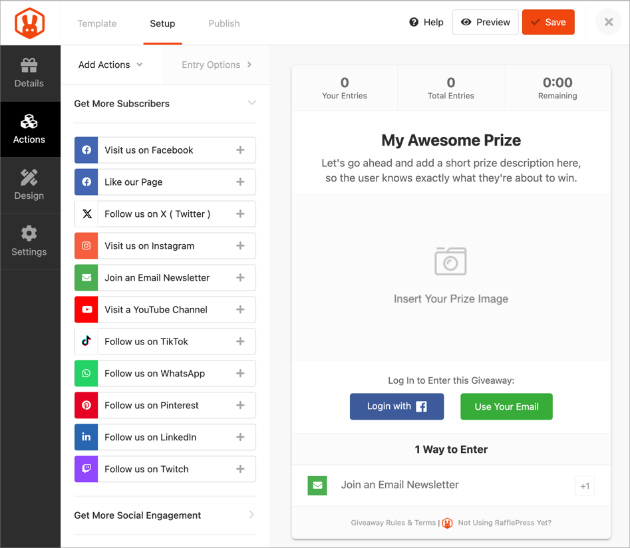
Here’s an example setup for a Pinterest contest:
- Follow us on Pinterest: An ideal way to boost your Pinterest followers and get more eyes on your profile.
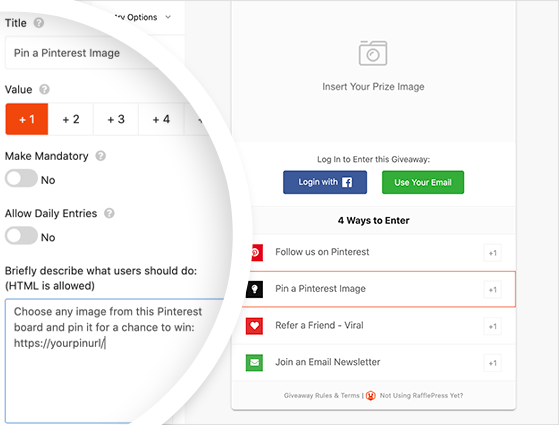
- Pin a Pinterest Image: Use the Invent Your Own action to ask users to pin an image from a collection on your Pinterest board. You can use this to create any type of entry you like.
- Refer-a-Friend Viral: A great way to encourage word-of-mouth marketing. You can also run a refer-a-friend giveaway to encourage participants to share your contest on Pinterest, Facebook, or email for more entries.
- Join an Email Newsletter: Include this action to require users to enter their email address for extra entries and grow your email list.
Click Save when you’re happy with your contest actions.
Step 5: Design Your Pinterest Contest
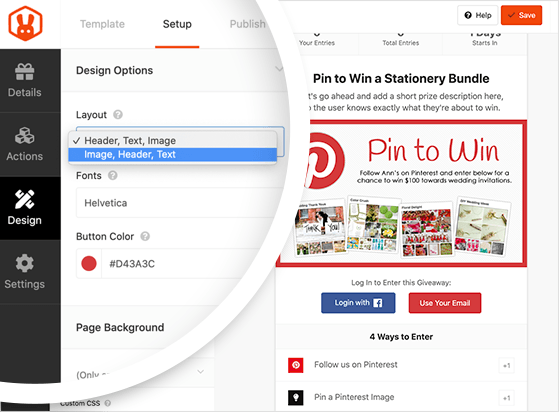
Next, customize how your contest looks by clicking the Design tab. There are 2 different layouts to choose from, plus several fonts and button colors.
If you’re creating a separate page for your contest, you can set the page’s background color or upload a background image. Once everything looks right, click Save.
How Long Should You Run Your Pinterest Contest?
Before you publish, decide on your contest duration. For most brands, 2-4 weeks is the sweet spot: long enough to build momentum and attract entrants, short enough to maintain urgency.
If you’re running an urgency-driven campaign (a product launch, a flash sale tie-in), 5-7 days works well. If your audience is small and you’re still building a following, a 4-6 week window gives you more time to reach new people.
Longer than 6 weeks and engagement typically drops because people assume they have plenty of time and never get around to entering.
Step 6: Configure Your Contest Settings
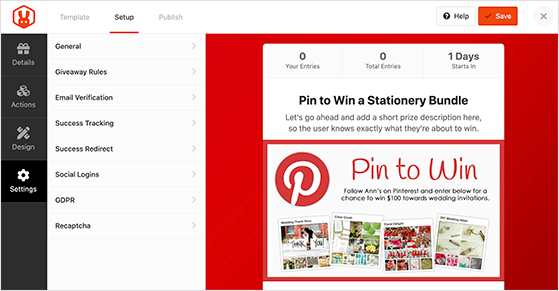
Now click the Settings tab. You’ll find 8 sections covering everything from your landing page URL to fraud protection. Here’s what each one does:
- General: Change your contest name, set your landing page permalink, and more.
- Giveaway Rules: Enter your contest rules or use the built-in giveaway rules generator to create them.
- Email Verification: Choose whether participants need to confirm their email to enter.
- Success Tracking: Enter your Google Analytics code to track page activity, or Facebook pixel to run retargeting ads.
- Success Redirect: Redirect users to a specific URL after entering, such as a thank you page.
- Social Logins: Allow users to log in to your contest with their Facebook account.
- GDPR: Add a GDPR consent checkbox users must agree to before entering.
- reCaptcha: Enable reCaptcha to prevent spam entries and fake signups.
The Giveaway Rules Generator is worth using. Click the + Generate Rules button, enter your contest details, then click Generate Rules to create a ready-to-use rules block for your widget.
Once you’ve finished configuring everything, click Save.
Step 7: Publish Your Pinterest Contest
With your contest configured, click the Publish button at the top of the screen. RafflePress gives you 3 ways to get your contest live:
- RafflePress WordPress Block: Add the giveaway to a post or page using the WordPress block editor.
- WordPress Shortcode: Embed your contest in the classic editor, sidebar, or theme with a simple shortcode.
- Giveaway Landing Page: Create a distraction-free landing page on your website for your contest.
Creating a giveaway landing page is usually the best option. With no other distractions on the page, users focus entirely on entering your contest.
To use this method, click the Giveaway Landing Page option. Click the link asking you to set up your landing page permalink, give your page a sensible URL, then click Save. Click View to see what your contest landing page looks like.
Step 8: Promote Your Pinterest Contest
With your contest live, you need to get eyes on it. Your first move should be to pin your contest on one of your Pinterest boards. Create an eye-catching Pinterest image, add it to Pinterest with your contest landing page as the destination URL, and include a clear description with relevant hashtags to improve the pin’s reach.
From there, use every channel available to you. Here are the promotion tactics that work best:
- Email your subscriber list: Your existing subscribers are your warmest audience. A direct email to your list on launch day typically generates your first wave of entries.
- Cross-promote on Instagram, Facebook, and TikTok: Share your contest link across every platform where you have a presence. Each cross-post brings new entrants who can then become Pinterest followers.
- Create a blog post announcing your contest: A dedicated post helps your contest get found through search and gives you something shareable with context.
- Consider a brand partnership or influencer share: If you have relationships with complementary brands or influencers in your niche, ask them to share your contest. Even one well-placed share from a trusted account can dramatically expand your reach.
- Submit to sweepstake directory websites: These directories list active contests and can drive a consistent stream of contest-focused entrants.
For more ideas, check out our proven Pinterest growth strategies to build momentum before and during your contest.
Step 9: Choose and Announce the Contest Winner
Choosing Your Winner
When your contest closes, the fairest way to choose a winner is through a random draw. RafflePress’s random winner generator makes this straightforward.
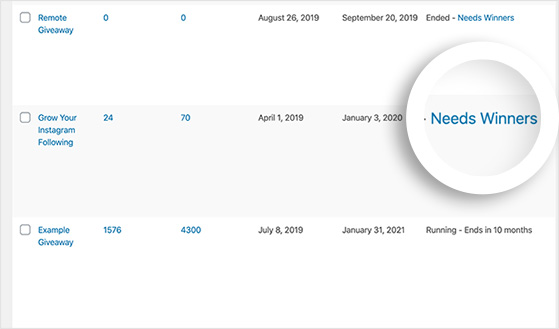
Go to RafflePress » Giveaways and click the Needs a Winner link on the right-hand side.
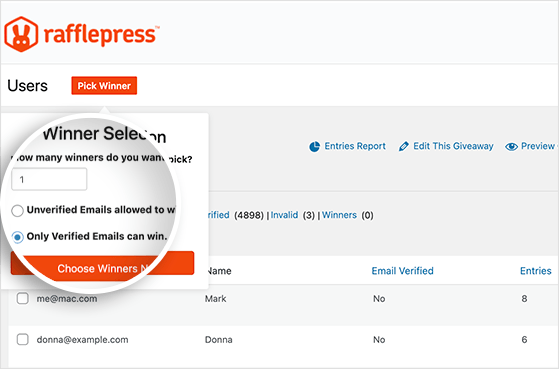
You’ll see a list of everyone who entered and the number of entries each person has. Click Pick a Winner, select your options, and click Choose Winners Now. The winner gets highlighted at the top of your entries list, and you can click to email them the good news.
For help with the winner selection process, see our detailed guide on how to pick a winner of a giveaway.
Announcing the Winner
After choosing your winner, announce it to everyone who took part. Doing so acknowledges the time people invested, builds goodwill, and keeps your audience engaged for the next campaign.
You can announce your contest winner by:
- Sharing the news on social media
- Writing a blog post announcing the winner
- Sending an email to everyone who took part (a great opportunity to grow your email list with a giveaway follow-up sequence)
You can also offer a consolation prize to everyone who entered, such as a discount code or voucher, to keep them engaged with your brand.
Step 10: Analyze Your Results
Your final task is to take stock of how your Pinterest contest performed. Start with your Pinterest analytics to see how many clicks and engagements your pin generated.
For deeper insight, use MonsterInsights, the best Google Analytics plugin for WordPress. It makes it straightforward to track visits to your contest landing page, referral traffic from social media, and overall traffic to the rest of your website, all inside your WordPress dashboard.
By reviewing your data, you can see which promotion strategies worked best and use that information to run a better contest next time.
What to Do After Your Pinterest Contest Ends
Your contest just ended and you’ve announced a winner, but the work isn’t done yet. The new followers and email subscribers you gained are valuable, and most brands let them go cold immediately.
Here’s how to turn your contest audience into long-term fans:
- Send a post-contest email: Within 24 hours of the contest closing, email everyone who entered. Thank them for participating, announce the winner (if you haven’t already), and include something useful: a resource, a tip, or a look at what’s coming next.
- Offer a consolation discount: A small discount code for all non-winners converts a percentage of them into buyers. Since these people already raised their hand by entering your contest, they’re warmer than cold traffic.
- Follow up on Pinterest: Post fresh, relevant content on Pinterest in the days after your contest ends. New followers are most likely to engage right after they’ve interacted with your brand, so don’t leave a gap in your posting schedule.
Frequently Asked Questions
Can you do a giveaway on Pinterest?
Yes, you can run giveaways and contests on Pinterest. Pinterest allows contests as long as you follow their community guidelines, which include not requiring users to pin a specific image, not allowing more than one entry per person, and not claiming that Pinterest sponsors or endorses your contest.
You can run a giveaway directly on Pinterest (Pin to Win, Board Contest, Comment Contest) or off-platform using a tool like RafflePress with a pin linking to your contest landing page.
How long should a Pinterest contest run?
For most brands, 2-4 weeks is the right window. It’s long enough to build momentum and reach new audiences through repins and shares, but short enough to maintain urgency throughout.
If you’re running an urgency-driven campaign (tied to a product launch or flash sale), 5-7 days works well. For smaller audiences still building a following, 4-6 weeks gives more time to spread the word. Avoid going longer than 6 weeks. Participation drops off sharply when people feel like they have unlimited time.
What are the rules for running a contest on Pinterest?
Pinterest’s community guidelines for contests require that you limit entries to one per person, give users the option to choose their own images rather than requiring a specific pin, and avoid spammy behavior like repeatedly reposting the same content.
You also cannot claim that Pinterest endorses or sponsors your contest, and you should only post your contest on boards that are relevant to it. Read the full guidelines at policy.pinterest.com before you launch.
Do you need a special app to run a Pinterest contest?
No, you can run a basic Pinterest contest (Pin to Win, Board Contest, Comment Contest) directly on the platform without any additional tools. You just need a Pinterest business account.
If you want to run an in-app contest with multiple entry options, email collection, and a dedicated landing page, a tool like RafflePress makes it much easier to manage. It handles entries, winner selection, and integrates directly with your WordPress site and email provider.
How do you pick a winner for a Pinterest contest?
The fairest method is a random draw. For in-app contests built with RafflePress, the built-in random winner generator selects a winner from all eligible entries. Go to RafflePress » Giveaways, click Needs a Winner, then click Pick a Winner and Choose Winners Now.
For contests run directly on Pinterest (like comment contests), use a random number generator tool to select from your list of eligible commenters. Always document the winner selection process so you can verify it was fair if anyone asks.
Ready to Run Your First Pinterest Contest?
You started this guide not knowing where to start with a Pinterest contest. Now you have a clear process: pick your format, set your rules, build it with RafflePress, promote it across every channel, and follow up with your new audience once it ends.
Get started with RafflePress and you can have your first Pinterest contest live today.
If you liked this article, please subscribe to our YouTube Channel for RafflePress video tutorials. You can also find us on Twitter and Facebook.


