How to Run a Selfie Contest (Step-by-Step)
 Stacey Corrin
Stacey Corrin
Stacey Corrin
 John Turner
John Turner
John Turner
TL;DR: How to Run a Selfie Contest You can run a successful selfie contest in 9 steps and start collecting real customer photos this week.
- Set clear goals: Decide what you want to achieve: followers, email subscribers, or UGC.
- Pick a theme: Choose a specific idea that fits your brand and excites your audience.
- Choose a prize: Pick something relevant to your business so winners stay interested after the contest.
- Write simple rules: Cover eligibility, entry method, duration, and how you’ll pick a winner.
- Build the contest: Use RafflePress to create your selfie contest inside WordPress in minutes.
- Promote actively: Share on social, email your list, and post daily during the contest window.
You post on Instagram asking customers to tag you in a selfie with your product. A week later, you’ve got three photos. Three. From 3,000 followers.
That’s the problem with relying on organic tags. There’s no mechanism pulling people in, no reason to participate right now. A selfie contest changes that ratio by giving people an actual reason to take and share that photo.
In this guide, I’ll walk you through exactly how to run a selfie contest step by step, using RafflePress to manage entries inside WordPress without any clunky third-party platforms.
Quick steps to run a selfie contest:
- Step 1: Set Clear Goals for Your Selfie Contest
- Step 2: Pick a Theme for Your Selfie Contest
- Step 3: Choose a Prize That Fits Your Audience
- Step 4: Write Simple Rules for Your Selfie Contest
- Step 5: Build Your Selfie Contest in WordPress
- Step 6: Promote Your Selfie Contest
- Step 7: Pick a Winner
- Step 8: Follow Up With Participants
- Step 9: Review Your Selfie Contest Results
What Is a Selfie Contest?
A selfie contest is a photo-based giveaway where participants submit a selfie for a chance to win a prize. They’re popular on Instagram, X (Twitter), and Facebook, where sharing a photo with a branded hashtag exposes the giveaway to a much wider audience.
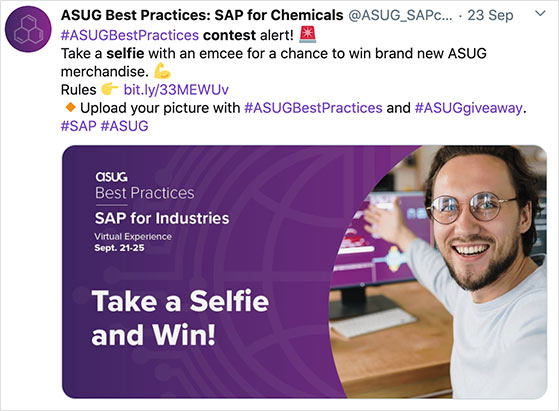
The best selfie contests ask users to share their photos with a hashtag like #selfie, which helps expose the giveaway to a broader audience. Smart brands also include a branded giveaway hashtag to make entries easier to find.
Selfie competitions work across many industries, including:
- Travel: “Share a selfie from your latest vacation to win your next booking for free…”
- Fitness: “Post your before and after shots for the chance to win a year’s supply of protein shakes…”
- Fashion: “Want to win this season’s must-have dress? Post your best dress selfie…”
- Beauty: “Send us your glitzy Christmas looks to win a free eyeshadow palette…”
Almost any industry can run a selfie contest. It takes a little planning to make it work, but the mechanics are straightforward once you know the steps.
How to Run a Successful Selfie Contest
Below I’ll show you how to run a selfie contest easily from your WordPress website.
Step 1: Set Clear Goals for Your Selfie Contest
For your selfie contest to be successful, you should first set out your goals. This means deciding what you want to get out of running a giveaway and how it can help grow your business.
For instance, you might want to run a selfie contest to:
- Get more social media followers
- Increase your website traffic
- Collect user-generated content (UGC)
- Get more email list subscribers
- Improve social media engagement
- Raise brand awareness
Defining your goals makes it easier to know if your giveaway was a success. It also helps you understand what does and doesn’t work so you can improve your next campaign.
Step 2: Pick a Theme for Your Selfie Contest
Once you’ve decided on your goals, come up with a giveaway theme. An interesting theme will excite your target audience, making them eager to join in as soon as you start accepting entries.
Take some time to think about what might interest your audience most. Your selfie contest theme could be about your industry, trending topics, or the time of year.
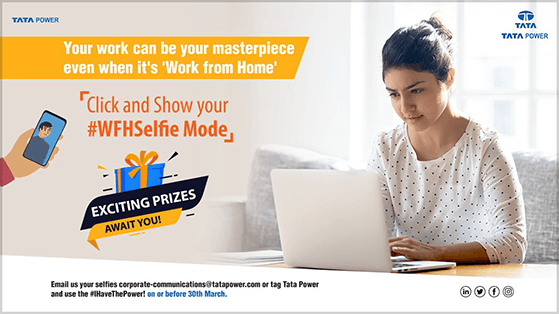
Here are a few selfie contest theme ideas to help you out:
- Work-from-home selfie contest
- Unboxing selfie contest
- First-day-of-school selfie contest
- TikTok duet selfie contest
- Group selfie competition
- Funny selfies
- Scavenger hunt selfies
- Product selfie contest
- In-store selfies
- Celebrity selfies
Once you’ve decided on a theme, you’ll need to choose an equally exciting prize.
Step 3: Choose a Prize That Fits Your Audience
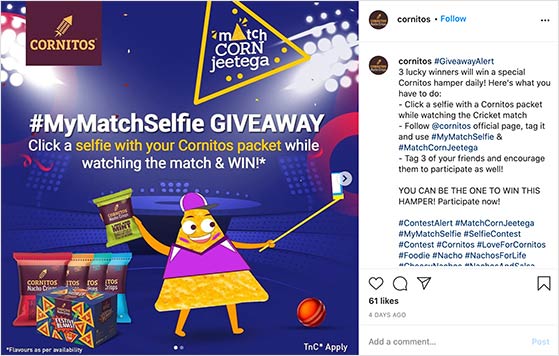
When selecting a giveaway prize, many companies make the mistake of choosing something unrelated to their industry. The problem with that is people will enter just for the freebie and lose interest once the contest is over.
To keep your new audience around long after the giveaway ends, pick a prize relevant to both your business and your audience’s interests.
For instance, if your company sells pet-related products, you can run a pet selfie contest that rewards the winner with a bundle of your goods. That way, you keep the prize related to your company and appeal to your audience’s interest in pets.
Click here to discover even more contest prize ideas for a variety of industries.
Step 4: Write Simple Rules for Your Selfie Contest
After choosing an excellent prize, you need to create some selfie competition terms and conditions. A good set of rules keeps your contest fair and makes it easier for people to join in.
Take a moment to ask yourself the following questions:
- Over what age should people be to enter your contest?
- Will you limit your giveaway to a specific area or country?
- What will the contest duration be?
- How will you choose a winner?
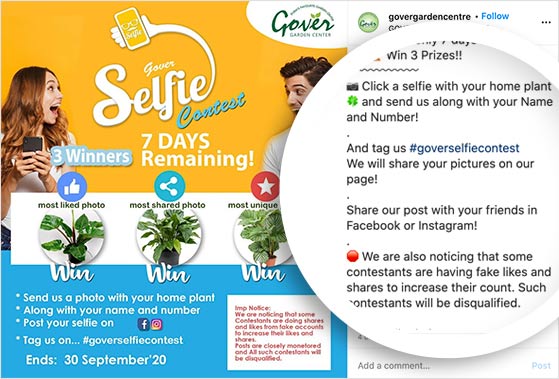
You should also think about how people can enter your selfie contest. Most brands ask people to post their selfies on social media, tagging the brand’s account and including a specific hashtag. Yet, this approach can become quite messy.
You’d have to search through multiple social media networks for photos with the correct tags, which is quite time-consuming. You’d also have to manually verify any bonus entries, like tagging friends and following your profile.
To avoid all that confusion, I’d suggest using a selfie contest app like RafflePress to create a contest on your WordPress website. RafflePress includes 1-click actions users can take to enter your giveaway. It stores verified actions, like uploading a selfie and referring friends, in its entry management dashboard, right inside WordPress.
Contest legality varies by country, and platforms like Instagram and Facebook each have their own promotion guidelines. For a full breakdown, see our guide on how to write giveaway rules like a pro.
Step 5: Build Your Selfie Contest in WordPress
The easiest way to create a selfie contest is with RafflePress, a WordPress giveaway plugin that lets you run viral contests from inside your WordPress dashboard with no separate platform or embed code required. Click here to get started and download the plugin to your computer.
Upload the plugin to your WordPress website and activate it. If you need help with that, follow this step-by-step guide to installing a WordPress plugin.
Choose a Giveaway Template
After activating RafflePress in WordPress, hover your mouse over the RafflePress icon in your WordPress admin area and click ‘Add New’.
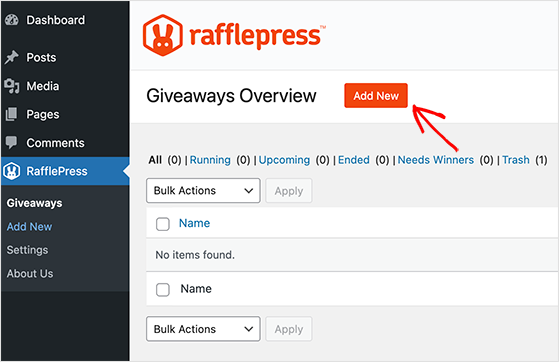
The next screen asks you to enter a giveaway name and choose a giveaway template. RafflePress has a variety of templates designed to get your contest live in under 10 minutes.
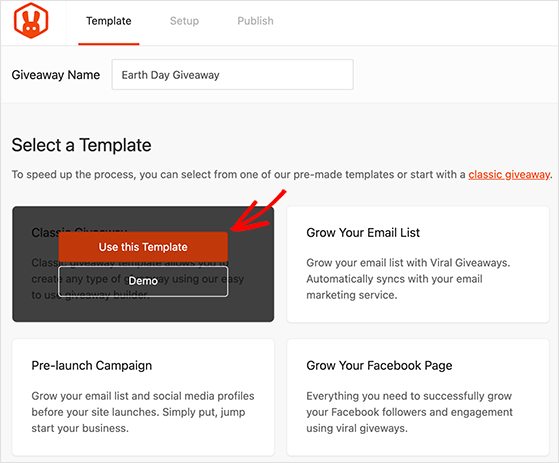
For this tutorial, we’ll select the Classic Giveaway. Hover your mouse over it and click ‘Use This Template’.
Enter Your Prize Details
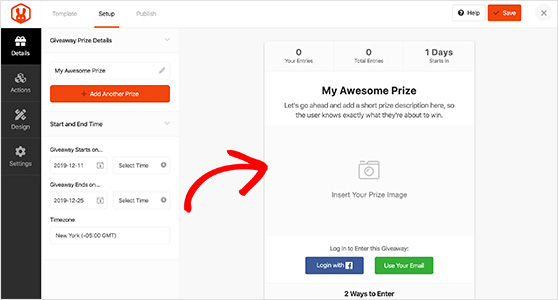
On the next screen, you’ll see the RafflePress drag-and-drop giveaway builder. This is where you enter the details for your selfie contest prize and the contest duration dates and times.
Click the pencil icon to edit your prize details. Enter the prize name, a description, and upload a photo. You can also add your contest duration in the ‘Start and End Time’ section on the left-hand side.
When you’re happy with your prize details, click the ‘Done Editing’ button and click ‘Save’ in the top right corner.
Add Your Selfie Contest Entry Methods
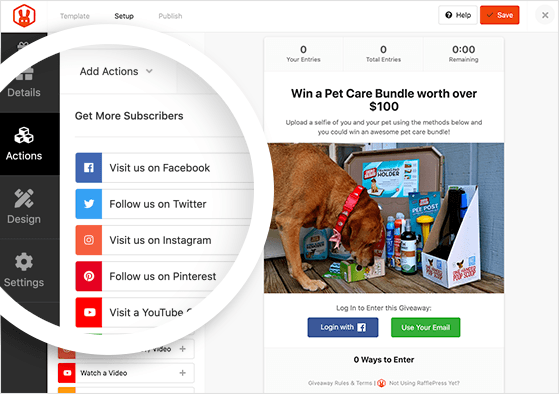
Click the ‘Actions’ tab in the left panel. This reveals all the actions you can ask users to take to enter your giveaway.
The first entry action you should choose is the ‘Submit an Image’ action, which you can find under the ‘Get More Traffic’ section.
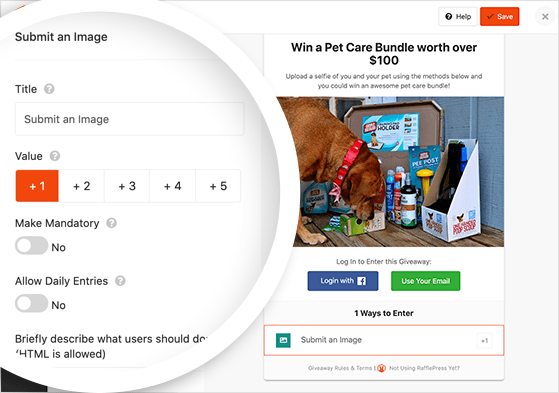
Clicking the action will add it to your giveaway builder and reveal the entry options. Change the name of the action to something like ‘Upload a selfie’ and set a value for how many giveaway entries that action is worth.
You can make this action mandatory, which means users must perform it to unlock any bonus entries. You can also allow users to perform this action daily by clicking the ‘Allow Daily Entries’ toggle. Remember to include any specific instructions in the text box provided.
If you like, you can add extra entry actions to give users a way to collect bonus contest entries. For instance, you can ask users to share the contest with friends to increase your reach and join your newsletter to grow your email list.
Remember to click ‘Save’ when you’re finished with this step.
Design Your Contest
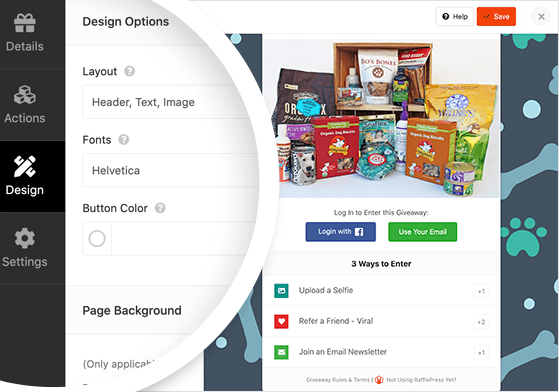
After adding your entry methods, click the ‘Design’ tab to show the design options for your giveaway. On this page, you can choose a different contest layout, pick different fonts, and select different button colors.
If you plan to publish your selfie contest on a dedicated giveaway landing page, you can also choose a background color or upload your own background image.
Configure Your RafflePress Settings
Click the ‘Settings’ tab to configure your giveaway settings. In this area, you can set up Email Verifications, Success Tracking, Social Logins, and more.
The most important setting is the ‘Giveaway Rules’ section. In RafflePress, you can generate a simple set of giveaway rules using the built-in rules generator. Click the ‘+ Generate Rules’ button and enter your contest details like your sponsor name, contact details, etc.
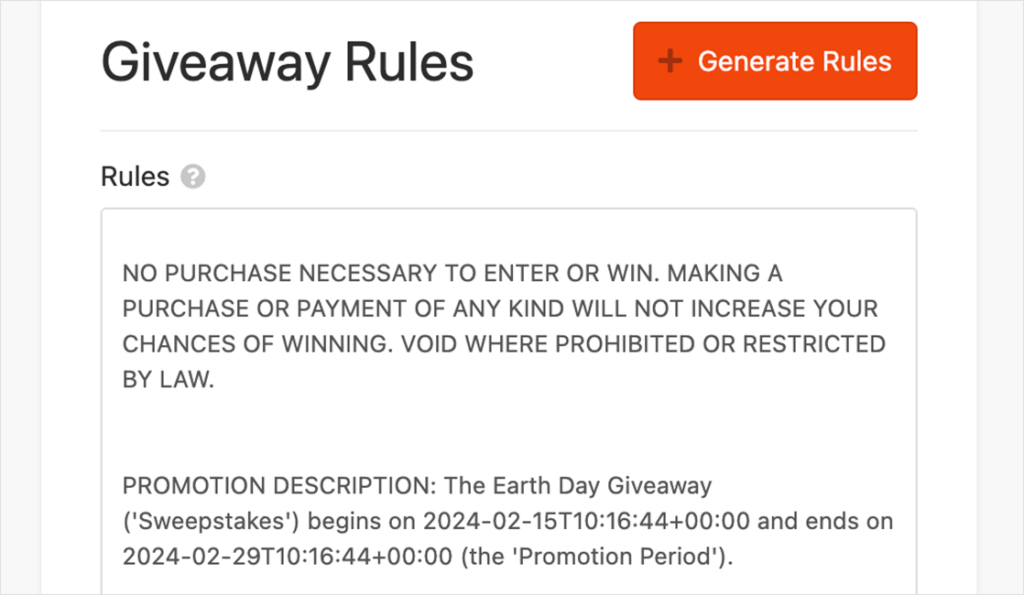
RafflePress creates a simple set of rules you can edit further to suit your needs.
Publish Your Contest
When you’re happy with your giveaway design, click the ‘Publish’ button at the top of your screen. You’ll then see 3 ways to publish your selfie contest in WordPress:
- With the RafflePress WordPress block inside any post or page on your website.
- By using the RafflePress shortcode to publish your giveaway on posts, pages, sidebars, or even within your WordPress theme.
- On a dedicated, distraction-free giveaway landing page.
The easiest option is to publish your contest on a giveaway landing page. That way, there won’t be anything to distract users from entering. Click the ‘Giveaway Landing Page’ option.
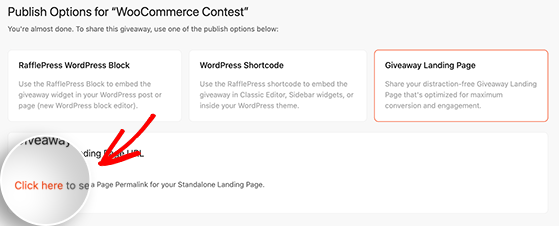
Underneath, you’ll see a message asking you to “Click here” to choose a permalink for your giveaway page. Upon clicking, you’ll head to the Settings page, where you can enter your permalink under the ‘Page Settings’ section.
Click ‘Save’ to store your settings, then click ‘View’ to see what your giveaway will look like.
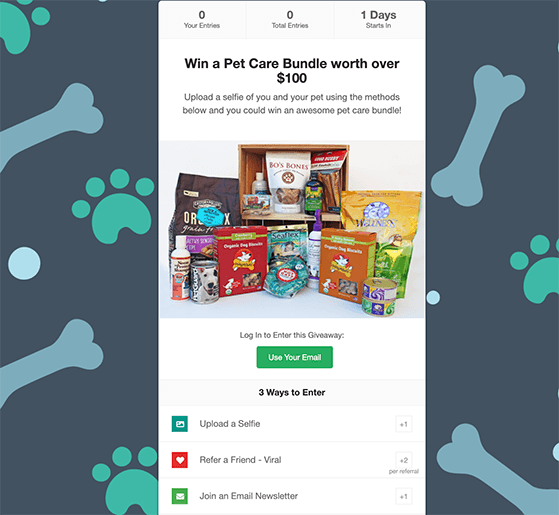
Congratulations! You’ve now created a selfie contest in WordPress.
Step 6: Promote Your Selfie Contest
Once your selfie contest goes live, you can’t simply wait for entries to roll in. You need to actively promote your giveaway to ensure it reaches your target audience.
You can promote your contest by:
- Announcing it on social media with a launch post
- Adding a lightbox popup to your website homepage
- Sending an email newsletter to your list
- Sharing selfie contest images as users submit them
- Submitting your contest to giveaway and sweepstakes directory sites
- Posting a teaser video on TikTok showing what participants could win (short-form video drives the highest contest discovery for audiences under 35)
- Sharing daily entry reminders on Instagram Stories throughout the contest window
A branded contest hashtag is worth setting up before you launch. Use something like #BrandNameSelfie2026 alongside a broad discovery hashtag like #selfiecontest or #photocontest.
The branded hashtag lets you track all submissions in one place, while the broad hashtag increases discovery from people who aren’t already following you.
For timing, promote 3 days before the contest opens to build anticipation, post daily during the contest window, and send a final-push email 24 hours before it closes. That last email consistently drives a spike in last-minute entries.
Check out this article for even more proven contest promotion ideas.
Step 7: Pick a Winner
When your contest comes to an end, you’ll need to choose a winner. There are a few ways you can do this:
- Picking a random winner
- Asking your audience to vote for a winner
- Judging the winner yourself
- Using a voting mechanic to turn winner selection into a viral loop
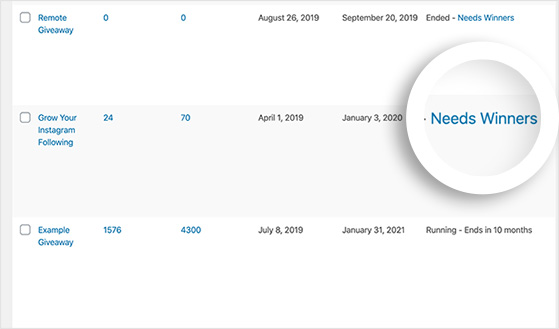
Picking a random winner in RafflePress is easy. Click ‘RafflePress » Giveaways’ from your WordPress dashboard, find your recently ended contest, and click the ‘Needs Winners’ link on the right-hand side.
On the next page, you’ll see a list of everyone who entered your selfie contest. Click the ‘Pick Winner’ button at the top, enter your options, and click ‘Choose Winners Now’.
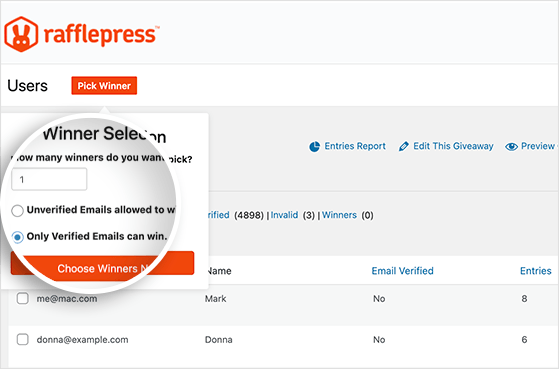
RafflePress will randomly choose a winner from all your entries and highlight them at the top. Click to email the winner with the news of their big win.
If brand awareness is your primary goal, consider the voting mechanic instead. Participants share the contest link and ask friends to vote for their selfie, earning more entries per vote. In RafflePress, this is the ‘Refer Friends’ entry action. It turns every participant into a promoter for your brand.
Step 8: Follow Up With Participants
After drawing a winner, follow up with everyone who took part in your selfie contest. A structured 3-email sequence works well here:
- Announcement email: Announce the winner by tagging them on social media and sending an email to all entrants. Thank everyone for participating and share a highlight from the contest (like your favorite selfie submission).
- Consolation email: Send non-winners a 10-15% discount code on a product related to the contest theme. This converts entrants into customers while their interest in your brand is warm.
- Re-engagement email (1 week later): Tease your next contest or campaign. Entrants who didn’t win are your highest-intent audience for the next giveaway.
You can also send out a newsletter announcement, thanking everyone for entering and giving people closure while keeping them engaged until your next contest.
Step 9: Review Your Selfie Contest Results
The final step is to check your results against the goals you set in Step 1. Look at these metrics specifically:
- New email subscribers added during the contest window
- Social follower change on each platform you promoted on
- Website traffic to the giveaway landing page
- UGC collected (number of selfie submissions and quality)
I use MonsterInsights to track visits to the giveaway landing page and social media referrals directly inside WordPress. It makes comparing results against your goals much faster than pulling the data from multiple places.
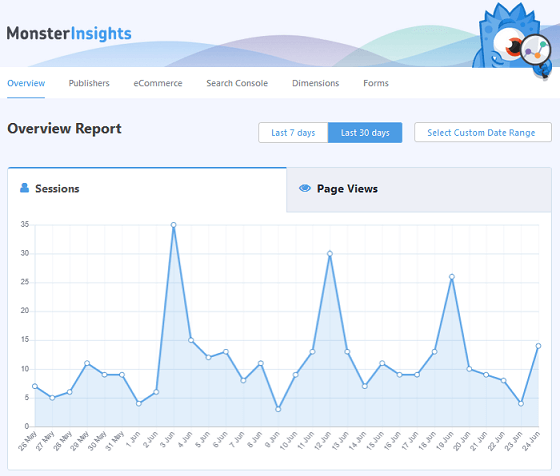
By analyzing your results, you can learn how successful your contest was and find ways to improve your next giveaway campaign.
Free: Download Our Giveaway Playbook
Templates, prize ideas, and promotion strategies in one guide.
What to Do With Your Selfie Contest Photos
Here’s something most brands overlook: the selfie submissions you collected are more valuable than the contest itself. You now have authentic customer photos that can work as testimonials, social proof on your website, or Instagram grid content.
Before you repost anything, make sure you have explicit permission. Your contest rules should already include a clause stating that entrants grant you the right to repost their submissions.
If you want to use a photo for paid advertising or website social proof, ask for written confirmation from the participant directly. A quick DM or email reply is enough.
FAQs About Selfie Contests
What are some good selfie contest ideas?
Popular themes include unboxing selfies, first-day-of-school selfies, in-store selfies, product selfies, and group selfies with a branded hashtag. The best themes connect to something your audience is already doing or excited about.
For seasonal ideas: holiday outfit selfies in December, back-to-school selfies in August, or summer travel selfies work well for most brands. Match the theme to your audience’s calendar, not just your product lineup.
Are selfie contests legal?
Yes, but you need clear rules. Include eligibility requirements (age, location), how winners are chosen, and contest dates. Instagram and Facebook both have their own promotion guidelines that apply separately from local laws.
Contest legality also varies by country. See our complete guide to writing giveaway rules for a full breakdown by platform and region.
How long should a selfie contest run?
Most selfie contests run for 1-2 weeks. That’s long enough to build momentum without losing participant interest. Longer than two weeks and momentum usually drops, because people assume they have plenty of time and never get around to entering.
A 7-10 day window with daily promotion posts tends to produce the best results. Promote heavily in the first 24 hours to get early entries and social proof working for you from the start.
Can I run a selfie contest on Instagram without a tool?
You can, but it’s significantly more work. Running a selfie contest directly on Instagram means manually searching for posts with your hashtag, verifying each entry, and tracking bonus actions like follows and tags by hand.
A tool like RafflePress handles entry collection, verification, and winner selection automatically inside WordPress. It also gives you a dedicated landing page so your contest isn’t buried in a feed. If you’re running a contest for business results, the tool is worth it.
You’ve now got everything you need to run a selfie contest that actually drives entries. That trickle of three tagged photos from 3,000 followers? The right contest structure fixes that.
Get started with RafflePress today to build your first selfie contest inside WordPress.
If you liked this article, then please subscribe to our YouTube Channel for RafflePress video tutorials. You can also find us on Twitter and Facebook.

