11 Caption Contest Examples I Keep Coming Back To (and How to Run One)
 Stacey Corrin
Stacey Corrin
Stacey Corrin
 John Turner
John Turner
John Turner
TL;DR: How to Run a Caption Contest
A caption contest is a giveaway where you post an image and ask your audience to write the best caption to win a prize. Here is how I run one start to finish:
- Pick the goal: Decide whether you want emails, follows, or comments before you choose anything else.
- Choose a funny image: The more character the photo has, the more creative the captions get.
- Build it in RafflePress: Use the “Answer a Question” action to collect captions right on your site.
- Set clear rules and a prize: Match the prize to your audience so you attract real customers, not freebie hunters.
- Promote and pick a winner: Share it everywhere, then judge by creativity or let your audience vote.
The caption contest examples below are the ones I keep coming back to. They are the captions you didn’t have to write, written for you by an audience having fun with a single photo.
First I’ll show you those examples, the ones I reach for when I’m planning community activities that actually get responses. Then I’ll walk you through the exact plan I use to run one of my own.
By the end you’ll be ready to launch, whether you want more email subscribers, social followers, or a feed full of replies.
Table of Contents:
- What Is a Caption Contest?
- 11 Caption Contest Examples Worth Copying
- How to Run a Successful Caption Contest
- FAQs About Caption Contests
What Is a Caption Contest?
A caption contest is a giveaway where a brand posts an image and asks its audience to write the best caption to win a prize. A winner is usually picked from the funniest or most creative captions, then rewarded with a prize.
The format flexes more than most people expect. You can run a photo caption contest or a drawing or cartoon caption contest, and you can ask for a one-line description or for dialogue the characters might be saying.
You also get to choose how it ends. You could pick the winner yourself, or let your audience vote.
Plenty of brands add bonus actions for extra entries, like joining an email newsletter, following a social profile, sharing the contest, or tagging a friend. They stay popular because they are fun, light-hearted, and easy to enter, and the captions often hand you free promotional content.
The trap most caption contests fall into: running them as comment-only posts on Facebook or Instagram. You get likes and comments, but you cannot verify who actually entered, and you cannot capture a single email address. The result is a burst of engagement and nothing to show for it once the post fades.
That’s the gap RafflePress, our WordPress giveaway plugin, closes. You collect captions on your own site, verify each entry, and turn entrants into subscribers you keep.
11 Caption Contest Examples Worth Copying
These are the caption contest examples I point people to when they ask what actually works. Each one shows a different mechanic you can borrow for your own types of contests.
1. New Yorker Cartoon Caption Contest
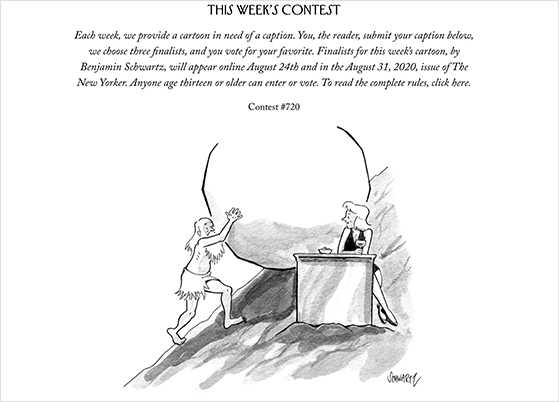
The New Yorker runs the most famous caption contest there is. It’s been a weekly feature, where readers submit a caption for that week’s cartoon, the magazine picks three finalists, and the audience votes for the winner, who then appears in print.
What makes it smart is the built-in loop. To enter, people log in, so the brand engages its existing audience, and finalists then share their entry to win votes, pulling in a wider audience for free.
You can see the live contest on the official New Yorker contest page.
You can copy this exact setup with RafflePress. Add your cartoon to the prize details, write your entry instructions, and use the “Answer a Question” action to collect captions. I will show you how later in this guide.
2. Starbucks #RedCupContest
Starbucks ran one of the cleanest examples of a photo caption-style contest with its #RedCupContest. Over three days in November 2014, fans posted creative photos of the brand’s red holiday cups using the hashtag, and Starbucks awarded five $500 prizes for the best entries.
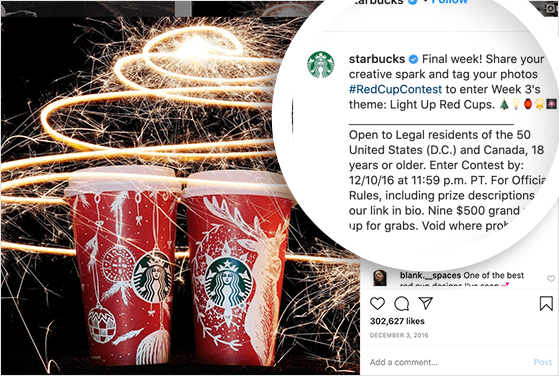
The result was hard to ignore. Across the 2014 holiday season, a red cup photo was reportedly shared on social media about every 14 seconds. You can read more about the campaign and that stat on its Wikipedia page.
The lesson here is the tight window. A short contest with a high-value prize and one simple hashtag creates urgency. With RafflePress, you could run the same idea on your own site and actually keep every entry instead of losing them in a hashtag feed.
3. Summer Photo Caption Contest
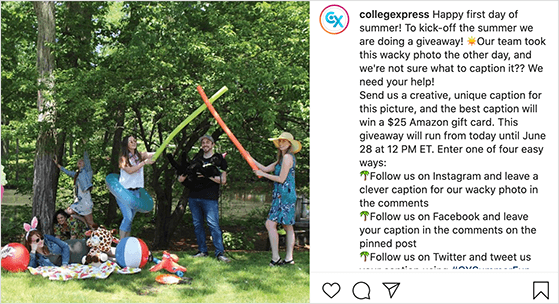
This pattern uses summer as the giveaway theme to boost engagement and followers. To win a $25 Amazon gift card, people followed the brand on Instagram, Facebook, or X, then commented with their caption using a branded hashtag.
The weak spot is the admin. Entries are scattered across three networks, so collecting and verifying them is a slog.
I would build this in the RafflePress giveaway builder instead. Add a separate entry action for each social profile so people never leave your site, and watch every entry land on one dashboard, ready to verify.
4. Facebook Comment Caption Contest
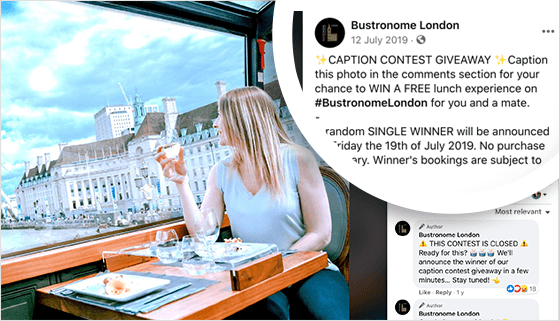
This is the classic Facebook setup: post the image, ask for a caption in the comments, and offer a prize like a dining experience. It is great for waking up an existing Facebook audience, but it stops there.
You can get more out of the same idea with the RafflePress Facebook giveaway template. It automatically adds the actions that grow your page, like “Visit us on Facebook” and “View Facebook Post/Video,” alongside a “Leave a Comment” action for the captions.
For the potential to make your contest go viral, layer in the “Viral Refer-a-Friend” action so entrants share it with their own networks.
5. Funny Blog Comment Caption Contest
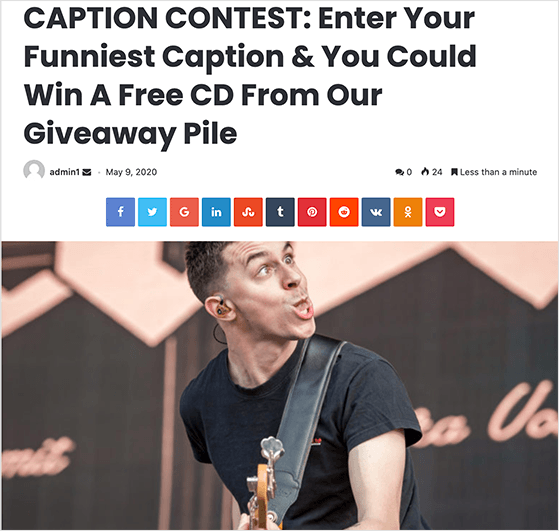
This pattern leans on humor to drive blog engagement, asking people to leave their caption in the blog’s comments to win a prize. More comments on your blog signal to new readers that your audience is active and worth joining.
The catch is volume. A popular contest can pull in thousands of comments, and sifting through them by hand is miserable. I use the RafflePress “Leave a Comment” action instead, which asks entrants to paste their comment URL so the entry verifies itself.
When the contest ends, the built-in random winner generator picks for you in one click.
6. Local Business Community Contest
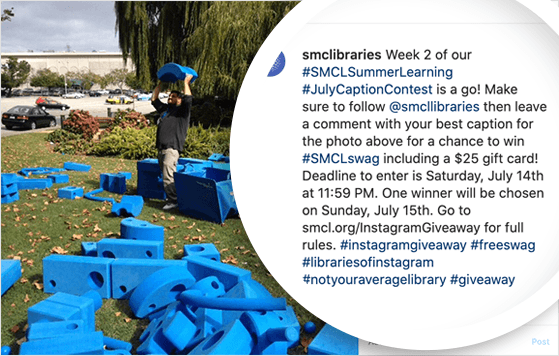
This is the pattern I recommend most to small businesses on Instagram. A library used a branded hashtag caption contest to promote its summer learning challenge, with a $25 gift card and a merchandise bundle as the prize.
It works because it ties the contest to something the local community already cares about. To stretch the reach, you could add the Refer a Friend action in RafflePress, which lets entrants share the contest on Facebook, Pinterest, X, and email.
7. Movie Promotion Caption Contest

This pattern asks people to buy a movie ticket and leave a caption to win an autographed poster, with the ticket shown as proof to claim the prize. It is a clever way to tie entries to a real purchase.
The proof-of-purchase step is where most tools fall down. I would handle it with the RafflePress “Invent Your Own” action, which lets you build a custom entry method, like asking for a ticket purchase number as proof.
8. Valentine’s Day Caption Contest
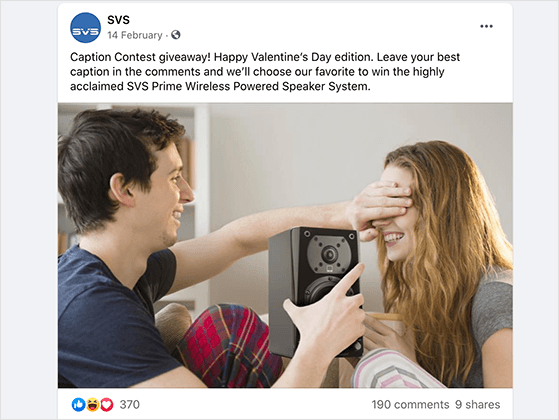
Holidays do the creative work for you. In this pattern, a wireless speaker retailer used Valentine’s Day to promote a product, giving the winner the chance to take it home for free.
The missed opportunity is the destination. Instead of sending traffic to a Facebook page, the RafflePress contest builder lets you pull that traffic to your own site, where you have a real shot at turning visitors into customers.
9. X Caption Contest
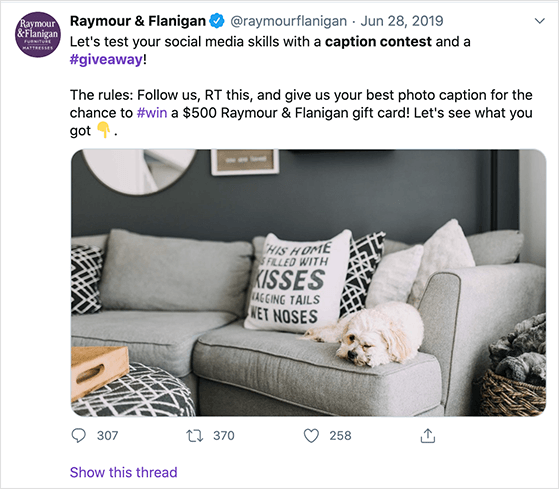
Furniture retailer Raymour & Flanigan ran a smart brand-awareness contest on X (formerly Twitter), giving entrants the chance to win a $500 gift card.
Two things made it land. The prize was big enough to pull in a lot of entries, and because the gift card was for their own store, it stayed relevant to the audience they actually wanted. A few well-chosen giveaway hashtags kept the engagement flowing.
You can learn how to do a Twitter giveaway in this step-by-step guide.
10. Follower Milestone Caption Contest
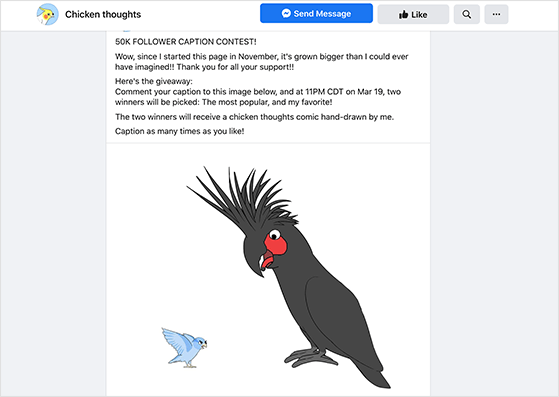
Small brands can run this just as well as big ones. Comic illustrator Chicken Thoughts marked a 50k follower milestone with a contest to win one of two hand-drawn comics, with the two favorite captions taking the prize.
To enter, people left a comment on the Facebook post. It is a simple way to thank an audience for their support, and a community that feels valued tends to promote your brand to its own circle without being asked.
11. Cash Prize Caption Contest
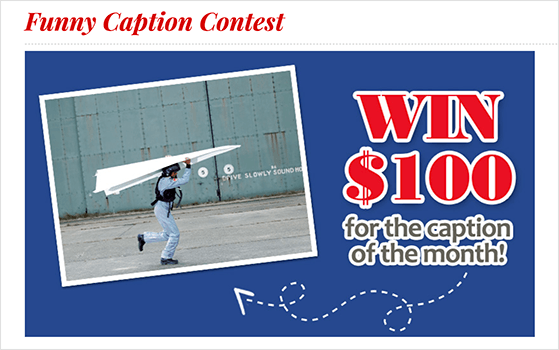
This pattern offers a $100 cash prize, collected through a form where people enter their caption and details. Cash works as a prize because it appeals to everyone, regardless of their tastes.
The form-based entry can get messy depending on your tools. The cleanest way I have found to replicate it is to pair the RafflePress giveaway builder with WPForms, the best contact form builder for WordPress.
Use the RafflePress “Visit a Page” action to send entrants to a page with your WPForms form. Once they fill it in, the entry verifies and their details land in the WPForms dashboard, and you can still add bonus actions to drive extra entries.
Free: Download Our Giveaway Playbook
Templates, prize ideas, and promotion strategies in one guide.
How to Run a Successful Caption Contest
Here is the plan I follow to run a caption contest that actually grows your business, not just the comment count.
1. Determine Your Contest Goals
The mistake I see most often is picking the prize before the goal. Decide what you want first, because that shapes every other choice. Common goals include:
- Grow your email list
- Increase your social media followers
- Promote a new product or service
- Increase user engagement
Pick a goal that matches your wider marketing aims. It makes choosing a prize far easier and keeps the results pointed at something useful.
2. Choose a Great Caption Image

The image is the whole contest. A flat photo gets flat captions, so the best entries almost always come from images with some character. Funny shots work best because they get an emotional reaction, but you can use almost anything:
- Your products in unexpected scenarios
- Behind-the-scenes or brand event photos
- Illustrations or cartoons of your company
- Customers using your product
- Your company mascot or the office pet
- Funny team photos
The more character the photo has, the more creative people can get with their captions.
3. Pick a Desirable Prize

A weak prize kills entries before you start. The fix is not a bigger prize, it is a more relevant one. Popular options include:
- Gift cards or vouchers
- Free products or services from your brand
- Cash prizes
- Brand merchandise
You can find more options in our contest prize ideas article. The one rule that matters: choose a prize your ideal customer actually wants, or you will attract freebie hunters who vanish the moment the contest ends.
4. Create Clear Contest Rules
Vague rules cause disputes and disqualified winners, so spell out what you expect and what people get in return. Your giveaway rules should cover:
- The minimum age of participants
- The geographic location your contest is open to
- The prize details
- How people enter
- The start and end times
- How you will draw the winner
- How you will contact the winner
Make sure your entry methods match your goal. If you want to grow your email list, for example, require people to join your newsletter as well as leave a caption.
5. Build Your Contest with RafflePress
This is where the comment-only contest problem gets solved. I build mine with RafflePress’s giveaway plugin for WordPress, because it keeps every entry on my own site instead of scattered across social feeds.
It’s one of the best WordPress plugins for this, with ready-made templates and one-click entry actions, and it lets you run a successful online contest straight from your WordPress dashboard.
Step 1: Create a New Giveaway
First, get started with RafflePress and download the plugin. If you need a hand, here is a guide for installing a WordPress plugin.
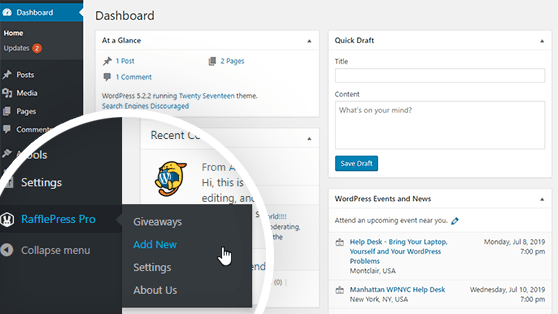
After you install and activate RafflePress, hover over the RafflePress icon in your WordPress admin area and click Add New to start a giveaway.
Step 2: Choose a Contest Template
On the next screen, name your contest and choose a template. RafflePress has templates built to grow your Facebook page, X profile, YouTube channel, and more.
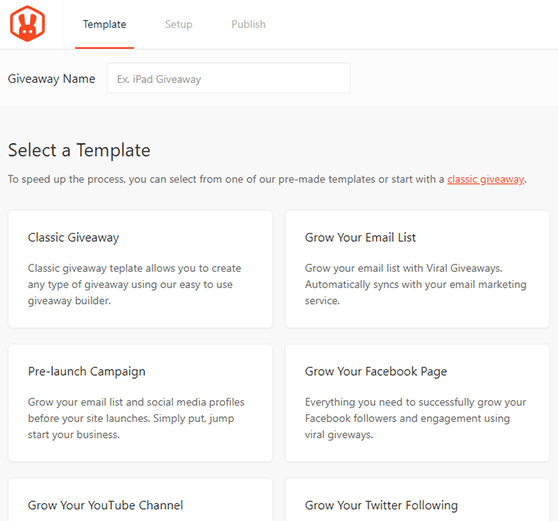
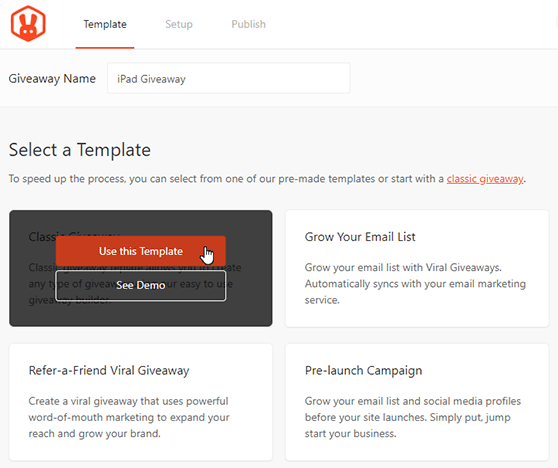
For this guide, pick the Classic giveaway template, which builds any contest type. Hover over the Classic template and click Use This Template.
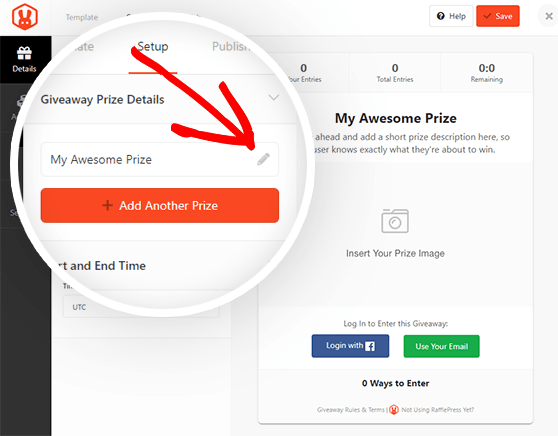
Step 3: Enter Your Prize Details and Photo
On the next screen, enter your prize details and upload the photo people will caption. First, click the Pencil icon under the Prize Giveaway Details heading.
Give your contest a title and description. This is your chance to explain how to enter and what people can win. Then click the Select Image button below the description to add your caption photo, choosing from your media library or uploading from your computer.
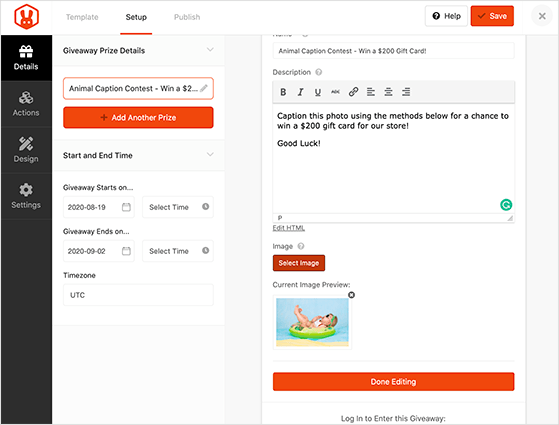
When you are happy with the details, click Done Editing. If you have more than one prize, click +Add Another Prize to enter the extras.
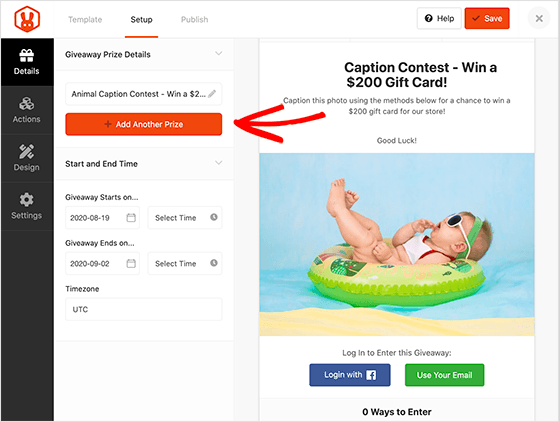
You can also set an end date and time zone in the Start and End Time section. Click Save periodically to keep your settings.
Step 4: Choose Your Entry Methods
Now add the actions that decide how people enter. Click the Actions tab to see every available entry action, then add one for submitting a caption.
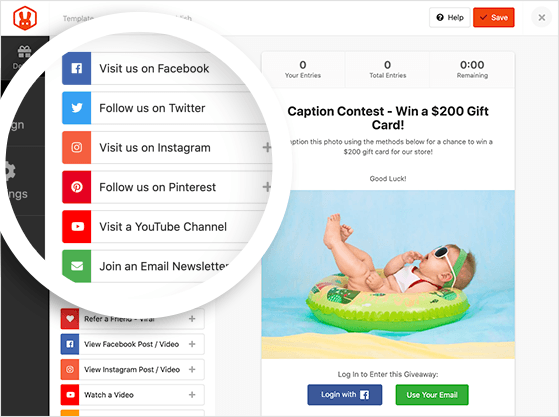
You have two solid ways to collect captions. Here is how to choose between them:
- Invent Your Own: Best when you want captions on another platform. Ask people to comment there and paste the comment link to verify the entry, which is handy for driving blog or social comments.
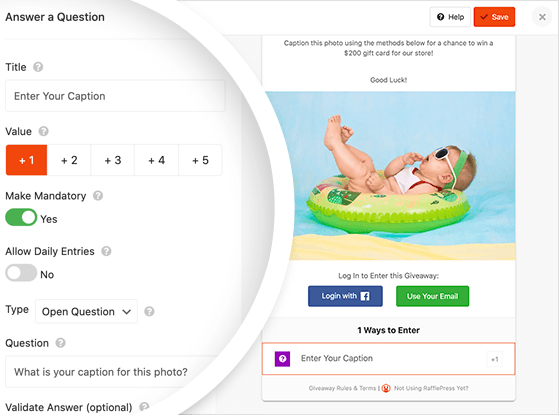
- Answer a Question: Best when you want everything on your site. Ask something like “What is your caption for this photo?” and people type their caption straight into the box.
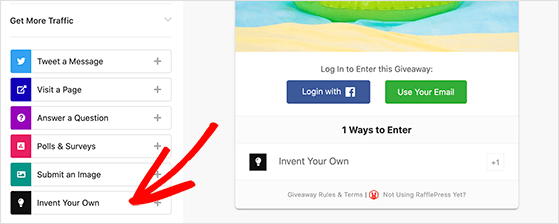
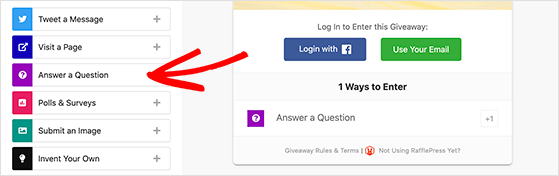
Once you pick an action, click it in the giveaway widget to edit the entry label, how many entries it is worth, whether it is mandatory, and whether to enable daily entries.
Support your main action with bonus actions so people can earn extra entries. Remember to click Save when you are happy.
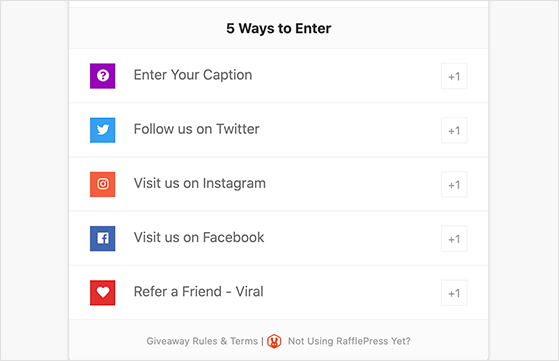
Here is the part most caption-contest guides skip. Add the “Viral Refer-a-Friend” action and your finalists will compete for votes by sharing the contest with their own networks. Judging turns into a growth loop: every person trying to win pulls in new entrants for you.
Step 5: Design Your Contest
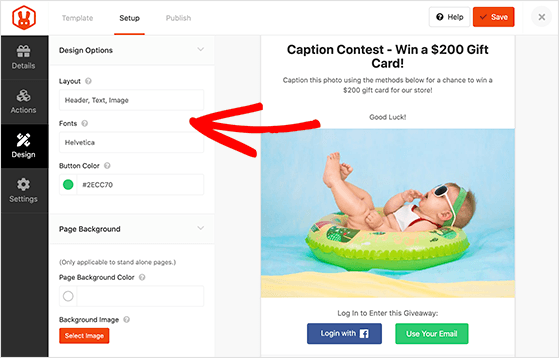
Click the Design tab to customize the look. You can choose two layouts (image then header, or header then image), plus fonts and button colors.
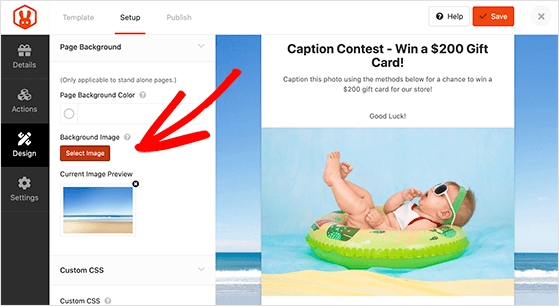
If you want a standalone web page for your giveaway, pick a background color or upload a background image. Click Save when it looks the way you want.
Step 6: Configure Your Settings
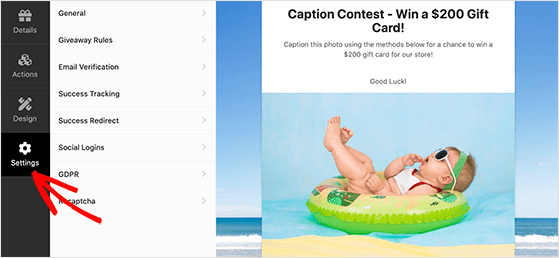
Click the Settings tab. This area has eight sections:
- General: Edit the contest name, landing page permalink, and more.
- Giveaway Rules: Generate a simple set of contest rules.
- Email Verification: Require people to verify their email to enter.
- Success Tracking: Track your giveaway with Google Analytics.
- Success Redirect: Send people to a specific page after entering.
- Social Logins: Let people log in to your contest using Facebook.
- GDPR: Include a consent checkbox before people enter.
- Recaptcha: Prevent spam entries and fraudulent sign-ups.
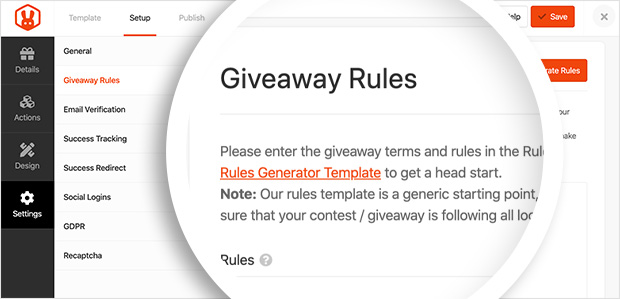
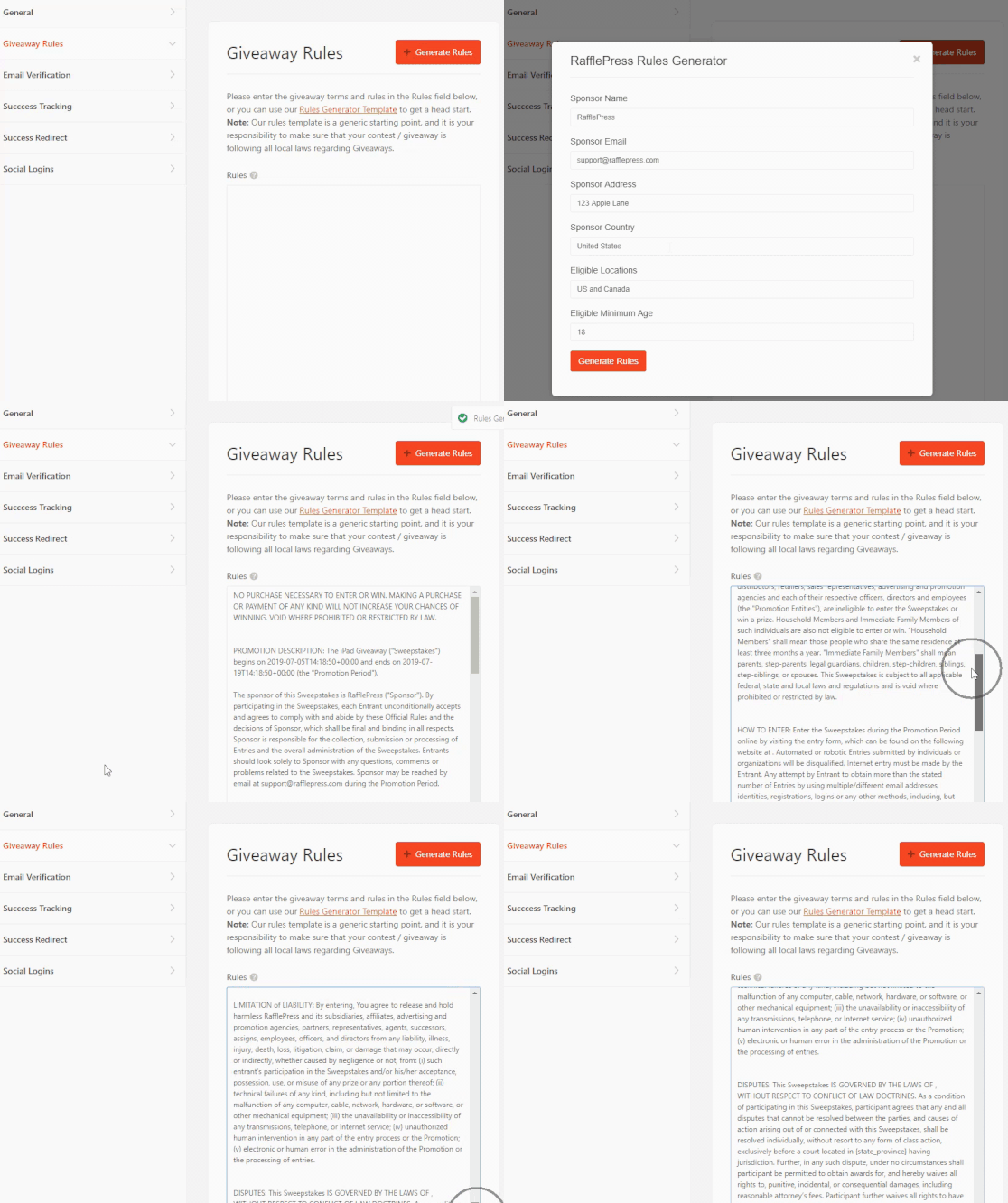
The Giveaway Rules section is one of the most important to configure. Click it to enter your rules, or use the Giveaway Rules Generator to create a simple set.
The generator asks for details like your sponsor info, email, and eligibility, then you click Generate Rules to add them to the widget.
You can check out our documentation for details on all the RafflePress settings. Click Save when you have finished.
Step 7: Publish Your Giveaway
The last step is publishing. Click the Publish button at the top of the screen to see three options:
- RafflePress WordPress Block: Embed the widget in a post or page using the block editor.
- WordPress Shortcode: Embed it in the classic editor, sidebar widgets, or your WordPress theme.
- Giveaway Landing Page: Create a distraction-free landing page on your site.
The easiest way to get more entries is a dedicated giveaway landing page. With nothing to distract them, people are more likely to enter. Choose the Giveaway Landing Page option.
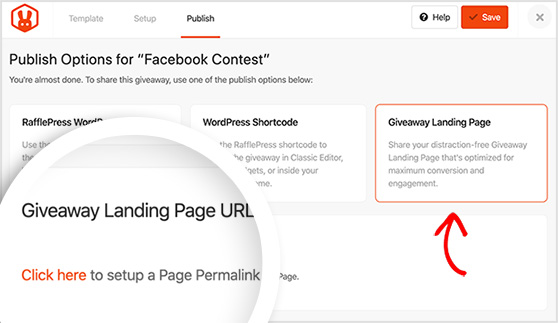
A message appears asking you to set up the page permalink. Click it to open the General settings, scroll to the Landing Page Permalink heading, and enter a short permalink. It is added to the end of your main site URL.
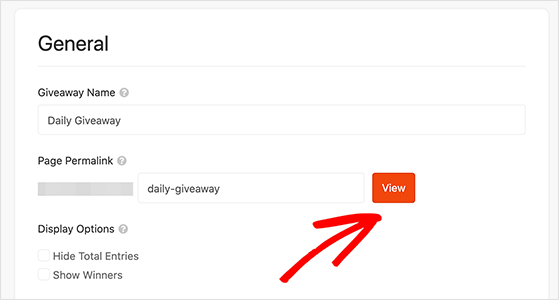
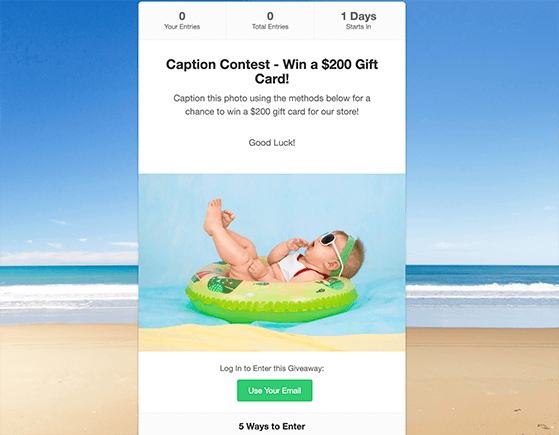
Click the View button for a preview of your contest live on your site.
Run your own caption contest this afternoon
You have seen the whole build. RafflePress collects every caption, verifies entries, and turns entrants into subscribers you keep, all from your WordPress dashboard.
Build My Caption Contest6. Promote Your Contest
A live contest no one sees collects no entries, so promotion is half the job. The easiest way to promote your contest is to share it with your followers on Instagram, Facebook, and X, with a few giveaway hashtags to widen the reach.
You can also promote it by:
- Sending an email newsletter
- Creating a popup with OptinMonster
- Submitting your contest to giveaway and sweepstakes directories
- Asking people to tag friends in the comments
For more, check out these proven giveaway promotion ideas. If you are weighing a platform, most of these patterns work well on Instagram and suit a small business with a tight budget, like the library and Chicken Thoughts examples above. For more, see our social media contest ideas.
7. Choose a Contest Winner
The hardest part of a caption contest is deciding what “best” means before you start. Pick your method early so you are not arguing with yourself when the entries pour in.
- Judge pick: Choose the funniest or most creative caption yourself. Decide your criteria up front, and skip clichés or overused memes so the winner feels fresh.
- Audience vote: Let your followers vote for their favorite. This drives extra engagement but rewards the most popular entrant, not always the best caption.
- Random draw: Use the RafflePress random giveaway winner picker to keep it 100% fair.
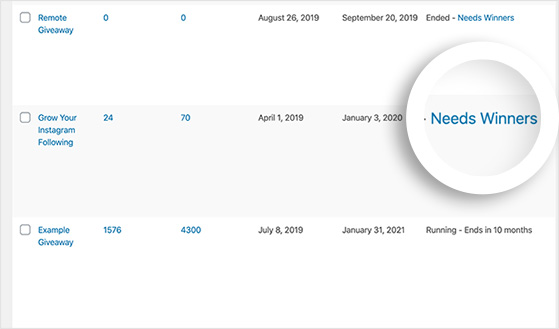
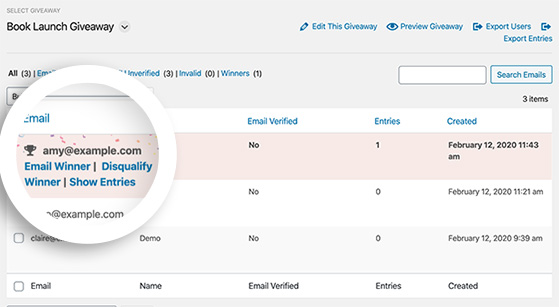
For a random draw, head to RafflePress » Giveaways from your WordPress dashboard and click the Needs Winners link on the right.
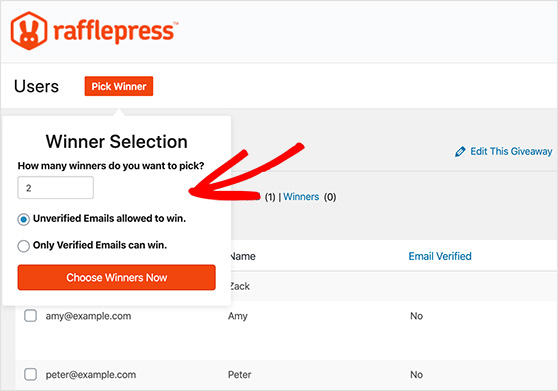
You will see everyone who entered and how many entries they have. Click Pick Winner, select your options, and click Choose Winners Now.
The winner appears highlighted at the top of all entries. From there, you can email them the news in a click.
8. After the Contest
The contest ending is where most brands stop, and where the real value starts. Follow up with everyone who entered to thank them and keep the relationship warm. That can be as simple as announcing the winner on social, sending a thank-you email, or handing entrants a discount code.
This is also your moment to bank free content. With permission, repurpose the best submitted captions as future social posts or marketing material. People love seeing their entry featured, and you get a stream of content you did not have to write.
Then look at your numbers. The easiest way to measure success is with MonsterInsights, the best Google Analytics plugin for WordPress. It tracks visits to your giveaway page, overall traffic, and giveaway referrals, all in reports inside your WordPress dashboard.
By checking that data, you can see which promotion drove the most traffic and use it to run a better contest next time.
FAQs About Caption Contests
What is the difference between a photo caption contest and a cartoon caption contest?
A photo caption contest uses a real photograph, so captions tend to react to a real moment or expression. A cartoon caption contest uses a drawing or illustration, which leaves more room open for absurd or imagined dialogue, like the New Yorker’s weekly contest.
Photos suit product and behind-the-scenes contests; cartoons suit brands with a mascot or a sense of humor to lean into.
Do you have to pick the winner, or can people vote?
Either works, and the choice is yours to make before the contest starts. A judge pick lets you reward the funniest or most creative caption, while an audience vote drives extra engagement but tends to reward the most popular entrant.
If you want it to be completely fair, you can also draw a winner at random with a tool like RafflePress.
Are caption contests good for engagement?
Yes. Caption contests get people commenting, tagging friends, and sharing your post, because writing a funny line takes less effort than creating a photo or video. That low entry bar is exactly why they tend to out-comment most other contest types.
What makes a good caption contest image?
Use a photo that is funny, expressive, or surprising. A clear emotional reaction or an odd situation gives people something to play off, so the more character the image has, the more creative the captions get.
How do you pick a winner in a caption contest?
You can choose the funniest or most creative caption yourself, ask your followers to vote, or draw a winner at random with a tool like RafflePress. Decide your method and criteria before the contest opens so there are no disputes later.
How long should a caption contest last?
I recommend 7 to 14 days. That is long enough to promote it and collect strong entries, but short enough to keep a sense of urgency, since contests that drag on tend to lose momentum.
For more detail on timing by contest type, see our guide on how long a giveaway should last.
Can you run a caption contest on Facebook or Instagram?
Yes. Just post the image and ask people to comment with their caption. The downside is that you cannot verify entries or collect emails, so if you want more control and bonus entry options, use a tool like RafflePress to collect entries on your own site.
Start Your Caption Contest Today
You have the examples and the exact plan I use, so the only thing left is to post the image.
You don’t need to build anything from scratch. Upload your photo, set your prize, and start collecting creative entries with RafflePress, all from your WordPress dashboard.
For more help getting started, see my top giveaway guides:
- How to Write Giveaway Rules Like a Pro
- How to Use Good Giveaway Copywriting to Drive Entries
- How to Use Contest Marketing to Grow Your Business
- Sweepstakes Definition Vs Contest Vs Lottery
- How To Pick A Winner For A Giveaway
Don’t forget to follow us on YouTube, Twitter, and Facebook for more great giveaway tips.


