UpViral vs RafflePress: Which Giveaway App Is Right for You?
 Stacey Corrin
Stacey Corrin
Stacey Corrin
 John Turner
John Turner
John Turner
Trying to figure out the best giveaway tool for your website? I’ve tested UpViral vs RafflePress, and this comparison breaks down what each one does well (and where they fall short).
Running giveaways is one of my favorite ways to grow traffic, email subscribers, and social media followers. But finding a tool that’s affordable, flexible, and beginner-friendly isn’t always easy.
That’s why I put these giveaway apps head-to-head. To help you pick the one that fits your business best.
Quick Summary
| Feature | UpViral | RafflePress |
|---|---|---|
| Platform | Cloud | WordPress |
| Main Focus | Referrals | Giveaways |
| Ease of Use | Moderate | Easy |
| Customization | High | High |
| Free Plan? | No | Yes |
| Price | $$$ | $$ |
| Best For… | Viral Growth | WordPress |
UpViral vs RafflePress: Detailed Comparison
In this giveaway app comparison, we’ll create the same giveaway in UpViral and RafflePress. Then, at the end, we’ll see how each giveaway tool compares in price.
Here are some quick links to help you find the section you need:
- Setup and Installation with UpViral and RafflePress
- Why should you use WordPress for Giveaways?
- Building Your Giveaway
- Giveaway Features: UpViral vs RafflePress
- Giveaway Settings
- Publishing Your Giveaway
- Choosing a Winner
- Differences between UpViral and RafflePress
- Pricing: UpViral vs RafflePress
- Customer Reviews u0026 Ratings
- Frequently Asked Questions
- UpViral vs RafflePress: Which Is Best?
To begin, let’s see how easy it is to set up a giveaway with each app.
Setup and Installation with UpViral and RafflePress
At first glance, UpViral may seem like the quickest way to get started with a giveaway campaign. That’s because it runs through your web browser with nothing to install on your website.
But that also means your options for adding a giveaway to your site are limited. For example, you’ll likely need to copy and paste embed codes, which may not always work as they should.
Moreover, your giveaway data isn’t yours to control if you use hosted platforms like UpViral. So, the information you collect stays on the platform’s servers, making it harder to ensure the data you collect is safe.
In comparison, RafflePress runs on self-hosted WordPress websites. That means you have complete control over the information you collect, and you can put extra security in place to ensure it’s safe.

While installing a WordPress plugin may sound like more work than UpViral, it’s worth considering whether security, control, and customization are important to your business. Plus, using WordPress is a lot easier now than it used to be.
Key Takeaway: RafflePress is the only option that gives you full control over your giveaway data without needing to mess with embed codes or hosted pages.
Why should you use WordPress for Giveaways?
There are many benefits of using WordPress for your website. Not only does it offer tons of customization options, but it also allows you to fine-tune your site in a way that best suits your business.
By investing just a bit more time in setting up your giveaway on WordPress, you can save time and frustration and control issues later. Not to mention, the best WordPress giveaway plugins work right out of the box, so you can set up a giveaway quickly without switching back and forth between different platforms.
Additionally, setting up a WordPress website is both easy and affordable. For instance, Bluehost lets you install WordPress with 1 click and includes 24/7 support if you need any help.

Plus, Bluehost also offers a free domain and SSL certificate to keep your giveaways secure. That means you won’t need to buy any extras to start your online store or business website.
Then there’s the matter of platform limitations. For example, UpViral limits how many leads you can collect to 10,000. Even though that limit is high, it still caps your lead generation potential.
In comparison, RafflePress doesn’t place any limits on how many giveaways you run or leads you can collect.
Building Your Giveaway
Now let’s look at how easy it is to build your giveaway with each marketing platform. Since each tool has a slightly different builder, we’ll look individually at UpViral and RafflePress.
First up is UpViral, and after logging into your UpViral dashboard, you can click the ‘Create a Campaign’ button to get started. After that, you’ll see several campaign templates to help you make the right giveaway for your business.
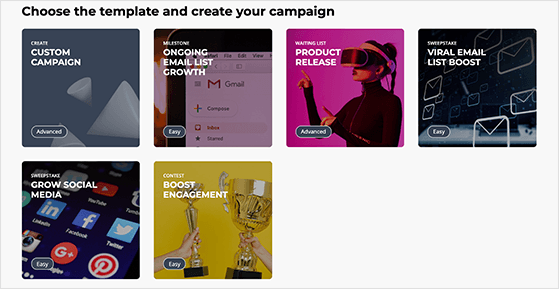
Clicking a campaign loads that template’s settings in the campaign builder automatically. From there, you only need to customize the settings to match your giveaway goals.
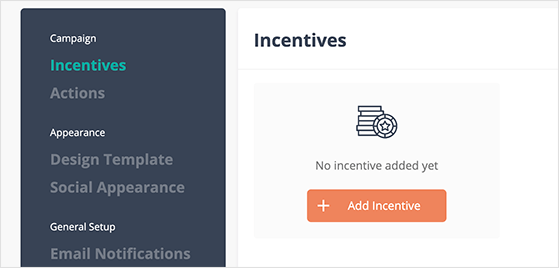
I found the settings for each campaign template confusing for beginners. For instance, what each setting does isn’t clear right away, and you need to dig through their knowledge base to find answers to any questions.
With RafflePress, everything is easy-to-understand and feature-rich right out of the box.
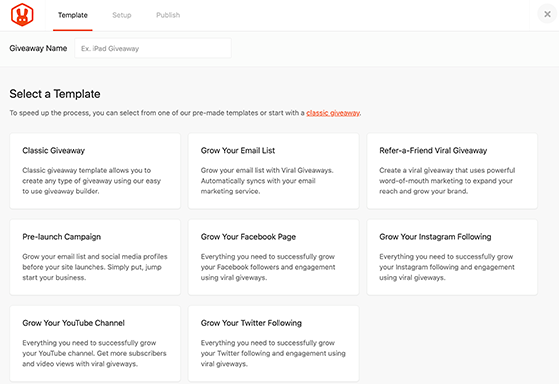
RafflePress’s laser-targeted giveaway templates tell you exactly which goal it aims to achieve:
- Grow Your Email List
- Refer-a-Friend Viral Giveaway
- Pre-launch Campaign
- Grow Your Facebook Page
- Grow Your Instagram Following
- Grow Your YouTube Channel
- Grow Your Twitter Following
After launching a template, you go straight to the beginner-friendly giveaway builder, where you can build and customize your giveaway widget.
RafflePress has the best interface compared to UpViral. It combines an easy drag-and-drop layout with clear labeling, so you won’t waste time figuring out what everything does.
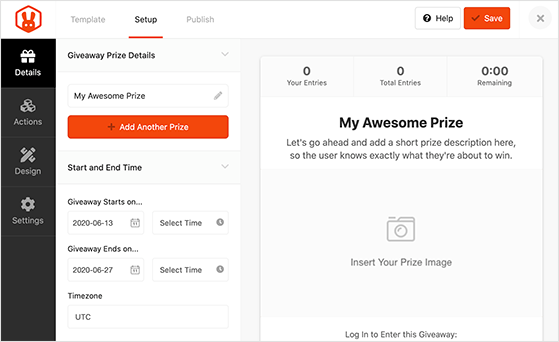
In RafflePress, your giveaway settings and options are on the left, while on the right is a preview of your giveaway design. This is something UpViral doesn’t offer without upgrading to premium plans or jumping through hoops.
It’s a game-changer because you can adjust your giveaway visually in real-time.
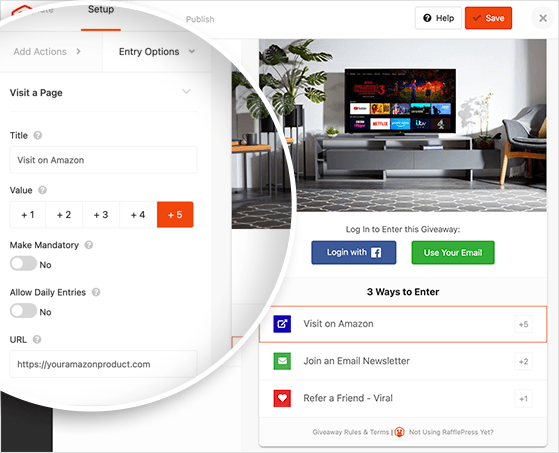
Moreover, you can drag and drop any element on your giveaway widget to reorganize it. Or, you can click an element to enter more details, such as your social media URLs, assign how many giveaway entries an action is worth, and more.
Key Takeaway: RafflePress has the most beginner-friendly builder with drag-and-drop controls, pre-made templates, and real-time previews, no guesswork required.
Giveaway Features: UpViral vs RafflePress
The features you can access in RafflePress and UpViral differ considerably.
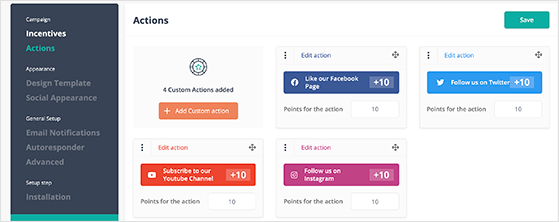
For instance, UpViral includes all the essential social media actions, custom actions you can create yourself, and referral marketing options.
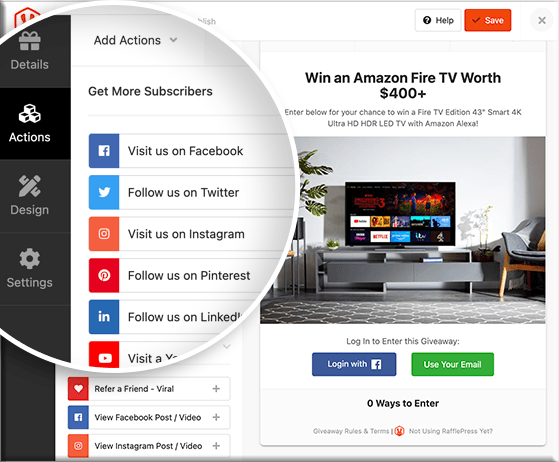
But in my opinion, RafflePress offers the most user-friendly layout and variety. Besides following and sharing on social media, you can invite users to:
- Enter automatically
- Sign up for your email newsletter
- Follow your Twitch channel
- Answer a question
- Submit an image
- Leave a comment
- Write a blog post
- Subscribe to RSS
- Complete a poll or survey
- Subscribe to your podcast
Plus, you can use the viral refer-a-friend action to drive even more giveaway entries and leads.
Key Takeaway: RafflePress offers the widest range of entry actions, including polls, image uploads, and podcast subscriptions, plus viral sharing to boost results.
Giveaway Settings
Now that you know what features each tool offers, let’s see how the giveaway settings compare. First, we’ll compare the different email marketing integrations that they offer to help grow your email list.
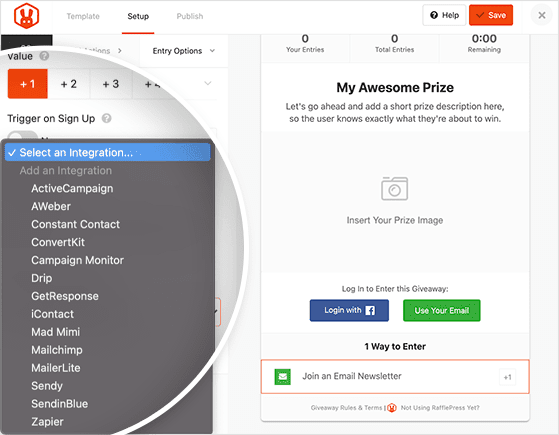
RafflePress and UpViral offer the same integrations, but you can also connect to thousands of other tools with Zapier. And if that wasn’t enough, RafflePress’s webhooks feature lets you connect to any platform or marketing tool with webhooks support.
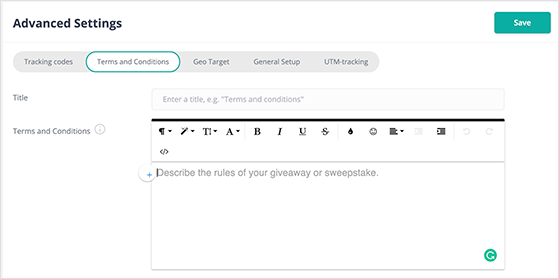
Another area where each giveaway app differs is how they handle your giveaway rules, terms, and conditions.
UpViral’s giveaway rules settings are hidden in the advanced settings panel, and it doesn’t offer any prompts on what you should include.
RafflePress’s giveaway rules are easy to find in the giveaway settings panel. From there, you can manually enter your rules or use the built-in rules generator template as a guideline.
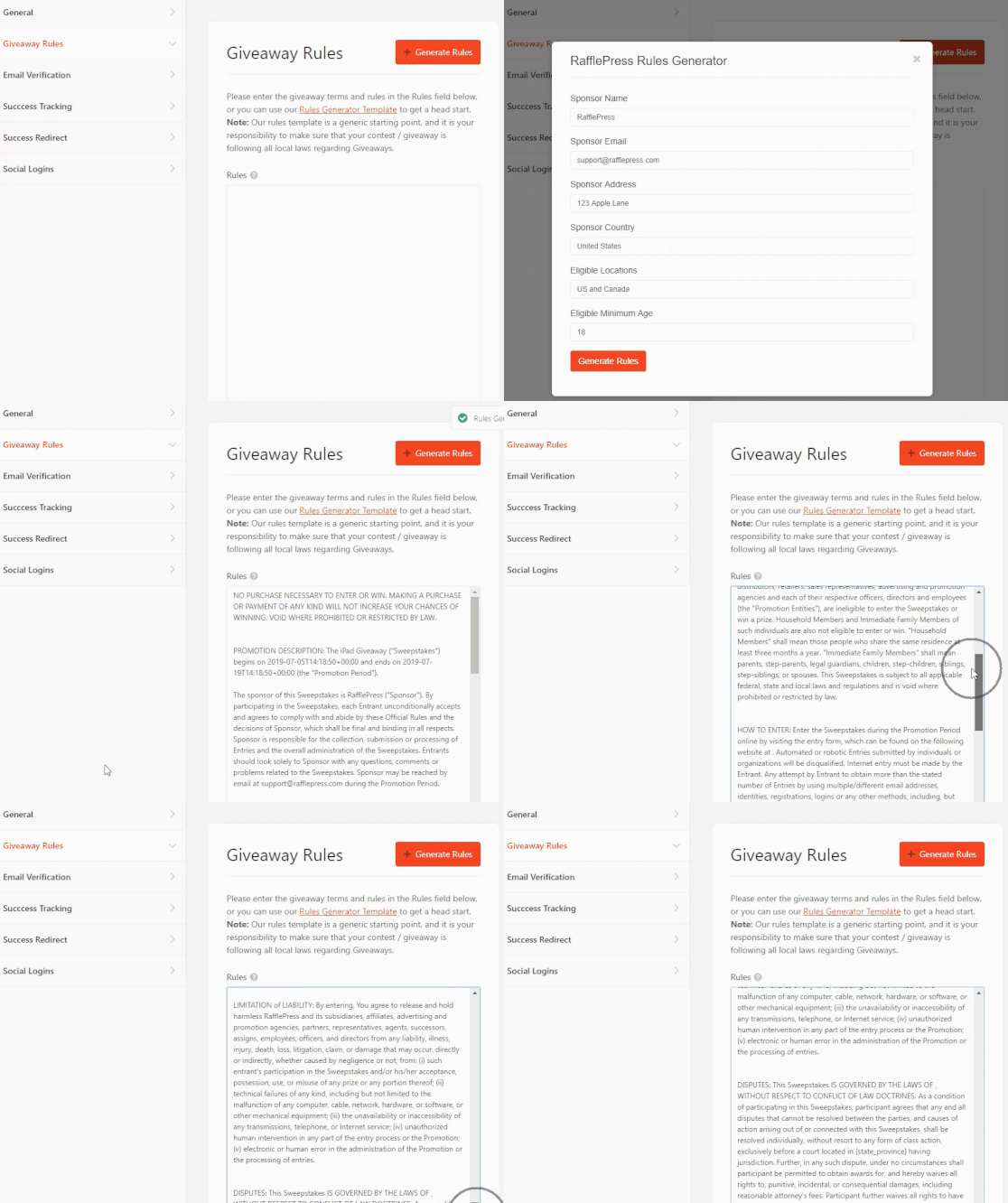
And the best thing is this feature is even available to users of the free version.
Key Takeaway: RafflePress makes it easy to connect with your email provider, add rules, and manage giveaway settings, even on the free plan.
Publishing Your Giveaway
UpViral lets you publish your giveaway campaign on one of their hosted pages without embedding it on your site. And that is a convenient way to get your campaign out in the wild fast.
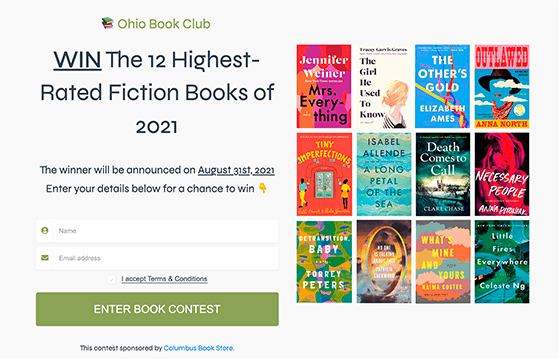
But if one of your goals is to drive traffic back to your business website, hosting your giveaway on your website is the best solution. And UpViral and RafflePress have different ways to do this.
For example, UpViral allows you to copy and paste an embed code you can add to your website.
But with RafflePress, your giveaway is already on your website, so all you need to do is click a few buttons to make it live.
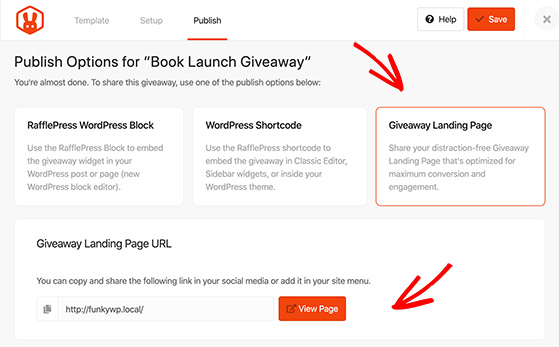
There are 3 ways RafflePress allows you to publish your giveaway:
- Use the RafflePress WordPress block to add your giveaway widget to posts and pages.
- Paste the giveaway shortcode inside the classic WordPress editor, your sidebar widgets, or in your WordPress theme.
- Launch a distraction-free giveaway landing page on a custom URL right on your website.
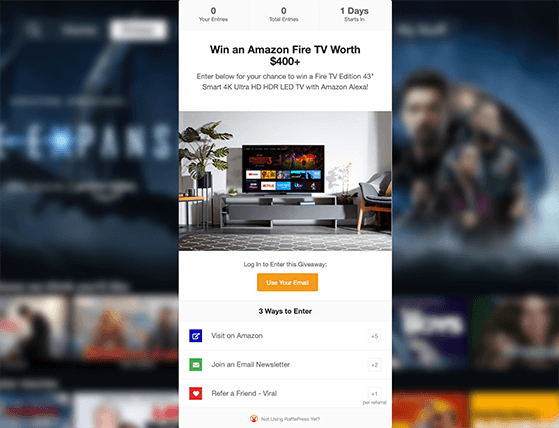
You can also turn off the RafflePress branding, which UpViral requires you to pay extra for.
Key Takeaway: RafflePress gives you the most publishing options, including a distraction-free giveaway landing page right on your WordPress site.
Choosing a Winner
When your giveaway is over, you’ll want an easy way to choose a winner.
In UpViral, choosing a winner is slightly different. You can either pick a winner at random or choose a winner with the most overall points. After, UpViral emails the winner automatically based on your autoresponder settings.
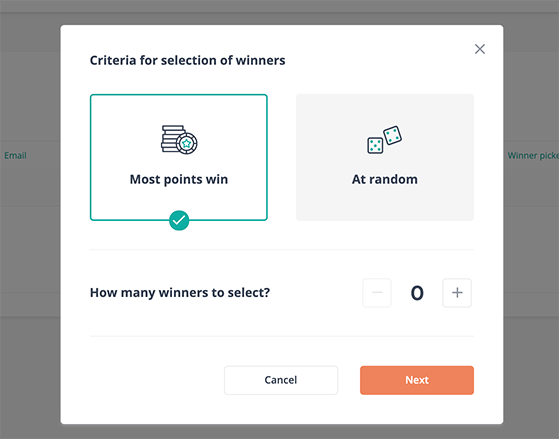
RafflePress allows you to choose single or multiple winners randomly or manually. You can also filter out unverified emails to reduce spam and false entries.
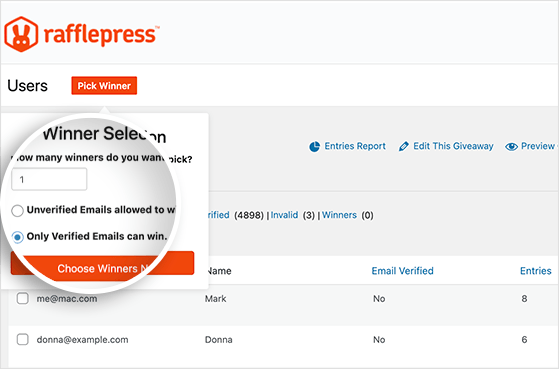
You’ll then see the winner at the top of your entry list, with a handy link to send a custom email announcing the winner.
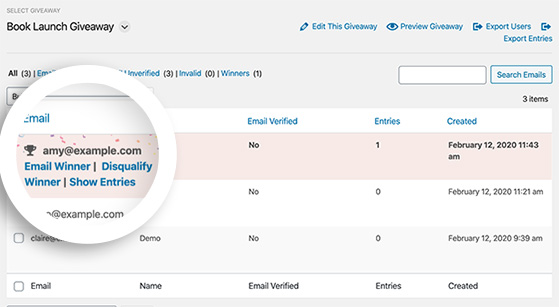
Key Takeaway: RafflePress makes it easy to pick random or manual winners, with built-in filters to block spam and unverified entries.
Differences between UpViral and RafflePress
Each giveaway tool has features that make them more suitable for different purposes. Here’s a rundown of the differences between UpViral vs RafflePress:
- UpViral focuses on referral marketing campaigns. RafflePress allows you to run referral campaigns, giveaways, and contests.
- UpViral offers a wide range of campaign templates and customization options. RafflePress has several pre-made templates and easy customization options.
- UpViral plans are more expensive, while RafflePress is the most affordable option.
However, if you’re still on the fence, here are the pros and cons:
| Platform | Pros | Cons |
|---|---|---|
| UpViral | Powerful referrals, customizable, analytics | No free plan, expensive, complex |
| RafflePress | Easy, many features, affordable, integrates with WordPress | Requires WordPress, fewer referral features |
Free: Download Our Giveaway Playbook
Templates, prize ideas, and promotion strategies in one guide.
Pricing: UpViral vs RafflePress
After checking out the features of each giveaway app, let’s see how much they cost.
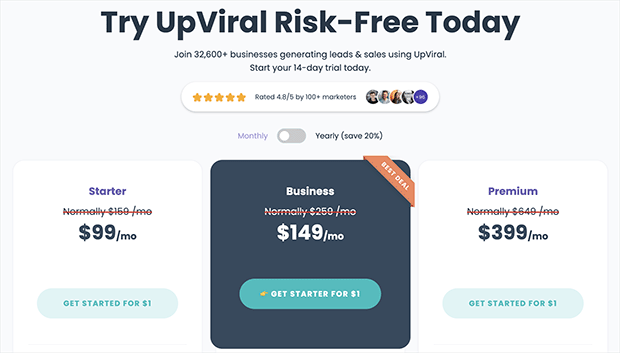
First, UpViral is the only giveaway tool on this list that doesn’t offer a free version, which is the most significant barrier for many users. Plus, the pricing starts from $99 per month for up to only 10,000 leads.
However, it does offer a 14-day free trial, so you can try it before committing.
In contrast, RafflePress offers a free plan that provides everything you need to run a successful contest on your WordPress website.
People can also enter your giveaway by:
- Visiting your Facebook page
- Liking your Facebook page
- Following you on Twitter
- Visiting you on Instagram
- Following you on Pinterest
- Tweeting a Message
- Sharing on Facebook
- Visiting a Web Page
And you won’t need to spend a single penny.
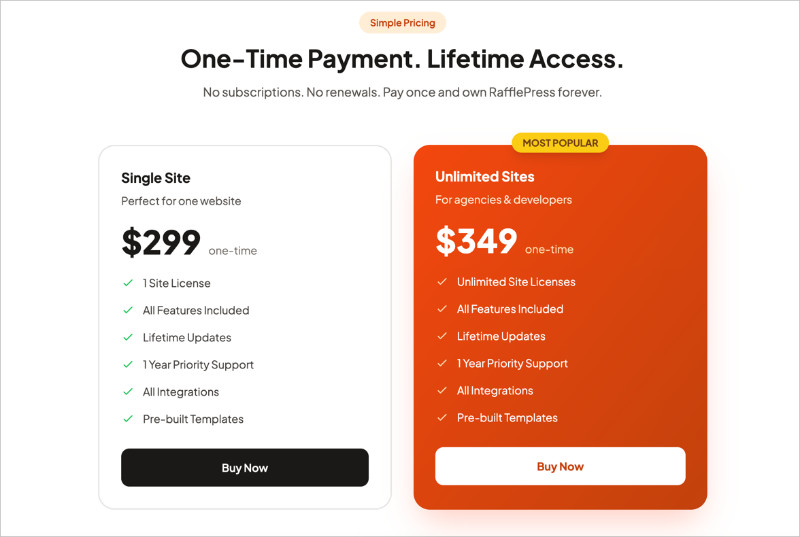
Yet, if you’d like advanced giveaway tools, you can get started with RafflePress for a one-time payment of $299 — no annual fees, ever — making it the most cost-effective solution in this comparison.
Customer Reviews & Ratings
Before we end this comparison, let’s see what real users think about these giveaway builders.
RafflePress Customer Reviews
RafflePress has many positive reviews and ratings from its users, who find it to be a powerful and intuitive giveaway app. They appreciate the drag-and-drop builder, which makes it easy to create attractive giveaway campaigns.
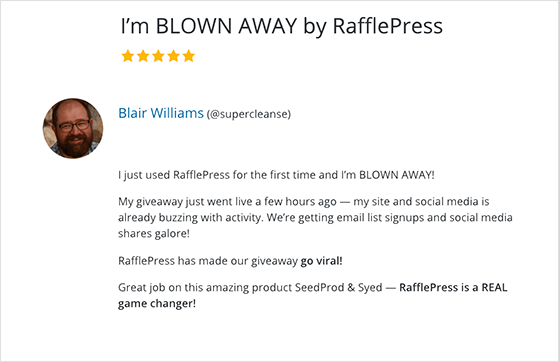
RafflePress also offers seamless integration with popular email marketing services and social media platforms. Users have praised its customer support for being responsive and helpful.
Overall, RafflePress is highly regarded for its user-friendly interface and robust features.
UpViral Customer Reviews
Customer reviews and ratings for UpViral are generally positive.
Many users praise its ease of use and effectiveness in running viral giveaways. They appreciate the various features it offers, such as referral tracking, email integration, and social sharing options. Some users have mentioned that customer support could be more responsive, but overall, UpViral has received favorable ratings for its performance and functionality.
Frequently Asked Questions
UpViral vs RafflePress: Which Is Best?
After comparing these giveaway builders, you should have a good idea of which solution is best for your business.
For ease of use, flexibility, and pricing, RafflePress is the clear winner. It runs natively on WordPress, includes more entry actions, and doesn’t limit your leads or campaigns — even on the free plan. If you want something powerful that’s also easy to use, start with RafflePress.
It has a dedicated WordPress giveaway plugin and includes customizable giveaway templates and actions that support your business and boost your leads like:
- Refer a friend viral giveaway actions
- Built-in giveaway entry reports
- Prize image gallery
- WordPress giveaway landing page
- Image submissions
- Polls & surveys
- Social logins
And that’s why tons of businesses, both small and large, have already chosen RafflePress as their go-to giveaway builder.
If you’re not convinced, check out these RafflePress case studies:
- Agile’ Grew Their Client’s Email List by 52% with RafflePress
- Smash Balloon Grew Their Email List by 3,584 Subscribers + More
- OptinMonster Generated 3,500+ New Users From One Giveaway
- WPForms Got 11K+ Facebook Group Members with RafflePress
So, are you ready to build your next giveaway campaign?
If this article helped you out, then please subscribe to our YouTube Channel for RafflePress video tutorials. You can also find us on Twitter and Facebook.

