How To Run a Giveaway on Facebook That Gets Noticed in 2026
 Stacey Corrin
Stacey Corrin
Stacey Corrin
 John Turner
John Turner
John Turner
TL;DR: How to Run a Giveaway on Facebook
Running a successful Facebook giveaway takes more than picking a prize and hitting publish. Here’s what makes one actually work:
- Set a clear goal – decide whether you want email subscribers, page followers, or website traffic before you build anything.
- Choose a relevant prize – something your specific audience wants, not just something expensive.
- Follow Facebook’s rules – no requiring likes or shares as entry; include a Meta disclaimer; post full rules on your website.
- Use a giveaway tool – RafflePress automates entry tracking, prevents duplicate entries, and picks a winner fairly.
- Publish on a landing page – send Facebook traffic to your own website, not just a Facebook post.
- Promote and follow up – email your list, share in Groups, and send a follow-up to all entrants after the winner is announced.
When I first tried to run a giveaway on Facebook, I thought posting a prize and waiting for likes would be enough. A few people entered, but it didn’t grow my audience or lead to more sales.
That’s when I learned a successful Facebook giveaway needs more than a post. You need a simple plan that builds real engagement and keeps people interested.
In this guide, I’ll walk you through how to host a giveaway on Facebook, from setup and promotion to choosing a winner, so you can run one that actually works.
- Step 1. Set Your Facebook Giveaway Goals
- Step 2. Choose a Giveaway Prize
- Step 3. Set Your Giveaway Theme
- Step 4. Choose Your Entry Criteria
- Step 5. Establish Your Facebook Giveaway Rules
- Step 6. Build Your Contest
- Step 7. Publish Your Giveaway on Facebook
- Step 8. Promote Your Facebook Giveaway or Contest
- Step 9. Announce the Winner
Step 1. Set Your Facebook Giveaway Goals
Consider what you want to achieve with your Facebook giveaway for your business. According to CoSchedule, marketers who set goals are 376% more likely to report success. A clear goal will guide your strategy.
Some potential giveaway goals could be:
- Highlight a brand-new product.
- Get more subscribers to your newsletter.
- Increase traffic to your website.
- Increase likes on your page.
- Get feedback from your customers.
- Get more Facebook engagement.
Once you’ve decided on your giveaway goal, the next step is to determine what prize you’ll give to your winner.
Step 2. Choose a Giveaway Prize
Select a prize that aligns with your giveaway goal. For example, if you’re highlighting a new product, you could give one away to your audience, as Soak & Sleep did with the example below.
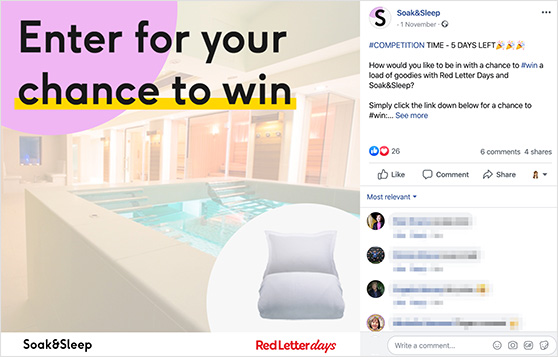
Alternatively, you could offer the lucky contest winner a bundle of goodies based on the time of year or your giveaway theme (more on that coming up).
Here’s how to tailor a prize to really excite your target audience:
- Understand Your Audience: Consider their demographics, interests, and the problems your prize can fulfill.
- Make it Relevant: Offer a prize directly related to their hobbies or needs.
- Add “Wow” Factor: A limited-edition item or an experience money can’t buy adds excitement.
For even more prize ideas, check out this article.
“At WPBeginner, we often give away free licenses of WordPress plugins and themes to our winners. One of our partner companies, WPForms, runs monthly giveaways of cool gadgets such as MacBooks.
Because our 14th birthday was a big celebration, we offered a big prize: premium plugins worth $50,000. On top of that, we offered a 1-1 mentorship call with WPBeginner founder, Syed Balkhi.”
WPBeginner – Tips to Run a Successful Giveaway Like WPBeginner
Free: Download Our Giveaway Playbook
Templates, prize ideas, and promotion strategies in one guide.
Step 3. Set Your Giveaway Theme
A theme can make your giveaway more engaging. Consider tying it to a season (like Christmas or summer) or an interest related to your brand.
Paper Christmas asks entrants to submit their best festive line drawing for a stationery bundle in this Facebook giveaway example.
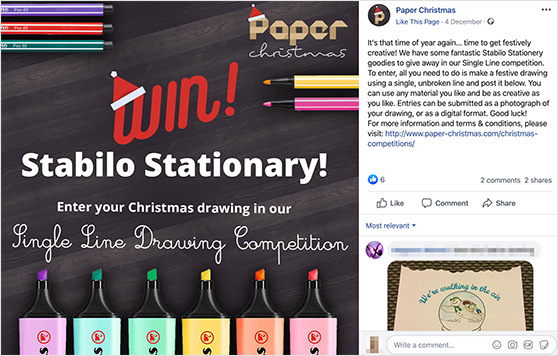
Here are some giveaway themes to try:
- Seasonal milestones: Tie your giveaway to holidays, anniversaries, or product launches – these have built-in urgency.
- Customer challenges: Build your theme around a real problem your audience has – prizes that solve something always attract the right entrants.
- Current moment (as of 2026): Work-from-anywhere setups and smart home devices are generating strong interest right now.
- A bundle of Black Friday goodies.
Have fun coming up with your theme. The more fun you have, the more fun your audience will have entering.
Learn how to run a Facebook photo contest here. You can also check out these inspiring Facebook giveaway ideas.
Step 4. Choose Your Entry Criteria
Decide how people will enter and choose methods that support your goal. For example, to grow your Facebook page, ask people to visit your page. To increase newsletter signups, require email entry.
Keep the entry process simple and choose methods that match what you want to accomplish, such as:
- Like this post: Simple and effective for reach.
- Follow this page: Great for growing your audience.
- Visit our Website: Drive traffic directly to your site.
- Join Email Newsletter: Turn social traffic into long-term subscribers.
- Comment with [Action]: Ask a question, or ask for an opinion – for example, “Comment with your favorite summer memory for a chance to win!”
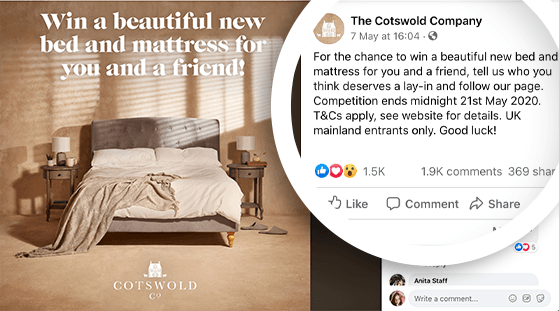
Step 5. Establish Your Facebook Giveaway Rules
I cannot stress this enough: do not make up your rules as you go. Clear contest rules are the only thing standing between you and a legal headache, or violating Facebook’s promotion policies.
Early on, I wrote “Rules in comments” on my posts. I quickly learned that wasn’t enough to protect my business.
To keep your Facebook sweepstakes or giveaway safe and fair, you must include specific details. Here is the checklist I use for every contest I run:
- Eligibility: Who can enter? (Define age and location limits clearly).
- Timing: Start and end dates, including the specific time zone.
- Mechanics: Exactly how to enter (e.g., “Visit our site”).
- The Prize: A clear description of what is being won.
- Selection: How and when the winner is chosen.
- Notification: How you will contact the winner.
- Release of Liability: You MUST state that Facebook is not involved.
Don’t clutter your Facebook post caption with paragraphs of legal text. It looks messy and lowers engagement.
Instead, I create a dedicated “Rules” page on my website. Then, I add a simple line in the contest post: “For full official rules, click here: [Link].” This keeps your post clean while ensuring you are fully compliant.
Breaking Facebook’s promotion guidelines has real consequences. Posts from non-compliant giveaways can be suppressed by the algorithm, reducing your reach. Repeat violations can result in page restrictions or suspension – damage that takes months to recover from.
Facebook Giveaway Do’s and Don’ts
The most common Facebook giveaway mistakes come from not knowing what the platform actually allows. This quick reference covers the rules that trip people up most often.
For the full breakdown of what Meta does and does not allow, see our dedicated guide to Facebook contest rules. This how-to keeps the rules brief so you can focus on getting your giveaway live.
| Do This | Avoid This |
|---|---|
| Require commenting to enter | Asking people to share on their personal timeline as an entry requirement |
| Require following your page | Requiring likes or tags as a condition of entry |
| Collect emails via a landing page | Running the giveaway from a personal profile instead of a page |
| Include a full rules page on your website | Omitting the Meta disclaimer (“This promotion is in no way sponsored by Meta”) |
| Use a dedicated giveaway tool to track entries | Choosing a prize with no connection to your audience or brand |
| Define eligibility clearly (age, location) | Unclear or missing eligibility rules |
I’ve seen pages lose weeks of organic reach from a single non-compliant giveaway post. Following these rules protects your page and keeps your results legitimate.
Step 6. Build Your Contest
Running a contest directly on your timeline can be messy. It is hard to track entries fairly without a dedicated tool.
Some popular options include Gleam, Rafflecopter, and Wishpond. But, personally, I like setting things up on my WordPress website. This lets me send valuable giveaway traffic to it while also growing my Facebook page.
For that reason, I use RafflePress, a WordPress giveaway plugin that lets you run viral contests to grow your email list, social following, and traffic, using a refer-a-friend mechanic that turns every entrant into a promoter.
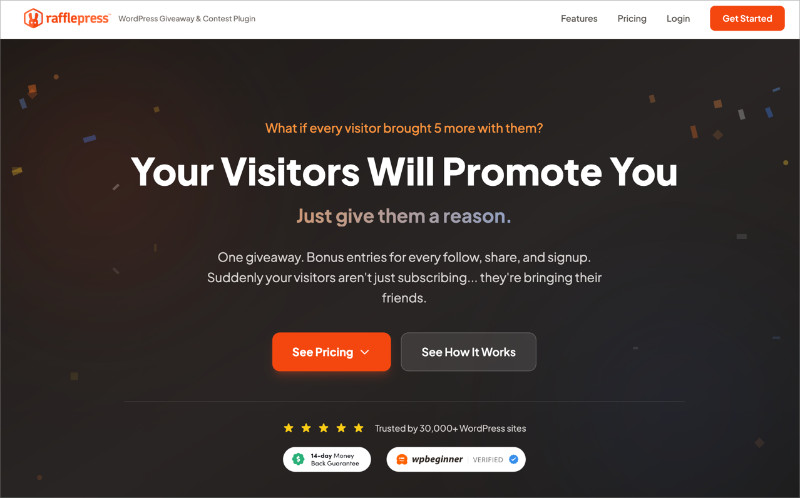
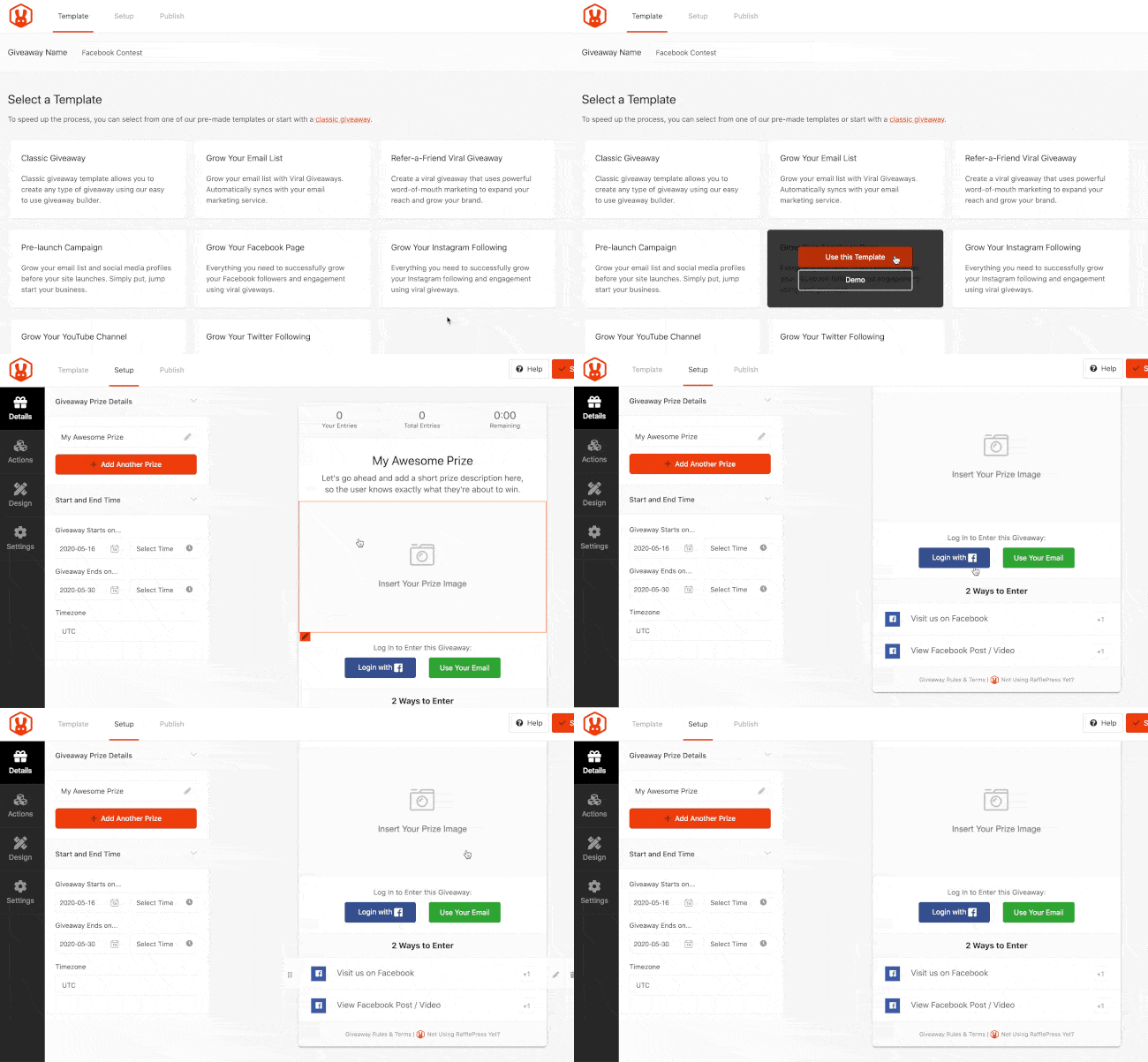
It makes running any type of giveaway easy with no code required. Just choose a Facebook giveaway template, enter your prize details and requirements, and you’re up and running.
More importantly, RafflePress has 1-click giveaway actions for Facebook built right in. You can require users to:
- Visit and follow your Facebook page.
- View a Facebook post or video and enter without leaving your website.
- Optionally like and share your Facebook page.
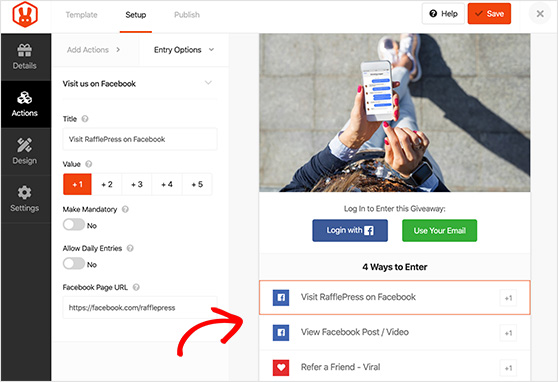
I think connecting your giveaway to your WordPress site is the best way to do a giveaway on Facebook, and RafflePress simplifies the process.
To see how I do it, follow my written steps for using RafflePress to run an online contest.
It’s important to note that Facebook’s rules don’t let you require likes, sharing, or tagging in exchange for giveaway entries, which is why RafflePress’s Facebook Visit Page action has Likes marked as optional.
Instead, you can use the Refer A Friend action to run a viral refer-a-friend giveaway and have people share your contest on Facebook.
Step 7. Publish Your Giveaway on Facebook
There are a few ways you can publish your giveaway:
- Through a widget displayed in a blog post or page.
- On a dedicated website landing page.
I think the smart move is to publish your giveaway on a landing page. This way, you can link to it in your initial Facebook post, and all that traffic goes to your website and your Facebook page.
Here’s how to do it.
From your RafflePress giveaway editor, click Publish. You’ll see a new page with 3 options. Click the Giveaway Landing Page option. Then, select the link labeled click here to configure your permalink.
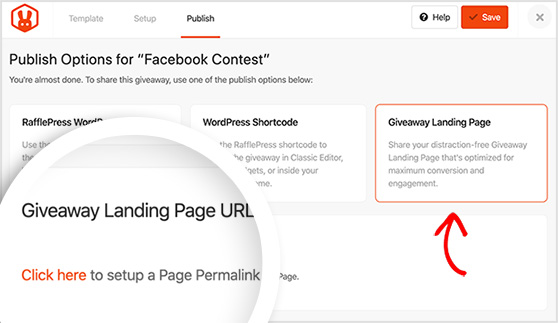
Now, create the custom web address for your giveaway page. Click Save when you are finished.
Pasting the URL into your browser will show you the landing page of your giveaway. Share this link with people so they can enter your contest.
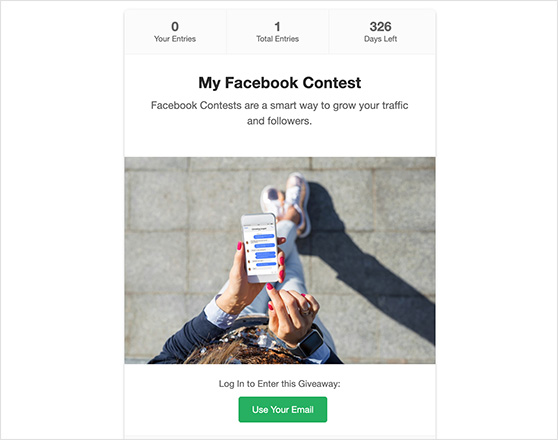
Post the URL on Facebook
When you post your giveaway announcement on Facebook, the post itself needs to do some work. A strong giveaway post includes:
- An attention-grabbing headline that names the prize
- A clear description of what’s being won, including the approximate value
- The entry deadline date
- A photo or video of the prize
- The link to your landing page
- A simplified one-line rules summary with a link to your full rules page
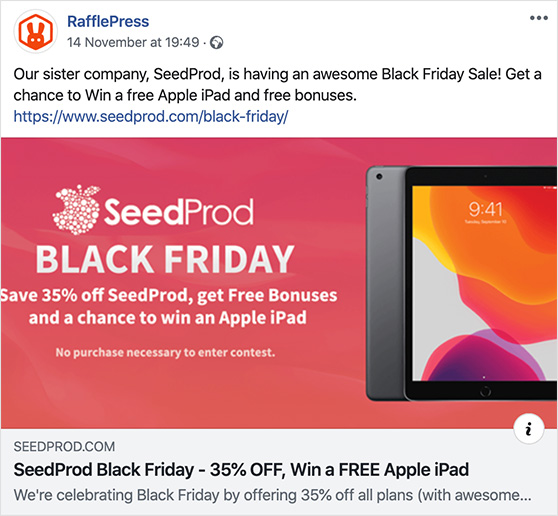
Here’s a great example from SeedProd, who used the landing page option for their Black Friday contest on Facebook. You can see SeedProd’s giveaway results in this case study.
Publishing your Facebook giveaway on a landing page gives you more control and makes promotion much easier.
Tip: After someone enters your giveaway, redirect them to a thank-you page that links to your most relevant product or offer. Some of the best conversions happen before the winner is announced. People who entered are already interested in what you do.
Step 8. Promote Your Facebook Giveaway or Contest
You can’t sit around and wait for people to enter your contest. Before you promote, it’s worth knowing how Facebook works in 2026, as a few things have shifted.
Algorithm timing matters. Posts that get comments and interactions in the first hour are shown to a wider audience, so launch timing matters. Post when your audience is already active, typically mid-morning on weekdays, and open with a direct ask: “Comment below to enter.”
Reels reach beyond your followers. A short Reel (under 30 seconds) announcing your giveaway with a prize visual and a CTA overlay can drive cold traffic to your contest landing page. I’ve seen giveaway Reels outperform standard posts by a wide margin for reach, especially in the first 24 hours.
Facebook Groups deliver targeted reach. Niche Groups outperform business pages for many brands. If you’re already active in a relevant Group, sharing your giveaway there (with admin approval) can bring in highly targeted entrants. Get permission before posting as unsolicited giveaway posts get removed and can get you banned.
Here are my top ways to advertise your giveaway on Facebook:
- Share across all your social media platforms (not just Facebook)
- Email your list and add a site popup to catch existing visitors
- Partner with relevant influencers in your niche
- Post regular reminders with fresh images and videos
- Go live to create excitement around your giveaway
- Share in Facebook Groups where you’re active (check rules first) to grow your Facebook Group reach
- Add an announcement banner on your website
- List it on contest websites for extra reach
- Reach out to bloggers in your industry
Start promoting your contest weeks before it goes live to get tons of traffic and entries on day 1.
Step 9. Announce the Winner
After all the work that went into creating, publishing, and promoting your contest, the time will eventually come to announce the winner.
For a Facebook contest, how do you pick winners? RafflePress has an automatic random winner generator that takes the guesswork out of it. You can learn all about picking a giveaway winner here.
Using this option takes the pain out of selecting a winner manually. There’s also a link you can click to email the winner right away.
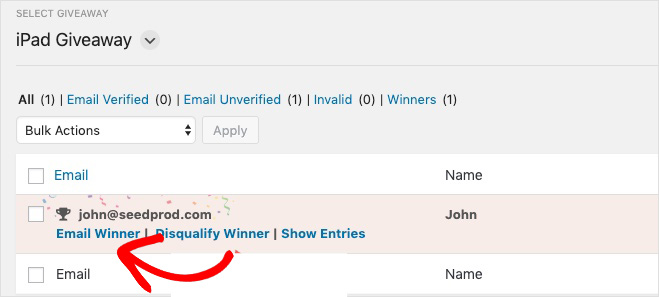
After announcing your winner on Facebook, the follow-up is where most giveaways leave money on the table.
Here’s what to do after the winner is announced:
- Email all entrants, not just the winner. Thank everyone for participating and let them know the winner’s name.
- Include a consolation offer. A discount code or free resource for non-winners keeps them engaged and turns the giveaway into a sales opportunity.
- Send entrants to a thank-you page. Redirect post-entry traffic to a page that links to your most relevant product or offer.
You could reward everyone who entered with early access to a new product. This incentivizes them to explore your offerings and potentially become paying customers.
You can also use giveaways to grow your email list long-term by nurturing entrants with a post-giveaway email sequence.
Analyzing Your Giveaway Results
After your giveaway ends, look at how well it performed. This helps you make your next contest even better.
This data also helps answer the question, “How efficient are giveaways on Facebook and Instagram?”
Look for an engagement rate between 1-3.5% (according to Rival IQ’s social benchmarks). This is significantly higher than the average Facebook post engagement rate of about 0.06%, proving the efficiency of contests.
Here are three main ways to check your results:
1. Google Analytics
Track how many people:
- Visited your website from the contest
- Signed up for your email list
- Made a purchase after entering
2. Contest Platform Reports
Most contest tools show you:
- Total number of entries
- Most popular ways people entered
- Which sharing methods worked best
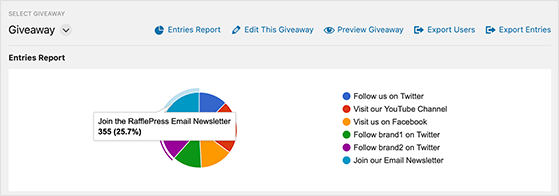
For instance, with RafflePress’s Entries Report, you can see which entry actions resonated most with your users so you know what to use in future giveaways.
3. Social Media Stats
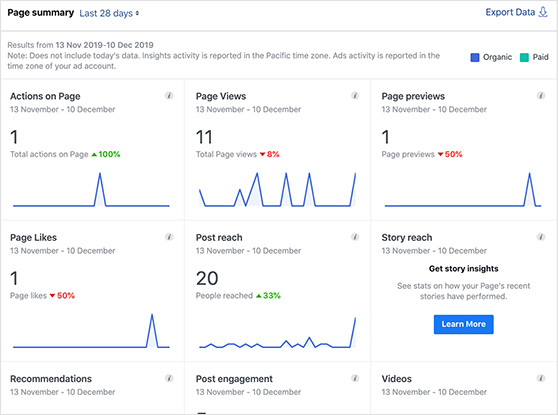
Check your social media analytics to see:
- How many people saw your contest
- Number of likes and shares
- Which posts got the most attention
How to Do a Giveaway on Facebook FAQs
How do I legally run a giveaway on Facebook?
To run a legal Facebook giveaway, you must follow Facebook’s promotion policies and local laws.
Include a disclaimer stating Facebook is not involved, post clear eligibility rules on a dedicated page on your website, and never require sharing or tagging as an entry condition. Using a giveaway tool like RafflePress helps you stay compliant by managing entries through approved action types.
What are the biggest mistakes to avoid with Facebook giveaways?
The most damaging mistakes are requiring likes or shares as entry conditions (against Facebook’s policies), running the giveaway from a personal profile instead of a page, and choosing a prize with no connection to your audience.
Other common mistakes include skipping the Meta disclaimer, setting a contest duration that’s too long (momentum drops after two weeks), and failing to follow up with non-winners after the giveaway ends.
How long should a Facebook giveaway run?
Most Facebook giveaways run between 3 and 14 days. Shorter giveaways (3-5 days) create urgency and tend to get better engagement per day. Longer contests (up to two weeks) allow more time for word-of-mouth to spread.
Going beyond two weeks usually hurts performance – people assume they have plenty of time and never enter.
What is a Facebook flash giveaway?
A Facebook flash giveaway is a short contest that runs for just 24 to 72 hours. The tight window creates urgency, which pushes people to enter right away instead of scrolling past.
Flash giveaways work best when the prize is easy to understand at a glance and entry takes seconds. A refer-a-friend action helps here, since every entrant becomes a promoter while the clock is still running.
Post the moment it goes live, then send two or three reminder updates like “Only 6 hours left to enter” across the window to keep momentum up.
Do I need a website to run a Facebook giveaway?
No, you can run a Facebook giveaway without a website using third-party apps. But if you want more control over branding and email list growth, setting it up on your website with a tool like RafflePress gives you better results.
A landing page on your own site means you own the data, can track conversions in Google Analytics, and keep the traffic for your site rather than Facebook’s platform.
Can I use Facebook ads to promote a giveaway?
Yes. Facebook ads let you target specific demographics and boost reach quickly. Boosting your giveaway announcement post or running a traffic campaign to your landing page are both effective approaches.
Keep the ad creative simple – lead with the prize, show the value, and make the entry step obvious. Even a small budget ($20-50) can significantly increase your entry volume in the first few days.
And there you have it!
You’ve now got everything you need to run a Facebook giveaway that grows your audience and drives real business results. With the right plan and RafflePress handling the technical side, running a contest is far simpler than most people expect.
You may also find the following guides helpful:
- How to Use Good Giveaway Copywriting to Drive Entries
- How to Write Giveaway Rules Like a Pro
- How to Create Custom Giveaway Images for Free
- How to Get Followers on Facebook
- How to Grow Your Facebook Group Faster
- How to Do a Like and Share Contest on Facebook
- Facebook Giveaway Examples Brands Actually Use
- How to Increase Engagement on Facebook
- Proven Facebook Marketing Tips for Small Business
We hope you liked this article. If you did, please follow us on YouTube for some great video tutorials. You can also find us on Facebook and Twitter here.


