I Tested 7 Constant Contact WordPress Integrations (Here’s What to Use)
 Stacey Corrin
Stacey Corrin
Stacey Corrin
 John Turner
John Turner
John Turner
The official Constant Contact Forms plugin is the first thing most people try. It’s free and it works, but it only gives you a basic signup form.
A form alone won’t grow a list quickly. This guide covers 7 WordPress plugins that connect directly to Constant Contact and do a lot more than the official plugin.
I tested each one and included the exact setup path, so you know what you’re getting before you install anything. If you’re in a hurry: RafflePress for giveaways, WPForms for forms, SeedProd for landing pages. The comparison table below covers all 7.
| Tool | Best For | Starting Price | Free Plan |
|---|---|---|---|
| RafflePress | Viral giveaways and list growth | $299 one-time | Yes (limited) |
| SeedProd | Landing pages and full site builds | $79/year | Yes (limited) |
| WPForms | Flexible forms and lead capture | $99.50/year | Yes (Lite) |
| OptinMonster | Popups and exit-intent campaigns | $9/month | No |
| MemberPress | Memberships and online courses | $179.50/year | No |
| Zapier | Connecting CC to 5,000+ other apps | From $17.80/month (annual) | Yes (100 tasks/mo) |
| Live Chat | Converting chat visitors to subscribers | $20/month per agent | No |
How I Chose the Best Constant Contact Integrations
When putting together this list, I focused on tools that work with Constant Contact and actually deliver better results from your email marketing. Here’s what I looked for:
- Direct integration – Each tool can connect to Constant Contact without complicated setups or third-party hacks.
- Ease of use – You don’t need advanced tech skills to set up or manage the integration.
- Proven results – These plugins and services are trusted by thousands of WordPress users and have strong reviews.
- Feature value – They offer features that help grow your list, improve conversions, or automate workflows.
- Support & updates – The integration is well-maintained with regular updates and responsive support.
By sticking to these criteria, I’ve narrowed the list down to integrations that are reliable, beginner-friendly, and ready to help you make the most of Constant Contact on your WordPress site.
Before You Start: The Official Constant Contact Plugin
Before I get into the tools below, it’s worth knowing the official Constant Contact Forms plugin exists at wordpress.org. It’s free, it’s built by Constant Contact, and it lets you embed a simple signup form on any post or page.
I’ve looked at it closely. For a basic opt-in box, it does the job. Where it falls short is everything else: there’s no giveaway builder, no popup triggers, no landing page templates, and no advanced form logic.
If all you need is a single signup form, the official plugin is a reasonable starting point. If you want to actually grow your list with multiple touchpoints, the 7 tools below will get you further.
Free: Download Our Giveaway Playbook
Templates, prize ideas, and promotion strategies in one guide.
Best Constant Contact Integrations for WordPress (Top Plugins & Tools)
Below, you’ll find some of the best Constant Contact integrations for WordPress. Each marketing tool is hand-picked for its ease of use, feature set, and excellent reputation for helping small businesses.
Let’s dive in with the first solution.
RafflePress: Run Viral Giveaways That Grow Your Email List

| Pricing: Starts at $299 one-time |
| Free Plan / Trial: Free version |
| Standout Features: |
| 🔹 Drag-and-drop giveaway builder 🔹 Pre-made giveaway templates 🔹 Viral refer-a-friend entries |
| Rating: A |
| Best For: Bloggers, marketers, and small businesses running lead-gen giveaways |
RafflePress is a WordPress plugin that lets you run professional giveaways and contests without touching code. It’s built for quick setup, clean designs, and lead capture.
You can launch a campaign in minutes by picking a pre-made template and adding your prize details, entry actions, and rules. Common actions include joining your email list, following you on social media, or sharing your giveaway for extra entries.
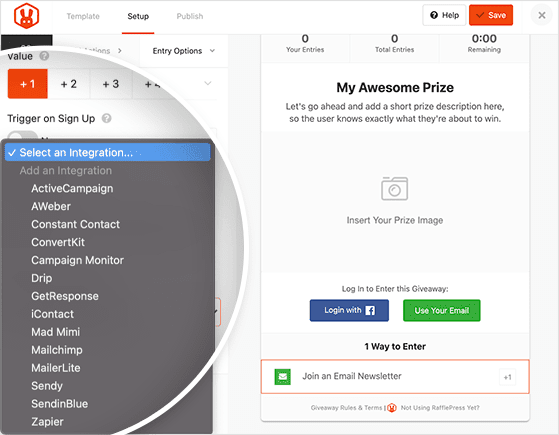
When I tested it, I liked how the Constant Contact integration only took a few clicks. Every newsletter sign-up from my giveaway went straight into my list without me touching a CSV file.
The viral share and refer-a-friend options helped my test giveaway spread faster than expected. It won’t replace a full email funnel, but for building an audience quickly, it’s one of the most efficient plugins I’ve used.
To connect RafflePress to Constant Contact, select Constant Contact from the integration dropdown in your giveaway builder, retrieve your API key from your Constant Contact account settings, paste it in, select your list, and save.
Pros
- Easy drag-and-drop giveaway builder
- Strong email marketing integrations
- Multiple social media entry options
- Built-in spam protection
Cons
- No free plan for advanced integrations
- Limited design customization without CSS
- Some features require higher-tier plans
My Verdict: RafflePress is a fast, beginner-friendly way to run email list–building giveaways. It’s best if you want growth from viral sharing, but design tweaks are limited unless you know CSS.
SeedProd: Build Landing Pages That Sync With Constant Contact
| Pricing: Starts at $79/year |
| Free Plan / Trial: Free version |
| Standout Features: |
| 🔹 Drag-and-drop page and theme builder 🔹 Pre-made templates and website kits 🔹 WooCommerce and payment support |
| Rating: A |
| Best For: Businesses and creators building high-converting WordPress pages |
SeedProd is a powerful WordPress landing page and theme builder. It’s designed for anyone who wants full control over their site layout without touching code.
You can create standalone landing pages, full custom themes, or tailored WooCommerce store pages. From there, it’s easy to add lead forms, payment buttons, and other conversion-focused elements.
In my tests, the real-time visual editor felt fast and responsive. I could drag in a opt-in form, style it, and connect it to my Constant Contact account in just a couple of clicks.
The pre-made kits helped me launch designs quickly. I still made tweaks for branding, but the templates cut my build time down by more than half compared to starting from scratch.
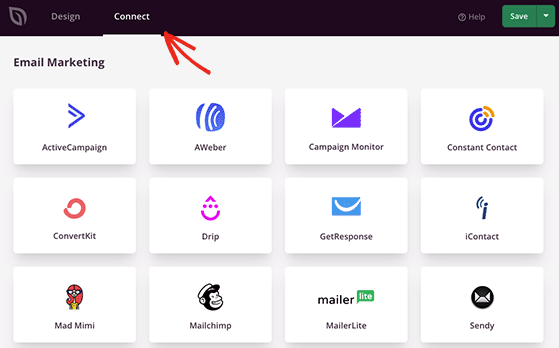
To connect SeedProd to Constant Contact, go to your WordPress admin, click SeedProd in the left menu, open the Connect tab, select Constant Contact, enter your API key from your Constant Contact account, and save.
Pros
- Fast, intuitive drag-and-drop editor
- Wide selection of templates and full website kits
- Direct Constant Contact integration
- Built-in WooCommerce and payment support
Cons
- No free plan with Constant Contact integration
- Advanced animation features require higher-tier plans
- Theme builder can be overwhelming for complete beginners
My Verdict: SeedProd is ideal if you want a visual builder that works well with Constant Contact. It’s packed with tools for serious marketers, though beginners may need a little time to explore its full range.
WPForms: Create WordPress Forms Linked to Constant Contact
| Pricing: Starts at $99.50/year |
| Free Plan / Trial: Yes (Lite version) |
| Standout Features: |
| 🔹 Visual drag-and-drop form builder 🔹 1000+ ready-made templates 🔹 Multi-step and conditional logic forms |
| Rating: A |
| Best For: Site owners who need powerful, customizable forms with CRM and email integrations |
WPForms is a user-friendly form builder for WordPress that works with Constant Contact. It’s designed to make building and customizing forms simple for anyone, even beginners.
With 1000+ templates, you can start quickly and adapt each form to your needs. Features like conditional logic, multi-page layouts, and payment field support mean it can handle everything from basic contact forms to advanced applications.
When I tested WPForms with Constant Contact, the connection process was straightforward. Submissions synced instantly, which meant no manual list updates.
I also appreciated how the entry management dashboard made it easy to review and filter responses. It’s a small detail, but it saves time when handling high-volume form submissions.
To connect WPForms to Constant Contact, go to WPForms Settings Integrations Constant Contact and follow the OAuth authentication steps. Once connected, open any form and add a Constant Contact marketing field to map subscribers to your list.
Pros
- Beginner-friendly visual builder
- Extensive template library
- Supports payments and advanced logic
- Direct Constant Contact integration
Cons
- Advanced features locked to higher-tier plans
- Free version is limited for business use
- May require multiple add-ons for complex workflows
My Verdict: WPForms is one of the easiest ways to create professional forms and sync them with Constant Contact. It’s flexible enough for advanced setups, but you’ll need a paid plan to unlock its full potential.
OptinMonster: Use Popups and Opt-Ins With Constant Contact
| Pricing: Starts at $9/month |
| Free Plan / Trial: No |
| Standout Features: |
| 🔹 Exit Intent and advanced targeting 🔹 Multiple campaign types 🔹 Built-in A/B testing |
| Rating: A |
| Best For: Site owners looking to boost conversions with targeted popups |
OptinMonster is a lead-generation toolkit and popup builder for WordPress. It’s built to help you capture leads, grow email lists, and increase sales with high-converting campaigns.
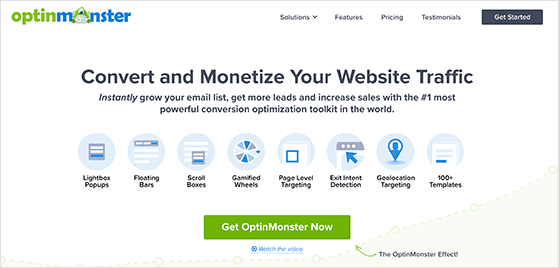
You can create lightbox popups, slide-ins, welcome mats, floating bars, and even gamified spin-to-win opt-ins. Each campaign starts with a pre-made template you can tweak using the visual drag-and-drop editor.
In my tests, Exit Intent was the standout. It triggered offers at just the right moment, turning abandoning visitors into new email subscribers through Constant Contact.
The targeting rules were also easy to set up, letting me display popups on specific categories or pages. That level of control helped keep offers relevant and less intrusive.
To connect OptinMonster to Constant Contact, go to Integrations inside the campaign editor, click Register Constant Contact, and authorize your account. You can then map the email field to a specific list in your CC account.
Pros
- Wide variety of campaign types
- Highly customizable targeting options
- Direct Constant Contact integration
- Built-in analytics and A/B testing
Cons
- No free plan available
- Advanced targeting features are on higher plans
- May feel feature-heavy for beginners
My Verdict: OptinMonster is ideal for marketers who want full control over popup timing and targeting. It’s powerful for conversions, though newcomers may need time to explore all its features.
MemberPress: Manage Membership Contacts in Constant Contact
| Pricing: Starts at $179.50/year |
| Free Plan / Trial: No |
| Standout Features: |
| 🔹 Online course and content builder 🔹 Multi-level membership support 🔹 Constant Contact integration via Zapier |
| Rating: A- |
| Best For: Creators and businesses running paid memberships or courses |
MemberPress is a WordPress plugin that turns your site into a full membership platform without coding. It’s built for selling subscriptions, online courses, and gated content.
You can set up paywalls, drip content over time, and sell digital downloads alongside memberships. The drag-and-drop course builder makes it easy to package lessons in a clean, professional layout.
When I tested its Constant Contact integration, new members’ details synced instantly. That made it simple to add them to automated onboarding or upsell email sequences.
Pricing page templates and coupon features also stood out, letting me test different offers to see which boosted sign-ups the most.
MemberPress connects to Constant Contact via Zapier. Create a Zap that triggers when a new member registers and adds them to your chosen Constant Contact list automatically.
Pros
- Full membership and course management in one plugin
- Direct Constant Contact integration
- Flexible pricing and coupon options
- Easy-to-use setup for beginners
Cons
- No free plan available
- Advanced features can take time to master
- Higher cost than some alternatives
My Verdict: MemberPress is an all-in-one solution for memberships, courses, and email list growth via Constant Contact. It’s powerful but comes at a premium, so it’s best for serious creators or businesses.
Zapier: Connect Constant Contact to 5,000+ Apps

| Pricing: Free plan for up to 5 Zaps, paid plans from $17.80/month (annual billing) |
| Free Plan / Trial: Yes |
| Standout Features: |
| 🔹 Connect 5,000+ apps 🔹 Automate repetitive workflows 🔹 Multi-step Zaps and conditional logic |
| Rating: A |
| Best For: Automating tasks and syncing data between multiple platforms |
Zapier is an automation platform that connects Constant Contact to thousands of other apps. It’s perfect for creating workflows that save time and reduce manual data entry.
For example, you can sync Google contacts, import Eventbrite attendees, or add HubSpot and Salesforce leads directly into your Constant Contact lists.
When I set up a test Zap, the process was straightforward. I connected Facebook Lead Ads to Constant Contact, and new leads were added instantly without me having to export and import files.
Multi-step Zaps with filters and conditions make it easy to fine-tune automations, so you only send relevant, segmented contacts to your email lists.
To connect Constant Contact via Zapier, create a new Zap and choose your trigger app (such as Facebook Lead Ads or Google Sheets). Add Constant Contact as the action, select “Create Contact,” and Zapier walks you through field mapping.
Pros
- Integrates with 5,000+ apps
- Easy, no-code automation builder
- Supports multi-step workflows
- Works with popular CRMs and marketing tools
Cons
- Free plan is limited to basic automations
- Costs can add up with higher-volume Zaps
- Some integrations require premium plan
My Verdict: Zapier is ideal if you need Constant Contact to work with other apps you already use. It’s incredibly flexible, though heavy users may find themselves upgrading to a paid plan quickly.
Live Chat: Turn Conversations Into Constant Contact Subscribers

| Pricing: Starts at $20/month per agent (billed annually) |
| Free Plan / Trial: No |
| Standout Features: |
| 🔹 Real-time website chat 🔹 AI chatbot automation 🔹 Product cards for showcasing items |
| Rating: B+ |
| Best For: Businesses wanting to convert live visitors into subscribers |
Live Chat lets you talk to customers in real time through a chat widget on your website. It’s built to help resolve questions fast and guide visitors toward making a purchase.
Its AI-powered chatbot can handle common queries, qualify leads, and collect information before handing off to a live agent. This frees your team to focus on high-value conversations.
When I tried Live Chat with Constant Contact, I found the pre-chat opt-in feature particularly useful. Visitors could join my email list before even starting the conversation, which expanded my campaign reach.
Being able to send product cards directly in the chat also helped highlight key offers without needing the visitor to navigate away from the conversation.
To connect LiveChat to Constant Contact, go to Settings Apps inside your LiveChat dashboard, find Constant Contact, and click Connect. You’ll be prompted to log in to your CC account and authorize access.
Pros
- Real-time communication with site visitors
- Built-in AI chatbot for lead qualification
- Integrates directly with Constant Contact
- Multi-device support for chat agents
Cons
- No free plan available
- Pricing is per agent, which can add up
- Advanced automation setup requires some learning
My Verdict: Live Chat is great for businesses that want to turn live interactions into subscribers. It’s effective for lead generation, but costs can rise quickly for larger teams.
Constant Contact WordPress Integration FAQs
How do I connect Constant Contact to WordPress?
The easiest way is to install a plugin that has a built-in Constant Contact integration. RafflePress, WPForms, SeedProd, and OptinMonster all connect directly — no third-party tools needed. Each plugin walks you through an authentication step (either an API key or OAuth login) from its own settings panel, and new subscribers sync to your chosen Constant Contact list automatically after that.
What’s the difference between the official Constant Contact plugin and third-party integrations?
The official Constant Contact Forms plugin (free at wordpress.org) lets you embed a basic signup form on any post or page. It works, but that’s all it does. Third-party integrations like RafflePress, WPForms, and OptinMonster go further — viral giveaways, exit-intent popups, conditional logic forms, landing page builders, and membership-level segmentation are all things the official plugin can’t do. If you want more than a single opt-in box, you’ll need one of the tools in this guide.
Which Constant Contact integration works best for a WooCommerce store?
SeedProd and WPForms are the strongest picks for WooCommerce. SeedProd lets you build custom WooCommerce product and checkout pages that sync form submissions directly to your Constant Contact list. WPForms can add a Constant Contact opt-in to your checkout flow so customers are added to your list when they complete a purchase. Zapier is also worth considering if you want to trigger Constant Contact actions based on specific WooCommerce order events.
Do I need Zapier to use Constant Contact with WordPress?
No — most of the plugins in this guide connect to Constant Contact directly without Zapier. RafflePress, WPForms, SeedProd, and OptinMonster all have native integrations that sync subscribers automatically. Zapier is only necessary when you want to connect Constant Contact to a tool that doesn’t have its own WordPress plugin, or when you need multi-step automations across several apps at once.
What’s the Best WordPress Constant Contact Integration?
The best Constant Contact integration for WordPress depends on your goals. If you want to grow your email list quickly with viral giveaways, RafflePress is the top choice because it connects directly to Constant Contact and makes collecting leads fun and engaging.
For building high-converting landing pages, SeedProd is the standout pick, while WPForms is ideal if you need flexible contact and lead capture forms.
All the integrations in this guide work with Constant Contact, so the “best” one comes down to how you plan to attract and manage subscribers.
I hope this guide has helped you find the best Constant Contact integrations for your WordPress site.
You might also like these other tips and tutorials for growing your business while you’re here:
- How to Fix WordPress Not Sending Email
- How to Use Email Marketing to Promote Your Contest
- 6 Best WordPress Email Capture Plugins & Tools
- Woorise Review: Is It Really the Best Way to Run a Giveaway?
If you liked this article, please subscribe to our YouTube Channel for RafflePress video tutorials. You can also find us on Twitter and Facebook.

