How to Do a YouTube Giveaway That Actually Works
 Stacey Corrin
Stacey Corrin
Stacey Corrin
 John Turner
John Turner
John Turner
A YouTube giveaway is a contest where you offer a prize and viewers enter by following simple instructions like commenting or visiting a link. To do a giveaway on YouTube, set clear rules, follow YouTube’s contest policies, choose a relevant prize, explain how to enter in your video, and announce the winner publicly.
It sounds simple, but there are a few details that can cause problems if you miss them. I learned that the hard way during my first giveaway.
In this guide, I’ll show you exactly how to run a YouTube giveaway step by step and stay within YouTube’s rules.
- Step 1. Set a Goal for Your Giveaway
- Step 2. Check YouTube Contest Policies and Guidelines
- Step 3. Choose Excellent Prize Ideas
- Step 4. Pick a YouTube Giveaway Type
- Step 5. Define Your Giveaway Rules and Guidelines
- Step 6. Launch Your YouTube Giveaway
- Step 7. Promote Your YouTube Giveaway
- Step 8. Announce the Winner and Review Results
Step 1. Set a Goal for Your Giveaway
Before you run a giveaway on YouTube, decide what you want to achieve. Your goal shapes the prize, entry method, and how you measure success.
- Grow subscribers
- Increase video views
- Drive traffic to your website
- Grow your email list
- Promote a product or launch
Pick one main goal. Keeping it focused makes your giveaway easier to manage and easier to measure when it’s over.
Step 2. Check YouTube Contest Policies and Guidelines
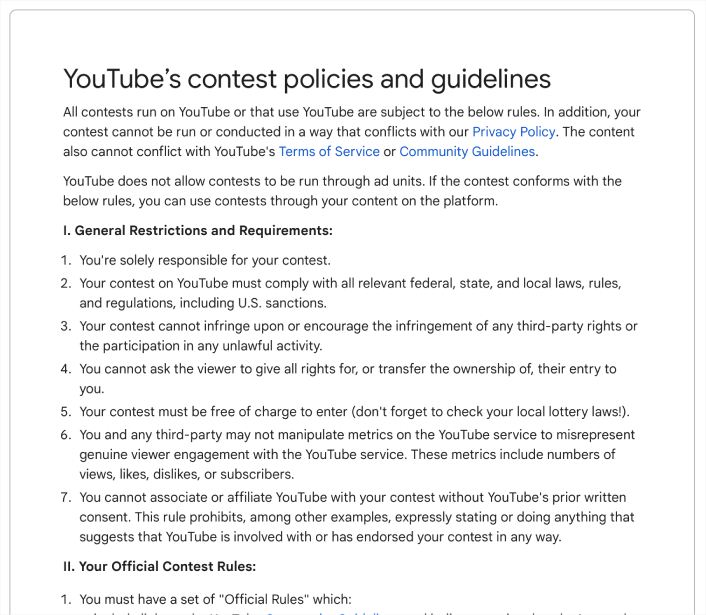
Before launching your YouTube giveaway, review YouTube’s contest policies. Breaking the rules can lead to removed videos or even account penalties.
Here are the key requirements from YouTube’s official contest guidelines:
- Follow YouTube’s Terms of Service, Community Guidelines, and Privacy Policy.
- Do not use copyrighted content without permission.
- The giveaway must be free to enter and comply with local laws.
- Do not artificially inflate views, likes, or subscribers.
- Include a disclaimer stating YouTube is not responsible for your contest.
You also cannot require likes or subscriptions as a condition of entry under YouTube’s fake engagement policy. You can encourage those actions, but they must stay optional.
Free: Download Our Giveaway Playbook
Templates, prize ideas, and promotion strategies in one guide.
Step 3. Choose Excellent Prize Ideas
Picking a prize is the fun part of any successful YouTube giveaway. But don’t get too excited—you need to make sure people actually want the prize you choose. If the prize isn’t good, not many people will join your subscriber giveaway.
Big YouTube channels might run high-stakes giveaways, but for a free YouTube channel giveaway, your prize doesn’t have to be expensive to get people excited.
If you have a small channel, try offering:
- Shoutouts in your video
- Include the winner in your video credits
- Your own merchandise or product
- A bundle of affordable items
- A 1-on-1 session with you
Think about what your viewers would actually be excited to win, not just what’s trendy. You can also check out our favorite contest prize ideas for more inspiration.
Step 4. Pick a YouTube Giveaway Type
The type of giveaway you choose affects how many people enter and how engaged they are. If you’re new to running contests, start simple and build from there.
Here are the most common YouTube giveaway formats:
| Giveaway Type | Description | Pros | Cons |
|---|---|---|---|
| Sweepstakes | Simple entry (comment, answer a question, or visit a link) | Easy to set up, attracts lots of entries | May attract prize-focused viewers |
| Partner Giveaway | Collaborate with another creator or brand | Reaches new audiences, builds credibility | Requires coordination and planning |
| User-Generated Content | Viewers submit videos, photos, or creative entries | High engagement, creates extra content | More work to review and judge entries |
| Video Voting | Viewers vote on their favorite video or entry | Encourages watch time and interaction | Harder to manage fairly |
If you’re unsure which to choose, a basic sweepstakes is usually the best place to start. It’s simple to manage and works well for growing views and engagement.
For more inspiration, you can explore our YouTube giveaway examples.
Step 5. Define Your Giveaway Rules and Guidelines
Every YouTube giveaway needs clear rules. This protects you and makes the contest fair for everyone entering.
Your giveaway rules should include:
- Who can enter (age and location requirements)
- How to enter
- How many entries are allowed
- Start and end dates (with timezone)
- How and when the winner will be selected
- Where the winner will be announced
Make sure your rules also include a disclaimer that YouTube is not responsible for the giveaway.
If you’re hosting your giveaway on your website, RafflePress includes a built-in rules generator to help you create terms quickly. For more help, see our guide on how to write giveaway rules.
Step 6. Launch Your YouTube Giveaway
Now that your rules are clear, you have two ways to move forward.
You can run the giveaway directly on YouTube and manage everything in the comments, or you can host it on your website for more control over entries and tracking.
Let’s look at the YouTube-only method first.
Option A: Run a Giveaway Directly on YouTube (No Website Needed)
If you want to keep everything on YouTube, run the giveaway from your channel and manage entries in the comments.
- Create a short giveaway video that explains the prize, deadline, and how you’ll choose the winner.
- Use a comment-based entry method (for example, “Comment with your favorite video from this channel”).
- Put your rules in the description, including eligibility, start and end dates (with timezone), and a YouTube disclaimer.
- Pin a comment that repeats the entry steps and deadline.
- Choose a winner with a clear method and announce it in a Community post, pinned comment, or new video.
Important: You can encourage likes or subscriptions, but you can’t require them as a condition of entry.
Option B: Host Your Giveaway on Your Website for More Control
If you want better entry tracking, spam protection, and an easier way to pick a winner, host your YouTube giveaway on your WordPress site. This keeps entries in one place and avoids messy comment threads.
I use RafflePress because it builds a simple giveaway landing page and can pick a random winner for you. Here’s the quickest setup.
Install and Activate RafflePress
Install and activate RafflePress on your WordPress site so you can build a giveaway landing page.
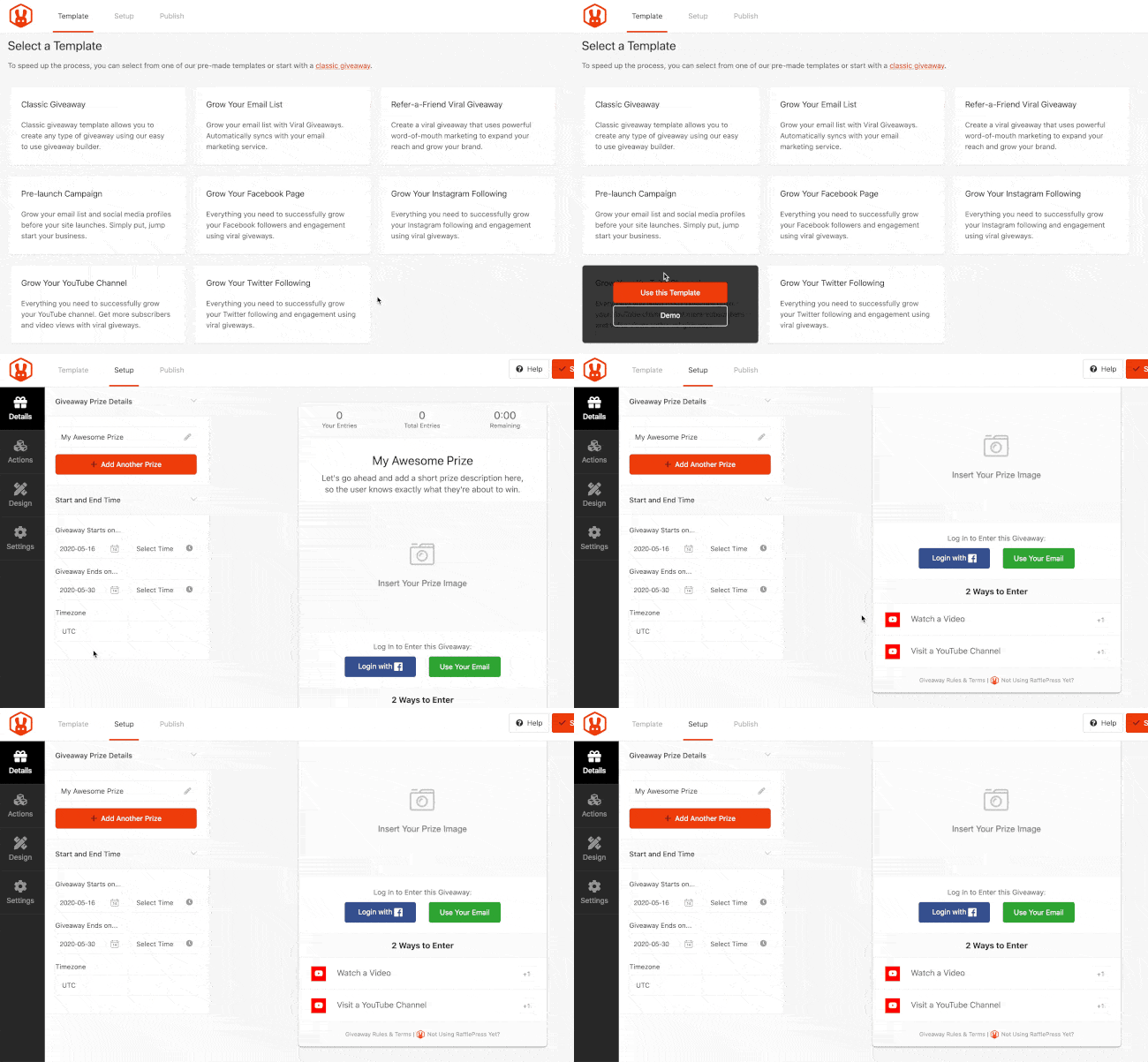
Create a YouTube Giveaway
Go to RafflePress » Add New, name your giveaway, and choose the Grow Your YouTube Channel template.
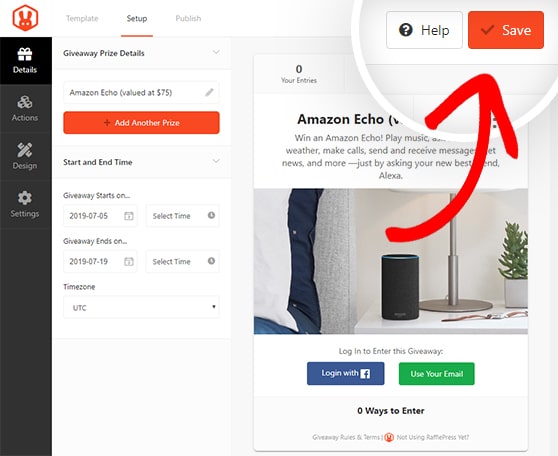
Set Your Giveaway Prize Details
Add your prize name, a short description, and an image, then set your start and end dates (with timezone) and click Save.
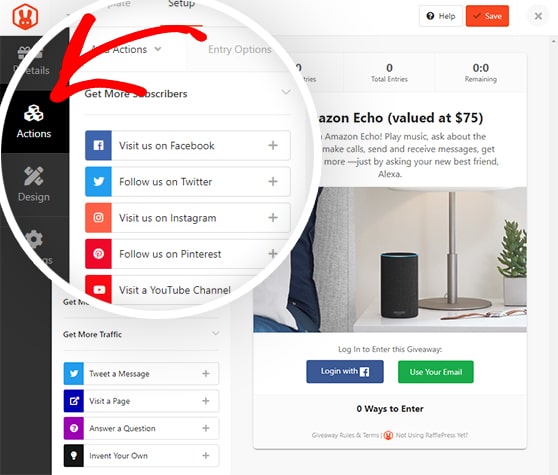
Choose Your Entry Methods
Use entry actions that support your goal and stay within YouTube’s policies. Good options include Watch a YouTube Video and Visit a YouTube Channel, plus an optional email sign-up if you want to grow your list.
Avoid making likes or subscriptions required for entry.
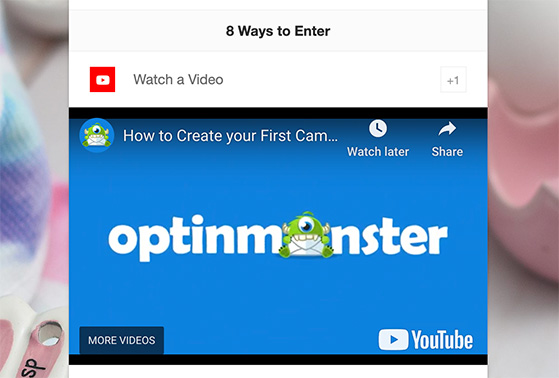
Pro Tip: The Watch a YouTube Video action embeds your video inside the giveaway, which can help drive extra views without sending people off the page.
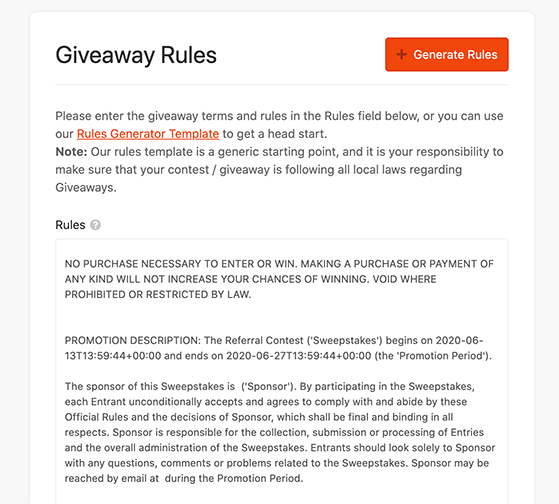
Configure Your Giveaway Settings
Open Settings and add clear giveaway rules, including eligibility, dates, how you’ll choose the winner, and a YouTube disclaimer.
Add a YouTube and FTC Release
Add a simple disclosure to your rules so it’s clear YouTube isn’t involved.
This giveaway is not sponsored, endorsed, or administered by YouTube.
Publish Your Giveaway on YouTube
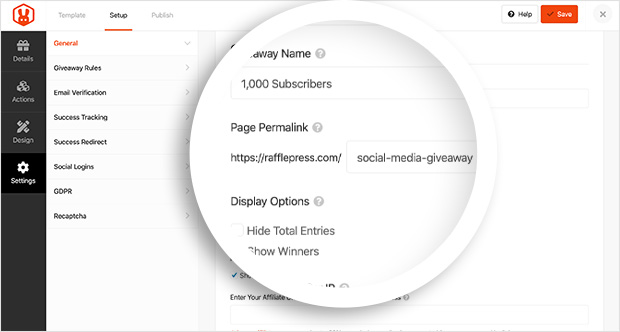
Publish your giveaway landing page, then add the link to your YouTube video description and pinned comment so viewers can enter.
Optional: Embed Your YouTube Giveaway on Your Website
If you want the giveaway to live inside a blog post too, you can embed the giveaway widget using the RafflePress block. This is optional, and most YouTube giveaways work fine with a standalone landing page link.
Step 7. Promote Your YouTube Giveaway
Once your giveaway is live, you need people to see it. Promotion is what turns a simple contest into real growth.
- Create an announcement video: Explain the prize and how to enter. Add the link in your description.
- Use cards and end screens: Promote the giveaway inside older, high-traffic videos.
- Share on social media: Post on Instagram, Facebook, Twitter, and anywhere your audience hangs out.
- Email your list: Let subscribers know before the deadline.
If you’re using RafflePress, the built-in refer-a-friend action encourages people to share your giveaway for bonus entries.
Tip: Use a custom UTM link to track how many entries come directly from YouTube.
Step 8. Announce the Winner and Review Results
When your giveaway ends, choose a winner using the method you outlined in your rules. Be transparent and announce the result publicly.
If you hosted the contest on your website, RafflePress can randomly select a winner for you. If you ran it directly on YouTube, use a reliable comment picker tool.
After that, review your results. Check whether you met your goal, how many entries you received, and which promotion channels performed best.
You can use YouTube Analytics to measure views and subscriber growth. If you linked to your website, track traffic and conversions in Google Analytics or MonsterInsights.
YouTube Giveaway FAQs
That said, when someone joins your giveaway, they’re already showing interest in your content. If you make the prize relevant and the experience fun, many of those visitors will subscribe on their own—especially if your video explains the giveaway clearly and gives them a reason to stick around.
And that’s it! That’s the full walkthrough. Hopefully now, running a YouTube giveaway feels a lot more doable.
Whether you’re running your first free YouTube channel giveaway or want to try a subscriber giveaway, the steps in this guide will help you get results without breaking the rules.
If you want more tips to grow your channel, check out these guides:
- How to Get More Likes on YouTube
- 10 YouTube Giveaway Examples
- Increase YouTube Views with a Giveaway
- How To Get Subscribers On YouTube
And don’t forget to follow us on YouTube, Facebook, and Twitter for more giveaway tips and tutorials.


