How to Do a Giveaway on Etsy to Grow Your Small Business
 Stacey Corrin
Stacey Corrin
Stacey Corrin
 John Turner
John Turner
John Turner
Running a giveaway on Etsy is challenging because Etsy doesn’t let you host contests directly on the platform. That means you need an external website to run a legal giveaway, track entries, and promote your shop the right way.
With a simple setup on your own site, you can run a giveaway that brings real traffic to your Etsy shop and attracts the customers you want. In this guide, I’ll show you the clear, step-by-step plan for creating a high-impact Etsy giveaway using RafflePress, so you can grow your audience without relying on outdated advice or luck.
How to Do A Giveaway on Etsy:
- Why Most Etsy Giveaways Fail
- Why Run a Giveaway on Etsy?
- Are Giveaways Allowed on Etsy?
- How to Run a Giveaway for Your Etsy Shop Using RafflePress
- Step 1: Set Your Giveaway Goals
- Step 2: Choose a Relevant Prize
- Step 3: Set Up Your Giveaway on WordPress
- Step 4: Enter Your Etsy Giveaway Prize Details
- Step 5: Add Ways to Enter Your Etsy Giveaway
- Step 6: Customize Your Giveaway Design
- Step 7: Configure Your Settings
- Step 8: Publish Your Etsy Giveaway on WordPress
- Step 9: Promote Your Giveaway on Social Media
- Step 10: Announce the Winner of Your Etsy Giveaway
Why Most Etsy Giveaways Fail
Most Etsy giveaways fail because they launch without a clear goal, a focused prize, or a plan for steady promotion. When these pieces don’t work together, you attract the wrong audience and see little impact on your shop.
Here are the most common problems I see in seller communities:
- No clear goal. Without a specific goal, it’s hard to choose entry actions that support your shop growth.
- Poor promotion. Posting once isn’t enough. Giveaways need reminders across multiple platforms to stay visible.
- Outdated methods. Old tactics like tagging friends or commenting “done” may break platform rules and limit reach.
- The wrong prize. Generic prizes attract freebie hunters instead of real shoppers.
The details matter. Strong giveaways match the goal with the right entry actions, include a clear start and end date, and use a prize that’s relevant to your ideal customer. For example, if your goal is more shop traffic, making “Visit a product page” your main action is much more effective than general social engagement.
This guide shows you how to avoid these issues with a simple, repeatable plan so your giveaway becomes a reliable marketing tool, not guesswork.
Why Run a Giveaway on Etsy?
Running a giveaway is one of the fastest ways to boost visibility for your Etsy shop because it turns casual attention into real traffic, followers, and potential buyers.
Giveaways work especially well for new or growing sellers since they motivate people to interact with your brand. Industry studies show contests can generate conversion rates around 34 percent, which is much higher than most content types.
- They drive traffic. A giveaway gives people a clear reason to visit your store, browse your listings, and learn what you offer.
- They grow your audience. You can ask people to follow you on social media, join your email list, or share your giveaway with friends.
- They build trust. Even if someone doesn’t win, they’ve interacted with your brand in a positive way, which makes them more likely to buy later.
The best part is you don’t need tech skills or a big budget. With the right tool and a clear goal, you can launch a giveaway that brings steady traffic and long-term interest to your Etsy shop.
Free: Download Our Giveaway Playbook
Templates, prize ideas, and promotion strategies in one guide.
Are Giveaways Allowed on Etsy?
Etsy doesn’t allow sellers to run giveaways directly on the platform, so you can’t list a $0 product or use Etsy tools to collect entries for a contest or sweepstakes.
You can still use a giveaway to promote your shop, but it must be hosted off Etsy—usually on your own website or a dedicated landing page.
- Entry must be free, with no purchase required.
- You can’t require Etsy follows or reviews. Use external entry methods instead.
- Clear rules are required, including eligibility, prize details, and end date.
The safest way to run a compliant Etsy giveaway is to host it on your WordPress site using a tool like RafflePress. This lets you collect entries legally and use actions like “Visit a product page” or “Join our email list” to send traffic back to your shop.
Before you launch, check Etsy’s legal guidelines and your local laws. These rules change over time, so don’t rely on old forum threads or outdated marketing advice.
While Etsy doesn’t offer built-in contest tools, a well-run off-platform giveaway can still help you bring in more shoppers, grow engagement, and raise awareness for your store.
How to Run a Giveaway for Your Etsy Shop Using RafflePress
The easiest way to run a giveaway for your Etsy shop is to host it on your WordPress site using RafflePress. This keeps your contest compliant with Etsy rules while giving you full control over entries, prize details, and winner selection.
In the steps below, I’ll show you exactly how to set up a high-converting Etsy giveaway from start to finish, using RafflePress to manage everything in one place.
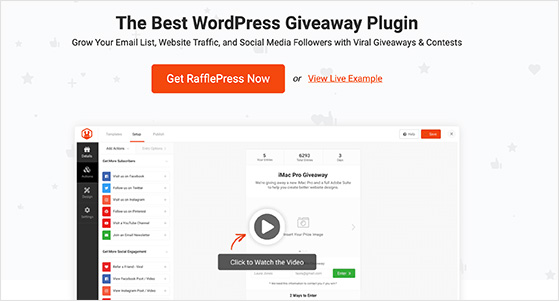
RafflePress is the best WordPress giveaway plugin for running contests, giveaways, and sweepstakes from your own website. It includes pre-made giveaway templates, a simple drag-and-drop builder, and dozens of entry actions to help you reach the right audience.
These entry actions let people:
- Follow you on social media
- Share your giveaway with friends
- Visit an Etsy product page
- Subscribe to your email list
- And more
Every completed action earns an entry, and RafflePress handles everything for you, including rules display, spam protection, and random winner selection.
Once you’re ready, follow the steps below to launch your Etsy giveaway with RafflePress.
Step 1: Set Your Giveaway Goals
Your giveaway goal guides every decision you make, from the prize you choose to the entry actions you add. A clear goal also helps you measure results and understand whether the giveaway worked.
Start by deciding what you want this giveaway to accomplish. For Etsy sellers, common goals include getting more product page visits, growing your email list, or increasing your social media following.
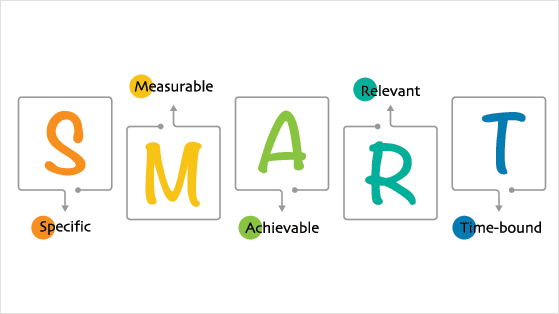
A simple way to create strong goals is to use the SMART framework, which keeps your goals focused and achievable.
- Specific — clear and well-defined.
- Measurable — you can track progress, like new followers or Etsy page visits.
- Achievable — realistic for your time and resources.
- Relevant — aligned with your shop goals, such as driving traffic or building awareness.
- Time-bound — has a clear end date.
For example, instead of saying “I want more followers,” set a goal like increasing your Instagram audience by 500 people during a two-week giveaway or sending 1,000 visitors to a new Etsy listing.
Setting a clear, realistic goal helps you stay focused and choose the right prize and entry actions from the start.
Need inspiration? These small business giveaway ideas can help you brainstorm.
Step 2: Choose a Relevant Prize
Your prize should appeal to your ideal customer and support your giveaway goal. The right prize attracts real shoppers who are likely to buy from your Etsy shop later, not people who only enter for free stuff.
Here are a few simple criteria to help you choose a strong prize:
- Know your audience. Pick something your customers genuinely want, such as a best-selling product or a themed bundle.
- Set a budget. Include the prize, shipping, packaging, and any extra costs. Choose a prize that fits your limits without hurting your margins.
- Keep it relevant. Choose a prize related to what you sell. For example, offer a physical item, a gift card to your Etsy shop, or a digital product if that’s what you create.
- Match the value to your goal. Your prize should be exciting enough to bring in entries, but not so broad it attracts the wrong audience.
- Make it exclusive. A limited-edition product or personalized item adds extra excitement and draws in more qualified entrants.
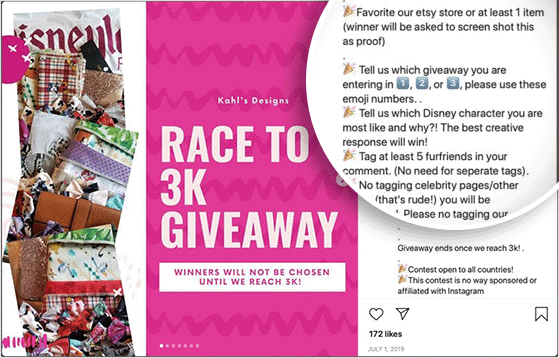
Choosing a relevant, audience-focused prize ensures your giveaway attracts the right people and helps you reach your goals.
Step 3: Set Up Your Giveaway on WordPress
To run a legal Etsy giveaway, you’ll host it on your WordPress site, and RafflePress makes this setup quick and beginner-friendly.
If you don’t already have a WordPress site, you can follow this step-by-step guide on how to set up a WordPress website. Once you’re ready, you can install your giveaway tool.
Start by installing and activating the RafflePress WordPress giveaway plugin. If it’s your first time adding a plugin, this guide on how to install a WordPress plugin walks you through it.
Note: You can use the free version of RafflePress for simple giveaways, but I’m using RafflePress Pro here because it includes more entry options and advanced features.
After activation, go to RafflePress » Settings in your WordPress dashboard and paste in your license key.
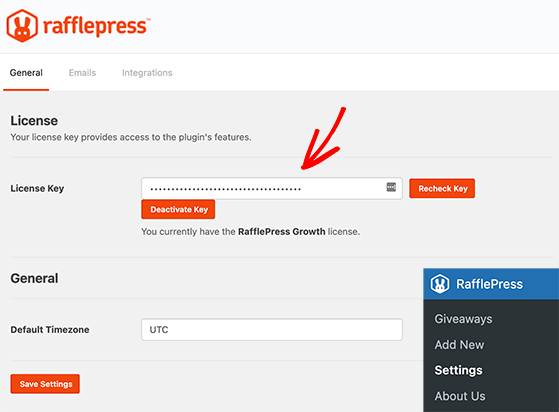
You’ll find your key in your account on the RafflePress website. Click Verify Key to activate it.
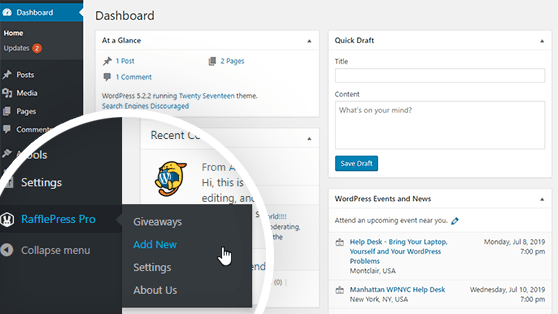
With your license verified, you’re ready to create your giveaway. Go to RafflePress » Add New to open the visual builder.
Pick a pre-made template based on your goal, such as growing your email list or increasing Instagram followers. Give your giveaway a name, hover over the template you want, and click Use This Template.
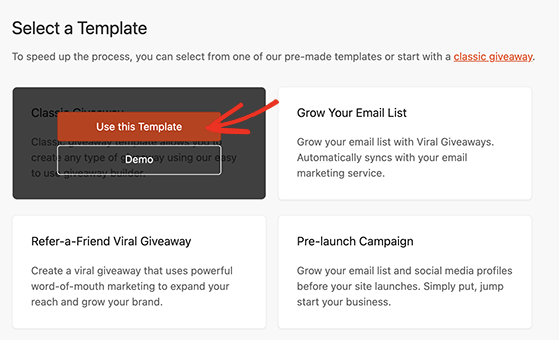
The drag-and-drop builder will open next, where you’ll enter your prize details and add entry actions.
Step 4: Enter Your Etsy Giveaway Prize Details
Your prize details help visitors understand exactly what they can win and why the giveaway is worth entering, so make this section clear and appealing.
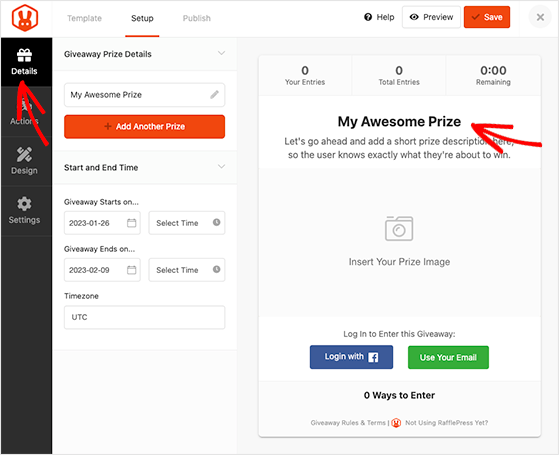
In the builder, click the prize block to add your giveaway name, a short description, and a prize image. This is your chance to highlight what makes the prize valuable or unique.
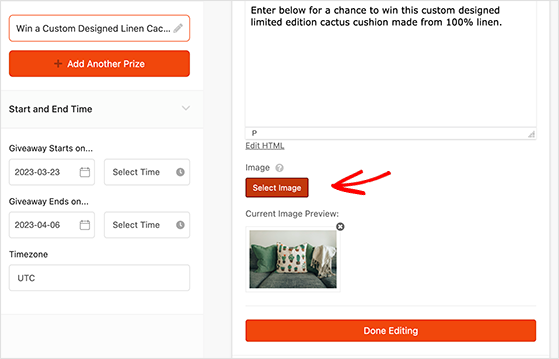
You can also upload a photo of your product or bundle by clicking Select Image. A clear, high-quality image usually increases entries because people can see exactly what they’ll receive.
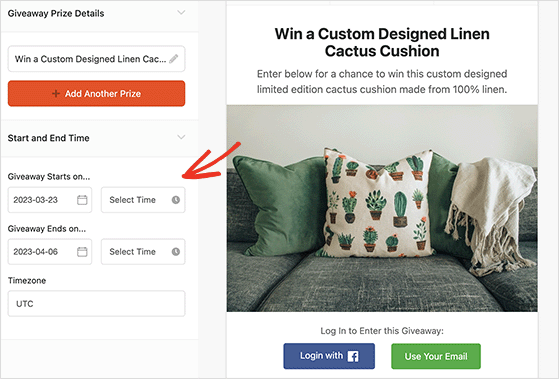
Next, add your giveaway duration. Set the start date, end date, and timezone so RafflePress can open and close the giveaway automatically.
Click Save anytime to store your progress before moving to the next step.
Step 5: Add Ways to Enter Your Etsy Giveaway
Your entry actions should match your giveaway goal. RafflePress lets you add multiple ways to enter, but your primary action should support the result you want most.
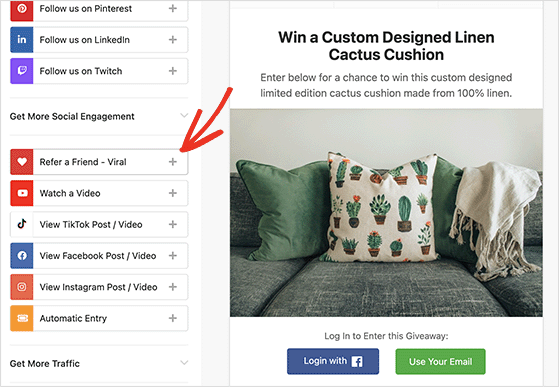
Click the Actions tab on the left to see all available entry options.
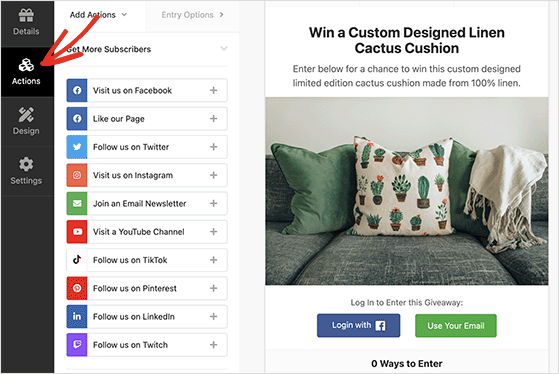
You’ll see actions like:
- Follow us on TikTok
- Visit us on Instagram
- Join an Email Newsletter
- And more
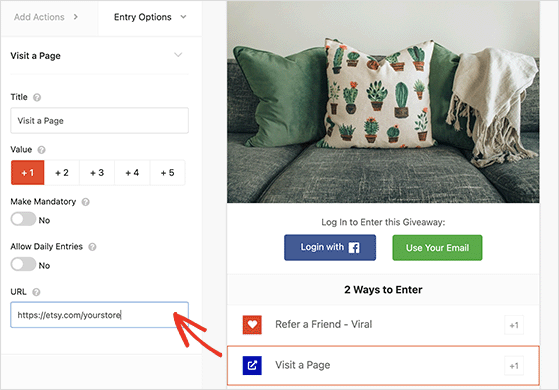
Choose actions that help you reach your goal. For example, if you want more Etsy traffic, use the Visit a Page action to send people to a product listing. To grow awareness, the Refer-a-Friend action helps your giveaway spread quickly.
Just click any action to add it to your giveaway. You can customize each one in the left panel, including making it mandatory or assigning extra entry points.
Each action includes settings you can edit. For example, the Visit a Page action lets you enter the URL you want visitors to visit.
If you add multiple entry options, drag your most important action to the top so it gets the most attention.
Step 6: Customize Your Giveaway Design
Your design helps visitors understand your giveaway quickly, so keep it clear, simple, and easy to read on any device.
Click the Design tab to customize your layout, fonts, button colors, background colors, and more.
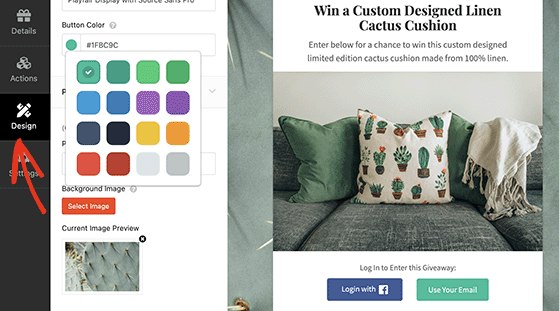
Use these settings to make your giveaway look professional and on-brand. Small changes like a matching button color or a clean background can improve trust and increase entries.
You can also add custom CSS if you want more control, but it’s completely optional.
When you’re happy with the design, click Save to keep your changes.
You can also use these tips to create eye-catching giveaway images for free.
Step 7: Configure Your Settings
Your settings control how your giveaway runs, keeps it fair, and helps you stay compliant with Etsy’s rules and local laws.
Click the Settings tab to adjust your general options, such as whether to show total entries, display winners, or limit sign-ups.
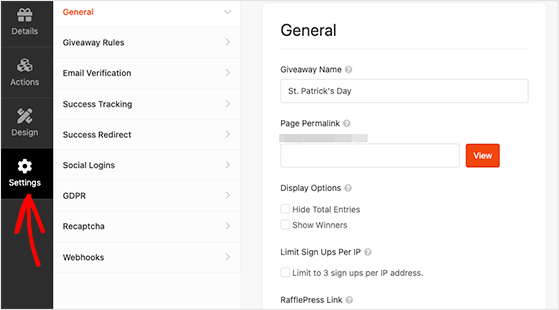
The most important section here is Giveaway Rules. Enter a few details about your contest, and RafflePress can auto-generate a rules template to help you stay compliant.
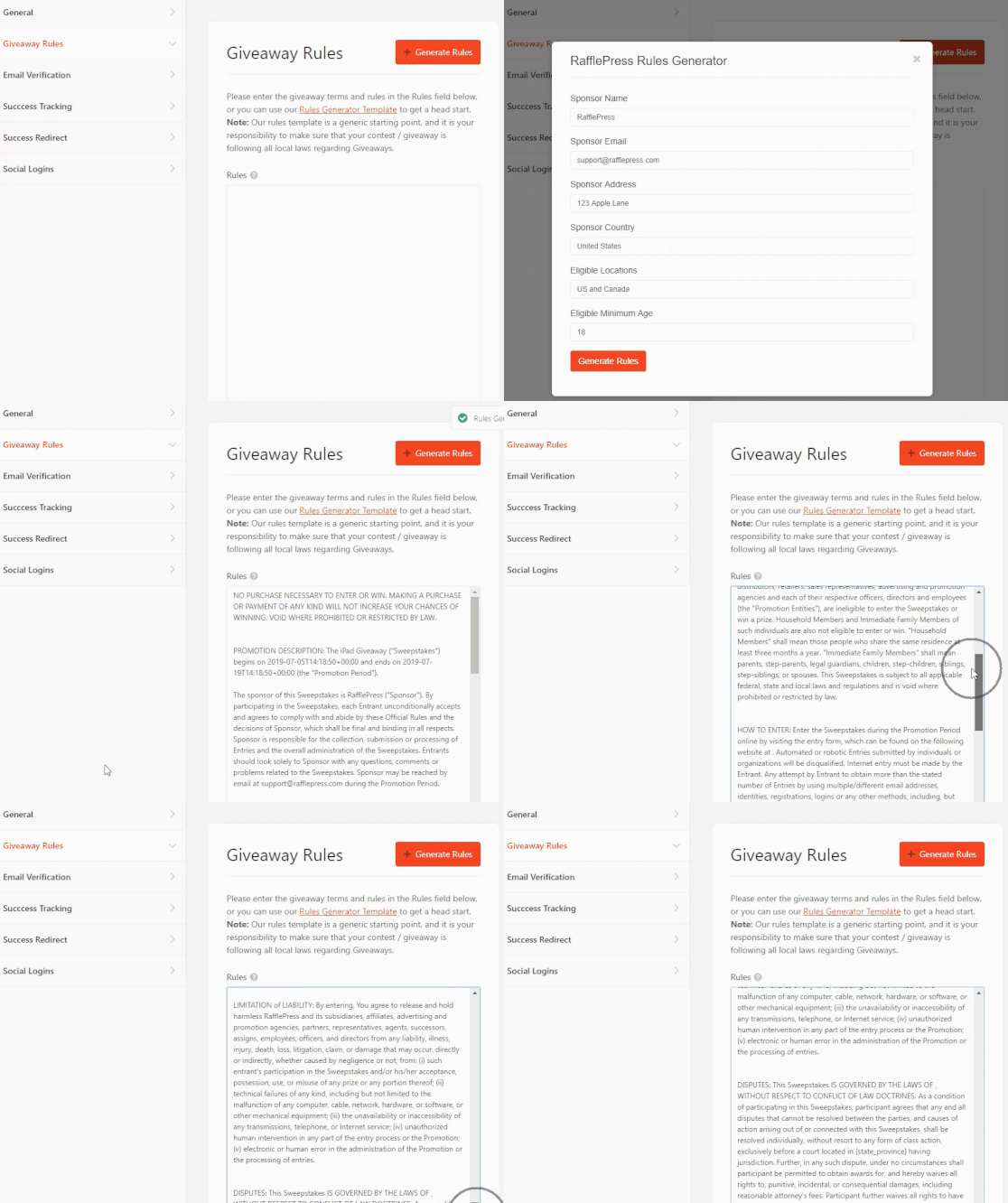
If you need help writing stronger rules, here’s a full guide on how to write giveaway rules like a pro.
You can also enable helpful features like:
- Email verification for more accurate entries
- Tracking scripts such as Google Analytics
- Redirecting users to a thank-you or upsell page
- Facebook login support
- GDPR consent toggles
- reCAPTCHA to prevent spam entries
You can explore each option in the Giveaway Settings documentation to learn how the features work.
Step 8: Publish Your Etsy Giveaway on WordPress
The best way to publish your Etsy giveaway is on a distraction-free landing page, because it’s easy to share and usually gets the highest number of entries.
You can publish your giveaway in three ways with RafflePress:
- Add it to a post or page using the WordPress block.
- Embed it anywhere using the RafflePress shortcode.
- Publish it on a standalone giveaway landing page.
For Etsy sellers, the landing page option is ideal. You can link to it from your product listings, add it to your Instagram bio, share it on 𝕏, or include it in your email campaigns without any distractions.
To create a landing page, open the Publish tab in the RafflePress builder and select Giveaway Landing Page.
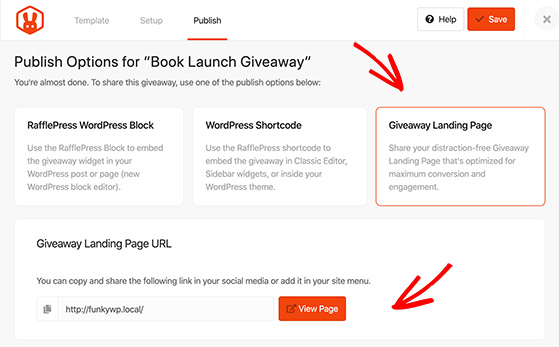
Click the “Click here” link to open the General Settings page.
Under “Page Permalink,” choose the URL for your giveaway page, then click Save.
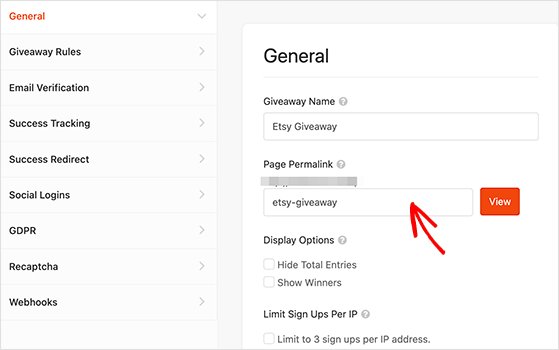
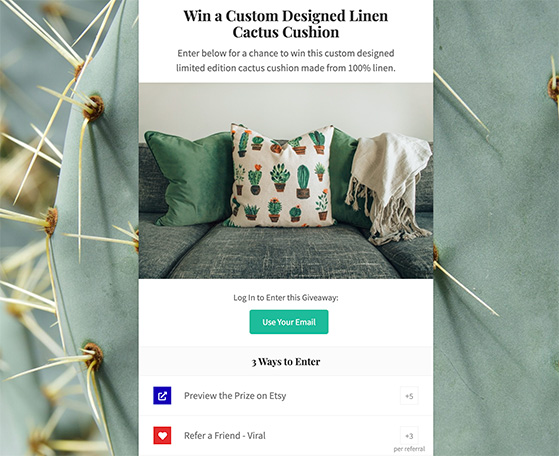
After saving, RafflePress will publish your giveaway on a clean, high-converting landing page. Click View to see it live.
Step 9: Promote Your Giveaway on Social Media
Your giveaway will only perform well if people know about it, so plan to promote it consistently before and during the campaign.
You can start by sharing the giveaway with your email list, posting it on your social channels, and mentioning it in communities or forums where your ideal customers spend time.
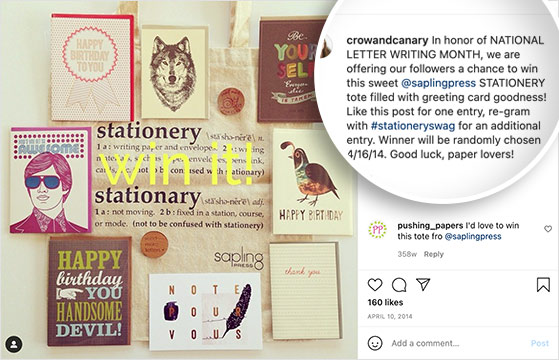
For extra visibility, you can also run Etsy ads or social media ads that link directly to your giveaway landing page. Even a small budget can bring in more entries and new potential customers.
If you need more promotion ideas, these proven contest promotion ideas can help you get more reach without spending much.
Step 10: Announce the Winner of Your Etsy Giveaway
When your giveaway ends, you can use RafflePress to pick a fair, random winner and share the results with your audience.
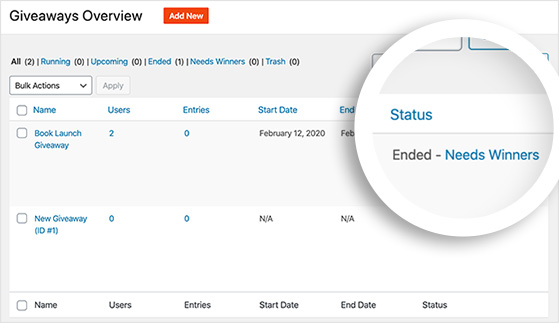
Go to the RafflePress page in your WordPress dashboard and click the “Needs Winners” link. You’ll see a full list of entrants and their total number of entries.
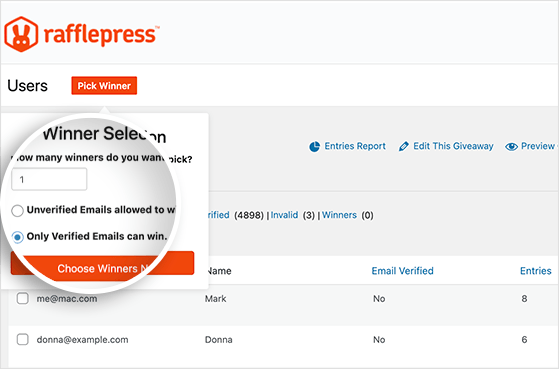
In the “Winner Selection” panel, enter how many winners you want to pick, then click Choose Winners Now to let RafflePress draw them at random.
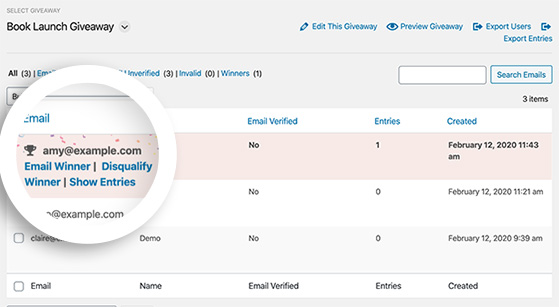
RafflePress will display the winner’s name at the top of the list. You can then email them directly to deliver the prize and confirm shipping details if needed.
To wrap up your campaign, announce the winner on your social channels or landing page. This builds trust with your audience and helps you promote your next giveaway.
Frequently Asked Questions (FAQs)
Bonus Guides for Running a Successful Giveaway
Here are more helpful guides if you want to improve your giveaway results and learn additional strategies.
- How to Use Good Giveaway Copywriting to Drive Entries
- Online Sweepstakes Websites to Promote Your Contest
- How to Create a Daily Giveaway With Multiple Entries
- Sweepstakes Definition Vs Contest Vs Lottery
- How to Use Contest Marketing to Grow Your Business
- How to Use Contest SEO to Boost Your Website’s Rankings
There you have it! Now you know how to do a giveaway on Etsy the smart way, with clear goals, the right tools, and a step-by-step plan.
If you’re ready to promote your shop and grow your audience, get started with RafflePress today. You can launch your first Etsy giveaway in just a few clicks, no code or stress required.
If you liked this article, please subscribe to our YouTube Channel for RafflePress video tutorials. You can also find us on Twitter and Facebook.

