How to Create a Daily Giveaway With Multiple Entries
 Stacey Corrin
Stacey Corrin
Stacey Corrin
 John Turner
John Turner
John Turner
Want to run a daily giveaway that keeps people coming back every 24 hours? A multi-day contest like this lets users complete repeat actions, like tweeting or visiting a page, to boost their chances of winning. But to make it work, you need a tool that can handle repeat entries without extra work on your end.
In this article, I’ll show you how to create a daily giveaway with RafflePress, the WordPress giveaway plugin. All so you can enjoy watching your business grow with viral contests.
TL;DR: How to Create a Daily Giveaway
A daily giveaway lets people enter every 24 hours to boost their chances of winning. Here’s how to set one up with RafflePress:
- Set a clear goal – traffic, leads, or social followers so you know what success looks like.
- Pick a relevant prize – something your target audience actually wants so they return every day.
- Install RafflePress – the WordPress giveaway plugin that handles repeat entry tracking automatically.
- Add daily entry actions – social follows, page visits, and posts users can complete each day.
- Pick a winner fairly – use RafflePress’s random winner picker, then follow up with all entrants.
- Measure your results – check traffic and entries in Google Analytics to improve your next contest.
- What Is a Daily Giveaway?
- How to Run a Daily Giveaway in WordPress
- Frequently Asked Questions
What Is a Daily Giveaway?
A daily giveaway is a type of contest that lets people enter every 24 hours using specific actions like sharing a link, visiting a page, or answering a question. Each day gives users a new chance to win, which keeps them coming back and engaging with your brand.
Why Run Daily Giveaways for Your Business?
Daily giveaways are recurring contests that give users multiple ways to enter every day. That means users can return each day and enter again to boost their chances of winning.
This is great news for your business because every time people return to take action, it increases the visibility of your contest and the potential to secure new leads.
For example, let’s say one of the daily entries for your giveaway is to share the contest on Twitter. Each time users return, they’ll tweet your contest to their followers, securing bonus entries and broadcasting the fact to their audience.
With more eyes on your giveaway, it’ll increase visits to your landing page and generate more leads for your business.
How to Run a Daily Giveaway in WordPress
Now that you know why creating a daily giveaway is an excellent way to drive brand awareness, chances are you want to get started right away. Before you start, there are a few things to take care of; you’ll need to plan your giveaway to ensure you get the best results.
Follow the steps below to get started.
Step 1. Choose Your Giveaway Goals
Before creating an online contest, you’ll need to decide your overall goals. Without a goal, it’s harder to learn if your giveaway was successful.
Your giveaway goal can be anything from getting more social media followers to increasing your website traffic, as long as it aligns with your broader business objectives. A daily entry sweepstakes works especially well for goals that benefit from sustained engagement, like list growth or brand awareness.
Step 2. Pick a Relevant Prize
With your goals in place, it’s time to choose a prize for your giveaway. Your prize is the bait for attracting the audience who’ll help you achieve your goals. To ensure your daily prize draw attracts the right type of audience, it needs to be relevant to their interests and your brand.
If you choose an irrelevant prize, people won’t engage with your brand after the contest, wasting all your hard work.
So pick a highly desirable prize relevant to your industry that you know your target audience craves.
Here are a few examples for inspiration:
- Sports brands can offer the chance to win a bundle of sports merchandise
- Food brands could choose a cooking masterclass prize
- Travel companies can give away a holiday to a top destination
- Gaming brands can offer the latest “must-have” games console as the prize
If you’re looking for more ideas, check out our proven contest prize ideas here.
Step 3. Choose a Daily Giveaway App
With your goals aligned with your business and a prize to entice entries, you’re ready to choose a daily giveaway app to create your giveaway.
There are several repeat entry giveaway apps to choose from, offering tons of features. Yet RafflePress, has all the essential features you need to run a successful contest. Without unnecessary bells and whistles to distract you, it helps you craft daily contests that align perfectly with goals to grow your business.
To help meet those goals, RafflePress comes with ready-made giveaway templates for objectives like growing your email list, growing your YouTube subscribers, and more.
Plus, with tons of 1-click daily entry options, you can keep your audience returning every day to increase their chances of winning while raising contest awareness.
RafflePress handles repeat entry tracking automatically, so you don’t have to manage it manually.
If you’re not convinced, here’s how OptinMonster generated 3,500+ new users from one giveaway.
Step 4. Create a Daily Contest With RafflePress
To create a daily giveaway with multiple entries in WordPress, follow the steps below. We’ll be using RafflePress for this tutorial to make things as easy as possible.
Create a New Repeat Entry Giveaway Campaign
Click here to get started with RafflePress and download the plugin to your computer. After that, upload the RafflePress plugin to your WordPress website.
If you need a little help, follow these instructions for installing a WordPress plugin.
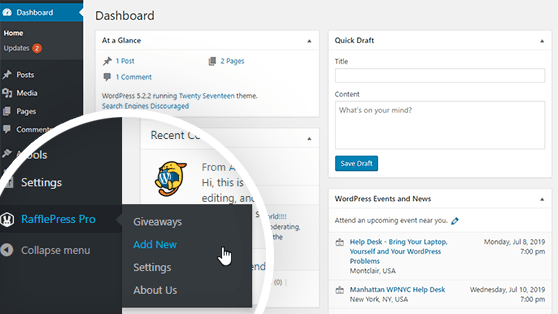
After installing and activating the WordPress plugin from your WordPress dashboard, hover your mouse over the RafflePress icon and click Add New to create your new contest.
Choose a Giveaway Template
On the next screen you see, you can choose from several giveaway templates designed to meet your business goals.
First, give your contest a name to help you recognize it later, then choose a giveaway template. Pick a template that aligns as close to your contest goals as possible.
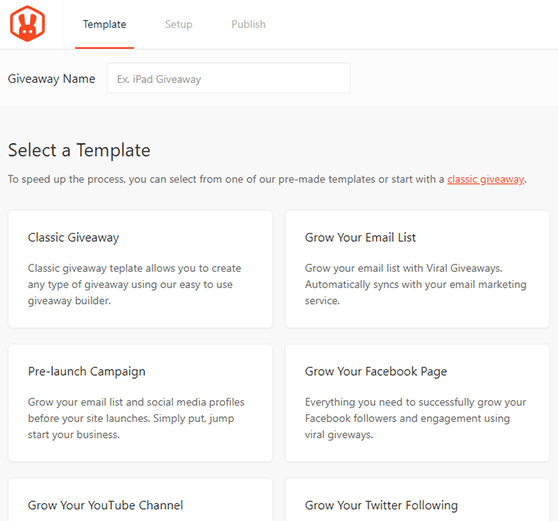
For instance, if you want to increase signups for your newsletter, choose the Grow Your Email List template. If your goal is to increase your Instagram followers, click the Grow Your Instagram Following template.
In this guide, we’ll use the Classic giveaway template, which lets you create any type of contest with the easy RafflePress builder.
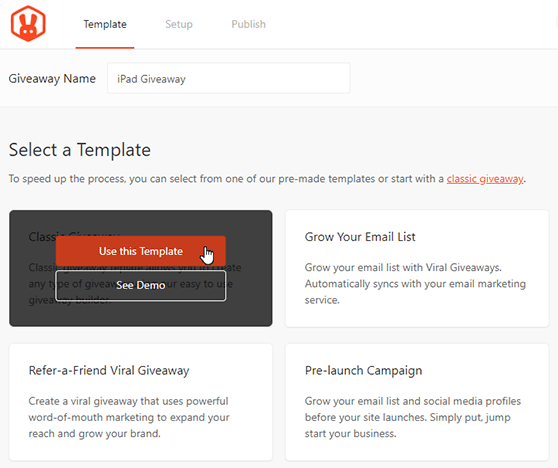
Choose your giveaway template by hovering over it with your mouse. Then click the Use This Template button.
Enter Your Prize Details
After choosing your template, you’re taken to the RafflePress giveaway builder. This is where you can enter your giveaway prize details, entry methods, and so on.
To add your prize details, click the pencil icon under the Giveaway Prize Details heading.
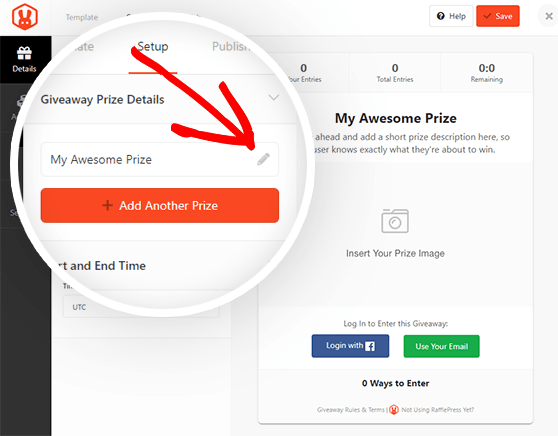
In that section, you can enter a name for your prize and write a short description of what you’re offering.
It’s also possible to upload an image of your prize by clicking the Select Image button under the description box. You’re then asked to choose an image from your WordPress media library or upload one from your computer.
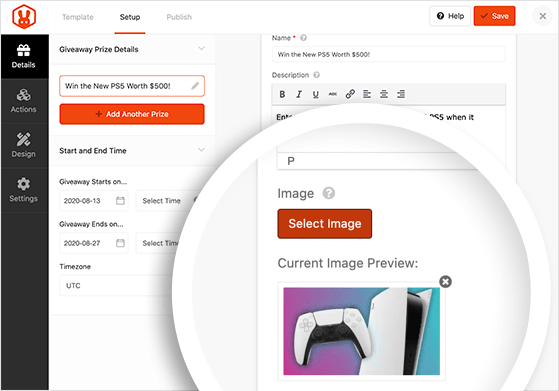
When you’ve finished perfecting your prize details, click the Done Editing button.
You can also add multiple prizes in RafflePress, by clicking the +Add Another Prize button. Then follow the instructions above for entering the prize details.
You must choose an end date for your giveaway so users know how long they have to participate. You can set the start and end date and time in the Start and End Time section. This is where you can choose your timezone too.
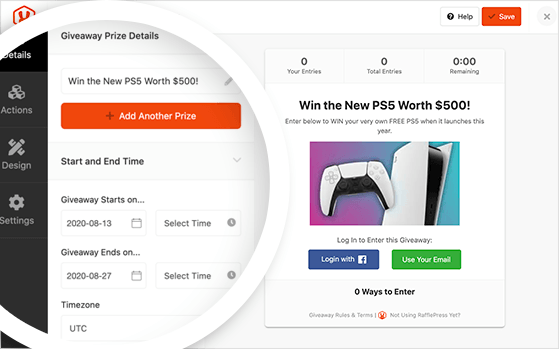
When you’re happy with the settings, click Save to preserve your changes. You can find the Save button in the top left corner.
Select Multiple Daily Entry Methods
Adding multiple daily entries to your contest is easy with the RafflePress daily giveaway app. Simply click the Actions tab to view all the available options.
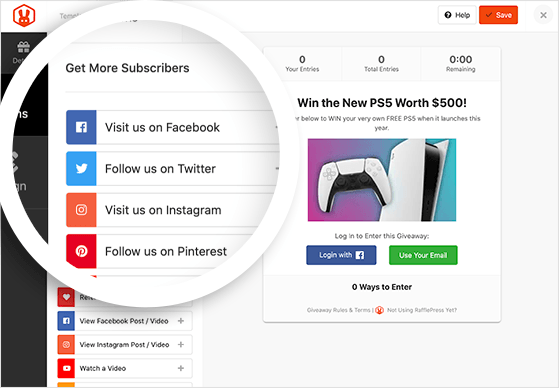
The entry actions are grouped by goal, such as:
- Get More Subscribers
- Get More Social Engagement
- Get More Traffic
This makes it easier to align your contest with the goals you defined earlier.
First, choose an action that’s mandatory for entering your contest. For example, choose the Join an Email Newsletter option to make joining your email list a requirement for entering. You can use mandatory actions for users to unlock daily bonus entries.
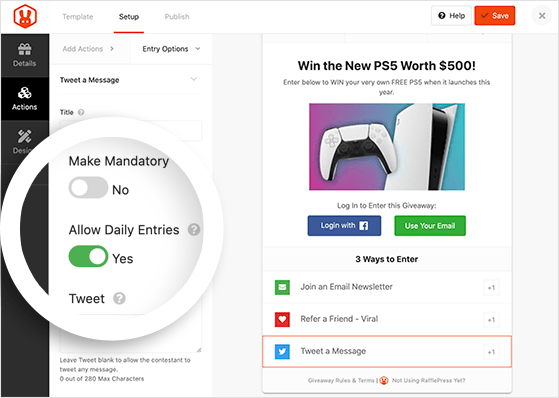
Now add bonus actions to the giveaway widget, which users can complete every day. The following RafflePress actions all allow daily entries:
- Post on X (Twitter)
- Visit a page
- Visit us on Facebook
- Visit us on Instagram
- Visit YouTube Channel
- View Facebook post/video
- View Instagram post/video
- Watch a video
- Answer question
- Polls and surveys
- Submit an image
- Invent your own
If you’re adding lots of actions, make sure the most important ones are worth the most entries. For instance, if you want to grow your Twitter followers more than your YouTube Channel, make the value of this bonus action worth more entries.
Now click the Save button.
Design Your Giveaway
The next step is to design your giveaway widget and landing page. Click the Design tab to choose from 2 different giveaway layouts and several fonts and button colors.
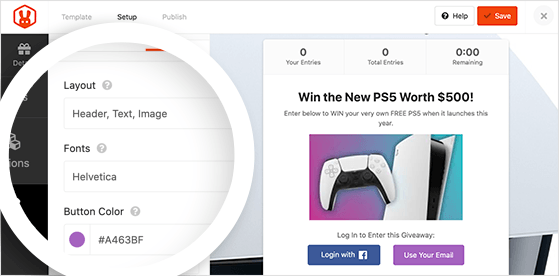
If you want to create a stand-alone landing page for your giveaway, you can give the page a background color or upload a background image to make it stand out.
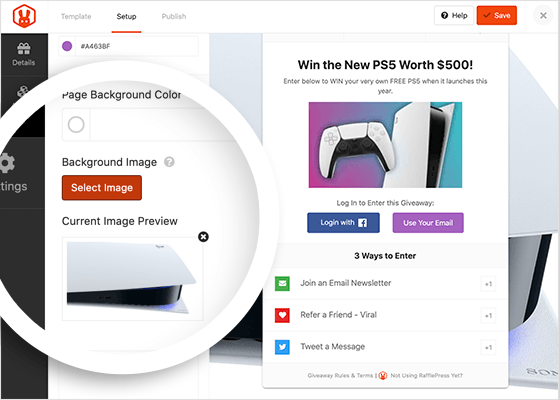
When your contest looks exactly how you want, click the Save button to preserve your changes.
Configure Your Settings
Now move on to configuring your contests’ settings. To do that, click the Settings tab, where you’ll see 8 different sections:
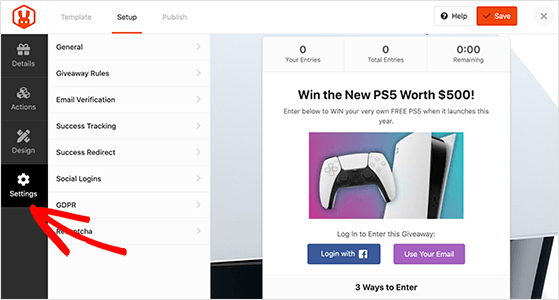
- General – Change your giveaway’s name, choose a permalink for your landing page, show winners on your contest widget, etc.
- Giveaway Rules – Create a simple set of giveaway rules with the built-in rules generator
- Email Verification – Choose to require users to verify their email to enter your contest
- Success Tracking – Enter your Google Analytics tracking code or retargeting pixels
- Success Redirect – Send participants to a specific page after entering your giveaway
- Social Logins – Allow users to log in to your contest with Facebook
- GDPR – Add a checkbox to your giveaway registration user must agree to before entering
- Recaptcha – Add a Recaptcha or invisible Recaptcha to your contest to avoid spam entries
One of the most important settings on this list is the Giveaway Rules. RafflePress makes it easy to create a simple set of rules with the giveaway Rules Generator template.
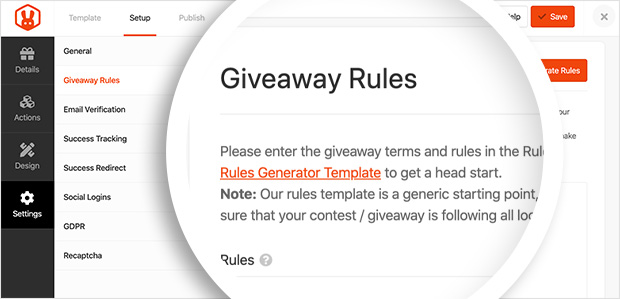
Click the +Generate Rules button to show a window where you can add your sponsors’ names, contact details, eligible locations, and more.
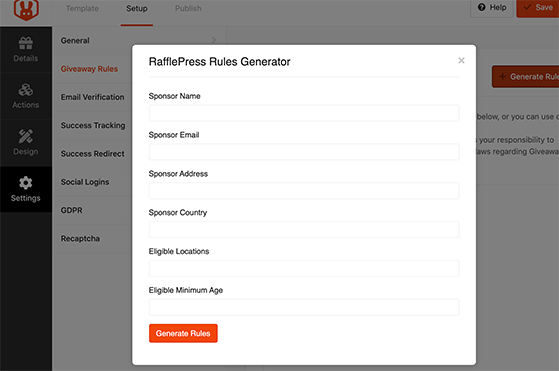
Then click the Generate Rules button to add your guidelines to the giveaway widget.
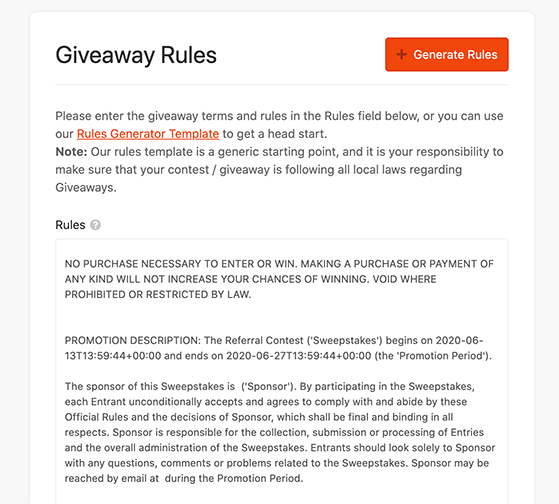
You can read our documentation for details on all the RafflePress settings.
When your settings are configured, click Save and move on to launching your contest.
Launch Your Giveaway
Now that you’re ready to publish your daily giveaway click the Publish button at the top of your screen.
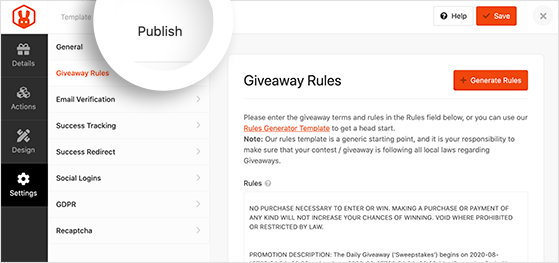
Doing so reveals 3 different ways to publish your contest with RafflePress:
- RafflePress WordPress Block – Add your giveaway widget to a new post or page in the WordPress block editor.
- WordPress Shortcode – Add your contest widget to posts and pages in the classic WordPress editor, your sidebar, or your WordPress theme with a shortcode.
- Giveaway Landing Page – Publish your contest on a distraction-free, standalone giveaway landing page on your website.
Choosing a dedicated landing page for your giveaway is an excellent option because it removes unnecessary distractions. Instead, it offers a clean, targeted page with nothing to distract users from entering. This makes them more likely to take part.
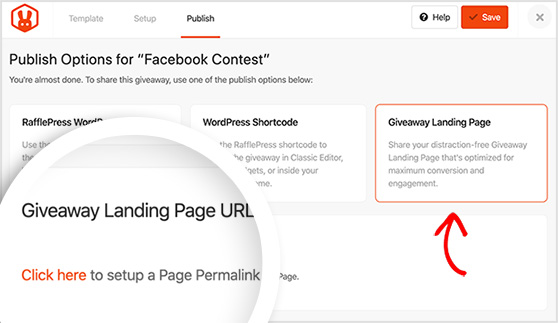
Let’s click the Giveaway Landing Page option. You’ll then see a section underneath asking you to “click here” to set up your page’s permalink.
Clicking the link takes you to the General Settings page.
Scroll down to the Page Permalink section and give your landing page a sensible permalink, which RafflePress will add to the end of your main website URL.
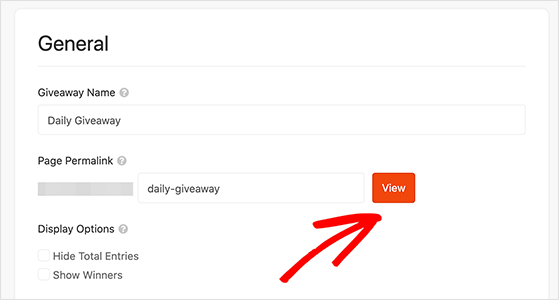
Once you’ve done that, click the View button to see a preview of your contest live on your website.
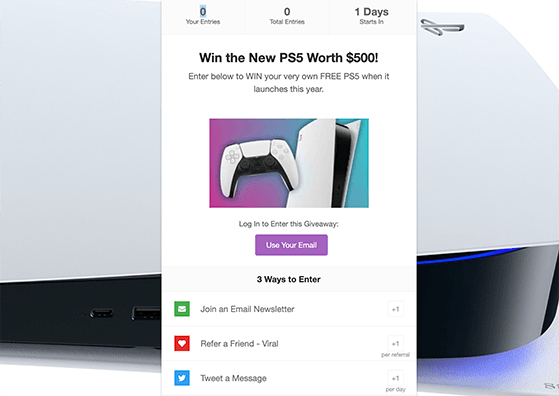
You now have a clean landing page for your giveaway!
With your giveaway live, you’ll need to promote it to encourage as many entries as possible. Take a look at these proven contest promotion ideas for help getting started.
Step 5. Pick a Daily Giveaway Winner
When it comes to choosing a winner, it can seem overwhelming. With so many people entering every day through your daily giveaway app, you’ll have tons of entries to track and verify.
RafflePress makes picking a giveaway winner straightforward. With the built-in random winner picker, it automatically sorts through verified entries and picks a winner randomly.
When your contest ends, navigate to RafflePress » Giveaways and find the appropriate contest. Then click the Needs Winners link on the right-hand side.
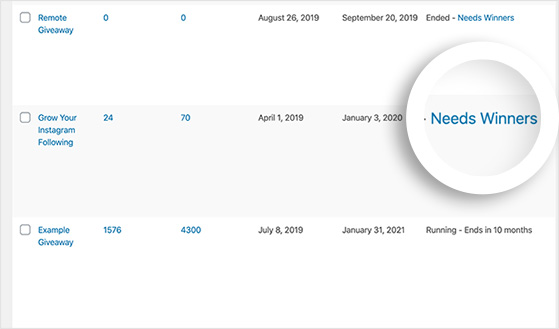
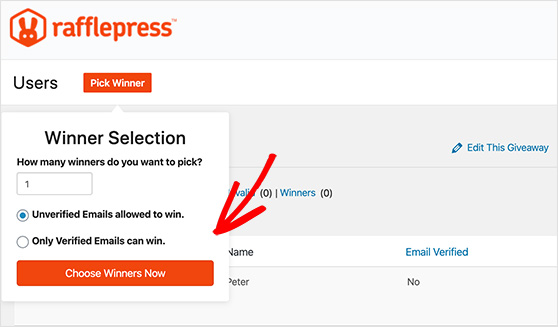
You can then see a list of people who entered your contest and how many actions each entry has. To pick a winner randomly, click the Pick Winner button, choose your options, and click Choose Winners Now.
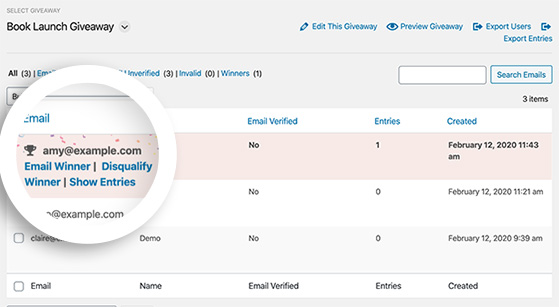
The winner is then highlighted instantly at the top of the list. Now you’re able to click and email them with the good news.
Step 6. Follow Up With Contest Participants
Once you’ve chosen the winner of your daily giveaway, it’s important you follow up with everyone who entered. This allows you to thank everyone for taking part and lets you invite them to watch for future giveaways.
By reaching out in this way, you demonstrate that you value your new audience, helping develop better relationships. Plus, it’ll send one last rush of traffic to your giveaway landing page for those who missed out.
You can follow up after your contest by:
- Posting an announcement on your social media networks and tagging the winner
- Sending an announcement email with a discount or voucher as a consolation prize
- Displaying the winner inside the RafflePress daily giveaway app
Congratulations! You now have a ton of new fans ready to engage with your business.
Step 7. Measure Your Results
If you want to improve the success of future giveaways, it’s smart to track your contest and analyze the results.
The easiest way to collect the data you need for improving your contest is to use MonsterInsights, the best Google Analytics plugin for WordPress.
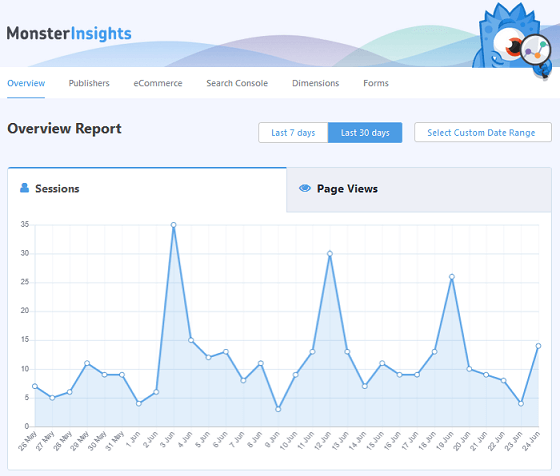
With MonsterInsights, you can track visits to your giveaway landing page, website traffic, referral traffic, eCommerce promotions, and a lot more. You can see all that information inside the MonsterInsights analytics dashboard right within WordPress.
By analyzing your giveaway data, you can see which promotion strategies drove the most traffic and conversions to your landing page. You can then use that information to make better decisions in the future.
Free: Download Our Giveaway Playbook
Templates, prize ideas, and promotion strategies in one guide.
Frequently Asked Questions
Here are some common questions about running a daily giveaway.
How do daily giveaway entries work?
With a daily giveaway, participants can complete specific entry actions once every 24 hours to earn bonus entries. These actions reset each day, so someone who tweets your contest on Monday can tweet it again on Tuesday for another entry. RafflePress tracks all of this automatically so you don’t have to monitor it manually.
How long should a daily giveaway run?
Most daily giveaways run for 7 to 14 days. A week is long enough to build momentum without losing people’s attention. Longer than two weeks and participation tends to drop off because the end feels too far away. Set a clear end date so entrants know how long they have to keep coming back.
What’s the best prize for a daily giveaway?
The best prize is something specific to your audience, not a generic gift card. If you run a food blog, a cooking class or specialty ingredient bundle attracts people who’ll actually care about your content. The more relevant the prize, the more likely entrants are to stick around after the contest ends.
How do you pick a fair winner for a daily giveaway?
Use RafflePress’s built-in random winner picker. It automatically filters verified entries and selects a winner at random, weighted by the number of entries each person earned. You can pick the winner directly from your RafflePress dashboard and email them from the same screen.
Can you run a daily giveaway for free?
RafflePress has a free version on WordPress.org that covers basic giveaway features. For daily entry actions, you’ll need a paid plan. Visit the RafflePress pricing page for current plans and options.
You now have everything you need to run a daily giveaway that keeps people coming back and builds real momentum for your list.
RafflePress handles the repeat entry tracking so you can focus on promoting your contest instead of managing spreadsheets.
Click here to get started with RafflePress today!
And don’t forget to follow us on YouTube, X, and Facebook for more great tips to grow your business.

