How I Run a Membership Site Giveaway That Gets Real Members
 Stacey Corrin
Stacey Corrin
Stacey Corrin
 John Turner
John Turner
John Turner
TL;DR: How to Run a Membership Site Giveaway
A well-run membership site giveaway pre-qualifies your audience with the right prize and converts non-winners into paying members after it closes.
- Set your goal: Email list growth is the highest-value goal for a membership site. You own the list.
- Choose your prize: A free 1-3 month membership trial pre-qualifies every entrant as someone already interested in what you’re selling.
- Set up with RafflePress: Install the WordPress giveaway plugin and create your campaign inside your WordPress dashboard.
- Enable refer-a-friend: This turns every entrant into a recruiter. Your existing members become your best promoters.
- Promote to your list first: Email subscribers before posting anywhere else. With refer-a-friend active, each share multiplies reach.
- Follow up within 48 hours: Announce the winner publicly, then send all non-winners a time-limited discount on membership signup.
You’ve got the content and the membership site is live, but your email list grows by a handful of names a week. Converting visitors to paid members always feels like one more opt-in form away.
A well-run membership site giveaway can add more subscribers in a week than a standard opt-in form builds in a month. I’ve run these with RafflePress, and the specific setup matters.
The wrong prize fills your list with people who’ll never pay. In this guide, I’ll walk you through the full setup, from choosing the right prize to converting non-winners after the giveaway closes.
Step 1: Set Your Giveaway Goal
The goal you pick before you start determines every other decision. If you want email subscribers, that shapes which entry actions you enable; if you want social followers, your promotion strategy changes entirely.
For a membership site, email list growth is the right primary goal. Social followers are tied to a platform; an email list is something you own.
After years of content marketing, I’ve watched email lists outlast every social channel they compete with.
Set a realistic target before you launch:
- 100-300 new subscribers is achievable for a small site with a modest existing audience
- 500+ is realistic if you have members who will share the giveaway
Seven to fourteen days is the right duration. It’s short enough to keep urgency alive, but long enough for the refer-a-friend mechanic to compound and reach people through word-of-mouth. (If you’re unsure about timing, this guide on giveaway timing covers when to wait and when to go.)
Before you launch, write basic T&Cs:
- Specify eligibility (age and geography if relevant)
- Confirm one entry per person
- State how and when you’ll notify the winner
A short paragraph in your giveaway description covers it.
Step 2: Choose the Right Prize
The prize determines who enters. Offer something your ideal member actually wants, and every entrant is pre-qualified as a potential customer.
Should You Give Away a Free Membership?
For a membership site, giving away your own membership is usually the smartest move. Anyone who enters already wants what you’re selling, which means your post-giveaway list is full of warm leads, not generic contest hunters.
I recommend giving away your own membership over any external prize. When the prize is your own product, you attract your own audience.
Give away a full paid membership, not a watered-down trial. One to three months at your standard paid level gives the winner a genuine experience of what you’ve built.
The perceived value matters too. A 3-month membership at $49/month is a $147 prize to someone who wants access to your community. A gift card for the same amount attracts anyone, and almost none of them will convert to paid members.
Other Prize Ideas for Membership Sites
External prizes can work when you want to reach beyond your existing audience. Keep the prize relevant to your membership’s topic so entrants still have a natural connection to what you offer.
Options that work for membership sites:
- Niche-specific physical products tied to your membership topic
- Access to a premium resource in your field (a book, course, or relevant tool subscription)
- A bundle of your membership plus a relevant partner product
- Avoid generic prizes (gift cards, cash): they attract the widest audience but the lowest post-giveaway conversion rate
For more inspiration, see these contest prize ideas organized by goal and audience type.
Free: Download Our Giveaway Playbook
Templates, prize ideas, and promotion strategies in one guide.
Step 3: Set Up Your Giveaway with RafflePress
I use RafflePress for giveaways. It runs directly inside WordPress, so there’s no separate account to log into and your data stays on your own server.
RafflePress is a WordPress giveaway plugin with 30+ entry actions, a refer-a-friend viral mechanic, dedicated landing pages, and built-in fraud protection. You can have a giveaway live in under 30 minutes.
One thing to know before you start, is the free Lite version covers basic setup, but email integrations and the refer-a-friend action require a paid plan. Unlike hosted giveaway tools that charge a monthly fee, RafflePress is a one-time payment.
Install and Activate RafflePress
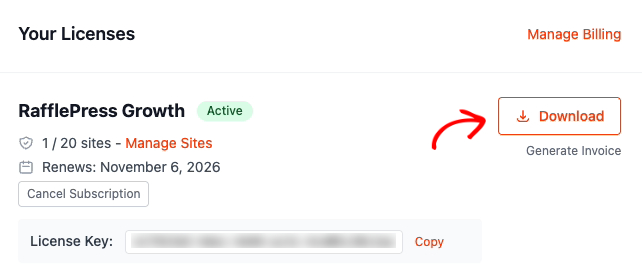
Log in to your RafflePress account and download the plugin ZIP file from your account dashboard.
In your WordPress admin, go to Plugins » Add New Plugin and click the ‘Upload Plugin’ button at the top. Choose the ZIP file you downloaded, click ‘Install Now,’ then ‘Activate.’
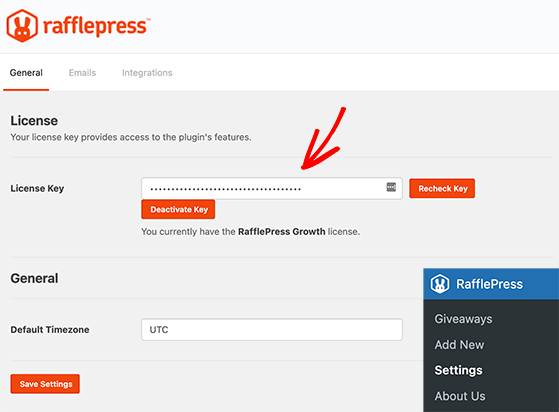
After activation, RafflePress appears in your left-hand admin menu. Open it and enter your license key when prompted to unlock all Pro features.
Create Your Giveaway Campaign
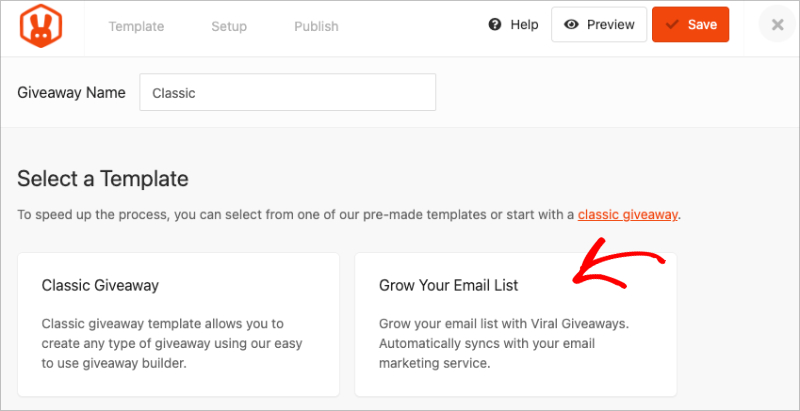
Go to RafflePress » Add New. Choose a template or start from scratch, then fill in your giveaway name, prize name, prize description, and prize image.
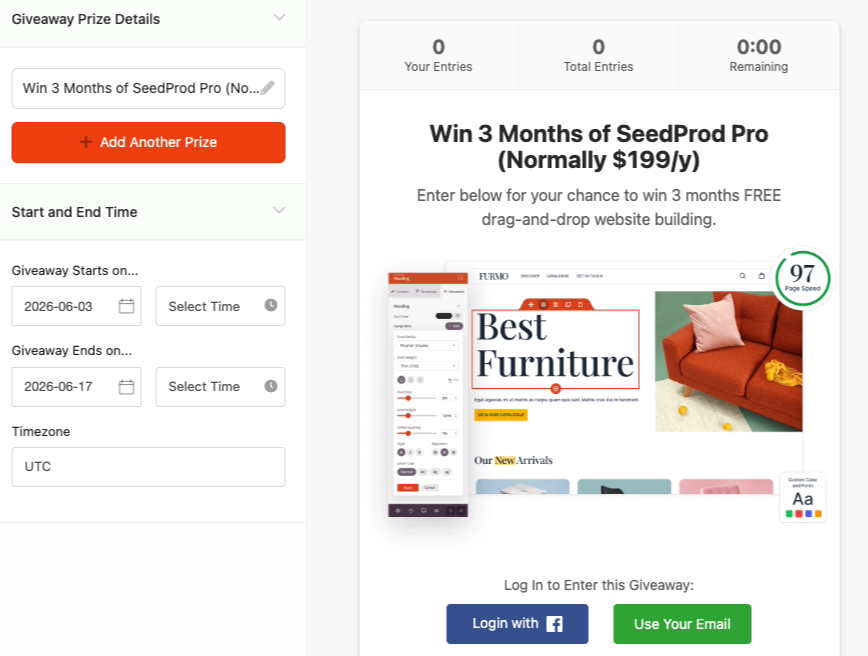
Set your start and end dates in this same panel, targeting the 7-14 day window from Step 1.
Keep the prize description clear and specific. “3-month [Your Membership Name] membership, normally $X/month” tells entrants exactly what they’re competing for and reinforces the value.
Choose Your Entry Actions
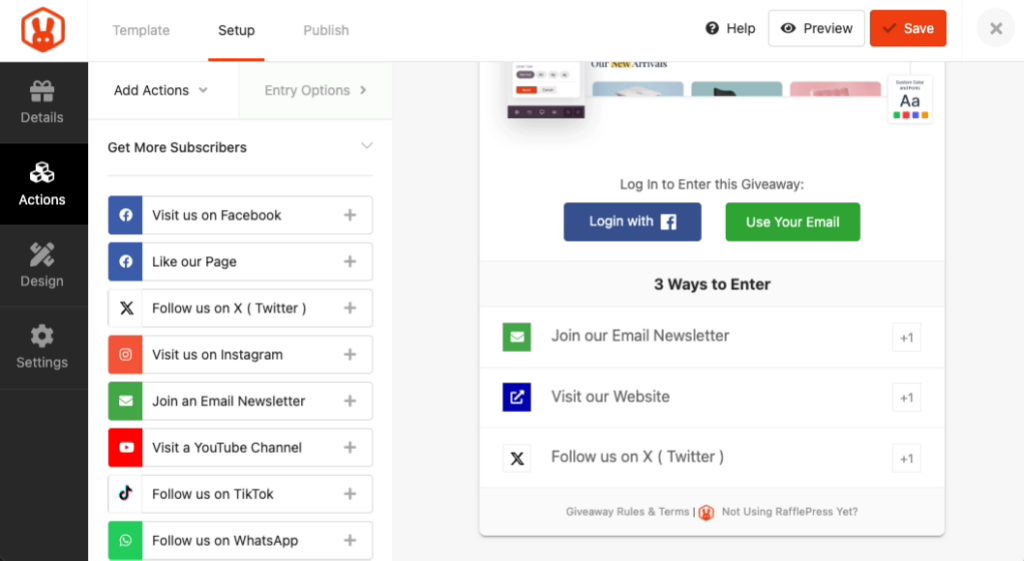
For a membership site, prioritize entry actions that build your email list first and grow your social accounts second.
Three entry actions that serve this goal are:
- Join email newsletter (required): Connect it to your email provider so new subscribers land directly in your list.
- Visit a page: Send entrants to your membership sales page. It pre-sells them on the membership before the giveaway even closes.
- Follow on social: Pick one or two platforms where your audience actually is.
RafflePress has built-in fraud protection, including:
- Duplicate email detection
- IP tracking
- reCAPTCHA
That’s why a dedicated giveaway plugin is more reliable than a manual spreadsheet when entries grow past a few dozen.
Enable the Refer-a-Friend Entry Action
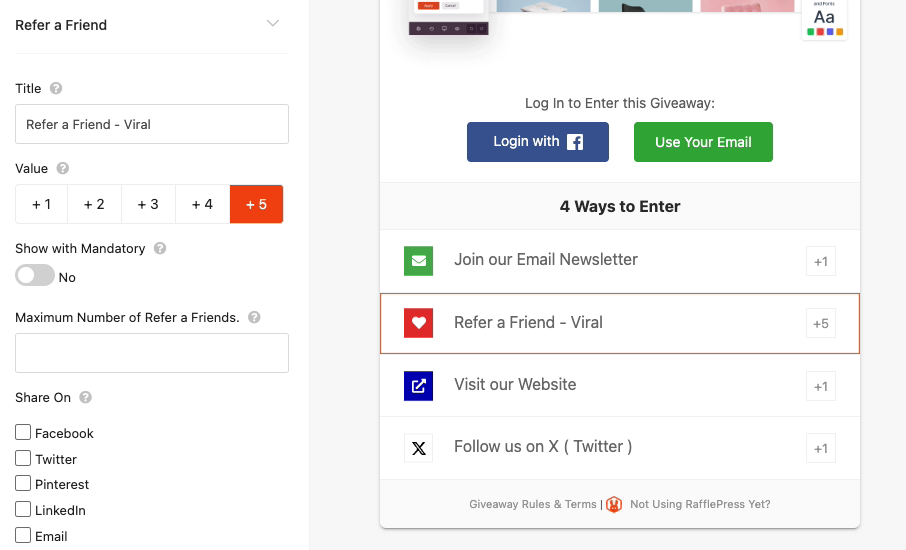
Refer-a-friend is the mechanic that turns a 200-person giveaway into a 2,000-person one. Each entrant gets a unique referral link and earns additional entries for every person they bring in.
Your existing members are the best promoters for a free membership prize. When you email your list to announce the giveaway, every member who shares it is recruiting potential future members on your behalf.
In RafflePress, add the ‘Refer a Friend’ action in the entry actions panel. Set the bonus entry amount high enough that sharing feels worthwhile.
For a deeper look at how referral contests work and how to structure rewards, that guide walks through the full setup.
Publish Your Giveaway
Click ‘Publish’ to choose your publish method and make the giveaway live. RafflePress allows you to create a dedicated landing page with no navigation links or distractions, and all entries are captured on your site.
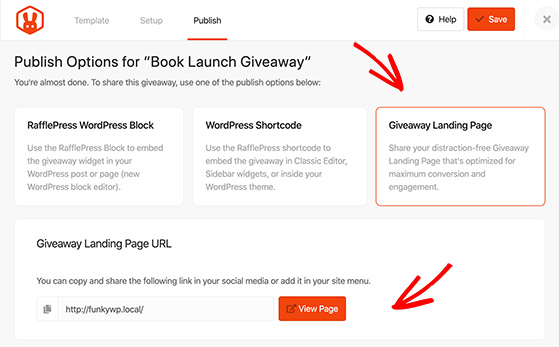
You can see how effective giveaway landing pages are structured in these real-world examples.
Copy the landing page URL. This is what you’ll share in every channel in Step 4.
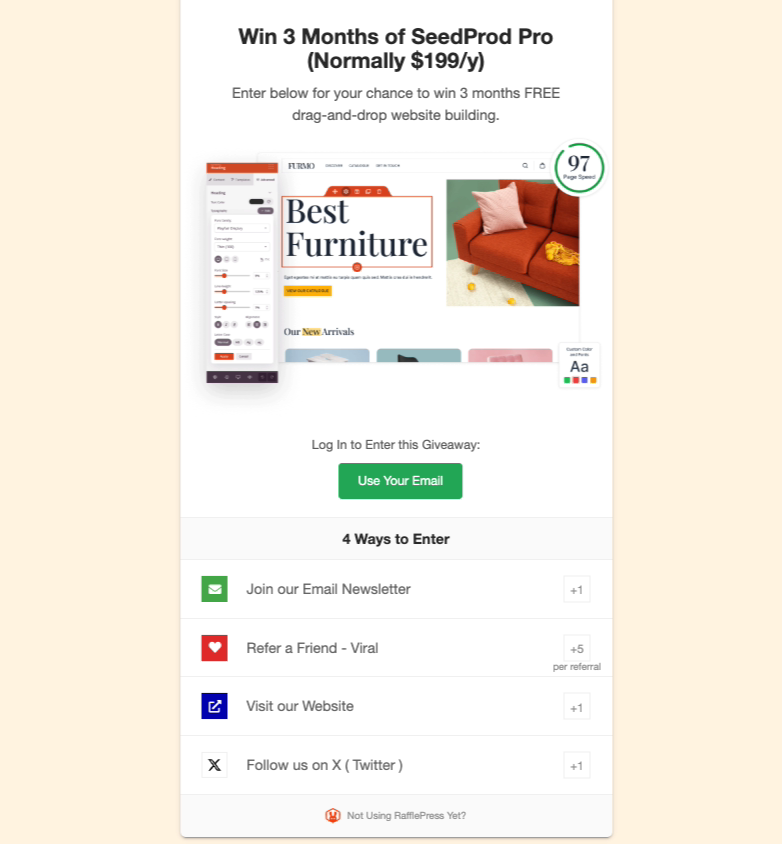
Step 4: Promote Your Giveaway
The giveaway page is live. I always email my existing members before posting anywhere else, and the refer-a-friend mechanic is why that order matters.
Email your existing members and subscribers first. They’re your most engaged audience, and every member who shares the giveaway brings new entrants without any additional work from you.
After your list, focus on:
- Niche communities: Facebook groups, Slack communities, and subreddits relevant to your membership topic. Authentic framing (“I’m running a free membership giveaway”) lands better than a promotional blast. These contest promotion ideas include channel-by-channel tactics you can adapt.
- Social media: Post on one or two platforms where your audience actually is. Don’t spread across all of them.
- Your RafflePress landing page vs. social-only: When you run the giveaway through RafflePress, every entrant’s email goes directly to your list. A social-only giveaway that asks for comments or shares doesn’t capture emails you own.
Step 5: Pick a Winner and Follow Up
When the giveaway closes, you can use RafflePress to select a random winner from verified entries. I always announce the winner publicly within 24 hours.
Here’s how to draw a winner and follow up:
- Go to your giveaway in RafflePress » Giveaways and open your campaign.
- Click ‘Draw a Winner.’ RafflePress pulls from entries that passed fraud verification.
- Note the winner’s name and email.
- Email the winner directly with how to activate their free membership access.
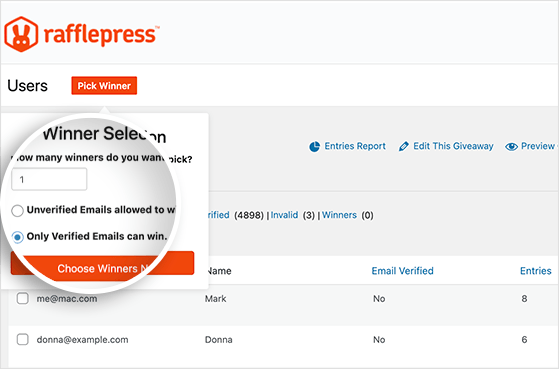
Post the announcement on your site, send it to your email list, and mention it on social. Public announcements build credibility and confirm the giveaway was real.
Step 6: Turn Giveaway Entrants into Paying Members
The winner announcement is where most membership site owners stop. It’s also the moment with the highest conversion potential.
Everyone on your new list raised their hand to say they’re interested in a membership like yours. The 48 hours after the winner announcement is the best window to reach them while that interest is still fresh.
Start with the winner. Activate their membership immediately and send them a welcome sequence that shows everything they have access to.
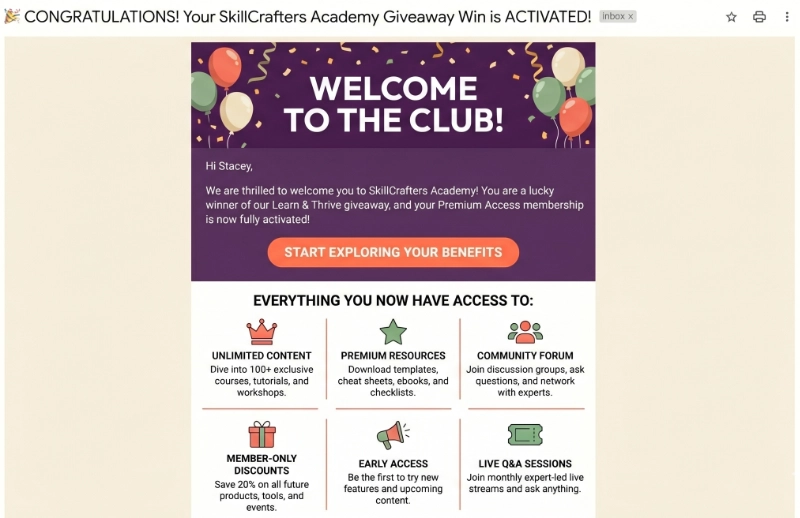
A winner who churns after one month is a missed opportunity. One who becomes an enthusiastic member talks about it.
Send a Consolation Offer to Non-Winners
The consolation offer is the most underused piece of a giveaway, and the one with the highest leverage. Email all non-winning entrants within 24-48 hours of the winner announcement with a time-limited discount on membership signup.
Here’s a framing that works:
“You didn’t win this time, but you clearly care about [membership topic]. Here’s a way to get started.”
If you want help writing that email, this giveaway copywriting guide covers follow-up messaging.
These people demonstrated intent by entering a giveaway specifically for a membership.
For entrants who don’t take the consolation offer, add them to your regular email nurture sequence. They’re already interested; they just need more time.
Track three numbers in the 30 days after the giveaway closes:
- Total new email subscribers
- Consolation offer conversion rate
- Total new members
Those three numbers tell you the real return. For more on the ROI side, this breakdown of whether giveaways increase sales is worth reading before you run your first one.
FAQs About Membership Site Giveaways
What type of giveaway works best for a membership site?
An entry-based giveaway with email signup as a required action works best. Add the refer-a-friend mechanic for viral reach and run it for 7-14 days. This gives you a list of warm leads, not just a one-time engagement spike.
Should I give away a free membership or an external prize?
A free membership (1-3 months) pre-qualifies every entrant as someone already interested in what you’re selling. External prizes attract a wider audience but convert at a much lower rate after the giveaway closes. For most membership sites, the free membership is the right choice.
How long should a membership site giveaway run?
Seven to fourteen days is the right window. Shorter than seven days and you don’t have enough time for refer-a-friend referrals to compound. Longer than fourteen days and urgency fades; entry rate drops before the giveaway closes.
How do I prevent fake entries in my giveaway?
RafflePress has built-in fraud protection: duplicate email detection, IP address tracking, and reCAPTCHA verification. This is why a dedicated giveaway plugin is more reliable than a manual spreadsheet at scale.
Do membership site giveaways attract real members or freebie hunters?
The prize determines who enters. If you give away your own membership, you attract people who want access to your community and content. If you give away a generic prize, you attract people who want the prize, and almost none of them will become members.
Start Growing Your Membership Site Today
Running a membership site giveaway compresses months of slow list-building into a few days. When the prize is your own membership, every person who enters is already pre-qualified as a potential paying member.
Over 200,000 WordPress sites run their giveaways with RafflePress, and it comes with a 14-day money-back guarantee. Get started with RafflePress today and you can have your first membership giveaway live before the end of the week.
You may also find the following giveaway guides helpful:
If you liked this article, please subscribe to our YouTube Channel for RafflePress video tutorials. You can also find us on Twitter and Facebook.


