How to Do a Book Launch Giveaway in WordPress
 Stacey Corrin
Stacey Corrin
Stacey Corrin
 John Turner
John Turner
John Turner
The easiest way to run a book giveaway in WordPress is by using a dedicated plugin like RafflePress. It lets you set clear goals, choose a prize, build the giveaway on your website, promote it across different channels, and randomly select a winner.
I’ve used this method to grow my email list, increase pre-orders, and collect reader reviews. In this guide, I’ll show you how to set up a successful book giveaway on your own website, step by step.
Essential steps to run a book giveaway:
What Is a Book Giveaway?
A book giveaway is when someone gives out free books to spread the word and get people interested. Authors or publishers often do this online or at events like book fairs to grab attention and find new readers.
Book Giveaway vs. Book Launch Giveaway
| Book Giveaway | Book Launch Giveaway |
|---|---|
| Ongoing contest used to grow readers and engagement | Timed contest tied to a new book release |
| Best For: Email list growth, social engagement, rewarding loyal readers | Best For: Driving pre-orders, gaining early reviews, creating launch buzz |
| Timing: Anytime (year-round) | Timing: Pre-launch and launch window |
| Primary Goal: Long-term audience growth and visibility | Primary Goal: Maximize sales momentum at launch |
A book giveaway helps with long-term audience growth, while a book launch giveaway helps with immediate sales momentum. Many authors use both strategies: smaller giveaways to stay connected with readers and a bigger launch giveaway to maximize impact when releasing a new title.
Types of Book Giveaways
Before setting up your giveaway, it helps to know the different types of book giveaways you can run. Each has its own benefits depending on your launch goals.
- Signed Copy Giveaway – A classic choice where you give away an autographed edition. Great for building personal connections with readers.
- Book Bundle Giveaway – Offer a set of your own titles or partner with other authors in your genre to create a themed bundle.
- Exclusive Content Giveaway – Share bonus chapters, prequels, or behind-the-scenes extras as the prize.
- Merchandise + Book Giveaway – Pair your book with related swag like bookmarks, tote bags, or mugs to increase excitement.
- eBook Giveaway – A digital giveaway that’s inexpensive to run and can reach a global audience instantly.
- ARC Giveaway – Give away advance reader copies to generate early reviews before your launch.
- Social Media Giveaway – Run a platform-specific giveaway (Instagram, TikTok, Facebook, or Twitter) to grow your following.
Choosing the right type of giveaway makes it easier to attract the readers you want and align the contest with your launch goals.
Benefits of Running a Book Giveaway on Your Website
While you can host a book giveaway on social media, running it on your own website gives you far more control and long-term benefits. Instead of relying on algorithms, you own the traffic, entries, and data you collect.
- Grow Your Email List – Collect reader emails during the giveaway so you can follow up with launch updates, promotions, and future releases.
- Boost Book Pre-Orders – Send participants directly to your sales or pre-order page as part of the entry process.
- Build Early Buzz – Generate excitement before your launch by showing your giveaway on a dedicated landing page.
- Improve Reader Engagement – Drive more comments, shares, and interactions on your site instead of just on social media.
- SEO Benefits – Every giveaway landing page can bring in organic search traffic and attract backlinks from blogs, forums, and book communities.
- Full Creative Control – Customize your giveaway page to match your book branding, add extras like videos or excerpts, and update it anytime.
By keeping your giveaway on your own website, you’re building an audience and a marketing asset you can use long after the contest ends.
How to Do a Book Giveaway in WordPress
Follow the easy steps below to create and run your own book giveaway on your WordPress website.
Step 1: Define Your Book Giveaway Goal
The first step in creating a successful book giveaway is to define a clear, measurable goal, such as growing your email list or driving pre-orders.

Your goal determines the structure of the giveaway and how you’ll measure your results at the end.
Think about what you want the outcome to be. Here are a few goal suggestions to help you find what’s right for you:
- Generate a buzz – Your goal could be to raise awareness and create interest in your latest book on various social media platforms.
- Pre-order sales – You might want to encourage potential readers to pre-order your novel.
- Quality leads – Perhaps you want to gather verified leads like email addresses to use in email marketing campaigns.
- Social media engagement – You may want your audience to interact more on your social media channels.
- Expand your audience – Or you might wish to grow your audience on social media.
- Sell more books – And of course, it could be to sell more books.
For example, when Josh Earl ran a giveaway for a software license, his email list grew by nearly 200,000 subscribers in just 11 days. The principle is the same for authors: the right prize can fuel massive growth.
Step 2: Choose Your Target Audience
After defining your goal, you must identify your target audience to ensure your giveaway attracts potential book buyers, not just freebie seekers.
To ensure your giveaway reaches the right audience, you need to understand how and where to reach them.
Authors and publishers might already have a good idea of who the contest will resonate with. But it’s always worth digging deeper to get the perfect picture of your audience.
It helps to create a simple reader profile to picture your ideal customer. Then, ask some questions to better understand what brings them to your website.
Here are some ideas for what you can include in a book buyer profile:
- Age range – What’s the ideal age of your customers? Are they young adults, children, or more mature readers?
- Location – Where is their location, and what language do they speak?
- Social platforms – Which social networks do they use? Do they prefer to interact on a Facebook page, Instagram, or Twitter profile?
- Interests – Do they prefer to read sci-fi over romance authors, or are they horror fans?
Then, once you’ve uncovered your target audience, you can start brainstorming good book launch prize ideas.
Step 3: Select the Right Giveaway Prize
When choosing a prize for your giveaway, make sure it’s something your readers genuinely care about. Generic prizes like Amazon gift cards may bring in entries, but they often attract people who have no interest in your book.
The best prize connects directly to your book and your audience. In the Types of Book Giveaways section above, I shared common formats like signed copies, eBooks, and bundles. Here are a few extra twists you can add to stand out:
- Tickets to a ghost tour – Perfect for horror fans and thriller readers.
- Spa day voucher – Great for romance or wellness audiences.
- Mystery dinner tickets – Ideal for crime and mystery lovers.
- Movie props or collectibles – Fun for sci-fi and fantasy fans.
By pairing your book with an experience or themed item, you make the prize more memorable and relevant, which means more excitement and better results for your launch.
There are also more proven contest prize ideas in this article.
Step 4: Choose a Giveaway Tool
Successful book launch campaigns need a powerful giveaway tool that saves time and helps you attract real readers. Using the right platform lets you manage entries, promote across social media, and even pick a winner automatically.
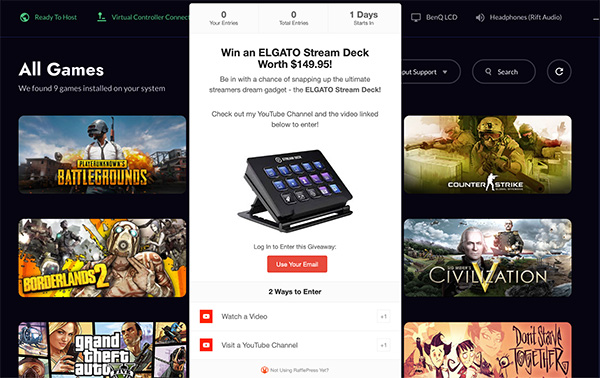
While there are several tools available, I recommend RafflePress because it’s built specifically for WordPress websites. Based on my experience running dozens of giveaways, it integrates seamlessly and its viral sharing features are highly effective.
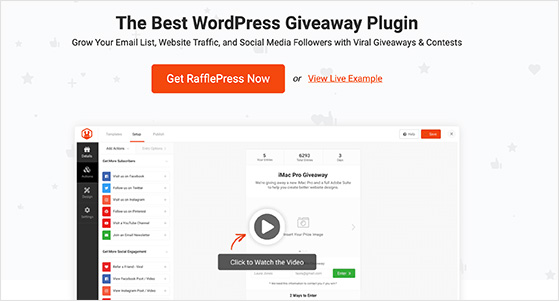
RafflePress’s lightweight WordPress plugin is ideal for authors because it includes a drag-and-drop giveaway builder, pre-built templates, and viral sharing actions that reward users for referring friends. You can grow your audience, collect qualified leads, and create buzz with minimal effort.
Plus, its distraction-free landing page option lets you run giveaways on your own branded page and share the link on Facebook, Instagram, YouTube, or anywhere else online.
Ready to get started? Grab your copy of RafflePress and start building your first book giveaway today.
Step 5: Create Your Book Giveaway
5.1: Install RafflePress and Choose a Template
Once you’ve downloaded and activated RafflePress, setting up your giveaway takes just a few minutes.
After installing the plugin, navigate to RafflePress » Add New in your WordPress dashboard. A setup screen will appear where you can name your giveaway and choose a pre-built template to begin.
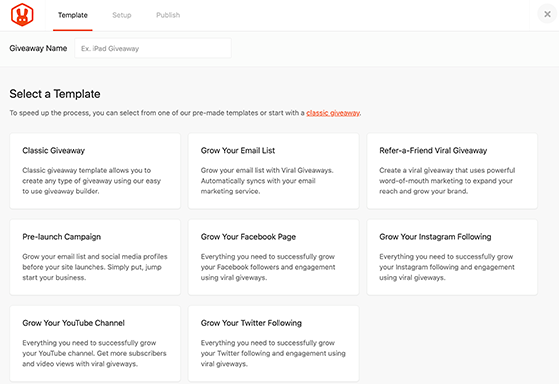
You can follow these instructions on how to do a giveaway to set yourself up.
5.2: Set Your Giveaway Entry Actions
Next, decide how people will enter your giveaway. Choose actions that match your goals, such as sharing your giveaway, visiting your pre-order page, or subscribing to your newsletter. Each action should move readers closer to what you want them to do.
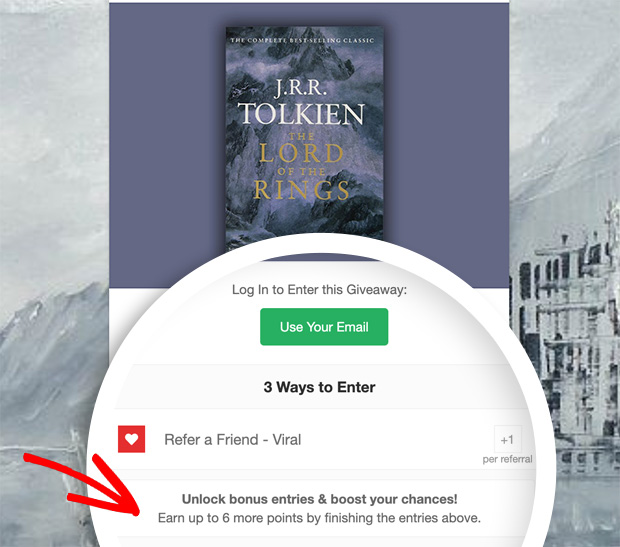
Here’s an example we’ve put together to give you an idea. For my giveaway, the goal is to get more people to pre-order the book. Therefore, I’ve chosen the following entry actions:
- Refer-a-friend – This is a mandatory action where entrants have to share a link to the giveaway in order to unlock more ways to enter.
- Visit a Page – Here, entrants can visit the pre-order page to unlock a single entry.
- Pre-order – I’ve used the Invent Your Own action to set this up. To confirm the book’s pre-order, customers need to add their order number, which will unlock 5 extra entries for them. Keep in mind, you will have to manually verify the order number if you pick a winner who used this entry method.
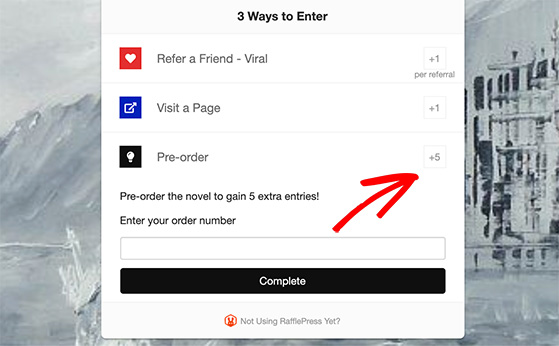
As you can see, each action leads the participant toward what I want them to do, which is to pre-order the book. And that’s why I’ve made it more desirable for them to act with 5 extra entries.
It gives them more opportunities to win.
Some other entries you can use for book giveaways include:
- Write a blog post – Ask users to write a book review on their blog to enter your giveaway.
- Leave a comment – You can add a bonus entry option to comment on a recent blog post.
- Subscribe to RSS – Ask people to subscribe to your RSS feed for new blog posts and updates.
- Join a Newsletter – Get users to subscribe to your email list for another bonus entry.
5.3: Configure Your Giveaway Rules
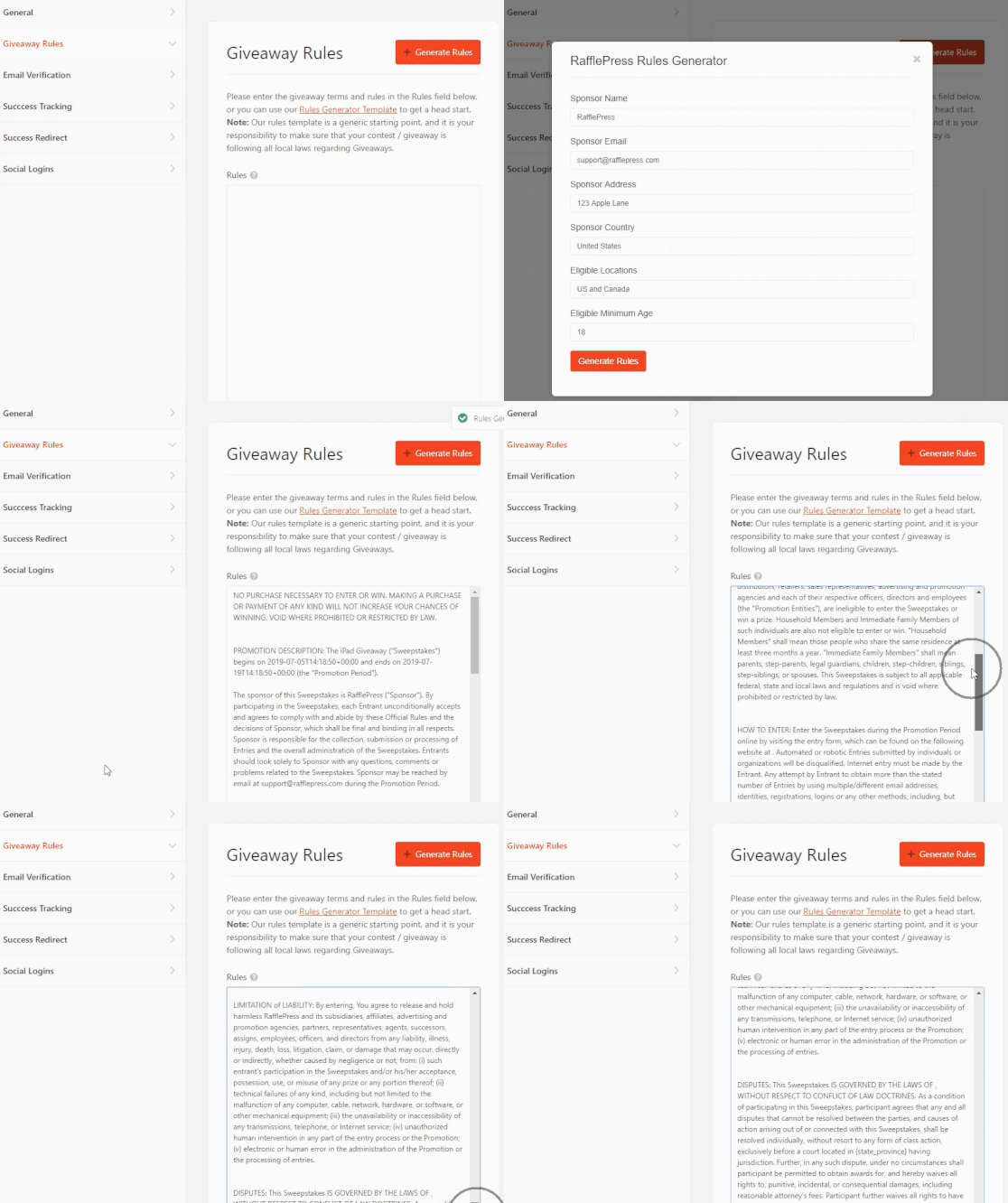
Next, you’ll need to confirm the settings for your giveaway. RafflePress comes with 7 different sections in the Settings tab: General, Giveaway Rules, Email Verification, Success Tracking, Success Redirect, Social Logins, GDPR, and Recaptcha.
The most important of these are the Giveaway Rules. It’s easy to get a head start putting your rules together. RafflePress has a Rules Generator Template that asks a few questions to generate a set of rules automatically. Just click the button to get started.
Pro Tip: The rules generator is a great starting point, but it’s always a good idea to double-check local laws for giveaways. Also, if you’re promoting on social media, be sure to review that platform’s specific rules for promotions.
You can see our documentation for details on all the RafflePress settings.
Step 6: Publish Your Giveaway
Now, it’s time to make your book launch competition live. Click Publish at the top of the screen, and you’ll see three publishing options.
You can publish your contest in the following ways:
- RafflePress Content Block – Embed the giveaway widget in a post or page with the new WordPress block editor.
- WordPress Shortcode – Embed the giveaway in the classic WordPress editor, the sidebar, widgets, or theme with a simple shortcode.
- Giveaway Landing Page – Create a landing page free of distractions on your site for the giveaway.
We’ll choose the dedicated landing page option for this example because it’s distraction-free and more likely to encourage people to enter.
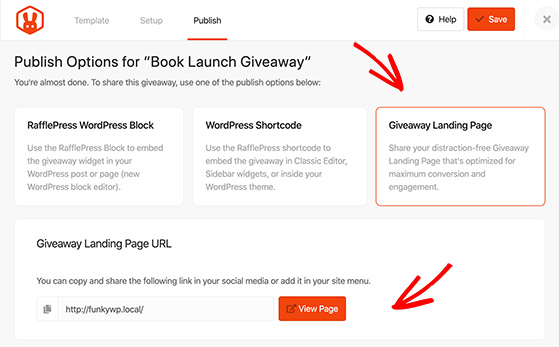
So go ahead and click the Giveaway Landing Page option.
You’ll be asked to set the permalink for the landing page, which is pretty simple. Just enter your preferred URL parameters. Then click the View button to see what your competition looks like.
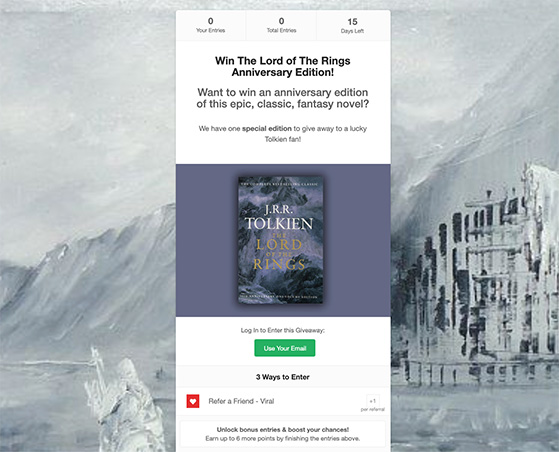
Great job! You’ve now got an amazing landing page for your book giveaway.
Step 7: Promote Your Book Giveaway
Once your giveaway is live, targeted promotion is crucial for reaching the right audience. Here are the main channels that work best:
- Social Media – Post on Instagram, Twitter (X), Facebook, and Pinterest with clear entry rules and hashtags like #bookgiveaway.
- Reader Communities – Share in Goodreads groups, Reddit threads, or Facebook reader groups that match your genre.
- Influencers – Partner with Bookstagrammers, BookTubers, or BookTok creators to amplify your reach.
- Your Own Channels – Send an email to your list, use a popup on your website, or create a landing page with RafflePress.
Pick two or three of these to focus on, and you’ll get far better results than trying to promote everywhere at once.
See this guide for even more giveaway promotion ideas.
Step 8: Pick and Announce a Giveaway Winner
The fairest way to choose a winner is to randomly draw a winner from all verified entrants.
It’s easy to do this with RafflePress. When the contest ends, head to RafflePress » Giveaways and click the Needs Winners link.
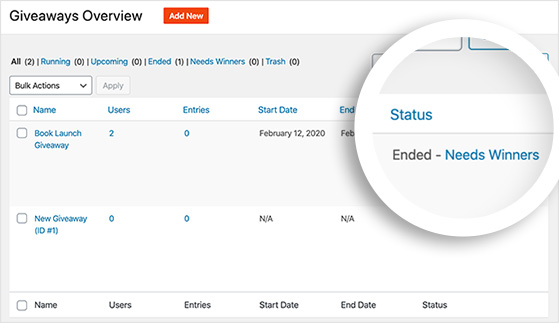
Here, you can see everyone who’s entered and how many entries they have. To randomly choose a winner, click the Pick Winner button, select your options, and click Choose Winner Now.
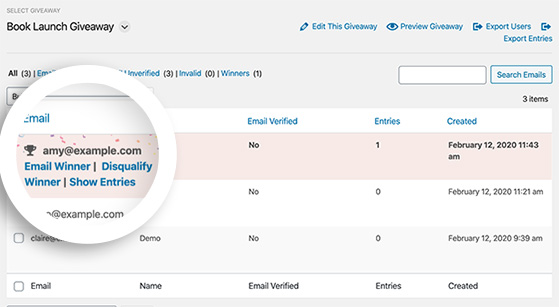
The winner is then highlighted so you can click to email them, deliver the good news, and make them feel special.
Pro Tip: Don’t forget to also announce the giveaway winner on your social media accounts and via email. This can give you an extra engagement and traffic boost.
Step 9: Track and Measure Your Results
The final step in your book giveaway is to analyze performance so you can see what worked and what needs improvement for next time. Tracking the right data helps you refine your strategy and grow faster with each launch.
Use MonsterInsights, the best Google Analytics plugin for WordPress, to view detailed reports without leaving your dashboard.
Track key metrics like your giveaway landing page’s conversion rate, the top referral sources driving entries, and the total number of new email subscribers collected.
For example, you can see if your Facebook promotion drove more entries than your email newsletter. MonsterInsights displays these insights directly in WordPress, so you can monitor performance in real time.
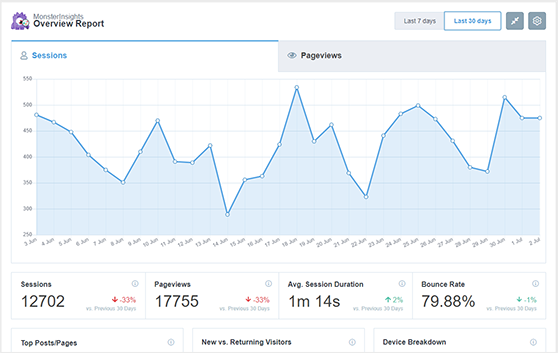
By reviewing your data, you’ll discover which platforms drive the most traffic and engagement, helping you fine-tune your next giveaway for even better results.
Free: Download Our Giveaway Playbook
Templates, prize ideas, and promotion strategies in one guide.
Book Giveaway Ideas and Real Examples
Here are a few real-world book giveaway examples to inspire your launch. Notice how each one ties the contest setup to a clear goal.
Twitter Book Giveaway Example
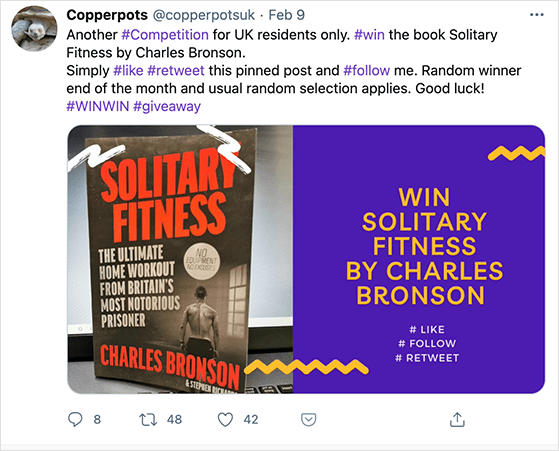
| Platform: Twitter |
| Goal: Book promo + follower growth |
| Entry Actions: Like, Retweet, Follow |
Lesson: Using giveaway hashtags like #giveaway and #win can expand your reach far beyond your normal followers.
Instagram Book Giveaway Example
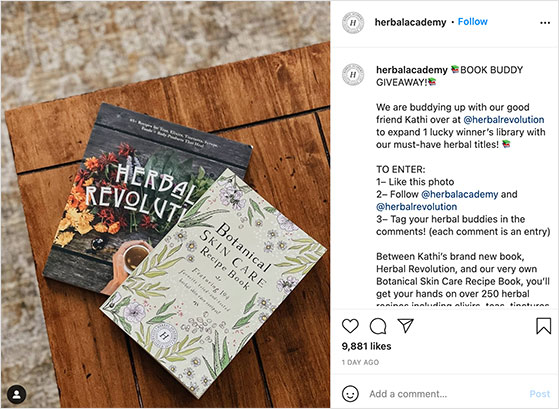
| Platform: Instagram |
| Goal: Audience expansion + product awareness |
| Entry Actions: Like post, Follow both accounts, Tag a friend |
Lesson: Partnering with a complementary brand or influencer helps you double your exposure with the same effort.
Seasonal/Theme-Based Book Giveaway Example

| Platform: Instagram |
| Goal: Promote seasonal book bundle |
| Entry Actions: Like post, Tag a friend, Follow account |
Lesson: Tying your giveaway to holidays or seasonal events creates urgency and makes it more shareable.
Facebook Book Giveaway Example
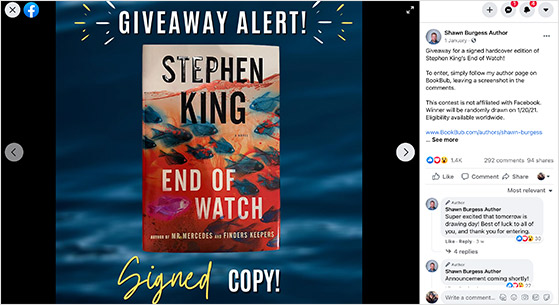
| Platform: Facebook |
| Goal: Boost BookBub follows |
| Entry Actions: Follow BookBub profile, Post screenshot in comments |
Lesson: Keep entry methods simple. Asking for one clear action (like a follow or screenshot) makes it easier and faster for people to enter, which increases participation.
FAQs About Book Launch Giveaways
Final Thoughts on Running a Book Launch Giveaway
Running a book launch giveaway is one of the fastest ways to get more readers and build buzz. To make your giveaway a success, here are the key takeaways:
- Set a Clear Goal: Know what you want to achieve, whether it’s more pre-orders or a bigger email list. This will guide all your other decisions.
- Offer a Relevant Prize: Choose a prize that your ideal readers will genuinely want. A signed copy or a themed bundle is better than a generic gift card.
- Use a Dedicated Tool: A plugin like RafflePress makes it easy to build, manage, and track your giveaway directly on your WordPress site.
- Promote Strategically: You don’t need to be everywhere. Focus on the platforms where your readers are most active, such as specific social media channels or reader communities.
If you follow these steps, you’ll turn a simple giveaway into a powerful tool for your book launch.
If you’re ready to create your own, I recommend RafflePress. It’s what I use, and it makes running book giveaways simple, fast, and effective.
Want more inspiration? Check out these guides next:
- How to Run a Social Media Photo Contest
- How to Run a Blog Giveaway
- How to Run an Influencer Giveaway
To get even more great tips for running a giveaway, subscribe to our YouTube Channel and follow us on Twitter and Facebook.

