9 Easter Marketing Ideas to Boost Traffic and Sales
 Stacey Corrin
Stacey Corrin
Stacey Corrin
 John Turner
John Turner
John Turner
Easter is a missed opportunity for most small businesses. While customers are ready to spend, many brands run no campaign at all or scramble at the last minute.
When that happens, Easter comes and goes without driving a single sale, signup, or traffic spike. It’s not because Easter doesn’t work. It’s because there’s no plan.
In this guide, I’ll walk you through Easter marketing ideas you can launch on a WordPress site, from giveaways and emails to simple landing pages and short-term promos that are quick to set up.
- 1. Run an Easter Giveaway to Grow Your Email List
- 2. Create an Easter-Themed Landing Page
- 3. Launch a Flash Sale With a Countdown Timer
- 4. Send an Easter Email Campaign That Gets Opened
- 5. Run an Easter Egg Hunt on Your Website
- 6. Use Easter-Themed Popups to Capture Leads
- 7. Create Easter Product Bundles or Limited-Time Packages
- 8. Post Easter Content on Social Media That Drives Action
- 9. Partner With Another Business for a Joint Easter Promotion
Why Easter Marketing Matters for Your Business
Easter is one of the largest consumer spending holidays in the United States, and most small businesses aren’t taking advantage of it.
According to the National Retail Federation, Easter spending reached $23.6 billion in 2025, with the average shopper spending $189.26.
The same report shows that 36% of shoppers planned to buy online, while 26% intended to shop at local or small businesses. That makes Easter especially relevant if you rely on your website, email list, or local visibility.
You don’t need an Easter-themed product to benefit. Seasonal momentum alone is enough to support giveaways, email signups, traffic pushes, and short-term offers that give people a clear reason to act now.
The rest of this guide breaks down specific Easter marketing ideas you can launch quickly, even if you’re working with limited time, budget, or technical experience.
1. Run an Easter Giveaway to Grow Your Email List
An Easter giveaway is one of the fastest ways to collect email addresses, grow your social following, and build excitement before the holiday. I’ve seen well-timed giveaways generate significant growth quickly.
For example, WPBeginner added 3,200 new subscribers in just one week with a targeted giveaway campaign.
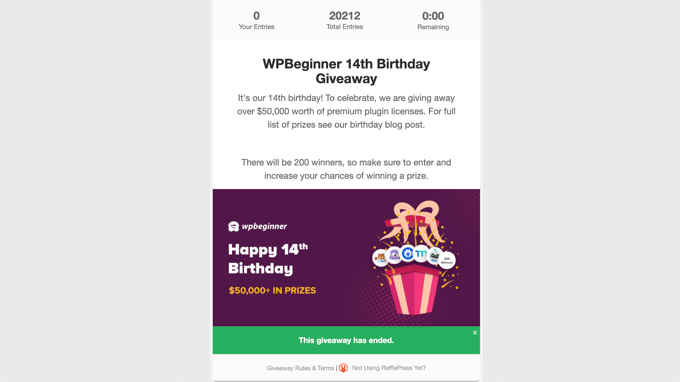
Giveaways work during Easter because people are already in a holiday mood. They’re looking for fun, seasonal content, and the barrier to entry is low. All someone has to do is enter for a chance to win, and you get their email address in return.
You can run several types of Easter giveaways:
- Sweepstakes where people enter by submitting their email
- Photo contests where followers share Easter-themed photos for a chance to win
- Egg hunt giveaways where finding hidden items on your site earns an entry
The real power of a giveaway comes from bonus entry actions. These let participants earn extra entries by following you on social media, visiting a specific page, referring a friend, or watching a video. Each action multiplies your reach without any extra cost.
For prizes, you don’t need anything expensive. Some giveaway prize ideas that work well for small businesses:
- Gift cards (your own store or a popular retailer)
- Easter baskets with themed products
- Product bundles from your shop
- Free consultations or services
RafflePress is a WordPress giveaway plugin that lets you build and launch an Easter giveaway without touching code. You set up the prize, choose your entry actions, and publish the giveaway on any page.
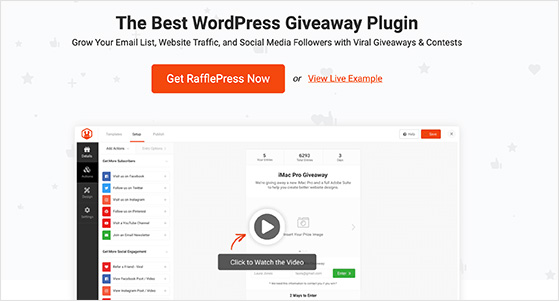
I like it because the whole process takes minutes, and you can configure bonus entries to grow your email list and social channels at the same time.
For more contest-specific ideas, check out our full list of Easter giveaway ideas and examples.
How to Set Up an Easter Giveaway in WordPress
Here’s how to get an Easter giveaway running on your WordPress site with RafflePress:
Step 1: Install and activate RafflePress, then click Add New to create a new giveaway. Choose from one of the pre-built giveaway templates to get started fast.

Step 2: Add your prize details. Include a name, description, and image so visitors know exactly what they’re entering to win.
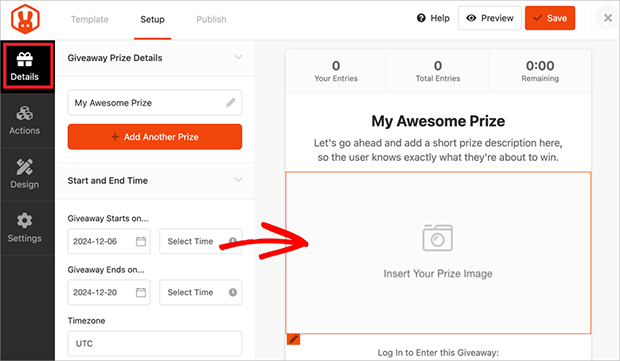
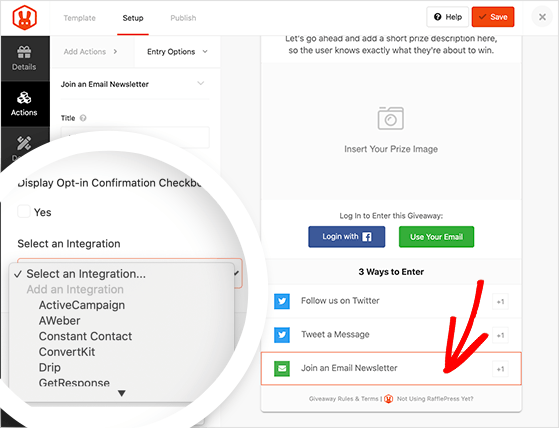
Step 3: Set your entry actions. Add options like “Join an Email Newsletter,” “Follow on Instagram,” or “Refer a Friend.” These are how participants enter and earn bonus entries.
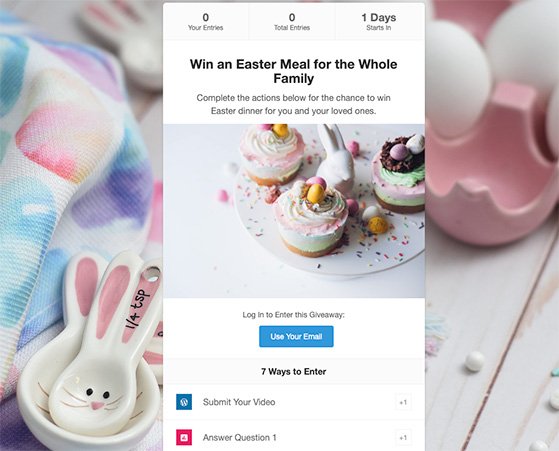
Step 4: Publish your giveaway. You can embed it on an existing page, add it to a blog post, or create a dedicated giveaway landing page.
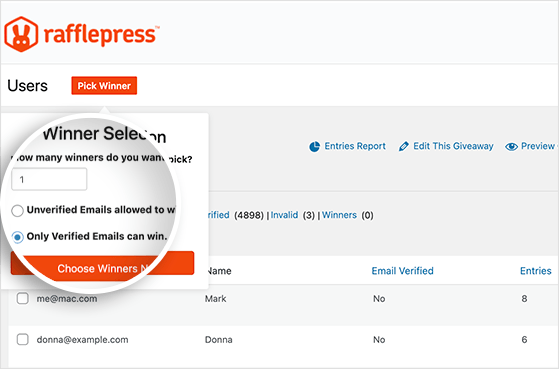
Step 5: When the giveaway ends, RafflePress picks a random winner for you. You can verify entries and announce the winner directly from your dashboard.
That’s it. The whole setup takes about 10 minutes.
Free: Download Our Giveaway Playbook
Templates, prize ideas, and promotion strategies in one guide.
2. Create an Easter-Themed Landing Page
A dedicated Easter landing page gives your seasonal promotion a focused home, separate from your regular site, so visitors see your offer right away.
From what I’ve seen, sending people to your homepage during a promotion almost always underperforms. A homepage has navigation, blog links, and a dozen other distractions. A landing page has one job: get visitors to take action on your Easter offer.
Here’s what to include on your Easter landing page:
- Your Easter offer front and center (giveaway, discount, bundle, or flash sale)
- A countdown timer showing how long the offer lasts
- One clear call-to-action button (enter the giveaway, shop the sale, claim the code)
- Seasonal visuals like pastel colors, spring imagery, or Easter-themed graphics
- Social proof if you have it (subscriber count, testimonials, past giveaway winners)
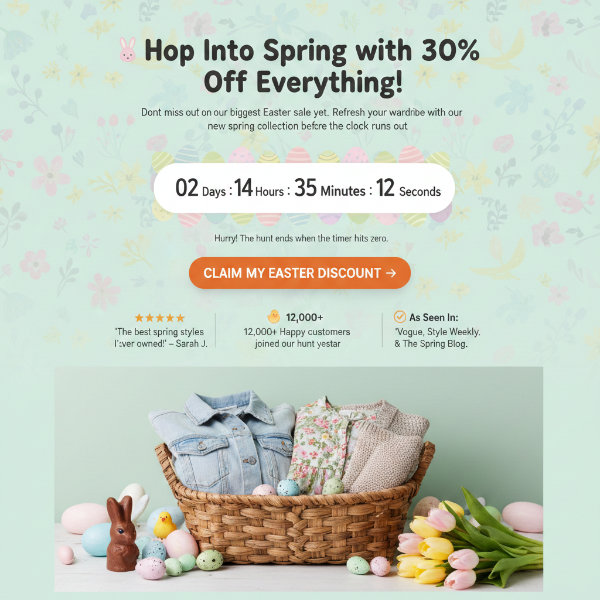
You can use this landing page as the hub for everything else in your Easter campaign. Link to it from your emails, social posts, and popups.
If you use WordPress, a page builder like SeedProd lets you create a landing page without any design skills or coding. You pick a template, customize it with a drag-and-drop editor, and publish.
3. Launch a Flash Sale With a Countdown Timer
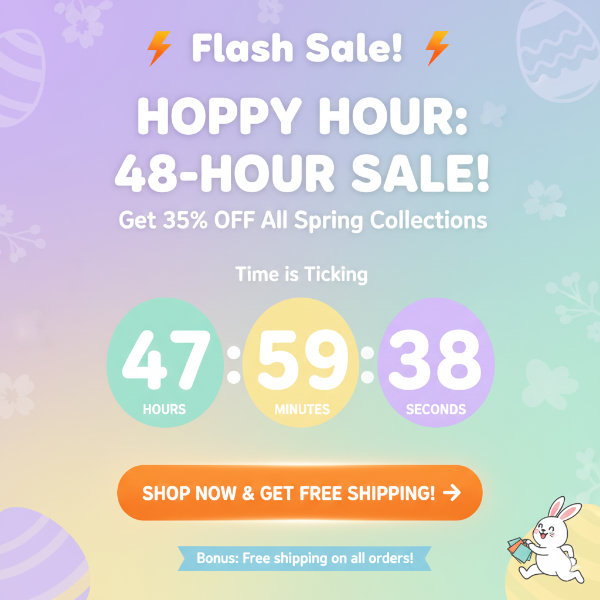
A short Easter flash sale with a visible countdown timer pushes visitors to buy before the deal disappears. It’s one of the most effective ways to drive quick revenue during the holiday.
The key is keeping it short. A 24 to 48-hour window creates real urgency. If a sale runs for two weeks, there’s no reason to act now.
Here’s how to make a flash sale work:
- Set a tight window. Good Friday through Easter Sunday works well. So does a 24-hour sale the week before.
- Add a countdown timer to your landing page, homepage, or product pages. A visible timer makes the deadline feel real.
- Announce the start time in advance. Tease the flash sale in your emails and social posts so people are ready when it goes live.
- Pair it with a bonus. Free shipping, a bonus product, or an extra discount for orders over a certain amount can increase your average order value.
Flash sales aren’t limited to product-based businesses. If you offer services, you can create a limited-time package with Easter pricing, like a discounted spring strategy session or a bundled consulting package available only through the weekend.
4. Send an Easter Email Campaign That Gets Opened
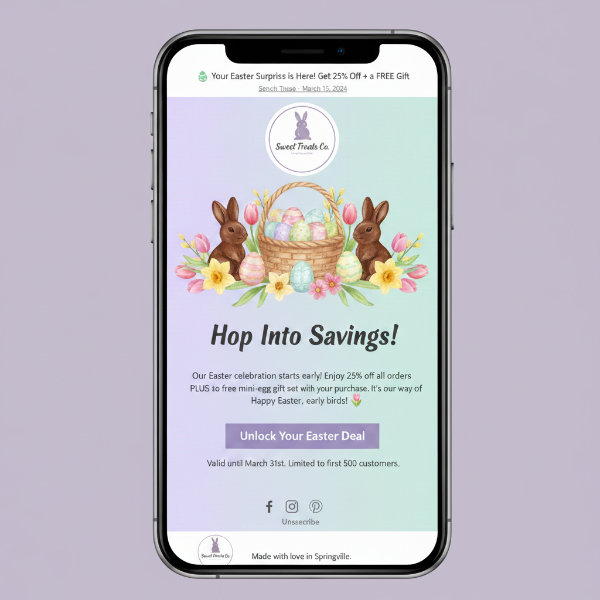
Start your Easter email campaign 2 to 3 weeks before the holiday, lead with a clear offer, and use a subject line that stands out in a crowded inbox.
I’ve noticed that a lot of businesses send one Easter email on Good Friday and call it a day. That’s too late and not enough. A short email sequence builds anticipation and gives you multiple chances to convert.
Here’s a timing framework that works:
| When to Send | Email Type | What to Include |
|---|---|---|
| 2-3 weeks before Easter | Announcement | Introduce your Easter offer, giveaway, or sale. Build excitement. |
| 1 week before | Reminder | Remind subscribers about the offer. Add a countdown or urgency cue. |
| Good Friday or Saturday | Last chance | Final push. Emphasize the deadline. Link to your landing page. |
| Monday after Easter | Follow-up | Thank new subscribers. Share results or a post-Easter offer. |
For subject lines, here are a few patterns that tend to get higher open rates:
- Urgency + offer: “Our Easter sale ends Sunday”
- Curiosity + seasonal: “What’s inside your Easter basket this year?”
- Direct benefit: “Save 25% this Easter weekend”
- Emoji + short: “🐣 Your Easter deal is live”
Keep each email focused on one call to action. Link to your Easter landing page or giveaway, use seasonal visuals, and keep the copy short.
If you ran a giveaway to grow your list (from the first section in this guide), this is where those new subscribers pay off. They signed up because they were interested in your Easter promotion, so they’re primed to open your emails.
5. Run an Easter Egg Hunt on Your Website
A digital Easter egg hunt drives engagement and page views by encouraging visitors to explore multiple pages on your site to find hidden items.
Here’s how it works: you hide small Easter egg images or icons on specific pages across your website. Each egg links to a discount code, a coupon, or an entry into a prize drawing. Visitors have to browse your site to find them, which increases time on site and exposes them to more of your content and products.
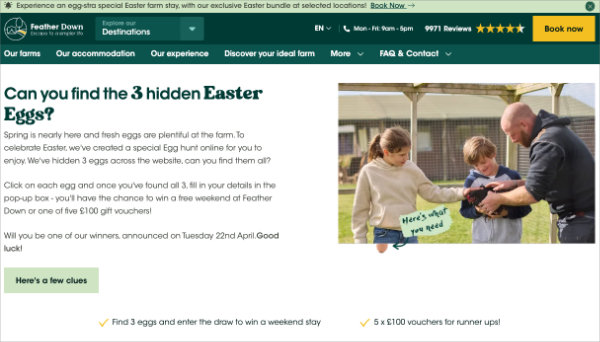
I like this idea because it turns passive visitors into active participants. Instead of landing on one page and leaving, they’re clicking through your site looking for eggs.
Here’s a quick way to set one up:
- Choose 5 to 10 pages on your site where you’ll hide eggs. Pick pages you want more traffic on, like product pages, popular blog posts, or your services page.
- Add a small Easter egg image to each page. Make it visible but not obvious. Tuck it into the sidebar, near the footer, or between content sections.
- Link each egg to a unique discount code or to a giveaway entry form.
- Announce the hunt through your email list and social channels. Tell people how many eggs there are and what they’ll get for finding them.
- Set a deadline. Run the hunt for a few days leading up to Easter.
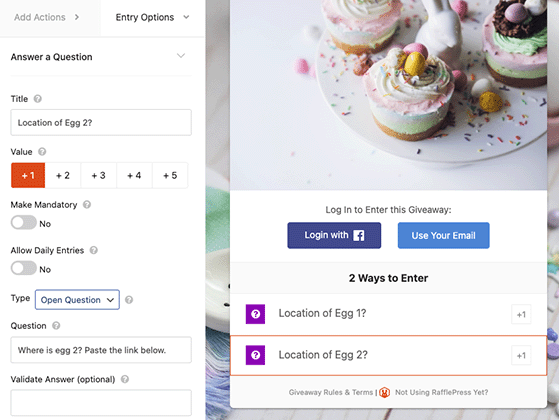
You can also pair the egg hunt with a giveaway. Everyone who finds all the eggs gets entered into a prize drawing. This gives people extra motivation to keep hunting. If you’re using RafflePress, you can set up the giveaway entry to reward people who visit specific pages on your site.
6. Use Easter-Themed Popups to Capture Leads
A seasonal popup with an Easter offer converts casual visitors into email subscribers while they’re already in a holiday spending mood.
Popups get a bad reputation, but from what I’ve seen, a well-timed popup with a relevant offer performs better than almost any other opt-in method on a website. The trick is making the popup feel like a gift, not an interruption.
Here are a few types that work well during Easter:
- Spin-the-wheel popups let visitors spin for a discount, free shipping, or a bonus entry into your giveaway. The gamification element drives higher engagement than a standard popup.
- Exit-intent popups detect when a visitor is about to leave and show a last-chance Easter offer. It’s your final shot at converting someone who would otherwise bounce.
- Timed popups that appear after a visitor has been on a page for 10 to 15 seconds, giving them time to engage before seeing your offer.
Keep the popup focused. One offer, one action. Enter your email to get a discount code, or spin the wheel for a chance to win. Don’t overload it with options.
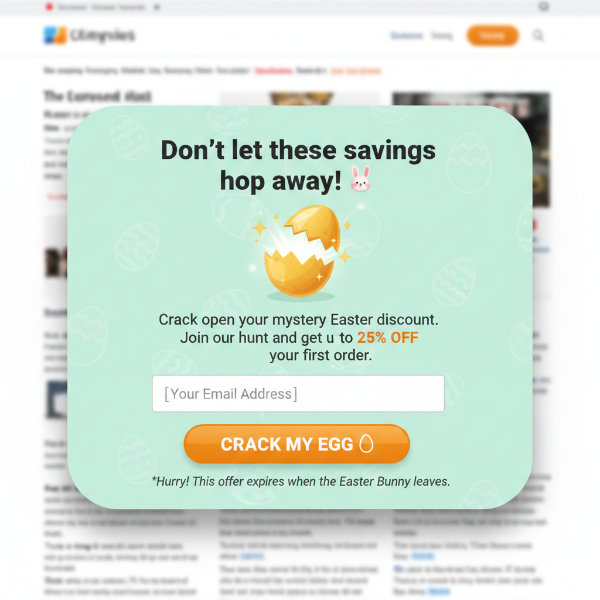
When Easter is over, swap back to your regular popup. Seasonal popups should feel limited and timely, which is part of what makes them work.
7. Create Easter Product Bundles or Limited-Time Packages
Group related products or services into an Easter bundle at a slight discount, and make it available only through the holiday weekend. Bundles increase your average order value because customers buy more items than they would individually.
This is also a good way to move slow-selling inventory. Pair a product that hasn’t been moving well with one of your bestsellers, and package them together at a small discount.
Easter basket-style bundles work across different business types:
- Physical products: Group complementary items together (a candle, a mug, and a bag of coffee as a “Spring Morning” basket)
- Digital products: Bundle a course with a template pack or an ebook
- Services: Offer a limited-time spring package (like a website audit plus a strategy call at Easter pricing)
Make sure to highlight the savings. Show what the items cost individually versus the bundle price. That comparison makes the deal feel tangible.
And limit availability. “Available through Easter Sunday” creates urgency without needing a countdown timer. When the holiday is over, the bundle goes away.
8. Post Easter Content on Social Media That Drives Action
The best Easter social media posts drive traffic back to your site, not just likes. Every post you publish during the Easter season should point somewhere, whether it’s your giveaway, your sale, or your landing page.
I see a lot of businesses post festive Easter graphics and get a handful of likes, but those posts don’t lead anywhere. A post without a destination is a missed opportunity.
Here are post types that actually drive results:
- Photo contests: Ask followers to share Easter-themed photos with a branded hashtag for a chance to win. This generates user content and spreads your reach.
- Behind-the-scenes content: Show how you’re preparing Easter bundles, packing orders, or setting up your giveaway. People connect with the process.
- Countdown posts: Post daily updates leading up to Easter that tease your offer. “3 days until our Easter flash sale” builds anticipation.
- User-generated content: Repost customer photos, tag them, and thank them publicly. It builds social proof and encourages more people to share.
- Giveaway announcements: Promote your Easter giveaway with a clear call to action and a link to your entry page.
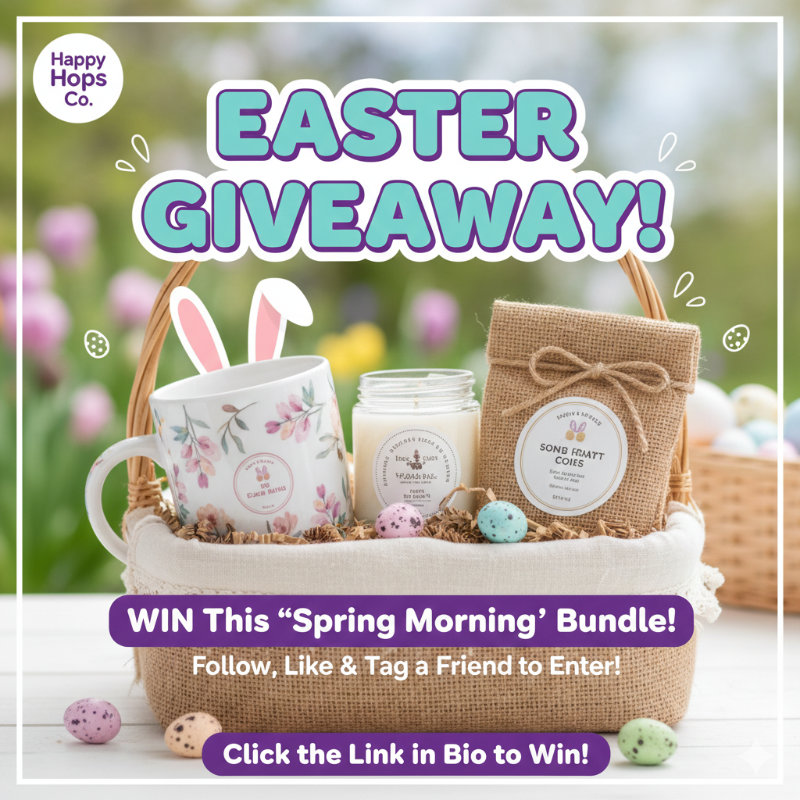
For platforms, Instagram and Facebook are strong for visual Easter content. Pinterest works well for Easter gift guides, recipe collections, and seasonal product boards. Focus on the platforms where your audience already spends time instead of trying to be everywhere.
If you’re running a photo contest or social media giveaway, RafflePress lets you track social entries and pick winners automatically.
9. Partner With Another Business for a Joint Easter Promotion
Team up with a complementary business to co-host a giveaway or cross-promote each other’s Easter offers. This doubles your reach without doubling your budget.
The best partnerships are with businesses that share your audience but don’t compete with you directly. If you sell handmade candles, partner with a local bakery. If you run a WordPress blog about productivity, team up with a tool company that your readers already use.
For example, Krave Beauty and ZitSticka ran a co-branded skincare giveaway that generated over 4,000 entries by combining complementary products in one prize bundle. Each brand promoted to their own audience, doubling the exposure without doubling the cost.
Here’s how a joint Easter promotion works in practice:
- Each business contributes a prize for a co-hosted giveaway. A bigger prize pool attracts more entries than either business could get alone.
- Both businesses promote the giveaway to their own email lists and social followers. You get exposure to their audience, and they get exposure to yours.
- Cross-promote Easter offers in each other’s newsletters. A short mention with a link can send qualified traffic both ways.
This works well for local businesses, niche online stores, and bloggers who want to grow faster during the holiday season. I’ve seen joint giveaways outperform solo ones by a wide margin because the combined audience gives each entry more momentum.
You can manage a joint giveaway in RafflePress the same way you’d run any other giveaway. Both businesses share the same giveaway link, and the plugin handles entries and winner selection.
When to Start Your Easter Marketing (and What to Do Each Week)
Start 4 to 6 weeks before Easter to build momentum. The closer you get to the holiday, the more urgent your messaging should be.
Here’s a week-by-week breakdown:
| Timeline | What to Do |
|---|---|
| 4-6 weeks before Easter | Plan your campaign. Decide which ideas you’ll use. Build your landing page and set up your giveaway. |
| 2-3 weeks before | Launch your giveaway. Send your first Easter email. Start posting on social media. |
| 1 week before | Ramp up urgency. Launch your flash sale. Send a reminder email. Promote the countdown. |
| Easter weekend | Send your last-chance email. Push hard on social. Announce giveaway winners on Easter Sunday or Monday. |
| Week after Easter | Follow up with new subscribers. Send a thank-you email. Review your campaign results and note what worked for next year. |
If you’re reading this and Easter is two weeks away, don’t skip it. You can launch a giveaway and send a few emails in an afternoon. Something is better than nothing, and even a short campaign can grow your list.
FAQs About Easter Marketing
What is the best time to start Easter marketing?
4 to 6 weeks before Easter is ideal. That gives you time to build a landing page, launch a giveaway, and send a short email sequence. If you’re starting late, 2 to 3 weeks still works. Focus on one or two ideas instead of trying to do everything. The key is getting your campaign live before inboxes get crowded.
Do Easter marketing ideas work for service-based businesses?
Yes. You don’t need physical products to run an Easter campaign. Service businesses can offer a free consultation as a giveaway prize, create a limited-time spring package, or run an Easter email campaign to re-engage past clients. The seasonal momentum works regardless of what you sell.
How much should I spend on Easter marketing?
You can run an effective Easter campaign for very little. If you already have an email list and social media accounts, your main investment is time. A giveaway plugin like RafflePress, a free email tool, and your existing social profiles are enough to launch a full campaign. You don’t need a big ad budget to see results.
What are the best Easter giveaway prizes for small businesses?
Gift cards, product bundles, Easter baskets, free services, and exclusive discounts all work well. Match your prize to your target audience. A higher-value prize attracts more entries, but a niche prize attracts more qualified leads. For example, a gift card to your own store brings in people who are already interested in what you sell.
Can I run an Easter marketing campaign on WordPress?
WordPress is one of the best platforms for seasonal campaigns. You can use RafflePress to run giveaways, a page builder like SeedProd to create Easter landing pages, and a popup plugin to capture leads. Everything connects to your existing WordPress site, and none of it requires coding.
Start Your Easter Campaign Today
You don’t need a big budget or a marketing team to run a successful Easter campaign. Pick 2 or 3 ideas from this list, start early, and focus on growing your email list while the seasonal buzz is working in your favor.
If you want to start with the idea that gives you the fastest results, launch an Easter giveaway with RafflePress. You can have it live on your site in minutes, and it will keep collecting entries and growing your list while you work on the rest of your campaign.
Thanks for reading! We’d love to hear your thoughts, so please feel free to join the conversation on YouTube, X, and Facebook for more helpful advice and content to grow your business.

