How to Run a Giveaway With AI (My Full Process + Prompts)
 Stacey Corrin
Stacey Corrin
Stacey Corrin
 John Turner
John Turner
John Turner
TL;DR: How to Use AI to Plan and Promote Your Next Giveaway
AI handles the writing work so you can focus on running a giveaway that actually grows your list. Here’s the full process:
- Plan prize and timeline with AI. Generate prize ideas, hooks, and a promotional calendar before you write a single word.
- Write launch copy and emails with AI. Get announcement posts, email subject lines, and launch emails drafted in minutes.
- Create mid-run social posts and a 5-email sequence with AI. Keep momentum going with scheduled content through the full campaign.
- Write winner announcement and re-engagement emails with AI. Close strong and convert non-winners into subscribers who stick around.
- Use RafflePress to handle entries, actions, and winner selection. The WordPress plugin tracks every action, manages referrals, and picks a fair winner.
- Personalize every AI output with your brand voice. Read it aloud. If you wouldn’t say it, rewrite it.
You want to run a giveaway, but you’re staring at a blank doc wondering what prize to offer, what to write in the announcement email, and how to keep the momentum going for two weeks. That’s the planning work AI can handle.
I’ve run giveaways the slow way, writing every post from scratch. It eats a full day before the thing even launches. With AI, you can compress that same work down to a couple of focused hours.
In my experience, AI can shave 3 to 5 hours off the writing work per campaign. That’s before you count the mid-run content, the follow-up sequence, and the winner announcement.
This guide walks you through every phase: planning, launch, mid-run promotion, closing, and follow-up. I’ve included the exact prompts I use so you can copy, adapt, and run.
- What AI Can (and Can't) Do for Your Giveaway
- Phase 1: Plan Your Giveaway with AI
- Phase 2: Write Your Launch Copy with AI
- Phase 3: Promote Your Giveaway While It Runs
- Phase 4: Close Strong and Announce Your Winner
- Phase 5: Follow Up After the Giveaway Ends
- How to Make AI Output Sound Like You, Not a Template
- Running Your Giveaway with RafflePress
- Frequently Asked Questions
What AI Can (and Can’t) Do for Your Giveaway
Before you start prompting, it’s worth being clear on where AI helps and where it doesn’t. It won’t run your giveaway for you, but it will do most of the writing.
AI is genuinely useful for:
- Prize ideas tailored to your audience
- Hooks and headline angles for your announcement
- Giveaway rules templates (see the legal note below)
- Announcement copy for social and email
- Full email sequences for the whole campaign
- Mid-run social posts and hashtag suggestions
- FAQ content for your giveaway page
- Winner announcement posts and re-engagement emails
AI can’t do:
- Run the giveaway widget or landing page
- Track entries or verify that someone completed an action
- Pick a random, auditable winner
- Manage referrals or bonus entries
Two important caveats before you start. First, AI output is a first draft, not a finished product. Every piece of copy needs your voice and your specifics before it goes live.
Second, if you use AI to generate giveaway rules, have a lawyer review them before you publish. Rules have legal implications that vary by country, state, and platform, and a template that looks complete may be missing something that matters.
Phase 1: Plan Your Giveaway with AI
Good planning prevents the mid-campaign scramble where you’re writing posts the morning they need to go out. Spend 30 minutes here and the rest of the campaign is much easier to manage.
Start with the prize. The most common mistake I see is choosing a prize that attracts everyone, because it actually attracts no one useful.
You want a prize that only your ideal customer would want. Browse giveaway prize ideas by category if you need inspiration beyond what AI generates.
Use this prompt to get targeted ideas:
Generate 10 prize ideas for a giveaway targeting [audience] interested in [niche]. Prioritize prizes that appeal to a likely buyer, not someone just looking for a freebie.
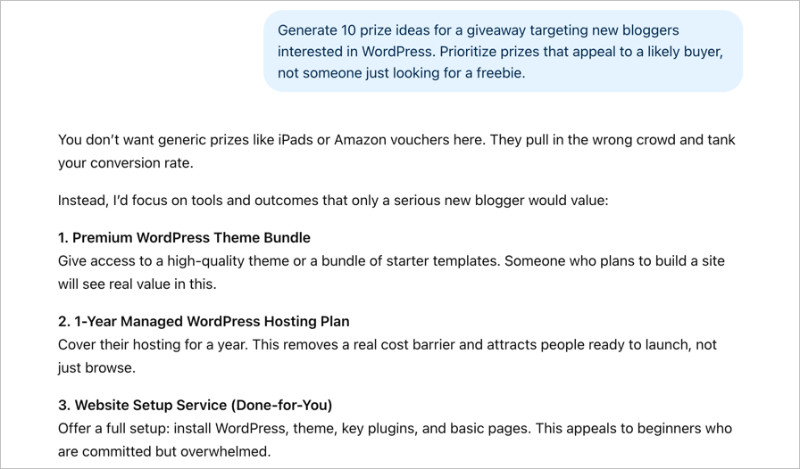
Once you have a prize, you need a hook. The hook is a one-sentence reason someone should care, and it needs to lead with the outcome, not the prize itself. If you’re wondering whether giveaways increase sales, the answer depends largely on how well the prize matches your actual buyers.
Write 5 giveaway hooks for [brand] targeting [audience] who want [desired outcome]. Each hook should be one sentence and lead with the outcome.
With a prize and hook locked in, build your promotional timeline. This stops you from winging the schedule mid-campaign.
Create a 2-week promotional timeline for a giveaway launching on [date]. Include email send dates, social post cadence, a mid-run push, and a last-chance push.
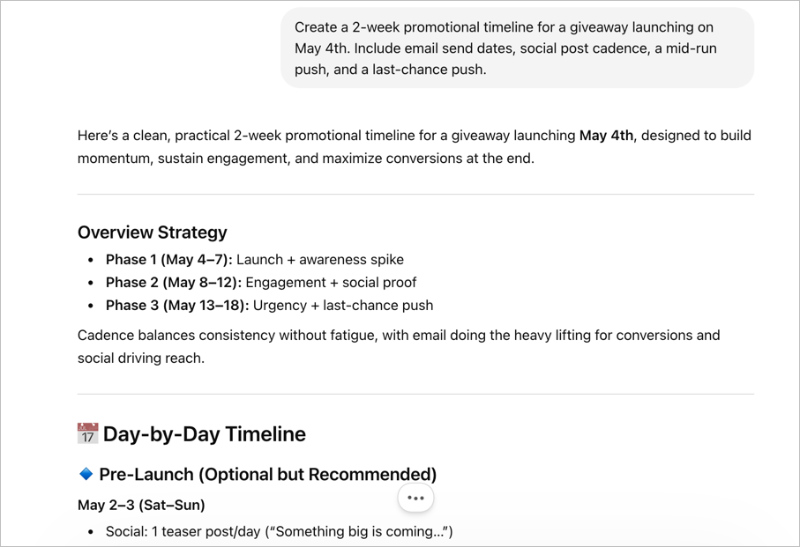
The timeline AI produces will need adjustment based on your posting schedule and audience habits. But it gives you a framework you can tweak in 10 minutes instead of building from scratch.
Free: Download Our Giveaway Playbook
Templates, prize ideas, and promotion strategies in one guide.
Phase 2: Write Your Launch Copy with AI
Launch day is the highest-traffic moment of your campaign. You want copy that’s ready before the day starts, not something you’re editing at the last minute.
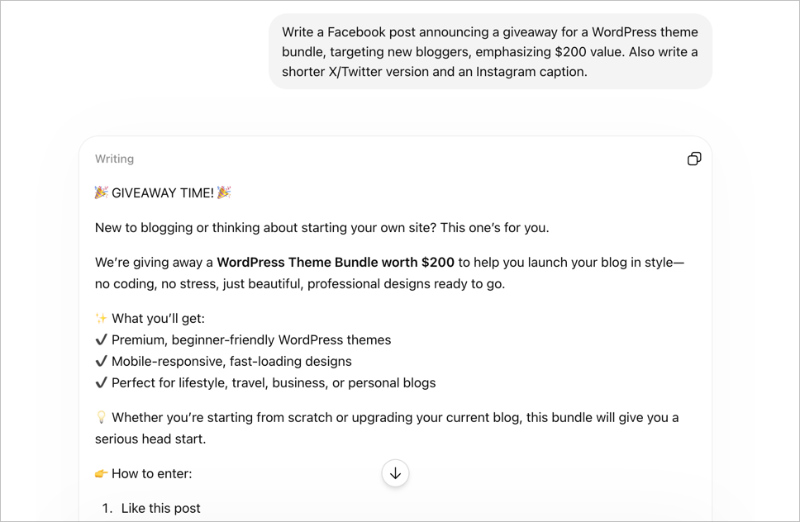
Start with the social announcement. This one prompt gives you three versions at once. If you need platform-specific angles, check these Facebook giveaway ideas and tips for how to run an Instagram giveaway before you finalize your copy.
Write a Facebook post announcing a giveaway for [prize], targeting [audience], emphasizing [benefit]. Also write a shorter X/Twitter version and an Instagram caption.
Then tackle the email subject lines. A strong subject line can be the difference between a 20% open rate and a 40% open rate on your announcement email. Strong giveaway copywriting starts with the subject line, so treat this step seriously.
Write 5 email subject lines for a giveaway announcement to [audience]. Include one curiosity, one urgency, one benefit-led, one question, one prize-led.
Having five options lets you A/B test or just pick the one that sounds most like you. I usually end up combining parts of two or three of them.
Don’t forget the actual announcement email body. Use the hook from Phase 1 as the opener, ask AI to expand it into a short email (150 to 200 words), and then edit down to your voice.
Phase 3: Promote Your Giveaway While It Runs
Most giveaways get a burst of entries on launch day, go quiet in the middle, and pick up again at the end. The mid-run period is where AI-written content pays off most, because you can have it ready before the giveaway even starts.
The most important thing to build ahead of time is your email sequence. Social media giveaway promotion can drive about 3x more engagement than regular posts, but email is where entries tend to convert at the highest rate. A solid contest marketing plan uses both channels throughout the full run.
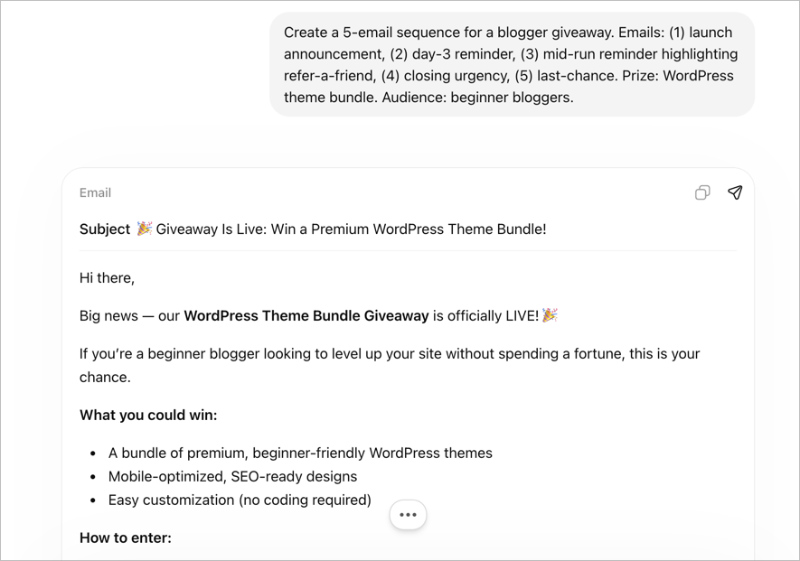
Here’s the 5-email structure that covers the full campaign:
- Email 1 (Launch day): Announce the giveaway, explain the prize, and include the entry link.
- Email 2 (Day 3): Reminder with a specific reason to enter today, not “someday.”
- Email 3 (Mid-run): Social proof angle, highlight the refer-a-friend action and bonus entries.
- Email 4 (Closing urgency): Three days left, reason to act now.
- Email 5 (Last chance): 24 hours, final push.
Use this prompt to generate all five at once:
Create a 5-email sequence for a [niche] giveaway. Emails: (1) launch announcement, (2) day-3 reminder, (3) mid-run reminder highlighting refer-a-friend, (4) closing urgency, (5) last-chance. Prize: [prize]. Audience: [audience].
For graphics, Canva’s AI tools can generate social images fast once you have the copy locked. For scheduling, Buffer or Hootsuite let you queue all your mid-run posts at the start of the campaign.
Viral refer-a-friend mechanics can multiply giveaway reach by 2 to 5x on their own. Read the full guide on how to run a referral contest if you want to set this up properly.
When you’re writing your mid-run emails and posts, always include a line about sharing the referral link for bonus entries. The mechanic works, but only if people know it exists.
Phase 4: Close Strong and Announce Your Winner
The closing phase has two jobs: pull in every last entry from people who haven’t acted yet, then use the winner announcement to build goodwill with everyone who didn’t win.
The closing urgency email is one of the highest-converting pieces in the whole campaign. Here’s the prompt:
Write a closing urgency email for a giveaway ending in 24 hours. Prize: [prize]. Audience: [audience]. Avoid sounding desperate.
The “avoid sounding desperate” instruction matters. AI defaults to ALL CAPS urgency language that reads as panicked rather than exciting. You want to convey that this is a genuine last chance, not that you’re begging.
After you pick a winner, write the announcement post. This is also the moment to convert non-winners into long-term followers.
Write a winner announcement post for [niche] giveaway. Congratulate [WINNER], thank all entrants, and end with a line encouraging non-winners to follow [brand] for the next giveaway.
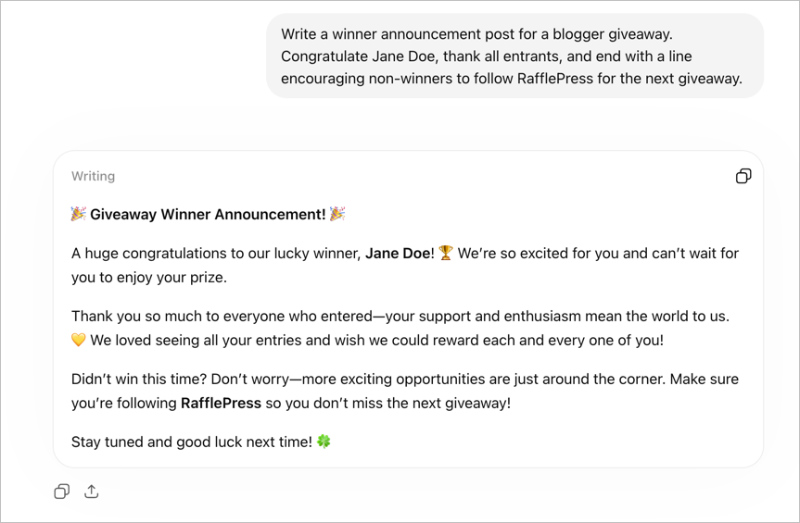
Post the announcement on every channel where you promoted the giveaway. People who entered via social are watching for the result, and a public announcement confirms the contest was real and fair.
Phase 5: Follow Up After the Giveaway Ends
This is the phase most people skip, and it’s where a lot of the long-term value lives. You’ve just added a batch of new subscribers who entered because they wanted your prize. You have about 72 hours to introduce yourself before they forget who you are.
Start with the non-winners. They didn’t get the prize, but they raised their hand and said they were interested in your niche. That’s worth following up on. If your main goal was list growth, the full guide on how to do a giveaway to grow your email list covers the follow-up strategy in more depth.
Write a re-engagement email to non-winners from a [niche] giveaway. Acknowledge they didn’t win, offer [consolation offer], and introduce [brand] as a soft next step.
The consolation offer can be a discount, a free resource, or a warm welcome to your newsletter. The goal is to give them a reason to stay subscribed beyond the giveaway.
For new subscribers who came through the giveaway cold, a 3-email welcome sequence builds the relationship before you ever ask them to buy anything.
Write a 3-email welcome sequence for new subscribers who entered a [niche] giveaway after it has ended. Email 1: welcome + what to expect. Email 2: most useful resource. Email 3: soft offer.
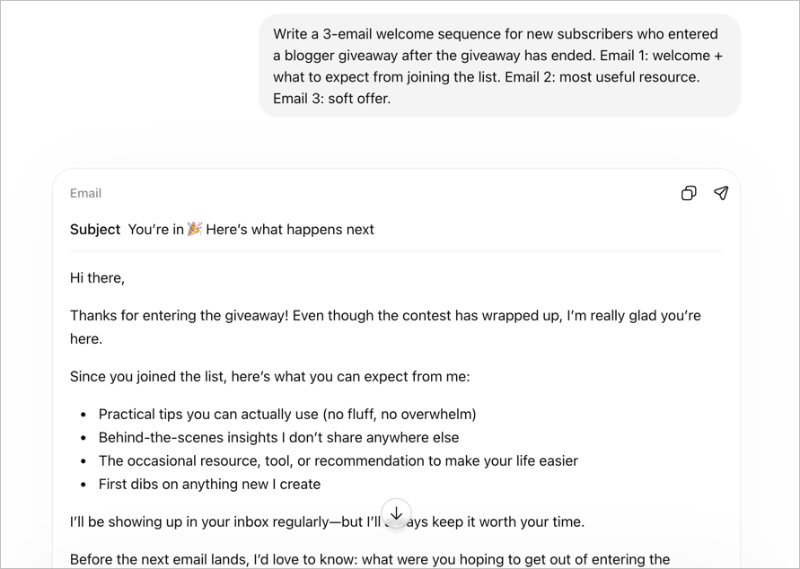
If you’re using RafflePress with one of its 15+ email integrations, new entrants are already on your list the moment they enter. That means you can set up this sequence before the giveaway ends and it starts delivering automatically.
How to Make AI Output Sound Like You, Not a Template
Every AI-generated draft will have tells: generic phrasing, overly formal transitions, sentences you’d never actually say. The fix isn’t to rewrite everything from scratch. It’s to give AI your voice before it writes.
Add this to the start of any prompt where voice matters:
Write in a [adjective] tone for [audience] who want [outcome]. Here are 2 examples of my past writing style: [paste examples]. Avoid: [banned phrases].
The “paste examples” step is the one most people skip, and it makes the biggest difference. Two paragraphs from a past email or post is enough to shift the output noticeably.
Here’s a quick before and after to show the gap. Without a voice prompt, AI might produce: “We are thrilled to announce an incredible opportunity for our valued community members to participate in an exciting new giveaway experience.”
With a voice prompt applied to a casual food blogger, the same brief might come back as: “I’m giving away a year’s supply of my favorite pasta sauce, and entering takes about 30 seconds.”
One more rule I follow without exception: read every AI output aloud before it goes live. If you stumble over a phrase or wouldn’t say it in a conversation, change it. Your audience knows when they’re reading copy and when they’re reading you.
Running Your Giveaway with RafflePress
AI is the content and planning layer. You still need something to actually run the giveaway, track every entry, manage referrals, and pick a winner you can stand behind. That’s where RafflePress, and its WordPress giveaway plugin, comes in.
The two layers work together cleanly. AI writes the copy encouraging people to share your referral link. RafflePress tracks every referral, assigns the bonus entries, and keeps the loop honest.
Here’s what RafflePress handles on the execution side:
Entry actions
RafflePress has 30+ entry actions including social follows, email subscriptions, referrals, page visits, polls, reviews, video watches, and custom actions you define yourself.
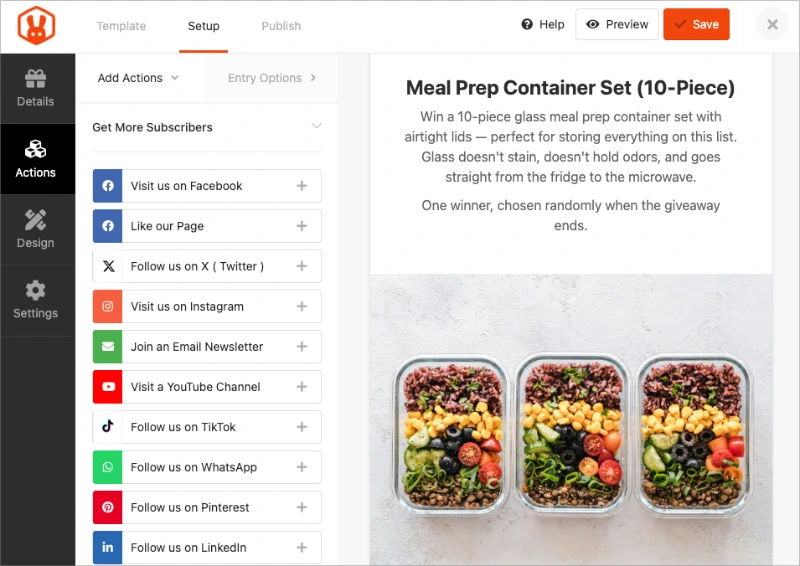
You can stack multiple actions in one giveaway, so a single campaign can grow your email list, social following, and YouTube channel at the same time.
Refer-a-friend
Each entrant gets a unique sharing link. When someone new enters via that link, the original entrant earns bonus entries.
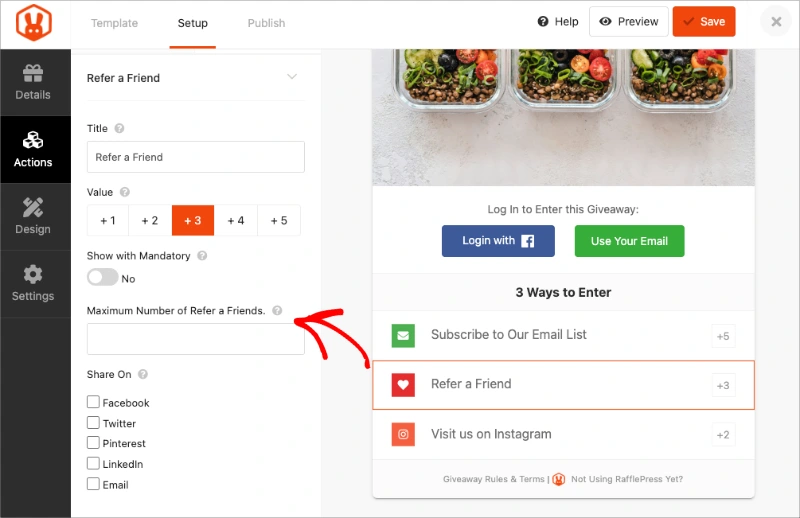
AI writes the copy that explains why sharing is worth doing. RafflePress handles the tracking, the bonus entry assignment, and the fraud detection.
Email integrations
RafflePress connects to 15+ email marketing tools. New entrants are added to your list automatically when they complete the email signup action, with no CSV exports, no manual imports, and no delay.
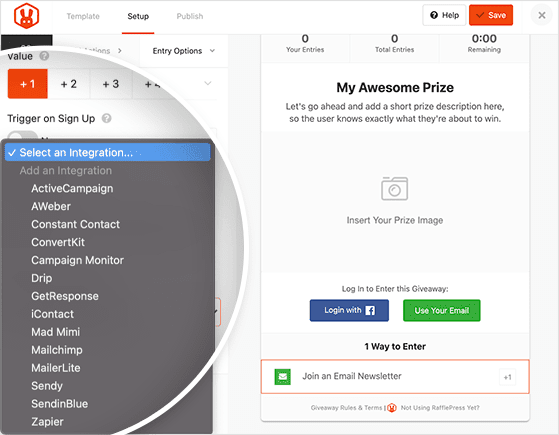
By the time your mid-run emails go out, your new subscribers are already in the sequence.
Winner selection
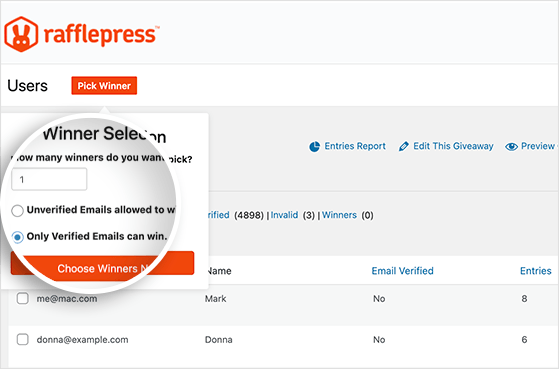
When the campaign ends, RafflePress picks a winner randomly from verified entries. You don’t have to manage a spreadsheet or worry about someone gaming the entry count.
If you’ve looked at tools like Gleam or Vyper: those run on monthly subscriptions and your data lives on their servers. RafflePress is a one-time payment and your data stays on your WordPress site.
You run as many giveaways as you want for the cost you already paid.
Frequently Asked Questions
How can AI help with giveaway marketing?
AI can write the copy for every phase of a giveaway: prize ideas, announcement posts, email subject lines, a full 5-email campaign sequence, mid-run social content, winner announcements, and post-giveaway re-engagement emails. It can also generate promotional timelines and FAQs for your giveaway page.
What it can’t do is track entries, manage referrals, or pick a winner. Those require a dedicated giveaway tool like RafflePress.
What is the best AI tool for running a giveaway?
No single AI tool “runs” a giveaway. ChatGPT, Claude, or Gemini work well for writing all the copy, from announcement emails to winner posts.
For the actual giveaway mechanics, entry tracking, and referral management, you need a dedicated plugin like RafflePress. The two work alongside each other: AI handles the writing, the plugin handles the execution.
How do you use ChatGPT for a giveaway?
Use ChatGPT to generate prize ideas, write launch copy for email and social, build a promotional calendar, draft a full email sequence, and write your winner announcement. Give it specific details: your audience, the prize, and the benefit you want to emphasize.
Add examples of your writing style so the output sounds like you rather than a template. Then edit before publishing.
How do you promote a giveaway effectively?
Promote across email and social simultaneously, with a consistent schedule throughout the campaign rather than only at launch and close. The three most effective tactics are: a launch email to your existing list, a refer-a-friend mechanic that turns every entrant into a promoter, and a last-chance push in the final 24 hours.
Social media giveaway posts can generate roughly 3x more engagement than regular posts, so use that momentum while the campaign is live.
What should I use as a giveaway prize?
Choose a prize that only your ideal customer would want, not something that attracts everyone. A generic gift card pulls in freebie hunters who unsubscribe after the winner is announced.
A prize specific to your niche, like your own product, a relevant tool, or an experience tied to what you sell, attracts people who are genuinely interested in what you offer. Quality of entrants matters more than quantity.
Can AI write giveaway rules for me?
AI can generate a rules template that covers the standard elements: eligibility, entry period, prize description, winner selection, and odds. But giveaway rules have legal implications that vary by country, state, and platform.
An AI-generated template may be missing requirements that apply to your specific situation. Always have a lawyer review your rules before publishing, especially if your giveaway is open to a broad or international audience.
How long should a giveaway run?
7 to 14 days is the range that works for most campaigns. Shorter than 7 days and you don’t have time for a mid-run push or for word-of-mouth referrals to compound.
Longer than 14 days and momentum fades, and the closing urgency loses its effect. Two weeks gives you room for a launch push, a mid-run reminder, a closing urgency email, and a last-chance post.
How do I get more entries for my giveaway?
The biggest lever is the refer-a-friend mechanic. When every entrant gets a unique link that earns bonus entries for referrals, the giveaway spreads to audiences you’d never reach through your own promotion.
Beyond that: promote via email on launch day, add a mid-run reminder that specifically highlights the referral link, and send a last-chance email in the final 24 hours. Consistent promotion throughout the campaign outperforms a single launch push.
Start Your Next Giveaway
That’s the full workflow. Use the prompts, adapt them to your voice, and you can have a complete campaign written before your giveaway even launches.
For actually running the giveaway, I use RafflePress. It handles entries, referrals, and winner selection on your WordPress site for a one-time payment.
Get started with RafflePress today.
If you liked this article, please subscribe to our YouTube Channel for RafflePress video tutorials. You can also find us on Twitter and Facebook.


