9 Best Affiliate Marketing Plugins for WordPress (Tested)
 Stacey Corrin
Stacey Corrin
Stacey Corrin
 John Turner
John Turner
John Turner


There are two types of WordPress affiliate plugins, and most guides mix them together like they’re the same thing.
Link managers help affiliates organize and cloak the links they use to promote other people’s products. Program managers help businesses recruit affiliates and track commissions. Picking the wrong one wastes your setup time.
I’ve spent 13 years in marketing testing plugins in both categories and use ThirstyAffiliates on this site. This guide covers 9 plugins split by type so you know exactly what you’re getting before you install anything.
How I Chose the Best Affiliate Marketing Plugins for WordPress
I tested each plugin hands-on rather than pulling from a features page. That meant setting each one up from scratch and checking for friction in setup, link management, and reporting.
I also looked at tracking accuracy, since click data and commission attribution matter in real affiliate work. Pricing had to make sense for what you actually get, and WooCommerce compatibility was a separate consideration because store owners have different needs than content publishers.
Every plugin here earned its spot. Anything that duplicated a better option didn’t make the list.
Affiliate Marketing Plugins at a Glance
| Plugin | Best For | Free Version | Starting Price | WooCommerce |
|---|---|---|---|---|
| AffiliateWP | Running your own affiliate program | No | $149.50/yr | Yes |
| Pretty Links Pro | Link cloaking and click reporting | Limited | $99.50/yr | Yes |
| MonsterInsights | Affiliate click tracking in Google Analytics | Limited | $99.50/yr | Yes |
| ThirstyAffiliates | Managing links you promote as an affiliate | Yes | $99.60/yr | Yes |
| Easy Affiliate | Affiliate program with MemberPress integration | No | $99.60/yr | Yes |
| AdSanity | Displaying and managing affiliate banner ads | No | $108/yr | No |
| Affiliates Manager | Basic affiliate program at no cost | Yes (fully free) | Free | Limited |
| YITH WooCommerce Affiliates | WooCommerce store affiliate programs | Yes | Free (premium available) | Yes |
Free: Download Our Giveaway Playbook
Templates, prize ideas, and promotion strategies in one guide.
Best Affiliate Marketing Plugins for WordPress
Below you’ll find detailed breakdowns of each plugin, ranked by use case. Use the quick comparison table above to find your starting point, then read the full entry to confirm it fits your setup.
- 1. AffiliateWP: Best for Running Your Own Affiliate Program
- 2. Pretty Links Pro: Best for Link Cloaking and Click Reporting
- 3. MonsterInsights: Best for Tracking Affiliate Clicks in Google Analytics
- 4. ThirstyAffiliates: Best for Managing Affiliate Links You Promote
- 5. Easy Affiliate: Best for Programs Paired with MemberPress
- 6. AdSanity: Best for Displaying Affiliate Banner Ads
- 7. Affiliates Manager: Best Free Plugin for Basic Affiliate Programs
- 8. YITH WooCommerce Affiliates: Best Free Option for WooCommerce Stores
1. AffiliateWP: Best for Running Your Own Affiliate Program
| Feature | Details |
|---|---|
| Pricing | From $149.50/yr |
| Free Plan | No |
| Standout Features | • Real-time referral tracking • PayPal and Stripe payouts • Uncanny Automator integration • Unlimited affiliates and custom commissions • Custom affiliate IDs and coupon tracking |
| Rating | A+ |
| Best For | Store owners and business owners who want to recruit affiliates and manage their own program |
AffiliateWP is a self-hosted WordPress plugin for building and managing your own affiliate program. It lets you recruit affiliates, track referrals in real time, set custom commission rates, and pay out via PayPal or Stripe, without a third-party platform.
It integrates natively with Easy Digital Downloads, WooCommerce, WPForms, and Uncanny Automator, so it fits most WordPress store setups without additional connectors.
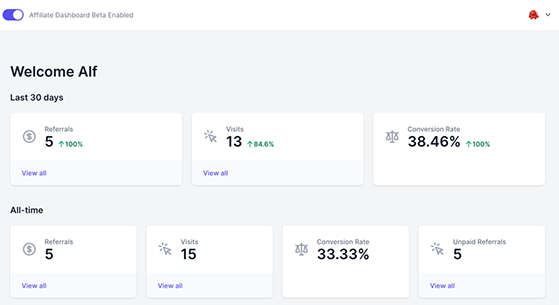
The affiliate-facing dashboard is one of the cleaner implementations I’ve seen. Partners can log in and see their referral count, earnings, and payout history without needing to contact you. That reduces the support overhead once your program has more than a few active affiliates.
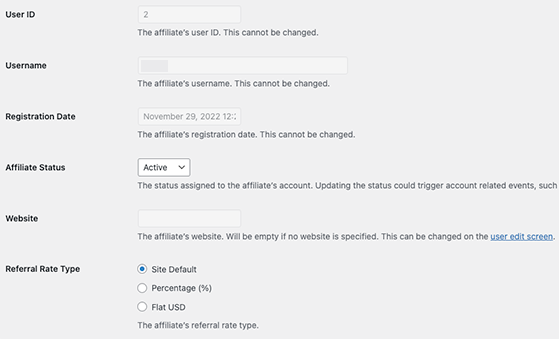
On the admin side, the commission structure is genuinely flexible. You can set up an affiliate program with flat rates, percentage rates, or per-product rates, and override them per affiliate if needed. Most simpler plugins force you to pick one structure for everyone.
The Uncanny Automator connection is where it pulls ahead for growing programs. Trigger-based automations like tier upgrades, welcome sequences, and payout alerts run without manual intervention once they’re configured. That’s the feature that makes AffiliateWP worth the higher starting price.
| Pros | Cons |
|---|---|
| Handles registration, tracking, and payouts in one plugin | No free version, paid plans only |
| Real-time referral tracking with accurate attribution | Higher starting price than most alternatives |
| Native integrations with WooCommerce, EDD, WPForms | |
| Automation via Uncanny Automator without code |
Verdict: AffiliateWP is the right choice if you’re serious about running your own affiliate program and need reliable tracking, affiliate management, and payouts in one place. It costs more than alternatives, but it’s the most fully featured option on this list.
2. Pretty Links Pro: Best for Link Cloaking and Click Reporting

| Feature | Details |
|---|---|
| Pricing | From $99.50/yr |
| Free Plan | Yes (limited) |
| Standout Features | • Short branded redirect links • Per-link click tracking with referrer data • Keyword auto-linking across posts • Geolocation-based redirects • Multiple redirect types (301, 302, 307) |
| Rating | A |
| Best For | Affiliate marketers who need clean links and granular click-level reporting |
Pretty Links Pro is a WordPress affiliate link management plugin that converts long, messy affiliate URLs into short branded links, tracks click performance by link, and can automatically insert links for specific keywords across your posts.
Where it stands apart from ThirstyAffiliates is reporting depth. Pretty Links Pro gives you per-link click data including unique vs. total clicks, referrer sources, and geographic breakdowns. If you need to report on affiliate performance in detail, that data matters.
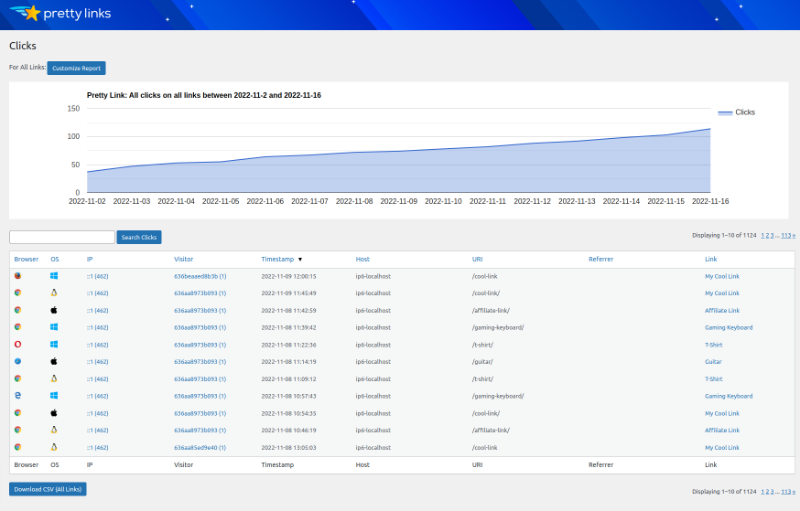
I’ve tested Pretty Links Pro on sites where affiliate link performance needed to be reportable, not just tracked internally but shareable with a client or partner. The per-link click reports with referrer data make that possible without exporting anything or digging through GA4.
The geolocation redirect is one of those features that sounds niche until you need it. If you promote software tools that have different pricing or affiliate programs by region, being able to redirect UK visitors to a different link than US visitors from the same post is genuinely useful.
One thing to watch: the keyword auto-linking will keep inserting until you set per-link limits. On posts with high keyword density, you can end up with five links to the same product in two paragraphs if you don’t configure the cap.
| Pros | Cons |
|---|---|
| Detailed per-link click reporting with referrer data | Deeper reporting locked to higher-priced plans |
| Geolocation redirects for region-specific links | Free version is limited |
| Keyword auto-linking across all posts | Auto-linking needs periodic review to avoid over-linking |
| Multiple redirect types for different use cases |
Verdict: Pretty Links Pro is the better choice when click reporting is central to how you manage affiliate relationships. If you mainly need clean links and basic tracking, ThirstyAffiliates covers the core jobs at a lower starting price.
3. MonsterInsights: Best for Tracking Affiliate Clicks in Google Analytics
| Feature | Details |
|---|---|
| Pricing | From $99.50/yr |
| Free Plan | Yes (limited) |
| Standout Features | • Top affiliate links report in WordPress dashboard • Automatic outbound link tracking in GA4 • Enhanced WooCommerce eCommerce tracking • Works alongside ThirstyAffiliates and Pretty Links • Form conversion tracking included |
| Rating | A |
| Best For | Publishers who want affiliate click data inside Google Analytics without touching code |
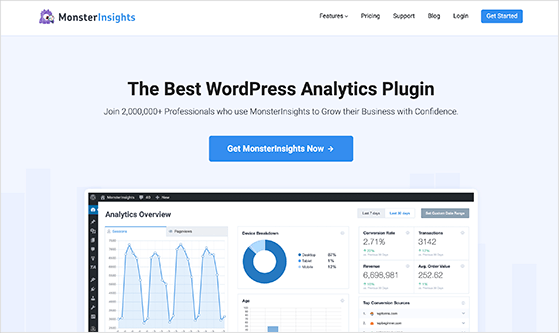
MonsterInsights is a Google Analytics plugin for WordPress that adds affiliate link click tracking to your Analytics dashboard, showing you which affiliate links generate the most clicks without any code changes.
It complements rather than competes with ThirstyAffiliates and Pretty Links. Most publishers run MonsterInsights alongside one of those two, so affiliate click data flows into the same GA4 property they use for everything else on the site.
I use MonsterInsights here on RafflePress, and the feature that changed how I work is the affiliate link report inside the WordPress dashboard.

Before it, I’d have to pull GA4 reports manually to see which affiliate links were actually getting clicks. Now I check it the same way I check page views, with a quick glance in the admin.
The automatic outbound link tracking took about five minutes to configure. After that, click data started appearing for all affiliate links site-wide, with no individual link tagging required. That matters on a site with hundreds of affiliate links spread across years of content.
| Pros | Cons |
|---|---|
| Affiliate link report directly in WordPress dashboard | Requires a GA4 account to get value from it |
| Works alongside ThirstyAffiliates and Pretty Links | Core affiliate tracking requires Plus plan or higher |
| No code required for outbound link tracking | Not a link management tool on its own |
| WooCommerce enhanced eCommerce tracking included |
Verdict: MonsterInsights is the right addition if you want affiliate click data in GA4 without a developer. It works best paired with a link management plugin, not as a standalone affiliate tool.
4. ThirstyAffiliates: Best for Managing Affiliate Links You Promote

| Feature | Details |
|---|---|
| Pricing | From $99.60/yr |
| Free Plan | Yes |
| Standout Features | • Keyword auto-linking across all existing posts • Click tracking by individual link • Amazon affiliate link uncloaking • Automatic broken link checker • Link categories and organization |
| Rating | A+ |
| Best For | Affiliate publishers managing a large library of links across many posts |
ThirstyAffiliates is a WordPress affiliate link management plugin that converts long affiliate URLs into short branded links, tracks click performance by individual link, and automatically inserts links for specific keywords across your posts.
It also handles Amazon compliance via link uncloaking, runs automatic broken link checks across your library, and organizes links by category. For publishers with large content archives promoting many products, that organization saves real time.

This is the plugin I actually use on this site, and the keyword auto-linking is what made it worth switching to. Once you add a product to your ThirstyAffiliates library, it finds every matching keyword across your existing content and links it automatically.
For a site with years of posts, that kind of retroactive coverage would take days to do by hand.
The broken link checker surfaced several expired affiliate links in my archive that were silently costing commissions. Affiliate programs change their URLs, products get discontinued, and without a checker running, you have no way of knowing which links have gone dark. That feature alone is worth the upgrade.
The free version covers link cloaking and basic click tracking. You’ll need a paid plan for keyword auto-linking and the broken link checker. Most publishers with an active affiliate setup will end up on the paid plan fairly quickly.
| Pros | Cons |
|---|---|
| Keyword auto-linking works across existing posts automatically | Auto-linking and broken link checker need paid plan |
| Built-in broken link checker for your affiliate library | Click reporting less granular than Pretty Links Pro |
| Amazon link uncloaking built in for compliance | |
| Free version available for basic link cloaking |
Verdict: ThirstyAffiliates is my top pick for affiliate publishers who promote other people’s products. The keyword auto-linking alone justifies the upgrade once you’re managing more than a handful of affiliate relationships.
5. Easy Affiliate: Best for Programs Paired with MemberPress
| Feature | Details |
|---|---|
| Pricing | From $99.60/yr |
| Free Plan | No |
| Standout Features | • Native MemberPress integration • Affiliate dashboard for partners • Real-time click and referral tracking • PayPal commission payouts • Customizable affiliate performance graphs |
| Rating | B+ |
| Best For | Membership site owners using MemberPress who want an integrated affiliate program |
Easy Affiliate is a WordPress plugin for creating and managing your own affiliate program. It lets you recruit affiliate partners, track their referrals, and handle commission payouts from inside your WordPress dashboard.
It’s built by the same team as MemberPress. If you’re running a membership site, the integration between the two is tighter than any third-party alternative. Members can become affiliates without a separate registration flow, and their referral stats sit inside the same admin they already use.
On membership sites running MemberPress, the Easy Affiliate integration removes a step that trips people up: you don’t need a separate affiliate registration form. Members can opt into the affiliate program from within their existing member dashboard, and their referral data sits alongside their membership data in the admin.
Outside of that pairing, AffiliateWP has broader integration support and a more active development track. Easy Affiliate earns its place on this list specifically because of the MemberPress connection, not in spite of its limitations elsewhere.
| Pros | Cons |
|---|---|
| Native MemberPress integration with no separate onboarding | Less compelling outside of MemberPress setups |
| Member and affiliate dashboards work together | Fewer third-party integrations than AffiliateWP |
| Referral tracking and PayPal payouts included | No free version |
Verdict: Easy Affiliate is the natural choice for MemberPress users who want to add an affiliate program. For everything else, AffiliateWP is the stronger general-purpose option.
6. AdSanity: Best for Displaying Affiliate Banner Ads

| Feature | Details |
|---|---|
| Pricing | From $108/yr |
| Free Plan | No |
| Standout Features | • Ad display and rotation from WordPress dashboard • Impression and click tracking per ad • Ad blocker detection • Google Analytics integration • Widget-based sidebar ad placement |
| Rating | B |
| Best For | Publishers who run affiliate banner ads alongside text-based affiliate links |
AdSanity is a WordPress ad management plugin that lets affiliate marketers display, rotate, and track performance of affiliate banner ads directly from the WordPress dashboard, without a third-party ad server.
It’s not a link management plugin. AdSanity handles the display side: placing banner ads in sidebars, within post content, or in specific post types, with impression and click tracking for each campaign.
Most publishers managing affiliate banner ads end up with an inconsistent mess of shortcodes, widgets, and manual image links scattered across their theme. AdSanity replaces that with a single admin screen where you can manage every banner campaign, see impressions and clicks, and swap out creatives without touching individual posts.
The ad blocker detection gave me a clear picture of what percentage of traffic was blocking banner ads entirely. On one content site I tested it on, that number was high enough to shift the monetization strategy away from banners toward in-content affiliate links. That kind of data is worth having before you invest heavily in banner placements.
| Pros | Cons |
|---|---|
| Manages banner ads from WordPress without a separate ad server | Not useful if you don’t run affiliate banner ads |
| Ad blocker detection included | No free version |
| Impression and click tracking per ad campaign | Limited compared to dedicated display ad networks |
Verdict: AdSanity earns its place if banner ads are a real part of your affiliate strategy. If you’re focused on text-based affiliate links, one of the link management plugins above serves you better.
7. Affiliates Manager: Best Free Plugin for Basic Affiliate Programs
| Feature | Details |
|---|---|
| Pricing | Free |
| Free Plan | Yes (fully free) |
| Standout Features | • Affiliate registration and account management • Real-time referral tracking • Customizable payout settings • Affiliate registration forms • WooCommerce and WP eCommerce integration |
| Rating | B |
| Best For | New affiliate programs that need basic tracking without a paid plugin |
Affiliates Manager is a free WordPress plugin for running a basic affiliate program. It tracks referrals, manages affiliate accounts, and handles commission calculations without requiring a paid license.
It’s the right starting point for small businesses that want to test an affiliate program before committing to a paid solution. The feature set is limited compared to AffiliateWP, but for a program with a handful of affiliates, it covers the essentials.
Setup on Affiliates Manager is faster than on any paid alternative I’ve tested, precisely because there’s less to configure. For a new program with a handful of affiliates and a single commission rate, that’s an asset. You’re not paying to configure features you won’t use for months.
The ceiling is real, though. Once you need tiered commissions, automations, or anything beyond basic referral tracking, you’ll feel the limits quickly. Most sites that start here migrate to AffiliateWP once the program gets traction.
| Pros | Cons |
|---|---|
| Completely free with no paid tiers | Limited features compared to premium alternatives |
| Simple setup for new programs | No automation or tiered commission options |
| Real-time referral tracking included | Fewer integrations than AffiliateWP |
Verdict: Affiliates Manager covers what most new programs actually need and costs nothing. When your program outgrows it, AffiliateWP is the natural next step.
8. YITH WooCommerce Affiliates: Best Free Option for WooCommerce Stores

| Feature | Details |
|---|---|
| Pricing | Free (premium available) |
| Free Plan | Yes |
| Standout Features | • WooCommerce-native affiliate tracking • Automatic commission calculation on orders • Custom affiliate refer IDs • Affiliate dashboard for registered partners • Automatic commission refunds on order cancellations |
| Rating | B+ |
| Best For | WooCommerce store owners who want a free affiliate program that tracks purchases |
YITH WooCommerce Affiliates is a WordPress plugin designed specifically for WooCommerce stores. It adds an affiliate program to your store, tracks referral purchases, and handles commission calculations and refund adjustments for WooCommerce orders automatically.
It’s a more focused option than Affiliates Manager for WooCommerce sites. Rather than working around WooCommerce, it integrates directly with the order flow, so commission calculations happen at the order level rather than through a separate tracking layer.
What stands out with YITH is how it handles order cancellations. Most affiliate plugins calculate commissions at the time of purchase and then leave you to manually claw them back if an order gets refunded.
YITH handles that automatically because it’s directly tied to the WooCommerce order lifecycle. That’s a real operational difference for stores with meaningful return rates.
The free version works well for a basic WooCommerce affiliate program. Before upgrading to premium, test whether the free feature set is enough for your store’s size. Many smaller WooCommerce stores never need more.
| Pros | Cons |
|---|---|
| WooCommerce-native order tracking and commission calculation | Only useful for WooCommerce stores |
| Automatic refund handling removes manual reconciliation | Advanced features require the premium upgrade |
| Free version covers basic program setup | Fewer integrations than AffiliateWP |
Verdict: YITH WooCommerce Affiliates is the best free starting point for WooCommerce stores that want an affiliate program without an upfront cost. Upgrade to premium once your program needs tiered commissions or more detailed reporting.
Bonus: How to Use RafflePress in Your Affiliate Marketing Strategy

RafflePress is not an affiliate marketing plugin. It’s one of the best WordPress giveaway plugins, and it belongs here because it solves a specific problem affiliate marketers run into: getting people to actually engage with and share your affiliate links.
The approach is practical. You run a giveaway contest where participants earn bonus entries by visiting your affiliate links, following your social accounts, or sharing your content. That drives traffic to the affiliate offers you’re promoting without a paid ads budget.

You can also use RafflePress if you run your own affiliate program and want to reward top-performing affiliates. Set up a contest where affiliates earn entries based on referrals, with a prize for the highest earner. It’s a low-cost way to increase affiliate engagement without building a tiered commission structure from scratch.
Pricing: RafflePress starts from $299 one-time (Single Site). The Unlimited Sites license is available for $349.
FAQs About WordPress Affiliate Marketing Plugins
What’s the difference between affiliate link management plugins and affiliate program plugins?
Affiliate link management plugins (like ThirstyAffiliates and Pretty Links) help you as a publisher organize, cloak, and track the affiliate links you promote on your site. Affiliate program plugins (like AffiliateWP and Easy Affiliate) help you run your own program where other people promote your products and earn commissions. Most WordPress sites need one or the other, not both.
Do I need a paid plugin to do affiliate marketing on WordPress?
Not necessarily. Affiliates Manager and YITH WooCommerce Affiliates both have fully functional free versions for running a basic affiliate program. ThirstyAffiliates also has a free version for link management. Most affiliate marketers upgrade to a paid plugin eventually for better tracking and automation, but you can start without paying anything.
Can I use multiple affiliate marketing plugins at the same time?
Yes, and most serious affiliate marketers do. A common setup is one plugin for link management (ThirstyAffiliates or Pretty Links) and a separate plugin for analytics tracking (MonsterInsights). If you’re also running your own affiliate program, that adds a third plugin category. The plugins don’t conflict because they solve different problems.
Which WordPress Affiliate Marketing Plugin is Right for You?
Most setups end up combining tools from this list. A link manager handles your outbound affiliate links, an analytics plugin surfaces click data in your WordPress dashboard, and a program manager sits in a separate category entirely.
They don’t compete. Pick what applies to your situation and start there.
For more ways to grow your site through affiliate marketing ideas, check out our full guide.
If you liked this article, please subscribe to our YouTube Channel for RafflePress video tutorials. You can also find us on Twitter and Facebook.

