7 Best Gamification Plugins for WordPress to Excite Your Fans
 Stacey Corrin
Stacey Corrin
Stacey Corrin
 John Turner
John Turner
John Turner

Good traffic with low engagement is a specific kind of frustration. Your content is finding people, they’re reading it, and then they’re gone. No return visit, no share, nothing earned.
Gamification plugins give visitors something to work toward. I’ve tested them on membership sites, WooCommerce stores, and plain old blogs, and the difference in repeat visits is real. A points system, a giveaway, or a spin wheel can turn a passive reader into someone who keeps coming back.
Below are the 7 best WordPress gamification plugins. I’ve noted what each one is best for, so you can skip straight to the fit.
Quick Summary: Best WordPress Gamification Plugins
| Plugin | Best For | Free/Paid | Top Gamification Features |
|---|---|---|---|
| RafflePress | Giveaways and referral contests | Freemium | Viral sharing, bonus entries, landing pages, email capture |
| OptinMonster | Lead generation with gamified popups | Paid | Spin-to-win wheels, A/B testing, exit-intent |
| WPForms | Forms, quizzes, and user submissions | Freemium | Contest templates, polls, surveys, quiz rewards |
| Thrive Quiz Builder | Interactive quizzes with scoring | Paid | Personalized results, badges, opt-in gates |
| GamiPress | Points, ranks, and achievements | Freemium | Leaderboards, reward systems, badge creation |
| myCred | Loyalty programs and community points | Freemium | Points and ranks, WooCommerce rewards, LMS support |
| CaptainUp | Enterprise-level gamification systems | Free + Enterprise | Custom badges, actions, analytics |
What Is a WordPress Gamification Plugin?
A gamification plugin lets you add game-like features to your WordPress site. That includes things like points, badges, leaderboards, or even prize wheels.
These tools make your site more interactive. Instead of just reading or scrolling, your visitors get to take part in the experience. And when people feel like they’re earning something, they’re more likely to stay, share, or come back.
This works well for blogs, eCommerce stores, membership sites, really any site that benefits from more engagement.
You don’t need to build any of this yourself. The plugins I’m about to show you make it easy to add these features without needing to code.
How I Chose These Gamification Plugins
I looked for WordPress plugins that make it easy to add gamification without needing to code or mess with complicated settings.
To narrow things down, I focused on tools that:
- Are beginner-friendly and well-supported
- Offer features like contests, points, quizzes, or rewards
- Work with other tools like email marketing services or WooCommerce
- Have either a free version or clear pricing
Some of these I’ve used on my own sites. Others I tested using their free versions or demos to see how simple they are to set up and customize.
Best WordPress Gamification Plugins
Below are some of the best gamification plugins to use on your WordPress website.
1. Best Gamification Plugin for Giveaways and Referrals: RafflePress

| Pricing: Free version available; Pro plans start at $39/year |
| Free Plan / Trial: Yes – Unlimited free trial here |
| Standout Features: |
| 🔹 Drag-and-drop giveaway builder 🔹 Viral sharing and bonus entry actions 🔹 Email marketing and CRM integrations 🔹 Landing page publishing and winner picker |
| Rating: A+ |
| Best For: Site owners who want to grow traffic, followers, and email lists through contests |
As someone who runs a lot of giveaways, I can say RafflePress makes the process fast and frustration-free. I’ve used it to grow my own list and social following, and it’s the only plugin I’ve stuck with long-term for this kind of thing.
My Experience
What sets RafflePress apart is how easy it is to launch a giveaway that actually gets results. The builder is super intuitive, and the pre-made templates are already designed to grow email signups or social shares without much extra setup.
During testing, I liked how easy it was to assign extra entries for bonus actions. You can reward users for following you on social, referring friends, visiting pages, or watching videos. It’s a great way to add that viral boost.
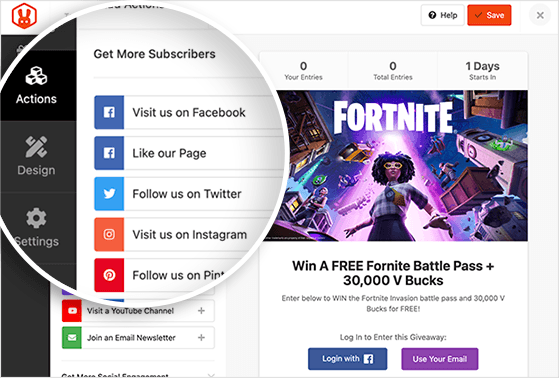
You can embed the giveaway in a post or run it on its own distraction-free landing page. And everything looks great on mobile without needing to tweak any settings.
RafflePress isn’t just a contest plugin. It’s a simple tool that helps you grow fast, especially if you’re just getting started.
Pros
- Beginner-friendly drag-and-drop interface
- Built-in viral sharing and referral actions
- Plenty of entry methods for traffic, engagement, and lead capture
- Works with email services like Mailchimp, ConvertKit, and more
- One-click winner picker built in
Cons
- Some of the best features are only in the paid version
- Less styling flexibility compared to full form or design tools
My Verdict: If your goal is to grow quickly with giveaways, RafflePress is the easiest and most reliable plugin I’ve used. It’s built for results and doesn’t waste your time.
2. Best Gamification Plugin for Spin-to-Win Offers: OptinMonster
| Pricing: Paid only; starts at $9/month |
| Free Plan / Trial: No free plan, but offers a 14-day money-back guarantee |
| Standout Features: |
| 🔹 Drag-and-drop opt-in form builder 🔹 Spin-to-win gamified campaigns 🔹 Exit-intent and behavior automation 🔹 A/B testing and conversion analytics |
| Rating: A |
| Best For: Website owners who want to boost email signups with interactive and targeted campaigns |
I’ve used OptinMonster on several client sites where the goal was to grow email lists fast without annoying visitors. The Spin-to-Win feature is always a hit and turns casual browsers into eager participants.
My Experience
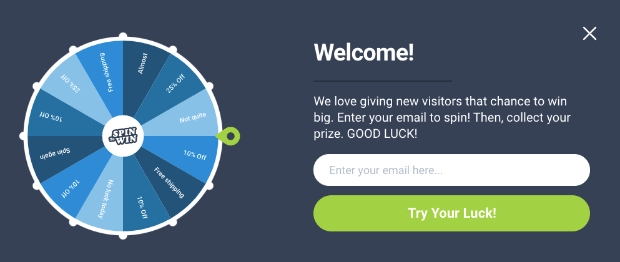
OptinMonster’s gamified wheel campaigns are great for creating urgency and curiosity. You can customize each slice with different discounts or offers, and the visuals make it feel fun, not salesy.
When I tested it, I appreciated how easy it was to target specific audiences. You can show offers to first-time visitors, returning users, or even people hovering toward the close button using exit-intent tech.
It also integrates easily with all the major email platforms, so you can segment and follow up without any tech headaches. Plus, the built-in stats make it simple to see what’s working.
If you want to turn your opt-in forms into something fun and effective, OptinMonster is a top-tier choice.
Pros
- Fun spin-to-win campaigns with full customization
- Powerful targeting rules and triggers
- Exit-intent detection to capture leaving visitors
- Works with all major email marketing tools
- Built-in analytics and A/B testing
Cons
- No free version available
- Some learning curve for advanced targeting
My Verdict: If you want to add a little Vegas-style flair to your lead gen strategy, OptinMonster’s gamified campaigns are hard to beat. It’s smart, slick, and built for growth.
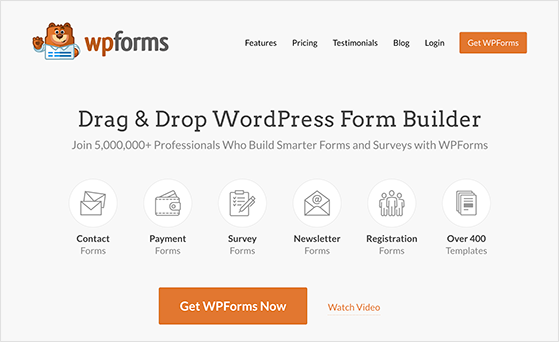
3. Best Gamification Plugin for Quizzes and Polls: WPForms
| Pricing: Free version available; Pro plans start at $49/year |
| Free Plan / Trial: Yes – WPForms Lite is available for free |
| Standout Features: |
| 🔹 Drag-and-drop form builder 🔹 Contest entry templates and quizzes 🔹 Surveys, polls, and conditional logic 🔹 Add-ons for payments and marketing |
| Rating: A |
| Best For: Site owners who want flexible forms with built-in gamification options |
I’ve used WPForms for everything from simple contact forms to more interactive quizzes and surveys. It’s incredibly beginner-friendly, and the pre-built templates save so much time.
My Experience
One of my favorite features is the Contest Entry Form. You can ask users to complete a quiz, poll, or short survey before unlocking a chance to win, which keeps engagement high while collecting valuable feedback.
The drag-and-drop builder feels effortless, even if you’re brand new to forms. You just choose a template, tweak a few settings, and you’re ready to publish. There’s also solid integration with email services, payment gateways, and more via add-ons.
If you’re looking for a flexible way to turn forms into engaging experiences, WPForms delivers without overcomplicating things.
Pros
- Beginner-friendly drag-and-drop interface
- Fun quiz and survey elements built in
- Templates for giveaways, polls, and lead gen
- Works with major email and payment tools
- Flexible with lots of useful add-ons
Cons
- Advanced features require a paid plan
- Not as focused on gamification as dedicated contest tools
My Verdict: WPForms is a great choice if you want to gamify your site with quizzes, polls, or interactive forms, especially if you also need a solid form builder for other tasks.
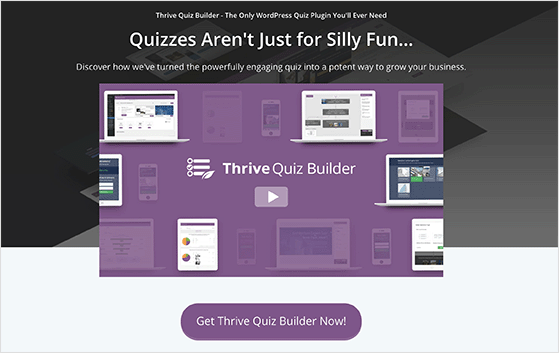
4. Best Gamification Plugin for Personality Quizzes: Thrive Quiz Builder
| Pricing: Paid only; plans start at $99/year |
| Free Plan / Trial: No free version, but included in Thrive Suite with access to all tools |
| Standout Features: |
| 🔹 Custom personality and scored quizzes 🔹 Visual quiz flow builder 🔹 Dynamic results pages and splash screens 🔹 Social sharing badges and opt-in gates |
| Rating: A- |
| Best For: Marketers who want to boost engagement with interactive, shareable quizzes |
I’ve used Thrive Quiz Builder when I wanted to add personality-style quizzes that feel more like Buzzfeed than boring surveys. It’s surprisingly easy to build out a whole funnel with just a few clicks.
My Experience
During testing, I loved how you can create unique result pages based on answers. Whether it’s a “You’re a Plant Parent” badge or a product suggestion tailored to their quiz type, it makes each user feel seen and rewarded.
The drag-and-drop flowchart builder is a standout feature. It lets you visualize and customize every path the quiz can take, so nothing feels generic. Add opt-in gates to grow your list, or use quizzes as lead magnets with high share potential.
If your goal is to personalize content while collecting leads, Thrive Quiz Builder packs a serious punch with its flexibility and polish.
Pros
- Highly customizable quiz types and layouts
- Personalized results boost conversions and sharing
- Built-in analytics for quiz performance
- Great for both fun quizzes and data collection
- Drag-and-drop logic builder is visual and intuitive
Cons
- No free version available
- Best value comes when bundled with Thrive Suite
My Verdict: If you’re looking to create quizzes that feel personal and engaging, and you want full control over the user journey, Thrive Quiz Builder is one of the smartest choices out there.
5. Best Gamification Plugin for Points and Leaderboards: GamiPress
| Pricing: Free version available; Pro plans start at $199/year |
| Free Plan / Trial: Yes – core plugin is free on WordPress.org |
| Standout Features: |
| 🔹 Points, ranks, and achievement systems 🔹 Leaderboards to boost competition 🔹 Open Badges integration 🔹 Fully customizable templates |
| Rating: B+ |
| Best For: Community-focused sites that want to reward interaction and create long-term engagement |
I’ve tested GamiPress on a membership site where we wanted to boost user engagement with points and rewards. It’s flexible, and the free version has more than enough to get started.
My Experience
The biggest strength of GamiPress is how modular it is. You can reward users for anything: logging in, commenting, submitting content, and then tie that to points, badges, or ranks. It’s like building your own reward economy.
I found the leaderboard feature especially useful for adding a sense of competition. It helped turn casual members into loyal fans. The design templates are easy to customize, and I liked that it integrates with Open Badges for official recognition.
It’s also GDPR-friendly, so if you’re dealing with user data in the EU or UK, that’s a nice win.
Pros
- Flexible point and achievement system
- Built-in leaderboards and badge creation
- Open Badges support for credentialing
- Core plugin is free and well supported
- Works well with membership and LMS plugins
Cons
- Premium plan is pricey for small sites
- Interface isn’t as beginner-friendly as some competitors
My Verdict: If you want to build a full gamification system with points, rewards, and user rankings, GamiPress gives you the tools, and it plays nicely with most WordPress setups.
6. Best Gamification Plugin for Loyalty Rewards: myCred
| Pricing: Free version available; Pro plans start at $149/year |
| Free Plan / Trial: Yes – core plugin is free on WordPress.org |
| Standout Features: |
| 🔹 Points, ranks, and badge rewards 🔹 Custom redemption options 🔹 Compatible with WooCommerce, LMSs, BuddyPress 🔹 Full point management system |
| Rating: B+ |
| Best For: Site owners who want to build loyalty programs or incentivize community engagement |
I’ve seen myCred used in everything from online courses to eCommerce stores, and it’s one of the most flexible reward plugins out there. It gives you full control over how users earn and spend points.
My Experience
During testing, I found it easy to set up actions like “leave a comment” or “make a purchase” to trigger points. You can even assign ranks and badges as users level up, which is great for membership or community sites.
It integrates smoothly with tools like WooCommerce, LearnDash, BuddyPress, and more. So if you’re running an online store or a learning platform, you can reward users for engagement automatically.
And since myCred has a built-in point management dashboard, tracking activity and setting up redemption options is pretty straightforward.
Pros
- Supports points, ranks, and badges
- Highly customizable reward actions
- Great for loyalty programs and gamified learning
- Integrates with WooCommerce, LearnDash, and BuddyPress
- Free core plugin with solid features
Cons
- Premium version is pricey compared to others
- Interface and setup can feel technical for beginners
My Verdict: If you want to build a robust points-based reward system for your WordPress site, myCred is powerful, flexible, and well-supported, even in the free version.
7. Best Gamification Plugin for Social Engagement: CaptainUp
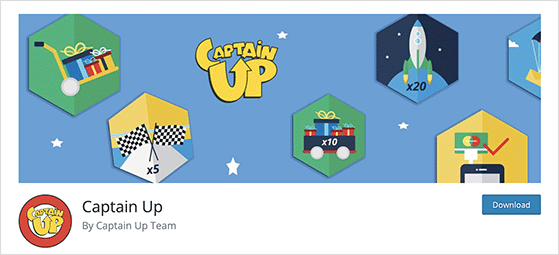
| Pricing: Free WordPress plugin; requires a paid Captain Up account (from ~$69/month) |
| Free Plan / Trial: No – the plugin is free but a Captain Up subscription is required |
| Standout Features: |
| 🔹 Custom badges and levels 🔹 Reward users for social and on-site actions 🔹 Real-time analytics and performance tracking 🔹 Works without needing a game or LMS setup |
| Rating: B |
| Best For: Websites focused on social engagement, interaction, and loyalty without traditional gamified content |
I tried CaptainUp when I wanted to encourage repeat visits and social shares on a client’s blog. It worked well for light gamification without needing full quiz or contest setups.
My Experience
CaptainUp made it easy to reward users for actions like visiting regularly, clicking certain links, or sharing content. You can customize what earns points and what those rewards look like, which is great for branding.
The plugin comes with a real-time analytics dashboard that helped me spot which actions were driving engagement. It’s less about quizzes or challenges and more about social motivation and loyalty triggers.
That said, the more advanced features are geared toward enterprise use, so it’s best suited for bigger sites or brands ready to scale up.
Pros
- Fully customizable badges, levels, and actions
- Social and on-site action rewards built in
- Lightweight setup compared to full LMS plugins
- Free version available with strong features
- Live analytics and performance tracking
Cons
- Some key features are enterprise-only
- Not ideal if you need quizzes, forms, or surveys
My Verdict: If your goal is to motivate visitors through social actions and custom badges without building full-blown games or quizzes, CaptainUp is a smart and flexible pick.
Free: Download Our Giveaway Playbook
Templates, prize ideas, and promotion strategies in one guide.
Gamification Plugins FAQs
What is the best WordPress gamification plugin?
The best gamification plugin depends on your goal. RafflePress is the top pick for running contests and giveaways. OptinMonster works best for spin-to-win lead generation. GamiPress and myCred are the strongest options for points, badges, and leaderboards on membership or community sites.
Is GamiPress free?
Yes, the GamiPress core plugin is free on WordPress.org and includes points, achievements, ranks, and leaderboards. Premium add-ons start at $199/year for extended functionality and advanced integrations.
Which gamification plugin works best with WooCommerce?
myCred is the strongest choice for WooCommerce. It rewards customers with points for purchases, reviews, and other actions, which they can redeem for discounts or store credit. GamiPress also supports WooCommerce via a premium add-on.
Can I use multiple gamification plugins on one WordPress site?
You can, but pick your plugins carefully. Running GamiPress alongside RafflePress works well since they serve different purposes. Where you run into trouble is using two plugins that both manage a points system, like GamiPress and myCred together. Choose one points system and supplement with tools that don’t overlap.
Which WordPress Gamification Plugin is Best?
All of the popular plugins in this article offer unique features and benefits, and the best one for you will depend on your specific needs and goals. However, I think the two best gamification plugins for WordPress are RafflePress and OptinMonster.
- RafflePress is an excellent option if you’re looking to run giveaways and contests to drive engagement and social media sharing. It’s easy to use, affordable, and comes with powerful features to help you achieve your goals.
- OptinMonster includes various gamification features, such as spin-to-win wheels, countdown timers, and more. It’s a great option if you’re looking to grow your email list and increase conversions on your site.
I hope this article has helped you find the best gamification plugins for WordPress. Whether you’re looking to run giveaways, create quizzes, or implement a rewards system, there’s a gamification plugin on this list to help you achieve your goals.
Before you leave, you might also like this guide on the best FOMO plugins for WordPress. You can also see these gamified contest ideas.
If you liked this article, please subscribe to our YouTube Channel for RafflePress video tutorials. You can also find us on Twitter and Facebook.


